Week 2: F1 Data Exploration
What is FastF1?
FastF1 is a data access library for Formula1 sessions
Install FastF1 in Jupyter Environment
Source:
- https://docs.fastf1.dev/getting_started/installation.html
- https://docs.fastf1.dev/getting_started/basics.html
pip install fastf1
pip install fastf1
Requirement already satisfied: fastf1 in /opt/conda/lib/python3.13/site-packages (3.7.0)
Requirement already satisfied: cryptography in /opt/conda/lib/python3.13/site-packages (from fastf1) (46.0.3)
Requirement already satisfied: matplotlib<4.0.0,>=3.5.1 in /opt/conda/lib/python3.13/site-packages (from fastf1) (3.10.7)
Requirement already satisfied: numpy<3.0.0,>=1.23.1 in /opt/conda/lib/python3.13/site-packages (from fastf1) (2.3.3)
Requirement already satisfied: pandas<3.0.0,>=1.4.1 in /opt/conda/lib/python3.13/site-packages (from fastf1) (2.3.3)
Requirement already satisfied: platformdirs in /opt/conda/lib/python3.13/site-packages (from fastf1) (4.5.0)
Requirement already satisfied: pyjwt in /opt/conda/lib/python3.13/site-packages (from fastf1) (2.10.1)
Requirement already satisfied: python-dateutil in /opt/conda/lib/python3.13/site-packages (from fastf1) (2.9.0.post0)
Requirement already satisfied: rapidfuzz in /opt/conda/lib/python3.13/site-packages (from fastf1) (3.14.3)
Requirement already satisfied: requests-cache>=1.0.0 in /opt/conda/lib/python3.13/site-packages (from fastf1) (1.2.1)
Requirement already satisfied: requests>=2.28.1 in /opt/conda/lib/python3.13/site-packages (from fastf1) (2.32.5)
Requirement already satisfied: scipy<2.0.0,>=1.8.1 in /opt/conda/lib/python3.13/site-packages (from fastf1) (1.16.2)
Requirement already satisfied: signalrcore in /opt/conda/lib/python3.13/site-packages (from fastf1) (0.9.5)
Requirement already satisfied: timple>=0.1.6 in /opt/conda/lib/python3.13/site-packages (from fastf1) (0.1.8)
Requirement already satisfied: websockets>=10.3 in /opt/conda/lib/python3.13/site-packages (from fastf1) (15.0.1)
Requirement already satisfied: contourpy>=1.0.1 in /opt/conda/lib/python3.13/site-packages (from matplotlib<4.0.0,>=3.5.1->fastf1) (1.3.3)
Requirement already satisfied: cycler>=0.10 in /opt/conda/lib/python3.13/site-packages (from matplotlib<4.0.0,>=3.5.1->fastf1) (0.12.1)
Requirement already satisfied: fonttools>=4.22.0 in /opt/conda/lib/python3.13/site-packages (from matplotlib<4.0.0,>=3.5.1->fastf1) (4.60.1)
Requirement already satisfied: kiwisolver>=1.3.1 in /opt/conda/lib/python3.13/site-packages (from matplotlib<4.0.0,>=3.5.1->fastf1) (1.4.9)
Requirement already satisfied: packaging>=20.0 in /opt/conda/lib/python3.13/site-packages (from matplotlib<4.0.0,>=3.5.1->fastf1) (25.0)
Requirement already satisfied: pillow>=8 in /opt/conda/lib/python3.13/site-packages (from matplotlib<4.0.0,>=3.5.1->fastf1) (11.3.0)
Requirement already satisfied: pyparsing>=3 in /opt/conda/lib/python3.13/site-packages (from matplotlib<4.0.0,>=3.5.1->fastf1) (3.2.5)
Requirement already satisfied: pytz>=2020.1 in /opt/conda/lib/python3.13/site-packages (from pandas<3.0.0,>=1.4.1->fastf1) (2025.2)
Requirement already satisfied: tzdata>=2022.7 in /opt/conda/lib/python3.13/site-packages (from pandas<3.0.0,>=1.4.1->fastf1) (2025.2)
Requirement already satisfied: six>=1.5 in /opt/conda/lib/python3.13/site-packages (from python-dateutil->fastf1) (1.17.0)
Requirement already satisfied: charset_normalizer<4,>=2 in /opt/conda/lib/python3.13/site-packages (from requests>=2.28.1->fastf1) (3.4.4)
Requirement already satisfied: idna<4,>=2.5 in /opt/conda/lib/python3.13/site-packages (from requests>=2.28.1->fastf1) (3.11)
Requirement already satisfied: urllib3<3,>=1.21.1 in /opt/conda/lib/python3.13/site-packages (from requests>=2.28.1->fastf1) (2.5.0)
Requirement already satisfied: certifi>=2017.4.17 in /opt/conda/lib/python3.13/site-packages (from requests>=2.28.1->fastf1) (2025.10.5)
Requirement already satisfied: attrs>=21.2 in /opt/conda/lib/python3.13/site-packages (from requests-cache>=1.0.0->fastf1) (25.4.0)
Requirement already satisfied: cattrs>=22.2 in /opt/conda/lib/python3.13/site-packages (from requests-cache>=1.0.0->fastf1) (25.3.0)
Requirement already satisfied: url-normalize>=1.4 in /opt/conda/lib/python3.13/site-packages (from requests-cache>=1.0.0->fastf1) (2.2.1)
Requirement already satisfied: typing-extensions>=4.14.0 in /opt/conda/lib/python3.13/site-packages (from cattrs>=22.2->requests-cache>=1.0.0->fastf1) (4.15.0)
Requirement already satisfied: cffi>=1.14 in /opt/conda/lib/python3.13/site-packages (from cryptography->fastf1) (2.0.0)
Requirement already satisfied: pycparser in /opt/conda/lib/python3.13/site-packages (from cffi>=1.14->cryptography->fastf1) (2.22)
Requirement already satisfied: websocket-client==1.0.0 in /opt/conda/lib/python3.13/site-packages (from signalrcore->fastf1) (1.0.0)
Requirement already satisfied: msgpack==1.0.2 in /opt/conda/lib/python3.13/site-packages (from signalrcore->fastf1) (1.0.2)
Note: you may need to restart the kernel to use updated packages.
Libraries
- fastf1: Python library for accessing Formula 1 telemetry, lap, and session data.
- pandas: Handles tables (DataFrames) for easy data manipulation.
- matplotlib: Base plotting library for static visualizations.
- seaborn: Builds on matplotlib for statistical and aesthetic plots.
- plotly.graph_objects: Creates interactive visualizations like Sankey diagrams.
Importing and Load Session
# Import necessary libraries

import fastf1  # Access F1 telemetry and lap data
import numpy as np
import pandas as pd  # For structured data manipulation
import matplotlib.pyplot as plt  # Static plots
import seaborn as sns  # Statistical plots
import plotly.graph_objects as go  # Interactive charts like Sankey

sns.set_theme()

fastf1.Cache.enable_cache("fastf1_cache_dir")
2025 São Paulo Grand Prix
Loading Session
# Enable caching to prevent repeated downloads
fastf1.Cache.enable_cache("fastf1_cache_dir")

year = 2025
gp = "São Paulo"
session_name = "R"   # 'Q' for qualifying

session = fastf1.get_session(year, gp, session_name)
session.load()
session

# # Check Race schedule
# schedule= fastf1.get_event_schedule(2025)
# schedule
core           INFO 	Loading data for São Paulo Grand Prix - Race [v3.7.0]
req            INFO 	Using cached data for session_info
req            INFO 	Using cached data for driver_info
req            INFO 	Using cached data for session_status_data
req            INFO 	Using cached data for lap_count
req            INFO 	Using cached data for track_status_data
req            INFO 	Using cached data for _extended_timing_data
req            INFO 	Using cached data for timing_app_data
core           INFO 	Processing timing data...
req            INFO 	Using cached data for car_data
req            INFO 	Using cached data for position_data
req            INFO 	Using cached data for weather_data
req            INFO 	Using cached data for race_control_messages
core        WARNING 	Driver 4 completed the race distance 00:00.010000 before the recorded end of the session.
core           INFO 	Finished loading data for 20 drivers: ['4', '12', '1', '63', '81', '87', '30', '6', '27', '10', '23', '31', '55', '14', '43', '18', '22', '44', '16', '5']
2025 Season Round 21: São Paulo Grand Prix - Race
Metadata
event = session.event
event
RoundNumber                                                         21
Country                                                         Brazil
Location                                                     São Paulo
OfficialEventName    FORMULA 1 MSC CRUISES GRANDE PRÊMIO DE SÃO PAU...
EventDate                                          2025-11-09 00:00:00
EventName                                         São Paulo Grand Prix
EventFormat                                          sprint_qualifying
Session1                                                    Practice 1
Session1Date                                 2025-11-07 11:30:00-03:00
Session1DateUtc                                    2025-11-07 14:30:00
Session2                                             Sprint Qualifying
Session2Date                                 2025-11-07 15:30:00-03:00
Session2DateUtc                                    2025-11-07 18:30:00
Session3                                                        Sprint
Session3Date                                 2025-11-08 11:00:00-03:00
Session3DateUtc                                    2025-11-08 14:00:00
Session4                                                    Qualifying
Session4Date                                 2025-11-08 15:00:00-03:00
Session4DateUtc                                    2025-11-08 18:00:00
Session5                                                          Race
Session5Date                                 2025-11-09 14:00:00-03:00
Session5DateUtc                                    2025-11-09 17:00:00
F1ApiSupport                                                      True
Name: 21, dtype: object
Weather data
weather = getattr(session, "weather_data", None)
weather.head() if weather is not None else "No weather_data attribute found in this FastF1 session."
| Time | AirTemp | Humidity | Pressure | Rainfall | TrackTemp | WindDirection | WindSpeed | |
|---|---|---|---|---|---|---|---|---|
| 0 | 0 days 00:01:01.035000 | 17.9 | 70.0 | 929.9 | False | 32.7 | 124 | 1.0 |
| 1 | 0 days 00:02:01.033000 | 17.9 | 70.0 | 929.9 | False | 32.7 | 160 | 1.3 |
| 2 | 0 days 00:03:01.033000 | 17.9 | 70.0 | 930.0 | False | 32.8 | 178 | 1.5 |
| 3 | 0 days 00:04:01.035000 | 18.0 | 70.0 | 929.9 | False | 32.8 | 158 | 2.0 |
| 4 | 0 days 00:05:01.034000 | 17.9 | 70.0 | 930.0 | False | 32.3 | 177 | 1.9 |
It's a win because there's weather data
Lap Table
"The goldmine."
laps = session.laps
laps.head()
| Time | Driver | DriverNumber | LapTime | LapNumber | Stint | PitOutTime | PitInTime | Sector1Time | Sector2Time | ... | FreshTyre | Team | LapStartTime | LapStartDate | TrackStatus | Position | Deleted | DeletedReason | FastF1Generated | IsAccurate | |
|---|---|---|---|---|---|---|---|---|---|---|---|---|---|---|---|---|---|---|---|---|---|
| 0 | 0 days 00:58:21.863000 | VER | 1 | 0 days 00:01:27.191000 | 1.0 | 1.0 | 0 days 00:57:08.347000 | NaT | NaT | 0 days 00:00:39.288000 | ... | True | Red Bull Racing | 0 days 00:56:54.480000 | 2025-11-09 17:03:14.079 | 12 | 18.0 | False | False | False | |
| 1 | 0 days 01:00:22.276000 | VER | 1 | 0 days 00:02:00.413000 | 2.0 | 1.0 | NaT | NaT | 0 days 00:00:21.320000 | 0 days 00:01:15.859000 | ... | True | Red Bull Racing | 0 days 00:58:21.863000 | 2025-11-09 17:04:41.462 | 24 | 17.0 | False | False | False | |
| 2 | 0 days 01:02:11.283000 | VER | 1 | 0 days 00:01:49.007000 | 3.0 | 1.0 | NaT | NaT | 0 days 00:00:21.675000 | 0 days 00:00:58.682000 | ... | True | Red Bull Racing | 0 days 01:00:22.276000 | 2025-11-09 17:06:41.875 | 4 | 16.0 | False | False | False | |
| 3 | 0 days 01:03:57.903000 | VER | 1 | 0 days 00:01:46.620000 | 4.0 | 1.0 | NaT | NaT | 0 days 00:00:25.318000 | 0 days 00:00:59.748000 | ... | True | Red Bull Racing | 0 days 01:02:11.283000 | 2025-11-09 17:08:30.882 | 4 | 16.0 | False | False | False | |
| 4 | 0 days 01:05:45.792000 | VER | 1 | 0 days 00:01:47.889000 | 5.0 | 1.0 | NaT | NaT | 0 days 00:00:30.078000 | 0 days 00:00:50.463000 | ... | True | Red Bull Racing | 0 days 01:03:57.903000 | 2025-11-09 17:10:17.502 | 41 | 16.0 | False | False | False |
5 rows × 31 columns
laps.columns.tolist()
['Time',
 'Driver',
 'DriverNumber',
 'LapTime',
 'LapNumber',
 'Stint',
 'PitOutTime',
 'PitInTime',
 'Sector1Time',
 'Sector2Time',
 'Sector3Time',
 'Sector1SessionTime',
 'Sector2SessionTime',
 'Sector3SessionTime',
 'SpeedI1',
 'SpeedI2',
 'SpeedFL',
 'SpeedST',
 'IsPersonalBest',
 'Compound',
 'TyreLife',
 'FreshTyre',
 'Team',
 'LapStartTime',
 'LapStartDate',
 'TrackStatus',
 'Position',
 'Deleted',
 'DeletedReason',
 'FastF1Generated',
 'IsAccurate']
Stints (Tyre runs)
(ChatGPT)
Does FastF1 have a built-in stint() function?
Answer: NOPE (but don't be sad, session.laps have Stints info")
How do you create get stint then? (ChatGPT)
laps = session.laps.get_driver("VER") stints = laps.groupby("Stint")
# laps = session.laps.pick_driver("VER"): pick_driver is deprecated. Use pick_drivers instead. There's dirver and then there's drivers.

laps = session.laps.pick_drivers("VER")
stints = laps.groupby("Stint")
stints.head()
| Time | Driver | DriverNumber | LapTime | LapNumber | Stint | PitOutTime | PitInTime | Sector1Time | Sector2Time | ... | FreshTyre | Team | LapStartTime | LapStartDate | TrackStatus | Position | Deleted | DeletedReason | FastF1Generated | IsAccurate | |
|---|---|---|---|---|---|---|---|---|---|---|---|---|---|---|---|---|---|---|---|---|---|
| 0 | 0 days 00:58:21.863000 | VER | 1 | 0 days 00:01:27.191000 | 1.0 | 1.0 | 0 days 00:57:08.347000 | NaT | NaT | 0 days 00:00:39.288000 | ... | True | Red Bull Racing | 0 days 00:56:54.480000 | 2025-11-09 17:03:14.079 | 12 | 18.0 | False | False | False | |
| 1 | 0 days 01:00:22.276000 | VER | 1 | 0 days 00:02:00.413000 | 2.0 | 1.0 | NaT | NaT | 0 days 00:00:21.320000 | 0 days 00:01:15.859000 | ... | True | Red Bull Racing | 0 days 00:58:21.863000 | 2025-11-09 17:04:41.462 | 24 | 17.0 | False | False | False | |
| 2 | 0 days 01:02:11.283000 | VER | 1 | 0 days 00:01:49.007000 | 3.0 | 1.0 | NaT | NaT | 0 days 00:00:21.675000 | 0 days 00:00:58.682000 | ... | True | Red Bull Racing | 0 days 01:00:22.276000 | 2025-11-09 17:06:41.875 | 4 | 16.0 | False | False | False | |
| 3 | 0 days 01:03:57.903000 | VER | 1 | 0 days 00:01:46.620000 | 4.0 | 1.0 | NaT | NaT | 0 days 00:00:25.318000 | 0 days 00:00:59.748000 | ... | True | Red Bull Racing | 0 days 01:02:11.283000 | 2025-11-09 17:08:30.882 | 4 | 16.0 | False | False | False | |
| 4 | 0 days 01:05:45.792000 | VER | 1 | 0 days 00:01:47.889000 | 5.0 | 1.0 | NaT | NaT | 0 days 00:00:30.078000 | 0 days 00:00:50.463000 | ... | True | Red Bull Racing | 0 days 01:03:57.903000 | 2025-11-09 17:10:17.502 | 41 | 16.0 | False | False | False | |
| 7 | 0 days 01:10:36.096000 | VER | 1 | 0 days 00:01:44.348000 | 8.0 | 2.0 | 0 days 01:09:12.204000 | NaT | 0 days 00:00:37.366000 | 0 days 00:00:49.826000 | ... | True | Red Bull Racing | 0 days 01:08:51.748000 | 2025-11-09 17:15:11.347 | 671 | 18.0 | False | False | False | |
| 8 | 0 days 01:11:49.237000 | VER | 1 | 0 days 00:01:13.141000 | 9.0 | 2.0 | NaT | NaT | 0 days 00:00:18.886000 | 0 days 00:00:37.345000 | ... | True | Red Bull Racing | 0 days 01:10:36.096000 | 2025-11-09 17:16:55.695 | 1 | 16.0 | False | False | True | |
| 9 | 0 days 01:13:02.286000 | VER | 1 | 0 days 00:01:13.049000 | 10.0 | 2.0 | NaT | NaT | 0 days 00:00:18.826000 | 0 days 00:00:37.385000 | ... | True | Red Bull Racing | 0 days 01:11:49.237000 | 2025-11-09 17:18:08.836 | 1 | 16.0 | False | False | True | |
| 10 | 0 days 01:14:16.021000 | VER | 1 | 0 days 00:01:13.735000 | 11.0 | 2.0 | NaT | NaT | 0 days 00:00:18.826000 | 0 days 00:00:38.060000 | ... | True | Red Bull Racing | 0 days 01:13:02.286000 | 2025-11-09 17:19:21.885 | 1 | 16.0 | False | False | True | |
| 11 | 0 days 01:15:30.837000 | VER | 1 | 0 days 00:01:14.816000 | 12.0 | 2.0 | NaT | NaT | 0 days 00:00:18.756000 | 0 days 00:00:39.077000 | ... | True | Red Bull Racing | 0 days 01:14:16.021000 | 2025-11-09 17:20:35.620 | 1 | 16.0 | False | False | True | |
| 34 | 0 days 01:44:40.213000 | VER | 1 | 0 days 00:01:31.337000 | 35.0 | 3.0 | 0 days 01:43:29.172000 | NaT | 0 days 00:00:36.894000 | 0 days 00:00:37.657000 | ... | True | Red Bull Racing | 0 days 01:43:08.876000 | 2025-11-09 17:49:28.475 | 1 | 11.0 | False | False | False | |
| 35 | 0 days 01:45:53.520000 | VER | 1 | 0 days 00:01:13.307000 | 36.0 | 3.0 | NaT | NaT | 0 days 00:00:18.622000 | 0 days 00:00:37.780000 | ... | True | Red Bull Racing | 0 days 01:44:40.213000 | 2025-11-09 17:50:59.812 | 1 | 9.0 | False | False | True | |
| 36 | 0 days 01:47:07.526000 | VER | 1 | 0 days 00:01:14.006000 | 37.0 | 3.0 | NaT | NaT | 0 days 00:00:18.594000 | 0 days 00:00:38.588000 | ... | True | Red Bull Racing | 0 days 01:45:53.520000 | 2025-11-09 17:52:13.119 | 1 | 6.0 | False | False | True | |
| 37 | 0 days 01:48:21.054000 | VER | 1 | 0 days 00:01:13.528000 | 38.0 | 3.0 | NaT | NaT | 0 days 00:00:18.814000 | 0 days 00:00:37.804000 | ... | True | Red Bull Racing | 0 days 01:47:07.526000 | 2025-11-09 17:53:27.125 | 1 | 6.0 | False | False | True | |
| 38 | 0 days 01:49:34.640000 | VER | 1 | 0 days 00:01:13.586000 | 39.0 | 3.0 | NaT | NaT | 0 days 00:00:18.815000 | 0 days 00:00:37.870000 | ... | True | Red Bull Racing | 0 days 01:48:21.054000 | 2025-11-09 17:54:40.653 | 1 | 5.0 | False | False | True | |
| 54 | 0 days 02:09:35.326000 | VER | 1 | 0 days 00:01:30.317000 | 55.0 | 4.0 | 0 days 02:08:25.635000 | NaT | 0 days 00:00:36.840000 | 0 days 00:00:36.746000 | ... | True | Red Bull Racing | 0 days 02:08:05.009000 | 2025-11-09 18:14:24.608 | 1 | 4.0 | False | False | False | |
| 55 | 0 days 02:10:47.773000 | VER | 1 | 0 days 00:01:12.447000 | 56.0 | 4.0 | NaT | NaT | 0 days 00:00:18.492000 | 0 days 00:00:37.232000 | ... | True | Red Bull Racing | 0 days 02:09:35.326000 | 2025-11-09 18:15:54.925 | 1 | 4.0 | False | False | True | |
| 56 | 0 days 02:12:00.355000 | VER | 1 | 0 days 00:01:12.582000 | 57.0 | 4.0 | NaT | NaT | 0 days 00:00:18.592000 | 0 days 00:00:37.284000 | ... | True | Red Bull Racing | 0 days 02:10:47.773000 | 2025-11-09 18:17:07.372 | 1 | 4.0 | False | False | True | |
| 57 | 0 days 02:13:13.321000 | VER | 1 | 0 days 00:01:12.966000 | 58.0 | 4.0 | NaT | NaT | 0 days 00:00:18.690000 | 0 days 00:00:37.550000 | ... | True | Red Bull Racing | 0 days 02:12:00.355000 | 2025-11-09 18:18:19.954 | 1 | 4.0 | False | False | True | |
| 58 | 0 days 02:14:26.154000 | VER | 1 | 0 days 00:01:12.833000 | 59.0 | 4.0 | NaT | NaT | 0 days 00:00:18.734000 | 0 days 00:00:37.403000 | ... | True | Red Bull Racing | 0 days 02:13:13.321000 | 2025-11-09 18:19:32.920 | 1 | 4.0 | False | False | True |
20 rows × 31 columns
Oh my GOD! What is this under 'TrackStatus'?!
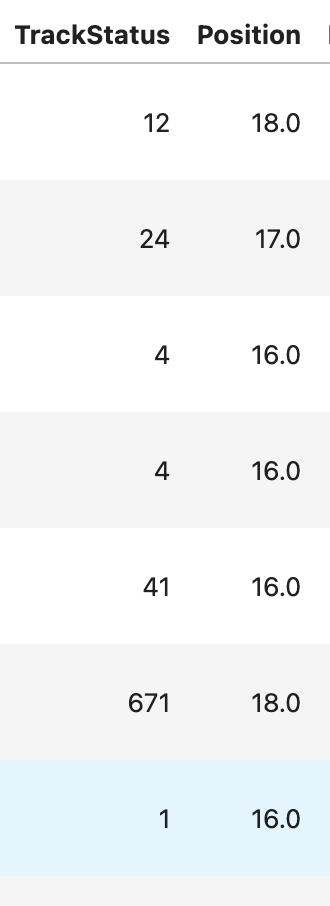
Mess Around and Find Out! Kidding.
Let's see what that means using the built-in "session.track_status"
session.load()
session.track_status
core           INFO 	Loading data for São Paulo Grand Prix - Race [v3.7.0]
req            INFO 	Using cached data for session_info
req            INFO 	Using cached data for driver_info
req            INFO 	Using cached data for session_status_data
req            INFO 	Using cached data for lap_count
req            INFO 	Using cached data for track_status_data
req            INFO 	Using cached data for _extended_timing_data
req            INFO 	Using cached data for timing_app_data
core           INFO 	Processing timing data...
req            INFO 	Using cached data for car_data
req            INFO 	Using cached data for position_data
req            INFO 	Using cached data for weather_data
req            INFO 	Using cached data for race_control_messages
core        WARNING 	Driver 4 completed the race distance 00:00.010000 before the recorded end of the session.
core           INFO 	Finished loading data for 20 drivers: ['4', '12', '1', '63', '81', '87', '30', '6', '27', '10', '23', '31', '55', '14', '43', '18', '22', '44', '16', '5']
| Time | Status | Message | |
|---|---|---|---|
| 0 | 0 days 00:00:00 | 1 | AllClear |
| 1 | 0 days 00:46:32.143000 | 2 | Yellow |
| 2 | 0 days 00:46:35.717000 | 1 | AllClear |
| 3 | 0 days 00:57:56.247000 | 2 | Yellow |
| 4 | 0 days 00:58:38.234000 | 4 | SCDeployed |
| 5 | 0 days 01:05:22.922000 | 1 | AllClear |
| 6 | 0 days 01:06:19.217000 | 2 | Yellow |
| 7 | 0 days 01:07:12.049000 | 6 | VSCDeployed |
| 8 | 0 days 01:10:06.866000 | 7 | VSCEnding |
| 9 | 0 days 01:10:19.151000 | 1 | AllClear |
Phew! That clears it up. The '671' in Lap 8 means that:
- VSCDeloyed
- VSCEnding
- AllClear
My guess is... there was a crash.
Driver Inspection
input: driver code output: single lap row + lap time
driver = session.drivers[2]
driver

# driver_laps = session.laps.pick_driver(driver): pick_driver is deprecated... but for some reason I keep forgetting.
driver_laps = session.laps.pick_drivers(driver)

# pick a lap that has a LapTime and not NaN
lap = driver_laps.dropna(subset=["LapTime"]).iloc[0]
lap
Time                      0 days 00:58:21.863000
Driver                                       VER
DriverNumber                                   1
LapTime                   0 days 00:01:27.191000
LapNumber                                    1.0
Stint                                        1.0
PitOutTime                0 days 00:57:08.347000
PitInTime                                    NaT
Sector1Time                                  NaT
Sector2Time               0 days 00:00:39.288000
Sector3Time               0 days 00:00:17.131000
Sector1SessionTime                           NaT
Sector2SessionTime        0 days 00:58:04.976000
Sector3SessionTime        0 days 00:58:22.006000
SpeedI1                                    306.0
SpeedI2                                    244.0
SpeedFL                                    305.0
SpeedST                                      NaN
IsPersonalBest                             False
Compound                                    HARD
TyreLife                                     1.0
FreshTyre                                   True
Team                             Red Bull Racing
LapStartTime              0 days 00:56:54.480000
LapStartDate          2025-11-09 17:03:14.079000
TrackStatus                                   12
Position                                    18.0
Deleted                                    False
DeletedReason
FastF1Generated                            False
IsAccurate                                 False
Name: 0, dtype: object
Explanation from ChatGPT:
- dropna(subset=["LapTime"]) removes rows where LapTime is NaN and why this matters:
- in-lap/out-laps often have no lap time
- Red flag/Safety Car laps might be incomplete
- After this, only valid timed laps remain
- iloc[0]: Grabs the first row by position in the filtered DataFrame
- It's not the fastest lap
- It's not the first lap of the race
- It's the first lap that has a valid LapTime
Extras: Telemetry
FastF1 has a handful of telemetry data.
Will run a few just for fun and check how different it is.
Telemetry is basically “car sensor data sampled over time”.
Input: a Lap object
Output: a dataframe with channels like Speed, Throttle, Brake, Gear, DRS (depends on availability)
tel = lap.get_telemetry()
tel.head(), tel.columns.tolist()
(                     Date            SessionTime DriverAhead  \
 2 2025-11-09 17:03:14.079 0 days 00:56:54.480000
 3 2025-11-09 17:03:14.142 0 days 00:56:54.543000
 4 2025-11-09 17:03:14.324 0 days 00:56:54.725000
 5 2025-11-09 17:03:14.342 0 days 00:56:54.743000
 6 2025-11-09 17:03:14.564 0 days 00:56:54.965000          31

    DistanceToDriverAhead                   Time          RPM      Speed  \
 2                  2.025        0 days 00:00:00  3529.597210  36.763888
 3                  2.025 0 days 00:00:00.063000  3517.872198  35.538886
 4                  2.025 0 days 00:00:00.245000  3484.000000  32.000000
 5                  2.025 0 days 00:00:00.263000  3488.725034  31.924999
 6                  2.025 0 days 00:00:00.485000  3547.000000  31.000000

    nGear  Throttle  Brake  DRS         Source  Distance  RelativeDistance  \
 2      1       0.0   True    1  interpolation -0.224661         -0.000057
 3      1       0.0   True    1            pos  0.335175          0.000086
 4      1       0.0   True    1            car  1.954167          0.000500
 5      1       0.0   True    1            pos  2.114423          0.000541
 6      1       0.0   True    1            car  4.020833          0.001028

     Status            X            Y       Z
 2  OnTrack -2707.329260 -8073.792045  7766.0
 3  OnTrack -2704.000000 -8081.000000  7766.0
 4  OnTrack -2692.067640 -8105.921700  7766.0
 5  OnTrack -2691.000000 -8108.000000  7766.0
 6  OnTrack -2681.402321 -8123.656896  7766.0  ,
 ['Date',
  'SessionTime',
  'DriverAhead',
  'DistanceToDriverAhead',
  'Time',
  'RPM',
  'Speed',
  'nGear',
  'Throttle',
  'Brake',
  'DRS',
  'Source',
  'Distance',
  'RelativeDistance',
  'Status',
  'X',
  'Y',
  'Z'])
Plot telemetry (Speed + Throttle + Brake)
Input: telemetry dataframe
Output: time-series plots that show how the driver drove the lap
fig, ax = plt.subplots(figsize=(10,4))
ax.plot(tel["Distance"], tel["Speed"])
ax.set_title(f"Speed vs Distance — {lap['Driver']} Lap {lap['LapNumber']}")
ax.set_xlabel("Distance (m)")
ax.set_ylabel("Speed (km/h)")
plt.show()

# Throttle & Brake often exist as 0-100 and True/False or 0/1
if "Throttle" in tel.columns:
    fig, ax = plt.subplots(figsize=(10,4))
    ax.plot(tel["Distance"], tel["Throttle"])
    ax.set_title("Throttle vs Distance")
    ax.set_xlabel("Distance (m)")
    ax.set_ylabel("Throttle (%)")
    plt.show()

if "Brake" in tel.columns:
    fig, ax = plt.subplots(figsize=(10,4))
    ax.plot(tel["Distance"], tel["Brake"])
    ax.set_title("Brake vs Distance")
    ax.set_xlabel("Distance (m)")
    ax.set_ylabel("Brake")
    plt.show()


plt.figure(figsize=(8,5))

# Scatter plot showing relationship between tyre life and lap time
sns.scatterplot(
    data=laps,
    x="TyreLife",  # Tyre life in laps
    y=laps["LapTime"].dt.total_seconds(),  # Convert lap time to seconds
    hue="Compound"  # Color by tyre compound
)

plt.title("Lap Time vs Tyre Life")
plt.xlabel("Tyre Life (laps)")
plt.ylabel("Lap Time (seconds)")
plt.show()

Histogram - Lap Time Distribution
# Histogram with KDE overlay
sns.histplot(
    laps["LapTime"].dt.total_seconds(),    # Converting LapTime to seconds
    bins=40,
    kde=True  # Adds smooth density curve
)
plt.title("Distribution of Lap Times")
plt.xlabel("Lap Time (seconds)")
plt.show()

Sankey
I tried but got a few errors but looked up what the functions/attributes associated with Sankey are:
ChatGPT Explanation
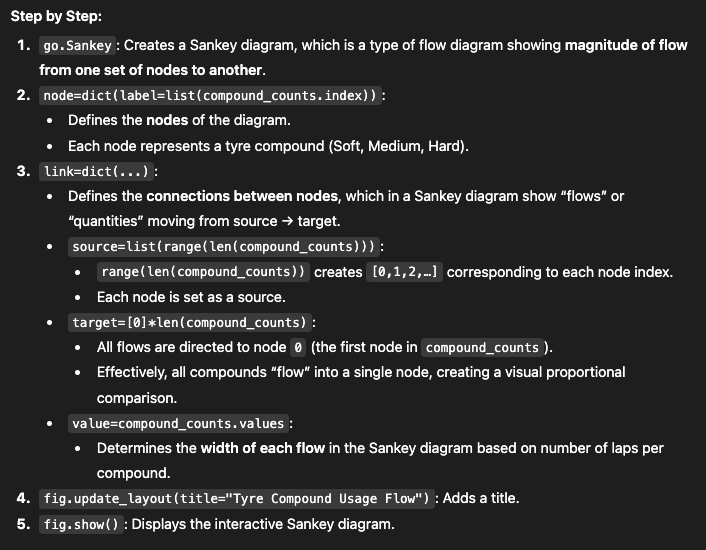
Drawing a track map using FastF1 Tutorials
lap = session.laps.pick_fastest()
pos = lap.get_pos_data()

circuit_info = session.get_circuit_info()

print(lap)
Time                      0 days 02:15:00.987000
Driver                                       ALB
DriverNumber                                  23
LapTime                   0 days 00:01:12.400000
LapNumber                                   59.0
Stint                                        3.0
PitOutTime                                   NaT
PitInTime                                    NaT
Sector1Time               0 days 00:00:18.386000
Sector2Time               0 days 00:00:37.404000
Sector3Time               0 days 00:00:16.610000
Sector1SessionTime        0 days 02:14:07.025000
Sector2SessionTime        0 days 02:14:44.429000
Sector3SessionTime        0 days 02:15:01.039000
SpeedI1                                    330.0
SpeedI2                                    258.0
SpeedFL                                    327.0
SpeedST                                    327.0
IsPersonalBest                              True
Compound                                  MEDIUM
TyreLife                                     4.0
FreshTyre                                   True
Team                                    Williams
LapStartTime              0 days 02:13:48.587000
LapStartDate          2025-11-09 18:20:08.186000
TrackStatus                                    1
Position                                    14.0
Deleted                                    False
DeletedReason
FastF1Generated                            False
IsAccurate                                  True
Name: 490, dtype: object
'''
https://docs.fastf1.dev/gen_modules/examples_gallery/general/plot_annotate_corners.html#sphx-glr-gen-modules-examples-gallery-general-plot-annotate-corners-py
'''

# The matric [[cos, sin], [-sin, cos]] if called a rotation matrix
# My matrix multiplication of the roation matrix with a vector [x, ]y, a new rotated vector [x_rot, y_rot] is obtained.
def rotate(xy, *, angle):
    rot_mat = np.array([[np.cos(angle), np.sin(angle)],
                        [-np.sin(angle), np.cos(angle)]])
    return np.matmul(xy, rot_mat)


# Get an array of shape [n, 2] where n is the number of points and the second
# axis is x and y.
track = pos.loc[:, ('X', 'Y')].to_numpy()

# Convert the rotation angle from degrees to radian.
track_angle = circuit_info.rotation / 180 * np.pi

# Rotate and plot the track map.
rotated_track = rotate(track, angle=track_angle)
plt.plot(rotated_track[:, 0], rotated_track[:, 1])
[<matplotlib.lines.Line2D at 0xfbcde30cdf90>]

import fastf1.plotting

# Enable Matplotlib patches for plotting timedelta values and load
# FastF1's dark color scheme
fastf1.plotting.setup_mpl(mpl_timedelta_support=True, color_scheme='fastf1')

# Loading session again (just in case)
session = fastf1.get_session(2025, "Monza", "R")
session.load()
core           INFO 	Loading data for Italian Grand Prix - Race [v3.7.0]
req            INFO 	Using cached data for session_info
req            INFO 	Using cached data for driver_info
req            INFO 	Using cached data for session_status_data
req            INFO 	Using cached data for lap_count
req            INFO 	Using cached data for track_status_data
req            INFO 	Using cached data for _extended_timing_data
req            INFO 	Using cached data for timing_app_data
core           INFO 	Processing timing data...
req            INFO 	Using cached data for car_data
req            INFO 	Using cached data for position_data
req            INFO 	Using cached data for weather_data
req            INFO 	Using cached data for race_control_messages
core           INFO 	Finished loading data for 20 drivers: ['1', '4', '81', '16', '63', '44', '23', '5', '12', '6', '55', '87', '22', '30', '31', '10', '43', '18', '14', '27']
driver_laps = session.laps.pick_drivers("VER").pick_quicklaps().reset_index()
fig, ax = plt.subplots(figsize=(8, 8))

sns.scatterplot(data=driver_laps,
                x="LapNumber",
                y="LapTime",
                ax=ax,
                hue="Compound",
                palette=fastf1.plotting.get_compound_mapping(session=session),
                s=80,
                linewidth=0,
                legend='auto')
<Axes: xlabel='LapNumber', ylabel='LapTime'>

Linear and Quadratic Function
# import numpy as np
# import matplotlib.pyplot as plt

# # Convert LapTime to seconds - already converted

# # Encode tyre compound
# compound_map = {
#     "SOFT": 0,
#     "MEDIUM": 1,
#     "HARD": 2
# }

# # loc - explicitly sets the coloumn on the full DataFrame
# laps.loc[:, "CompoundEncoded"] = laps["Compound"].map(compound_map)

# # Drop missing values
# data = laps[["LapTime", "TyreLife", "CompoundEncoded"]].dropna()
Fitting a Linear and Qudratic to LapTime and TyreLife
# # Using code snippt from Professor Neil's Linear and Quadratic Fitting
# # X = TyreLife, Y = LapTime
# x = data["TyreLife"].values
# y = data["LapTime"].dt.total_seconds().values

# # Fit linear and quadratic
# coeff1 = np.polyfit(x, y, 1)  # linear
# coeff2 = np.polyfit(x, y, 2)  # quadratic

# # Prepare fitted curves
# xfit = np.linspace(x.min(), x.max(), 100)
# yfit1 = np.poly1d(coeff1)(xfit)
# yfit2 = np.poly1d(coeff2)(xfit)

# # Plot
# plt.figure(figsize=(8,5))
# plt.scatter(x, y, alpha=0.5, label="laps")
# plt.plot(xfit, yfit1, 'g-', label="linear fit")
# plt.plot(xfit, yfit2, 'r-', label="quadratic fit")
# plt.xlabel("Tyre Life (laps)")
# plt.ylabel("Lap Time (s)")
# plt.title("Lap Time vs Tyre Life")
# plt.legend()
# plt.show()
Multiple Features with Linear Regression
# from sklearn.linear_model import LinearRegression

# # X = TyreLife + CompoundEncoded
# X = data[["TyreLife", "CompoundEncoded"]].values
# y = data["LapTime"].values

# # Linear regression
# model = LinearRegression()
# model.fit(X, y)

# # Print coefficients
# print("Intercept:", model.intercept_)
# print("Coefficients:", model.coef_)
# import pandas as pd

# X_quad = pd.DataFrame({
#     "TyreLife": data["TyreLife"],
#     "TyreLife2": data["TyreLife"]**2,
#     "CompoundEncoded": data["CompoundEncoded"]
# })

# model = LinearRegression()
# model.fit(X_quad, y)
# print("Intercept:", model.intercept_)
# print("Coefficients:", model.coef_)