Week 3: Machine Learning
Overview of the session and take aways from the session and exploration using ChatGPT
In the third week of the Data science session, Proffessor Neil took us through a clear framework for understanding intelligent systems, starting with Artificial Intelligence (AI) (the general goal of emulating intelligence), narrowing to Machine Learning (ML) (the ability to learn from data), and finally focusing on Deep Learning (DL) (learning via deep neural networks).
Core Principles of Neural Network
I have now learned that neural networks are structured in layers of interconnected nodes (or neurons/perceptrons). The core operation involves a linear sum over inputs, each multiplied by its corresponding weight and adjusted by a constant bias. This result then passes through a nonlinear activation function. This architecture, though originally inspired by the brain, now leverages its depth for exponential expressive power.
I now understand the specific roles of various components:
Input Layer: Data is represented as a feature vector (e.g., a flattened 784-dimensional vector for a $28 \times 28$ MNIST image).
Hidden Layers: These internal layers process complex relationships using activations like $\text{Tanh}$ (range $-1$ to $1$).
Output Units: The choice here depends on the task: $\text{Sigmoid}$ for binary classification, $\text{Softmax}$ for multi-class classification (like the 10 digits in MNIST), or $\text{Linear}$ for continuous regression.
Key Activation Functions
Sigmoid: Outputs values between 0 and 1, ideal for binary outputs.
Tanh (Hyperbolic Tangent): Outputs values between $-1$ and $1$, often preferred for internal layers.
ReLU (Rectified Linear Unit): $\max(0, x)$. This is vital as it addresses the vanishing gradients problem and is computationally efficient.
Leaky ReLU: A variation that fixes "disappearing gradients" by allowing a very small slope for negative inputs ($\alpha x$).
Training and Optimiation
The loss function defines the training goal for supervised learning. I focused on Cross-Entropy, which measures the difference between two probability distributions (the network's predicted probabilities vs. the true label). For reinforcement learning, the goal is often defined by a return, such as games won.
The network is trained using an update step, which relies on calculating the gradient of the loss function with respect to the network's parameters (weights and biases).
Assignment 4: For this assignment after going through Rico's work and documentation. I have also decided to work on Handwriting recognition machine learning model. Which is kind of supervised Machine learning.
Exploration of Frameworks.
- Tensorflow
- I have learned that the TensorFlow is an opensource platform primarily build for training machine learning model.
- OS Module
- The os library acts as a bridge, allowing your Python code to perform tasks that the operating system normally handles, such as managing files, directories, environment variables, and process execution.
Terminology and functions explored and learnt for the assignment
- Keras form Tensor flow
- Load_data()
- normalize
- dense
- Flatten
- complie
- fit
- save
- epochs
- evaluate
- optimizer
- loss
- meritcs
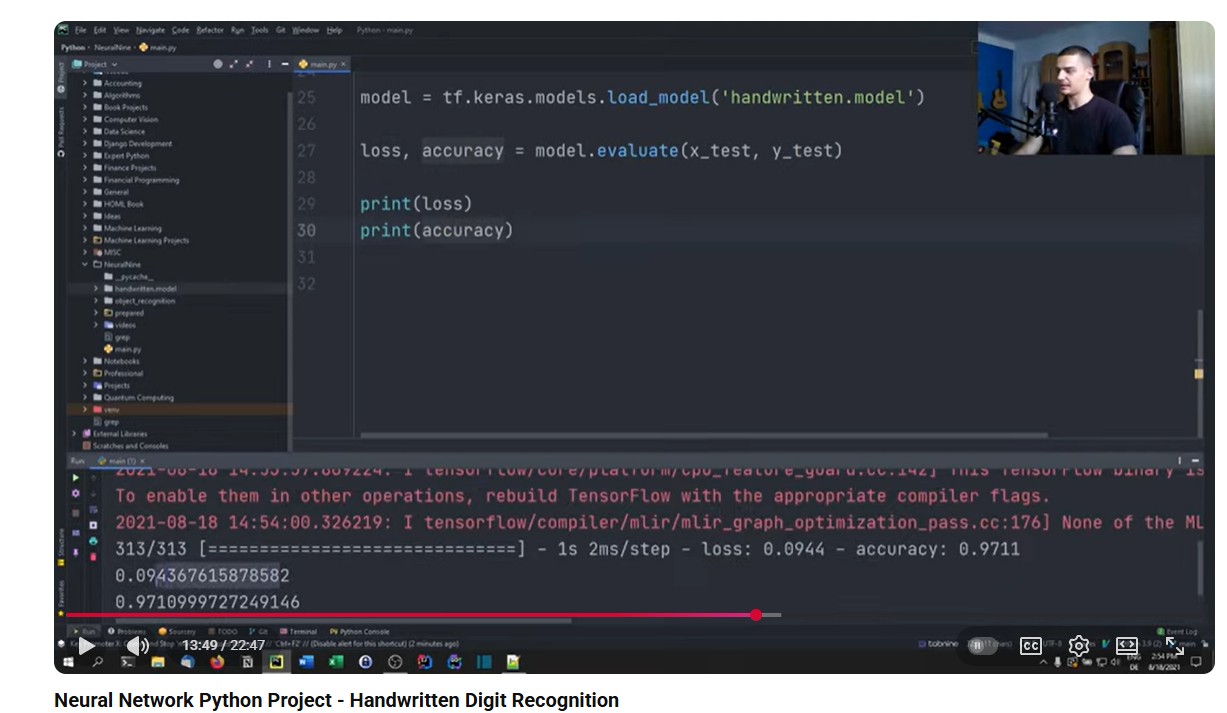
Video Reference for completing the 4th assignment
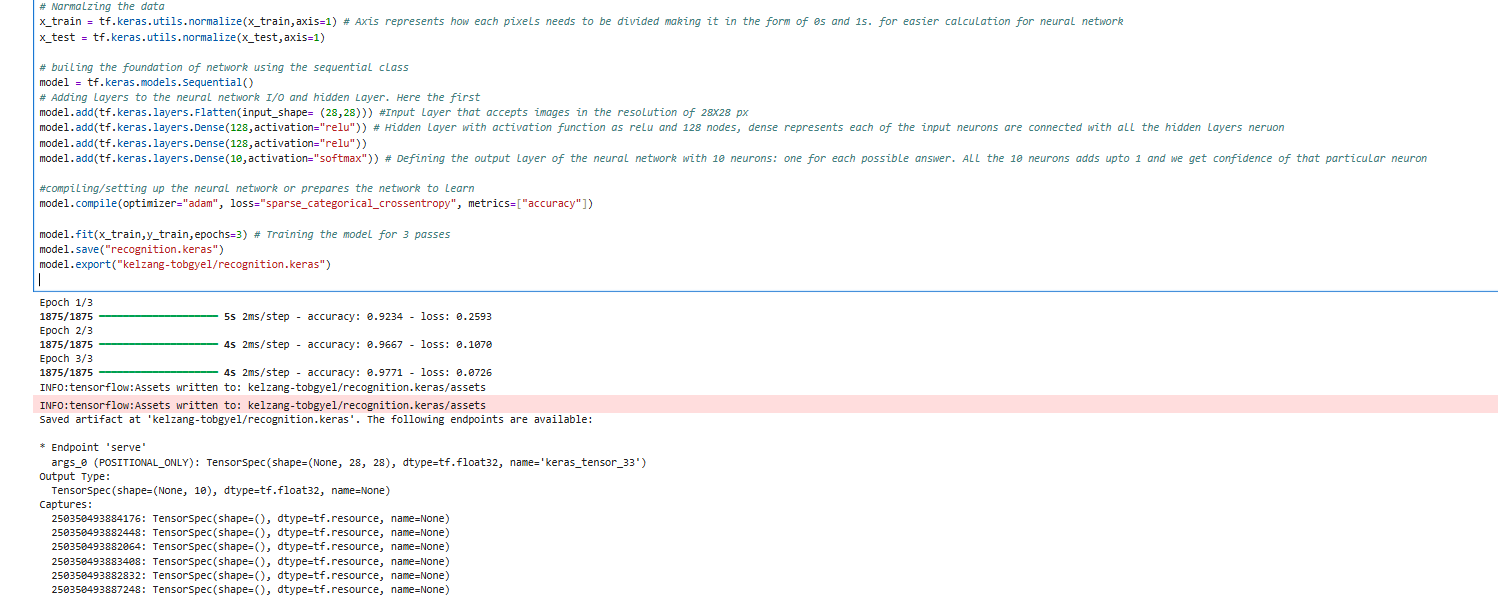
Code for building the Machine Learning Model.
# importing the necessary libraries and modules
import os # to work with files and directoreies
import numpy as np
#import cv2
import matplotlib.pyplot as plt
import tensorflow as tf

# loading the mnist dataset
mnist = tf.keras.datasets.mnist
(x_train, y_train),(x_test,y_test) = mnist.load_data()       # here x_train holds the imagges of handwritten data and y_train is the classificaiton

# Narmalzing the data
x_train = tf.keras.utils.normalize(x_train,axis=1) # Axis represents how each pixels needs to be divided making it in the form of 0s and 1s. for easier calculation for neural network
x_test = tf.keras.utils.normalize(x_test,axis=1)

# builing the foundation of network using the sequential class
model = tf.keras.models.Sequential()
# Adding layers to the neural network I/O and hidden Layer. Here the first
model.add(tf.keras.layers.Flatten(input_shape= (28,28))) #Input layer that accepts images in the resolution of 28X28 px
model.add(tf.keras.layers.Dense(128,activation="relu")) # Hidden layer with activation function as relu and 128 nodes, dense represents each of the input neurons are connected with all the hidden layers neruon
model.add(tf.keras.layers.Dense(128,activation="relu"))
model.add(tf.keras.layers.Dense(10,activation="softmax")) # Defining the output layer of the neural network with 10 neurons: one for each possible answer. All the 10 neurons adds upto 1 and we get confidence of that particular neuron

#compiling/setting up the neural network or prepares the network to learn
model.compile(optimizer="adam", loss="sparse_categorical_crossentropy", metrics=["accuracy"])

model.fit(x_train,y_train,epochs=3) # Training the model for 3 passes
model.save("recognition.keras")
#model.export("kelzang-tobgyel/recognition.keras")
/opt/conda/lib/python3.13/site-packages/google/protobuf/runtime_version.py:98: UserWarning: Protobuf gencode version 5.28.3 is exactly one major version older than the runtime version 6.31.1 at tensorflow/core/framework/attr_value.proto. Please update the gencode to avoid compatibility violations in the next runtime release.
  warnings.warn(
/opt/conda/lib/python3.13/site-packages/google/protobuf/runtime_version.py:98: UserWarning: Protobuf gencode version 5.28.3 is exactly one major version older than the runtime version 6.31.1 at tensorflow/core/framework/tensor.proto. Please update the gencode to avoid compatibility violations in the next runtime release.
  warnings.warn(
/opt/conda/lib/python3.13/site-packages/google/protobuf/runtime_version.py:98: UserWarning: Protobuf gencode version 5.28.3 is exactly one major version older than the runtime version 6.31.1 at tensorflow/core/framework/resource_handle.proto. Please update the gencode to avoid compatibility violations in the next runtime release.
  warnings.warn(
/opt/conda/lib/python3.13/site-packages/google/protobuf/runtime_version.py:98: UserWarning: Protobuf gencode version 5.28.3 is exactly one major version older than the runtime version 6.31.1 at tensorflow/core/framework/tensor_shape.proto. Please update the gencode to avoid compatibility violations in the next runtime release.
  warnings.warn(
/opt/conda/lib/python3.13/site-packages/google/protobuf/runtime_version.py:98: UserWarning: Protobuf gencode version 5.28.3 is exactly one major version older than the runtime version 6.31.1 at tensorflow/core/framework/types.proto. Please update the gencode to avoid compatibility violations in the next runtime release.
  warnings.warn(
/opt/conda/lib/python3.13/site-packages/google/protobuf/runtime_version.py:98: UserWarning: Protobuf gencode version 5.28.3 is exactly one major version older than the runtime version 6.31.1 at tensorflow/core/framework/full_type.proto. Please update the gencode to avoid compatibility violations in the next runtime release.
  warnings.warn(
/opt/conda/lib/python3.13/site-packages/google/protobuf/runtime_version.py:98: UserWarning: Protobuf gencode version 5.28.3 is exactly one major version older than the runtime version 6.31.1 at tensorflow/core/framework/function.proto. Please update the gencode to avoid compatibility violations in the next runtime release.
  warnings.warn(
/opt/conda/lib/python3.13/site-packages/google/protobuf/runtime_version.py:98: UserWarning: Protobuf gencode version 5.28.3 is exactly one major version older than the runtime version 6.31.1 at tensorflow/core/framework/node_def.proto. Please update the gencode to avoid compatibility violations in the next runtime release.
  warnings.warn(
/opt/conda/lib/python3.13/site-packages/google/protobuf/runtime_version.py:98: UserWarning: Protobuf gencode version 5.28.3 is exactly one major version older than the runtime version 6.31.1 at tensorflow/core/framework/op_def.proto. Please update the gencode to avoid compatibility violations in the next runtime release.
  warnings.warn(
/opt/conda/lib/python3.13/site-packages/google/protobuf/runtime_version.py:98: UserWarning: Protobuf gencode version 5.28.3 is exactly one major version older than the runtime version 6.31.1 at tensorflow/core/framework/graph.proto. Please update the gencode to avoid compatibility violations in the next runtime release.
  warnings.warn(
/opt/conda/lib/python3.13/site-packages/google/protobuf/runtime_version.py:98: UserWarning: Protobuf gencode version 5.28.3 is exactly one major version older than the runtime version 6.31.1 at tensorflow/core/framework/graph_debug_info.proto. Please update the gencode to avoid compatibility violations in the next runtime release.
  warnings.warn(
/opt/conda/lib/python3.13/site-packages/google/protobuf/runtime_version.py:98: UserWarning: Protobuf gencode version 5.28.3 is exactly one major version older than the runtime version 6.31.1 at tensorflow/core/framework/versions.proto. Please update the gencode to avoid compatibility violations in the next runtime release.
  warnings.warn(
/opt/conda/lib/python3.13/site-packages/google/protobuf/runtime_version.py:98: UserWarning: Protobuf gencode version 5.28.3 is exactly one major version older than the runtime version 6.31.1 at tensorflow/core/protobuf/config.proto. Please update the gencode to avoid compatibility violations in the next runtime release.
  warnings.warn(
/opt/conda/lib/python3.13/site-packages/google/protobuf/runtime_version.py:98: UserWarning: Protobuf gencode version 5.28.3 is exactly one major version older than the runtime version 6.31.1 at xla/tsl/protobuf/coordination_config.proto. Please update the gencode to avoid compatibility violations in the next runtime release.
  warnings.warn(
/opt/conda/lib/python3.13/site-packages/google/protobuf/runtime_version.py:98: UserWarning: Protobuf gencode version 5.28.3 is exactly one major version older than the runtime version 6.31.1 at tensorflow/core/framework/cost_graph.proto. Please update the gencode to avoid compatibility violations in the next runtime release.
  warnings.warn(
/opt/conda/lib/python3.13/site-packages/google/protobuf/runtime_version.py:98: UserWarning: Protobuf gencode version 5.28.3 is exactly one major version older than the runtime version 6.31.1 at tensorflow/core/framework/step_stats.proto. Please update the gencode to avoid compatibility violations in the next runtime release.
  warnings.warn(
/opt/conda/lib/python3.13/site-packages/google/protobuf/runtime_version.py:98: UserWarning: Protobuf gencode version 5.28.3 is exactly one major version older than the runtime version 6.31.1 at tensorflow/core/framework/allocation_description.proto. Please update the gencode to avoid compatibility violations in the next runtime release.
  warnings.warn(
/opt/conda/lib/python3.13/site-packages/google/protobuf/runtime_version.py:98: UserWarning: Protobuf gencode version 5.28.3 is exactly one major version older than the runtime version 6.31.1 at tensorflow/core/framework/tensor_description.proto. Please update the gencode to avoid compatibility violations in the next runtime release.
  warnings.warn(
/opt/conda/lib/python3.13/site-packages/google/protobuf/runtime_version.py:98: UserWarning: Protobuf gencode version 5.28.3 is exactly one major version older than the runtime version 6.31.1 at tensorflow/core/protobuf/cluster.proto. Please update the gencode to avoid compatibility violations in the next runtime release.
  warnings.warn(
/opt/conda/lib/python3.13/site-packages/google/protobuf/runtime_version.py:98: UserWarning: Protobuf gencode version 5.28.3 is exactly one major version older than the runtime version 6.31.1 at tensorflow/core/protobuf/debug.proto. Please update the gencode to avoid compatibility violations in the next runtime release.
  warnings.warn(
/opt/conda/lib/python3.13/site-packages/keras/src/layers/reshaping/flatten.py:37: UserWarning: Do not pass an `input_shape`/`input_dim` argument to a layer. When using Sequential models, prefer using an `Input(shape)` object as the first layer in the model instead.
  super().__init__(**kwargs)
Epoch 1/3
1875/1875 ━━━━━━━━━━━━━━━━━━━━ 5s 2ms/step - accuracy: 0.9214 - loss: 0.2688
Epoch 2/3
1875/1875 ━━━━━━━━━━━━━━━━━━━━ 4s 2ms/step - accuracy: 0.9661 - loss: 0.1104
Epoch 3/3
1875/1875 ━━━━━━━━━━━━━━━━━━━━ 4s 2ms/step - accuracy: 0.9773 - loss: 0.0734
Terminology and Codes learnt
- The mnist library gives us 70,000 small, grayscale images of handwritten digits (0 through 9) that is automatically splitted into both training and testing data.
- Keras: Keras's main role is to enhance developer productivity and make deep learning accessible by providing a standard set of APIs to perform common tasks, abstracting away the underlying complexity of the TensorFlow backend.
- tf.keras.models.Sequential() creates an empty, ordered container. This container knows that it will only accept steps in sequence—one layer must be finished before the next one starts
- The two main alternatives over sequential class in TensorFlow/Keras for building more complex neural networks are:
- The Keras Functional API (The most common alternative).
- Model Subclassing (For maximum control
- Activation function: A decision maker in a neuron in neural network.
- confidence is a measure of how certain the model is about its own prediction.
- What does an optimizer do?
- The optimizer figures out how much and in what direction to adjust the millions of internal numbers (the weights) to make the network perform better the next time.
- Optimizer Algorithm: "Adam" is a reliable, and fast optimizer algorithm. It's the default choice for most beginners.
- The Loss Function is the scorekeeper that measures how bad the network's mistake was.
- An epoch is defined as one complete pass of the entire training dataset through the neural network.
Training the model
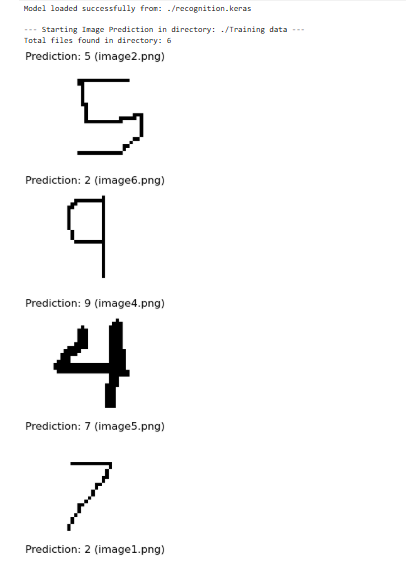
Testing the Model
# importing the necessary libraries and modules
import os # to work with files and directoreies
import numpy as np
import cv2
import matplotlib.pyplot as plt
import tensorflow as tf

# loading the mnist dataset
mnist = tf.keras.datasets.mnist
(x_train, y_train),(x_test,y_test) = mnist.load_data()       # here x_train holds the imagges of handwritten data and y_train is the classificaiton

# Narmalzing the data
x_train = tf.keras.utils.normalize(x_train,axis=1) # Axis represents how each pixels needs to be divided making it in the form of 0s and 1s. for easier calculation for neural network
x_test = tf.keras.utils.normalize(x_test,axis=1)

# builing the foundation of network using the sequential class
'''model = tf.keras.models.Sequential()
# Adding layers to the neural network I/O and hidden Layer. Here the first
model.add(tf.keras.layers.Flatten(input_shape= (28,28))) #Input layer that accepts images in the resolution of 28X28 px
model.add(tf.keras.layers.Dense(128,activation="relu")) # Hidden layer with activation function as relu and 128 nodes, dense represents each of the input neurons are connected with all the hidden layers neruon
model.add(tf.keras.layers.Dense(128,activation="relu"))
model.add(tf.keras.layers.Dense(10,activation="softmax")) # Defining the output layer of the neural network with 10 neurons: one for each possible answer. All the 10 neurons adds upto 1 and we get confidence of that particular neuron

#compiling/setting up the neural network or prepares the network to learn
model.compile(optimizer="adam", loss="sparse_categorical_crossentropy", metrics=["accuracy"])

model.fit(x_train,y_train,epochs=3) # Training the model for 3 passes
model.save("recognition.keras")
model.export("kelzang-tobgyel/recognition.keras")'''

ROOT_DIR = "."
# Confirmed path: ./Training data/
IMAGE_DIR = os.path.join(ROOT_DIR, "Training data")

# --- PATH CHECK ---
if not os.path.isdir(IMAGE_DIR):
    # Added a print for the current working directory to help debug
    print(f"ERROR: Image directory not found at {IMAGE_DIR}")
    print(f"Current Working Directory (CWD): {os.getcwd()}")
    print("Please ensure the notebook is running from the directory containing the 'Training data' folder.")
    exit()

# --- 2. LOAD TRAINED MODEL ---
# NOTE: Using load_model with the .keras extension
try:
    model = tf.keras.models.load_model(os.path.join(ROOT_DIR, "recognition.keras"))
    print(f"Model loaded successfully from: {ROOT_DIR}/recognition.keras")
except Exception as e:
    print(f"Error loading model: {e}")
    # If the model fails to load, we can't continue.
    exit()

# --- 3. PREDICTION LOOP (ENHANCED DEBUGGING AND THRESHOLDING FIX) ---
all_files = os.listdir(IMAGE_DIR)
all_files_count = len(all_files)
print(f"\n--- Starting Image Prediction in directory: {IMAGE_DIR} ---")
print(f"Total files found in directory: {all_files_count}")

files_found = 0
png_files_found = 0

# os.listdir() gets a list of all files in the directory
for filename in all_files:
    if filename.endswith(".png"):
        png_files_found += 1

        # Construct the full path to the image
        img_path = os.path.join(IMAGE_DIR, filename)

        try:
            # 1. Read the image in BGR format
            img_bgr = cv2.imread(img_path, cv2.IMREAD_UNCHANGED)

            # Check 1: Was the image read successfully?
            if img_bgr is None:
                print(f"WARNING: Failed to read image file (cv2.imread returned None): {filename}")
                continue

            # 2. Convert to grayscale.
            if len(img_bgr.shape) == 3:
                img_gray = cv2.cvtColor(img_bgr, cv2.COLOR_BGR2GRAY)
            else:
                img_gray = img_bgr

            # 3. Resize the image if it's not 28x28 (MNIST standard)
            if img_gray.shape != (28, 28):
                img_gray = cv2.resize(img_gray, (28, 28), interpolation=cv2.INTER_AREA)
                print(f"INFO: Resized image {filename} to 28x28.")

            # --- CRITICAL FIX: THRESHOLDING ---
            # Threshold the image to make it purely black and white.
            # This cleans up the image and removes noise/shadows.
            # Pixels darker than 127 become 0 (Black), others become 255 (White).
            (thresh, img_thresholded) = cv2.threshold(img_gray, 127, 255, cv2.THRESH_BINARY)
            img_gray = img_thresholded
            # -----------------------------------

            # --- CRITICAL FIX: INVERT IMAGE ---
            # If your custom images are black digits on a white background (which they are
            # after thresholding), this inverts them to white digits on a black background (like MNIST).
            img_gray = 255 - img_gray
            # ----------------------------------

            # 4. Normalize the image (Scale to 0-1)
            img_normalized = img_gray / 255.0

            # 5. Reshape for the model (Add the batch dimension)
            # Model expects shape (1, 28, 28) - 1 image, 28x28
            img_reshaped = np.expand_dims(img_normalized, axis=0)

            # 6. Make the prediction
            predictions = model.predict(img_reshaped, verbose=0)

            # 7. Get the predicted digit (index of highest probability)
            predicted_digit = np.argmax(predictions)

            # --- Display Results ---
            plt.figure(figsize=(2, 2))
            # Use the grayscale image data
            plt.imshow(img_gray, cmap=plt.cm.binary)
            plt.title(f"Prediction: {predicted_digit} ({filename})")
            plt.axis('off')
            plt.show()

            files_found += 1

        except Exception as e:
            print(f"Failed to process {filename}. Runtime Error: {e}")

print(f"\n--- Finished Processing ---")
print(f"PNG files found in folder: {png_files_found}")
print(f"Images successfully processed and displayed: {files_found}")

# --- FINAL DEBUGGING HELP ---
if files_found == 0 and png_files_found > 0:
    print("\nDEBUGGING TIP: All PNG files found, but none processed successfully.")
    print("Possibilities: Image size mismatch (now fixed by resize), or a fundamental issue with the file content/format.")
if files_found == 0 and all_files_count > 0 and png_files_found == 0:
    print("\nDEBUGGING TIP: Your images are NOT '.png' files. Check their extensions and update the code filter accordingly (e.g., '.jpg').")
if all_files_count == 0:
    print("\nDEBUGGING TIP: The folder 'Training data' is empty.")
Model loaded successfully from: ./recognition.keras

--- Starting Image Prediction in directory: ./Training data ---
Total files found in directory: 6


--- Finished Processing ---
PNG files found in folder: 6
Images successfully processed and displayed: 6
Output
Overall Takeaway
In order to create a machine learning model we have to do the following steps:
- Loading the training and testing data
- Normalizing the data
- Building the Neural Network I/O and hidden layer with activation function
- Comipling the rules for training the model like setting optimizer, loss and metrices.
- Training the model with epochs attribute.
- Saving the model.
- Tesing the model with unlabeled data.