Week 1: Introduction
This week we will identify a dataset which we will use to explore and make our self familiar with the tools.
Assignment
- Work Environment: Setting the work environment
- Dataset: Identification and brief description about the dataset
- Data Analysis
Work Environment
Setting Jupyter Notebooks in VS Code as my work environment for this course.
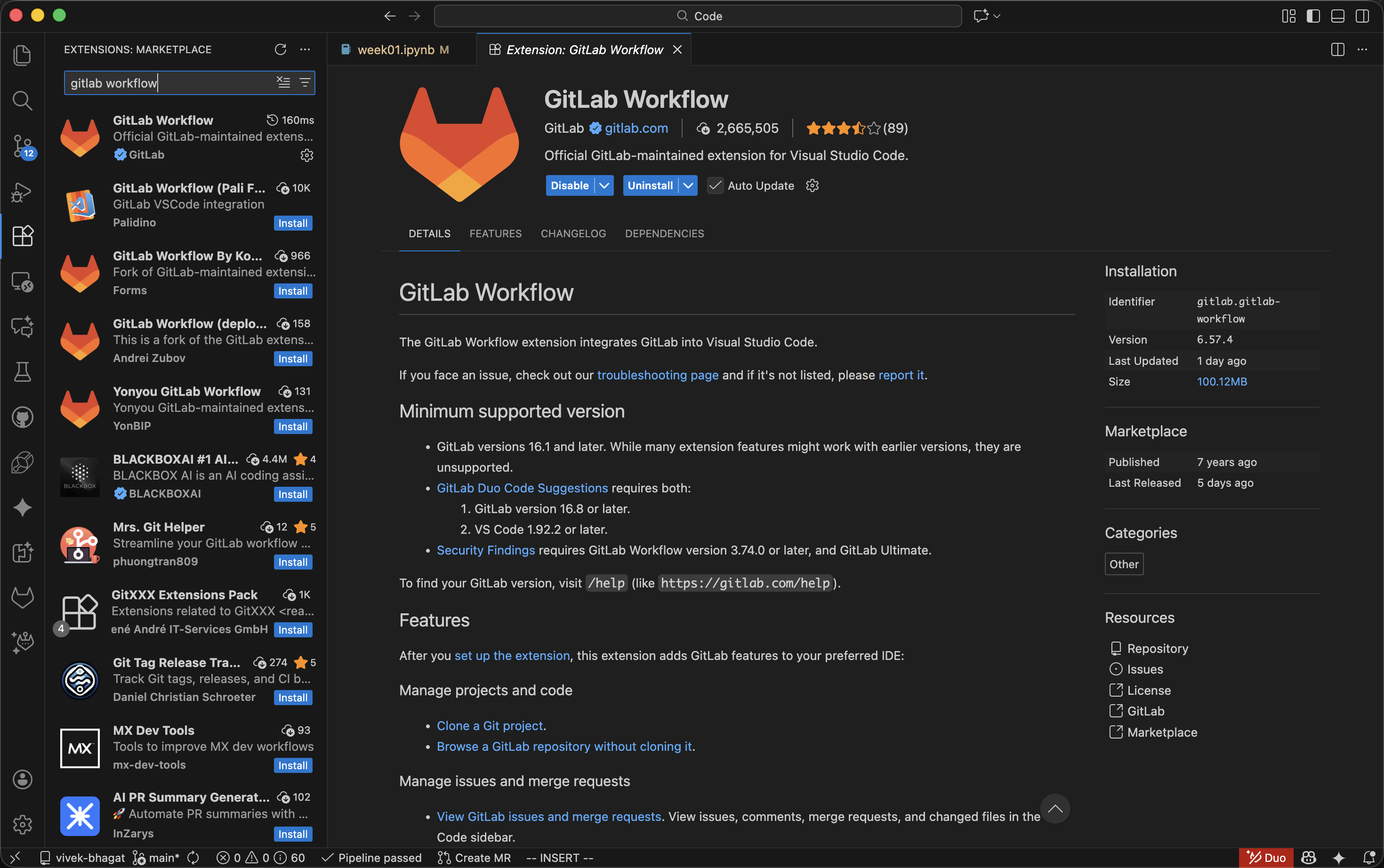
Install GitLab Workflow extension in VS Code.
Generate a Personal Access Token in GitLab.
Go to your GitLab profile settings.

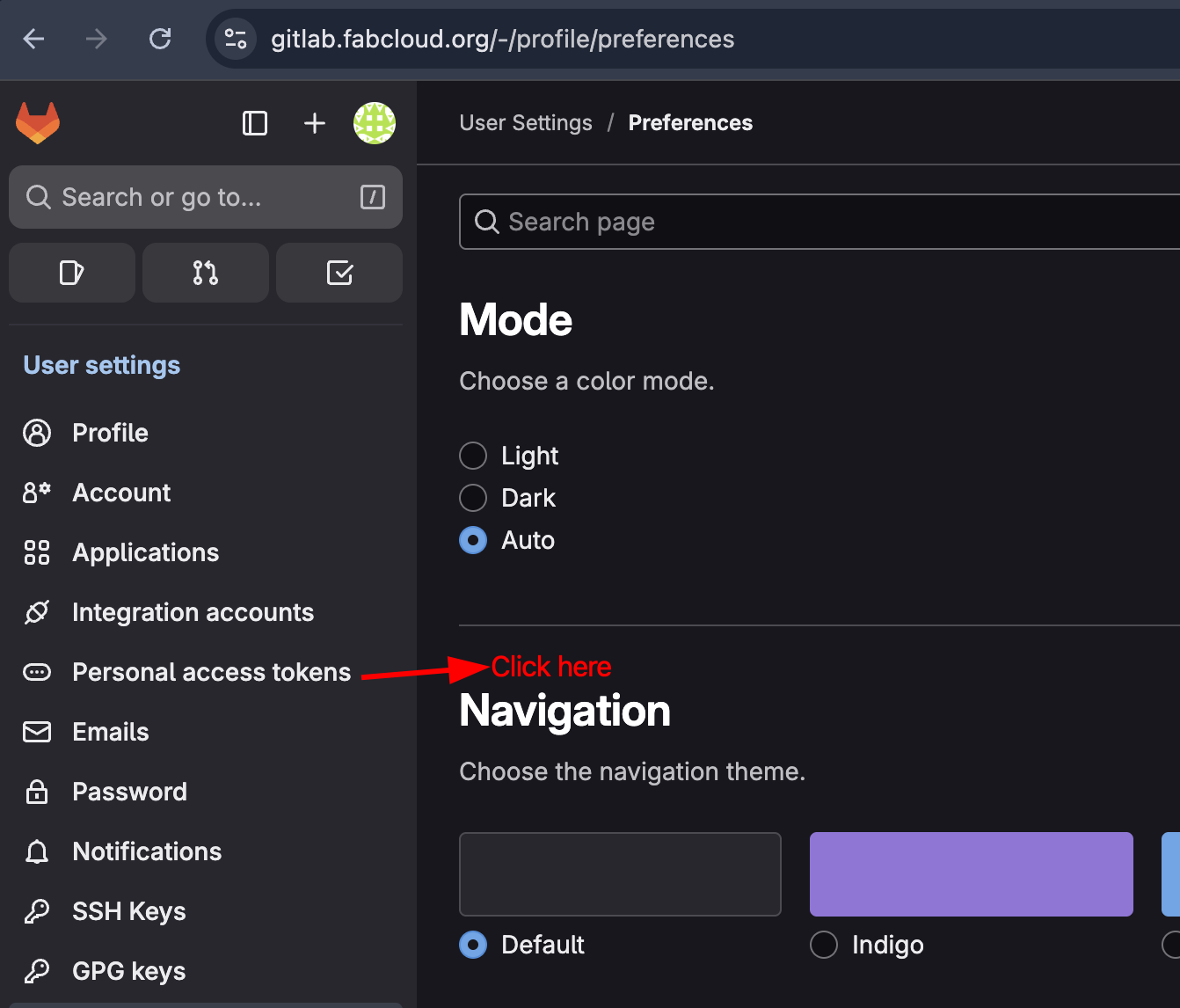
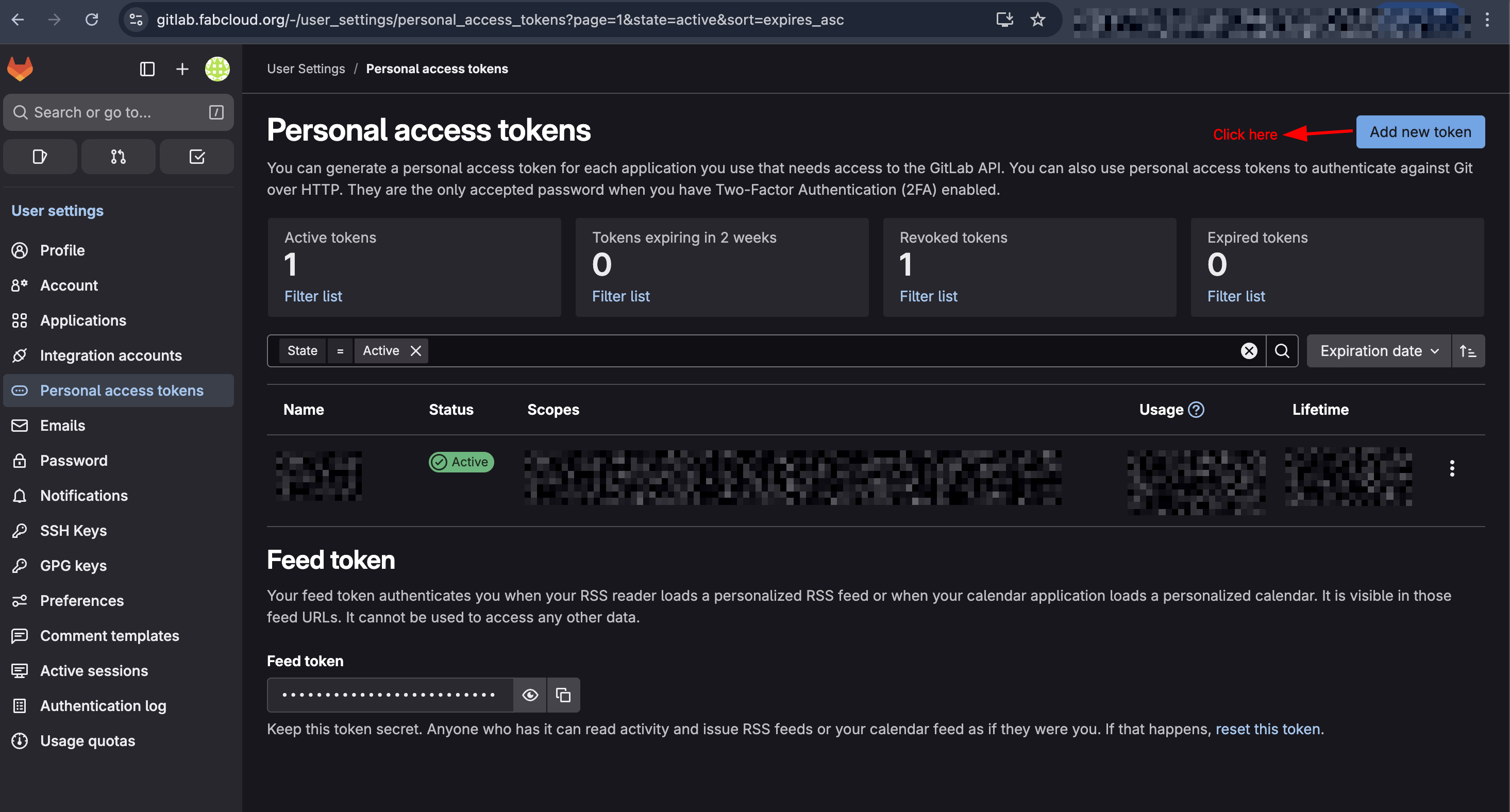
Click on Preferences > Personal Access Tokens > Add new token.

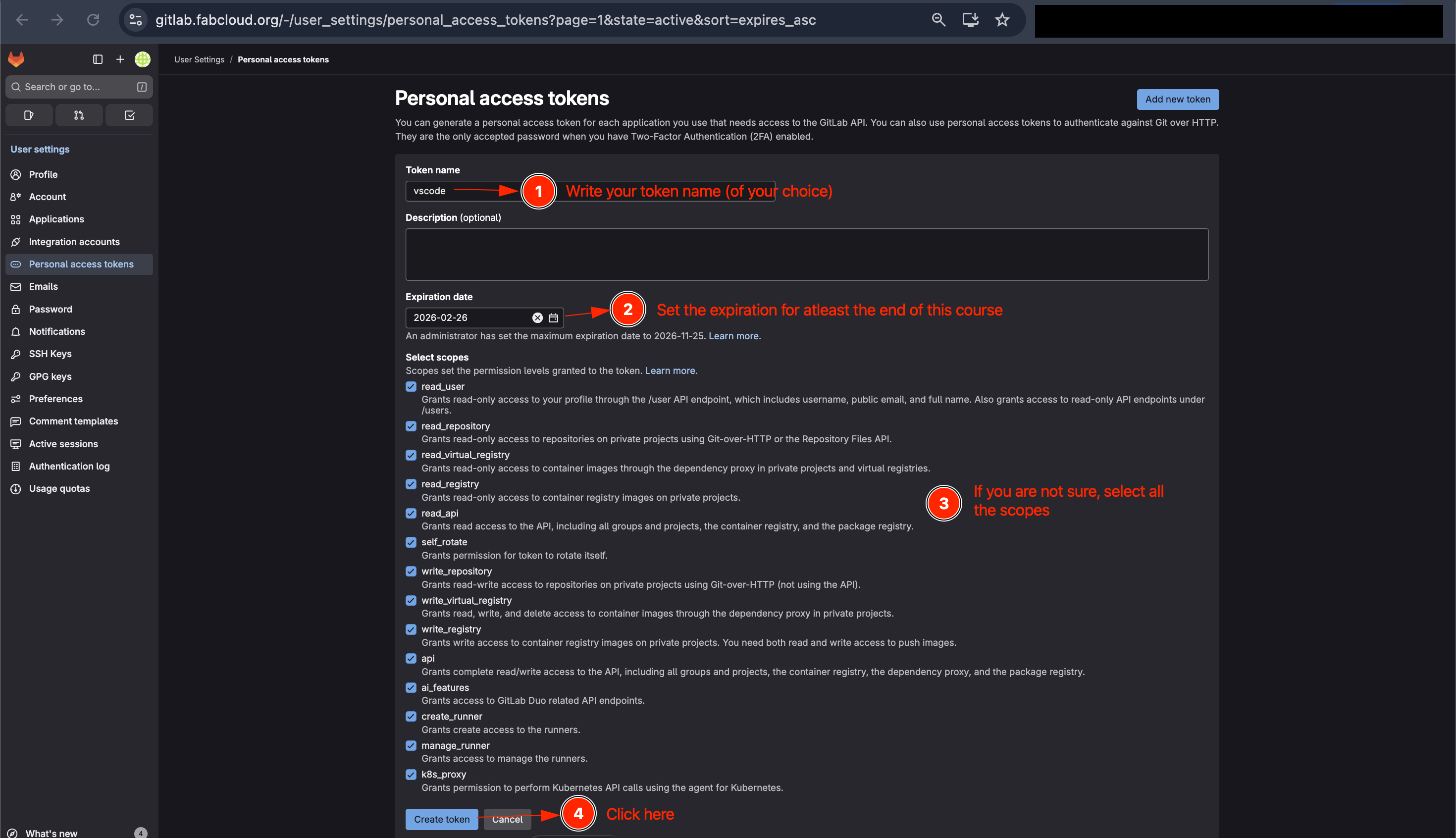
Now enter token name of your choice, select the expiry date and the required scopes. Finally click on "Create token" button.
Copy the generated token and save it for later use as you won't be able to see it again.
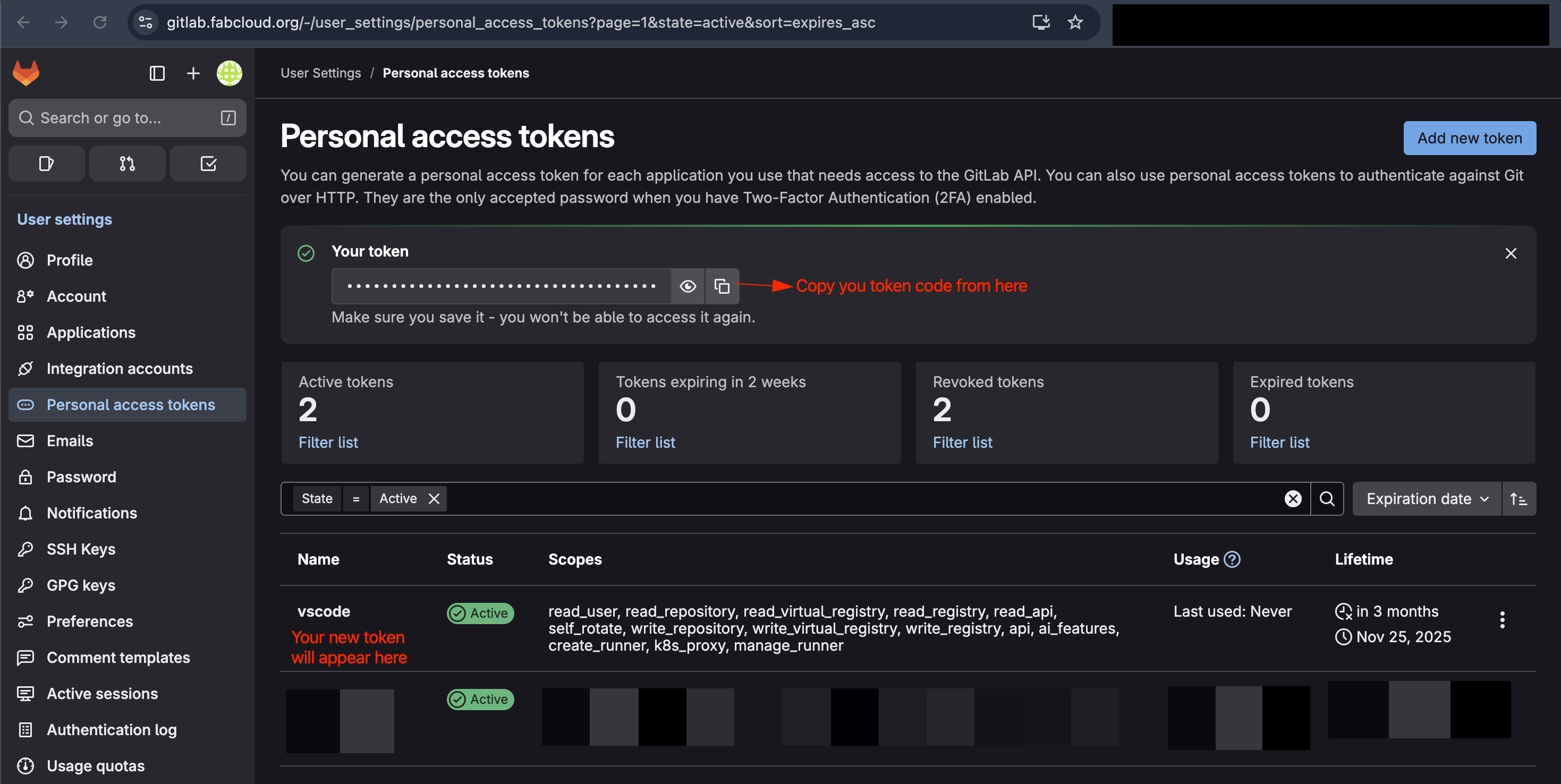
Now add your GitLab account details in VS Code.
Open Command Palette (Command+Shift+P on Mac) and search for "GitLab: Authenticate"
OR
Click on the Search Code bar at the top and search for ">GitLab: Authenticate" (works for all OS).
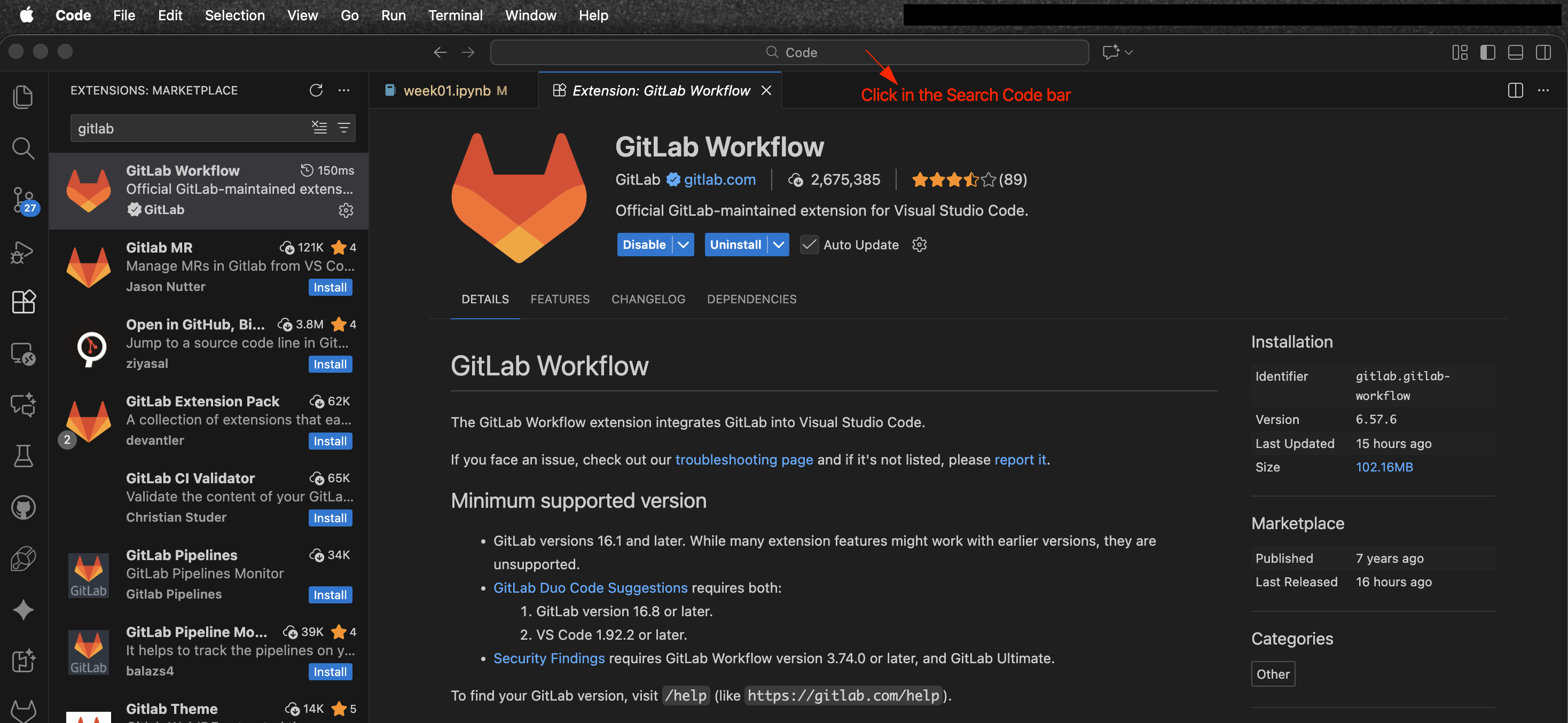
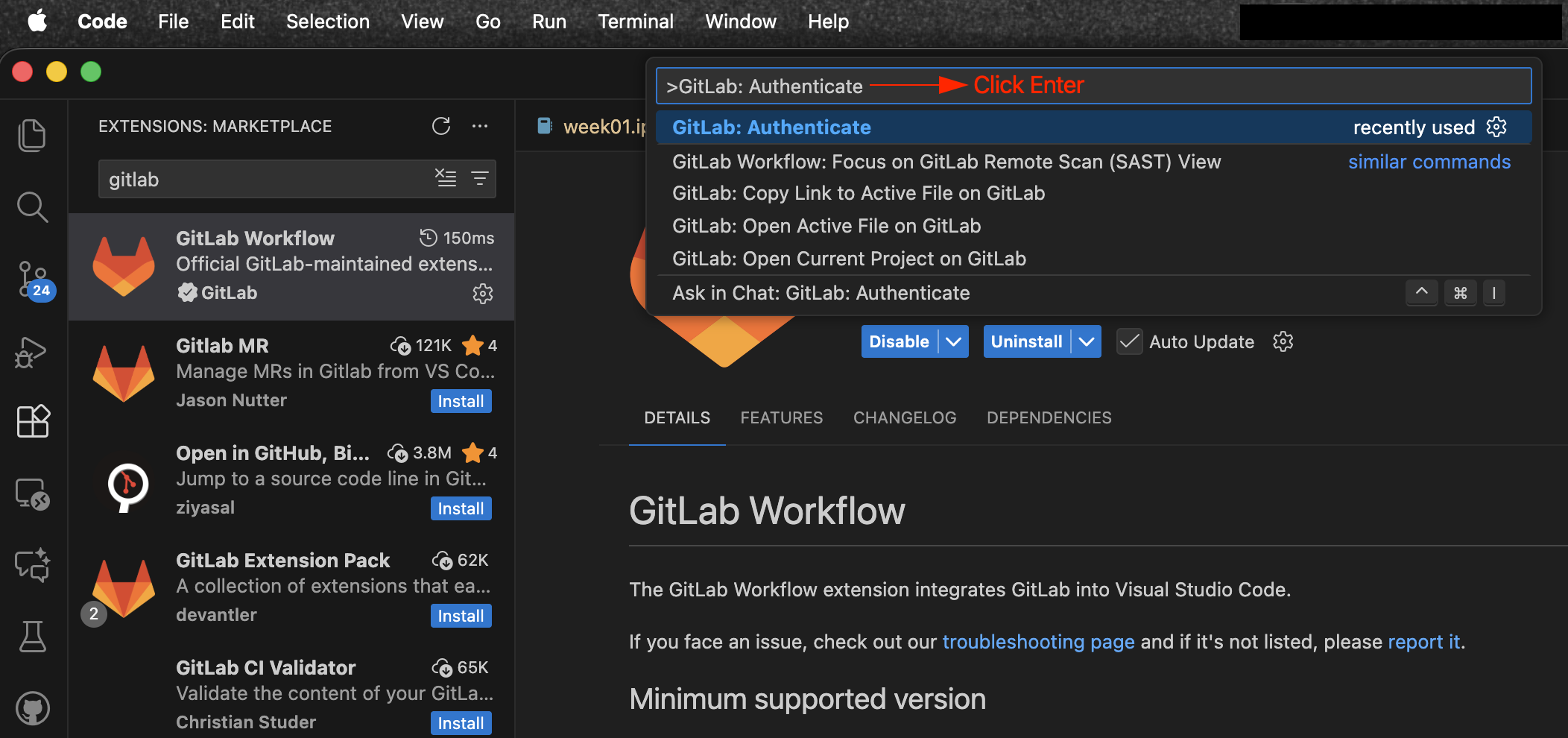
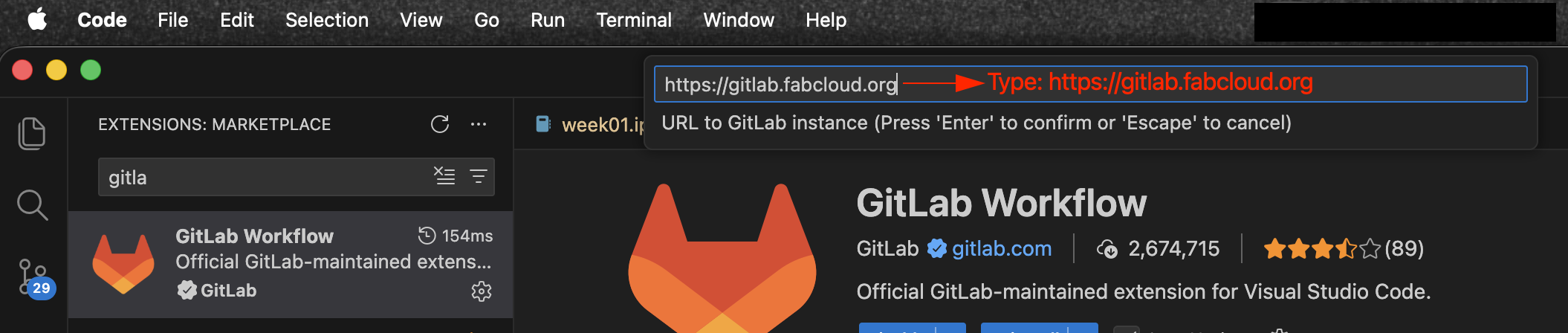
Now enter your GitLab instance URL (https://gitlab.fabcloud.org) and press Enter.
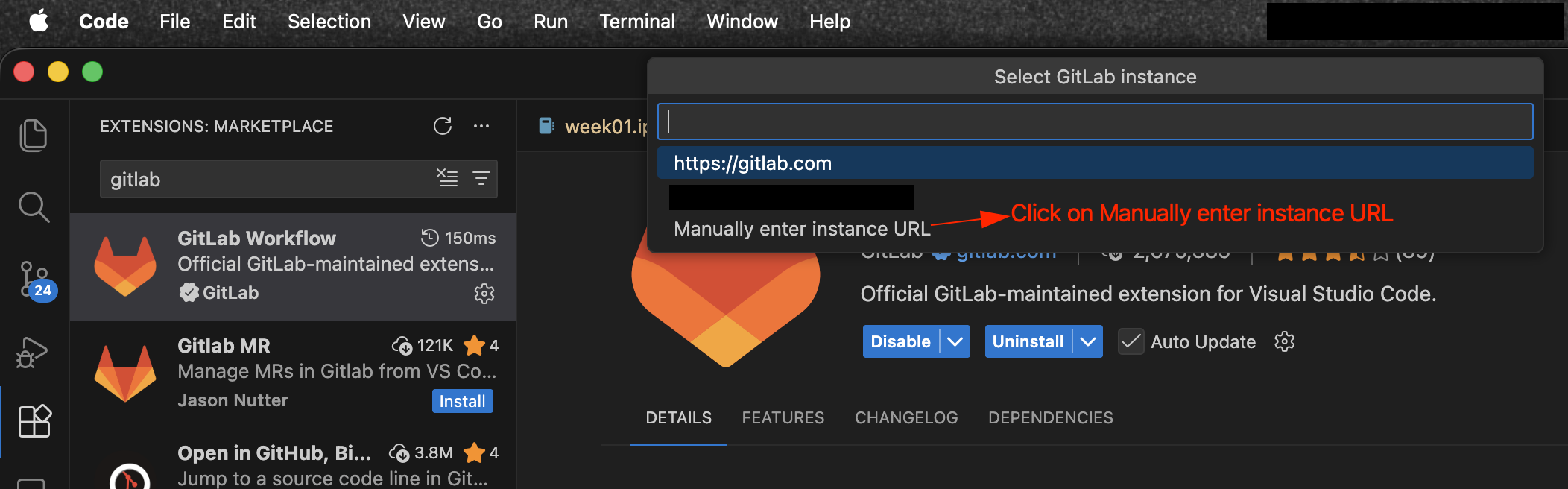
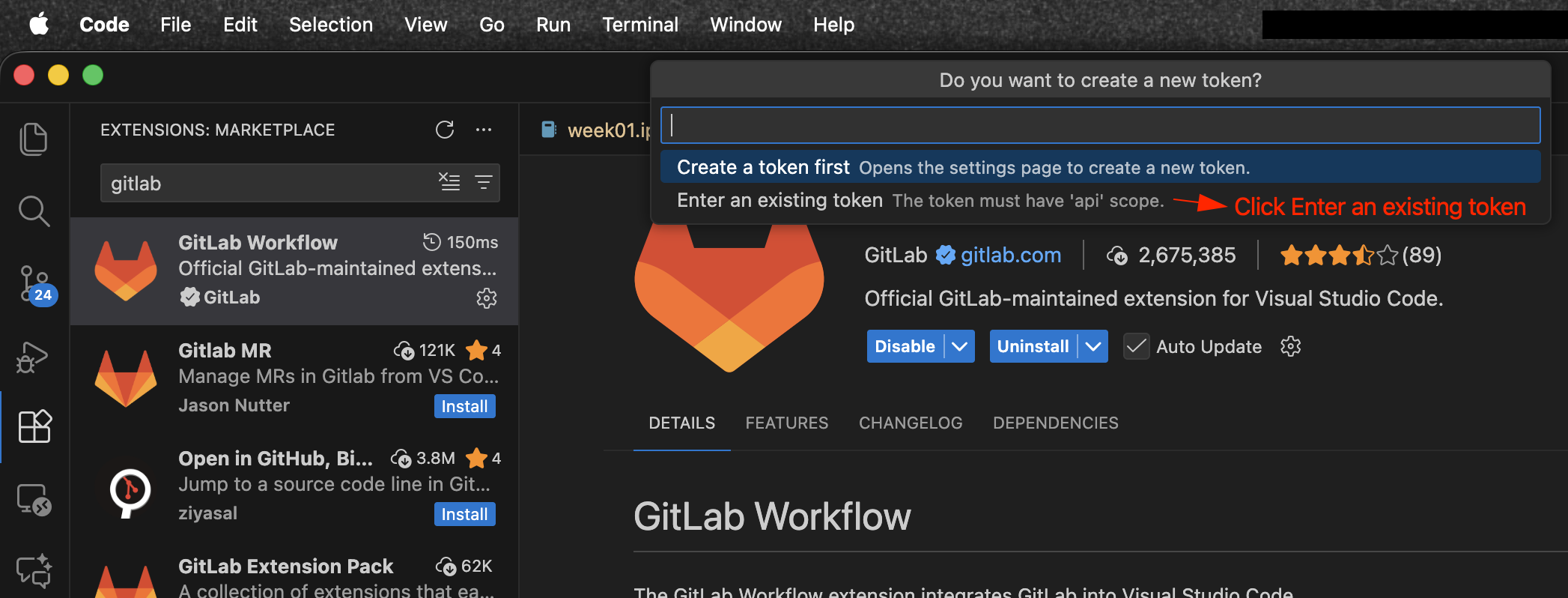
Now click Enter an existing token and enter the Personal Access Token you generated earlier and press Enter.
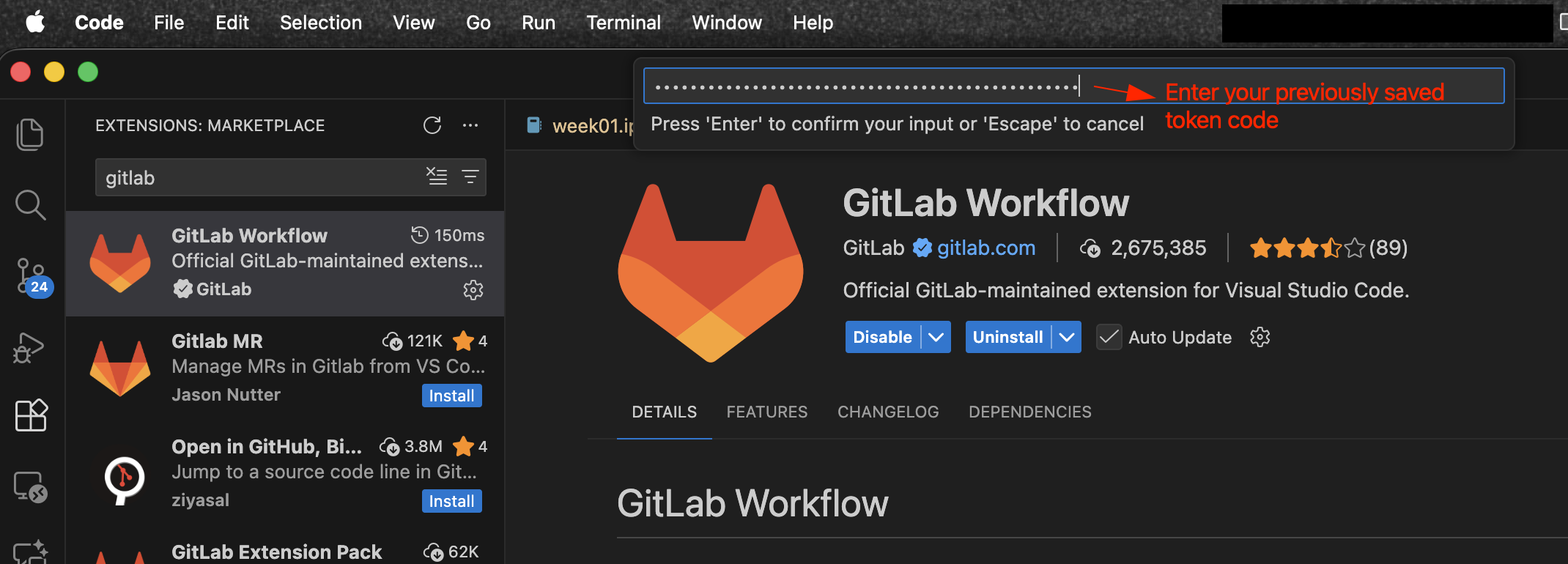
You will see a notification confirming that you have successfully authenticated your GitLab account in VS.

Clone the course repository from GitLab to your local machine.
Open Command Palette (Command+Shift+P on Mac) and search for "Git: Clone"
OR
Click on the Search Code bar at the top and search for ">Git: Clone" (works for all OS).
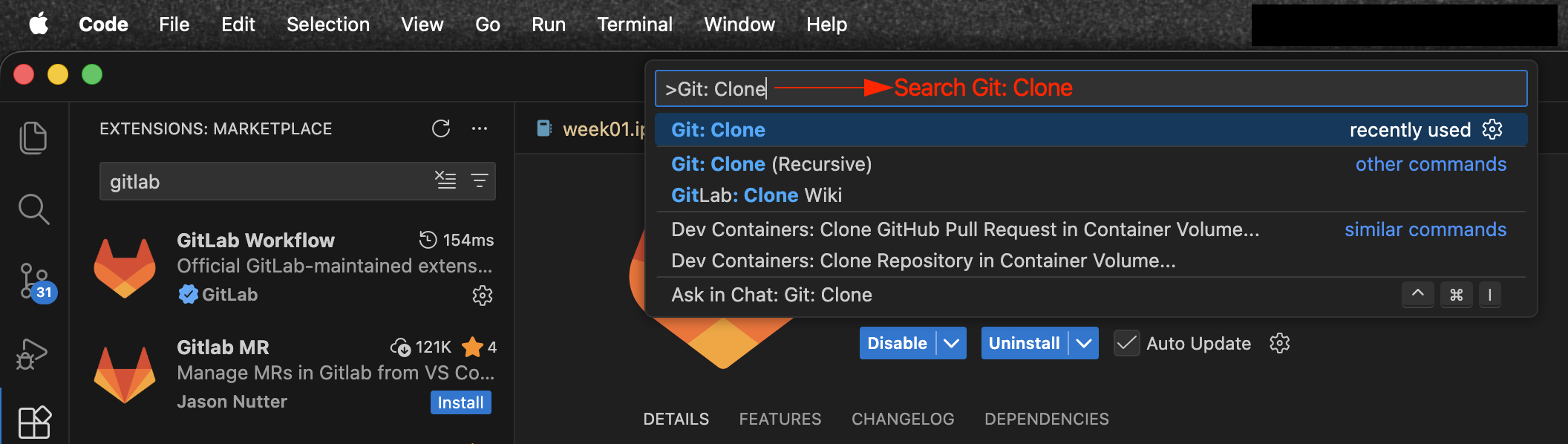
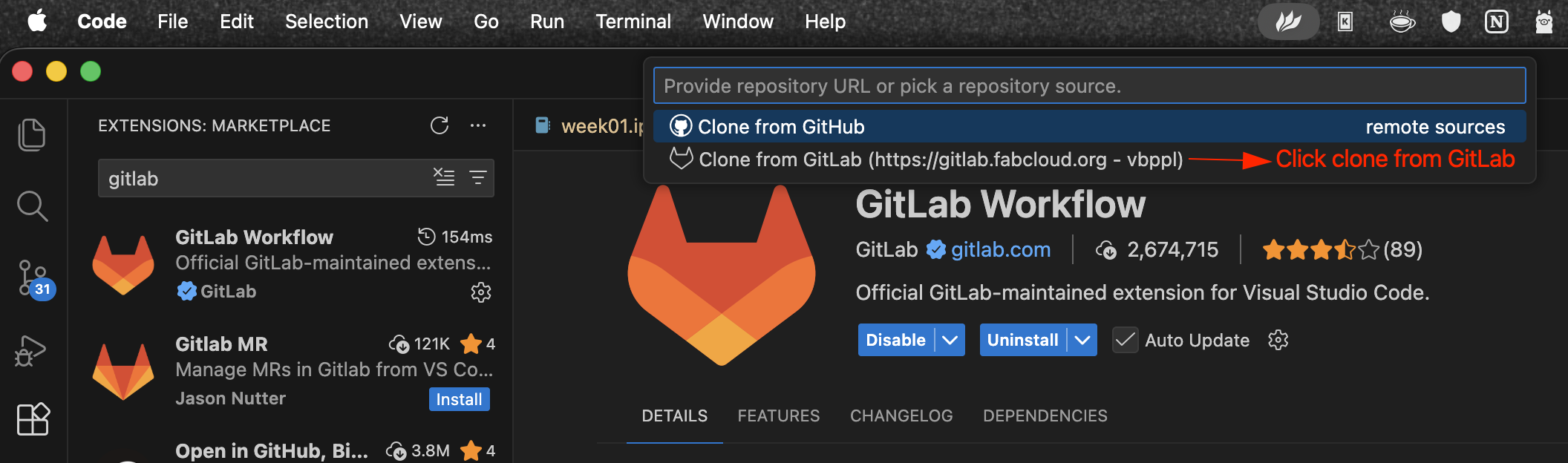
Now click "Clone from GitLab".
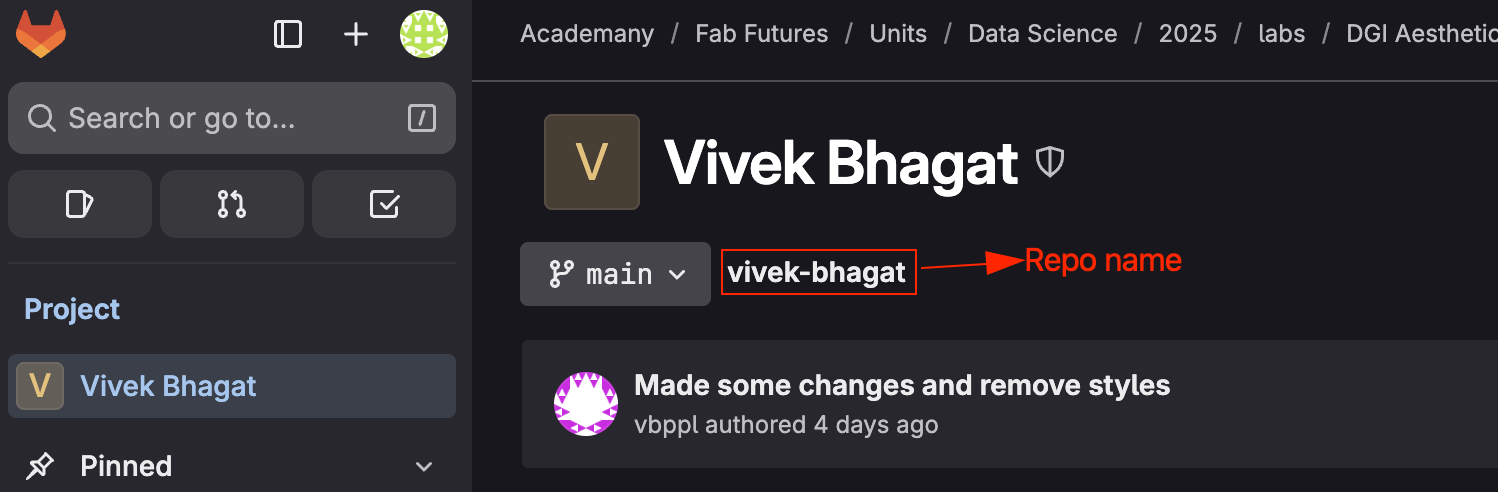
Search for the repository you want to clone and select it. You can find course repo in gitlab.
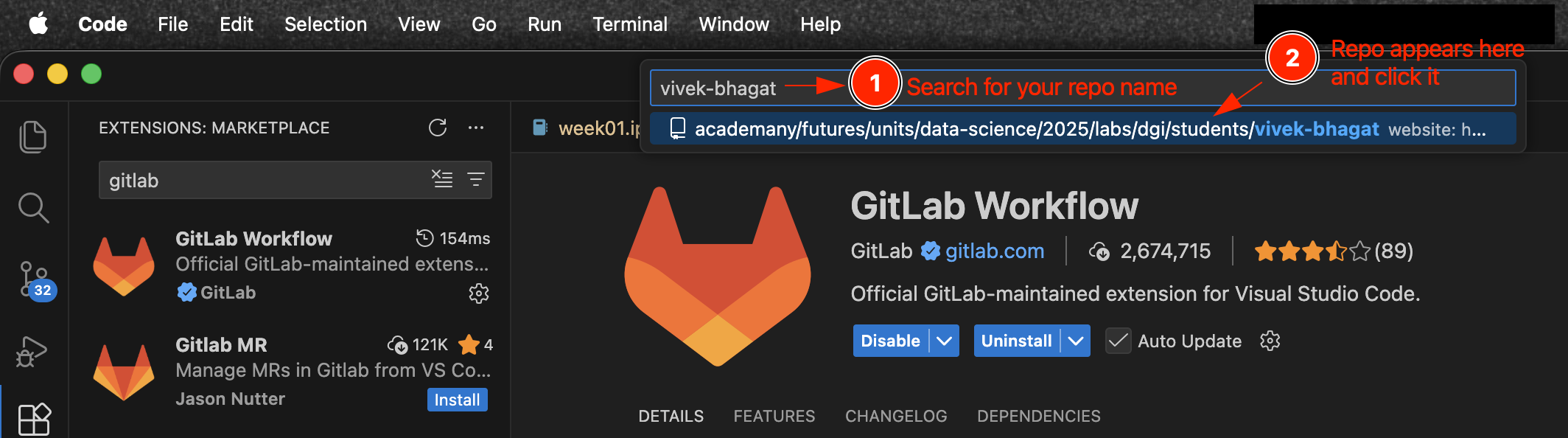
Now select the cloning method, select "Clone with HTTPS".
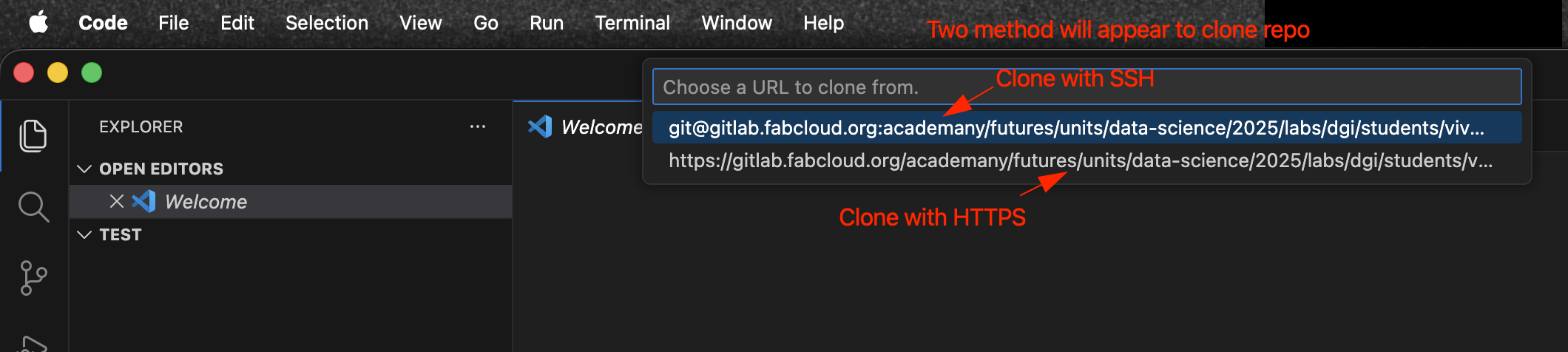
Now select the local directory where you want to clone the repository and click "Select Repository Location".
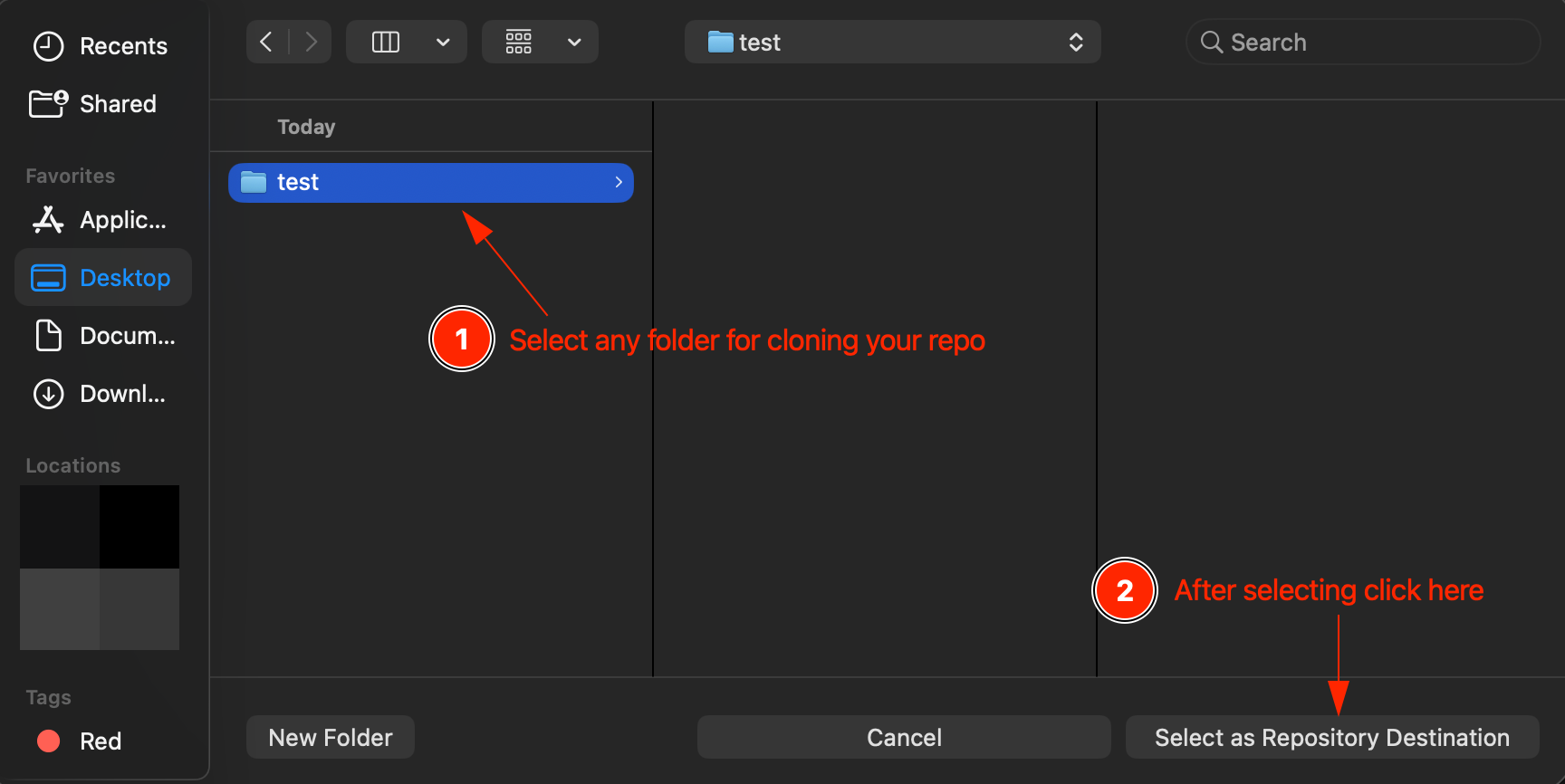

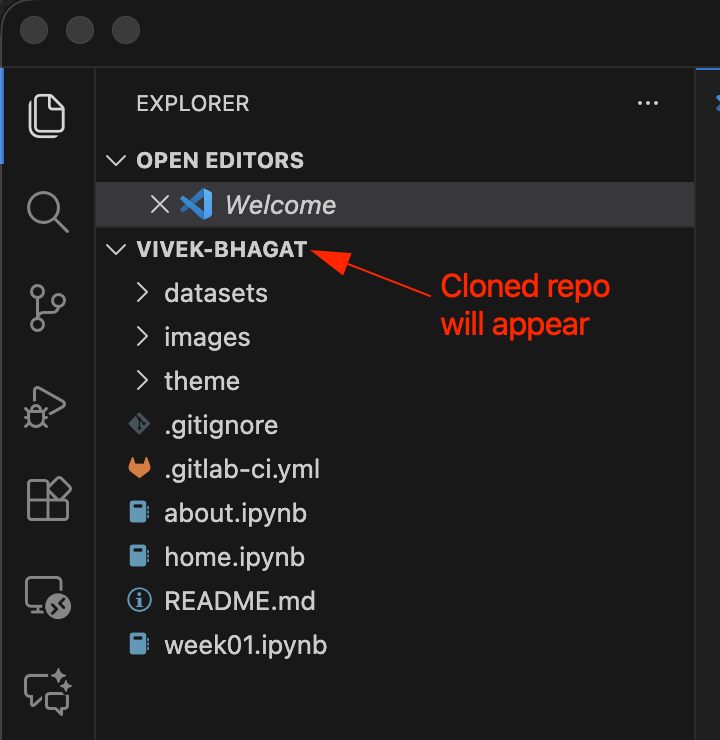
Push, Pull, Commit changes to the repository directly from VS Code or from other IDE.
Let’s assume we need to add a image “home” to the repository to modify the homepage.git add images/home.png #Stage the file home.png for commit. git commit -m "Added image 'home' for home page" # Commit message should be relevant to the changes made. git push origin main
Let's assume we need to add multiple images starting with "clone_repo_" to the repository.
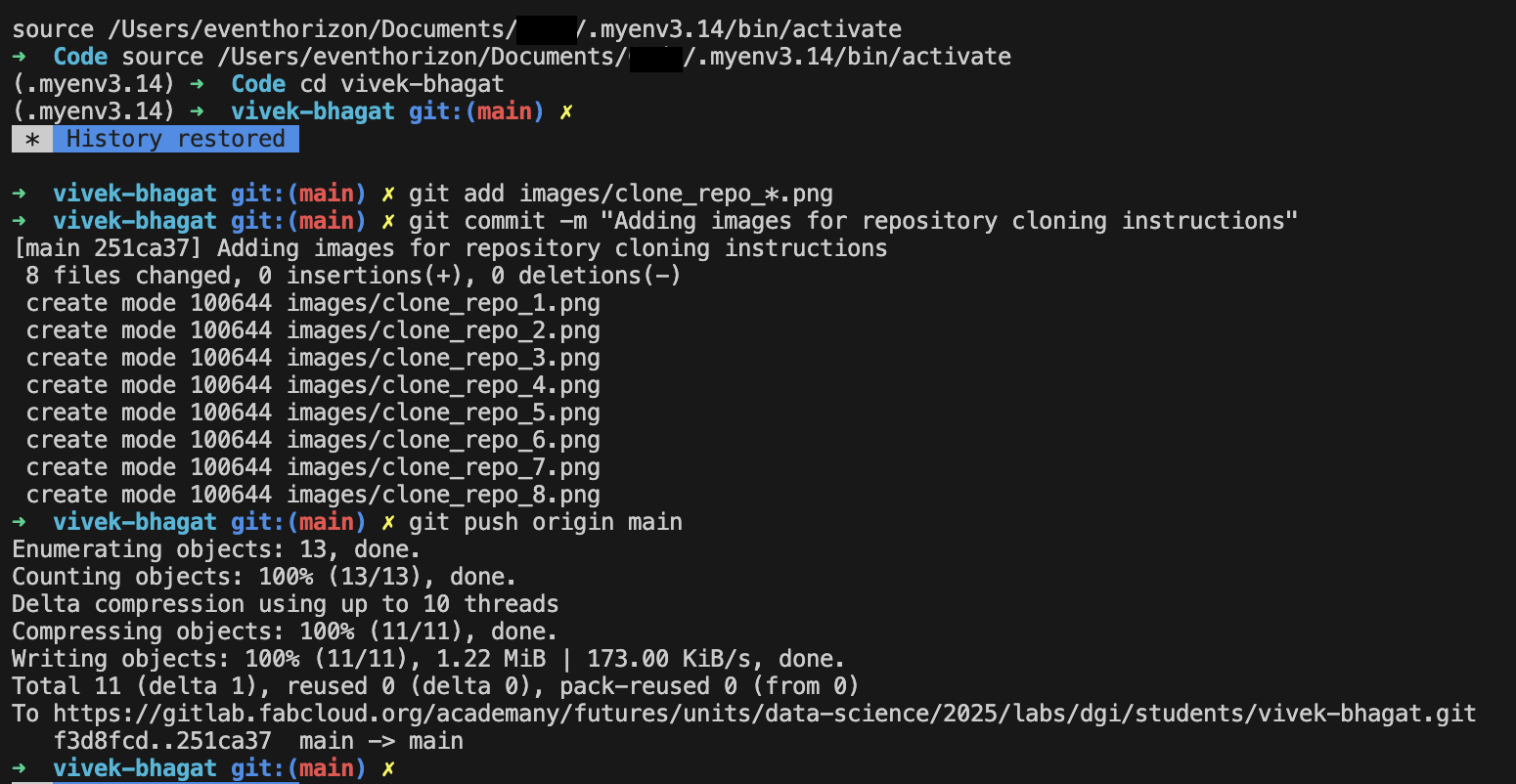
git add images/clone_repo_*.png  	#Stage all the files starting with clone_repo_ for commit.
git commit -m "Adding images for repository cloning instructions"
git push origin main
Let's assume we staged a file and then realized we don't want to commit it.

git add images/push_commit.png  	#Stage the file push_commit.png for commit.
git reset HEAD images/push_commit.png  	#Unstage the file ready to commit.
Dataset
HIPPARCOS - Hipparcos Main Catalog
Hipparcos (High Precision Parallax Collecting Satellite) was a scientific satellite of the European Space Agency (ESA), launched in 1989 and operated until 1993. It was the first space experiment devoted to precision astrometry, the accurate measurement of the positions and distances of celestial objects on the sky. This was the first practical attempt at all-sky absolute parallax measurement, something not possible with ground side observatories, and thus represented a fundamental breakthrough in astronomy. The resulting high-precision measurements of the absolute positions, proper motions, and parallaxes of stars enabled better calculations of their distance and tangential velocity; when combined with radial velocity measurements from spectroscopy, astrophysicists were able to finally measure all six quantities needed to determine the motion of stars. The resulting Hipparcos Catalogue, a high-precision catalogue of more than 118,200 stars, was published in 1997.
HEASARC Parameter Names
| Hipparcos | CDS Name | HEASARC Name | Description |
|---|---|---|---|
| -- | * New * | Name | Catalog Designation |
| H0 | Catalog | * Not Displayed * | Catalogue (H=Hipparcos) |
| H1 | HIP | HIP_Number | Identifier (HIP number) |
| H2 | Proxy | Prox_10asec | Proximity flag |
| H3 | RAhms | RA | RA in h m s, ICRS (J1991.25) |
| H4 | DEdms | Dec | Dec in deg ' ", ICRS (J1991.25) |
| H5 | Vmag | Vmag | Magnitude in Johnson V |
| H6 | VarFlag | Var_Flag | Coarse variability flag |
| H7 | r_Vmag | Vmag_Source | Source of magnitude |
| H8 | RAdeg | RA_Deg | RA in degrees (ICRS, Epoch-J1991.25) |
| H9 | DEdeg | Dec_Deg | Dec in degrees (ICRS, Epoch-J1991.25) |
| H10 | AstroRef | Astrom_Ref_Dbl | Reference flag for astrometry |
| H11 | Plx | Parallax | Trigonometric parallax |
| H12 | pmRA | pm_RA | Proper motion in RA |
| H13 | pmDE | pm_Dec | Proper motion in Dec |
| H14 | e_RAdeg | RA_Error | Standard error in RA*cos(Dec_Deg) |
| H15 | e_DEdeg | Dec_Error | Standard error in Dec_Deg |
| H16 | e_Plx | Parallax_Error | Standard error in Parallax |
| H17 | e_pmRA | pm_RA_Error | Standard error in pmRA |
| H18 | e_pmDE | pm_Dec_Error | Standard error in pmDE |
| H19 | DE:RA | Crl_Dec_RA | (DE over RA)xCos(delta) |
| H20 | Plx:RA | Crl_Plx_RA | (Plx over RA)xCos(delta) |
| H21 | Plx:DE | Crl_Plx_Dec | (Plx over DE) |
| H22 | pmRA:RA | Crl_pmRA_RA | (pmRA over RA)xCos(delta) |
| H23 | pmRA:DE | Crl_pmRA_Dec | (pmRA over DE) |
| H24 | pmRA:Plx | Crl_pmRA_Plx | (pmRA over Plx) |
| H25 | pmDE:RA | Crl_pmDec_RA | (pmDE over RA)xCos(delta) |
| H26 | pmDE:DE | Crl_pmDec_Dec | (pmDE over DE) |
| H27 | pmDE:Plx | Crl_pmDec_Plx | (pmDE over Plx) |
| H28 | pmDE:pmRA | Crl_pmDec_pmRA | (pmDE over pmRA) |
| H29 | F1 | Reject_Percent | Percentage of rejected data |
| H30 | F2 | Quality_Fit | Goodness-of-fit parameter |
| H31 | --- | * Not Displayed * | HIP number (repetition) |
| H32 | BTmag | BT_Mag | Mean BT magnitude |
| H33 | e_BTmag | BT_Mag_Error | Standard error on BTmag |
| H34 | VTmag | VT_Mag | Mean VT magnitude |
| H35 | e_VTmag | VT_Mag_Error | Standard error on VTmag |
| H36 | m_BTmag | BT_Mag_Ref_Dbl | Reference flag for BT and VTmag |
| H37 | B-V | BV_Color | Johnson BV colour |
| H38 | e_B-V | BV_Color_Error | Standard error on BV |
| H39 | r_B-V | BV_Mag_Source | Source of BV from Ground or Tycho |
| H40 | V-I | VI_Color | Colour index in Cousins' system |
| H41 | e_V-I | VI_Color_Error | Standard error on VI |
| H42 | r_V-I | VI_Color_Source | Source of VI |
| H43 | CombMag | Mag_Ref_Dbl | Flag for combined Vmag, BV, VI |
| H44 | Hpmag | Hip_Mag | Median magnitude in Hipparcos system |
| H45 | e_Hpmag | Hip_Mag_Error | Standard error on Hpmag |
| H46 | Hpscat | Scat_Hip_Mag | Scatter of Hpmag |
| H47 | o_Hpmag | N_Obs_Hip_Mag | Number of observations for Hpmag |
| H48 | m_Hpmag | Hip_Mag_Ref_Dbl | Reference flag for Hpmag |
| H49 | Hpmax | Hip_Mag_Max | Hpmag at maximum (5th percentile) |
| H50 | HPmin | Hip_Mag_Min | Hpmag at minimum (95th percentile) |
| H51 | Period | Var_Period | Variability period (days) |
| H52 | HvarType | Hip_Var_Type | Variability type |
| H53 | moreVar | Var_Data_Annex | Additional data about variability |
| H54 | morePhoto | Var_Curv_Annex | Light curve Annex |
| H55 | CCDM | CCDM_Id | CCDM identifier |
| H56 | n_CCDM | CCDM_History | Historical status flag |
| H57 | Nsys | CCDM_N_Entries | Number of entries with same CCDM |
| H58 | Ncomp | CCDM_N_Comp | Number of components in this entry |
| H59 | MultFlag | Dbl_Mult_Annex | Double and or Multiple Systems flag |
| H60 | Source | Astrom_Mult_Source | Astrometric source flag |
| H61 | Qual | Dbl_Soln_Qual | Solution quality flag |
| H62 | m_HIP | Dbl_Ref_ID | Component identifiers |
| H63 | theta | Dbl_Theta | Position angle between components |
| H64 | rho | Dbl_Rho | Angular separation of components |
| H65 | e_rho | Rho_Error | Standard error of rho |
| H66 | dHp | Diff_Hip_Mag | Magnitude difference of components |
| H67 | e_dHp | dHip_Mag_Error | Standard error in dHp |
| H68 | Survey | Survey_Star | Flag indicating a Survey Star |
| H69 | Chart | ID_Chart | Identification Chart |
| H70 | Notes | Notes | Existence of notes |
| H71 | HD | HD_Id | HD number <III 135> |
| H72 | BD | BD_Id | Bonner DM <I 119>, <I 122> |
| H73 | CoD | CoD_Id | Cordoba Durchmusterung (DM) <I 114> |
| H74 | CPD | CPD_Id | Cape Photographic DM <I 108> |
| H75 | (V-I)red | VI_Color_Reduct | VI used for reductions |
| H76 | SpType | Spect_Type | Spectral type |
| H77 | r_SpType | Spect_Type_Source | Source of spectral type |
| -- | * New * | Class | HEASARC BROWSE classification |
Why this dataset?
The main reason to choose this dataset is to explore the field of astronomy and try to classify the stars based on spectral class.
Types of Stars
Stars are classified based on their spectral characteristics, which are primarily determined by their surface temperatures. The most common classification system is the Morgan-Keenan (MK) system, which uses a combination of letters O, B, A, F, G, K, and M, a sequence from the hottest (O type) to the coolest (M type) and then again subdivided using a numeric digit 0 to 9 with 0 being hottest and 9 being coolest to categorize stars. The main spectral classes are:
- O-type: These are the hottest and most massive stars, with surface temperatures above 30,000 K. They are blue in color and have strong ionized helium lines in their spectra.
- B-type: These stars have surface temperatures between 10,000 and 30,000 K. They are also blue in color and exhibit strong hydrogen lines in their spectra.
- A-type: A-type stars have surface temperatures between 7,500 and 10,000 K. They are white or bluish-white and show strong hydrogen lines as well as some metal lines.
- F-type: These stars have surface temperatures between 6,000 and 7,500 K. They are yellow-white and exhibit weaker hydrogen lines and stronger metal lines.
- G-type: G-type stars, like our Sun, have surface temperatures between 5,200 and 6,000 K. They are yellow in color and show strong metal lines in their spectra.
- K-type: These stars have surface temperatures between 3,700 and 5,200 K. They are orange in color and exhibit strong metal lines and molecular bands in their spectra.
- M-type: M-type stars are the coolest and most common stars, with surface temperatures below 3,700 K. They are red in color and show strong molecular bands, particularly of titanium oxide.
Hertzsprung-Russell Diagram
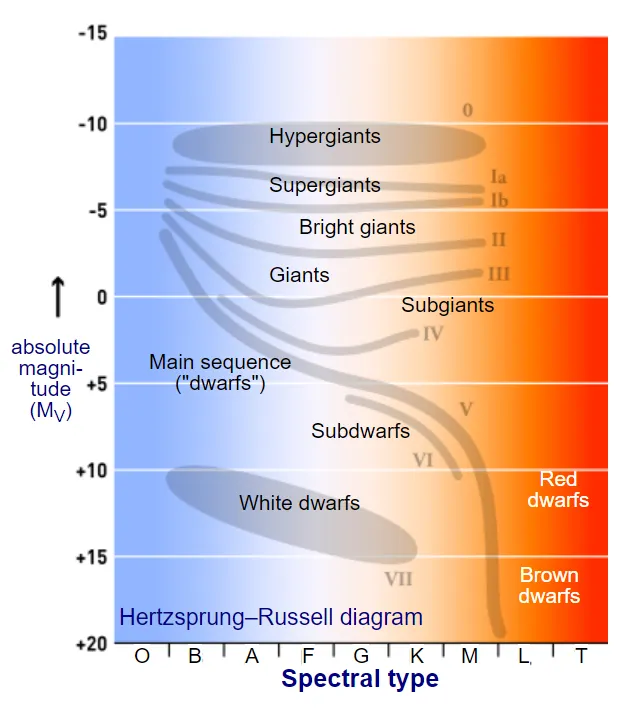
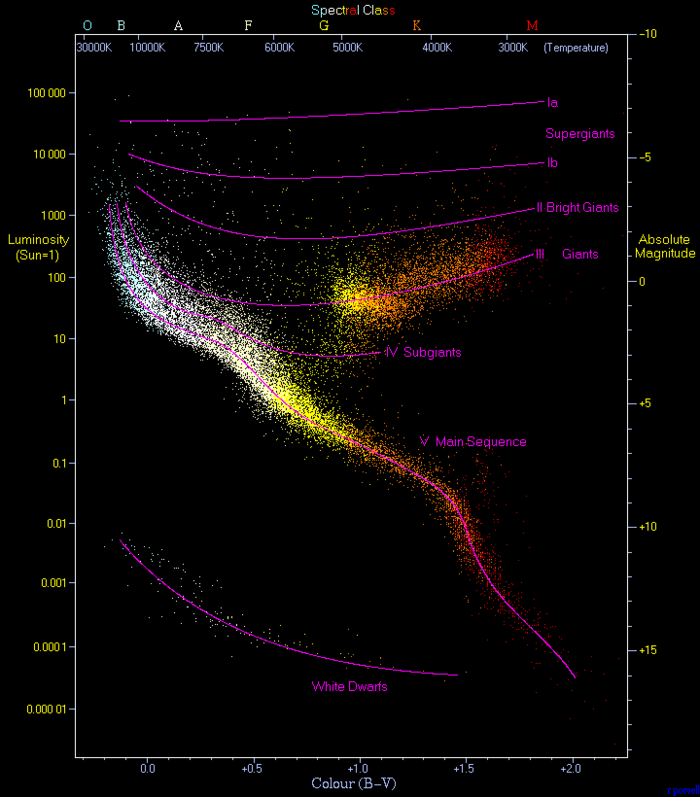
The Hertzsprung-Russell (H-R) diagram is a scatter plot that illustrates the relationship between the luminosity (or absolute magnitude) of stars and their surface temperatures (or spectral classes). It is a fundamental tool in astrophysics for understanding stellar evolution and properties.
The H-R diagram can also show evolutionary tracks of stars, illustrating how they change in luminosity and temperature over time as they evolve through different stages of their life cycles.
The H-R diagram typically has the following features:
- Main Sequence: Most stars, including the Sun, fall along a diagonal band called the main sequence. Stars on the main sequence are in a stable phase of hydrogen fusion in their cores. The position of a star on the main sequence is determined by its mass, with more massive stars being hotter and more luminous.
- Giants and Supergiants: Above the main sequence, there are regions occupied by giant and supergiant stars. These stars have exhausted the hydrogen in their cores and are in later stages of stellar evolution. They are cooler but much more luminous than main sequence stars of the same temperature.
- White Dwarfs: Below the main sequence, there is a region occupied by white dwarfs. These are the remnants of low to intermediate-mass stars that have shed their outer layers. White dwarfs are very hot but have low luminosity due to their small size.
Using the HIPPARCOS dataset, we can plot an H-R diagram by using the absolute magnitude (derived from the apparent magnitude and parallax) against the color index (B-V) to visualize the distribution of stars and their classifications.
 |
 |
|---|
Reference
Readings
- Wikipedia - Hipparcos
- ESA - Hipparcos
- The Hipparcos and Tycho Catalogues
- HIPPARCOS - Hipparcos Main Catalog
- The Hipparcos-2 Catalogue
- Hertzsprung–Russell diagram
- H-R Diagram and Stellar Classification
- Hertzsprung-Russell Diagram Lab
- The Hertzsprung-Russell Diagram
- Spectral Classification of Stars
- Luminosity
- Types of Stars - NASA
- Types of Stars - AstroBackyard