< Home
2. Tools
Assignment
- Visualize your data set(s)
Prompt (ChatGPT) What is a dataset in data science?
Answer
In data science, a dataset is a collection of data that is organized for analysis or machine learning.
- Basic Definition
- A collection of data: It can include numbers, text, images, audio, or other formats.
- Structured format: Usually organized into rows (records) and columns (features/attributes).
- Example: Tables in CSV, Excel, SQL, folders of images, JSON files, etc.
- Components of a Dataset
- Samples (instances): Each individual data point (row) for analysis.
- Example: A record of a person’s height, weight, and age.
- Features (variables): Attributes or properties of the samples (columns).
- Example: height, weight, age, gender.
- Labels (if applicable): The target or correct answer used in supervised learning.
- Example: Whether a person has a disease (Yes/No), or product category.
- Types of Datasets
- Structured datasets: Organized in tables with numbers or text (CSV, Excel, SQL).
- Unstructured datasets: Images, audio, video, or text that cannot be directly analyzed.
- Semi-structured datasets: JSON, XML, or similar formats with some structure.
- Role in Data Science
- Modeling: Used to train and evaluate machine learning models or statistical analyses.
- Visualization: Helps understand patterns and trends in the data.
- Exploratory analysis: Used to check data quality and decide preprocessing steps.
Summary:
A dataset is a collection of data organized for analysis in data science, usually with rows = samples, columns = features, and sometimes labels.
How to read files
[.txt] Open and read .txt file in Python
w3schools: Python File Open
## You should always close your files.
## In some cases, due to buffering, changes made to a file may not show until you close the file.

file = open("data/text.txt")
print(file.read())
file.close()
Hello World!
Hello Python!
## Then you do not have to worry about closing your files,
## the with statement takes care of that.

with open("data/text.txt") as file:
  print(file.read())
Hello World!
Hello Python!
## return one line by using the readline() method:

with open("data/text.txt") as file:
  print(file.readline())
Hello World!
## Read two lines of the file:

with open("data/text.txt") as file:
  print(file.readline())
  print(file.readline())
Hello World!

Hello Python!
### Return the 5 first characters of the file:
with open("data/text.txt") as file:
  print(file.read(5))
Hello
[.csv] Python csv Module
w3schools: Python csv Module
reader
- Return a reader object that will iterate over lines in the CSV file.
DictReader
- Read CSV data into dictionaries, using the first row as fieldnames.
reader vs DictReader
| Aspect | reader | DictReader |
|---|---|---|
| Data handling | Access via index in list | Access via column name (similar to pandas) |
| Readability | Hard to understand (row[0]) |
Intuitive (row["name"]) |
| Step toward pandas | A bit far | Conceptually close to DataFrame |
'''
DictReader
'''

import csv

with open("data/data.csv", newline="", encoding="utf-8") as f: ## f=file object
    reader = csv.DictReader(f)
    for row in reader:
        print(row["name"], row["age"])
Jon Snow 25
Daenerys Targaryen 23
Tyrion Lannister 32
Arya Stark 18
Cersei Lannister 42
[.csv][.json][.toml][.xml] Pandas
w3schools: Pandas Read CSV
CSV file
import pandas as pd

df = pd.read_csv('data/data.csv')
print(df.to_string()) #Display all rows and columns of a DataFrame as a string
                 name      house  age                         role
0            Jon Snow      Stark   25            King in the North
1  Daenerys Targaryen  Targaryen   23             Queen of Dragons
2    Tyrion Lannister  Lannister   32            Hand of the Queen
3          Arya Stark      Stark   18                     Assassin
4    Cersei Lannister  Lannister   42  Queen of the Seven Kingdoms
import pandas as pd

df = pd.read_csv("data/data.csv")
df.head(3) # Displays the first 5 rows of the DataFrame by default. The number of rows can be specified via an argument
| name | house | age | role | |
|---|---|---|---|---|
| 0 | Jon Snow | Stark | 25 | King in the North |
| 1 | Daenerys Targaryen | Targaryen | 23 | Queen of Dragons |
| 2 | Tyrion Lannister | Lannister | 32 | Hand of the Queen |
JSON File
import pandas as pd

df = pd.read_json("data/data.json")
print(df.head())
                 name      house  age                         role
0            Jon Snow      Stark   25            King in the North
1  Daenerys Targaryen  Targaryen   23             Queen of Dragons
2    Tyrion Lannister  Lannister   32            Hand of the Queen
3          Arya Stark      Stark   18                     Assassin
4    Cersei Lannister  Lannister   42  Queen of the Seven Kingdoms
import pandas as pd

df = pd.read_json("data/data.json")
df.head()
| name | house | age | role | |
|---|---|---|---|---|
| 0 | Jon Snow | Stark | 25 | King in the North |
| 1 | Daenerys Targaryen | Targaryen | 23 | Queen of Dragons |
| 2 | Tyrion Lannister | Lannister | 32 | Hand of the Queen |
| 3 | Arya Stark | Stark | 18 | Assassin |
| 4 | Cersei Lannister | Lannister | 42 | Queen of the Seven Kingdoms |
XML file
import pandas as pd

df = pd.read_xml("data/data.xml", parser="etree")#Use Python’s built-in xml.etree.ElementTree library without installing lxml
print(df.head())
                 name      house  age                         role
0            Jon Snow      Stark   25            King in the North
1  Daenerys Targaryen  Targaryen   23             Queen of Dragons
2    Tyrion Lannister  Lannister   32            Hand of the Queen
3          Arya Stark      Stark   18                     Assassin
4    Cersei Lannister  Lannister   42  Queen of the Seven Kingdoms
import pandas as pd

df = pd.read_xml("data/data.xml", parser="etree")
df.head()
| name | house | age | role | |
|---|---|---|---|---|
| 0 | Jon Snow | Stark | 25 | King in the North |
| 1 | Daenerys Targaryen | Targaryen | 23 | Queen of Dragons |
| 2 | Tyrion Lannister | Lannister | 32 | Hand of the Queen |
| 3 | Arya Stark | Stark | 18 | Assassin |
| 4 | Cersei Lannister | Lannister | 42 | Queen of the Seven Kingdoms |
TOML
import tomllib
import pandas as pd

with open("data/data.toml", "rb") as f: # Use Python’s built-in tomllib library without installing the toml package
    data = tomllib.load(f)

df = pd.DataFrame(data["character"])
print(df.head())
                 name      house  age                         role
0            Jon Snow      Stark   25            King in the North
1  Daenerys Targaryen  Targaryen   23             Queen of Dragons
2    Tyrion Lannister  Lannister   32            Hand of the Queen
3          Arya Stark      Stark   18                     Assassin
4    Cersei Lannister  Lannister   42  Queen of the Seven Kingdoms
import tomllib
import pandas as pd

with open("data/data.toml", "rb") as f:
    data = tomllib.load(f)

df = pd.DataFrame(data["character"])
df.head()
| name | house | age | role | |
|---|---|---|---|---|
| 0 | Jon Snow | Stark | 25 | King in the North |
| 1 | Daenerys Targaryen | Targaryen | 23 | Queen of Dragons |
| 2 | Tyrion Lannister | Lannister | 32 | Hand of the Queen |
| 3 | Arya Stark | Stark | 18 | Assassin |
| 4 | Cersei Lannister | Lannister | 42 | Queen of the Seven Kingdoms |
Visualize data set(s)
I got some dataset from e-Stat which is a portal site for Japanese Government Statistics.
A free online course using e-Stat will start on January 13, 2026.
Population Pyramid
I downloaded the following dataset as a CSV file from Other Func:
- Prefecture: 14 Kanagawa-ken
- City: 14100 Yokohama-shi
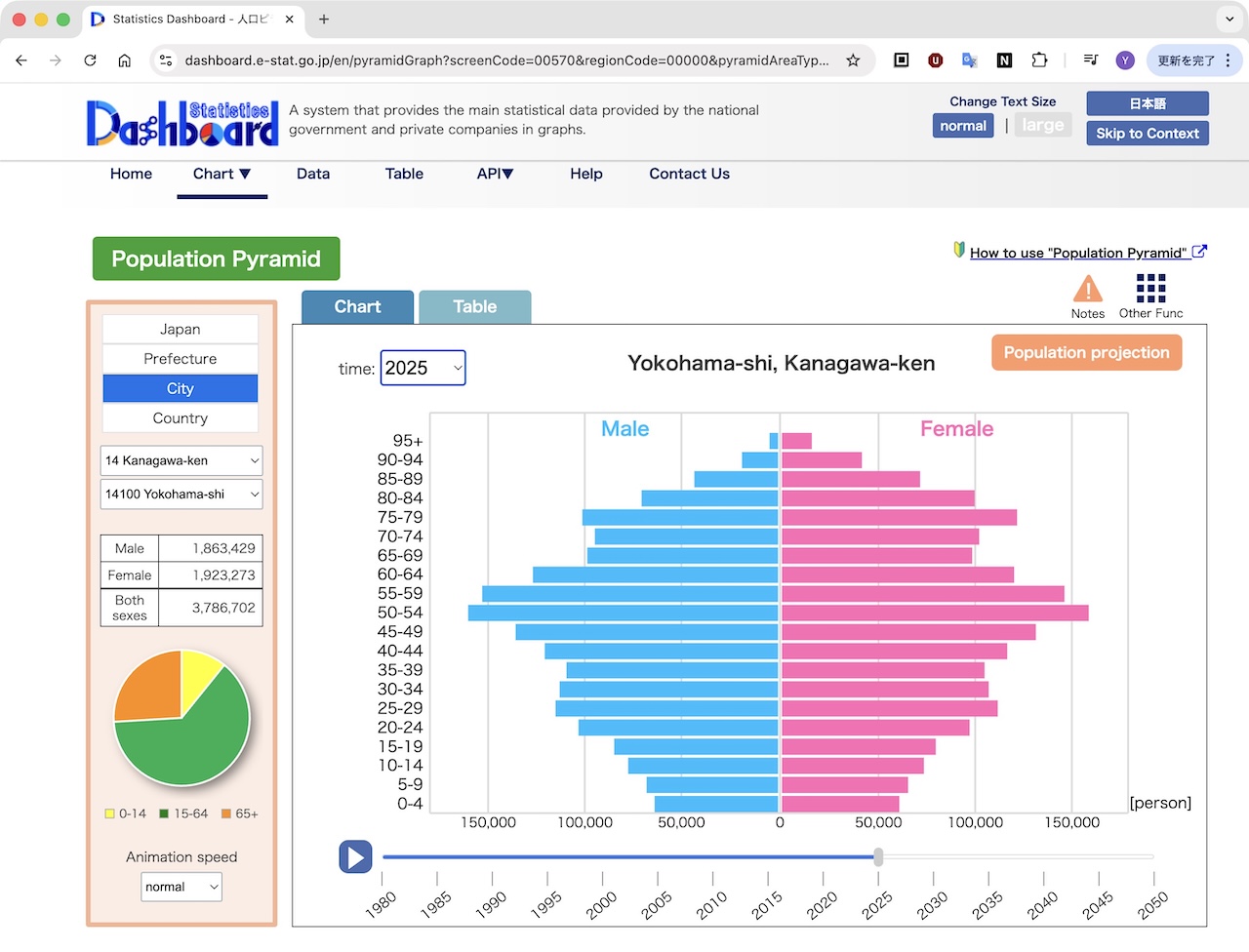
I saved the CSV file (2KB) in datasets folder. All contents of this folder will be ignored because /datasets is listed in the .gitignore file.
.gitignore
.ipynb_checkpoints/
/public
/datasets
import pandas as pd

df = pd.read_csv("datasets/Population Pyramid_Kanagawa-ken Yokohama-shi_2025.csv")

df.head()
| Region | Time | Age Group | Population projection (Male) [person] | Annotation | Population projection (Female) [person] | Annotation.1 | Population projection (Both sexes) [person] | Annotation.2 | |
|---|---|---|---|---|---|---|---|---|---|
| 0 | Kanagawa-ken Yokohama-shi | 2025 | 95+ | 4405 | NaN | 15477 | NaN | 19882 | NaN |
| 1 | Kanagawa-ken Yokohama-shi | 2025 | 90--94 | 18658 | NaN | 41397 | NaN | 60055 | NaN |
| 2 | Kanagawa-ken Yokohama-shi | 2025 | 85--89 | 43319 | NaN | 71519 | NaN | 114838 | NaN |
| 3 | Kanagawa-ken Yokohama-shi | 2025 | 80--84 | 70603 | NaN | 99732 | NaN | 170335 | NaN |
| 4 | Kanagawa-ken Yokohama-shi | 2025 | 75--79 | 101265 | NaN | 121690 | NaN | 222955 | NaN |
Visualizing the dataset
Prompt
I can read a CSV and show it with df.head(). How do I visualize the data?
Answer
Generated Code is below
import pandas as pd
import matplotlib.pyplot as plt

# Read the CSV file
df = pd.read_csv("datasets/Population Pyramid_Kanagawa-ken Yokohama-shi_2025.csv")

# Select only the necessary columns and rename them
df = df[["Age Group",
         "Population projection (Male) [person]",
         "Population projection (Female) [person]"]]
df.columns = ["Age", "Male", "Female"]

# Display the first few rows to check the data
print(df.head())

# Prepare the age and population for males and females
age = df["Age"]
male = df["Male"] * -1  # Make male population negative to plot on the left
female = df["Female"]   # Female population stays positive for the right side

# Create the plot
plt.figure(figsize=(10, 8))

plt.barh(age, male, color="blue", label="Male")
plt.barh(age, female, color="pink", label="Female")

# Set labels and title
plt.xlabel("Population")
plt.ylabel("Age Group")
plt.title("Population Pyramid of Yokohama, 2025")
plt.legend()
plt.tight_layout()  # Adjust layout to prevent label cutoff

# Show the population pyramid
plt.show()
      Age    Male  Female
0     95+    4405   15477
1  90--94   18658   41397
2  85--89   43319   71519
3  80--84   70603   99732
4  75--79  101265  121690

Compare to official one), I want to adjust the graph:
1.Invert Y axis
2.Change the X axis unit to population from -2.0 ~2.0[1e6] to 200000 to 200,000
2-1. Change from 2x10^6 to 200000
2-2. 200000 to 200,000
3.Remove the row that contains the total (the last row in CSV)

To do this:
1.Add plt.gca().invert_yaxis() after plt.legend()
2-1. Add plt.ticklabel_format(style='plain', axis='x')
2-2. Add import matplotlib.ticker as ticker
plt.gca().xaxis.set_major_formatter(ticker.FuncFormatter(lambda x, pos: f"{int(x):,}"))
3. Addd df = df.iloc[:-1]
import pandas as pd
import matplotlib.pyplot as plt
import matplotlib.ticker as ticker ##2.2.Add comma formatting to the x-axis


# Read the CSV file
df = pd.read_csv("datasets/Population Pyramid_Kanagawa-ken Yokohama-shi_2025.csv")

# Select only the necessary columns and rename them
df = df[["Age Group",
         "Population projection (Male) [person]",
         "Population projection (Female) [person]"]]
df.columns = ["Age", "Male", "Female"]

# Remove the last row
print(df.tail(1)) # print the last raw before remove it
df = df.iloc[:-1] # Remove the last row because it contains the total # --------------3.Remove the last row that contains the total
print(df.tail(1)) # print the last raw after remove it

# Display the first few rows to check the data
# print(df.head()) # stop printing

# Prepare the age and population for males and females
age = df["Age"]
male = df["Male"] * -1  # Make male population negative to plot on the left
female = df["Female"]   # Female population stays positive for the right side

# Create the plot
plt.figure(figsize=(10, 8))

plt.barh(age, male, color="blue", label="Male")
plt.barh(age, female, color="pink", label="Female")

# Set labels and title
plt.xlabel("Population")
plt.ylabel("Age Group")
plt.title("Population Pyramid of Yokohama, 2025")
plt.legend()
plt.gca().invert_yaxis()  #--------------------------------------- 1.invert Y axis

plt.ticklabel_format(style='plain', axis='x')  #-------------------2-1.Disable scientific notation on the x-axis
plt.gca().xaxis.set_major_formatter(ticker.FuncFormatter(lambda x, pos: f"{int(x):,}"))#------2.2.Add comma formatting to the x-axis


plt.tight_layout()  # Adjust layout to prevent label cutoff

# Show the population pyramid
plt.show()
         Age     Male   Female
20  All ages  1863429  1923273
     Age   Male  Female
19  0--4  63865   60757

Prompt(ChatGPT)
Male is plotted as a negative value, but the X-axis label is overwritten with a positive value.
Answer
Generated Code is below
import pandas as pd
import matplotlib.pyplot as plt
import matplotlib.ticker as ticker

# Read the CSV file
df = pd.read_csv("datasets/Population Pyramid_Kanagawa-ken Yokohama-shi_2025.csv")

# Select only the necessary columns and rename them
df = df[["Age Group",
         "Population projection (Male) [person]",
         "Population projection (Female) [person]"]]
df.columns = ["Age", "Male", "Female"]

# 3.Remove the last row
df = df.iloc[:-1]

# Prepare the age and population for males and females
age = df["Age"]
male = df["Male"] * -1 # Make male population negative to plot on the left
female = df["Female"] # Female population stays positive for the right side

# Create the plot
plt.figure(figsize=(10, 8))

plt.barh(age, male, color="blue", label="Male")
plt.barh(age, female, color="pink", label="Female")

# Set labels and title
plt.xlabel("Population")
plt.ylabel("Age Group")
plt.title("Population Pyramid of Yokohama, 2025")
plt.legend()
plt.gca().invert_yaxis() # 1.Invert Y axis

# Format x-axis: positive numbers even for negative bars
plt.gca().xaxis.set_major_formatter(
    ticker.FuncFormatter(lambda x, pos: f"{int(abs(x)):,}") # 2.convert to integer and add commas
)

plt.tight_layout() # Adjust layout
plt.show()

Prompt(ChatGPT)
I want to load datasets/Population Pyramid_Kanagawa-ken Yokohama-shi_2050.csv as well and use a toggle switch to switch between the plots. I also want to clearly indicate the year being displayed (2025 or 2050).
Since changing the x-axis scale makes the graph hard to read, I want to fix the x-axis scale based on the 2025 data.
Answer
Generated Code is below
import pandas as pd
import matplotlib.pyplot as plt
import matplotlib.ticker as ticker
import ipywidgets as widgets
from IPython.display import display

# Function to load CSV
def load_population_csv(file_path):
    df = pd.read_csv(file_path)
    df = df[["Age Group",
             "Population projection (Male) [person]",
             "Population projection (Female) [person]"]]
    df.columns = ["Age", "Male", "Female"]
    df = df.iloc[:-1]  # Remove the last row containing the total
    return df

# Load data
df_2025 = load_population_csv("datasets/Population Pyramid_Kanagawa-ken Yokohama-shi_2025.csv")
df_2050 = load_population_csv("datasets/Population Pyramid_Kanagawa-ken Yokohama-shi_2050.csv")

# Fix x-axis range based on 2025 data
max_population = max(df_2025["Male"].max(), df_2025["Female"].max())

# Plot function
def plot_population(year):
    plt.figure(figsize=(10, 8))

    if year == 2025:
        df = df_2025
    else:
        df = df_2050

    age = df["Age"]
    male = df["Male"] * -1  # Make male population negative for left side
    female = df["Female"]     # Female population stays positive for right side

    plt.barh(age, male, color="blue", label="Male")
    plt.barh(age, female, color="pink", label="Female")

    plt.xlabel("Population")
    plt.ylabel("Age Group")
    plt.title(f"Population Pyramid of Yokohama, {year}")
    plt.legend()
    plt.gca().invert_yaxis()  # Invert y-axis so youngest at the bottom

    # Format x-axis labels as positive integers with commas
    plt.gca().xaxis.set_major_formatter(
        ticker.FuncFormatter(lambda x, pos: f"{int(abs(x)):,}")
    )

    # Fix x-axis range based on 2025 data
    plt.xlim(-max_population, max_population)

    plt.tight_layout()
    plt.show()

# Create toggle button for year selection
toggle = widgets.ToggleButtons(
    options=[2025, 2050],
    description='Year:',
)
widgets.interact(plot_population, year=toggle)
interactive(children=(ToggleButtons(description='Year:', options=(2025, 2050), value=2025), Output()), _dom_cl…
<function __main__.plot_population(year)>
Prompt(ChatGPT)
I want to load datasets/Population Pyramid_Kanagawa-ken Yokohama-shi_2035.csv and 2045.csv as well, and use a slider to switch between the plots. I also want to clearly indicate the year currently being displayed.
Answer
Generated Code is below
import pandas as pd
import matplotlib.pyplot as plt
import matplotlib.ticker as ticker
import ipywidgets as widgets
from IPython.display import display

# Function to load CSV
def load_population_csv(file_path):
    df = pd.read_csv(file_path)
    df = df[["Age Group",
             "Population projection (Male) [person]",
             "Population projection (Female) [person]"]]
    df.columns = ["Age", "Male", "Female"]
    df = df.iloc[:-1]  # Remove the last row containing the total
    return df

# Load all data
dfs = {
    2025: load_population_csv("datasets/Population Pyramid_Kanagawa-ken Yokohama-shi_2025.csv"),
    2035: load_population_csv("datasets/Population Pyramid_Kanagawa-ken Yokohama-shi_2035.csv"),
    2045: load_population_csv("datasets/Population Pyramid_Kanagawa-ken Yokohama-shi_2045.csv"),
    2050: load_population_csv("datasets/Population Pyramid_Kanagawa-ken Yokohama-shi_2050.csv"),
}

# Fix x-axis range based on 2025 data
max_population = max(dfs[2025]["Male"].max(), dfs[2025]["Female"].max())

# Plot function
def plot_population(year):
    plt.figure(figsize=(10, 8))

    df = dfs[year]

    age = df["Age"]
    male = df["Male"] * -1  # Make male population negative for left side
    female = df["Female"]     # Female population stays positive for right side

    plt.barh(age, male, color="blue", label="Male")
    plt.barh(age, female, color="pink", label="Female")

    plt.xlabel("Population")
    plt.ylabel("Age Group")
    plt.title(f"Population Pyramid of Yokohama, {year}")
    plt.legend()
    plt.gca().invert_yaxis()  # Invert y-axis so youngest at the bottom

    # Format x-axis labels as positive integers with commas
    plt.gca().xaxis.set_major_formatter(
        ticker.FuncFormatter(lambda x, pos: f"{int(abs(x)):,}")
    )

    # Fix x-axis range based on 2025 data
    plt.xlim(-max_population, max_population)

    plt.tight_layout()
    plt.show()

# Create a slider for year selection
slider = widgets.IntSlider(
    value=2025,
    min=2025,
    max=2050,
    step=10,  # steps: 2025, 2035, 2045, 2050
    description='Year:',
    continuous_update=False
)

widgets.interact(plot_population, year=slider)
interactive(children=(IntSlider(value=2025, continuous_update=False, description='Year:', max=2050, min=2025, …
<function __main__.plot_population(year)>
Number of Pilgrims by Gender
import pandas as pd
import matplotlib.pyplot as plt

df = pd.read_csv('datasets/finalproject/gender.csv')

print(df.head())
   Gender    2004   2005   2006   2007   2008   2009    2010    2011    2012  \
0    male  100431  55706  59416  66780  72936  85946  151706  105831  108809
1  female   79513  38218  40961  47246  52205  59932  120429   77535   83679

     2016    2017    2018    2019   2020   2021    2022    2023    2024  Ratio
0  144067  153169  162542  169777  30221  90128  207801  209593  210422  51.9%
1  133841  147867  164836  177801  23923  88784  230506  236445  245677  48.1%
import pandas as pd
import matplotlib.pyplot as plt

df = pd.read_csv('datasets/finalproject/gender.csv')
print("df.head")
print(df.head())

df = df.set_index("Gender")

# Extract column names from df.columns that consist only of digits and store them in a list.
#years = [c for c in df.columns if c.isdigit()]

years = []
for c in df.columns:
    if c.isdigit():
        years.append(c)

df_years = df[years]

print("df_years.head()")
print(df_years.head())

plt.figure(figsize=(10,5)) # X-Axis 10inch, Y-Axis 5inch

plt.plot(years, df.loc["male", years],marker="o", label="Male")
plt.plot(years, df.loc["female", years],marker="o", label="Female")

plt.title("Number of Pilgrims by Gender (2004-2024)")
plt.xlabel("Year")
plt.ylabel("Number of People")
plt.legend(loc="upper left",title="Gender",frameon=True) #判例
#plt.grid(alpha=0.3)
#plt.tight_layout()
plt.show()
df.head
   Gender    2004   2005   2006   2007   2008   2009    2010    2011    2012  \
0    male  100431  55706  59416  66780  72936  85946  151706  105831  108809
1  female   79513  38218  40961  47246  52205  59932  120429   77535   83679

     2016    2017    2018    2019   2020   2021    2022    2023    2024  Ratio
0  144067  153169  162542  169777  30221  90128  207801  209593  210422  51.9%
1  133841  147867  164836  177801  23923  88784  230506  236445  245677  48.1%
df_years.head()
          2004   2005   2006   2007   2008   2009    2010    2011    2012  \
Gender
male    100431  55706  59416  66780  72936  85946  151706  105831  108809
female   79513  38218  40961  47246  52205  59932  120429   77535   83679

          2016    2017    2018    2019   2020   2021    2022    2023    2024
Gender
male    144067  153169  162542  169777  30221  90128  207801  209593  210422
female  133841  147867  164836  177801  23923  88784  230506  236445  245677

Unplot COVID years
import pandas as pd
import matplotlib.pyplot as plt

df = pd.read_csv('datasets/finalproject/gender.csv')
print("df.head")
print(df.head())

df = df.set_index("Gender")

exclude_years = ["2020", "2021"] # COVID
years = [c for c in df.columns if c.isdigit() and c not in exclude_years]

df_years = df[years]

print("df_years.head()")
print(df_years.head())

plt.figure(figsize=(10,5)) # X-Axis 10inch, Y-Axis 5inch

plt.plot(years, df.loc["male", years],marker="o", label="Male")
plt.plot(years, df.loc["female", years],marker="o", label="Female")

plt.title("Number of Pilgrims by Gender (2004-2024)")
plt.xlabel("Year")
plt.ylabel("Number of People")
#plt.legend()
plt.legend(loc="upper left",title="Gender",frameon=True) #判例
#plt.grid(alpha=0.3)
#plt.tight_layout()
plt.show()
df.head
   Gender    2004   2005   2006   2007   2008   2009    2010    2011    2012  \
0    male  100431  55706  59416  66780  72936  85946  151706  105831  108809
1  female   79513  38218  40961  47246  52205  59932  120429   77535   83679

     2016    2017    2018    2019   2020   2021    2022    2023    2024  Ratio
0  144067  153169  162542  169777  30221  90128  207801  209593  210422  51.9%
1  133841  147867  164836  177801  23923  88784  230506  236445  245677  48.1%
df_years.head()
          2004   2005   2006   2007   2008   2009    2010    2011    2012  \
Gender
male    100431  55706  59416  66780  72936  85946  151706  105831  108809
female   79513  38218  40961  47246  52205  59932  120429   77535   83679

          2016    2017    2018    2019    2022    2023    2024
Gender
male    144067  153169  162542  169777  207801  209593  210422
female  133841  147867  164836  177801  230506  236445  245677
