Class 2 - Internet security
References:
For each of the following systems, research and document 3 parts what threat does it address? what’s the trust model? what’s the residual risk?
- PGP (end to end email security)
- SSH (secure remote access)
- VPN / IPsec (network-layer tunneling)
- MACsec (link-layer encryption)
- DNS Security (DNSSEC & DNS spoofing)
- IDS / IPS (detection vs. prevention)
TLS Handshake Trace
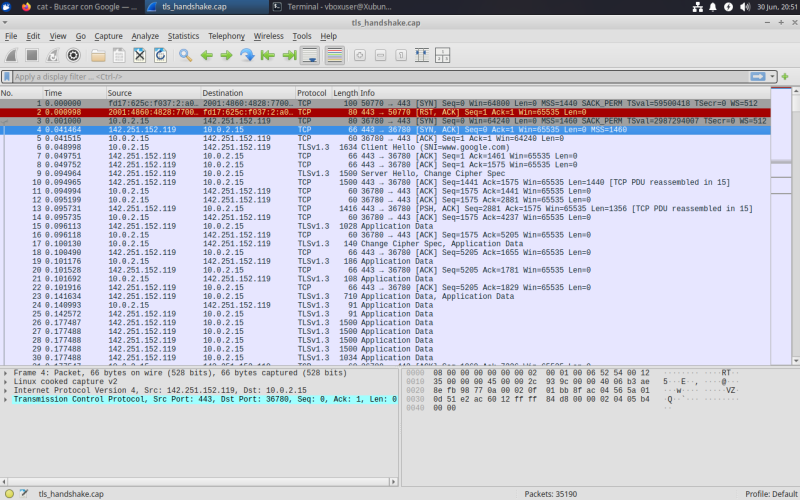
Trace a real TLS handshake and an encrypted data segment. Identify how the session is established — cipher suite, certificate, key exchange — and confirm what an observer can and cannot see.
sudo apt update
sudo apt install curl
sudo apt install tshark
Start capture packages
sudo tcpdump -i any -w tls_handshake.pcap port 443
Example of request https - 443 port
curl --tlsv1.2 -v https://www.google.com
Install Wireshark to see the outcomes
sudo apt install wireshark
wireshark tls_handshake.cap &
Port Scan & Firewall
Your VM will be subjected to a port scan. Determine what it reveals about your exposed services, then configure the firewall to reduce what’s reachable from outside.
To see which ports are active
sudo ss -tuln
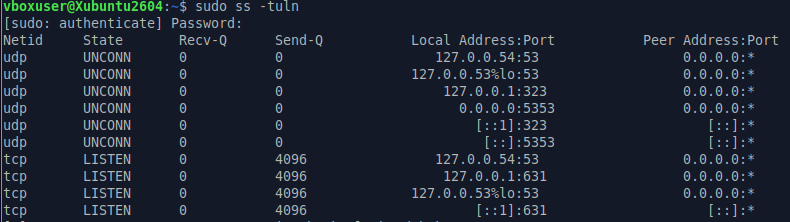
The command output reveals that almost all active TCP/UDP services are bound strictly to the loopback interface (localhost / 127.0.0.1). This means they only accept inbound requests originating from within the virtual machine itself. Consequently, if an external actor launches a port scan, the target ports (such as TCP 631) will return as closed. The only exception is port UDP 5353 (Multicast DNS), which is listening on 0.0.0.0 and would respond to external network discovery.
Config firewall UFW
Make sure to block all incoming traffic by default.
sudo ufw default deny incoming
Allow all outgoing traffic so you don’t lose internet access on the VM.
sudo ufw default allow outgoing
Enable the firewall
sudo ufw enable
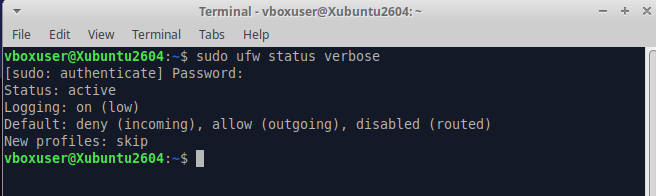
Check the status of the firewall
sudo ufw status verbose