Class 02: Internet Security
Homework
For each of the following systems, research and document 3 parts what threat does it address? what’s the trust model? what’s the residual risk?
PGP (end to end email security) SSH (secure remote access) VPN/ IPsec (network-layer tunneling) MACsec (link-layer encryption) DNS Security (DNSSEC & DNS spoofing) IDS / IPS (detection vs. prevention)
Complete these exercises:
TLS Handshake Trace
Trace a real TLS handshake and an encrypted data segment. Identify how the session is established — cipher suite, certificate, key exchange — and confirm what an observer can and cannot see.
Port Scan & Firewall
Your VM will be subjected to a port scan. Determine what it reveals about your exposed services, then configure the firewall to reduce what’s reachable from outside.
Answers:
| Systems | Threat this system addresses | Trust Model | Residual Risk |
|---|---|---|---|
| PGP | Protects email confidentiality, integrity, and authenticity from eavesdropping and tampering | Users trust public/private key cryptography and verify each other’s public keys (Web of Trust or trusted key servers) | Metadata (sender, recipient, subject) is usually visible. Compromised private keys, phishing, or poor key verification can still lead to attacks |
| SSH | Prevents eavesdropping, credential theft, and man-in-the-middle attacks during remote login and file transfer | Client trusts the server’s host key, and the server trusts authenticated users (passwords or SSH keys) | Stolen private keys, weak passwords, compromised endpoints, or accepting fake host keys can still compromise security |
| VPN/IPsec | Protects network traffic from interception and unauthorized access over untrusted networks | Devices trust each other using digital certificates or pre-shared keys established during IPsec authentication | Traffic is only protected while inside the VPN tunnel. Compromised VPN endpoints, weak authentication, or VPN server breaches remain risks |
| MACsec | Protects Ethernet traffic from eavesdropping, replay, and tampering on local networks | Neighboring devices authenticate each other using IEEE 802.1X and MACsec keys | Only secures a single Ethernet link. Traffic is unprotected after leaving the secured link unless additional encryption is used |
| DNS Security | Prevents DNS spoofing and cache poisoning by verifying DNS responses are authentic | DNS resolvers trust the DNS root, which establishes a chain of trust through signed DNS records | DNSSEC does not encrypt DNS queries or responses, so privacy is not provided. Misconfigurations or denial-of-service attacks are still possible |
| IDS / IPS | Detects or blocks malicious activities, attacks, and unauthorized network behavior | Administrators trust detection rules, signatures, behavioral analysis, and timely updates | Unknown (zero-day) attacks, false positives, false negatives, and encrypted traffic can reduce effectiveness |
Do execute the second part of the homework - completing the exercises, I first checked the wireshark version on my VM using the code </> bash and then typing wireshark –version. This confirms that my VM has wireshark installed and also I am aware of its version.
And in trying to trace TLS, I need to configure the interface using IP address. Using the wireshark from the terminal access point, I received this image with the warning/suggesstion: 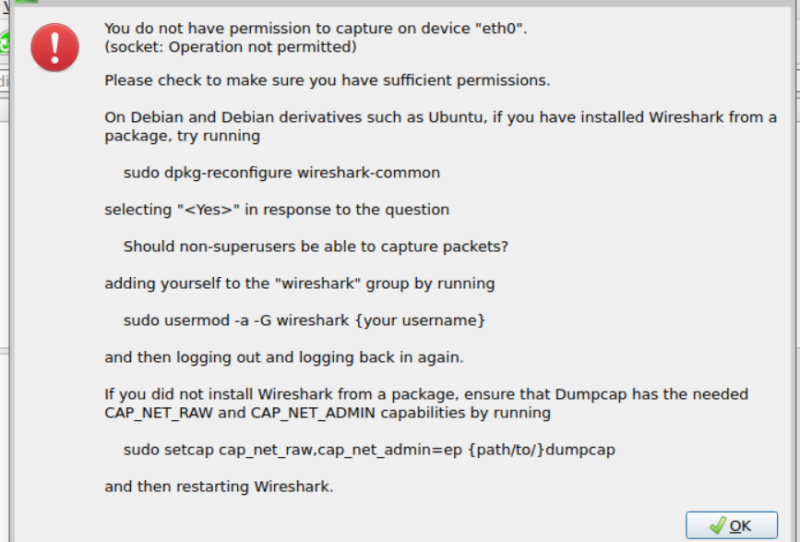 Then I thought I need to try something further and rectify.
I kept on exploring with the help of an AI, of course. But do not fully rely on it - I was learning and experimenting.
Finally, I realized I was not added to the wireshark group. On the terminal access point, I ran </> Bash
sudo usermod -aG wireshark $USER
This added me in the wireshark group with the permission to capture the active interfaces with the IP Addresses.
After this, I reboot with on the terminal as; </> Bash
sudo reboot
Reopening the terminal on the VM and running wireshark worked well as I could see my interface with the IP Address to capture the communications.
Then I thought I need to try something further and rectify.
I kept on exploring with the help of an AI, of course. But do not fully rely on it - I was learning and experimenting.
Finally, I realized I was not added to the wireshark group. On the terminal access point, I ran </> Bash
sudo usermod -aG wireshark $USER
This added me in the wireshark group with the permission to capture the active interfaces with the IP Addresses.
After this, I reboot with on the terminal as; </> Bash
sudo reboot
Reopening the terminal on the VM and running wireshark worked well as I could see my interface with the IP Address to capture the communications.
For the second part, first I updated/installed nmap for port scan and firewall purposes. Scaning using the code </> bash nmap localhost, I could see SSH - remote terminal access port, web server port and printing service port.
Next is about installing and runing firewall. The following inputs were done; 1. Installing/checking update of firewall: </> bash sudo apt update </> bash sudo apt install ufw
- Checking the status of firwall: </> bash sudo ufw status verbose
this reveals what is exposed and restricted.
- Allowing and Denying access: For default deny/allow; </> bash sudo ufw default deny incoming OR sudo ufw default allow outgoing
And then apply the rules to allow SSH and noVNC server access with the code: </> bash sudo ufw allow 22/tcp OR sudo ufw allow 5901/tcp
Otherwise, if we keep as default setting, everything would be blocked as I experienced. I had to reload using PuTTy from my PC terminal and adjust firewall setting from my PC to get into VM using ssh.
I learnt which port to restrict from visiting my server.
Remark: Not only did I learn those different systems, I also learnt roles of each of these systems. Of course I make use of the AI to hunt for answers, I do read and analyzed.