Session 2: Internet Security
Assignment Questions and Answers
For each of the following systems, research and document 3 parts what threat does it address? what’s the trust model? what’s the residual risk?
PGP (end to end email security)
PGP encrypts the email body itself, end-to-end, so even your email provider can’t read it. It also lets you sign messages, proving you wrote them. The trust model is unusual — rather than a central CA, PGP relies on a “web of trust” where individuals vouch for each other’s key authenticity. In practice this is its biggest weakness: most people never verify keys properly, and the metadata (to, from, subject, timing) is never encrypted regardless. If your recipient’s device is compromised, the decrypted email is exposed.
Threat Eavesdropping on email content by providers, ISPs, or surveillance — even the mail server can’t read it. Forgery of the sender’s identity via digital signatures.
Trust model The web of trust: you rely on others to vouch that a public key really belongs to who it claims. No central CA — trust is decentralized and must be verified out-of-band.
Residual risk Metadata (to, from, subject, timing) is never encrypted. Key management is hard and most users skip verification. Endpoint compromise exposes plaintext after decryption.
SSH (secure remote access)
SSH replaced Telnet with an encrypted tunnel for remote server access, plus strong authentication via key pairs. The trust model has a known soft spot: the first time you connect to a server, you just have to trust that the key fingerprint shown is real (this is called TOFU — Trust On First Use). After that, stored fingerprints protect you. The main residual risks are key sprawl (old authorized keys lying around on decommissioned servers) and stolen private keys granting full access.
Threat Eavesdropping on remote admin sessions. Server impersonation (connecting to the wrong machine). Unauthorized access — SSH authenticates both directions.
Trust model TOFU (Trust On First Use): you manually verify the server’s fingerprint on first connection. Subsequent connections check the stored fingerprint. Client auth trusts the authorized_keys file.
Residual risk First connection is vulnerable if intercepted. Key sprawl: old authorized keys on decommissioned servers are hard to audit. A stolen private key provides full access with no further authentication.
VPN / IPsec (network-layer tunneling)
VPN/IPsec builds an encrypted tunnel at the network layer, making remote machines appear to be on your local network. The trust model requires both endpoints to authenticate each other and assumes the device connecting is clean. The risk: VPN gateways are high-value targets because compromising one gives access to everything behind it. Split-tunneling misconfigurations can also leave traffic unexpectedly exposed.
Threat Eavesdropping and tampering on traffic crossing untrusted networks. Makes remote users appear as if they’re on the internal network, securely.
Trust model Both endpoints authenticate each other (certificates or pre-shared keys). You trust the VPN gateway and assume the connecting device is clean and managed.
Residual risk VPN gateways are high-value targets — one compromise grants access to the whole network. Split-tunneling misconfigurations leak traffic. Endpoint security is assumed, not enforced.
MACsec (link-layer encryption)
MACsec works hop-by-hop at Layer 2, encrypting traffic between directly adjacent devices (workstation-to-switch, switch-to-switch). It’s the right tool when you’re worried about someone physically tapping your cables. The limitation is that it only protects one link at a time — traffic is decrypted at each switch, so a compromised switch sees everything.
Threat Physical eavesdropping — someone tapping a cable between a workstation and a switch, or between two switches. Also prevents ARP spoofing between authenticated peers.
Trust model Each link requires a pre-configured security association between the two endpoints. Requires MACsec-capable hardware on both sides of every protected link.
Residual risk Hop-by-hop only: traffic is decrypted at each switch, so a compromised switch sees plaintext. Doesn’t protect against attacks from within the same MACsec domain.
DNS Security (DNSSEC & DNS spoofing)
DNSSEC adds cryptographic signatures to DNS records, preventing attackers from poisoning DNS caches with fake responses that redirect you to malicious servers. It doesn’t encrypt DNS queries though — anyone watching the network can still see which domains you’re looking up. That gap is addressed separately by DNS-over-HTTPS (DoH).
Threat DNS cache poisoning: injecting fake DNS responses to redirect users to attacker-controlled servers. DNSSEC proves that a DNS record is authentic and unmodified.
Trust model A chain of trust rooted at ICANN. Each zone’s records are signed with its private key; the parent zone vouches for the child’s public key, all the way up to the IANA root key.
Residual risk DNSSEC doesn’t encrypt queries — your lookups are still visible to network observers. Deployment is incomplete (many zones unsigned). Large responses enable DNS amplification DDoS attacks.
IDS / IPS (detection vs. prevention)
IDS/IPS watches for known attack signatures and anomalies. An IDS alerts; an IPS can also block. The core limitation is that encrypted traffic is largely a blind spot — an attacker exfiltrating data over HTTPS looks like normal web traffic. And like any signature-based system, it’s blind to attacks it hasn’t seen before.
Threat Known attack signatures, malware patterns, protocol anomalies, and policy violations. IDS alerts on them; IPS can also automatically block matching traffic.
Trust model Signature databases must be current and comprehensive. Anomaly detection relies on an accurate baseline of “normal.” IPS must be trusted to block without causing collateral disruption.
Residual risk Encrypted traffic is largely a blind spot. Zero-days have no signatures. Alert fatigue: high false-positive rates cause analysts to tune out. An over-aggressive IPS itself becomes a DoS risk.
Exercise Questions
TLS Handshake Trace
- Your browser says hello (visible to anyone watching) Your browser sends a message saying: “I want to connect securely. Here are the encryption methods I support, and here’s my side of the key exchange.” It also sends the website name (e.g. bank.com) in plain text — this is called the SNI and it’s readable even on HTTPS.
- The server responds (visible to anyone watching) The server replies: “OK, let’s use AES-256-GCM encryption. Here’s my side of the key exchange.” At this point both sides have enough information to calculate the same secret key — without ever actually sending it across the network.
- Both sides calculate the same secret key (happens in memory, never sent) This is the clever bit. Using Diffie-Hellman math, both sides arrive at the same session key without ever transmitting it. Even if someone recorded every byte of this conversation, they can’t figure out the key. This is called forward secrecy — past sessions stay safe even if keys are stolen later.
- Server proves its identity (encrypted) The server sends its certificate (encrypted now). Your browser checks: was this certificate issued by a CA it trusts? Is it for the right domain? Is it still valid? If any of those fail, you get the “connection not secure” warning.
- Both sides confirm the handshake wasn’t tampered with (encrypted) Each side sends a checksum of the entire handshake so far. If anything was altered in transit, the checksum won’t match and the connection is dropped.
- Normal traffic flows (encrypted) All your HTTP requests, passwords, cookies, and responses are now encrypted with AES-256-GCM. The encryption also includes a built-in integrity check, so any tampering is detected immediately.
What a network observer actually sees vs. what they get
| Item | Visible? | Risk |
|---|---|---|
| Destination IP address (e.g. 142.250.80.46) | YES | Knows who you talk to |
| Website name — SNI (e.g. bank.com) | YES | Knows which site |
| How much data was sent and when | YES | Can infer activity |
| Encryption method chosen (cipher suite) | YES | Harmless on its own |
| The actual pages, URLs, and content | NO | Nothing |
| Passwords and form data | NO | Nothing |
| The session key (now or later) | NO | Nothing |
Port Scan & Firewall
What the scan finds — and what to do about each port
| Port | What it is and why it matters | Action |
|---|---|---|
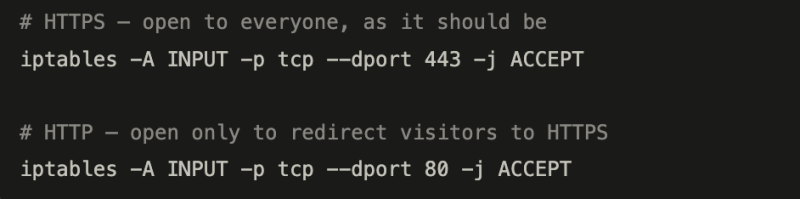
| 443 / HTTPS | Your web server — this is supposed to be open. All traffic is encrypted. | Keep open |
| 80 / HTTP | Unencrypted web traffic. Fine only if it redirects to HTTPS immediately. | Redirect only |
| 22 / SSH | Remote admin access. Open to the whole internet = password-guessing bots will hammer it constantly. | Restrict to your IP |
| 3306 / MySQL | Your database — directly exposed to the internet. This is a critical misconfiguration. Attackers will attempt to log in immediately. | Close now |
| 8080 / dev server | Likely a test or debug service accidentally left running in production. May have no authentication at all. | Close + investigate |
| 111 / rpcbind | A legacy service with no reason to be internet-facing. Known vector for attacks. | Close now |
Firewall rules (run these in order)
Step 1 — wipe existing rules and block everything by default
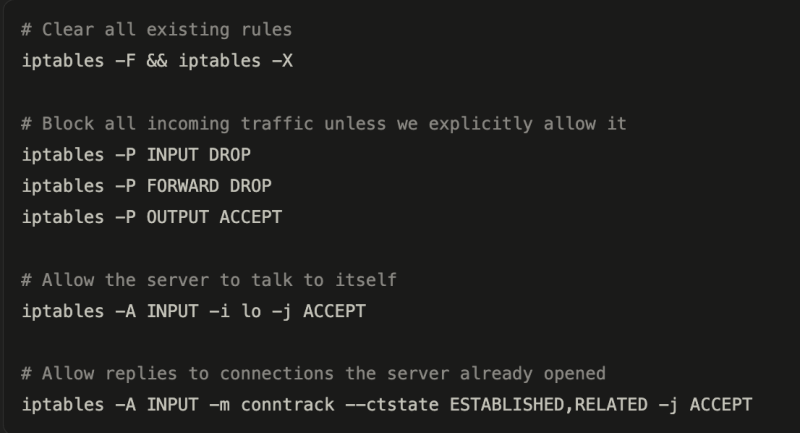 This is the most important step. “Default deny” means anything not on the allow list is blocked — not just the ports you know about.
Step 2 — allow your web server
Step 3 — lock SSH down to your IP only
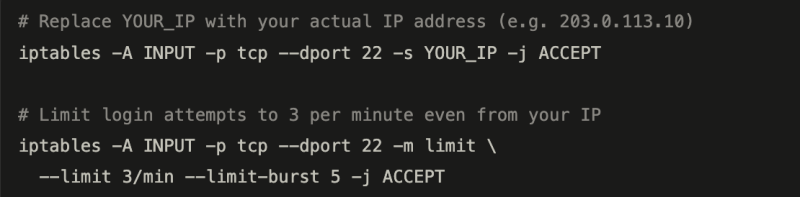 Don’t know your IP? Run: curl ifconfig.me on your own machine.
Step 4 — explicitly block the dangerous ports
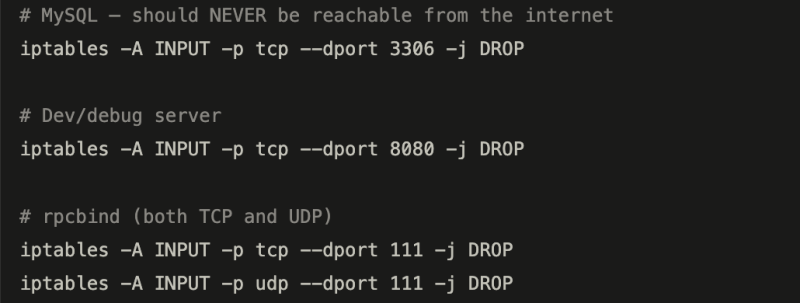 The default-deny rule from step 1 already blocks these — but adding explicit DROP rules makes your intent clear and survives if the policy is accidentally changed.
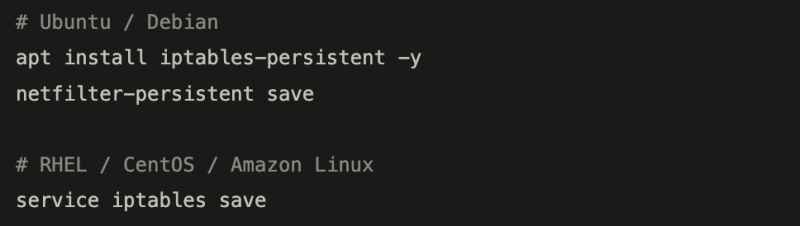
Step 5 — save the rules so they survive a reboot
Step 6 — verify it worked
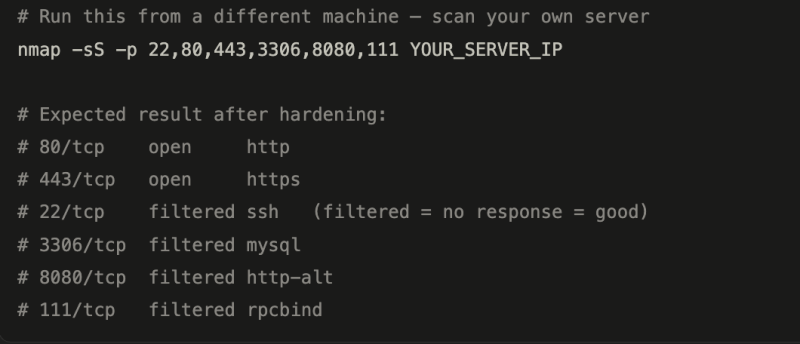 “Filtered” means the firewall is silently dropping packets — the attacker gets no information back. “Closed” (RST response) is worse because it confirms the port exists.
Each code block has a copy button built in. The main things to personalise before running: replace YOUR_IP in step 3 with your actual IP (the curl ifconfig.me will give it to you), and replace YOUR_SERVER_IP in step 6 with your server’s public address.