Internet Security
Safety note. As in every session, this page contains no private keys, passwords, tokens, or secrets — only public material (commands, tool output, public certificates).
Building on the cryptography foundations from Session 1 — keys, signatures, encryption, certificates — this session moves up to the network layer: how data flows across untrusted networks and what protocols protect it in transit. The class introduced a 3-question framework for analyzing any security mechanism, then demonstrated it with TLS/HTTPS and network segmentation. The homework extends that analysis to six more systems.
The 3-question toolkit
Every security mechanism in this session is analyzed with the same three questions [1]:
- What threat does it address? — What adversary objective (eavesdropping, tampering, impersonation, lateral movement) is it designed to stop?
- What is the trust model? — What does the mechanism assume about the attacker, and what does it rely on to function?
- What is the residual risk? — Even when it works as designed, what remains exposed? What does it not solve?
Part A — Research: 6 network security systems
Reference stack
The class mapped security mechanisms to the OSI/TCP-IP stack [1]:
| Layer | Protocol | Security |
|---|---|---|
| Application | HTTP, DNS, SMTP | PGP, DNSSEC |
| Transport (L4) | TCP, UDP | TLS/SSL |
| Network (L3) | IP | IPsec, VPNs, firewalls |
| Link (L2) | Ethernet, Wi-Fi | MACsec, VLANs |
01PGP — Pretty Good Privacy
End-to-end email security · Layer: Application · Standard: RFC 4880 [2], updated RFC 9580 (2024)
What threat does it address? Email travels in cleartext through multiple SMTP relays before reaching the recipient — any relay or ISP along the path can read, modify, or forge the content. PGP solves this by encrypting the message body end-to-end (confidentiality) and signing it digitally (authenticity and integrity). It protects against eavesdropping on the content, tampering with the message, and impersonation of the sender.
What is the trust model? PGP uses a decentralized model called the Web of Trust (WoT): instead of a central CA, each user signs the public keys of people they know personally, forming a network of endorsements [3]. You trust a key if someone you already trust has signed it. Anyone can act as a “trusted introducer” — there is no hierarchy and no institutional cost. Keyservers (such as keys.openpgp.org) help with key discovery but do not verify identity.
What is the residual risk? The most immediate weakness is that metadata is never encrypted: To:, From:, Subject:, and timestamps are visible to any SMTP relay or network observer — an adversary can fully map your communication network without reading a single message [4]. Beyond that, the WoT does not scale: past the first degree of trust, quantifying confidence becomes ambiguous, and the model is vulnerable to social engineering since no one can verify that an endorser actually knows the key holder [5]. PGP also lacks forward secrecy — a private key compromised in the future allows decryption of all past messages encrypted to that key. Finally, usability has historically been poor: the “Why Johnny Can’t Encrypt” study (Whitten & Tygar, 1999) showed that most users could not encrypt email even with graphical interfaces [4].
02SSH — Secure Shell
Secure remote access · Layer: Application (over TCP) · Standard: RFC 4251–4254 [6]
What threat does it address? Before SSH, remote access used Telnet, rsh, and rlogin — all of which sent credentials and data in cleartext. SSH replaces these with a mutually authenticated encrypted channel. It protects against eavesdropping on remote sessions, tampering with commands in transit, and server impersonation. It authenticates both the server (host key) and the client (password or public key).
What is the trust model? By default, SSH uses TOFU (Trust On First Use): on the first connection to a host, the client stores the server’s public key in ~/.ssh/known_hosts and compares it on all subsequent connections — with no prior identity verification, assuming the first connection is legitimate [7]. A more robust alternative is SSH Certificate Authorities: an organizational CA signs host keys, and clients only need to trust that CA’s root key. This eliminates the TOFU problem and scales well across large infrastructure [8].
What is the residual risk? The most critical problem with TOFU is its vulnerability at the first connection: if an attacker intercepts that initial handshake, they can present their own key and the client will accept it without warning [7]. In infrastructure environments, the most common risk is lateral movement via long-lived keys: SSH keys shared across administrators or copied between servers create a credential graph where a compromised key on one host may be authorized on dozens of others [8]. Additionally, if an attacker gains write access to a server’s ~/.ssh/authorized_keys file, they can insert their own key and maintain persistent access indefinitely.
03VPN / IPsec — Network-layer tunneling
Network-layer tunneling · Layer: Network (L3) · Standard: RFC 4301 [9], RFC 7296 (IKEv2)
What threat does it address? IPsec encrypts and authenticates complete IP packets. In tunnel mode (VPN), it encapsulates the original IP packet inside a new one, connecting two remote networks as if they were the same LAN (site-to-site), or letting a device operate as though it were on the corporate network (remote-access VPN). It protects against eavesdropping on traffic in transit, packet tampering, and malicious routing through intermediate networks (coffee shops, ISPs, compromised nodes).
What is the trust model? IKEv2 supports two authentication models. The most robust uses PKI with certificates: both peers hold certificates signed by a shared CA — you trust the peer because a recognized authority certified it [9]. The alternative is Pre-Shared Key (PSK): a secret configured out-of-band on both endpoints, simpler to operate but with a single key that, if leaked, compromises all historical and future sessions.
What is the residual risk? The most important risk is that IPsec protects the channel, not the endpoints: if one endpoint is compromised (malware, stolen session), the attacker receives already-decrypted traffic [10]. Split tunneling worsens this: when only corporate traffic goes through the tunnel, the rest of the device (general browsing) is uninspected — an infected device can communicate with C2 infrastructure outside the tunnel without IT detecting it [10]. At the protocol level, recent research (2024–2025) identified CVE-2024-7595 and CVE-2025-23018/23019 in tunneling protocols (IPIP, GRE, 4in6) used over IPsec, enabling traffic injection into tunnels [11]. Finally, in transport mode the IP headers (source and destination IPs) remain visible — an observer knows who is talking to whom even without reading the content.
04MACsec — IEEE 802.1AE
Link-layer encryption · Layer: Link (L2) · Standard: IEEE 802.1AE (2006, rev. 2018) [12]
What threat does it address? MACsec encrypts and authenticates Ethernet frames on the physical network segment — the space where a sniffer like Wireshark can capture all local LAN traffic. It uses AES-GCM (128 or 256 bits) to encrypt each frame’s payload and adds a MACsec Security Tag (SecTAG) to authenticate origin and integrity [12]. It protects against eavesdropping on the LAN, tampering and replay of Ethernet frames, and MitM attacks between switches or between host and switch.
What is the trust model? MACsec Key Agreement (MKA), defined in IEEE 802.1X-2020, negotiates session keys. Peers authenticate with a CAK (Connectivity Association Key) pre-shared out-of-band, or with EAP-TLS over 802.1X, where a CA issues certificates to each device [12]. The trust model is fundamentally hop-by-hop: MACsec protects one Ethernet link at a time, not end-to-end. Each intermediate node with MACsec support decrypts, processes, and re-encrypts the frame.
What is the residual risk? The direct consequence of the hop-by-hop model is that every switch in the path sees the traffic in cleartext while processing it — a compromised switch is a total blind spot [12]. MACsec also only protects the local segment: once traffic leaves the LAN toward the internet, the encryption no longer applies. This makes MACsec necessarily complementary to TLS or IPsec, not a substitute. Operationally, it requires NICs and switches with 802.1AE support — legacy hardware does not implement it, complicating deployment in heterogeneous networks. And as with all AES-128-based solutions, it faces theoretical security reduction under Grover’s algorithm on quantum computers; AES-256 mitigates this [13].
05DNSSEC — DNS Security Extensions
Application-layer authentication · Layer: Application · Standard: RFC 4033–4035 [14], RFC 3833 (threat analysis) [15]
What threat does it address? The original DNS (RFC 1035, 1987) has no authentication — a resolver can receive a forged response and has no way to distinguish it from a legitimate one. The Kaminsky attack (2008) demonstrated that DNS cache poisoning was practical at global scale, redirecting users to malicious servers without their knowledge. DNSSEC adds digital signatures to DNS records so that resolvers can cryptographically verify that a response was signed by the legitimate zone owner [14]. It protects against DNS spoofing, cache poisoning, and in-transit manipulation of responses.
What is the trust model? DNSSEC uses a hierarchical chain of trust rooted in the DNS root zone. The Root Zone is signed with a KSK managed by ICANN; each TLD (.com, .mx) signs its zone; each domain signs its records. Validating resolvers verify the complete chain from root down to the queried record [14]. The trust anchor is ICANN’s Root Key Signing Key (KSK), published publicly and pre-configured in resolvers that implement validation.
What is the residual risk? The most critical problem with DNSSEC is its extremely low adoption: only 0.47% of DNS queries are validated end-to-end with DNSSEC (May 2026), and .com domain signing is around 4–5% [16]. Without validation at the resolver, a signed zone provides no protection to the end user. This is compounded by the “last mile” problem: DNSSEC authenticates data between nameservers and resolvers, but the final hop (resolver to client) remains cleartext — DoT and DoH address this but their adoption is only 11.8% [17]. DNSSEC does not encrypt: any observer can see what domains you query (for query privacy, DoH or DoT are needed, and they are orthogonal to DNSSEC). Operationally, DNSSEC responses are significantly larger than plain DNS responses, making them attractive as an amplification vector in reflective DDoS attacks. And mismanaged ZSK/KSK rotation can leave a domain unresolvable for all validating resolvers.
06IDS / IPS — Intrusion Detection and Prevention
Transversal (L3/L4 and Application) · Reference: NIST SP 800-94 [18]
What threat does it address? IDS and IPS are the last line of defense for detecting attacks that have already passed the perimeter. The key difference: an IDS (Intrusion Detection System) is passive — it monitors, detects, and alerts without intervening; an IPS (Intrusion Prevention System) sits inline and blocks in real time [18]. They protect against exploit attempts, reconnaissance port scans, malware C2 traffic, internal lateral movement, brute force, and known protocol attacks.
Detection can be signature-based (compares traffic against known attack signatures — precise for known attacks, blind to zero-days) or anomaly/behavior-based (builds a model of normal behavior and alerts on deviations — can detect zero-days but more prone to false positives) [19].
What is the trust model? The system trusts that its signature database is current and that its baseline model of “normal” accurately reflects legitimate traffic. ML-based systems learn a behavioral baseline from historical training data. Effectiveness depends entirely on the quality of rules, frequency of signature updates, and continuous tuning adapted to the specific environment [19].
What is the residual risk? The most significant blind spot today is encrypted traffic: network IDS/IPS cannot inspect TLS payloads without terminating the encryption. With >95% of the web on HTTPS, a growing fraction of malicious traffic is opaque to the network sensor [20]. False positives create alert fatigue: too many alerts saturate the security team until they ignore everything — a poorly tuned IPS also blocks legitimate traffic, with direct operational impact [19]. Signature-based systems are blind to zero-days, and classic evasion techniques such as packet fragmentation, encoding, and timing manipulation bypass detection on outdated systems [20]. Finally, an IPS as a chokepoint introduces availability risk: if it fails, traffic may be blocked entirely (fail-closed) or pass uninspected (fail-open) — both situations are problematic.
Summary
| # | System | Layer | Main threat | Trust anchor | Key residual risk |
|---|---|---|---|---|---|
| 1 | PGP | Application | Email content eavesdropping | Web of Trust (peer-to-peer) | Metadata unencrypted; no forward secrecy [2][4] |
| 2 | SSH | Application | Eavesdropping / MitM on remote sessions | TOFU or SSH CA | First-connection vulnerability; lateral movement [7][8] |
| 3 | VPN/IPsec | L3 | Eavesdropping on inter-network transit | PKI / PSK | Compromised endpoint sees cleartext; split tunneling [9][10] |
| 4 | MACsec | L2 | Eavesdropping / tampering on physical LAN | CAK or 802.1X/EAP-TLS | Hop-by-hop: compromised switch sees everything [12] |
| 5 | DNSSEC | Application | DNS spoofing and cache poisoning | ICANN Root KSK | 0.47% adoption; last mile unencrypted [14][16] |
| 6 | IDS/IPS | Transversal | Exploit attempts and known attacks | Signature / baseline quality | Blind to encrypted traffic; evasion [18][20] |
Part B — Practical exercises
01TLS Handshake Trace
Capture a live TLS handshake with Wireshark, identify the negotiated cipher suite and version, and document exactly what a passive observer on the network can and cannot see.
Setup. Wireshark 4.6.6, interface Wi-Fi: en0, display filter tls.handshake.
Target: https://class.academany.org opened in a fresh private window (no TLS session cache).
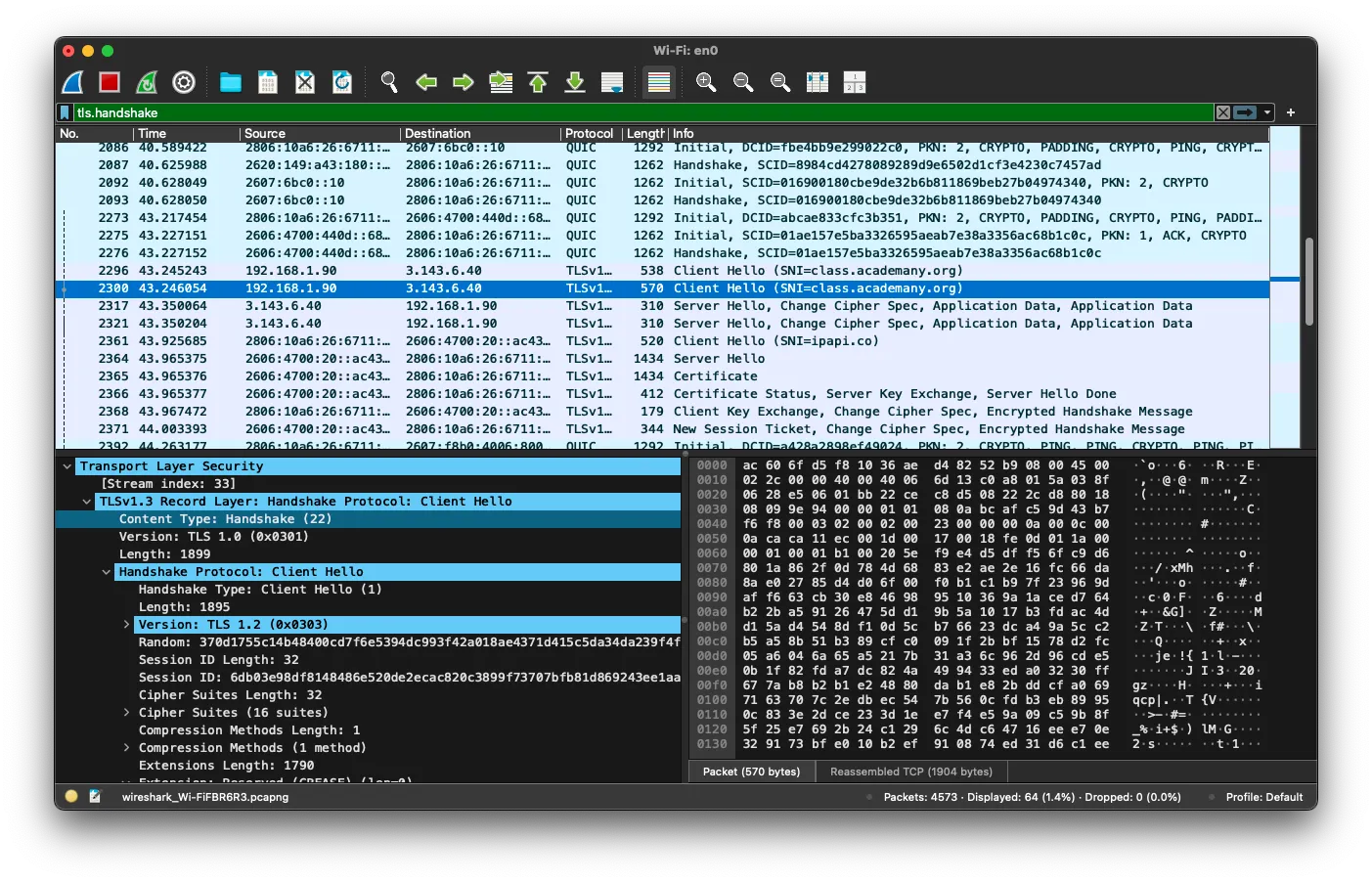
Client Hello — packet 2300, 192.168.1.90 → 3.143.6.40:
- Wireshark labels the record
TLSv1.3(it detected thekey_shareextension) legacy_versionfield readsTLS 1.2 (0x0303)— TLS 1.3 mandates this value for backward compatibility with middleboxes that filter on version bytes- SNI extension contains
class.academany.orgin plaintext — any observer between the client and the server knows which hostname is being contacted before any encryption takes place - 16 cipher suites advertised; extensions block is 1790 bytes (includes
key_share,supported_versions,signature_algorithms,psk_key_exchange_modes)
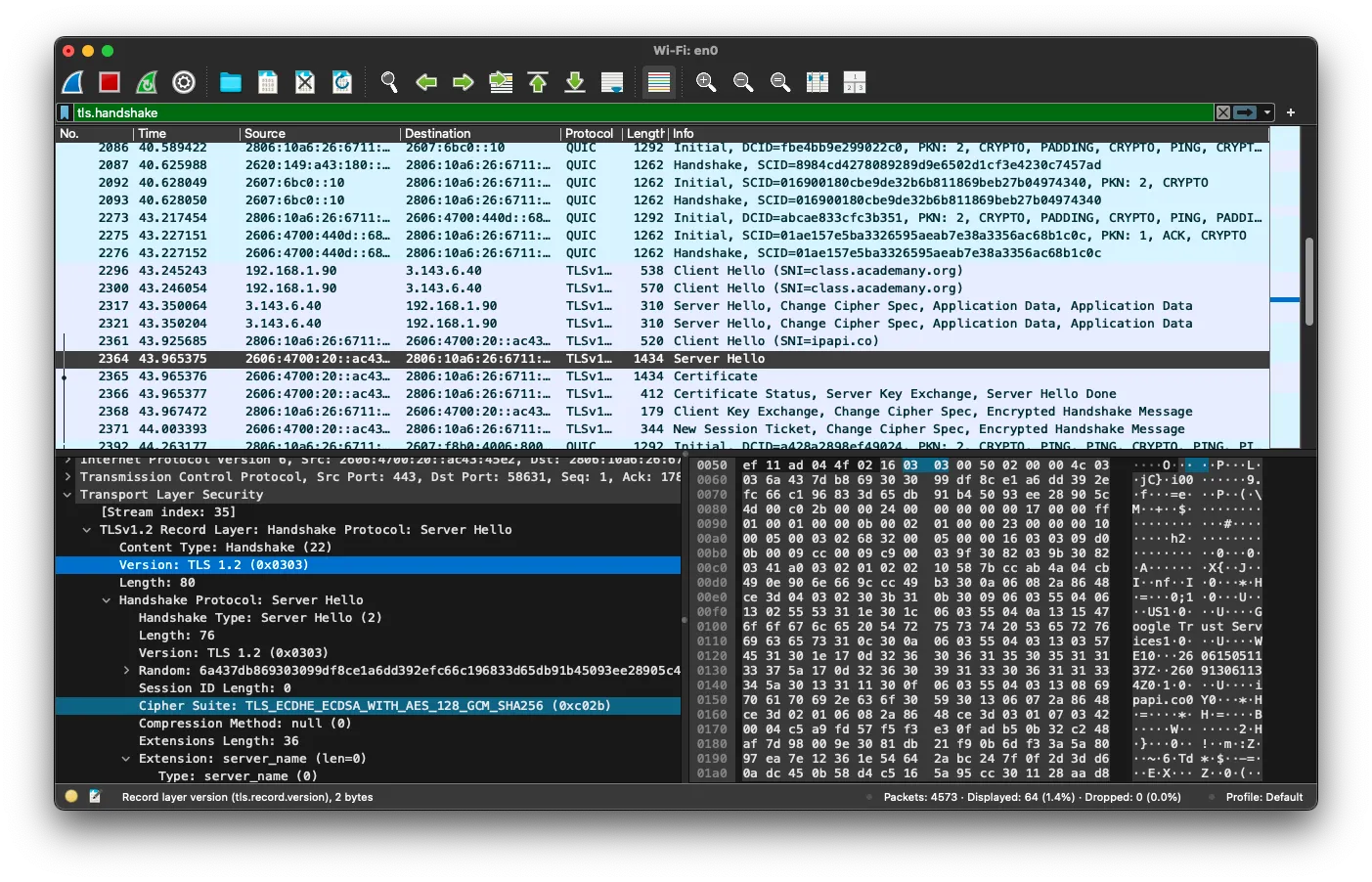
Server Hello — packet 2317, 3.143.6.40 → 192.168.1.90:
Wireshark shows a single record labeled Server Hello, Change Cipher Spec, Application Data — the server’s key share and the first encrypted application data arrive in one flight. This is the TLS 1.3 1-RTT pattern: after the Client Hello there is only one more round-trip before data flows. In TLS 1.2 the handshake required two full round-trips. A second captured connection (Cloudflare CDN over IPv6) negotiated TLS 1.2 and shows the cipher suite selected explicitly: TLS_ECDHE_ECDSA_WITH_AES_128_GCM_SHA256 — ECDH ephemeral key exchange guarantees forward secrecy.
Bonus — QUIC: the capture also shows QUIC packets above the TLS/TCP handshake. The browser sent an HTTP/3 connection attempt over UDP before falling back to TCP. The tls.handshake display filter matches both.
Observer model — what the network sees vs. what it cannot:
| Visible to observer | Hidden from observer | |
|---|---|---|
| IP | Source and destination addresses | — |
| TLS | SNI (class.academany.org), protocol version, cipher suite, packet sizes, timing | Certificate content, key material |
| HTTP | — | Method, path, headers, cookies, response body |
Full capture walkthrough (screen recording):
02Port Scan & Firewall
Run an initial nmap -sV 192.168.80.19 against the course VM to map the exposed attack surface,
configure ufw to reduce it, then confirm the result with a second scan.
Tool: nmap 7.99 · Target: ff-cs-rafael-perez (192.168.80.19) · Access: WireGuard VPN active (origin: 192.168.81.20)
Initial scan — before the firewall
nmap -sV 192.168.80.19

PORT     STATE SERVICE VERSION
22/tcp   open  ssh     OpenSSH 9.6p1 Ubuntu 3ubuntu13.16
5901/tcp open  vnc     VNC (protocol 3.8)

Not shown: 998 closed tcp ports (conn-refused)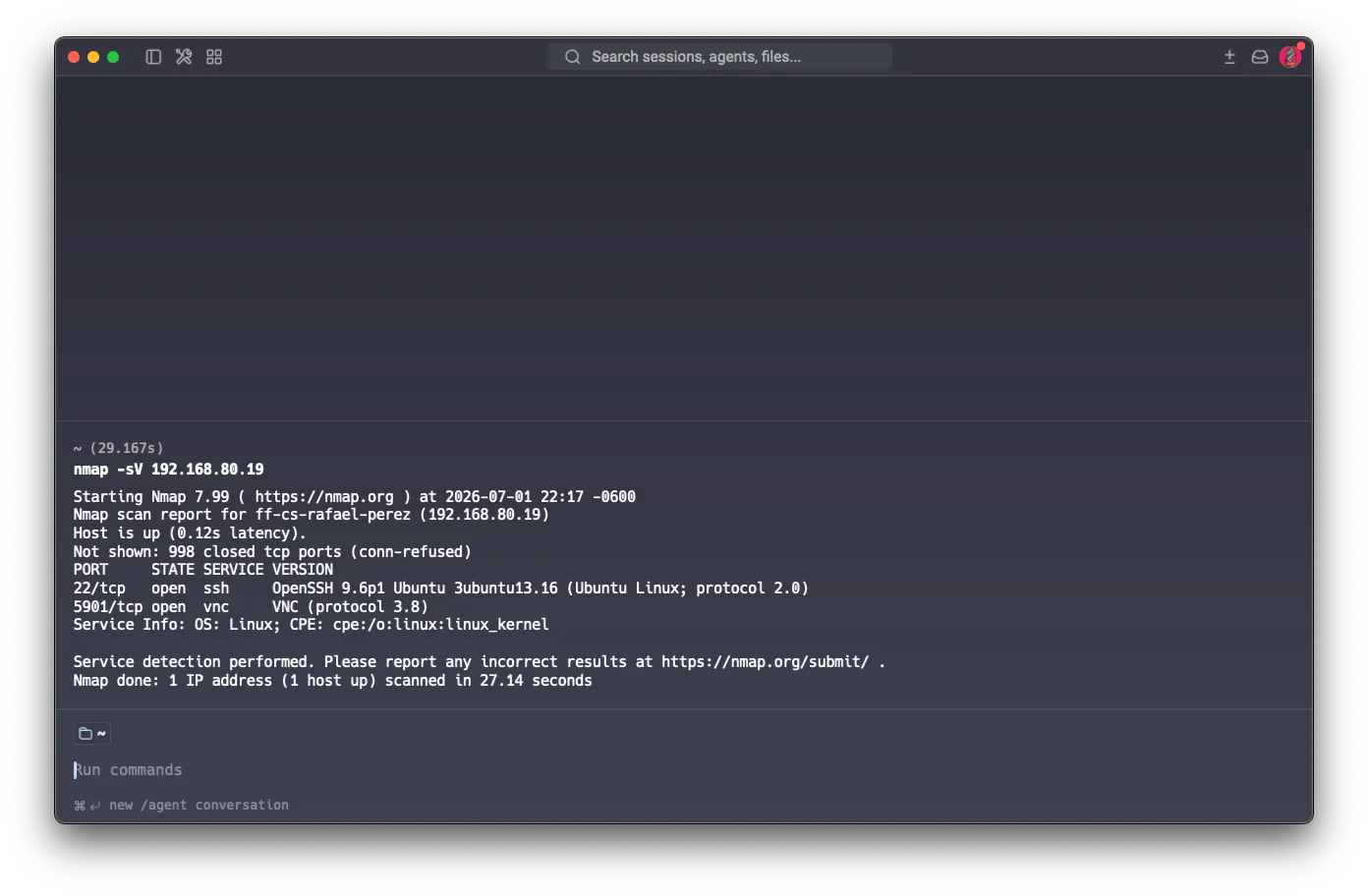
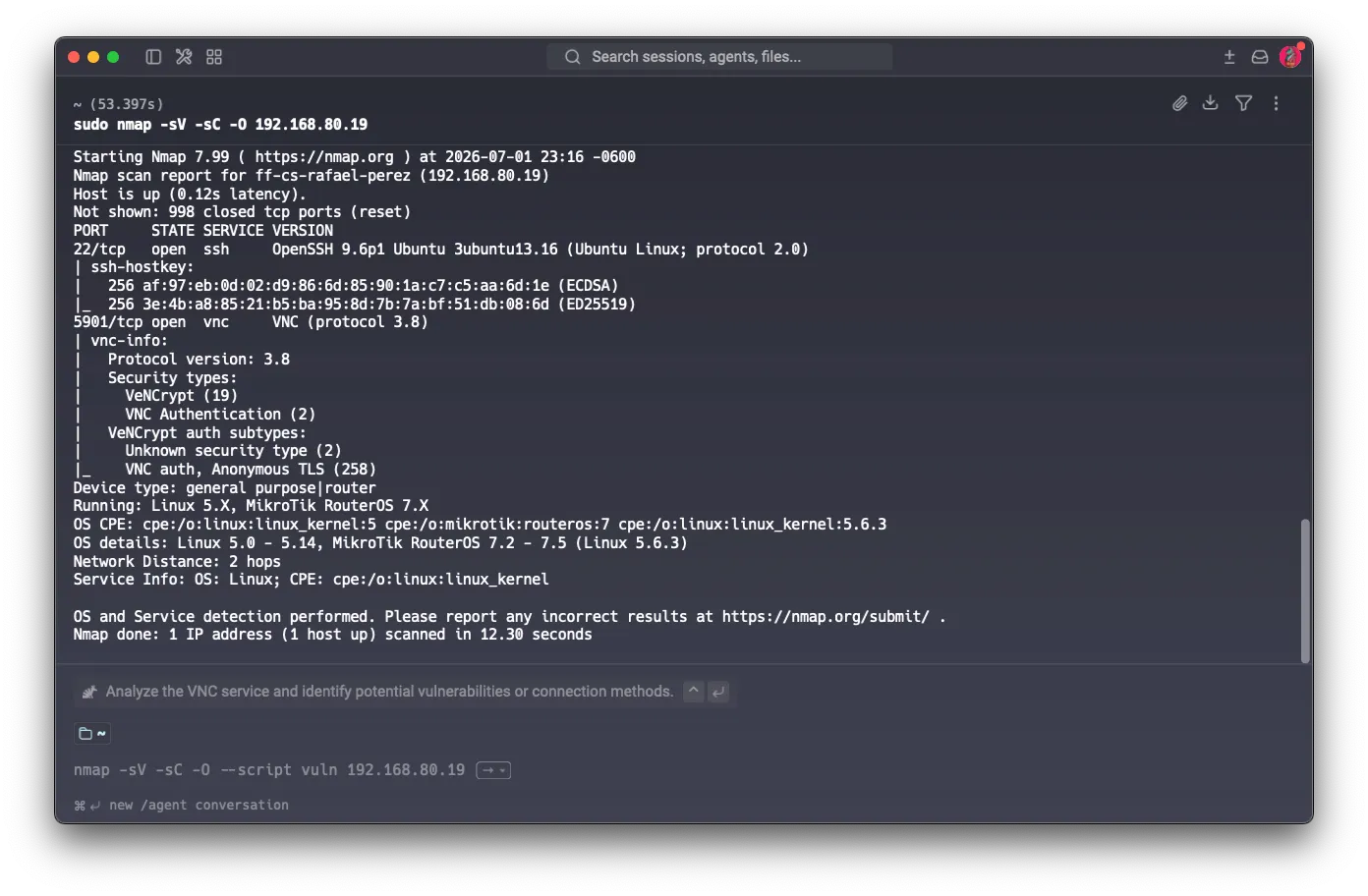
Exposed surface: SSH and VNC visible. The remaining 998 ports respond with TCP RST (conn-refused) — the OS actively reveals that it exists and those ports are closed. An attacker with network access can enumerate services without any obstacles.
Running a deeper scan with -sC -O confirms additional detail: the VNC service advertises VeNCrypt (type 19 — TLS-wrapped VNC) alongside plain VNC Authentication (type 2). OS fingerprinting identifies the host as Linux 5.x and the nmap script engine shows both ECDSA and ED25519 SSH host keys.
What is ufw?
ufw (Uncomplicated Firewall) is the high-level interface for managing iptables on Ubuntu. iptables is the Linux kernel subsystem that filters network packets, but its syntax is complex and error-prone. ufw simplifies it with readable commands.
ufw operates with ordered rules + default policy: each incoming packet is compared against rules in order; if none match, the default policy applies (deny in our case). Two blocking modes:
- DENY — drops the packet silently (no-response) — the origin cannot tell whether the host exists
- REJECT — responds with an ICMP error — more useful for debugging but reveals host presence
We use deny (ufw’s default) because it is more stealthy.
ufw configuration
# Default policies
sudo ufw default deny incoming
sudo ufw default allow outgoing

# SSH open (access required)
sudo ufw allow 22/tcp comment 'SSH'

# VNC restricted to WireGuard IP only
sudo ufw allow from 192.168.81.20 to any port 5901 comment 'VNC VPN-only'

sudo ufw enable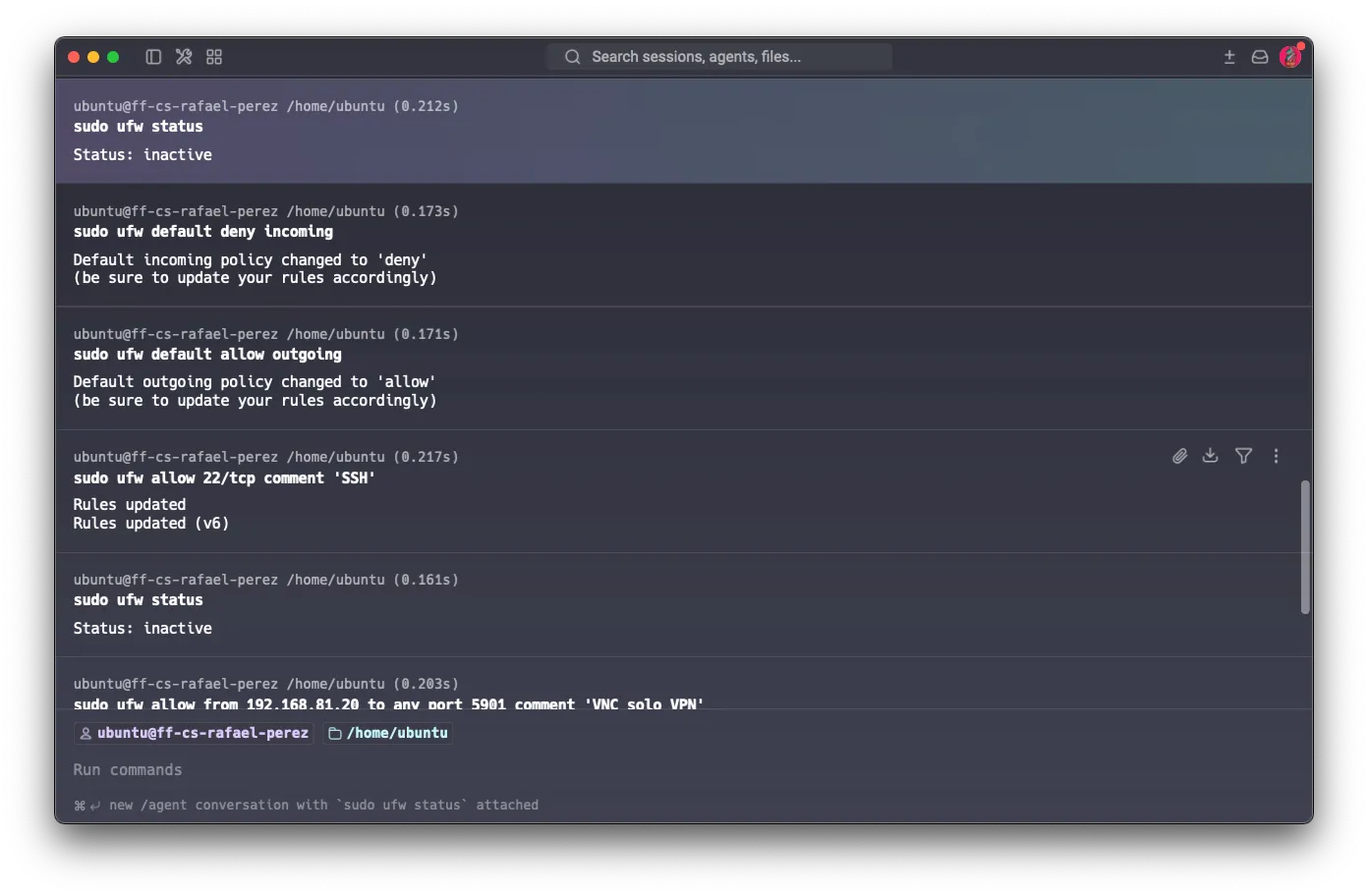
Pre-existing rule conflict
After sudo ufw status following ufw enable, position [1] was a pre-existing system rule that allowed VNC from any origin. ufw applies the first matching rule in ascending order — our VPN-only restriction at [3] was never evaluated.
![ufw status showing the problematic state: 5901/tcp ALLOW Anywhere at position [1] taking precedence over the VPN-only rule at [3]](/futures/cybersecurity/2026/labs/puebla/students/rafael-perez/_astro/ufw-conflict.BoleHJ3a_1euQk6.webp)
Diagnosis and fix
# Problematic state (5 rules):
[ 1] 5901/tcp      ALLOW IN  Anywhere           # ← pre-existing (PROBLEM)
[ 2] 22/tcp        ALLOW IN  Anywhere           # SSH
[ 3] 5901          ALLOW IN  192.168.81.20      # VNC VPN-only
[ 4] 5901/tcp (v6) ALLOW IN  Anywhere (v6)      # ← pre-existing v6
[ 5] 22/tcp (v6)   ALLOW IN  Anywhere (v6)      # SSH

# Delete in reverse order (higher → lower) to avoid renumbering:
sudo ufw delete 4   # v6 first
sudo ufw delete 1   # then v4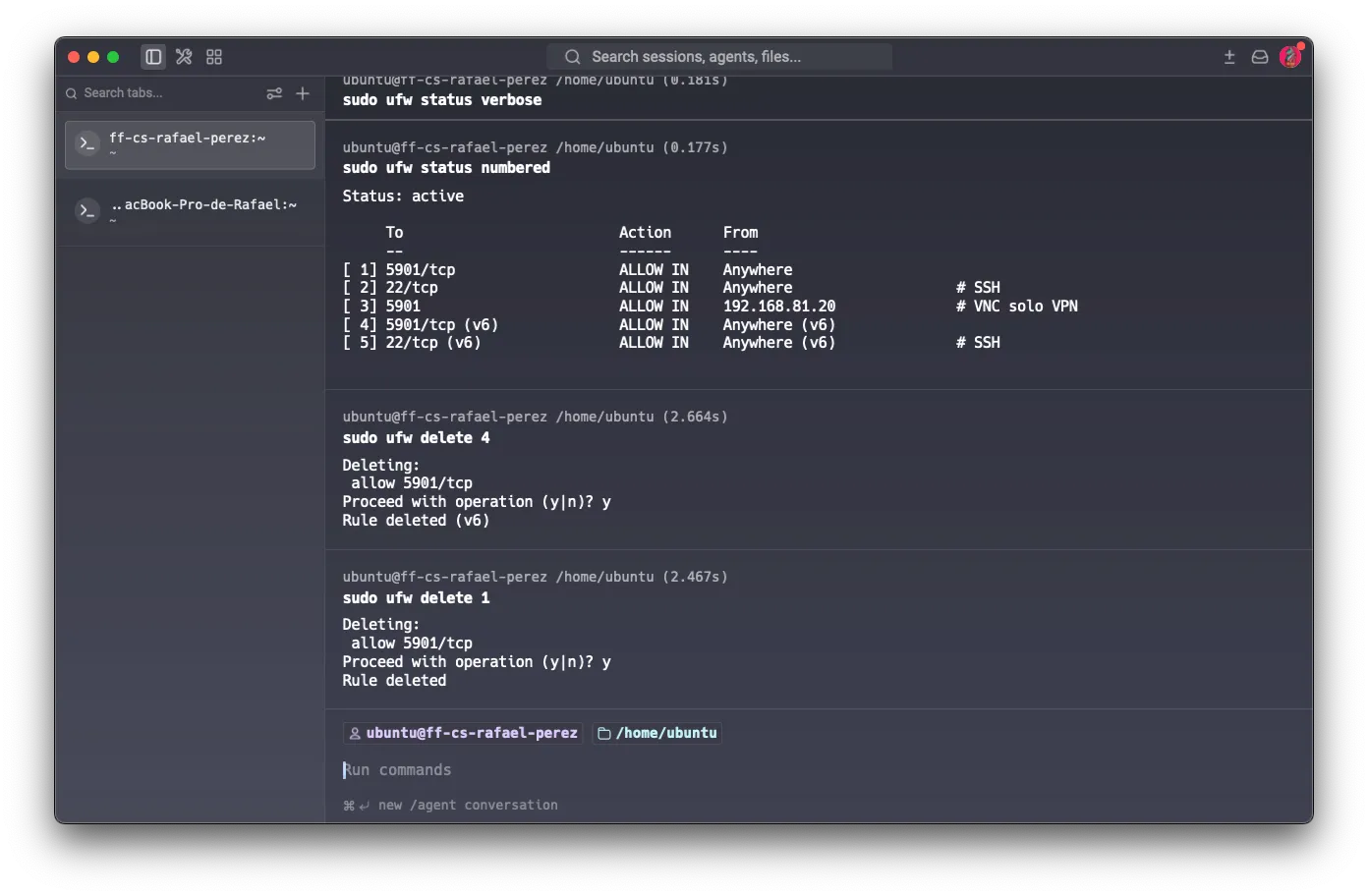
Final rules (ufw status numbered):
[ 1] 22/tcp        ALLOW IN    Anywhere      # SSH
[ 2] 5901          ALLOW IN    192.168.81.20 # VNC VPN-only
[ 3] 22/tcp (v6)   ALLOW IN    Anywhere (v6) # SSH
Final scan — after the firewall
nmap -sV -Pn 192.168.80.19

PORT     STATE SERVICE VERSION
22/tcp   open  ssh     OpenSSH 9.6p1 Ubuntu 3ubuntu13.16
5901/tcp open  vnc     VNC (protocol 3.8)

Not shown: 998 filtered tcp ports (no-response)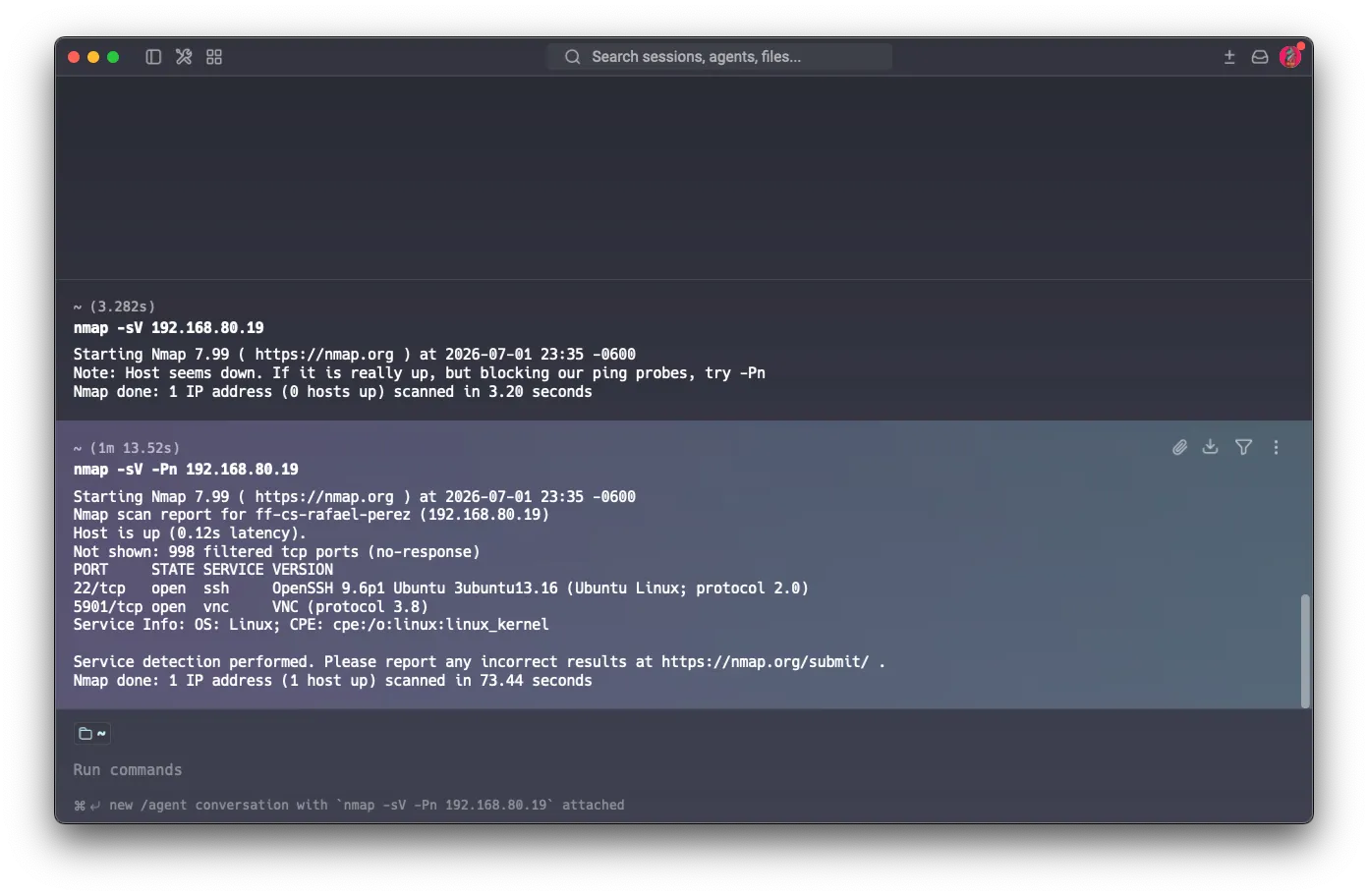
Note: the first attempt without -Pn reported “Host seems down” — ufw is blocking ICMP pings, making the host invisible to automatic discovery scanners.
Before vs. after
| Before | After | |
|---|---|---|
| ICMP / ping | Responds — host visible | Blocked — host “invisible” to scanners |
| 998 closed ports | conn-refused — OS responds with TCP RST, confirming existence | no-response — ufw silently drops packets |
| SSH (22) | Open to any origin | Open to any origin (intentional) |
| VNC (5901) | Open to any origin | Accessible only from 192.168.81.20 |
The most significant change is the shift from conn-refused to filtered (no-response): before, the system actively responded to each connection attempt, revealing that it existed and that the port was closed. Now ufw drops packets without responding — an external observer cannot distinguish whether the host exists at all.
VNC still appears open in the second scan because nmap runs from 192.168.81.20, which is exactly the only authorized IP. Any other origin receives no-response.
Reflection
Part A was useful mainly for organizing knowledge I already had but in scattered form. SSH, PGP, VPN, and IDS I knew in use — I use them in my backend projects and in the lab infrastructure — but applying the three-question toolkit to each one forced me to articulate them in a way I normally don’t: not just what they do, but what they assume and what they leave uncovered. That second level is where real design decisions live.
The case I genuinely hadn’t explored before was MACsec. I had a clear picture of L3 protection (IPsec, VPNs) and application-layer protection (TLS), but the space between them — the local physical Ethernet segment — was a blind spot. That a compromised switch sees all traffic in cleartext even when the rest of the stack is encrypted is the kind of risk that doesn’t appear in deployment tutorials. For someone working with physical infrastructure (Fab Lab, Raspberry Pis on a local network, connected fabrication machines), that hop-by-hop model has concrete implications worth keeping in mind.
The Port Scan & Firewall exercise was the most revealing of the session. The initial nmap result — 998 ports responding with conn-refused — is not a neglected server: it is the default behavior of any freshly installed Linux machine. The kernel actively responds to every connection attempt, confirming that the host exists and that the port is closed. For an attacker, that is enough to map the entire surface. When I consider how many student VMs, academic project servers, or cloud instances sit in that state because no one configured the firewall after apt install, the scale of the problem becomes clear — not from negligence, but because it is not obvious that the default state is already an exposure.
What stayed with me most was the difference between conn-refused and filtered (no-response): the information the system gives away for free when rejecting a connection — I exist, the port is closed — disappears completely when ufw drops the packet silently. That transition, which looks cosmetic, fundamentally changes what an observer can infer. Applied to my own projects: when I deploy a FastAPI service or a Django API, the ports not in use are also saying something. Configuring a firewall is not just protecting the open ports — it is stopping the announcement of the closed ones.
Tools & references
- Network Security: Protecting Traffic, Controlling Flow — Fab Futures Cybersecurity 2026 lecture slides
- RFC 4880 — OpenPGP Message Format · IETF, 2007
- PGP Web of Trust: Delegated Trust and Keyservers — Linux Foundation
- SoK: Securing Email — A Stakeholder-Based Analysis — arXiv, 2018
- Challenging the Trustworthiness of PGP: Is the Web-of-Trust Tear-Proof? — ResearchGate
- RFC 4251 — The Secure Shell (SSH) Protocol Architecture · IETF, 2006
- Why Trust-On-First-Use Doesn’t Work (Even for SSH) — agwa.name
- Fearless SSH: short-lived certificates bring Zero Trust to infrastructure — Cloudflare Blog
- RFC 4301 — Security Architecture for the Internet Protocol (IPsec) · IETF, 2005
- VPN Split Tunneling Security Risks and Monitoring Guide (2026) — DecryptionDigest
- CVE-2024-7595 / CVE-2025-23018/23019 — Tunneling Protocol Vulnerabilities — Top10VPN Research
- MACsec Explained: Securing Data in Motion — Rambus
- IEEE 802.1AE — Wikipedia
- RFC 4033 — DNS Security Introduction and Requirements · IETF, 2005
- RFC 3833 — Threat Analysis of the Domain Name System · IETF, 2004
- DNSSEC Adoption in 2026: Only 0.47% of DNS Queries Validated — technologychecker.io
- DoT, DoH and the DNS “Last Mile” Security Problem — Infoblox
- NIST SP 800-94 — Guide to Intrusion Detection and Prevention Systems — NIST
- Intrusion Detection vs Prevention Systems — PurpleSec
- IDS, IPS, and Firewalls — Detection, Prevention, and Evasion Techniques — MyCyberSecurityPath