Final Project — Analyzing & Hardening the LIARE Lab Network
Course assignment: “Analyze and harden the vulnerabilities of a computing system that you want to secure.” System chosen: LIARE — the local network of the Laboratorio de Inteligencia Artificial y Realidad Extendida at IBERO Puebla.
1. Overview & Motivation
Why this system
LIARE is a real, in-use laboratory network that I built and operate. It sits behind a consumer router that connects to the institutional IBERO network but keeps a separate internal LAN for lab work. It is used every day to:
- Give students a network they can connect to for coursework (e.g. in Programmable Architectures, students reach their Raspberry Pi boards over SSH).
- Host a Raspberry Pi running OctoPrint (
rasprinter) so anyone on the lab network can send 3D print jobs. - Run a couple of machines that act as servers for the AI / XR demos we showcase in the lab.
Because it grew organically to enable work rather than to protect it, LIARE is exactly the kind of system this assignment targets: a network with real assets, a real trust boundary, and — as the analysis below confirms — real, unmanaged exposure. Choosing it means the whole project is grounded in evidence I collected myself, not in a textbook scenario.
What I set out to do
- Analyze the current state of the network: map it, discover what is actually running, and identify vulnerabilities with real evidence.
- Harden it by applying defenses drawn directly from each session of the course.
- Extend it with an AI angle: anomaly detection on lab traffic (an IDS that learns), reconnecting the security work with the lab’s own reason to exist.
- Argue the residual risk honestly and lay out a target profile / roadmap.
Scope & ethics
- The analysis is limited to the LIARE segment (
192.168.0.0/24), over which I have authority. I did not scan the upstream IBERO infrastructure, on which I do not. - Timing note (important for reading the results): the scans were run during the summer break, when only my own devices are connected — the students’ Raspberry Pi boards are not on the network right now. So the measured state is the network in its “empty” state (my devices only). The primary threat model (an internal student attacker) applies to the populated state of the semester, when those boards are present.
- All scanning was performed from inside LIARE (an authenticated host on the LAN). Findings therefore reflect the viewpoint of an internal attacker — a student or device already on the network — which is my primary threat model.
- No credentials, private keys, or captured media are published here, per the course’s documentation rules.
2. Network Topology & Trust Boundaries
LIARE is an island behind its own NAT: the TP-Link router (in Router mode) creates a private
192.168.0.0/24 LAN that is distinct from the IBERO network. The single point of control between
the two is the router itself.
- Dropbear SSH 2012 (DSA-1024)
- plain-HTTP admin panel
- UPnP-IGD on · SSDP open
- 2018 firmware
- PostgreSQL exposed to LAN
- weak hardcoded creds
- plain-HTTP API · SSH password
- OpenClaw agent — actively running
- RTSP exposed (554)
- TLS cert valid to 2073
- clock ~14 days off
- 5 ports · unpatched IoT
- OctoPrint login + TLS — OK
- SSH accepts password
- self-signed cert, 10 yr
- 1000 ports filtered
- default-deny firewall
- the safest host — not mine
- machine used to scan
- every semester: default user left unchanged (recurring config drift)
- summer break = not connected; internal threat of the populated state
.108 — the network is flat, nothing stops it.Toggle between the measured state (§3) and the hardened state (§5) — the boxes and colors above are the same hosts, same IPs, same trust boundary.
Trust zones:
| Zone | What it is | Trust level |
|---|---|---|
| Zone 0 | Internet / IBERO institutional network | Untrusted |
| Boundary | TP-Link WR840N router (NAT gateway) | Single point of control |
| Zone 1 | LIARE LAN — all lab devices | Flat: every host trusts every other host |
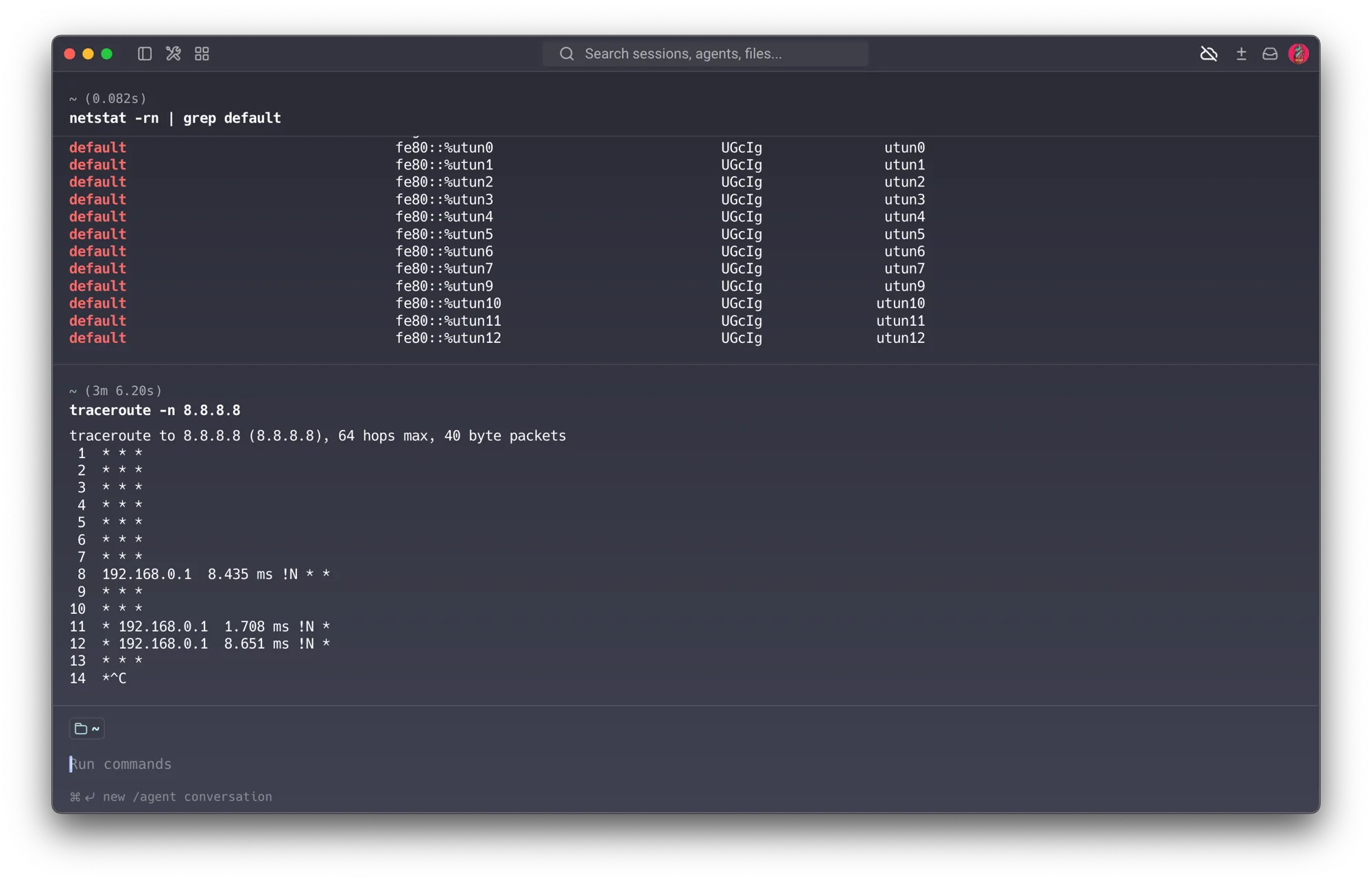
A key observation for the trust model: at the time of testing, the router’s WAN port requested
an IP from the IBERO network by DHCP and received none (WAN: 0.0.0.0, and traceroute
returned !N / network-unreachable at the gateway). In other words, the boundary is real and
bidirectional: LIARE does not trust IBERO, and IBERO does not trust LIARE. This isolation is,
incidentally, the most secure possible state for the lab devices — they keep working because their
traffic never needs to leave the segment.
Reference — Session 2 (Internet Security): this section applies the threat model / trust model / residual risk lens from the six-system toolkit directly to LIARE as a whole. The trust boundary is the conceptual core of the project.
3. Phase 1 — Analysis (Reconnaissance & Vulnerability Discovery)
This is the “analyze” half of the assignment. Everything here is backed by real scan output.
3.1 Environment confirmation
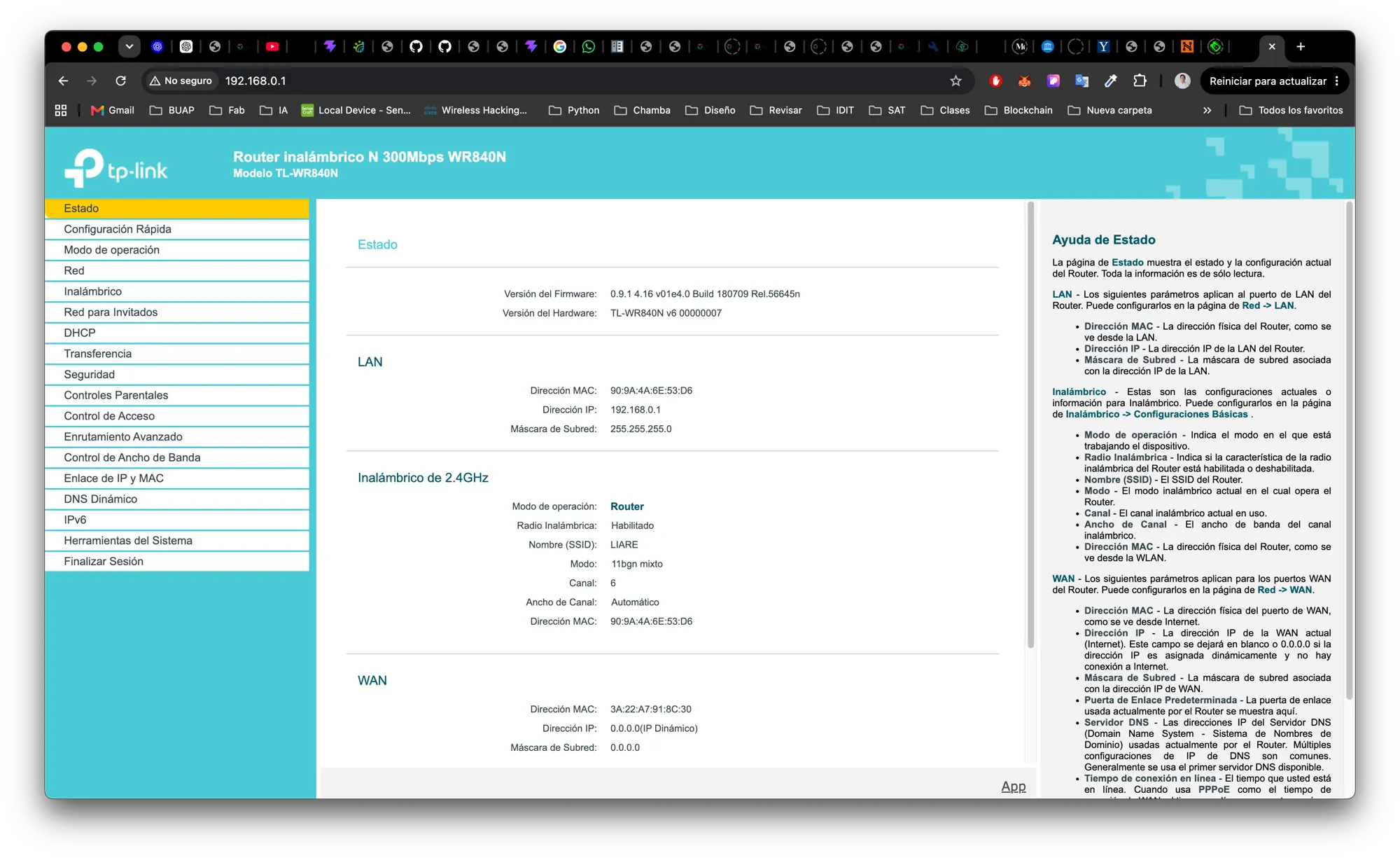
- Router: TP-Link TL-WR840N v6, firmware
0.9.1 4.16 v01e4.0 Build 180709(2018), operating in Router mode, SSIDLIARE, LAN192.168.0.1/24. - Analyst host (my MacBook):
192.168.0.103.
3.2 Host discovery
sudo nmap -sn 192.168.0.0/24 -oN liare_hosts.txt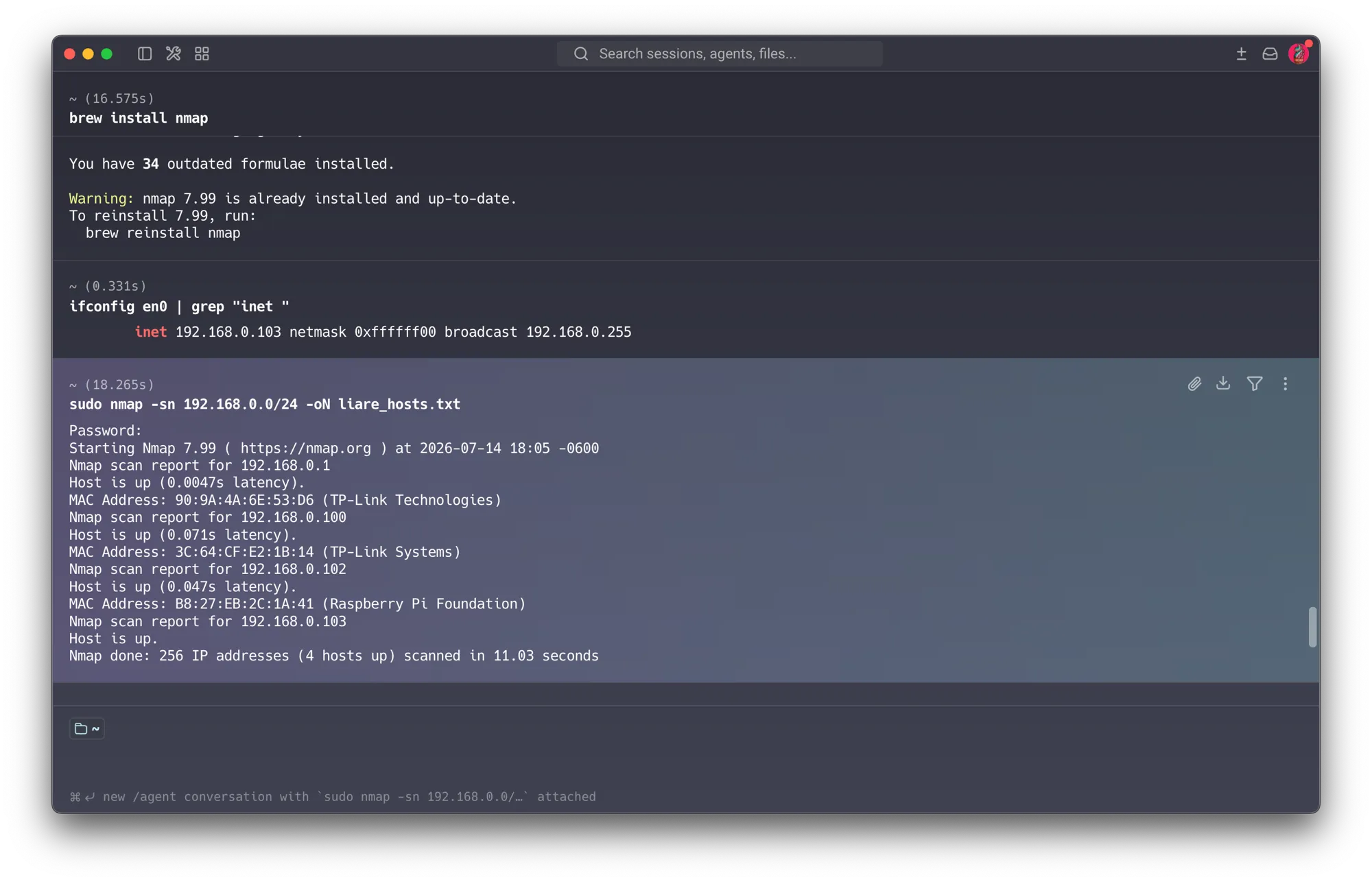
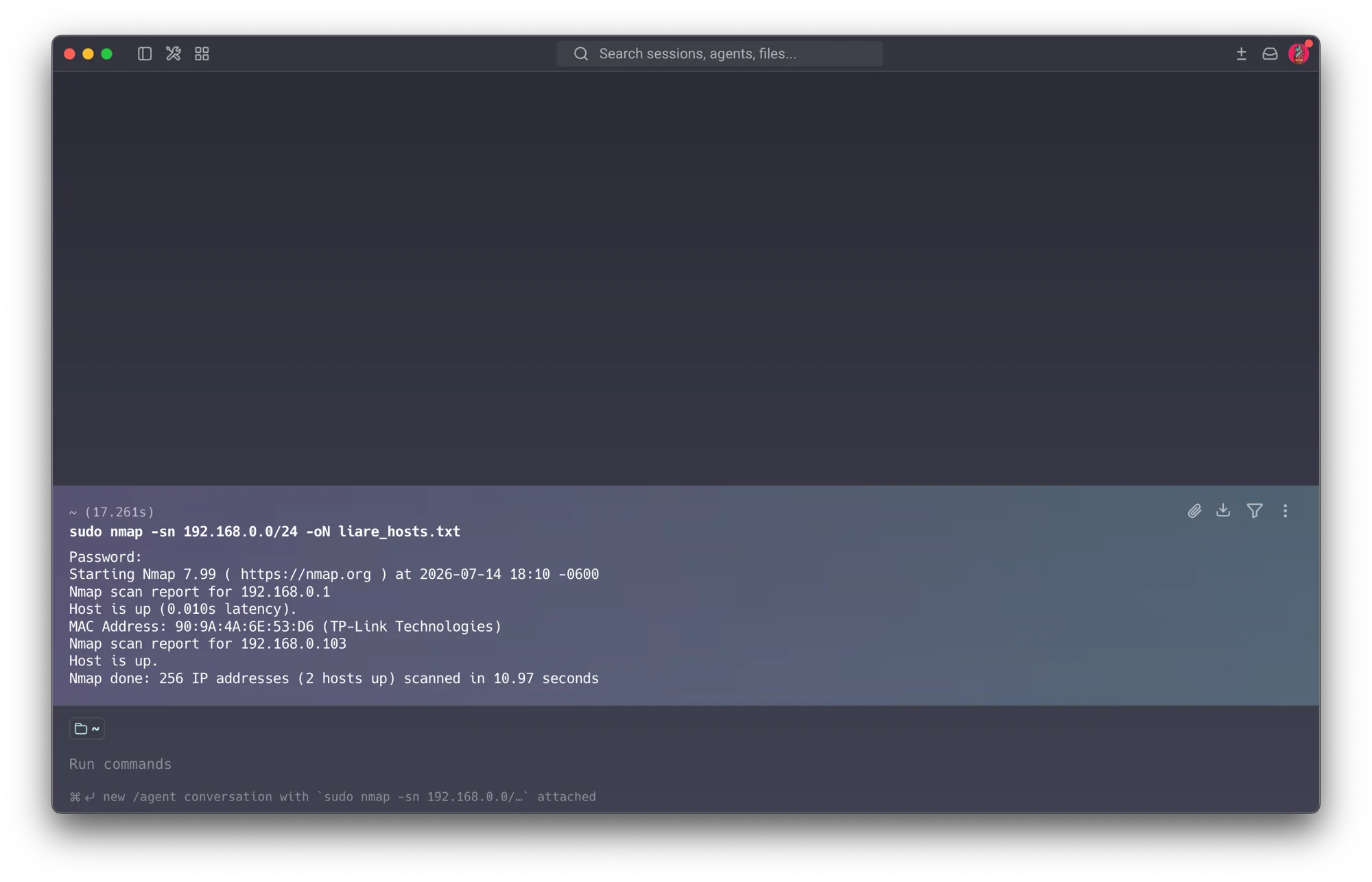
Note on method (a documented learning): discovery was unreliable in a telling way. Two
consecutive runs returned different host counts (4, then 2), and two more live hosts (.104,
.108) never appeared in the ping sweep at all — I only found them by checking known IPs
manually and confirming reachability. This is expected: ping/ARP discovery is not fully reliable;
devices can ignore probes, drop out of the ARP cache, or (as with .104) silently drop all probes
behind a strict host firewall. The lesson: passive/active discovery has limits, and a host being
“invisible” is not evidence it’s absent — it can even mean it’s well defended. A more reliable
inventory uses ARP discovery directly:
sudo nmap -sn -PR 192.168.0.0/24 -oN liare_hosts_arp.txt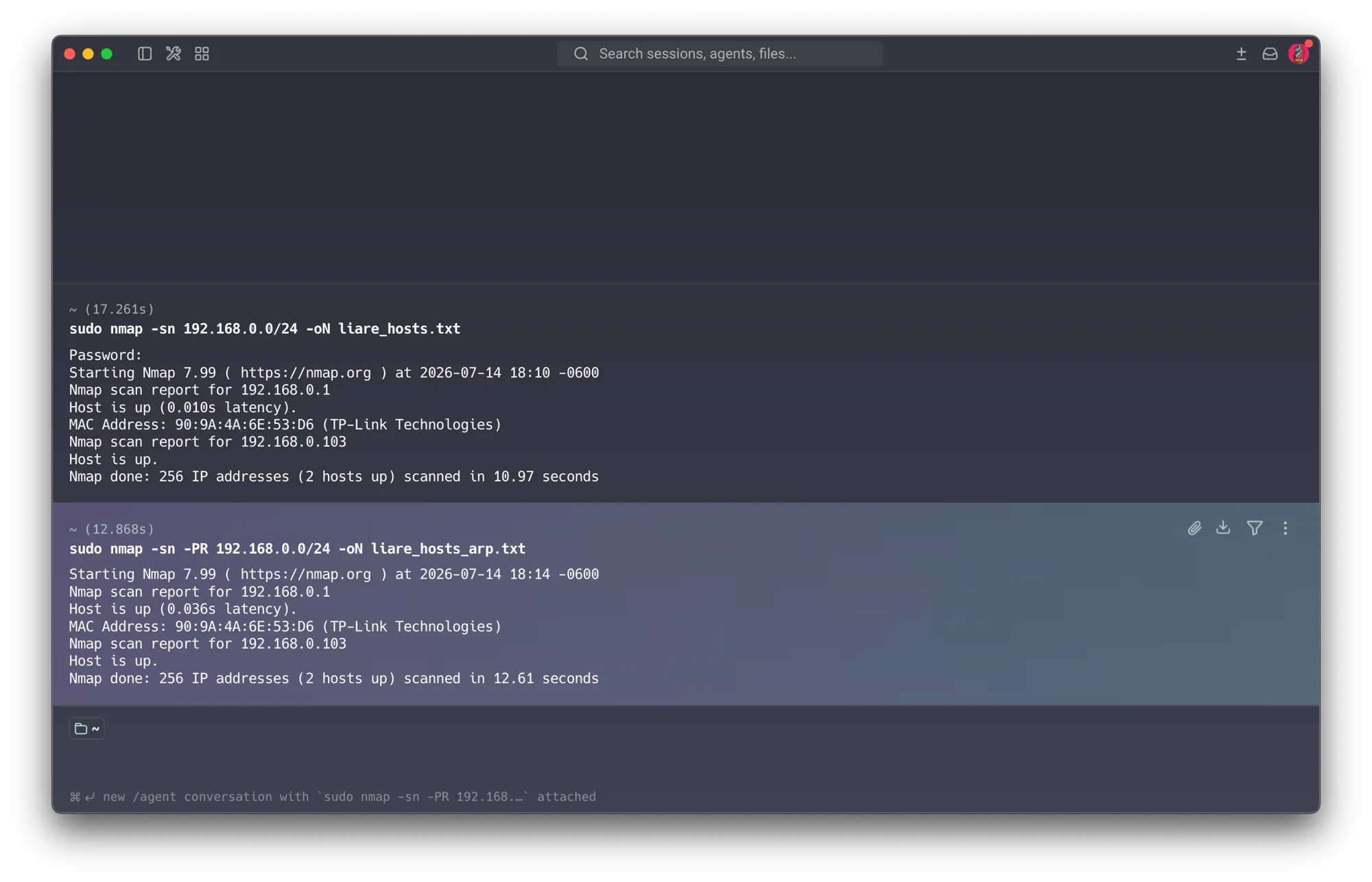
3.3 Definitive inventory
| IP | Device | Open ports | Key findings | Severity |
|---|---|---|---|---|
.1 | Router TP-Link WR840N | 22, 80, 1900 | Dropbear 2012 + DSA-1024 host key; admin panel over plain HTTP; UPnP enabled; kernel 2.6.36; 2018 firmware | High |
.100 | IP camera (TP-Link, for a YOLO vision project — left connected & forgotten) | 443, 554, 2020, 8443, 8800 | RTSP exposed (port 554); TLS cert valid until 2073 (50 yr); clock ~14 days off; wide attack surface | High |
.102 | Raspberry Pi / OctoPrint (rasprinter) | 22, 80, 443 | SSH accepts password auth; self-signed cert valid 10 yr; OctoPrint login enabled; TLS present | Med-High |
.103 | MacBook | — | Analyst workstation | — |
.104 | Work laptop (managed by campus IT/TICs; I can’t install anything) | none reachable | All 1000 ports filtered — strict default-deny host firewall; didn’t respond to discovery. The most secure host on the network — see Section 3.5. | None (well defended) |
.108 | Vision server (my desktop-as-server; runs a Docker vision project: DB + API + YOLO engine over WebSocket + frontend) | 22, 5432, 8000 | PostgreSQL 16 exposed to the LAN with weak hardcoded credentials (port 5432); FastAPI/Uvicorn API over plain HTTP (8000); SSH accepted password; modern OpenSSH 9.6; OpenClaw AI agent found actively running (exec + browser + Telegram + Gmail-watcher) | High |
Not present in this scan: the students’ Raspberry Pi boards — they’re off the network during the summer break. During the semester, each cohort connects several Raspberry Pis, and a recurring pattern is that the default user is often left unchanged — a systemic config-drift issue that feeds the threat model (see Section 4) and motivates the student-zone segmentation (Section 5.3). Framed as an environment pattern, not a finding against any individual.
3.4 Detailed findings per host
Router 192.168.0.1
sudo nmap -sV -sC 192.168.0.1 -oN router_001.txt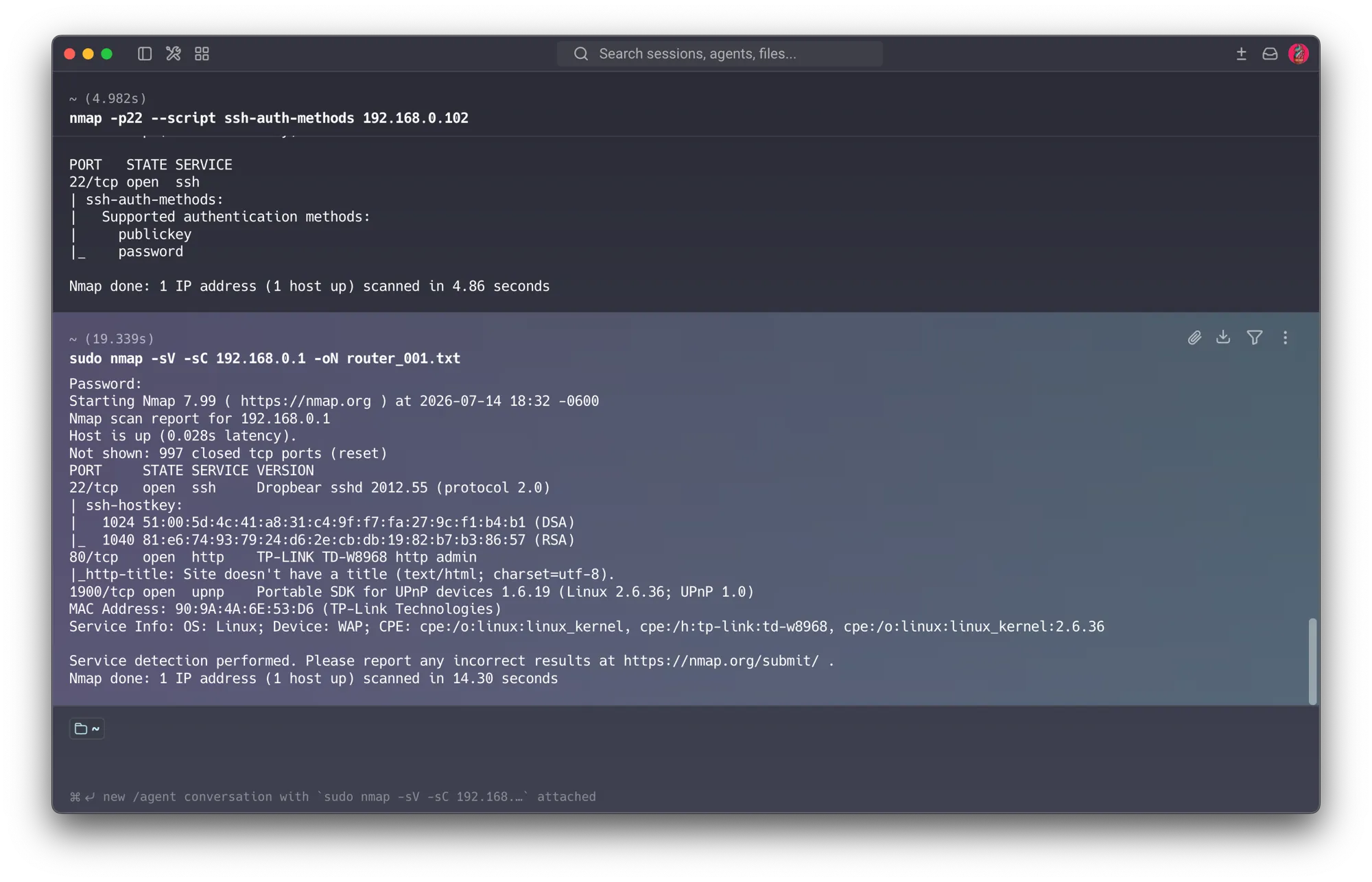
- Port 22 — Dropbear SSH 2012.55 with a DSA-1024 and RSA-1040 host key. DSA-1024 is obsolete and considered broken; OpenSSH disabled it by default years ago. → textbook example of the weak/legacy crypto that industry is moving away from (Session 1).
- Port 80 — admin panel over plain HTTP. The router login password travels unencrypted
across the LAN; on a flat network, anyone sniffing can capture the admin credential. (Fingerprint
reports
TD-W8968, revealing the shared TP-Link firmware lineage.) - Port 1900 — UPnP on an ancient Linux 2.6.36 kernel. UPnP lets any LAN device open outbound ports automatically without asking — a classic escape vector. → recommend disabling.
IP Camera 192.168.0.100 — the headline finding
sudo nmap -sV -sC 192.168.0.100 -oN host_100.txt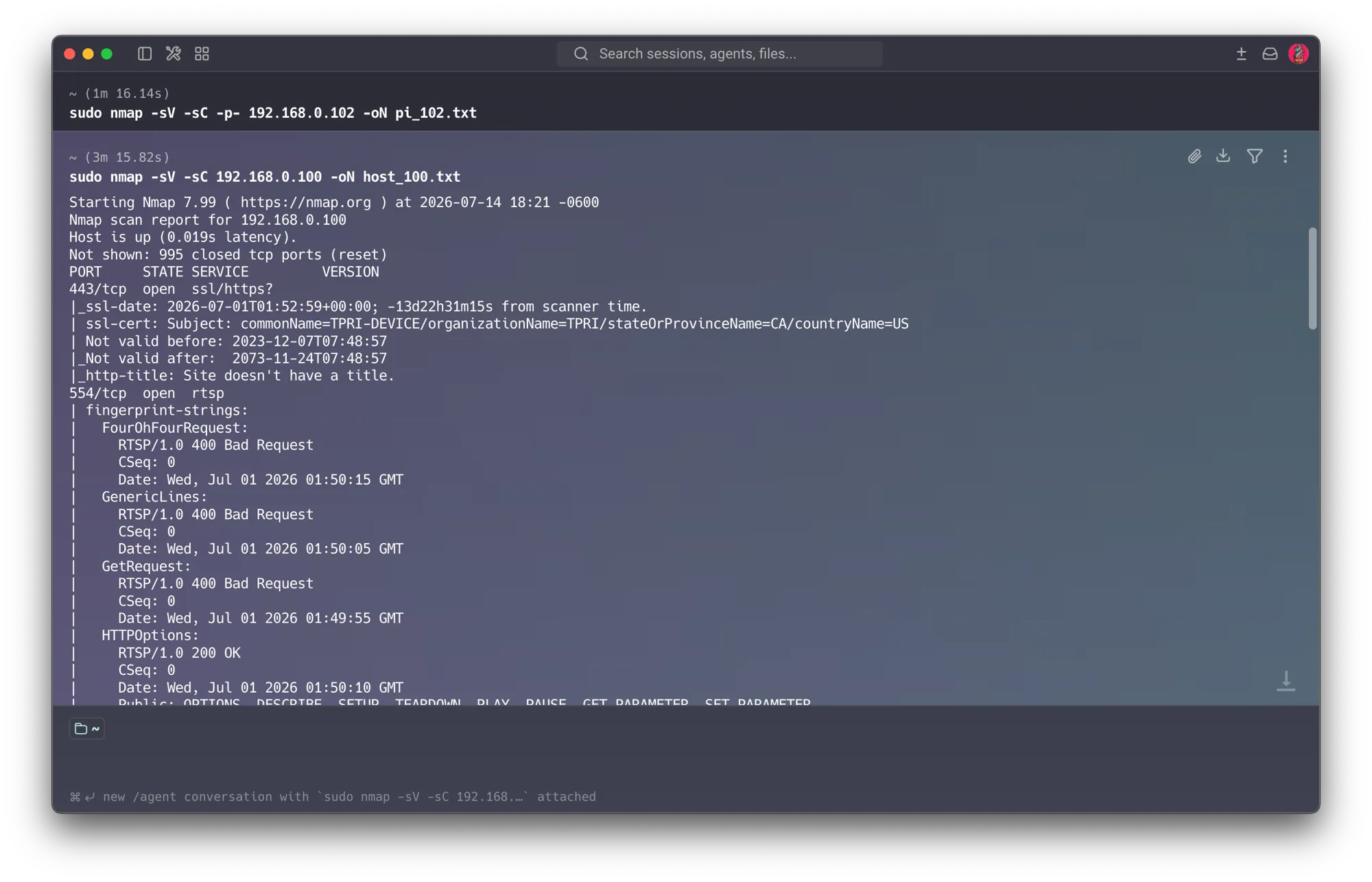
- Port 554 — RTSP responding
200 OKtoDESCRIBE/SETUP/PLAY. A live video stream of the lab, potentially reachable by any host on LIARE. - TLS certificate
commonName=TPRI-DEVICE, valid until 2073 — a 50-year self-signed certificate, an extreme example of vendor bad practice (impossible to rotate if compromised). - Clock skew ~14 days — a wrong device clock breaks certificate validation and makes forensic timestamps unreliable.
- Origin: I installed this camera myself for a computer-vision project (YOLO — heatmaps, dwell time, foot-traffic analysis of the lab) that I never finished, and I forgot it was still connected. This is the single most important lesson of the whole project (see Section 4) — forgotten devices and configuration drift, not clever attackers, are the leading real-world cause of breaches.
Ethical note: I confirmed the RTSP port is open and unauthenticated as a finding; I did not view the stream to check who might be on camera.
Raspberry Pi / OctoPrint 192.168.0.102
sudo nmap -sV -sC -p- 192.168.0.102 -oN pi_102.txt
nmap -p22 --script ssh-auth-methods 192.168.0.102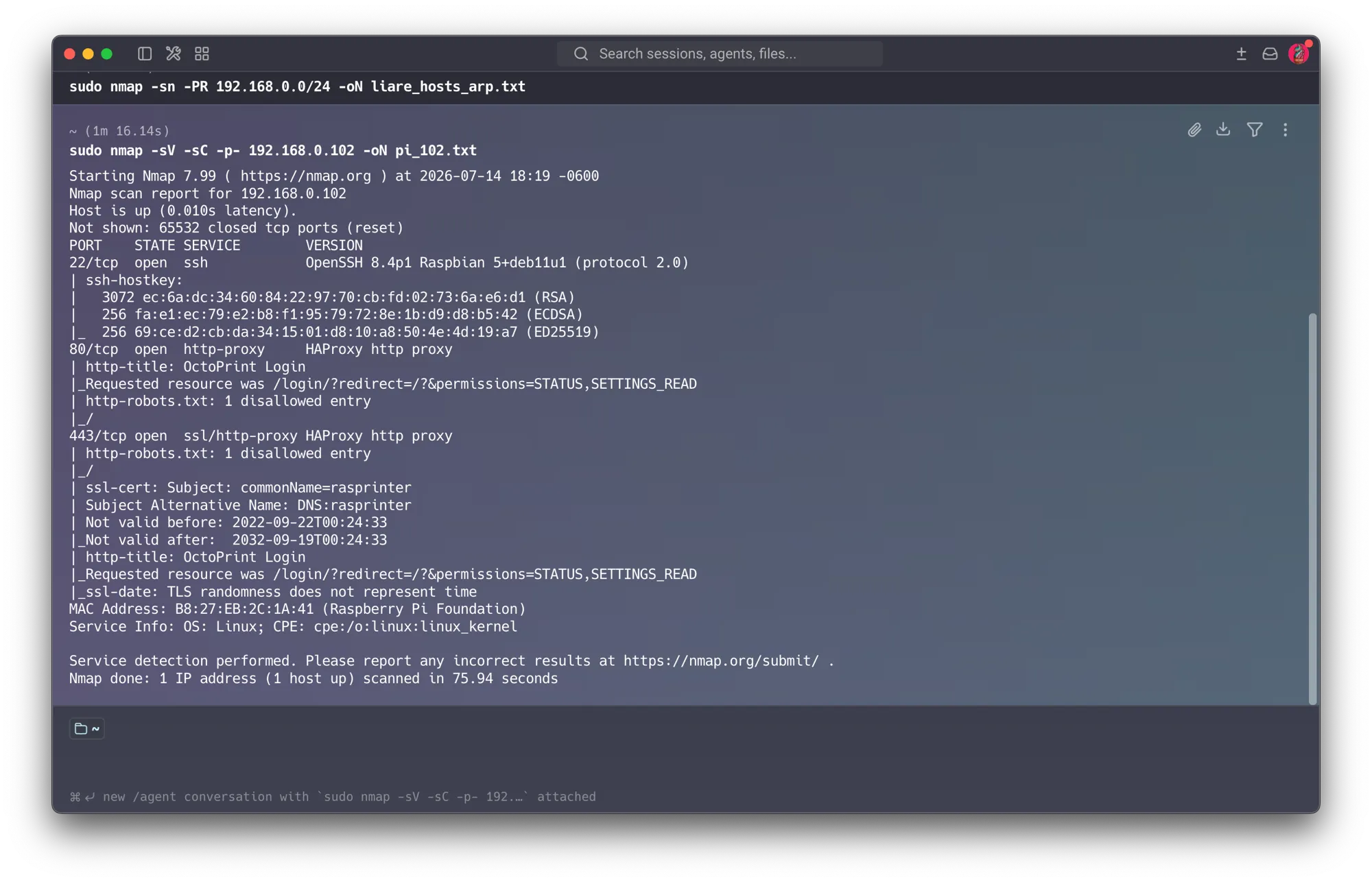
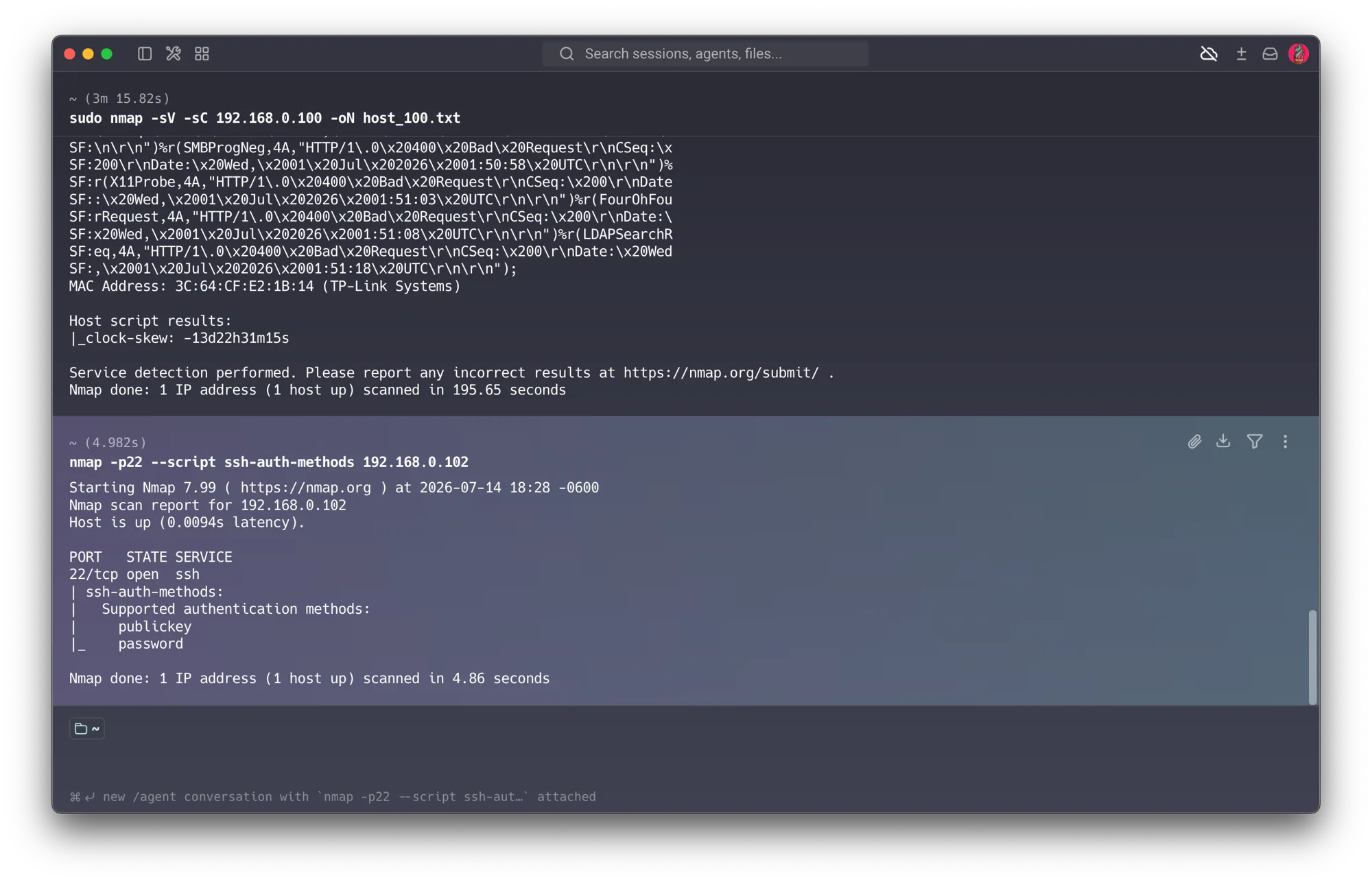
- Port 22 — SSH accepts
passwordandpublickey. On a Raspberry Pi (well-known default user) this invites brute-force / credential-guessing. → primary hardening target (Session 1). - Port 80 / 443 — OctoPrint behind HAProxy, with a login page and TLS. Good news: this is not one of the thousands of unauthenticated OctoPrint instances. Login is enabled and HTTPS is served.
- Caveat: the TLS cert is self-signed (
rasprinter) with a 10-year validity — acceptable for an internal LAN, but a documented residual risk (self-signed = no CA vouching for identity; a same-named impostor could self-sign too).
Work laptop 192.168.0.104 — the positive contrast
sudo nmap -sV -sC 192.168.0.104 -oN host_104.txt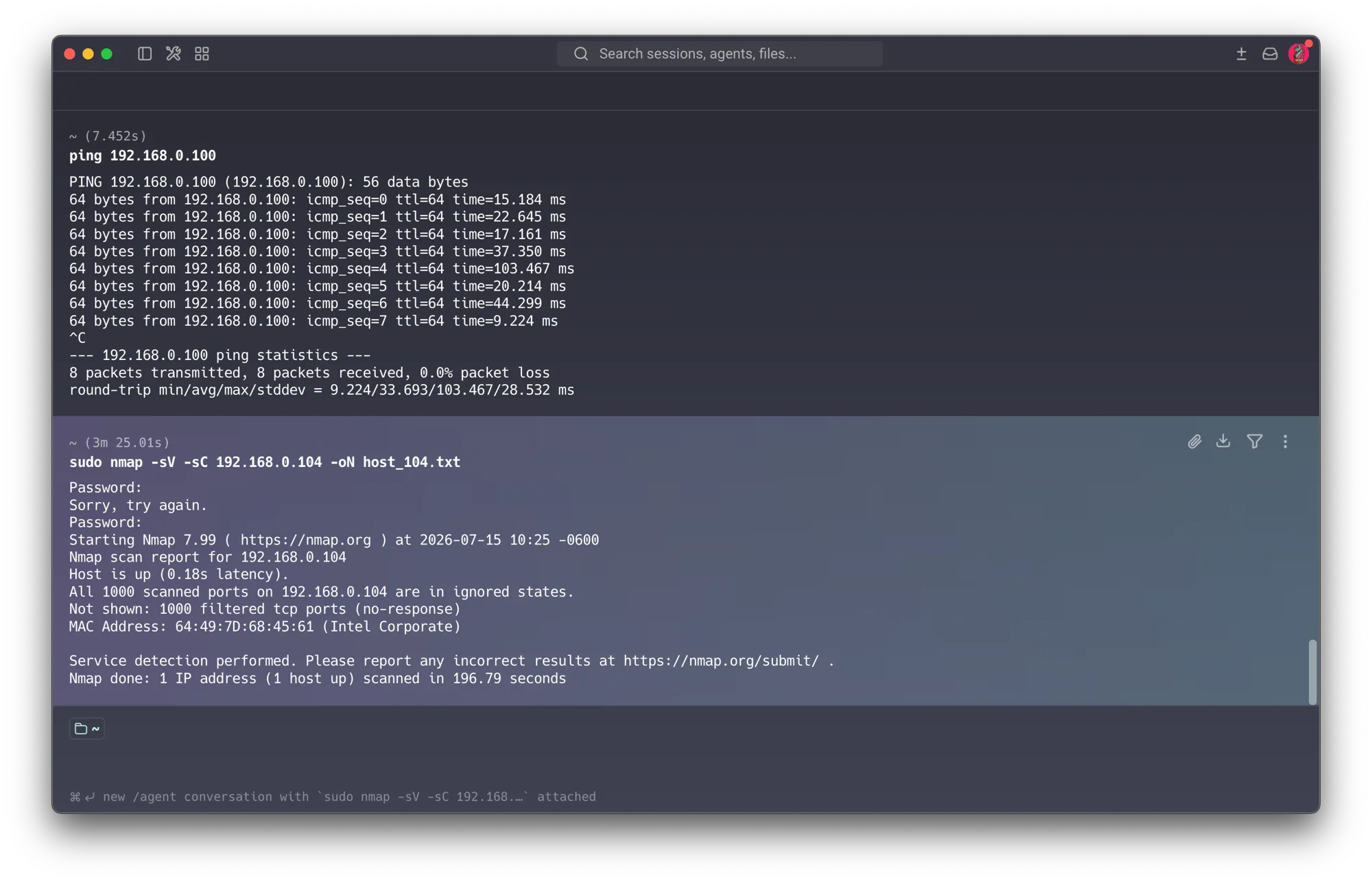
- All 1000 ports
filtered(no-response). This host silently drops every probe — the signature of a strict, default-deny host firewall. It’s a device managed by campus IT (TICs); I cannot install anything on it without an admin account. - This is a finding in the positive direction, and the most instructive host on the network: the one machine I don’t control — locked down by a third party — has effectively zero attack surface from the LAN. It didn’t even show up in discovery. The devices I administer freely, for convenience, are the exposed ones. → central to the project’s thesis (Section 3.5); ties to Session 5 (host hardening) and Session 7 (the security-vs-convenience trade-off).
- Action: none — out of my authority, and correctly hardened by a third party. Included as the security baseline the rest of the network should aspire to.
Vision server 192.168.0.108 — my most important asset
sudo nmap -sV -sC 192.168.0.108 -oN host_108.txt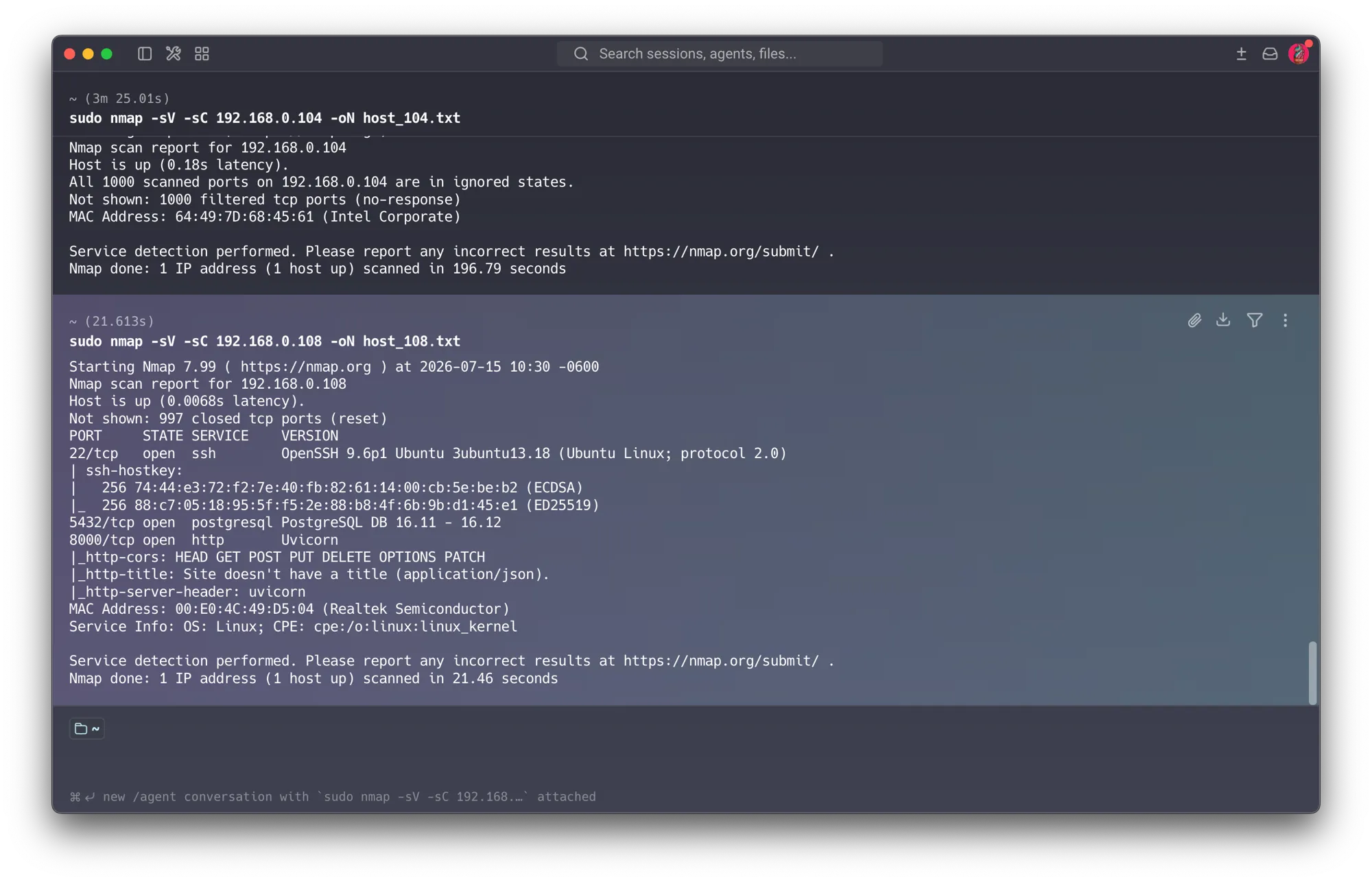
This desktop-as-server runs my computer-vision project: a Dockerized DB + API, a YOLO engine exposed over WebSocket, and a frontend. It holds the most valuable data and shows a revealing mix of good and bad:
- Port 5432 — PostgreSQL 16 exposed to the LAN (the server’s most serious finding). The
database is listening on the network, reachable by any host on LIARE — including the
forgotten IoT camera and student devices (flat network = everyone reaches everyone).
Root cause (from the
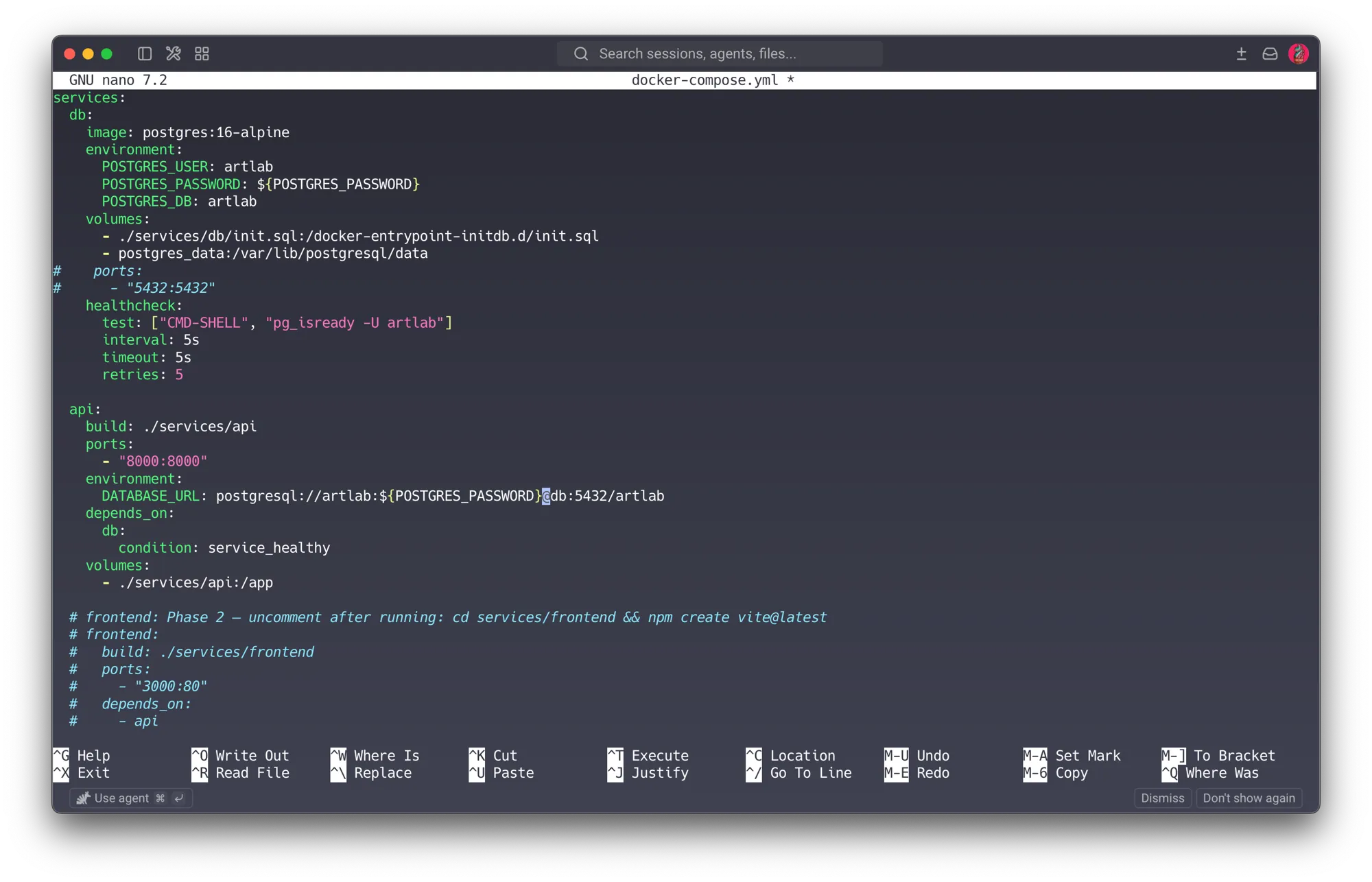
docker-compose.yml): the DB service publishesports: 5432:5432, binding it to all host interfaces — yet the API doesn’t need it: the API reaches the DB by the Docker service name over the internal Docker network (postgresql://...@db:5432/...), which works without publishing the port. So the mapping serves no one but an attacker. Fixed in Section 5.6.1. - Weak, hardcoded DB credentials (raises the severity of the above). The compose hardcoded trivial credentials (user = password = database name) in plaintext. Combined with the exposed port, any host on LIARE could connect with easily-guessed credentials — one of the first things any attacker script tries. Fixed in Section 5.6.2.
- Port 8000 — FastAPI/Uvicorn API over plain HTTP, bound to
0.0.0.0. API traffic (potential tokens/data) travels unencrypted across the LAN (S1/S2: what an observer can see). CORS answers all methods — worth confirmingallow_originsisn’t*for anything sensitive. Deferred to the roadmap — see Section 5.6.4. - Port 22 — OpenSSH 9.6p1 (Ubuntu, modern), ECDSA/ED25519 host keys, no DSA. A sharp contrast
with the router’s 2012 Dropbear. It still accepted
passwordalongsidepublickey— fixed in Section 5.1, the same key-only hardening applied here as on the Pi. - OpenClaw — an AI computer-use / automation agent, installed in March for an Emerging Technologies course exercise, later found actively running months later. This turned out to be far more than leftover software: a live, self-restarting autonomous agent with command-execution, browser control, a Telegram channel, a Gmail watcher, and configured OpenAI/Google keys. It became the project’s second headline finding — full write-up in Section 5.7. → Session 7 / agentic-AI attack surface.
3.5 Patterns that emerge from the whole picture
Looking at the network as a system, several themes recur — and each maps to a session:
- Weak / legacy cryptography everywhere — DSA-1024 on the router, perpetual self-signed certs (2032, 2073), plain-HTTP admin, plain-HTTP API. → Session 1.
- Unmanaged attack surface — UPnP, RTSP, an exposed database, ports nobody knew were open. → Session 2.
- Devices that cannot be patched — the IoT camera, the aging TP-Link firmware. The defense is to isolate, not to fix. → Session 3.
- The human factor as root cause — the forgotten camera, the forgotten OpenClaw, the password-enabled SSH. → Session 7.
The thesis of the whole project — control vs. exposure. Ranking the hosts by who controls them makes the point undeniable:
| Host | Who controls it | State |
|---|---|---|
.104 Work laptop | Third party (IT/TICs), default-deny | Secure zero surface, invisible to scans |
.108 Vision server | Me, freely | Exposed DB exposed, API without TLS, forgotten software (OpenClaw) |
.100 Camera | Me, forgotten | Exposed RTSP exposed, cert to 2073 |
.102 Pi / OctoPrint | Me | Partial auth + TLS in place, but SSH passwords + long-lived cert |
The hosts I administer freely — for the sake of getting work done — are the exposed ones; the host a third party locked down is the safest. Security and convenience are in tension, and configuration drift (a forgotten camera, a forgotten OpenClaw install, a database left exposed by Docker defaults) is the real attack vector here — not a sophisticated adversary. That is the conclusion the hardening phase acts on.
4. Phase 2 — Threat Model
For each adversary: how they get in, what they’re after, and whether anything stops them today.
| Adversary | Entry vector | Goal | Stopped today? |
|---|---|---|---|
| Malicious/curious student on the LAN | already inside LIARE (WiFi/cable), often on a Raspberry Pi with default credentials | pivot between hosts, watch camera, tamper with prints, reach servers | No flat network, no segmentation, no monitoring |
| External attacker via IBERO | must traverse the router | use LIARE as a stepping stone | Partial NAT only; no uplink at test time |
| Physical actor in the lab | cable / WiFi / USB / removing an SD card or disk | direct device control | No boundary doesn’t cover physical access; SD cards are unencrypted (demonstrated: I reset the Pi’s password via the SD card — see Section 5.1). Defense = full-disk encryption |
| Compromised host (e.g. the forgotten IoT camera) | already trusted on the LAN | lateral movement — e.g. reach the exposed PostgreSQL on .108 and the plain-HTTP API | No every host trusts every other; DB listens to the whole LAN |
Assets I’m protecting: lab availability; integrity of the devices (printer, boards, servers); research data and models; student work; and — critically — ensuring LIARE cannot become a stepping stone into the IBERO network.
Reference — Sessions 2 & 7: the adversary/asset framing is the Session 2 toolkit; the student-as-primary-threat and the forgotten-camera story are Session 7 (Human Security), where my perspective as the lab’s instructor is an advantage.
5. Phase 3 — Hardening (with evidence)
Principle (reuse over rederivation): each control below cites the session it comes from, so the project demonstrates applied learning rather than generic best practice. Most of this phase was executed at home — LIARE’s NAT-island design (Section 2) means the router + Pi are portable without losing their topology; the server and camera stayed at the lab, so their remaining items (server
ufw, segmentation, camera removal, the AI demo, API TLS) are queued for the next session there.
5.1 SSH: keys only, no passwords — Session 1 (Cryptography) Done — both hosts
Finding: both the Pi (.102) and the vision server (.108) accepted password auth.
Action taken (both hosts):
- Installed my ed25519 public key (
ssh-copy-id). - Set
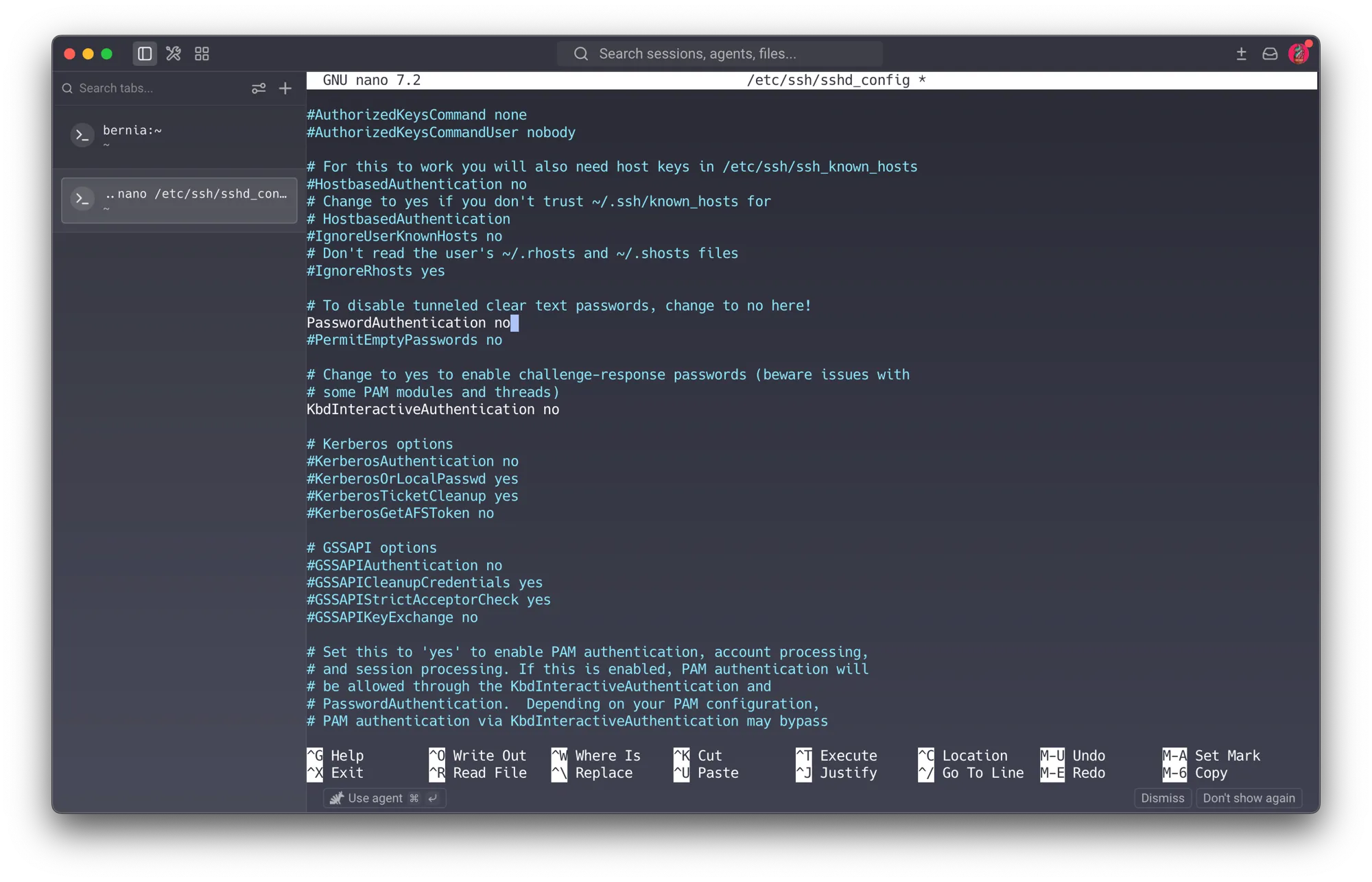
PasswordAuthentication noin/etc/ssh/sshd_config, restartedssh. - Verified with the same tool used to find it:
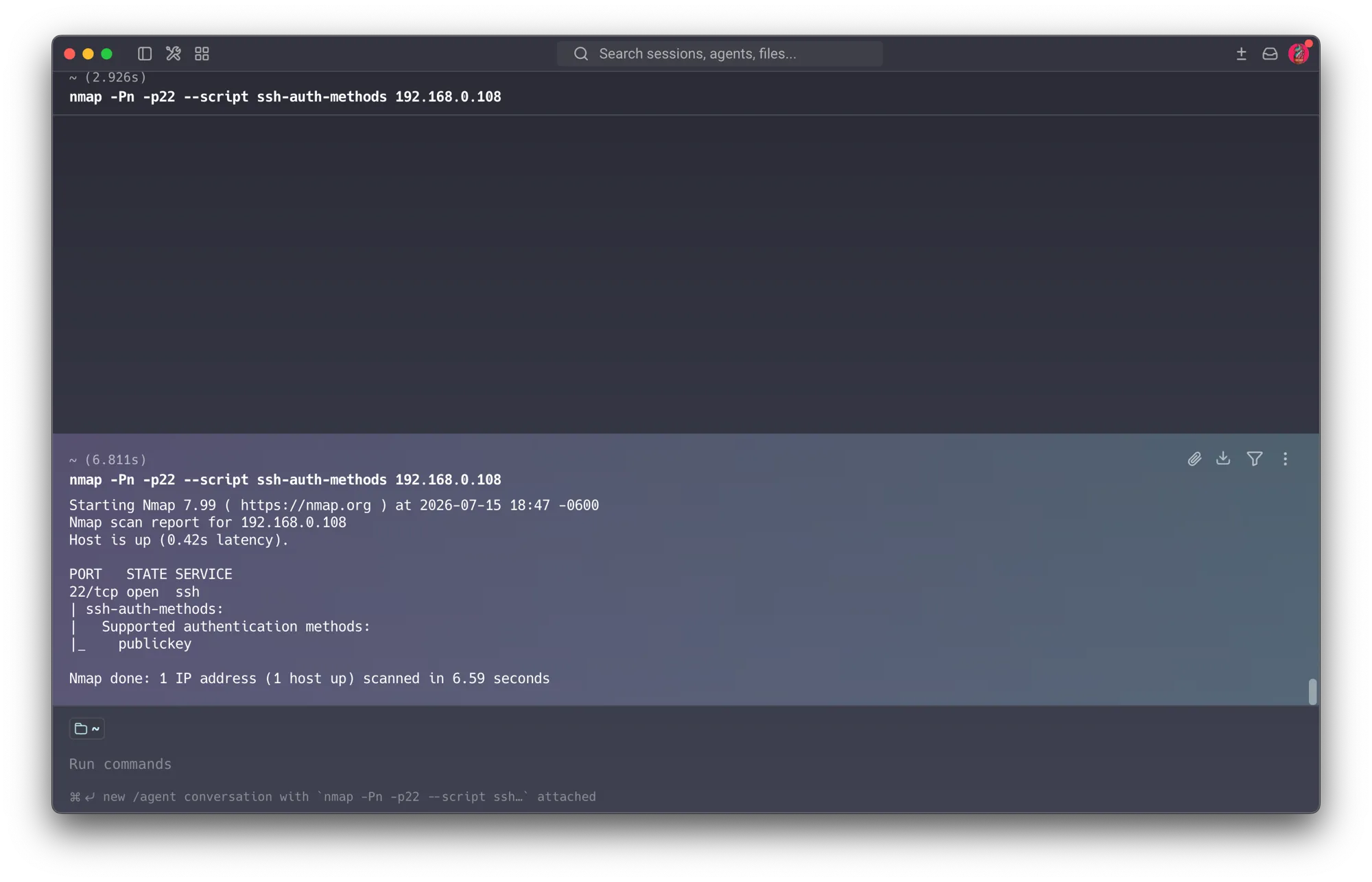
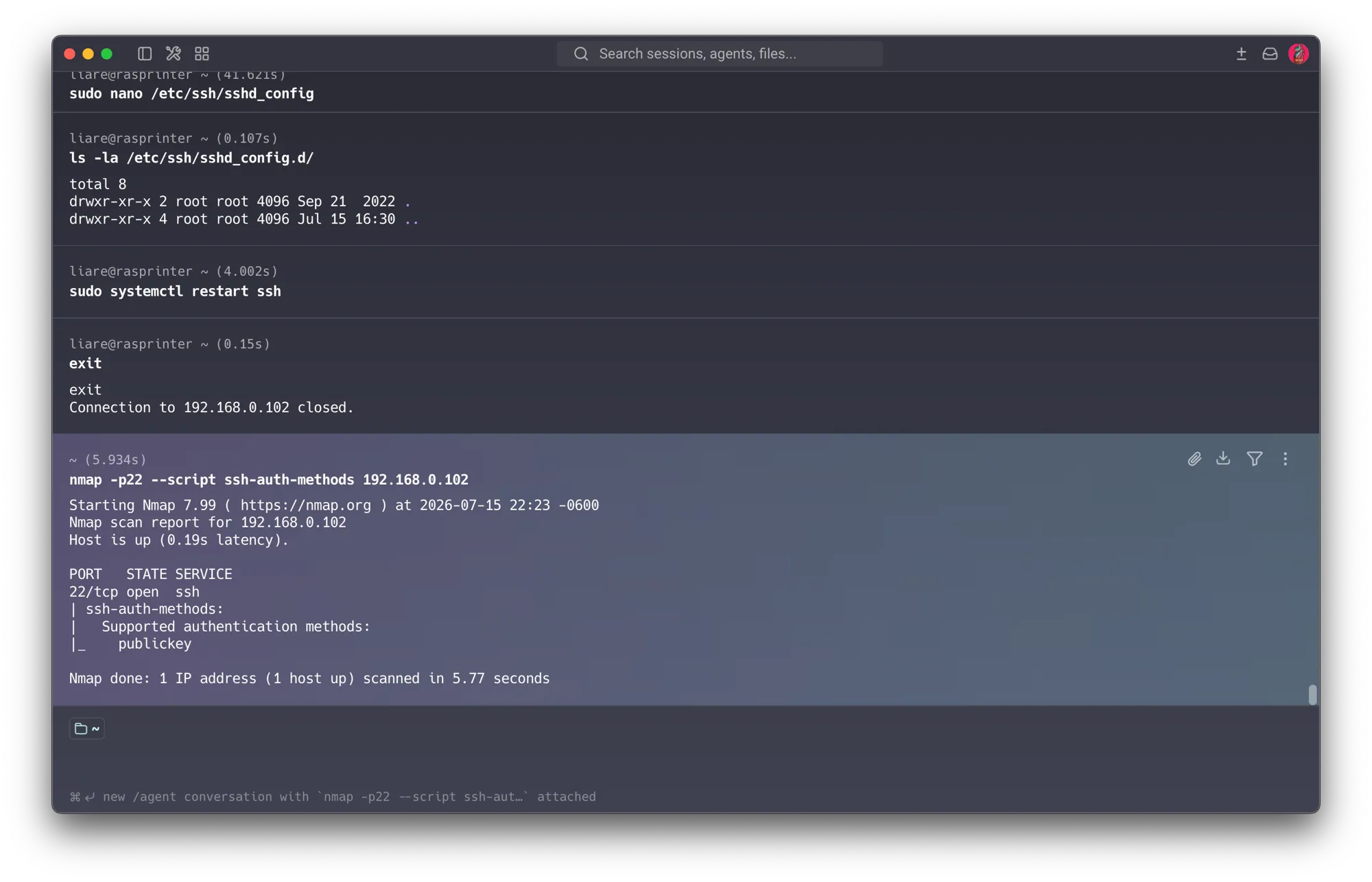
nmap -p22 --script ssh-auth-methodsagainst each host. Result on both:publickey, password→publickeyonly.
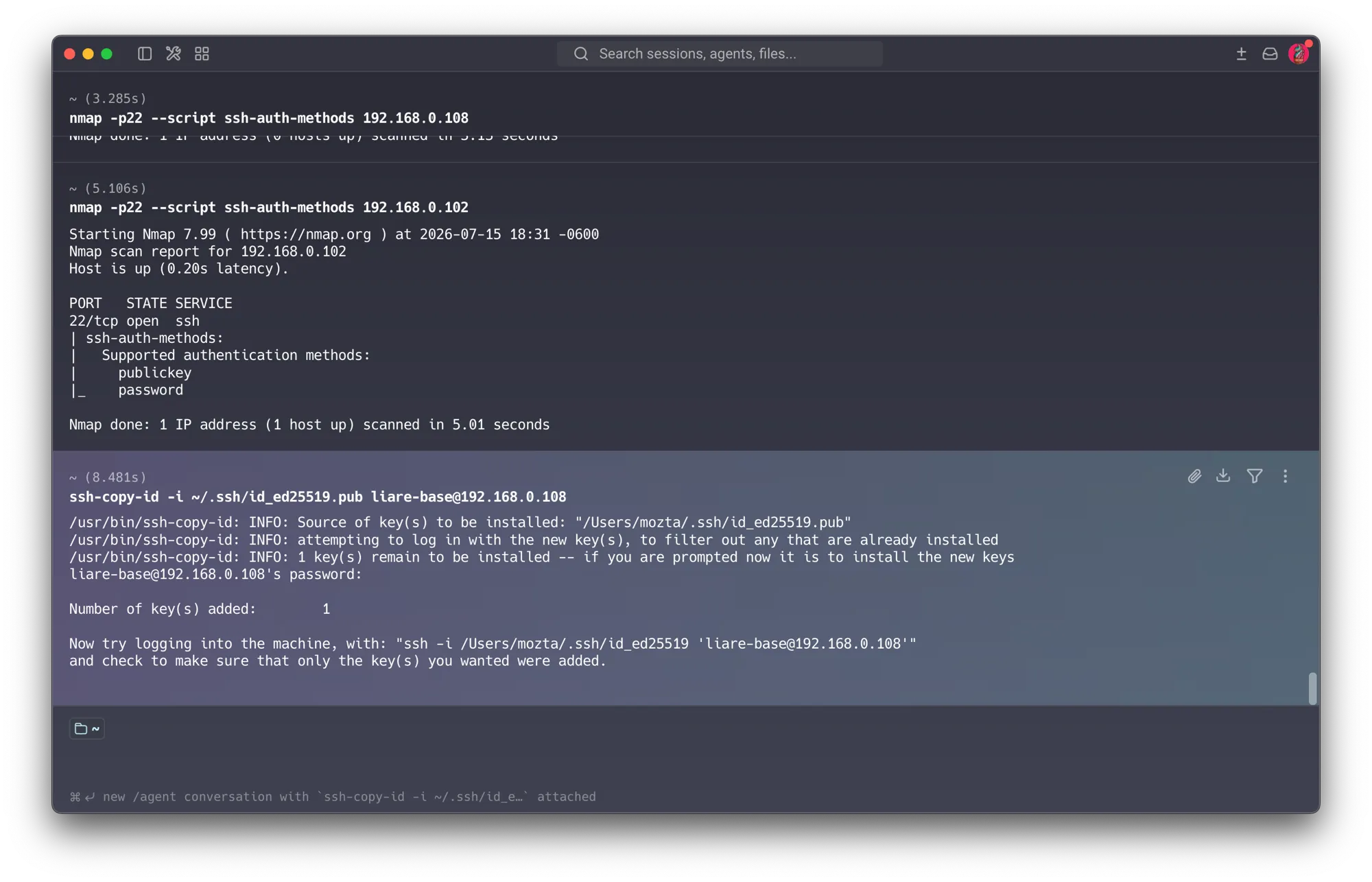
Two different root causes, one symptom (documented troubleshooting):
- On the server (
.108, Ubuntu), the mainsshd_configneeded the line set explicitly tono(screenshot above), and the host stopped answering ordinary ping discovery afterward — the-Pnflag was needed to scan it, a side benefit of the hardening. Ubuntu 24 can also carry a/etc/ssh/sshd_config.d/drop-in that re-enables passwords and overrides the main file, so it’s worth checking that directory too. - On the Pi (
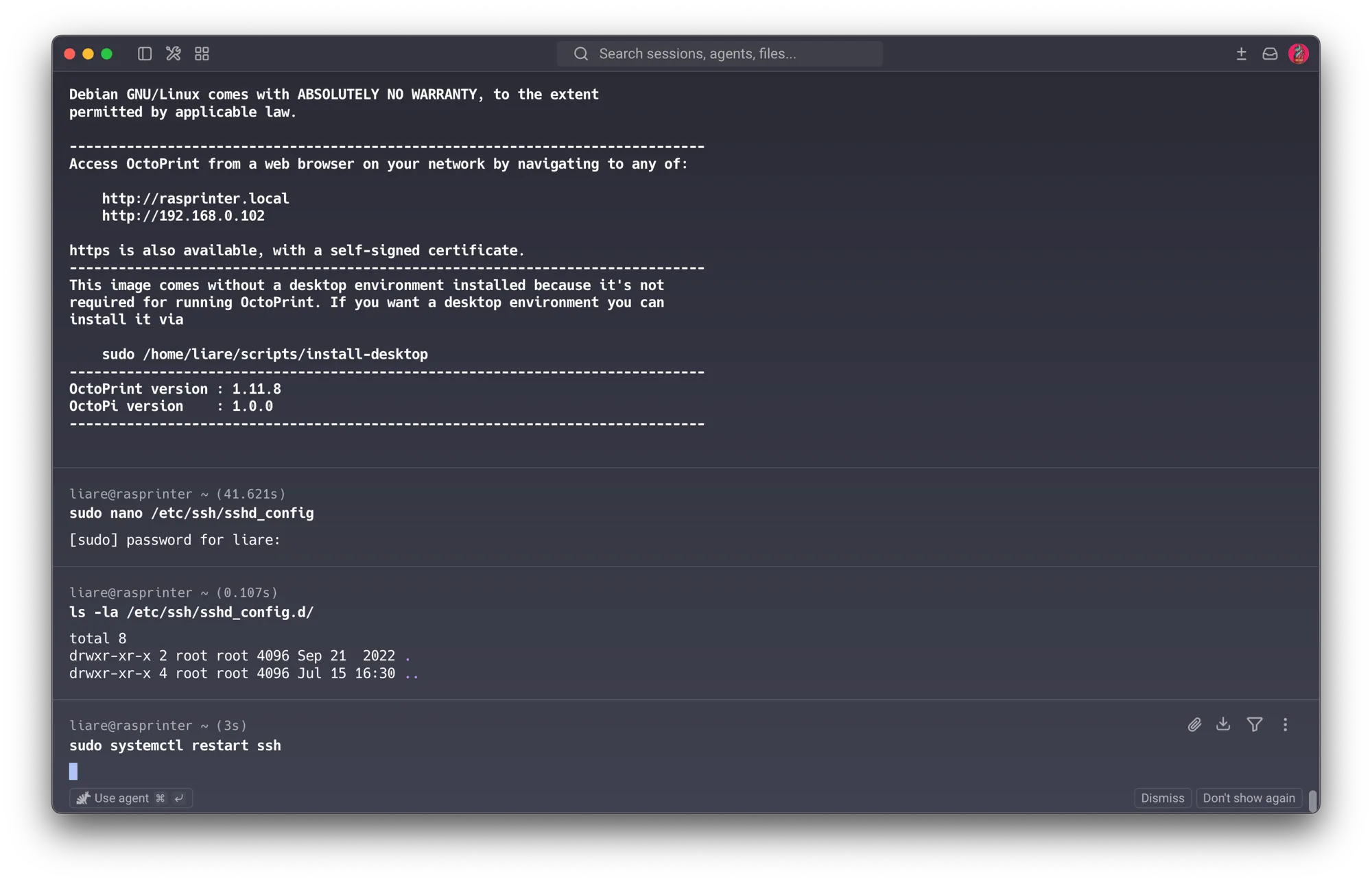
.102), the line was merely commented (#PasswordAuthentication yes), which SSH treats as the defaultyes— so it had to be set explicitly tono. Itssshd_config.d/directory was empty (confirmed above): no drop-in here. Diagnosing each host rather than copy-pasting a fix mattered.
Residual risk (honest): disabling passwords raises the bar dramatically, but a stolen private key still grants access — so the key carries a passphrase and is stored protected. (Directly answers the S1 question “why must the private key be protected?”)
Physical-access aside — a threat demonstrated first-hand. I had lost the Pi’s OS password. I
recovered it by pulling the microSD, editing cmdline.txt to boot into a root shell
(init=/usr/bin/sh), remounting the root filesystem read-write, and running passwd. It worked —
which is precisely the point: physical access defeats software controls. Anyone who gets hold
of the SD card can do the same, reset any password, and read everything on it.
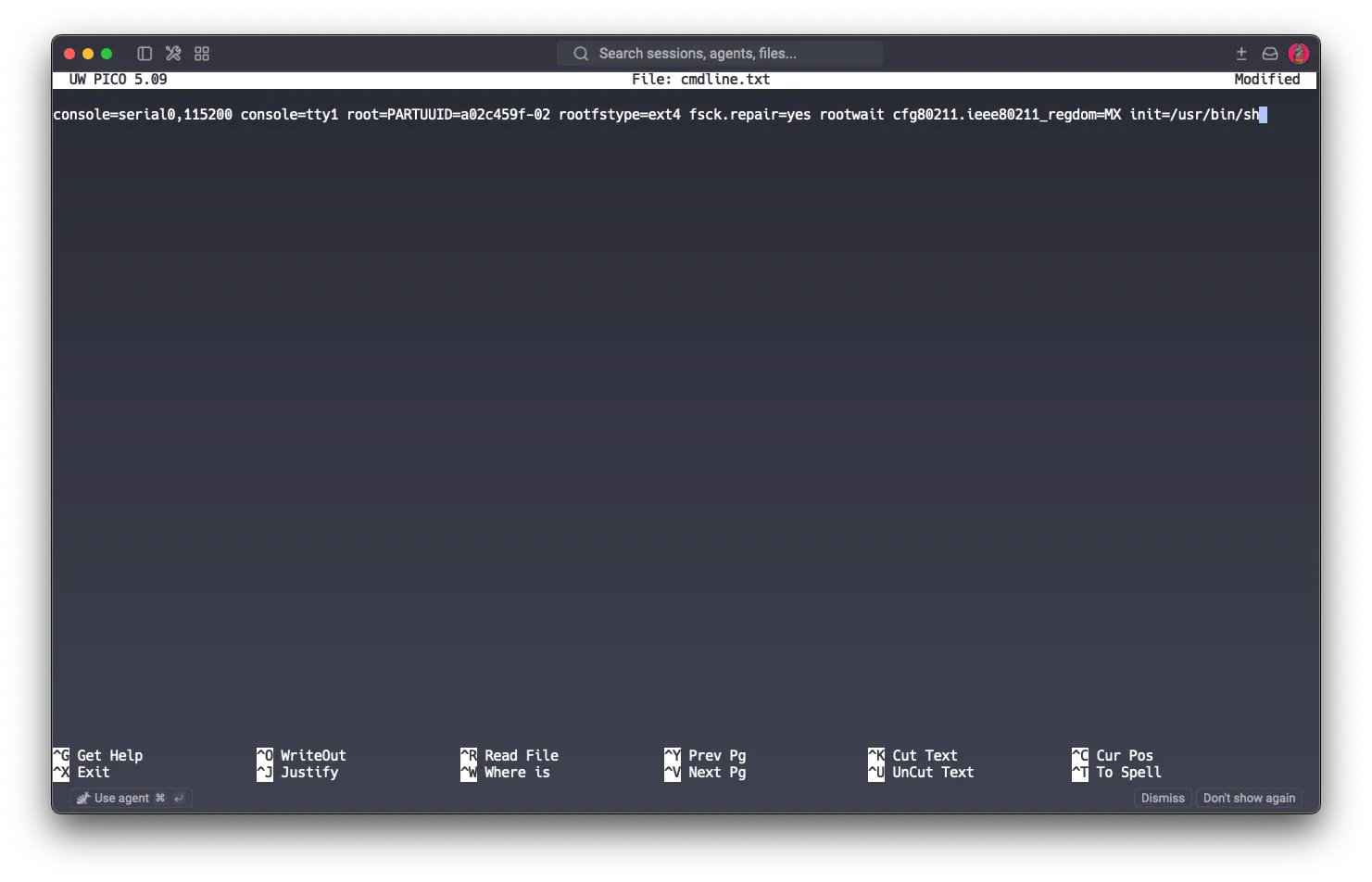
This is the “physical actor in the lab” row of the threat model made concrete, and it’s the strongest argument for full-disk encryption (LUKS) as the real defense against a physical attacker (an S1 topic) — without it, the SD card is an open book.
5.2 Firewall policy — Session 2 (Port Scan & Firewall)
Finding: hosts had no host firewall — embedded devices like the Pi don’t ship with one (ufw
wasn’t even installed). This reinforces that the flat network had no native defenses.
Pi (.102) — done. Installed ufw (a friendly front-end over the kernel’s netfilter — the
firewall engine was always there, only the management tool was missing), then applied a
default-deny inbound policy allowing only the services the Pi legitimately offers:
sudo apt install -y ufw
sudo ufw default deny incoming
sudo ufw default allow outgoing
sudo ufw allow 22/tcp     # SSH (key-only)
sudo ufw allow 80/tcp     # OctoPrint (redirects to login)
sudo ufw allow 443/tcp    # OctoPrint over TLS
sudo ufw enable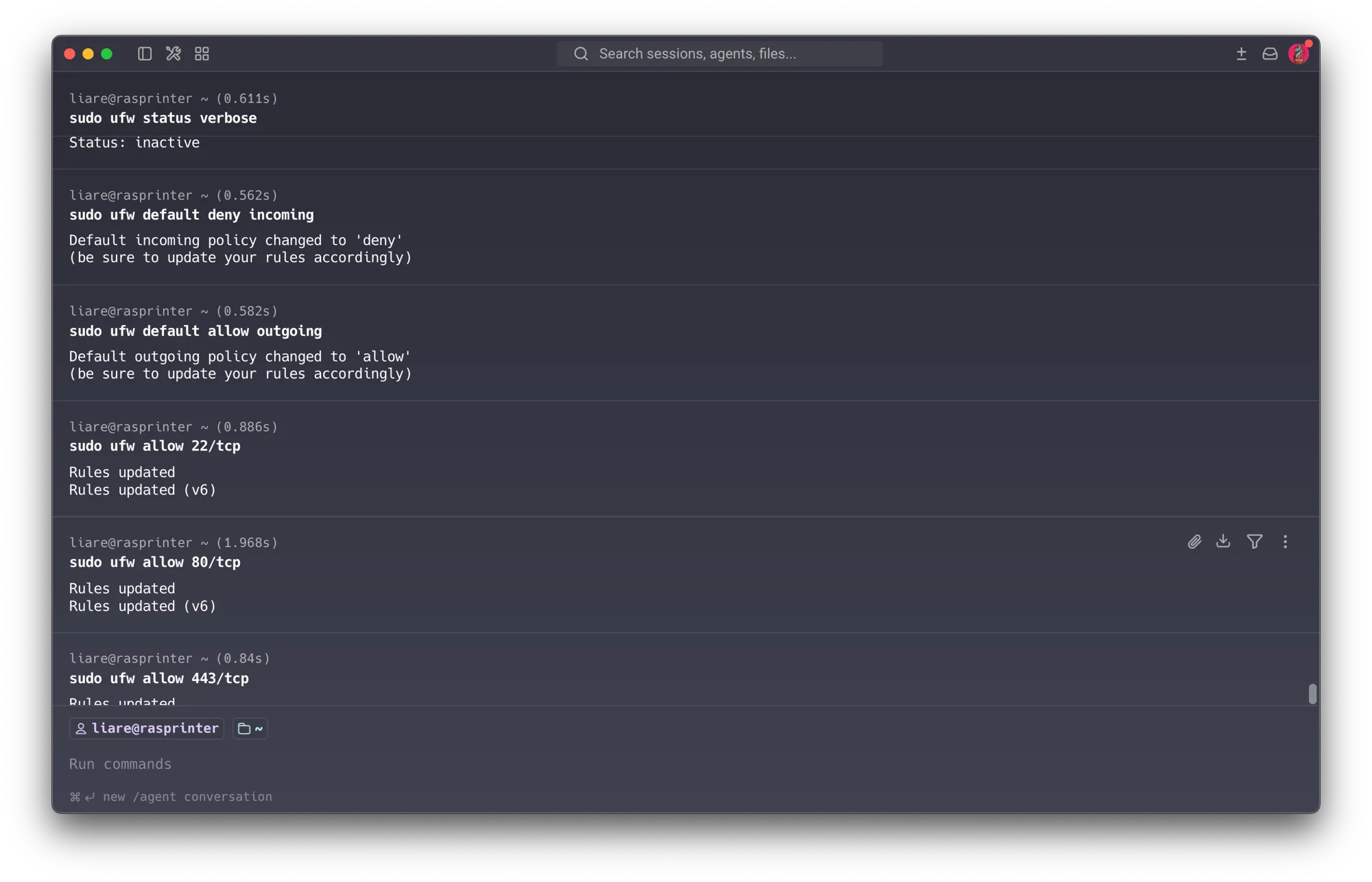
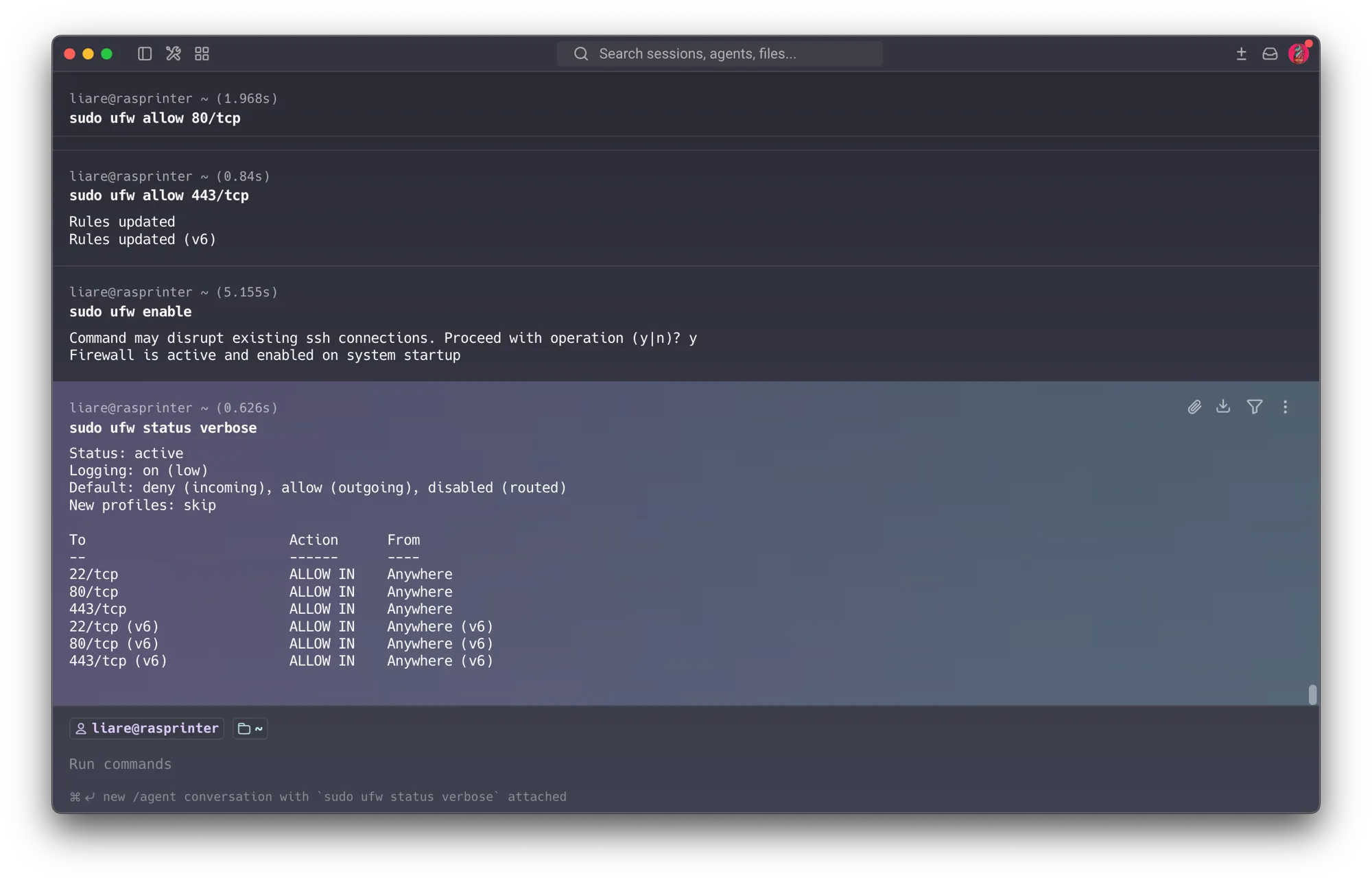
Verified from the Mac (the real proof, not just ufw status):
nmap -p22,80,443 192.168.0.102       → all open       (allowed services intact)
nmap -p5353,8080,9090 192.168.0.102  → all filtered   (blocked)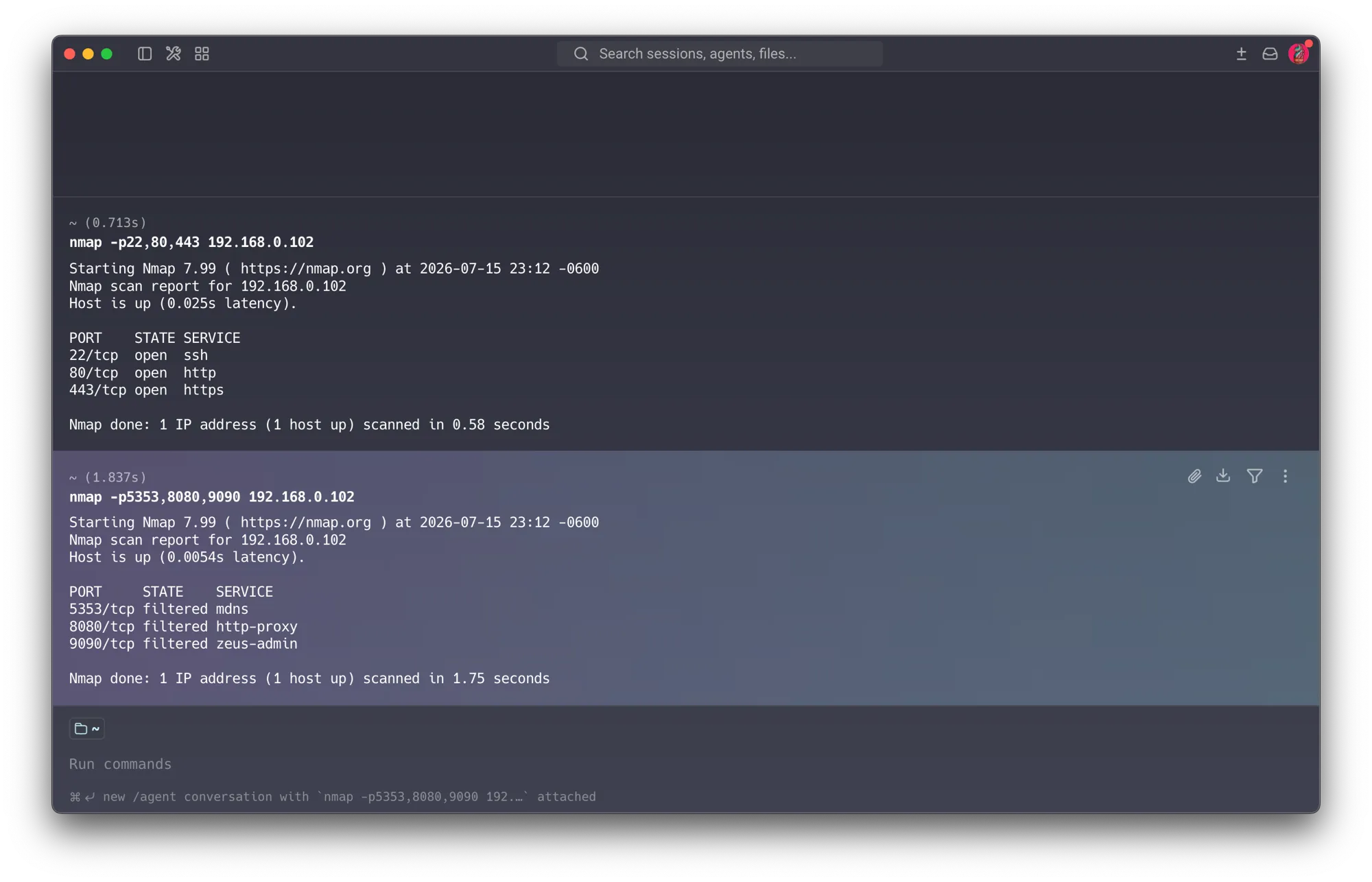
Non-permitted ports went from closed (active reject) to filtered (silent drop) — the signature
of an active firewall. Reuses the ufw walkthrough from my Session 2 assignment.
Server (.108) — code ready, pending execution (no access at time of writing). Same policy,
but note it will allow 22 and 8000 and deliberately not open 5432 — so the firewall
reinforces the Docker fix from Section 5.6.1, giving the database two independent layers keeping it off
the LAN (defense in depth, an S2 concept):
sudo ufw default deny incoming
sudo ufw default allow outgoing
sudo ufw allow 22/tcp     # SSH (key-only)
sudo ufw allow 8000/tcp   # API
# 5432 intentionally NOT allowed — DB stays off the LAN
sudo ufw enable
5.3 Segmentation — the flagship control — Session 3 (isolate what you can’t patch) Designed — execution pending
Finding: the network is flat; the un-patchable IoT camera and student devices sit in the same broadcast domain as the servers.
Reality of the hardware: the WR840N does not support real VLANs. My available lever is the router’s “Red para Invitados” (Guest Network), which on this model isolates guest clients from the main LAN.
Design:
- Put student devices on the Guest network, keeping servers + printer on the trusted LAN.
- Where the router can’t enforce it, host firewall rules (now in place on the Pi, Section 5.2) act as a compensating control (S3: if you can’t fix the device, contain it).
- Honest framing: the Guest network is an approximation of true segmentation; the WR840N can’t do VLANs. This limitation itself is part of the argument for the hardware replacement in Section 5.4 / the roadmap (Section 7) — professional/OpenWrt hardware would give real VLANs.
Status: designed and ready to configure; execution + isolation re-test pending at the lab (the full device set wasn’t present during the at-home session).
5.4 Router hardening — Sessions 1, 2, 5, 6 Partially done — hardware limits documented
UPnP disabled — with an honest caveat. Disabled UPnP in the panel (Transferencia → UPnP). This turns off UPnP-IGD — the dangerous function that lets LAN devices open ports outward automatically — which was the real risk.
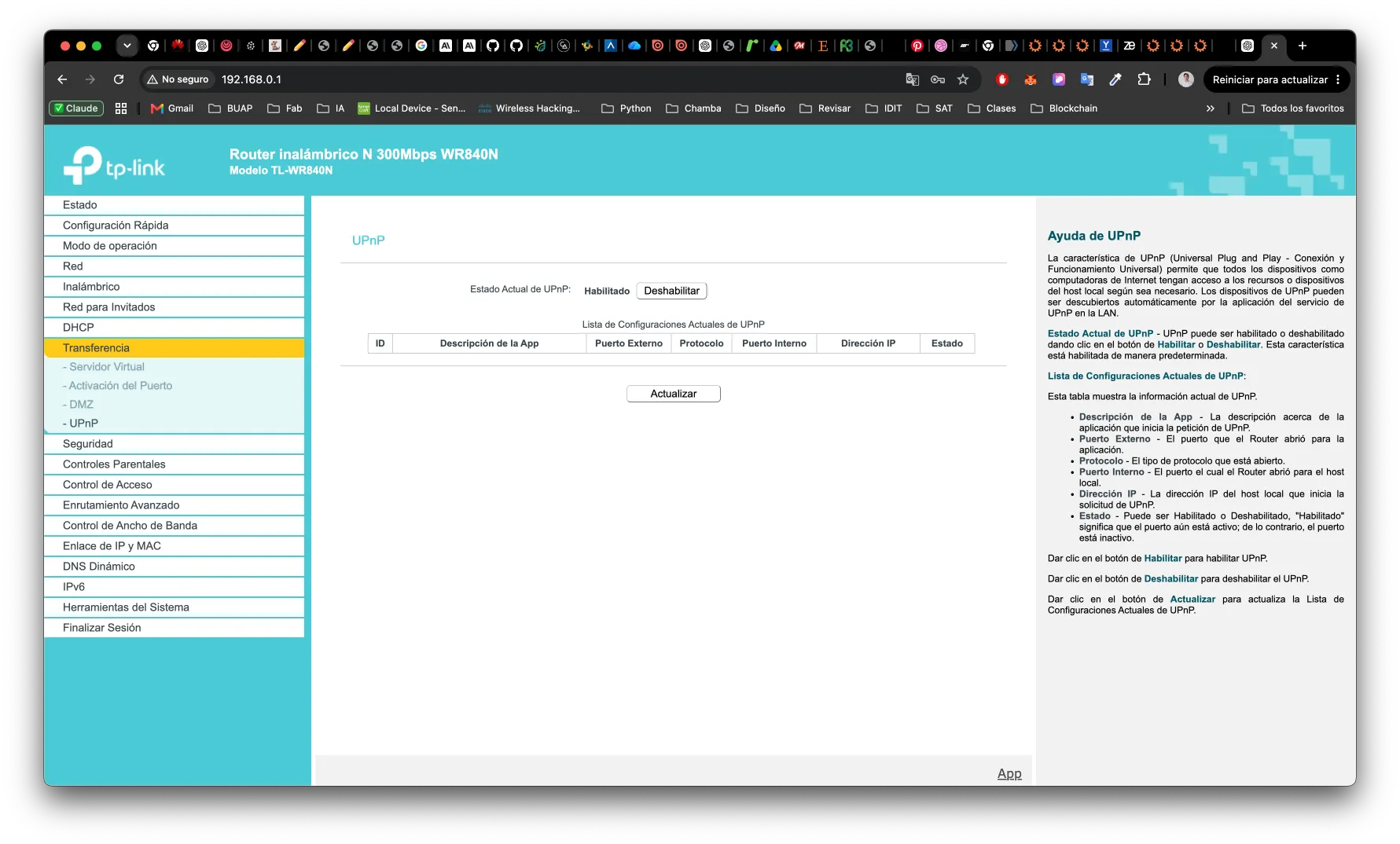
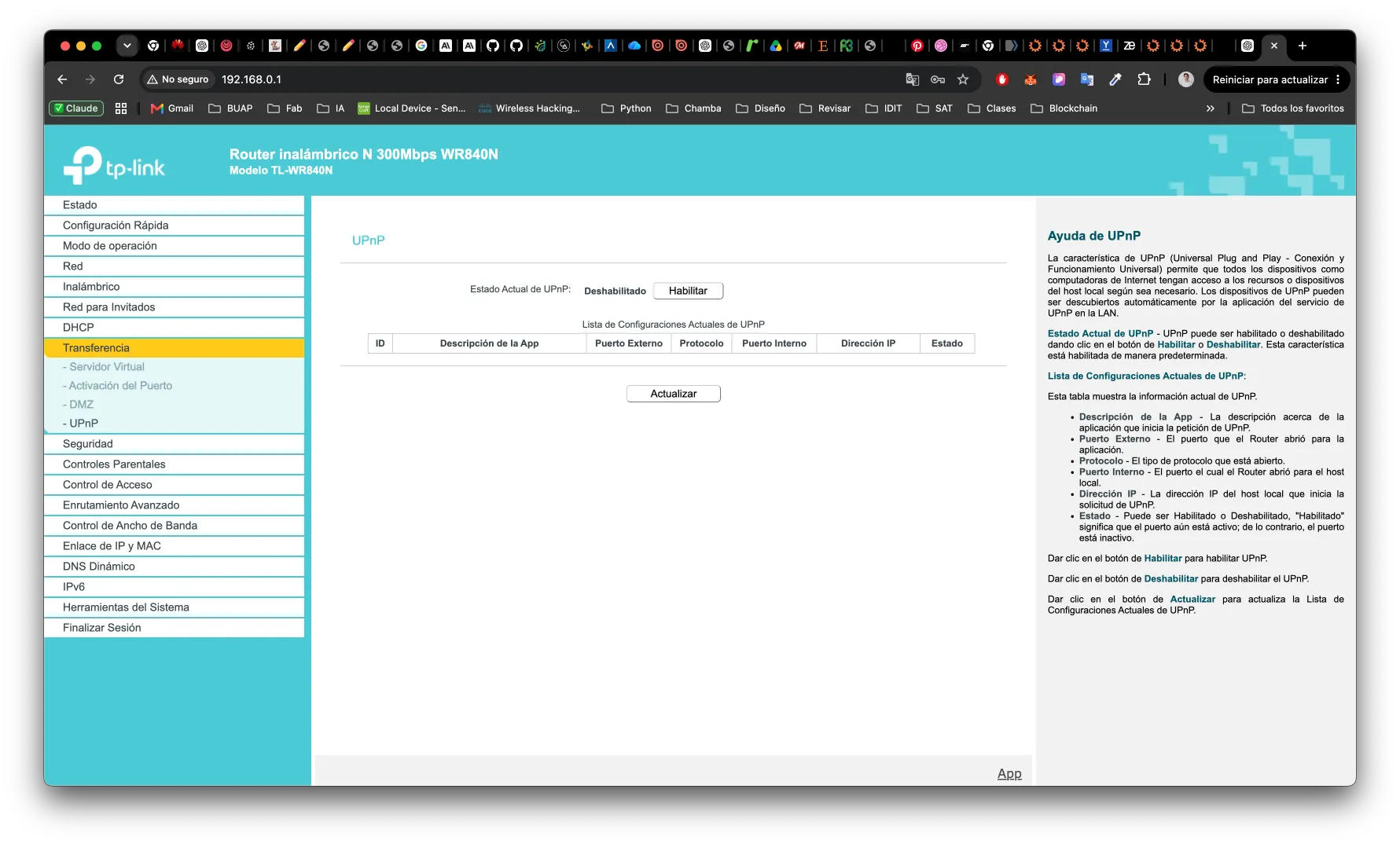
However, re-scanning after a reboot still shows 1900/tcp open: the stock firmware keeps the
SSDP discovery socket listening even with UPnP functionally off. This is a firmware limitation
I can’t override without replacing the firmware/router — a residual exposure documented honestly
rather than papered over.
Default admin credentials changed — and it was a finding. The router’s admin was still on
the factory username admin. Changed to a custom username + strong password. Combined with
the plain-HTTP admin panel (Section 3.4), factory credentials made the router trivially compromisable from
the LAN. (The credential-change form itself is not published as a screenshot — it briefly shows
the new username being typed.)
Unfixable in stock firmware (the case for replacement). Several router weaknesses cannot be remediated on this hardware: Dropbear SSH 2012 with a broken DSA-1024 host key, the plain-HTTP admin panel (no HTTPS option), the lingering SSDP socket, and a 2018 firmware. Together they make a clear roadmap recommendation: replace this consumer router with open-firmware (OpenWrt) or professional-grade hardware — which would also provide the real VLANs the current segmentation has to approximate via the Guest network (Section 5.3). One hardware change resolves several findings at once.
5.5 Camera & OctoPrint hardening — Sessions 1, 5, 6
Camera (.100) — decision: decommission. Because the camera isn’t in use (the YOLO vision
project was never finished), the most defensible action is to remove it from the network
entirely rather than leave it running “just in case.” Taking an unused device off the network
reduces its attack surface to zero — a stronger fix than trying to patch a camera whose firmware I
can’t control. When the vision project resumes, it will be re-integrated already hardened with
everything this project taught: RTSP authentication, a corrected clock (NTP), a sanely-dated
certificate, and placement inside the isolated segment. (Physical removal pending back at the
lab.)
OctoPrint (.102):
- Confirm login on all interfaces; consider shortening/replacing the self-signed cert.
5.6 Vision server (.108) hardening — Sessions 1, 2, 5, 7 Mostly done
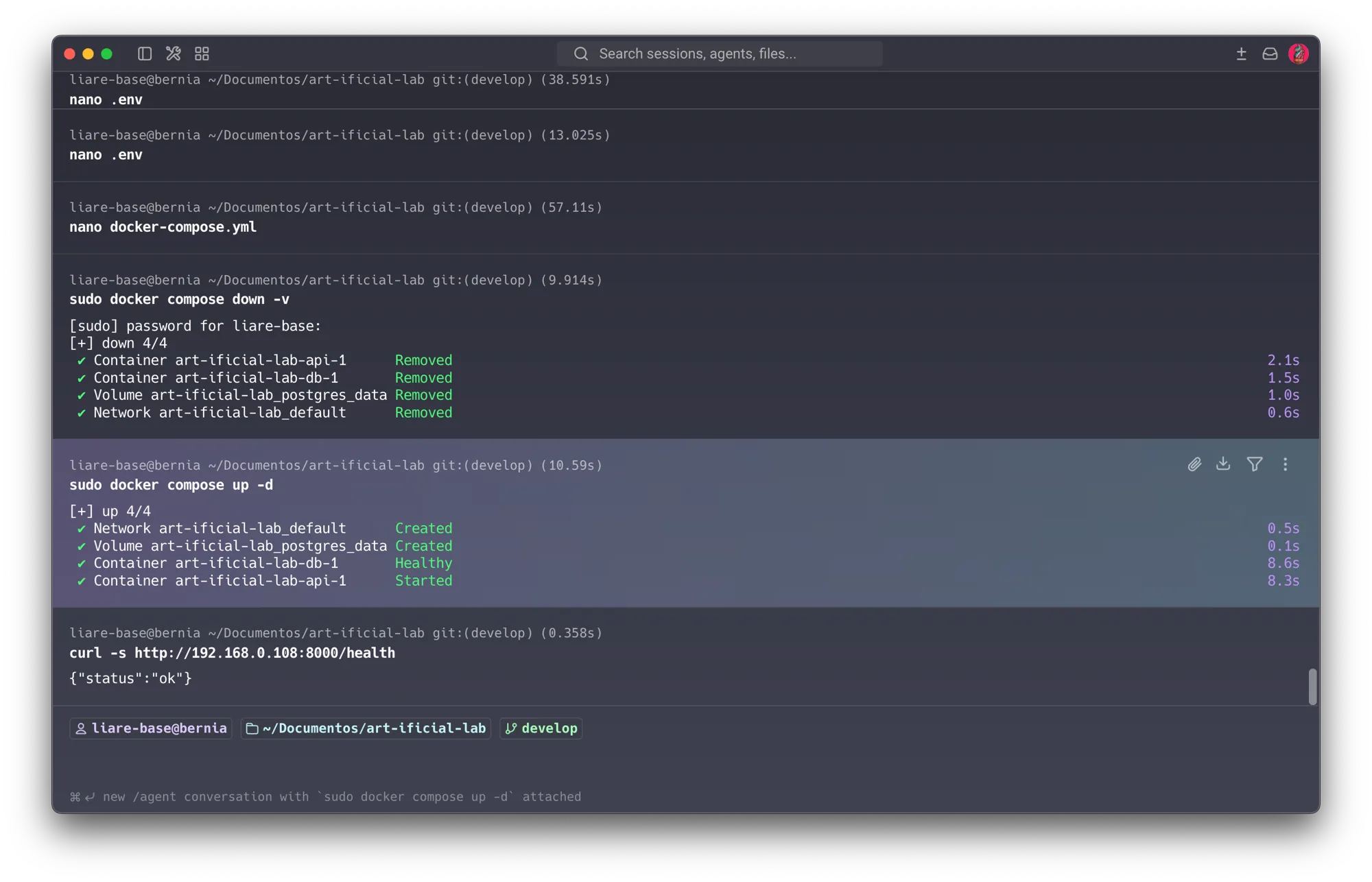
5.6.1 PostgreSQL closed to the LAN — done. The root cause was ports: 5432:5432 in
docker-compose.yml, publishing the DB to all host interfaces though the API reaches it over
Docker’s internal network. Working over SSH from my Mac, I stopped the stack, removed the mapping,
and recreated it.
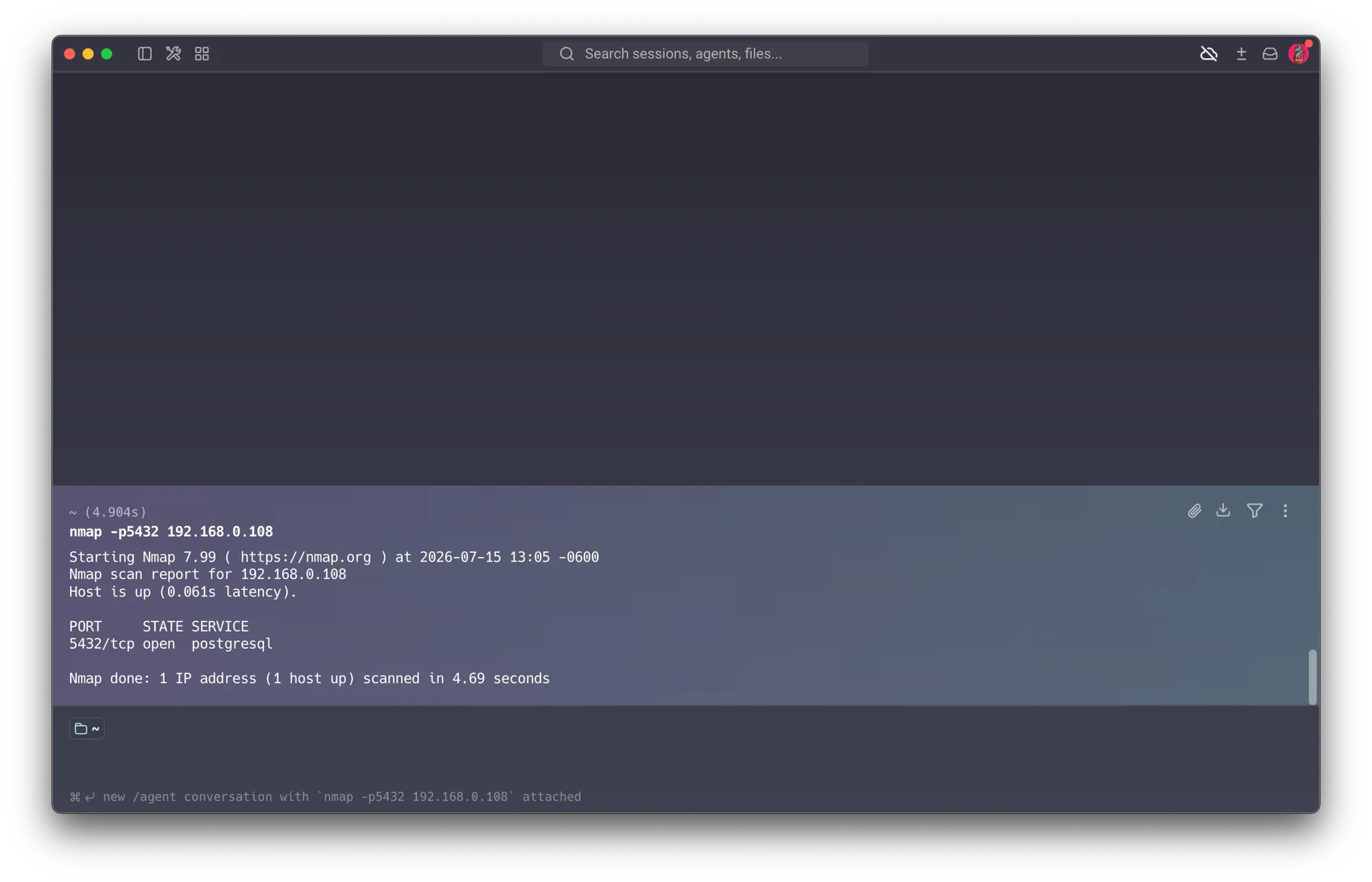
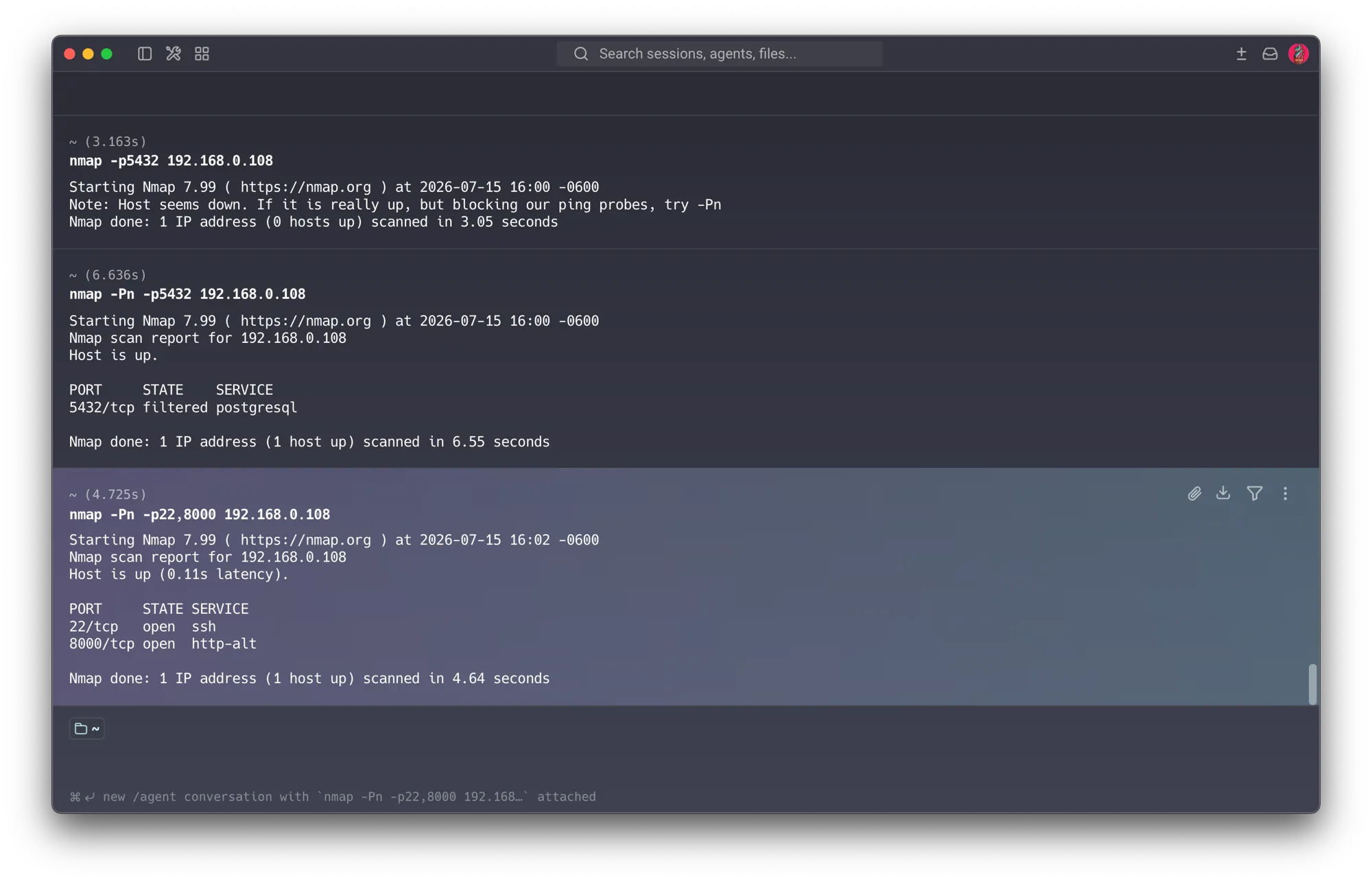
This is the project’s flagship before/after: a one-line config change closed the database to the network while every legitimate service kept running. (Note: after the change the host reports “down” to ordinary discovery — a quieter, harder-to-find posture.)
5.6.2 Strong DB credentials — done. The compose hardcoded trivial credentials (user = password
= db name). Moved the secret to a .env (${POSTGRES_PASSWORD}, referenced in both the DB
service and DATABASE_URL), used a strong value, recreated the volume so the new password took
effect. Confirmed .env is git-ignored (never committed to the project’s GitHub repo).
5.6.3 SSH key-only — done. See Section 5.1 — server now publickey only.
5.6.4 API over plain HTTP (port 8000) — deferred to roadmap. The FastAPI/Uvicorn API still
serves plain HTTP, bound to 0.0.0.0. Since the high-severity findings on this host are resolved
and an internal API would only get a self-signed cert (same pattern as OctoPrint/camera), TLS via
a reverse proxy (e.g. Caddy) is documented as a target-profile improvement (Section 7) rather than
executed now. Also review CORS allow_origins.
5.7 The forgotten AI agent (OpenClaw) — the second headline finding — Session 7 Done
While enumerating the server, I found OpenClaw — an autonomous AI computer-use agent — actively running, not merely leftover. It had been installed back in March as an exercise for my Emerging Technologies course, and had been quietly present ever since. This is the most striking finding of the project and the clearest example of a very 2026 risk class: the attack surface of unmanaged agentic-AI tooling.
How I found it (method, not assumption): I was aware the process was still alive, but rather than assume its nature I traced it with tooling to understand exactly what it was and what it could do:
sudo ss -tlnp | grep -i claw          # what ports is it listening on?
ps aux | grep -i claw                  # is it a live process? how long running?
systemctl --user list-units | grep -i claw   # how does it stay alive?
ls -la ~/.openclaw                      # what capabilities/config does it hold?
This turned a vague “leftover software” note into a precise, evidence-backed finding.
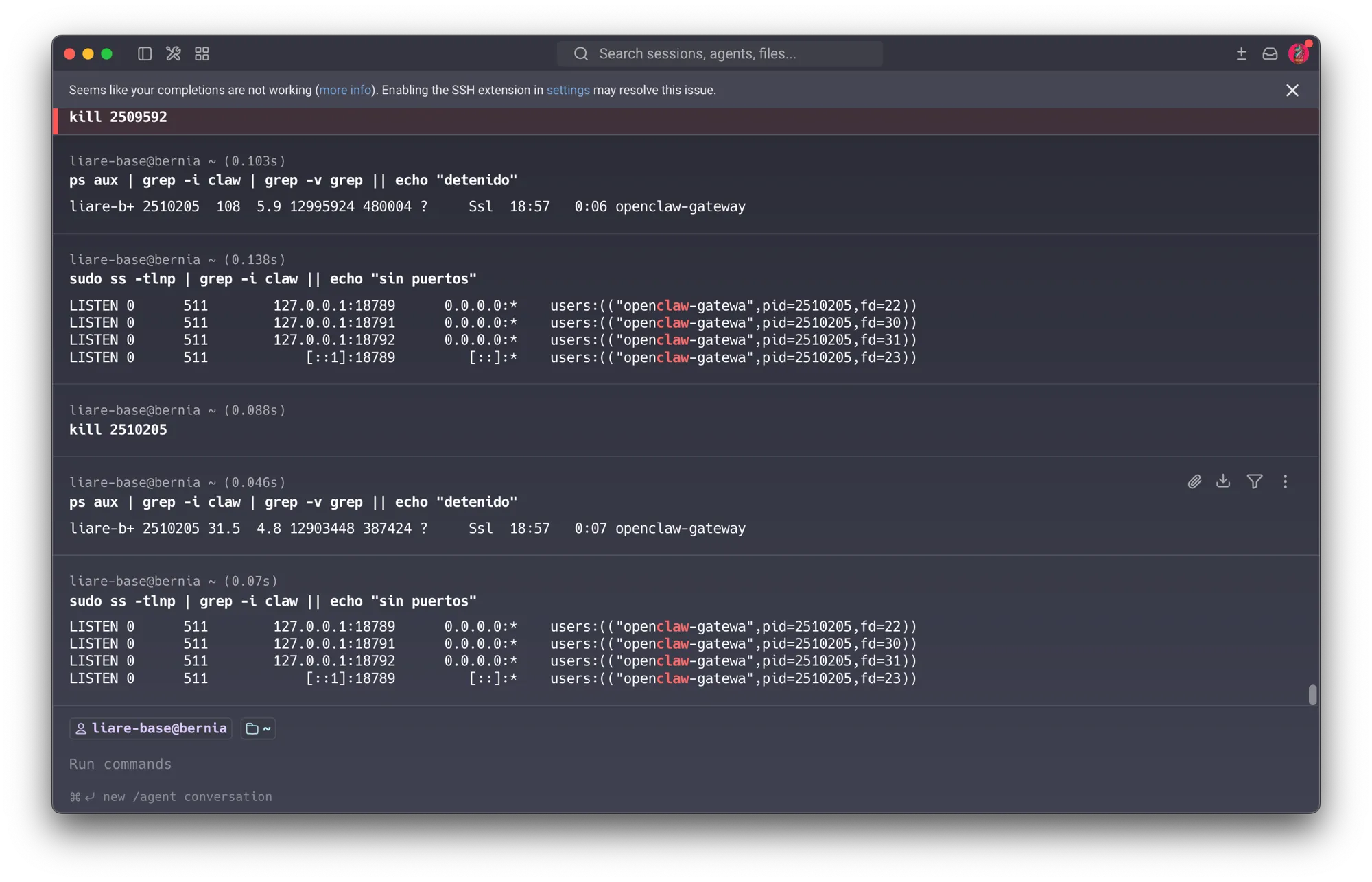
What the investigation revealed:
- Alive and persistent — and it fought back. It ran as a
systemd --userservice (openclaw-gateway.service, v2026.3.2) with auto-restart. My first instinct was tokillthe process — but it kept respawning under a new PID every time. systemd was relaunching it within seconds. Only stopping anddisable-ing the service broke the cycle. That persistence-by-design — resisting being turned off — is exactly what makes a rogue agent a distinct security risk compared to ordinary leftover software.
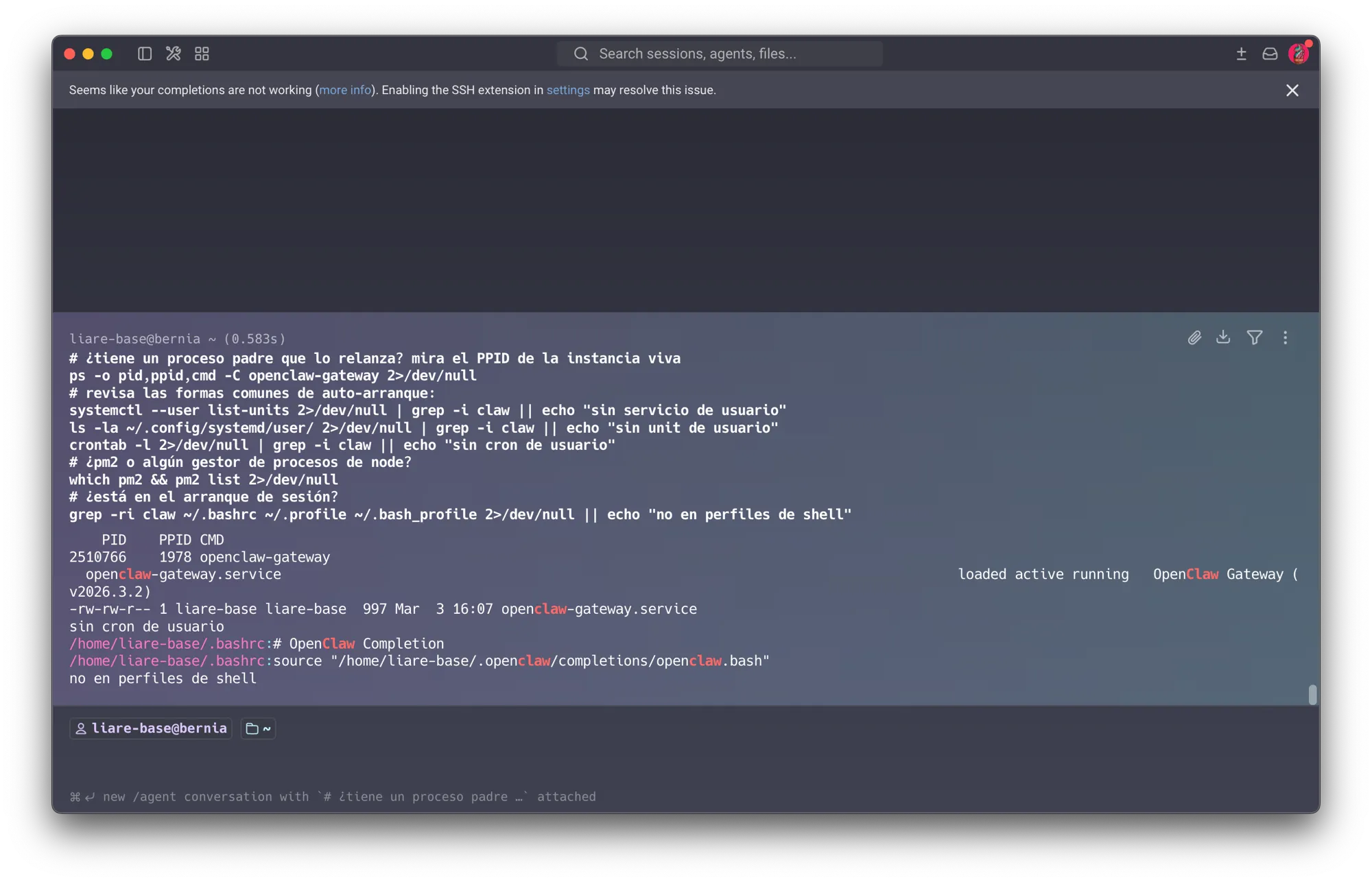
- A note on uptime: the process’s own CPU time was small, but the systemd unit file on disk (above) is dated March 3 — the server had simply rebooted more recently, resetting the process clock. The real exposure window was months, not days.
- Powerful capabilities, confirmed by its own shutdown logs: command execution
(
exec-approvals.json), browser control, a Telegram control channel (webhook — remote command intake), a Gmail watcher (it was monitoring my email), and cron (scheduled autonomous actions). - Credentials: it held OpenAI and Google API keys that I had configured for the exercise.
- One mitigant: it listened only on loopback (
127.0.0.1:18789-92), not the LAN — so it wasn’t reachable from other hosts over those ports. Given everything else, that’s thin comfort.
Risk: an autonomous agent with command-exec + browser + Telegram + Gmail access + LLM keys, unsupervised for months, on the same host as the production DB and API. Anyone reaching its control channel would gain not just data but the ability to act.
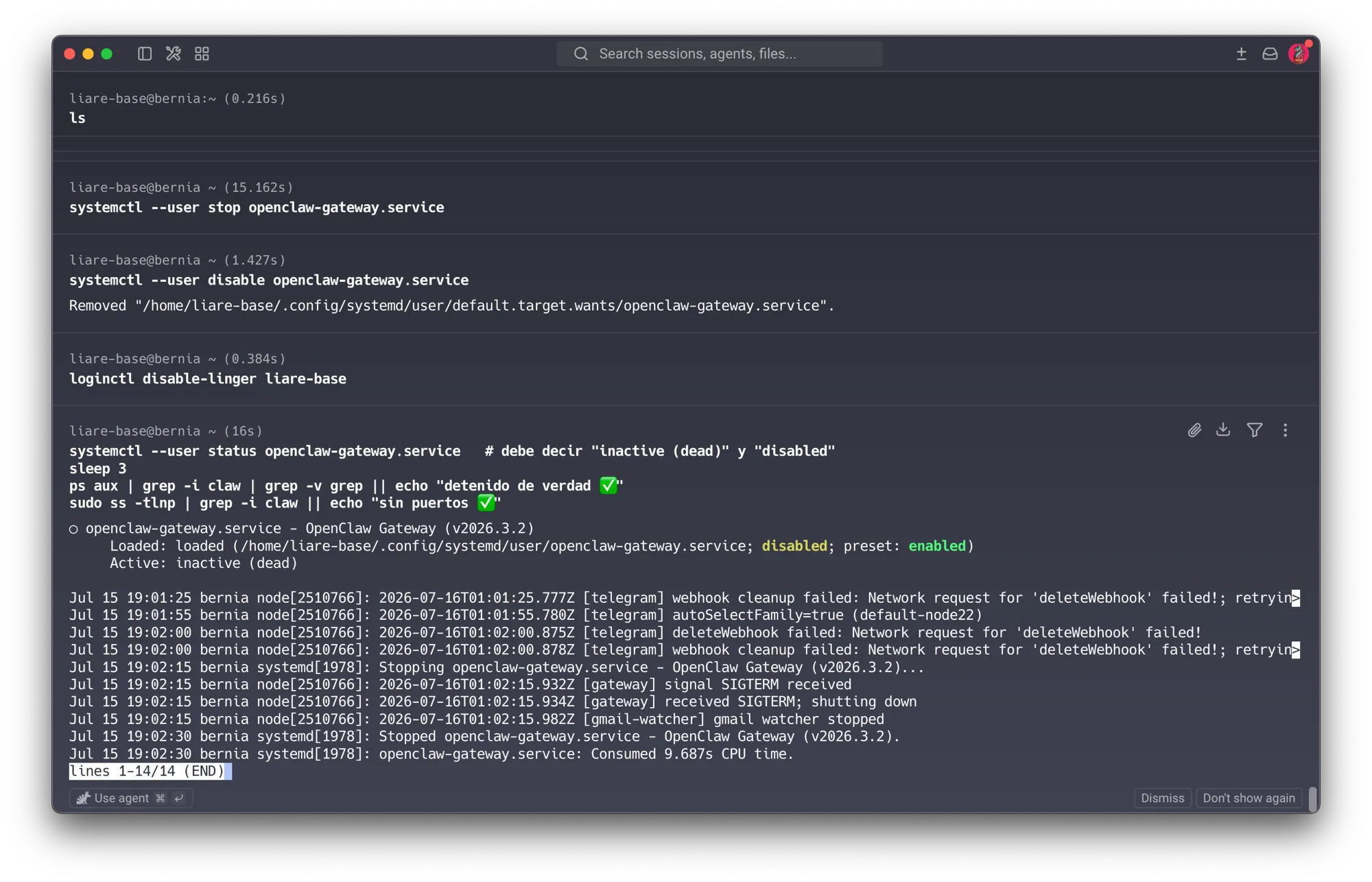
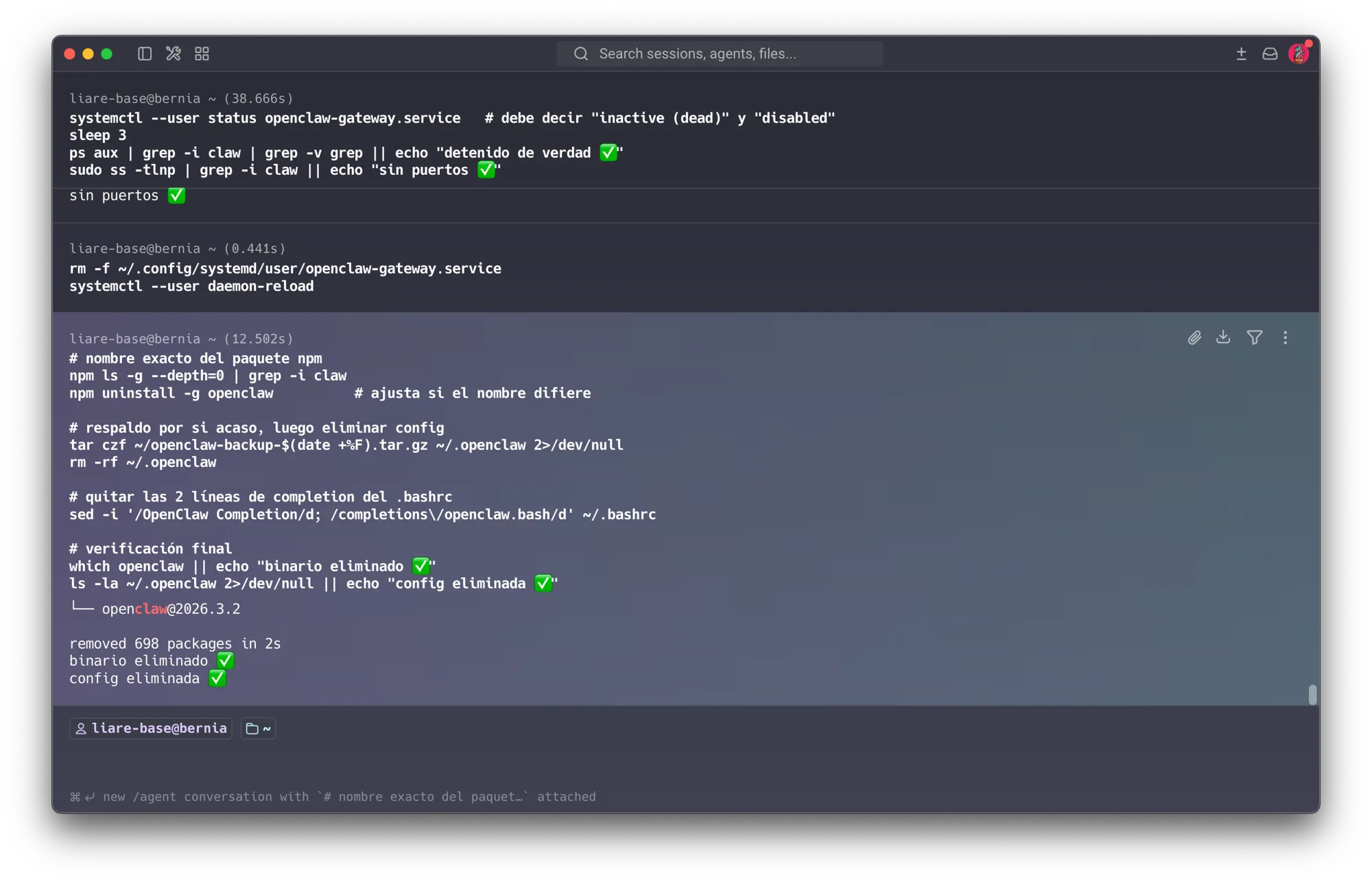
Remediation (done): stopped and disabled the service (breaking the auto-restart), disabled
linger, uninstalled the binary (npm uninstall -g openclaw — 698 packages), removed
~/.openclaw (kept a backup archive), cleaned the .bashrc hooks, and revoked/rotated the
OpenAI and Google keys in their provider consoles — because deleting local files does not
invalidate a leaked key.
Lesson: this is the camera pattern escalated. A forgotten passive device (the camera) is an exposure; a forgotten active agent is a live, self-restarting, remotely-controllable foothold that had access to email, a browser, and command execution for months. Both trace to the same root: configuration drift and unmanaged lifecycle — but the agent is the far more dangerous shape of it.
6. Phase 4 — AI Extension: Anomaly Detection (IDS that learns) Built & validated on synthetic traffic — live capture next
Reference — Session 2 (IDS/IPS): this extends the detection-vs-prevention system into a working demo, and reconnects the security project with the lab’s own AI focus.
Idea: capture traffic at the LIARE gateway, then apply unsupervised anomaly detection to flag “weird” device behavior (scans, off-hours traffic, unexpected talker pairs).
Approach (my stack — Python):
- Capture:
tcpdump -i <iface> -w liare.pcap(or Suricata/Zeek if time allows). - Feature extraction from the pcap/flows: bytes, ports, hour-of-day, source→destination pairs.
- Model: Isolation Forest or an autoencoder to score anomalies.
- Demo proof: run an
nmapscan myself and show the model flag it as anomalous — a small but convincing end-to-end demonstration.
Threat-intelligence angle (light touch, S7): students using generative AI to write phishing or exploit code is a real emerging threat; an LLM can also triage IDS alerts into readable reports. Kept as a secondary note, not the core.
6.1 Validation strategy: synthetic traffic modeled on LIARE itself
Before pointing an anomaly detector at production infrastructure, it should be validated against
traffic with a known ground truth — that’s standard practice for any detection system, not a
shortcut. generate_synthetic_traffic.py builds that ground truth directly from this project’s own
evidence, not a generic network: the real host inventory and open ports from Section 3.3 (router
.1, camera .100, Pi .102, analyst .103, work laptop .104, vision server .108), realistic
session traffic between them (SSH, OctoPrint polling, the vision API), background service noise
(SSDP, mDNS, DHCP/NTP), and one labeled nmap-style port-scan burst as the anomaly to detect.
Everything downstream of the flow data — feature extraction, the model, scoring, the plot below —
is the exact code that runs against a live capture; only the traffic source changes. Full code:
tools/liare-ids/ in this repo.
6.2 Feature engineering — what actually separates a scan from normal traffic
Raw byte/duration/packet counts turned out to be the wrong primary signal: a long SSH admin session and a scan probe can both look “small and quick” or “rare and unusual” in isolation. What actually distinguishes a scan is fan-out over a short time window — one source touching many distinct destination ports and hosts in a burst, which normal service traffic never does:
WINDOW = pd.Timedelta(seconds=5)

for _src, idx in df.groupby("src_ip").groups.items():
    idx = list(idx)
    times = df.loc[idx, "timestamp"].to_numpy()
    ports = df.loc[idx, "dst_port"].to_numpy()
    ips = df.loc[idx, "dst_ip"].to_numpy()
    start = 0
    for end in range(len(idx)):
        while times[end] - times[start] > WINDOW:
            start += 1
        distinct_ports[idx[end]] = len(set(ports[start:end + 1]))   # fan-out over ports
        distinct_ips[idx[end]] = len(set(ips[start:end + 1]))       # fan-out over hosts
        flow_rate[idx[end]] = end - start + 1                        # flows/5s from this source
These three rolling features, plus duration (log-transformed — SSH sessions can be 1000× the bytes of a scan probe and would otherwise dominate the split decisions), protocol, destination port, and hour-of-day, feed an unsupervised Isolation Forest — it never sees a label:
model = IsolationForest(n_estimators=200, contamination=0.08, random_state=42)
model.fit(df[FEATURE_COLS])
df["anomaly_score"] = -model.score_samples(df[FEATURE_COLS])
df["flagged"] = model.predict(df[FEATURE_COLS]) == -1
6.3 Result — the model flags the scan
979 synthetic flows over a simulated 3-hour window (matching the “empty network,” summer-break state from Section 3), with one 70-port nmap-style burst from the analyst host injected at minute 126. The model separates it cleanly from the background:
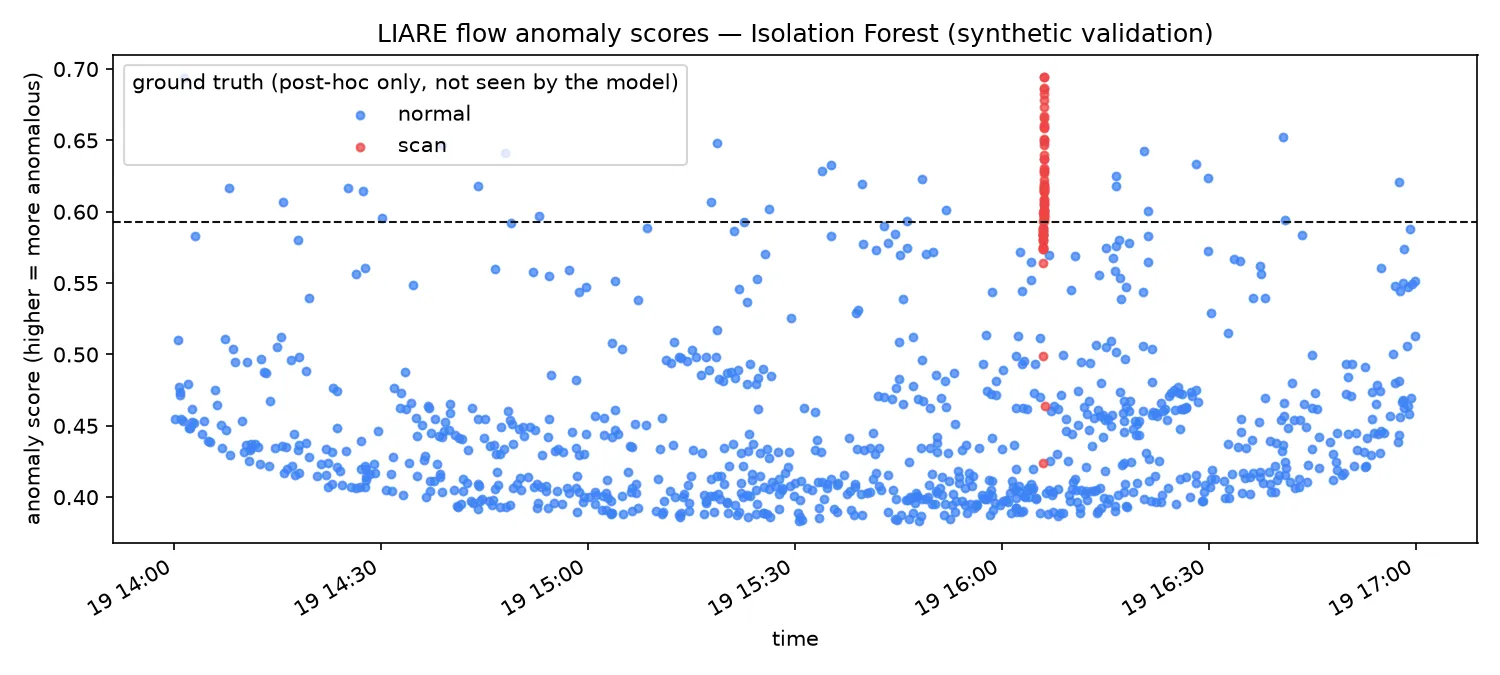
| Metric | Value | Note |
|---|---|---|
| Scan flows flagged | 50 / 71 (70% recall) | the model’s top-ranked anomalies are overwhelmingly scan flows |
| Precision at threshold | 63% | at an assumed 8% contamination rate |
| Mean anomaly score | scan 0.61 vs. normal 0.45 | clear separation between the two populations |
An honest limitation, not a hidden one — window warm-up. The 21 missed scan flows are not
scattered randomly: they are almost entirely the first ~1 second of the burst, before the
trailing 5-second window has accumulated enough distinct ports to look unusual. src_distinct_ports_5s
climbs from 1 to 12 across those flows — genuinely closer to normal traffic at that instant. A
sliding-window detector has an inherent detection lag: it needs roughly a window’s worth of
activity before a fast scan becomes visible. That is a real, documented characteristic of this
class of detector, not a bug in the synthetic setup — and it argues for pairing the window feature
with a stateful port-scan counter (e.g. Suricata’s stream/scan keywords) in the target profile
(Section 7), rather than relying on Isolation Forest alone.
6.4 Deployment at the gateway
The pipeline is built to take a live capture with zero code changes — swapping the input source is the only difference between what ran above and what runs at the gateway:
-
tools/liare-ids/capture_traffic.sh <iface>— capture a real window of LIARE traffic. -
pcap_to_flows.py— convert it into the same flow schema the synthetic generator produces. -
train_and_detect.py— re-run unchanged, then run annmapscan against LIARE from my own host to reproduce the “model flags my own scan” proof against live traffic.
7. Phase 5 — Residual Risk & Roadmap (Current → Target Profile)
Residual risk after hardening
Even with the controls above in place, the following remain:
- Physical access to the lab is outside the router’s trust boundary.
- Un-patchable device firmware (camera, old router) — mitigated by isolation, not eliminated.
- Shared WiFi / human factor — passwords, device hygiene, students rotating each semester.
- Self-signed certificates — no CA vouches for identity on the internal LAN.
Current → Target profile
| Capability | Current | Target |
|---|---|---|
| Segmentation | Flat LAN | Enforced student ↔ server isolation (VLAN-capable hardware) |
| Authentication | Mixed (SSH passwords, HTTP admin) | Key-only SSH, strong admin auth over HTTPS |
| Encryption in transit | Partial (some TLS, some plain HTTP) | TLS everywhere; certs rotated & sanely dated |
| Telemetry / IDS | None | Live anomaly-detection IDS at the gateway |
| Device inventory | Manual, drifted (forgot the camera!) | Continuous inventory dashboard |
| Management | Per-device, ad hoc | Centralized (mesh-style app: open/limit network, stats, remote mgmt) — FastAPI + React |
(See the interactive topology diagram in Section 2 — toggle it to “After” for the hardened state side by side with the same hosts and IPs.)
The centralized management app (Meraki/mesh-style) is presented as target architecture / roadmap, sustained by what is actually implemented now (firewall + segmentation + IDS), not claimed as a finished deliverable.
8. Mapping — How Each Session Grounds This Project
This is the backbone that shows the final project synthesizes the whole course.
| Session | Topic | Where it appears in LIARE |
|---|---|---|
| S1 | Cryptography | SSH key auth on the Pi; analysis of self-signed certs (Pi 10 yr, camera 50 yr); DSA-1024 as obsolete-algorithm case study; disk/data encryption on servers |
| S2 | Internet Security | Threat/trust/residual lens across the whole net; the real port scan (this project’s evidence); firewall (ufw) policy; TLS handshake on OctoPrint; IDS/IPS → AI extension |
| S3 | Software / Memory Safety | Embedded devices (camera, Raspberry Pis, printer) can’t be reliably patched → isolate as a compensating control — the bridge from Protostar to network segmentation |
| S4 | Microarchitecture Security | Shared demo servers → isolate tenants via VMs/containers rather than shared bare metal |
| S5 | OS & Application Security | Host hardening, patching, least privilege, OctoPrint auth, disabling unneeded services |
| S6 | Hardware Security | The IP camera & router as IoT/hardware risk; physical access to the lab; default-credential exposure |
| S7 | Human Security | The forgotten camera & config drift; students as primary internal threat; acceptable-use policy & onboarding; my vantage point as the lab’s instructor |
Reflection
If I had to compress this whole project into one sentence, it would be the control-vs-exposure table in Section 3.5: the one host I don’t administer — locked down by someone else, by default — is the safest thing on the network, and everything I run myself for the sake of getting work done is where the real findings live. That’s an uncomfortable thing to document about your own lab, but it’s also the most useful thing the course gave me: a reason to actually look.
The two headline findings say the same thing in different registers. The camera was a passive mistake — I installed it, moved on, and forgot it was still listening. OpenClaw was the same mistake wearing a much more dangerous shape: an active, self-restarting agent with command execution, a browser, and access to my email, sitting quietly on the same host as the production database for months. Neither was the work of a sophisticated attacker. Both were configuration drift — software I set up for a specific exercise and never circled back to decommission. As someone who now recommends AI tooling to colleagues and students routinely, that’s the finding I’ll carry forward the longest: an agent is not “just another script” left running — it has a lifecycle, and forgetting to close it out is a real, current-generation risk class, not a hypothetical one.
The SD-card password reset was the other lesson that landed physically rather than conceptually. I knew, abstractly, that physical access defeats software controls; doing it to my own Raspberry Pi in five minutes with a card reader made it concrete in a way no lecture slide could. It’s also the cleanest argument I have for why the roadmap in Section 7 — disk encryption, real segmentation, an actual inventory process — isn’t optional polish. Each of those closes a gap I personally exploited on my own hardware.
Finally, this project doesn’t end when the course does. LIARE is the network my students connect
to every semester, and the patterns I found in it — default credentials, forgotten devices,
convenience winning over caution — are patterns they will reproduce unless the lab itself models
something better. The segmentation, the firewall policy, and the inventory habit aren’t just items
on a checklist for a grade; they’re the baseline I now owe any user or device that connects to
LIARE — not just a student’s Raspberry Pi, but every laptop, phone, camera, or server that ever
joins the LAN, including the ones I bring in myself.
None of this would have surfaced without the analysis phase in Section 3. It’s tempting to treat reconnaissance as the boring half of the assignment — the real work being the fixes in Section 5 — but every hardening action in this document exists only because the scans first described exactly where the network was weak. I didn’t harden LIARE against a generic checklist; I hardened it against the specific, evidenced vulnerabilities the analysis found — the exposed database, the password-enabled SSH, the router’s dead cryptography, the agent nobody remembered installing. That is the habit I want to keep: analyze first, and let the evidence — not assumption — decide what gets fixed.
Acknowledgments
To the instructors of Fab Futures — Cybersecurity 2026, whose demanding course (directed by Neil Gershenfeld of MIT’s Center for Bits and Atoms) pushed me to turn a network I had been quietly ignoring into a real, evidence-based hardening project. To the Fab Lab Puebla node, for the space and the standing to run LIARE the way this project needed. To IBERO Puebla, my workplace and the institution that hosts the lab this whole project exists to protect. And to myself, for not giving up, and for choosing, once again, to keep going.