Week 8: presentation

My first dataset contains loan applications, like credit cards and personal loans. It includes customer demographics and approval decisions.
I used the tools to display histograms to get a better undestanding of my data.
Then I managed to fit a function that shows how the debt to income ration is distributed
I trained a model that predict with 85% accuracy what would be the loan decision based on customer demographics and financial product type
Probability helped me to explore the relation between age and credit score
Density estimation is still a work in progress in my mind
I used another dataset with measurments from a temperature sensor to explore data transforms
I learned a lot, I realy like challenging myself !
Step 1 - get the data
# Data source = complete dataset of 50,000 loan applications across Credit Cards, Personal Loans, and Lines of Credit. Includes customer demographics,
# financial profiles, credit behavior, and approval decisions based on real US & Canadian banking criteria.
# From Kaggle
# Credit: Brian Risk - https://www.kaggle.com/code/devraai/loan-approval-data-analysis-and-prediction

import numpy as np
import pandas as pd
import matplotlib
import matplotlib.pyplot as plt
import seaborn as sns

df = pd.read_csv("datasets/Loan_approval_data_2025.csv", delimiter=',', encoding='ascii')
numeric_cols = df.select_dtypes(include=[np.number]).columns.tolist()
categorical_cols = df.select_dtypes(exclude=[np.number]).columns.tolist()

# 🧾 Display dataset informations
print("Dataset shape:", df.shape)
df.head(5)
Dataset shape: (50000, 20)
| customer_id | age | occupation_status | years_employed | annual_income | credit_score | credit_history_years | savings_assets | current_debt | defaults_on_file | delinquencies_last_2yrs | derogatory_marks | product_type | loan_intent | loan_amount | interest_rate | debt_to_income_ratio | loan_to_income_ratio | payment_to_income_ratio | loan_status | |
|---|---|---|---|---|---|---|---|---|---|---|---|---|---|---|---|---|---|---|---|---|
| 0 | CUST100000 | 40 | Employed | 17.2 | 25579 | 692 | 5.3 | 895 | 10820 | 0 | 0 | 0 | Credit Card | Business | 600 | 17.02 | 0.423 | 0.023 | 0.008 | 1 |
| 1 | CUST100001 | 33 | Employed | 7.3 | 43087 | 627 | 3.5 | 169 | 16550 | 0 | 1 | 0 | Personal Loan | Home Improvement | 53300 | 14.10 | 0.384 | 1.237 | 0.412 | 0 |
| 2 | CUST100002 | 42 | Student | 1.1 | 20840 | 689 | 8.4 | 17 | 7852 | 0 | 0 | 0 | Credit Card | Debt Consolidation | 2100 | 18.33 | 0.377 | 0.101 | 0.034 | 1 |
| 3 | CUST100003 | 53 | Student | 0.5 | 29147 | 692 | 9.8 | 1480 | 11603 | 0 | 1 | 0 | Credit Card | Business | 2900 | 18.74 | 0.398 | 0.099 | 0.033 | 1 |
| 4 | CUST100004 | 32 | Employed | 12.5 | 63657 | 630 | 7.2 | 209 | 12424 | 0 | 0 | 0 | Personal Loan | Education | 99600 | 13.92 | 0.195 | 1.565 | 0.522 | 1 |
Step 2 - use tools to represent the data
plt.figure(figsize=(12, 8))
for idx, col in enumerate(numeric_cols):
    plt.subplot(4, 4, idx+1)
    sns.histplot(df[col], kde=True, bins=30)
    plt.title(col)
plt.tight_layout()
plt.show()

Step 3 - use tools to adjust a function to match the data
# We want to achieve something similar to the curve generated by the KDE parameter in this histogram
plt.figure()
sns.histplot(df['debt_to_income_ratio'], kde=True, bins=30) # According to the documentation, when the KDE paramter is True, it computes a kernel density estimate to smooth the distribution and show on the plot as (one or more) line(s). Only relevant with univariate data.
plt.title('debt_to_income_ratio')
plt.tight_layout()
plt.show()

# Sort data by debt_to_income_rate, Create 30 equal buckets, split the data and count
df_sorted = df.sort_values(by='debt_to_income_ratio')
df['bucket'] = pd.cut(df_sorted['debt_to_income_ratio'], bins=30)
#counts_equal_width = bins_equal_width.value_counts().sort_index()
results = df.groupby('bucket',observed=False).agg(
    count=('debt_to_income_ratio', 'size'), # 'size' counts all items, including NaNs, in the group
    average_value=('debt_to_income_ratio', 'mean') # 'mean' calculates the average
)
# Let's display a basic chart
plt.plot(results['average_value'], results['count'],'o')
plt.xlabel('Average value per category')
plt.ylabel('Count')
plt.show()

# Try to fit a function
x = results['average_value']
xmin = x.min()
xmax = x.max()
npts = x.count()
y = results['count']
coeff1 = np.polyfit(x,y,1) # fit first-order polynomial
coeff2 = np.polyfit(x,y,2) # fit second-order polynomial
coeff3 = np.polyfit(x,y,3) # fit third-order polynomial
coeff4 = np.polyfit(x,y,4) # fit fourth-order polynomial
xfit = np.arange(xmin,xmax,(xmax-xmin)/npts)
pfit1 = np.poly1d(coeff1)
yfit1 = pfit1(xfit) # evaluate first-order fit
print(f"first-order fit coefficients: {coeff1}")
pfit2 = np.poly1d(coeff2)
yfit2 = pfit2(xfit) # evaluate second-order fit
print(f"second-order fit coefficients: {coeff2}")
pfit3 = np.poly1d(coeff3)
yfit3 = pfit3(xfit) # evaluate third-order fit
print(f"third-order fit coefficients: {coeff3}")
pfit4 = np.poly1d(coeff4)
yfit4 = pfit4(xfit) # evaluate fourth-order fit
print(f"fourth-order fit coefficients: {coeff4}")
plt.plot(x,y,'o')
plt.plot(xfit,yfit1,'g-',label='first-order')
plt.plot(xfit,yfit2,'r-',label='second-order')
plt.plot(xfit,yfit3,'y-',label='third-order')
plt.plot(xfit,yfit4,'b-',label='fourth-order')
plt.legend()
plt.show()
# Cleanup
df = dr_raw.drop(['bucket'], axis=1)
first-order fit coefficients: [-3634.87677097  3125.16103026]
second-order fit coefficients: [-10284.81091016   4641.92738261   2004.76081151]
third-order fit coefficients: [ 55076.80835688 -76998.11717826  26319.61345257    504.83893844]
fourth-order fit coefficients: [-7.96009487e+04  1.84026230e+05 -1.44460272e+05  3.86583105e+04
 -2.46815666e+01]

Step 4 - use machine learning to learn about the data and to predict an outcome
import jax
import jax.numpy as jnp
from jax import grad, jit
import csv

# [Philippe] Code generated by Claude AI using the prompt presented during the class.
# The suggested code does not consider non-numerical features !!! but some of them could be meaningfull !

# Load and preprocess data
def load_data(filename, max_rows=5000):
    with open(filename, 'r') as f:
        reader = csv.DictReader(f)
        rows = list(reader)[:max_rows]  # Limit data for memory

    # Select numerical features
    feature_names = ['age', 'years_employed', 'annual_income', 'credit_score',
                     'credit_history_years', 'savings_assets', 'current_debt',
                     'defaults_on_file', 'delinquencies_last_2yrs', 'derogatory_marks',
                     'loan_amount', 'interest_rate', 'debt_to_income_ratio',
                     'loan_to_income_ratio', 'payment_to_income_ratio']

    X = []
    y = []
    for row in rows:
        features = [float(row[name]) for name in feature_names]
        X.append(features)
        y.append(float(row['loan_status']))

    return jnp.array(X), jnp.array(y)

# Normalize features
# [Philippe]  Something new here. It looks like an attempt to make all features less "different"
#
def normalize(X):
    mean = jnp.mean(X, axis=0)
    std = jnp.std(X, axis=0) + 1e-8
    return (X - mean) / std

# Initialize network parameters
# [Philippe] In this code (when called), we will have 4 layers: 1 input (15 features => 15 neurons), 1 hidden (16 features, why one more ??), another hidden (8 neurons) and then an output with 1 neuron

def init_network(layer_sizes, key):
    params = []
    for i in range(len(layer_sizes) - 1):
        key, subkey = jax.random.split(key)
        w = jax.random.normal(subkey, (layer_sizes[i], layer_sizes[i+1])) * 0.1
        b = jnp.zeros(layer_sizes[i+1])
        params.append((w, b))
    return params

# Forward pass
# [Philippe]

def forward(params, x):
    for i, (w, b) in enumerate(params[:-1]):
        x = jnp.tanh(jnp.dot(x, w) + b)
    w, b = params[-1]
    return jnp.dot(x, w) + b

# Sigmoid activation
# [Philippe] convert raw output to probability (0 to 1 range). Something new here... sigmoid used instead of softmax

def sigmoid(x):
    return 1 / (1 + jnp.exp(-x))

# Binary cross-entropy loss
def loss_fn(params, x, y):
    logits = forward(params, x)
    probs = sigmoid(logits.squeeze())
    return -jnp.mean(y * jnp.log(probs + 1e-8) + (1 - y) * jnp.log(1 - probs + 1e-8))

# Prediction function
# [Philippe] gets network output and convert it to 1 (loan approved) or 0 (loan denied)
def predict(params, x):
    logits = forward(params, x)
    return (sigmoid(logits.squeeze()) > 0.5).astype(jnp.float32)

# Training step
# [Philippe]
@jit
def train_step(params, x, y, lr):
    loss, grads = jax.value_and_grad(loss_fn)(params, x, y)
    params = [(w - lr * dw, b - lr * db) for (w, b), (dw, db) in zip(params, grads)]
    return params, loss

# Main training loop
# [Philippe] there is data shuffeling here. According to the AI, the intent is to prenvent learning order pattern
def train(X, y, layer_sizes=[15, 16, 8, 1], epochs=500, lr=0.01, batch_size=64):
    key = jax.random.PRNGKey(42)

    # Normalize data
    X_norm = normalize(X)

    # Split data (80/20)
    n_train = int(0.8 * len(X))
    X_train, X_test = X_norm[:n_train], X_norm[n_train:]
    y_train, y_test = y[:n_train], y[n_train:]

    # Initialize network
    params = init_network(layer_sizes, key)

    # Training loop
    n_batches = len(X_train) // batch_size

    for epoch in range(epochs):
        # Shuffle data
        key, subkey = jax.random.split(key)
        perm = jax.random.permutation(subkey, len(X_train))
        X_train_shuffled = X_train[perm]
        y_train_shuffled = y_train[perm]

        for i in range(n_batches):
            start = i * batch_size
            end = start + batch_size
            X_batch = X_train_shuffled[start:end]
            y_batch = y_train_shuffled[start:end]

            params, batch_loss = train_step(params, X_batch, y_batch, lr)

        if (epoch + 1) % 50 == 0:
            train_loss = loss_fn(params, X_train, y_train)
            test_loss = loss_fn(params, X_test, y_test)

            train_preds = predict(params, X_train)
            test_preds = predict(params, X_test)
            train_acc = jnp.mean(train_preds == y_train)
            test_acc = jnp.mean(test_preds == y_test)

            print(f"Epoch {epoch+1}/{epochs}")
            print(f"  Train Loss: {train_loss:.4f}, Train Acc: {train_acc:.4f}")
            print(f"  Test Loss: {test_loss:.4f}, Test Acc: {test_acc:.4f}")

    return params

if __name__ == "__main__":
    # Load data
    print("Loading data...")
    X, y = load_data("datasets/Loan_approval_data_2025.csv")
    print(f"Dataset: {X.shape[0]} samples, {X.shape[1]} features")

    # Train model
    print("\nTraining neural network...")
    params = train(X, y)

    print("\nTraining complete!")
Loading data...
Dataset: 5000 samples, 15 features

Training neural network...
Epoch 50/500
  Train Loss: 0.3570, Train Acc: 0.8338
  Test Loss: 0.3895, Test Acc: 0.8170
Epoch 100/500
  Train Loss: 0.3481, Train Acc: 0.8348
  Test Loss: 0.3834, Test Acc: 0.8220
Epoch 150/500
  Train Loss: 0.3263, Train Acc: 0.8510
  Test Loss: 0.3626, Test Acc: 0.8390
Epoch 200/500
  Train Loss: 0.3031, Train Acc: 0.8650
  Test Loss: 0.3396, Test Acc: 0.8510
Epoch 250/500
  Train Loss: 0.2948, Train Acc: 0.8690
  Test Loss: 0.3357, Test Acc: 0.8480
Epoch 300/500
  Train Loss: 0.2903, Train Acc: 0.8683
  Test Loss: 0.3341, Test Acc: 0.8510
Epoch 350/500
  Train Loss: 0.2866, Train Acc: 0.8698
  Test Loss: 0.3336, Test Acc: 0.8520
Epoch 400/500
  Train Loss: 0.2832, Train Acc: 0.8718
  Test Loss: 0.3328, Test Acc: 0.8510
Epoch 450/500
  Train Loss: 0.2798, Train Acc: 0.8740
  Test Loss: 0.3309, Test Acc: 0.8550
Epoch 500/500
  Train Loss: 0.2765, Train Acc: 0.8760
  Test Loss: 0.3311, Test Acc: 0.8560

Training complete!
Bonus: try an AutomML implementation
# Warning: this code does NOT run on Fab Futures server, due to the dependencies (a lot..)
# I ran it on my computer, without GPU. The output is hereafter

import torch
import keras
import autokeras as ak
import pandas as pd
from sklearn.model_selection import train_test_split

# Load data
dr_raw = pd.read_csv("pytorch_env/Loan_approval_data_2025.csv", delimiter=',', encoding='ascii')
df = dr_raw.drop(['customer_id'], axis=1)  # Drop customer_id as it is not useful for prediction

# Identify categorical variables to convert using one-hot encoding
categorical_vars = ['occupation_status', 'product_type', 'loan_intent']
# This process is commonly known as one-hot encoding, and it's essential for preparing categorical data for machine learning algorithms that typically require numerical input.
df_model = pd.get_dummies(df, columns=categorical_vars, drop_first=True)

# Define the target and features
target = 'loan_status'
features = [col for col in df_model.columns if col != target]
print("Features=",features)

X = df_model[features].to_numpy(dtype='int64')
y = df_model[target].to_numpy(dtype='int64')

# Split the dataset into training and testing sets
xtrain, xtest, ytrain, ytest = train_test_split(X, y, test_size=0.2, random_state=42)
print("xtrain",xtrain.shape)
print("xtest",xtest.shape)
print("ytrain",ytrain.shape)
print("ytest",ytest.shape)
print("",)

# Initialize the structured data regressor.
reg = ak.StructuredDataRegressor(
    overwrite=True, max_trials=3
)  # It tries 3 different models.
# Feed the structured data regressor with training data.
reg.fit(
    xtrain,
    ytrain,
    epochs=10,
)
# Export the best model
model = reg.export_model()
print(type(model))  # <class 'keras.engine.training.Model'>
model.save("model_autokeras.keras")
# Predict with the best model.
predicted_y = reg.predict(xtest)
# Evaluate the best model with testing data.
print(reg.evaluate(xtest, ytest))
2025-12-08 15:35:23.726880: I external/local_xla/xla/tsl/cuda/cudart_stub.cc:31] Could not find cuda drivers on your machine, GPU will not be used. 2025-12-08 15:35:23.814539: I tensorflow/core/platform/cpu_feature_guard.cc:210] This TensorFlow binary is optimized to use available CPU instructions in performance-critical operations. To enable the following instructions: AVX2 FMA, in other operations, rebuild TensorFlow with the appropriate compiler flags. 2025-12-08 15:35:25.552158: I external/local_xla/xla/tsl/cuda/cudart_stub.cc:31] Could not find cuda drivers on your machine, GPU will not be used. Features= ['age', 'years_employed', 'annual_income', 'credit_score', 'credit_history_years', 'savings_assets', 'current_debt', 'defaults_on_file', 'delinquencies_last_2yrs', 'derogatory_marks', 'loan_amount', 'interest_rate', 'debt_to_income_ratio', 'loan_to_income_ratio', 'payment_to_income_ratio', 'occupation_status_Self-Employed', 'occupation_status_Student', 'product_type_Line of Credit', 'product_type_Personal Loan', 'loan_intent_Debt Consolidation', 'loan_intent_Education', 'loan_intent_Home Improvement', 'loan_intent_Medical', 'loan_intent_Personal'] xtrain (40000, 24) xtest (10000, 24) ytrain (40000,) ytest (10000,)
2025-12-08 15:35:28.609650: E external/local_xla/xla/stream_executor/cuda/cuda_platform.cc:51] failed call to cuInit: INTERNAL: CUDA error: Failed call to cuInit: UNKNOWN ERROR (303)
Search: Running Trial #1
Value |Best Value So Far |Hyperparameter True |True |structured_data_block_1/normalize 2 |2 |structured_data_block_1/dense_block_1/num_layers False |False |structured_data_block_1/dense_block_1/use_batchnorm 0 |0 |structured_data_block_1/dense_block_1/dropout 32 |32 |structured_data_block_1/dense_block_1/units_0 32 |32 |structured_data_block_1/dense_block_1/units_1 0 |0 |regression_head_1/dropout adam |adam |optimizer 0.001 |0.001 |learning_rate
/home/tux/pytorch_project/pytorch_env/lib/python3.13/site-packages/keras/src/models/functional.py:241: UserWarning: The structure of inputs doesn't match the expected structure.
Expected: ['keras_tensor']
Received: inputs=Tensor(shape=(32000, 24))
warnings.warn(msg)
Epoch 1/10
1000/1000 ━━━━━━━━━━━━━━━━━━━━ 4s 3ms/step - loss: 0.1490 - mean_squared_error: 0.1490 - val_loss: 0.1154 - val_mean_squared_error: 0.1154
Epoch 2/10
1000/1000 ━━━━━━━━━━━━━━━━━━━━ 3s 3ms/step - loss: 0.1038 - mean_squared_error: 0.1038 - val_loss: 0.0999 - val_mean_squared_error: 0.0999
Epoch 3/10
1000/1000 ━━━━━━━━━━━━━━━━━━━━ 3s 3ms/step - loss: 0.0908 - mean_squared_error: 0.0908 - val_loss: 0.0893 - val_mean_squared_error: 0.0893
Epoch 4/10
1000/1000 ━━━━━━━━━━━━━━━━━━━━ 3s 3ms/step - loss: 0.0827 - mean_squared_error: 0.0827 - val_loss: 0.0835 - val_mean_squared_error: 0.0835
Epoch 5/10
1000/1000 ━━━━━━━━━━━━━━━━━━━━ 3s 3ms/step - loss: 0.0771 - mean_squared_error: 0.0771 - val_loss: 0.0794 - val_mean_squared_error: 0.0794
Epoch 6/10
1000/1000 ━━━━━━━━━━━━━━━━━━━━ 3s 3ms/step - loss: 0.0738 - mean_squared_error: 0.0738 - val_loss: 0.0763 - val_mean_squared_error: 0.0763
Epoch 7/10
1000/1000 ━━━━━━━━━━━━━━━━━━━━ 3s 3ms/step - loss: 0.0712 - mean_squared_error: 0.0712 - val_loss: 0.0732 - val_mean_squared_error: 0.0732
Epoch 8/10
1000/1000 ━━━━━━━━━━━━━━━━━━━━ 3s 3ms/step - loss: 0.0692 - mean_squared_error: 0.0692 - val_loss: 0.0707 - val_mean_squared_error: 0.0707
Epoch 9/10
1000/1000 ━━━━━━━━━━━━━━━━━━━━ 3s 3ms/step - loss: 0.0677 - mean_squared_error: 0.0677 - val_loss: 0.0710 - val_mean_squared_error: 0.0710
Epoch 10/10
1000/1000 ━━━━━━━━━━━━━━━━━━━━ 3s 3ms/step - loss: 0.0667 - mean_squared_error: 0.0667 - val_loss: 0.0696 - val_mean_squared_error: 0.0696
Trial 1 Complete [00h 00m 33s] val_loss: 0.06956733763217926
Best val_loss So Far: 0.06956733763217926 Total elapsed time: 00h 00m 33s
Search: Running Trial #2
Value |Best Value So Far |Hyperparameter True |True |structured_data_block_1/normalize False |False |structured_data_block_1/dense_block_1/use_batchnorm 2 |2 |structured_data_block_1/dense_block_1/num_layers 32 |32 |structured_data_block_1/dense_block_1/units_0 0 |0 |structured_data_block_1/dense_block_1/dropout 1024 |32 |structured_data_block_1/dense_block_1/units_1 0 |0 |regression_head_1/dropout adam |adam |optimizer 0.001 |0.001 |learning_rate
Epoch 1/10 1000/1000 ━━━━━━━━━━━━━━━━━━━━ 5s 5ms/step - loss: 0.1217 - mean_squared_error: 0.1217 - val_loss: 0.0977 - val_mean_squared_error: 0.0977 Epoch 2/10 1000/1000 ━━━━━━━━━━━━━━━━━━━━ 4s 4ms/step - loss: 0.0878 - mean_squared_error: 0.0878 - val_loss: 0.0858 - val_mean_squared_error: 0.0858 Epoch 3/10 1000/1000 ━━━━━━━━━━━━━━━━━━━━ 4s 4ms/step - loss: 0.0790 - mean_squared_error: 0.0790 - val_loss: 0.0786 - val_mean_squared_error: 0.0786 Epoch 4/10 1000/1000 ━━━━━━━━━━━━━━━━━━━━ 5s 5ms/step - loss: 0.0741 - mean_squared_error: 0.0741 - val_loss: 0.0739 - val_mean_squared_error: 0.0739 Epoch 5/10 1000/1000 ━━━━━━━━━━━━━━━━━━━━ 5s 5ms/step - loss: 0.0710 - mean_squared_error: 0.0710 - val_loss: 0.0731 - val_mean_squared_error: 0.0731 Epoch 6/10 1000/1000 ━━━━━━━━━━━━━━━━━━━━ 5s 5ms/step - loss: 0.0688 - mean_squared_error: 0.0688 - val_loss: 0.0717 - val_mean_squared_error: 0.0717 Epoch 7/10 1000/1000 ━━━━━━━━━━━━━━━━━━━━ 5s 5ms/step - loss: 0.0674 - mean_squared_error: 0.0674 - val_loss: 0.0711 - val_mean_squared_error: 0.0711 Epoch 8/10 1000/1000 ━━━━━━━━━━━━━━━━━━━━ 5s 5ms/step - loss: 0.0656 - mean_squared_error: 0.0656 - val_loss: 0.0707 - val_mean_squared_error: 0.0707 Epoch 9/10 1000/1000 ━━━━━━━━━━━━━━━━━━━━ 5s 5ms/step - loss: 0.0649 - mean_squared_error: 0.0649 - val_loss: 0.0700 - val_mean_squared_error: 0.0700 Epoch 10/10 1000/1000 ━━━━━━━━━━━━━━━━━━━━ 5s 5ms/step - loss: 0.0637 - mean_squared_error: 0.0637 - val_loss: 0.0691 - val_mean_squared_error: 0.0691
Trial 2 Complete [00h 00m 50s] val_loss: 0.06913255900144577
Best val_loss So Far: 0.06913255900144577 Total elapsed time: 00h 01m 23s
Search: Running Trial #3
Value |Best Value So Far |Hyperparameter True |True |structured_data_block_1/normalize False |False |structured_data_block_1/dense_block_1/use_batchnorm 2 |2 |structured_data_block_1/dense_block_1/num_layers 32 |32 |structured_data_block_1/dense_block_1/units_0 0 |0 |structured_data_block_1/dense_block_1/dropout 1024 |1024 |structured_data_block_1/dense_block_1/units_1 0.25 |0 |regression_head_1/dropout adam |adam |optimizer 0.001 |0.001 |learning_rate
Epoch 1/10 1000/1000 ━━━━━━━━━━━━━━━━━━━━ 7s 6ms/step - loss: 0.1217 - mean_squared_error: 0.1217 - val_loss: 0.1039 - val_mean_squared_error: 0.1039 Epoch 2/10 1000/1000 ━━━━━━━━━━━━━━━━━━━━ 6s 6ms/step - loss: 0.0909 - mean_squared_error: 0.0909 - val_loss: 0.0874 - val_mean_squared_error: 0.0874 Epoch 3/10 1000/1000 ━━━━━━━━━━━━━━━━━━━━ 6s 6ms/step - loss: 0.0819 - mean_squared_error: 0.0819 - val_loss: 0.0781 - val_mean_squared_error: 0.0781 Epoch 4/10 1000/1000 ━━━━━━━━━━━━━━━━━━━━ 6s 6ms/step - loss: 0.0772 - mean_squared_error: 0.0772 - val_loss: 0.0752 - val_mean_squared_error: 0.0752 Epoch 5/10 1000/1000 ━━━━━━━━━━━━━━━━━━━━ 6s 6ms/step - loss: 0.0736 - mean_squared_error: 0.0736 - val_loss: 0.0753 - val_mean_squared_error: 0.0753 Epoch 6/10 1000/1000 ━━━━━━━━━━━━━━━━━━━━ 6s 6ms/step - loss: 0.0717 - mean_squared_error: 0.0717 - val_loss: 0.0744 - val_mean_squared_error: 0.0744 Epoch 7/10 1000/1000 ━━━━━━━━━━━━━━━━━━━━ 6s 6ms/step - loss: 0.0707 - mean_squared_error: 0.0707 - val_loss: 0.0713 - val_mean_squared_error: 0.0713 Epoch 8/10 1000/1000 ━━━━━━━━━━━━━━━━━━━━ 6s 6ms/step - loss: 0.0689 - mean_squared_error: 0.0689 - val_loss: 0.0706 - val_mean_squared_error: 0.0706 Epoch 9/10 1000/1000 ━━━━━━━━━━━━━━━━━━━━ 6s 6ms/step - loss: 0.0676 - mean_squared_error: 0.0676 - val_loss: 0.0689 - val_mean_squared_error: 0.0689 Epoch 10/10 1000/1000 ━━━━━━━━━━━━━━━━━━━━ 8s 8ms/step - loss: 0.0665 - mean_squared_error: 0.0665 - val_loss: 0.0691 - val_mean_squared_error: 0.0691
Trial 3 Complete [00h 01m 03s] val_loss: 0.06888584047555923
Best val_loss So Far: 0.06888584047555923
Total elapsed time: 00h 02m 26s
Epoch 1/10
1250/1250 ━━━━━━━━━━━━━━━━━━━━ 10s 7ms/step - loss: 0.1202 - mean_squared_error: 0.1202
Epoch 2/10
1250/1250 ━━━━━━━━━━━━━━━━━━━━ 8s 6ms/step - loss: 0.0879 - mean_squared_error: 0.0879
Epoch 3/10
1250/1250 ━━━━━━━━━━━━━━━━━━━━ 8s 6ms/step - loss: 0.0791 - mean_squared_error: 0.0791
Epoch 4/10
1250/1250 ━━━━━━━━━━━━━━━━━━━━ 9s 6ms/step - loss: 0.0743 - mean_squared_error: 0.0743
Epoch 5/10
1250/1250 ━━━━━━━━━━━━━━━━━━━━ 7s 6ms/step - loss: 0.0713 - mean_squared_error: 0.0713
Epoch 6/10
1250/1250 ━━━━━━━━━━━━━━━━━━━━ 7s 6ms/step - loss: 0.0696 - mean_squared_error: 0.0696
Epoch 7/10
1250/1250 ━━━━━━━━━━━━━━━━━━━━ 8s 6ms/step - loss: 0.0681 - mean_squared_error: 0.0681
Epoch 8/10
1250/1250 ━━━━━━━━━━━━━━━━━━━━ 9s 5ms/step - loss: 0.0667 - mean_squared_error: 0.0667
Epoch 9/10
1250/1250 ━━━━━━━━━━━━━━━━━━━━ 7s 6ms/step - loss: 0.0658 - mean_squared_error: 0.0658
Epoch 10/10
1250/1250 ━━━━━━━━━━━━━━━━━━━━ 7s 6ms/step - loss: 0.0649 - mean_squared_error: 0.0649
/home/tux/pytorch_project/pytorch_env/lib/python3.13/site-packages/keras/src/saving/saving_lib.py:797: UserWarning: Skipping variable loading for optimizer 'adam', because it has 2 variables whereas the saved optimizer has 14 variables.
saveable.load_own_variables(weights_store.get(inner_path))
<class 'keras.src.models.functional.Functional'>
313/313 ━━━━━━━━━━━━━━━━━━━━ 1s 2ms/step
313/313 ━━━━━━━━━━━━━━━━━━━━ 1s 3ms/step - loss: 0.0659 - mean_squared_error: 0.0659
[0.06586974859237671, 0.06586974859237671]
Step 5 - use probabilities to quantify uncertainty
# Compute some statistics
data = [('Column name','Mean','Standard deviation')]
for idx, col in enumerate(numeric_cols):
    data.append([col, df[col].mean(), df[col].std()])

col_widths = [max(len(str(item)) for item in col) for col in zip(*data)]
for row in data:
    formatted_row = [str(item).ljust(col_widths[i]) for i, item in enumerate(row)]
    print("  ".join(formatted_row))
Column name              Mean                 Standard deviation
age                      34.95706             11.118602817934459
years_employed           7.454868             7.612096740249689
annual_income            50062.89204          32630.501014124966
credit_score             643.61482            64.73151828712788
credit_history_years     8.168274             7.207552305542376
savings_assets           3595.6194            13232.399397651972
current_debt             14290.44222          13243.757492939529
defaults_on_file         0.05348              0.22499089318908017
delinquencies_last_2yrs  0.55464              0.8450495562833942
derogatory_marks         0.14764              0.4129961763947325
loan_amount              33041.874            26116.185101786836
interest_rate            15.4985908           4.06794197023421
debt_to_income_ratio     0.28572416           0.1597865231706192
loan_to_income_ratio     0.7019986600000001   0.4657875213640885
payment_to_income_ratio  0.23399493999999998  0.15526809690994003
loan_status              0.55046              0.4974522465270163
# At step2, I found out that credit score looks like a Gaussian distribution...
# 1) let's try to show it by fitting a Gaussian on the on the histogram
# 2) then plot manualy another Guaussian based on the mean and standard deviation computed previously
# Both should be identical

from scipy.stats import norm
# Plotting the histogram.
plt.hist(df['credit_score'], bins=30, density=True, alpha=0.6, color='b')

# Fit a normal distribution to the data and get mean and standard deviation
mu, std = norm.fit(df['credit_score'])
print('mu: ', mu, ' std: ', std)

# Plot the PDF.
xmin, xmax = plt.xlim()
x = np.linspace(xmin, xmax, 100)
p = norm.pdf(x, mu, std)
plt.plot(x, p, 'r', linewidth=2)

# Plot the second one
mu2 = df['credit_score'].mean()
std2 = df['credit_score'].std()
p2 = norm.pdf(x, mu2, std2)
plt.plot(x, p, 'g', linewidth=2)

title = "You should not see any red line here"
plt.title(title)

plt.show()
mu: 643.61482 std: 64.73087096870859

# Heatmap displays data as a grid of colored squares. Each cell in the grid corresponds to the intersection of two variables
# (one on the x-axis, one on the y-axis) or two categories.
# Heatmaps are frequently used to visualize correlation matrices, where each cell's color represents the correlation coefficient between two variables.
# This helps identify strong positive or negative correlations and independent variables.

numeric_df = df.select_dtypes(include=[np.number])
if len(numeric_df.columns) >= 4:
    plt.figure(figsize=(10, 8))
    corr = numeric_df.corr()
    sns.heatmap(corr, annot=True, cmap='coolwarm', fmt='.2f')
    plt.title('Correlation Heatmap')
    plt.show()

# Covariance measures how two variables change together, indicating direction, while correlation is a standardized version of covariance
# that measures both the direction and strength of a linear relationship on a scale of -1 to +1
# Covariance can range from negative to positive infinity and its value is affected by the scale of the variables, whereas correlation is
# dimensionless and not affected by scale.

# Calculate the covariance matrix between age and credit score
cov_matrix = np.cov(df['age'], df['credit_score'])

print("Covariance Matrix:")
print(cov_matrix)

# Extract the covariance between x and y
covariance_xy = cov_matrix[0, 1]
print(f"\nCovariance between x and y: {covariance_xy}")

# To interpret a covariance matrix, look at the diagonal elements for variance (how much each variable spreads out) and the off-diagonal elements
# for covariance (how variables change together). Positive off-diagonal values indicate that variables tend to increase and decrease together,
# while negative values mean they move in opposite directions. Values close to zero suggest little linear relationship

# Upper-left cell = variance of age feature
# Lower-right cell = variance of credit score feature
# Other cells = covariance between age and credit score
#               A positive number for covariance indicates that two variables tend to increase or decrease in tandem.
#               I guess it makes sense in the real world, since your credit score is lower when you are young. (Note: when you are very old as well...)
Covariance Matrix:
[[ 123.62332862  265.77305583]
 [ 265.77305583 4190.16945976]]

Covariance between x and y: 265.7730558319165
# Age vs credit score
np.random.seed(10)
np.set_printoptions(precision=2)
np.set_printoptions(suppress=True)

feature1 = 'age'
feature2 = 'credit_score'   # credit_score
#
# load data
#
data = df[[feature1, feature2]]
#print(data.columns)
#
# find mean, covariance, eigenvalues, and eigenvectors
#
covarmean = np.mean(data,axis=0)
print('covarmean: ', covarmean)
covar = np.cov(data,rowvar=False)
evalu,evect = np.linalg.eig(covar)   # eigenvector tells us which direction the distribution points
dx0 = evect[0,0]*np.sqrt(evalu[0])
dx1 = evect[1,0]*np.sqrt(evalu[1])
dy0 = evect[0,1]*np.sqrt(evalu[0])
dy1 = evect[1,1]*np.sqrt(evalu[1])
covarplotx = [covarmean.iloc[0]-dx0,covarmean.iloc[0]+dx0,None,covarmean.iloc[0]-dx1,covarmean.iloc[0]+dx1]
print('covarplotx: ', covarplotx)
covarploty = [covarmean.iloc[1]+dy0,covarmean.iloc[1]-dy0,None,covarmean.iloc[1]+dy1,covarmean.iloc[1]-dy1]
print('covarploty: ', covarploty)
#
# plot and print
#
print("covariance matrix:")
print(covar)
plt.figure()
plt.hist2d(data[feature1],data[feature2],bins=30,cmap='viridis')
plt.plot(data[feature1],data[feature2],'o',markersize=1.5,alpha=0.3)
plt.plot(covarmean.iloc[0],covarmean.iloc[1],'ro')
plt.plot(covarplotx,covarploty,'r')
#plt.axis('off')
plt.show()
covarmean:  age              34.95706
credit_score    643.61482
dtype: float64
covarplotx:  [np.float64(45.2467933563304), np.float64(24.667326643669597), None, np.float64(30.74461224618814), np.float64(39.16950775381186)]
covarploty:  [np.float64(642.9451727421691), np.float64(644.2844672578309), None, np.float64(578.8867655544439), np.float64(708.3428744455562)]
covariance matrix:
[[ 123.62  265.77]
 [ 265.77 4190.17]]

# ENTROPY :-)
# (definition from Gemini) Data science uses entropy (Shannon's measure of uncertainty) for feature selection by quantifying how much a feature reduces disorder,
# with higher Information Gain (reduction in entropy) indicating a more valuable feature for classification or prediction, helping to select
# key features that significantly improve model accuracy and efficiency by reducing noise and dimensionality.
# Methods like using Mutual Information or KL Divergence leverage entropy to score features, effectively identifying those that best distinguish between classes, forming the basis
# for algorithms in decision trees and other ML models.
# Credit: Meera Nair - https://medium.com/@miramnair/feature-selection-mutual-information-a0def943e1ed

# Here is a Mutual Information computation example

import pandas as pd
import numpy as np
from sklearn.model_selection import train_test_split
import matplotlib.pyplot as plt
from sklearn.feature_selection import mutual_info_classif

df_raw = pd.read_csv("datasets/Loan_approval_data_2025.csv", delimiter=',', encoding='ascii')
df_entropy = df_raw.drop(['customer_id'], axis=1)  # Drop customer_id as it is not useful
#print(df_entropy.info())

numeric_cols_entropy = df_entropy.select_dtypes(include=[np.number]).columns.tolist()
categorical_cols_entropy = df_entropy.select_dtypes(exclude=[np.number]).columns.tolist()
#print(categorical_cols_entropy)

for col in numeric_cols_entropy:
    if df_entropy[col].isnull().sum() > 0:
        df_entropy[col].fillna(df_entropy[col].median(), inplace=True)

for col in categorical_cols_entropy:
    if df_entropy[col].isnull().sum() > 0:
        df_entropy[col].fillna(df_entropy[col].mode()[0], inplace=True)


df_entropy = pd.get_dummies(df_entropy, columns=categorical_cols_entropy, drop_first=True)
#print(df_entropy.info())

X = df_entropy
y = df_entropy['loan_status']

X_train, X_test, y_train, y_test = train_test_split(X,y, test_size=0.30, random_state=0)
mutual_info = mutual_info_classif(X_train, y_train)

mutual_info = pd.Series(mutual_info)
mutual_info.index = X_train.columns
output = mutual_info.sort_values(ascending=False)

print(output)

# Low Mutual Information: Low mutual information indicates that the feature has weak or negligible statistical dependence on the target variable. In this case,
# the feature may not provide much information for predicting or classifying the target, and it might be a less important feature to include in a model.

# In our dataset, the most important feature is the credit score, followed by the interest rate and the debt to income ratio
# There is no info on how the credit score is calculated by the data provider but we could assume it already takes into account variables like the other ones in the dataset
# Intrestingly, there are very few concerns about how the customer will spend the money :-)
loan_status                        0.694429
credit_score                       0.156192
interest_rate                      0.103029
debt_to_income_ratio               0.081020
delinquencies_last_2yrs            0.064007
age                                0.048979
defaults_on_file                   0.048616
credit_history_years               0.043246
years_employed                     0.036288
savings_assets                     0.030921
derogatory_marks                   0.021247
payment_to_income_ratio            0.020415
loan_to_income_ratio               0.019092
loan_intent_Debt Consolidation     0.011661
loan_amount                        0.011353
annual_income                      0.011329
product_type_Personal Loan         0.008115
loan_intent_Personal               0.006391
occupation_status_Self-Employed    0.003177
loan_intent_Education              0.002594
current_debt                       0.002491
loan_intent_Medical                0.000953
loan_intent_Home Improvement       0.000768
occupation_status_Student          0.000026
product_type_Line of Credit        0.000000
dtype: float64
Step 6 - use density information to estimate data probability distributions
# k-means method
import matplotlib.pyplot as plt
from scipy.spatial import Voronoi,voronoi_plot_2d
import numpy as np
import time
#
# k-means parameters
#
nclusters = 6
nsteps = 35
#
# load data (for credit cards only )
#
categories_to_keep = ['NO_Personal Loan', 'Credit Card', 'NO_Line of Credit']
filtered_df_multiple = df[df['product_type'].isin(categories_to_keep)]

xf = filtered_df_multiple['credit_score'].to_numpy()
npts = len(xf)
yf = filtered_df_multiple['interest_rate'] .to_numpy()

#
# choose starting points
#
indices = np.random.uniform(low=0,high=len(xf),size=nclusters).astype(int)
mux = xf[indices]
muy = yf[indices]
#
# plot before iteration
#
fig,ax = plt.subplots()
plt.plot(xf,yf,'.')
vor = Voronoi(np.stack((mux,muy),axis=1))
voronoi_plot_2d(vor,ax=ax,show_points=True,show_vertices=False,point_size=20)
plt.autoscale()
plt.title('before k-means iterations')
plt.xlim(350, 900)
plt.ylim(4, 25)
plt.show()
#
# do k-means iteration
#
for i in range(nsteps):
    #
    # find closest points
    #
    xm = np.outer(xf,np.ones(len(mux)))
    ym = np.outer(yf,np.ones(len(muy)))
    muxm = np.outer(np.ones(len(xf)),mux)
    muym = np.outer(np.ones(len(xf)),muy)
    distances = np.sqrt((xm-muxm)**2+(ym-muym)**2)
    mins = np.argmin(distances,axis=1)
    #
    # update means
    #
    for i in range(len(mux)):
        index = np.where(mins == i)
        mux[i] = np.sum(xf[index])/len(index[0])
        muy[i] = np.sum(yf[index])/len(index[0])
#
# plot after iteration
#
fig,ax = plt.subplots()
plt.plot(xf,yf,'.')
vor = Voronoi(np.stack((mux,muy),axis=1))
voronoi_plot_2d(vor,ax=ax,show_points=True,show_vertices=False,point_size=20)
#plt.autoscale()
plt.title('after k-means iteration')
plt.xlim(350, 900)
plt.ylim(4, 25)
plt.show()


# Kernel Density Estimation
import matplotlib.pyplot as plt
from scipy.spatial import Voronoi,voronoi_plot_2d
import numpy as np
import time
#
# load data
#
categories_to_keep = ['Personal Loan', 'Credit Card', 'Line of Credit']
filtered_df_multiple = df[df['product_type'].isin(categories_to_keep)]

xf2 = filtered_df_multiple['credit_score'].to_numpy()
yf2 = filtered_df_multiple['interest_rate'] .to_numpy()

#
# Gaussuam mixture model parameters
#
npts = len(xf2)
nclusters = 4
nsteps = 35
nplot = 100

#
# choose starting points and initialize
#
indices = np.random.uniform(low=0,high=len(xf2),size=nclusters).astype(int)
mux = xf2[indices]
muy = yf2[indices]
varx = (np.max(xf2)-np.min(xf2))**2
vary = (np.max(yf2)-np.min(yf2))**2
pc = np.ones(nclusters)/nclusters
#
# plot before iteration
#
fig,ax = plt.subplots()
plt.plot(xf2,yf2,'.')
plt.errorbar(mux,muy,xerr=np.sqrt(varx),yerr=np.sqrt(vary),fmt='r.',markersize=20)
plt.xlim(350, 900)
plt.ylim(4, 25)
plt.title('before iteration')
plt.show()
#
# do E-M iterations
#
for i in range(nsteps):
    #
    # construct matrices
    #
    xm = np.outer(xf2,np.ones(nclusters))
    ym = np.outer(yf2,np.ones(nclusters))
    muxm = np.outer(np.ones(npts),mux)
    muym = np.outer(np.ones(npts),muy)
    varxm = np.outer(np.ones(npts),varx)
    varym = np.outer(np.ones(npts),varx)
    pcm = np.outer(np.ones(npts),pc)
    #
    # use model to update probabilities
    #
    pvgc = (1/np.sqrt(2*np.pi*varxm))*\
       np.exp(-(xm-muxm)**2/(2*varxm))*\
       (1/np.sqrt(2*np.pi*varym))*\
       np.exp(-(ym-muym)**2/(2*varym))
    pvc = pvgc*np.outer(np.ones(npts),pc)
    pcgv = pvc/np.outer(np.sum(pvc,1),np.ones(nclusters))
    #
    # use probabilities to update model
    #
    pc = np.sum(pcgv,0)/npts
    mux = np.sum(xm*pcgv,0)/(npts*pc)
    muy = np.sum(ym*pcgv,0)/(npts*pc)
    varx = 0.1+np.sum((xm-muxm)**2*pcgv,0)/(npts*pc)
    vary = 0.1+np.sum((ym-muym)**2*pcgv,0)/(npts*pc)
#
# plot after iteration
#
fig,ax = plt.subplots()
plt.plot(xf2,yf2,'.')
plt.errorbar(mux,muy,xerr=np.sqrt(varx),yerr=np.sqrt(vary),fmt='r.',markersize=20)
plt.xlim(350, 900)
plt.ylim(4, 25)
plt.title('after iteration')
plt.show()
#
# plot distribution
#
xplot = np.linspace(np.min(xf2),np.max(xf2),nplot)
yplot = np.linspace(np.min(yf2),np.max(yf2),nplot)
(X,Y) = np.meshgrid(xplot,yplot)
p = np.zeros((nplot,nplot))
for c in range(nclusters):
    p += np.exp(-(X-mux[c])**2/(2*varx[c]))/np.sqrt(2*np.pi*varx[c])\
       *np.exp(-(Y-muy[c])**2/(2*vary[c]))/np.sqrt(2*np.pi*vary[c])\
       *pc[c]
fig, ax = plt.subplots(subplot_kw={"projection":"3d"})
ax.plot_surface(X,Y,p)
plt.title('probability distribution')
plt.show()

plt.figure(figsize=(8, 8))
# Create a 2D histogram
plt.hist2d(xf2, yf2, bins=50, cmap='viridis')

# Add a colorbar for reference
plt.colorbar(label='Count')

# Add labels and title
plt.xlabel('Interest rate')
plt.ylabel('Credit score')
plt.title('2D Histogram of interest rate and credit score')

# Display the plot
plt.show()

# Not sure how to interpret this... it looks like here only one big peak in the data, explaining why my 4 clusters are focusing on the same area, but why is it in the middle of nowhere. Let's try another approach to confirm it
# The 2D histogram shows a peak in one zone, around 600-700 score , this is the same information we saw on the 3D diagram before.
# There is still a secondary peak, lower, in the other cloud.


Step 7 - use transforms to find the most informative data representations
import pandas as pd
import numpy as np
import seaborn as sns
import matplotlib.pyplot as plt

df = pd.read_csv("datasets/sensor-fault-detection.csv", sep=';', parse_dates=["Timestamp"])
plt.figure(figsize=(10, 6))
plt.plot(df['Timestamp'], df['Value'], '.')
plt.title('Sensor Data')
plt.xlabel('Time')
plt.ylabel('Measurement')
plt.grid(True)
plt.xticks(rotation=45)
plt.tight_layout()

# we have outliers and some missing data!
# 8 outliers detected - all showing the exact same suspicious value of 149.6° (likely a sensor fault), occurring in March 2017.

# Check for missing values
print(f"\nMissing values:")
print(df.isnull().sum())

# Check for duplicates
duplicates = df.duplicated().sum()
print(f"\nDuplicate rows: {duplicates}")
if duplicates > 0:
    df = df.drop_duplicates()
    print(f"Removed {duplicates} duplicate rows")

# Sort by Timestamp and SensorId
df = df.sort_values('Timestamp').reset_index(drop=True)

# Remove any rows with missing values (if any)
df = df.dropna()
# Calculate Q1, Q3, and IQR
Q1 = df['Value'].quantile(0.25)
Q3 = df['Value'].quantile(0.75)
IQR = Q3 - Q1

# Define lower and upper bounds for outliers
lower_bound = Q1 - 1.5 * IQR
upper_bound = Q3 + 1.5 * IQR
print('Lower: ', lower_bound, ' Upper: ', upper_bound)

# Remove outliers
df = df[(df['Value'] >= lower_bound) & (df['Value'] <= upper_bound)]

plt.figure(figsize=(16, 6) )
plt.plot(df['Timestamp'], df['Value'], '.')
plt.title('Sensor Data - without outliers')
plt.xlabel('Time')
plt.ylabel('Measurement')
plt.grid(True)
plt.xticks(rotation=45)
plt.tight_layout()

# now we can see there are gaps with no readings !

# Define the start and end dates for filtering
start_date = '2017-04-15'
end_date = '2017-05-15'

# Filter the DataFrame
filtered_df = df.loc[(df['Timestamp'] >= start_date) & (df['Timestamp'] <= end_date)]
plt.figure(figsize=(16, 6) )
plt.plot(filtered_df['Timestamp'], filtered_df['Value'], '.')
plt.title('Sensor Data - one month zoom')
plt.xlabel('Time')
plt.ylabel('Measurement')
plt.grid(True)
plt.xticks(rotation=45)
plt.tight_layout()

# Define the start and end dates for filtering
start_date = '2017-04-29'
end_date = '2017-04-30'

# Filter the DataFrame
filtered_df = df.loc[(df['Timestamp'] >= start_date) & (df['Timestamp'] <= end_date)]
plt.figure(figsize=(16, 6) )
plt.plot(filtered_df['Timestamp'], filtered_df['Value'], '.')
plt.title('Sensor Data - one day zoom')
plt.xlabel('Time')
plt.ylabel('Measurement')
plt.grid(True)
plt.xticks(rotation=45)
plt.tight_layout()
Missing values:
Timestamp    0
SensorId     0
Value        0
dtype: int64

Duplicate rows: 0
Lower:  12.257856374999996  Upper:  36.555356975


AI prompt: "Using the uploaded file, are there missing data for some days across the time range ?
AI answer: Yes, there are missing data for some days.
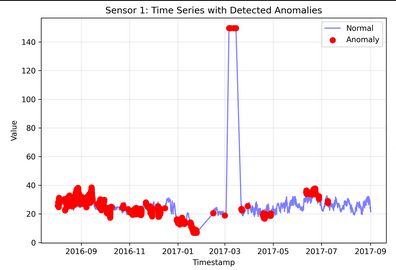
- 50 days completely missing (12.6% of the 396-day period)
- 347 days have data (87.4% coverage)
- 2 days with sparse data (only 5 readings each: Nov 19 & 21, 2016)
Key patterns:
- Average: 180.5 readings/day (~every 8 minutes)
- Most days have 276 readings (every 5 minutes)
- Maximum: 288 readings/day (every 5 minutes continuously)
Notable gaps:
- Early September 2016 (2 days)
- Mid-December 2016 (5 consecutive days)
- Late January to early February 2017 (15+ consecutive days) - largest gap
The sensor appears to have been offline or experiencing connectivity issues during these periods. This is common in IoT sensor deployments due to maintenance, network issues, or power outages.