< Home
Week 1: Playground
My journey into digital science officially began this week. Just like the first week of Fab Academy, it reminded me how powerful it is to learn by exploring and making sense of information.
Class
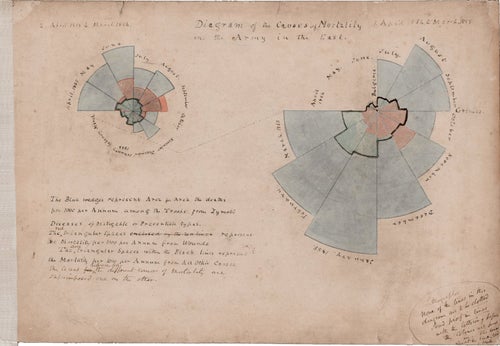
I was especially surprised to learn that data visualization has such a long history. Figures like John Snow and Florence Nightingale used visual methods more than a century ago to reveal hidden patterns and influence public health decisions. It reminded me how powerful visualization can be in shaping society.



Assignment
- Select a data set to analyze
- Connect to a JupyterLab server and become familiar with the user interface
Selecting a data set for analysis
During the class, we were introduced to a wide range of datasets. In my work, I dealt with spoken-language corpora—such as TV program transcripts—and some bio-related datasets. I realized that real-time datasets could also be very interesting to explore. It was also my first time seeing the Japanese government’s open data portal, which I found quite impressive.
Dataset I got curious about:
Approach for This Assignment
Although I am also interested in datasets related to mental health—which directly relate to my current work— for this assignment I would like to focus on analyzing data about Fab Academy labs and students from the perspective of an instructor. My goal is to identify challenges and consider possible action plans based on the data.
Since there is no comprehensive public dataset for Fab Academy, I plan to gather the necessary information myself through web scraping and data extraction from GitLab.
Planned Data Sources

1. Fab Academy Annual Data
- Method: Scraping necessary information from the Fab Academy website
- Lab name, country, city, student names, URLs
- Graduation year
- Images of students’ final projects
- Lab location > Get Latitude and longitude using Open Streetmap Data > Map
2. Fab Academy Student Activity Data
- Method: Retrieving student information from Gitlab via the REST API
- Project ID
- Weekly commit activity and total commit count
- (Repository size)
3. Data for Exploring the Relationship Between Fab Academy and Society
- Trend search data (e.g. Google trends)
- Keywords such as “Fablab,” “Fab Academy,” etc.
- National GDP data
- For examining potential relationships with the growth of Fab Labs
Making Fab Academy Data set
1. Fab Academy Annual Students Data
Data Retrieval from the Fab Academy Website. The URL and structure of the student pages differ by year.
- 2019-2025 https://fabacademy.org/2025/people.html
- 2018 https://archive.fabacademy.org/2018/people.html
- 2017 https://archive.fabacademy.org/archives/2017/master/students.html
- 2016 https://archive.fabacademy.org/archives/2016/master/students.html
- 2015 https://fabacademy.org/archives/2015/students/index.html
- 2014 https://fabacademy.org/archives/2014/students/index.html
- 2013 https://fabacademy.org/archives/2013/students/index.html
- 2012 https://fabacademy.org/archives/2012/students/index.html
Since the Fab Academy website is written in HTML, it is possible to extract information using web scraping. I inspected the structure of the student-list page using Chrome’s Developer Tools.
   <div class="list">
      <div class="lab">
        <h3><a href="/2025/labs/aalto/">Aalto Fablab (Espoo, Finland)</a></h3>
        <ul>
          <li><a href="/2025/labs/aalto/students/forrest-oliphant/">Forrest Oliphant</a></li>
          <li><a href="/2024/labs/aalto/students/sara-kutkova/">Sara Kutkova</a></li>
        </ul>
      </div>
      <div class="lab">
        <h3><a href="/2025/labs/aindustriosa/">Asociación Tecnolóxica A Industriosa (Vigo, Spain)</a></h3>
        <ul>
          <li><a href="/2025/labs/aindustriosa/students/francisco-ruz/">Francisco Ruz</a></li>
          <li><a href="/2025/labs/aindustriosa/students/pablo-guindos/">Pablo Guindos Bretones</a></li>
          <li><a href="/2025/labs/aindustriosa/students/pepe-vazquez/">Pepe Vazquez</a></li>
        </ul>
      </div>
then asked ChatGPT to generate the scraping code based on that structure. The prompt is:
Write Python code that scrapes all lab name(city, country) and student names from this page (https://fabacademy.org/2025/people.html) and prints them out. The structure of the page is:

<div class="lab">
    <h3>
      <a href="Lab URL">Lab Name(City, Country)</a>
    </h3>
    <ul>
      <li>
        <a href="Student URL">Student 1 name </a>
      </li>
      <li>
        <a href="...">Student 2 name</a>
      </li>
    </ul>
</div>```
from bs4 import BeautifulSoup
import requests

url = "https://fabacademy.org/2025/people.html"
html = requests.get(url).text
soup = BeautifulSoup(html, "html.parser")

# Get all Labs
labs = soup.find_all("div", class_="lab")
labList = []
for lab in labs:
    lab_name = lab.find("h3").text.strip()
    students = [a.text.strip() for a in lab.find_all("a")]
    '''
    print(f" {lab_name}: ")
    for s in students:
        print(f" - {s}")
    '''
    labList.append({
        "lab_name": lab_name,
        "students": students
    })

print(f"{labList[0]["lab_name"]}:")
for s in labList[0]["students"]:
    print(" -", s)
Aalto Fablab (Espoo, Finland):
 - Aalto Fablab (Espoo, Finland)
 - Forrest Oliphant
 - Sara Kutkova
The Python code uses the following libraries:
- requests: to access the website and retrieve the HTML content
- BeautifulSoup: to parse and analyze the structure of the HTML
Prompt:
Based on the code, I want to scrape labs and students for the years 2019–2025. Use requests and BeautifulSoup.
- The URL is:   https://fabacademy.org/<year>/people.html
- Save the output as JSON.
  - year
  - lab_name_raw (the text exactly as shown)
  - lab_name (the short name with parentheses removed)
  - lab_url (/labs/<lab-name>.html)
  - students: [{name, url}]
  - geo: {city, country}

- About "geo" handling:
  - For 2021–2025, extract city/country from “Lab Name (City, Country)”.
  - For 2019–2020, The data structure is different and no country data. So fill geo using the 2021-2025 data.
  - Print a list of labs whose geo information is still missing.
Python code:
import requests
from bs4 import BeautifulSoup
import json
import re
import time

BASE_URL = "https://fabacademy.org/"
YEARS = list(range(2019, 2026))

all_years_data = []

# -------------------------------
#  Scraping
# -------------------------------
for year in YEARS:
    year_url = f"{BASE_URL}{year}/people.html"
    #print(f" Processing year {year} ...")

    try:
        res = requests.get(year_url)
        if res.status_code != 200:
            print(f" {year_url} not found ({res.status_code})")
            continue

        soup = BeautifulSoup(res.text, "html.parser")
        labs = soup.find_all("div", class_="lab")
        year_data = {"year": year, "labs": []}

        for lab_div in labs:
            lab_name_tag = lab_div.find("h3")
            if not lab_name_tag:
                continue

            lab_name_raw = lab_name_tag.text.strip()
            lab_url = f"{BASE_URL}{year}/labs/{lab_name_raw.lower().replace(' ', '-')}.html"

            # Students List
            students = []
            for li in lab_div.find_all("li"):
                a = li.find("a")
                if a and "href" in a.attrs:
                    student_name = a.text.strip()
                    student_url = a["href"]
                    if not student_url.startswith("http"):
                        student_url = f"{BASE_URL}{year}/" + student_url.lstrip("/")
                    students.append({"name": student_name, "url": student_url})

            year_data["labs"].append({
                "lab_name_raw": lab_name_raw,
                "lab_name": lab_name_raw,  # 後で括弧除去して短縮名にする
                "lab_url": lab_url,
                "students": students,
                "geo": {}
            })

        all_years_data.append(year_data)
        time.sleep(1)

    except Exception as e:
        print(f" Error processing {year}: {e}")

# -------------------------------
# 2021-2025 Geo data
# -------------------------------
lab_geo_map = {}  # 短縮ラボ名 → {"city": ..., "country": ...}

for year_data in all_years_data:
    if year_data["year"] >= 2021:
        for lab in year_data["labs"]:
            # 括弧で都市・国がある場合
            match = re.search(r"(.+?)\s*\((.+?),\s*(.+?)\)$", lab["lab_name_raw"])
            if match:
                short_name = match.group(1).strip()
                city = match.group(2).strip()
                country = match.group(3).strip()
                lab["lab_name"] = short_name
                lab["geo"] = {"city": city, "country": country}
                lab_geo_map[short_name] = {"city": city, "country": country}
            else:
                # 括弧がなければそのまま
                lab["lab_name"] = lab["lab_name_raw"]

# -------------------------------
# 2019-2020 Geo data
# -------------------------------
for year_data in all_years_data:
    if year_data["year"] <= 2020:
        for lab in year_data["labs"]:
            # 括弧がある場合は短縮ラボ名を取得
            match = re.match(r"(.+?)\s*(\(.+\))?$", lab["lab_name_raw"])
            short_name = match.group(1).strip()
            lab["lab_name"] = short_name
            if short_name in lab_geo_map:
                lab["geo"] = lab_geo_map[short_name]

# -------------------------------
# Labs with unknown city/country
# -------------------------------
#print("\n List of labs with unknown city/country:")
for year_data in all_years_data:
    for lab in year_data["labs"]:
        if not lab["geo"]:
            print(f"{year_data['year']}: {lab['lab_name']}")

# -------------------------------
#  Export to JSON
# -------------------------------
with open("fabacademy_2019_2025_with_geo.json", "w", encoding="utf-8") as f:
    json.dump(all_years_data, f, ensure_ascii=False, indent=2)

#print("\n JSON saved successfully:fabacademy_2019_2025_with_geo.json")
2019: AKGEC
2019: Aachen
2019: Algarve Fabfarm
2019: Bahrain
2019: Bottrop
2019: Brighton
2019: CEPT
2019: CIT
2019: Crunchlab
2019: Dassault Systemes
2019: Dhahran
2019: Dilijan Fab Lab
2019: IED
2019: Kochi
2019: LCCC
2019: La Kazlab
2019: Polytech
2019: SZOIL
2019: Seoul
2019: Singapore
2019: Trivandrum
2019: Waag
2019: Winam
2019: ÉchoFab
2020: AKGEC
2020: Agrilab
2020: Algarve Farm
2020: Bahrain
2020: Bhubaneswar
2020: Chaihuo x.factory
2020: Crunchlab
2020: Deusto
2020: ESNE
2020: EcoStudio
2020: Kerala - Kochi
2020: New Cairo
2020: Reykjavik
2020: SZOIL
2020: Seoul Innovation Lab
2020: St. Jude
2020: Tinkerers Fab Lab Castelldefels
2020: Twarda - Powered by Orange
2020: Waag - Amsterdam
2020: Winam
2020: Yucatán
2020: ÉchoFab
2022: ioannina (, )
2023: Other
The Python code uses the following libraries:
- requests: to access the website and retrieve the HTML content
- BeautifulSoup: to parse and analyze the structure of the HTML
- re: Used for finding specific patterns in strings with regular expressions. Applied to extract lab names, countries, and cities.
- json: Used for exporting data in JSON format.
- time: Used for adding intervals during scraping.
Get Geo data
I asked ChatGPT how to obtain latitude and longitude from country and city names using OpenStreetMap, and decided to try geopy + Nominatim (OpenStreetMap).
!which pip
/opt/conda/bin/pip
!pip install geopy
Collecting geopy
  Using cached geopy-2.4.1-py3-none-any.whl.metadata (6.8 kB)
Collecting geographiclib<3,>=1.52 (from geopy)
  Using cached geographiclib-2.1-py3-none-any.whl.metadata (1.6 kB)
Using cached geopy-2.4.1-py3-none-any.whl (125 kB)
Using cached geographiclib-2.1-py3-none-any.whl (40 kB)
Installing collected packages: geographiclib, geopy
   ━━━━━━━━━━━━━━━━━━━━━━━━━━━━━━━━━━━━━━━━ 2/2 [geopy]
Successfully installed geographiclib-2.1 geopy-2.4.1
import requests
from bs4 import BeautifulSoup
import json
import re
import time
import os
from geopy.geocoders import Nominatim

BASE_URL = "https://fabacademy.org/"
YEARS = list(range(2021, 2026))

all_years_data = []

# -------------- obtain latitude and longitude --------------
geolocator = Nominatim(user_agent="fabacademy_mapper")

def get_latlon(city, country):
    query = f"{city}, {country}"
    try:
        location = geolocator.geocode(query, timeout=10)
        if location:
            return (location.latitude, location.longitude)
    except Exception as e:
        print("Error:", e)
    return (None, None)

# --------------------------------------------------------------
#  Scraping
# --------------------------------------------------------------

#print("start")

for year in YEARS:
    year_url = f"{BASE_URL}{year}/people.html"
    #print(f" Processing year {year} ...")

    try:
        res = requests.get(year_url)
        if res.status_code != 200:
            print(f" {year_url} not found ({res.status_code})")
            continue

        soup = BeautifulSoup(res.text, "html.parser")
        labs = soup.find_all("div", class_="lab")
        year_data = {"year": year, "labs": []}

        for lab_div in labs:
            lab_name_tag = lab_div.find("h3")
            if not lab_name_tag:
                continue

            lab_name_raw = lab_name_tag.text.strip()
            lab_url = f"{BASE_URL}{year}/labs/{lab_name_raw.lower().replace(' ', '-')}.html"

            # Student List
            students = []
            for li in lab_div.find_all("li"):
                a = li.find("a")
                if a and "href" in a.attrs:
                    student_name = a.text.strip()
                    student_url = a["href"]
                    if not student_url.startswith("http"):
                        student_url = f"{BASE_URL}" + student_url.lstrip("/")
                        # student_url = f"{BASE_URL}{year}/" + student_url.lstrip("/")
                    students.append({"name": student_name, "url": student_url})

            year_data["labs"].append({
                "lab_name_raw": lab_name_raw,
                "lab_name": lab_name_raw,  # 後で括弧除去して短縮名にする
                "lab_url": lab_url,
                "students": students,
                "geo": {}
            })

        all_years_data.append(year_data)
        time.sleep(1)

    except Exception as e:
        print(f" Error processing {year}: {e}")

# -------------------------------
# City, Country  2021-2025
# -------------------------------
#print("city country")
lab_geo_map = {}  # 短縮ラボ名 → {"city": ..., "country": ...}

for year_data in all_years_data:
    #if year_data["year"] >= 2025:
    if year_data["year"] >= 2021:
        for lab in year_data["labs"]:
            # 括弧で都市・国がある場合
            match = re.search(r"(.+?)\s*\((.+?),\s*(.+?)\)$", lab["lab_name_raw"])
            if match:
                short_name = match.group(1).strip()
                city = match.group(2).strip()
                country = match.group(3).strip()
                lat, lon = get_latlon(city, country)
                time.sleep(1)  # 1sec wait
                lab["lab_name"] = short_name
                #lab["geo"] = {"city": city, "country": country }
                lab["geo"] = {"city": city, "country": country,"latitude": lat, "longitude": lon }
                lab_geo_map[short_name] = {"city": city, "country": country}

            else:
                # 括弧がなければそのまま
                lab["lab_name"] = lab["lab_name_raw"]


# -------------------------------
# Labs with unknown city/country
# -------------------------------
print("\n Labs with unknown city/country:")
for year_data in all_years_data:
    for lab in year_data["labs"]:
        if not lab["geo"]:
            print(f"{year_data['year']}: {lab['lab_name']}")

# -------------------------------
# Create Json file
# -------------------------------
with open("fabacademy_2021_2025_with_geolatlon.json", "w", encoding="utf-8") as f:
    json.dump(all_years_data, f, ensure_ascii=False, indent=2)

print("\n Export:fabacademy_2021_2025_with_geolatlon.json")
Error: Non-successful status code 503

 Labs with unknown city/country:
2022: ioannina (, )
2023: Other

 Export:fabacademy_2021_2025_with_geolatlon.json
Kernel status was busy.......... but finished successfully after 482 seconds. I think the delay was caused by the 1-second wait I added when retrieving latitude and longitude with geopy.
This is an example of Aalto lab data in 2021.
{
    "year": 2021,
    "labs": [
      {
        "lab_name_raw": "Aalto (Espoo, Finland)",
        "lab_name": "Aalto",
        "lab_url": "https://fabacademy.org/2021/labs/aalto-(espoo,-finland).html",
        "students": [
          {
            "name": "Kitija Kuduma",
            "url": "https://fabacademy.org/2021/labs/aalto/students/kitija-kuduma/"
          },
          {
            "name": "Ranjit Menon",
            "url": "https://fabacademy.org/2020/labs/kochi/students/ranjit-menon/"
          },
          {
            "name": "Ruo-Xuan Wu",
            "url": "https://fabacademy.org/2021/labs/aalto/students/russianwu/"
          },
          {
            "name": "Solomon Embafrash",
            "url": "https://fabacademy.org/2019/labs/aalto/students/solomon-embafrash/"
          }
        ],
        "geo": {
          "city": "Espoo",
          "country": "Finland",
          "latitude": 60.2049651,
          "longitude": 24.6559808
        }
      },
I first manually fixed the two unknown labs (2022,2023) by checking their websites, and then created the JSON dataset for 2021–2025.
Adding student data:
For the years 2012–2018, the website URLs and structure are different, so requires individual handling.
While examining the HTML, I found that a JSON file is available from:
Graduation Year
We can get alumni info from this page.
The structure is:
<h2 id="_2025">

...

<tbody>
  <tr><td>Francisco Ruz</td> <td>A Industriosa</td> <td>2025</td></tr>
  <tr><td>Pepe Vazquez</td> <td>A Industriosa</td> <td>2025</td></tr>
  ...
Counting the number of graduates
from bs4 import BeautifulSoup
import requests
import re
import pandas as pd

url = "https://fabacademy.org/students/alumni-list.html"
res = requests.get(url)
soup = BeautifulSoup(res.text, "html.parser")

data = []

for h2 in soup.find_all("h2"):
    # year
    match = re.search(r"\d{4}", h2.text)
    if not match:
        continue
    year = int(match.group())

    # students table
    table = h2.find_next("table")
    if not table:
        continue

    # num of students
    tbody = table.find("tbody")
    rows = tbody.find_all("tr") if tbody else table.find_all("tr")

    data.append({"year": year, "graduates": len(rows)})

df = pd.DataFrame(data).sort_values("year")
print(df)
    year  graduates
16  2008          2
15  2009         14
14  2011         13
13  2012         31
12  2013         40
11  2014         68
10  2015        147
9   2016        163
8   2017        185
7   2018        164
6   2019        159
5   2020        126
4   2021        121
3   2022        117
2   2023        107
1   2024        168
0   2025        111
2. Fab Academy Student Activity Data
To retrieve data from GitLab, I used the REST API.
- Gitlab Rest API
- Submit a request to an API endpoint by using a REST API client.
- A REST API request must start with the root endpoint and the path.
- The root endpoint is the GitLab host name.
- The path must start with /api/v4 (v4 represents the API version).
- REST API requests are subject to rate limit settings. These settings reduce the risk of a GitLab instance being overloaded. For details, see Rate limits.
In the following example, the API request retrieves the list of all projects on GitLab host. The return is in Json format. In this example, the number of results is limited using the page parameter.
!curl --request GET \
  --url "https://gitlab.fabcloud.org/api/v4/projects?per_page=1"
[{"id":5755,"description":"Fab electronics component library for KiCad","name":"KiCad","name_with_namespace":"Jhasmin Ayala / KiCad","path":"kicad","path_with_namespace":"ARJhasmin16/kicad","created_at":"2025-11-11T16:44:43.241Z","default_branch":"master","tag_list":[],"topics":[],"ssh_url_to_repo":"git@gitlab.fabcloud.org:ARJhasmin16/kicad.git","http_url_to_repo":"https://gitlab.fabcloud.org/ARJhasmin16/kicad.git","web_url":"https://gitlab.fabcloud.org/ARJhasmin16/kicad","readme_url":"https://gitlab.fabcloud.org/ARJhasmin16/kicad/-/blob/master/README.md","forks_count":0,"avatar_url":null,"star_count":0,"last_activity_at":"2025-11-11T16:44:43.159Z","visibility":"public","namespace":{"id":13166,"name":"Jhasmin Ayala","path":"ARJhasmin16","kind":"user","full_path":"ARJhasmin16","parent_id":null,"avatar_url":"https://secure.gravatar.com/avatar/503668d46e3368f253cc714e7fcf183c5f6239caac76db305025f90cbbc870a2?s=80\u0026d=identicon","web_url":"https://gitlab.fabcloud.org/ARJhasmin16"}}]
I also tried retrieving the "groups" and "users" data. I was able to get the group data, but I couldn’t retrieve the user data due to authorization restrictions.
!curl --request GET \
  --url "https://gitlab.fabcloud.org/api/v4/groups?per_page=2"
[{"id":849,"web_url":"https://gitlab.fabcloud.org/groups/fabdx/2017-18","name":"2017-18","path":"2017-18","description":"Cohort of 2017-2018","visibility":"public","share_with_group_lock":false,"require_two_factor_authentication":false,"two_factor_grace_period":48,"project_creation_level":"developer","auto_devops_enabled":null,"subgroup_creation_level":"owner","emails_disabled":false,"emails_enabled":true,"show_diff_preview_in_email":true,"mentions_disabled":null,"lfs_enabled":true,"archived":false,"math_rendering_limits_enabled":true,"lock_math_rendering_limits_enabled":false,"default_branch":null,"default_branch_protection":1,"default_branch_protection_defaults":{"allowed_to_push":[{"access_level":30}],"allowed_to_merge":[{"access_level":30}]},"avatar_url":null,"request_access_enabled":false,"full_name":"FABdx / 2017-18","full_path":"fabdx/2017-18","created_at":"2017-12-18T13:23:54.208Z","parent_id":821,"organization_id":1,"shared_runners_setting":"enabled","max_artifacts_size":null,"marked_for_deletion_on":null,"ldap_cn":null,"ldap_access":null,"wiki_access_level":"enabled"},{"id":846,"web_url":"https://gitlab.fabcloud.org/groups/academany/fabacademy/2018","name":"2018","path":"2018","description":"","visibility":"public","share_with_group_lock":false,"require_two_factor_authentication":false,"two_factor_grace_period":48,"project_creation_level":"developer","auto_devops_enabled":null,"subgroup_creation_level":"owner","emails_disabled":false,"emails_enabled":true,"show_diff_preview_in_email":true,"mentions_disabled":null,"lfs_enabled":true,"archived":false,"math_rendering_limits_enabled":true,"lock_math_rendering_limits_enabled":false,"default_branch":null,"default_branch_protection":1,"default_branch_protection_defaults":{"allowed_to_push":[{"access_level":30}],"allowed_to_merge":[{"access_level":30}]},"avatar_url":null,"request_access_enabled":false,"full_name":"Academany / Fab Academy / 2018","full_path":"academany/fabacademy/2018","created_at":"2017-12-08T14:30:38.588Z","parent_id":845,"organization_id":1,"shared_runners_setting":"enabled","max_artifacts_size":null,"marked_for_deletion_on":null,"ldap_cn":null,"ldap_access":null,"wiki_access_level":"enabled"}]
I found the Skylab Workshop data in the Group data.
{"id":11397,
"web_url":"https://gitlab.fabcloud.org/groups/academany/fabacademy/2024/labs/skylab",
"name":"Skylabworkshop ",
"path":"skylab","description":"",
"visibility":"public",
"share_with_group_lock":false,
"require_two_factor_authentication":false,
"two_factor_grace_period":48,
"project_creation_level":"developer",
"auto_devops_enabled":null,
"subgroup_creation_level":"maintainer",
"emails_disabled":false,
"emails_enabled":true,
"show_diff_preview_in_email":true,
"mentions_disabled":null,
"lfs_enabled":true,"archived":false,
"math_rendering_limits_enabled":true,
"lock_math_rendering_limits_enabled":false,
"default_branch":null,
"default_branch_protection":1,
"default_branch_protection_defaults":{"allowed_to_push":[{"access_level":30}],"allowed_to_merge":[{"access_level":30}]},
"avatar_url":null,
"request_access_enabled":true,
"full_name":"Academany / Fab Academy / 2024 / Fab Academy 2024 Labs / Skylabworkshop ",
"full_path":"academany/fabacademy/2024/labs/skylab","created_at":"2024-01-18T09:23:11.046Z",
"parent_id":11038,
"organization_id":1,
"shared_runners_setting":"enabled",
"max_artifacts_size":null,
"marked_for_deletion_on":null,
"ldap_cn":null,
"ldap_access":null,
"wiki_access_level":"enabled"},
!curl --request GET \
  --url "https://gitlab.fabcloud.org/api/v4/users"
{"message":"403 Forbidden - Not authorized to access /api/v4/users"}
- [Repositories API](https://docs.gitlab.com/api/repositories
- We can get tree, size and content using access token
I checked the structure of a project.
{
"id":5725,
"description":"",
"name":"carolina.delgado",
"name_with_namespace":"Berrak Zeynep Okyar / carolina.delgado",
"path":"carolina.delgado",
"path_with_namespace":"berrak-okyar/carolina.delgado",
"created_at":"2025-10-10T10:02:54.220Z",
"default_branch":"master",
"tag_list":[],
"topics":[],
"ssh_url_to_repo":"git@gitlab.fabcloud.org:berrak-okyar/carolina.delgado.git",
"http_url_to_repo":"https://gitlab.fabcloud.org/berrak-okyar/carolina.delgado.git",
"web_url":"https://gitlab.fabcloud.org/berrak-okyar/carolina.delgado",
"readme_url":null,
"forks_count":0,
"avatar_url":null,
"star_count":0,
"last_activity_at":"2025-10-10T10:02:54.129Z",
"visibility":"public",
"namespace":{"id":13410,"name":"Berrak Zeynep Okyar","path":"berrak-okyar","kind":"user","full_path":"berrak-okyar","parent_id":null,"avatar_url":"https://secure.gravatar.com/avatar/c057fc24a6b291bf75d48109b69a3632c4a5f7808df915b7b4a28d2ba0ed14c9?s=80\u0026d=identicon","web_url":"https://gitlab.fabcloud.org/berrak-okyar"}
},
My Project and Commits
Finally I found my project id: 1334: kamakura/students/kae-nagano
I also tried to get repository info like commits using Repositories API.
!curl --request GET \
  --url "https://gitlab.fabcloud.org/api/v4/projects/1334"
{"id":1334,"description":null,"name":"kae.nagano","name_with_namespace":"Academany / Fab Academy / 2019 / Fab Academy 2019 Labs / Kamakura / Kamakura students / kae.nagano","path":"kae-nagano","path_with_namespace":"academany/fabacademy/2019/labs/kamakura/students/kae-nagano","created_at":"2019-01-16T18:33:01.074Z","default_branch":"master","tag_list":[],"topics":[],"ssh_url_to_repo":"git@gitlab.fabcloud.org:academany/fabacademy/2019/labs/kamakura/students/kae-nagano.git","http_url_to_repo":"https://gitlab.fabcloud.org/academany/fabacademy/2019/labs/kamakura/students/kae-nagano.git","web_url":"https://gitlab.fabcloud.org/academany/fabacademy/2019/labs/kamakura/students/kae-nagano","readme_url":"https://gitlab.fabcloud.org/academany/fabacademy/2019/labs/kamakura/students/kae-nagano/-/blob/master/README.md","forks_count":0,"avatar_url":null,"star_count":0,"last_activity_at":"2025-06-12T15:14:47.916Z","visibility":"public","namespace":{"id":1696,"name":"Kamakura students","path":"students","kind":"group","full_path":"academany/fabacademy/2019/labs/kamakura/students","parent_id":1635,"avatar_url":null,"web_url":"https://gitlab.fabcloud.org/groups/academany/fabacademy/2019/labs/kamakura/students"}}
!curl --request GET \
  --url "https://gitlab.fabcloud.org/api/v4/projects/1334/repository/commits?per_page=2"
[{"id":"6d21e922611c6fa65d2dfcd0419b37f70617629d","short_id":"6d21e922","created_at":"2025-06-12T15:14:47.000+00:00","parent_ids":["fc4143c6f53d30a81ab1b99547409757f783bdc2"],"title":"Edit final-project.md","message":"Edit final-project.md","author_name":"Kae Nagano","author_email":"kae0104nagano@gmail.com","authored_date":"2025-06-12T15:14:47.000+00:00","committer_name":"Kae Nagano","committer_email":"kae0104nagano@gmail.com","committed_date":"2025-06-12T15:14:47.000+00:00","trailers":{},"extended_trailers":{},"web_url":"https://gitlab.fabcloud.org/academany/fabacademy/2019/labs/kamakura/students/kae-nagano/-/commit/6d21e922611c6fa65d2dfcd0419b37f70617629d"},{"id":"fc4143c6f53d30a81ab1b99547409757f783bdc2","short_id":"fc4143c6","created_at":"2019-07-03T01:54:33.000+09:00","parent_ids":["abbe82a43ef7e964e98aaf015acc382298ae1b04"],"title":"modified final pj documents and video","message":"modified final pj documents and video\n","author_name":"KaeNagano","author_email":"naganoyoshie@K-MacBook-Pro-8.local","authored_date":"2019-07-03T01:54:33.000+09:00","committer_name":"KaeNagano","committer_email":"naganoyoshie@K-MacBook-Pro-8.local","committed_date":"2019-07-03T01:54:33.000+09:00","trailers":{},"extended_trailers":{},"web_url":"https://gitlab.fabcloud.org/academany/fabacademy/2019/labs/kamakura/students/kae-nagano/-/commit/fc4143c6f53d30a81ab1b99547409757f783bdc2"}]
The structure of each commit is as follows. We can get autor, message, commited date.
{"id":"6d21e922611c6fa65d2dfcd0419b37f70617629d",
"short_id":"6d21e922",
"created_at":"2025-06-12T15:14:47.000+00:00",
"parent_ids":["fc4143c6f53d30a81ab1b99547409757f783bdc2"],
"title":"Edit final-project.md",
"message":"Edit final-project.md",
"author_name":"Kae Nagano",
"author_email":"kae0104nagano@gmail.com",
"authored_date":"2025-06-12T15:14:47.000+00:00",
"committer_name":"Kae Nagano",
"committer_email":"kae0104nagano@gmail.com",
"committed_date":"2025-06-12T15:14:47.000+00:00",
"trailers":{},
"extended_trailers":{},
"web_url":"https://gitlab.fabcloud.org/academany/fabacademy/2019/labs/kamakura/students/kae-nagano/-/commit/6d21e922611c6fa65d2dfcd0419b37f70617629d"
},
I asked ChatGPT to write Python code that retrieves my commit data and outputs it as a CSV file.
Prompt:
I want to use Python to retrieve commit data from GitLab’s REST API using a project ID. I have confirmed that I can get the data with: curl --request GET \
  --url "https://gitlab.fabcloud.org/api/v4/projects/1334/repository/commits"
From this response, I want to extract author_name and committed_date,and generate a CSV file that shows the number of commits per week.
According to chatGPT and Gitlab doc, token is necessary to retrieve the data. I got my private token and used it in the Python code. Gitlab Access Token
How to create token:
- On the left sidebar, select your avatar. If you’ve turned on the new navigation, this button is in the upper-right corner.
- Select Edit profile.
- On the left sidebar, select Personal access tokens.
- Select Add new token.
- In Token name, enter a name for the token.
- In Expiration date, enter an expiration date for the token.
- Select Create personal access token.
- Save the personal access token somewhere safe. After you leave the page, you no longer have access to the token.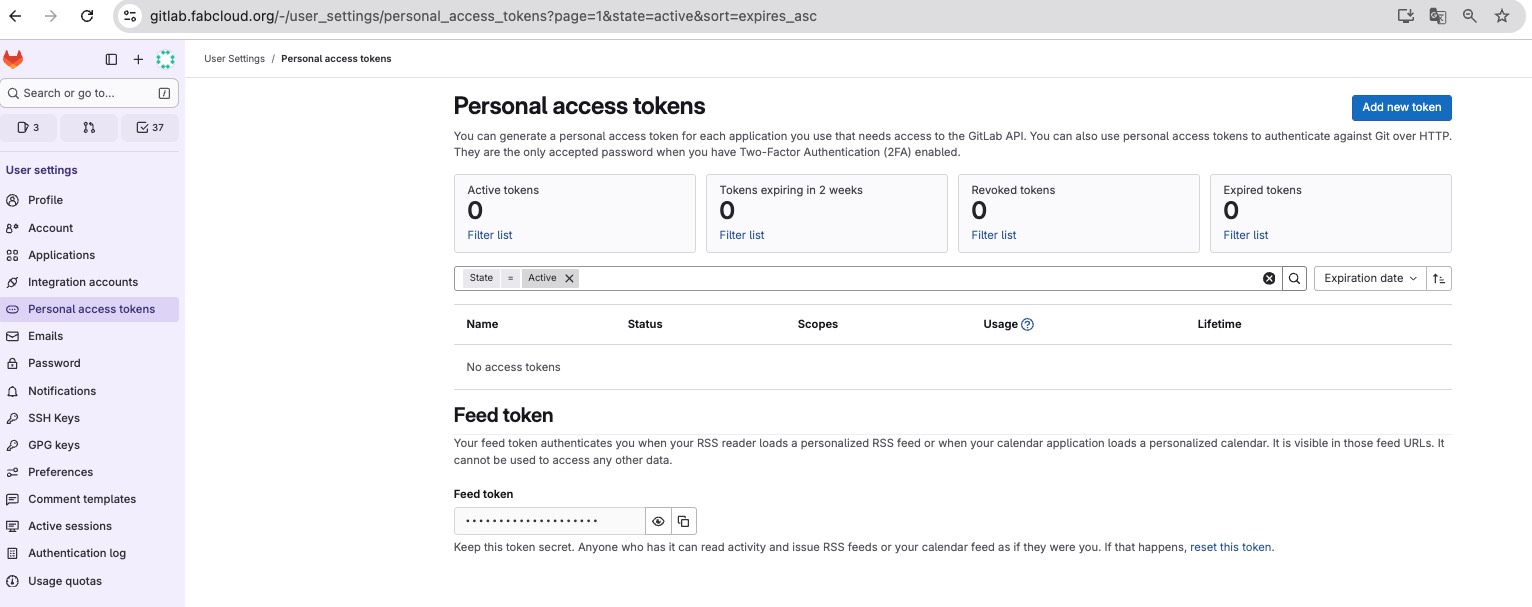
import requests
import csv
from datetime import datetime
from collections import defaultdict


GITLAB_URL = "https://gitlab.fabcloud.org/api/v4"
PRIVATE_TOKEN = "Write my token"   #
PROJECT_ID = 1334                   #  My Project ID
OUTPUT_CSV = "weekly_commits.csv"   #

# ---------------------------------------
# Retrieve commits data
# ---------------------------------------
def fetch_all_commits(project_id):
    headers = {"PRIVATE-TOKEN": PRIVATE_TOKEN}
    page = 1
    per_page = 100
    all_commits = []

    while True:
        url = f"{GITLAB_URL}/projects/{project_id}/repository/commits"
        params = {"page": page, "per_page": per_page}

        r = requests.get(url, headers=headers, params=params)
        r.raise_for_status()

        commits = r.json()
        if not commits:
            break

        all_commits.extend(commits)
        page += 1

    return all_commits


# ---------------------------------------
# Week number
# ---------------------------------------
def get_week_key(date_str):
    dt = datetime.fromisoformat(date_str.replace("Z",""))
    year, week, _ = dt.isocalendar()
    return f"{year}-W{week:02d}"


# ---------------------------------------
# Main
# ---------------------------------------
commits = fetch_all_commits(PROJECT_ID)

weekly_count = defaultdict(int)
commit_details = []   # CSVで誰が何週にコミットしたか記録したい場合

for c in commits:
    author = c.get("author_name")
    date = c.get("committed_date")
    week_key = get_week_key(date)

    weekly_count[week_key] += 1
    commit_details.append([week_key, author, date])


# ---------------------------------------
# Write CSV
# ---------------------------------------
with open(OUTPUT_CSV, "w", newline="", encoding="utf-8") as f:
    writer = csv.writer(f)
    writer.writerow(["week", "commit_count"])
    for week, count in sorted(weekly_count.items()):
        writer.writerow([week, count])

print(f"saved the weekly commit counts to {OUTPUT_CSV} ")

# ---------------------------------------
# Note: To export a detailed version (who committed what and when)
# ---------------------------------------
DETAIL_CSV = "commits_detail.csv"
with open(DETAIL_CSV, "w", newline="", encoding="utf-8") as f:
    writer = csv.writer(f)
    writer.writerow(["week", "author_name", "committed_date"])
    for row in commit_details:
        writer.writerow(row)

print(f"saved the individual commit details to {DETAIL_CSV}")
saved the weekly commit counts to weekly_commits.csv
saved the individual commit details to commits_detail.csv
The data is as follows. In addition to myself, the author list also includes the IT staff who created the project.
The time is using ISO 8601 time formtat.
week,author_name,committed_date
2025-W24,Kae Nagano,2025-06-12T15:14:47.000+00:00
2019-W27,KaeNagano,2019-07-03T01:54:33.000+09:00
2019-W26,KaeNagano,2019-06-25T23:45:55.000+09:00
2019-W25,KaeNagano,2019-06-22T11:43:19.000+09:00
2019-W25,KaeNagano,2019-06-22T11:19:00.000+09:00
2019-W25,KaeNagano,2019-06-22T11:10:32.000+09:00
2019-W25,KaeNagano,2019-06-22T11:07:37.000+09:00
2019-W25,KaeNagano,2019-06-22T11:04:58.000+09:00
....
2019-W04	KaeNagano	2019-01-26T15:52:35.000+09:00
2019-W04	KaeNagano	2019-01-26T11:10:35.000+09:00
2019-W03	fibasile	2019-01-16T17:16:43.000+00:00
2019-W03	Fiore Basile	2019-01-16T16:22:21.000+01:00
2019-W03	Fiore Basile	2019-01-16T16:21:20.000+01:00
3. Trend Data
I used Google Trends to gather trend data about Fablab. You can select the time period and country to explore the data. Although the results can be viewed directly on the website, there is also an option to download them as a CSV file.
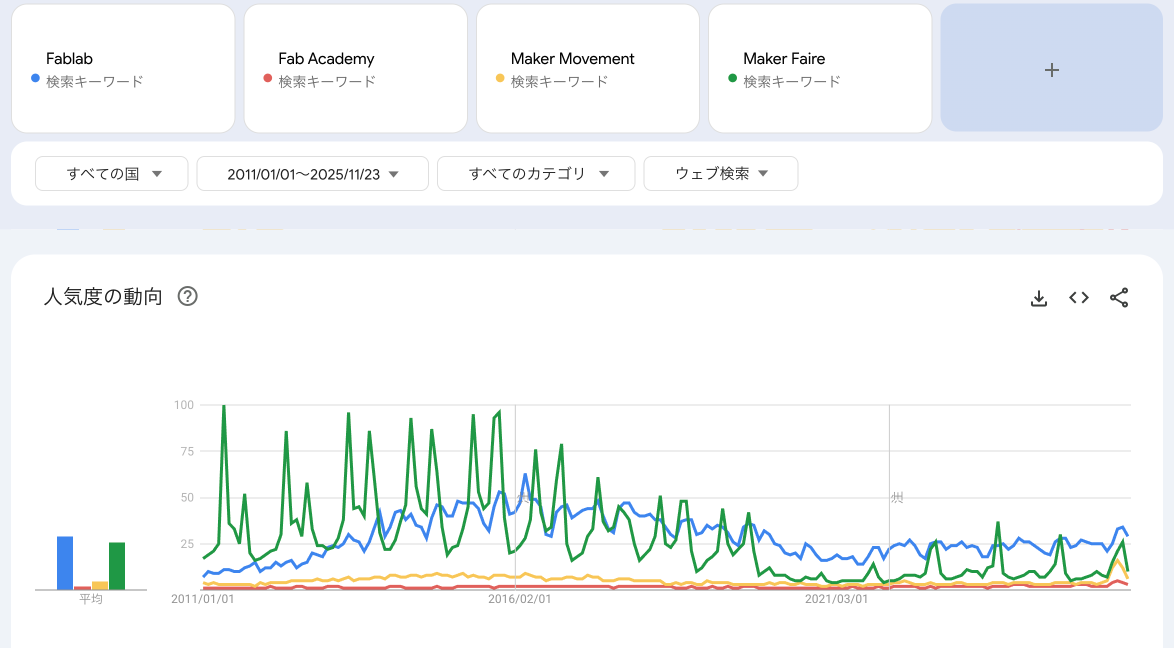
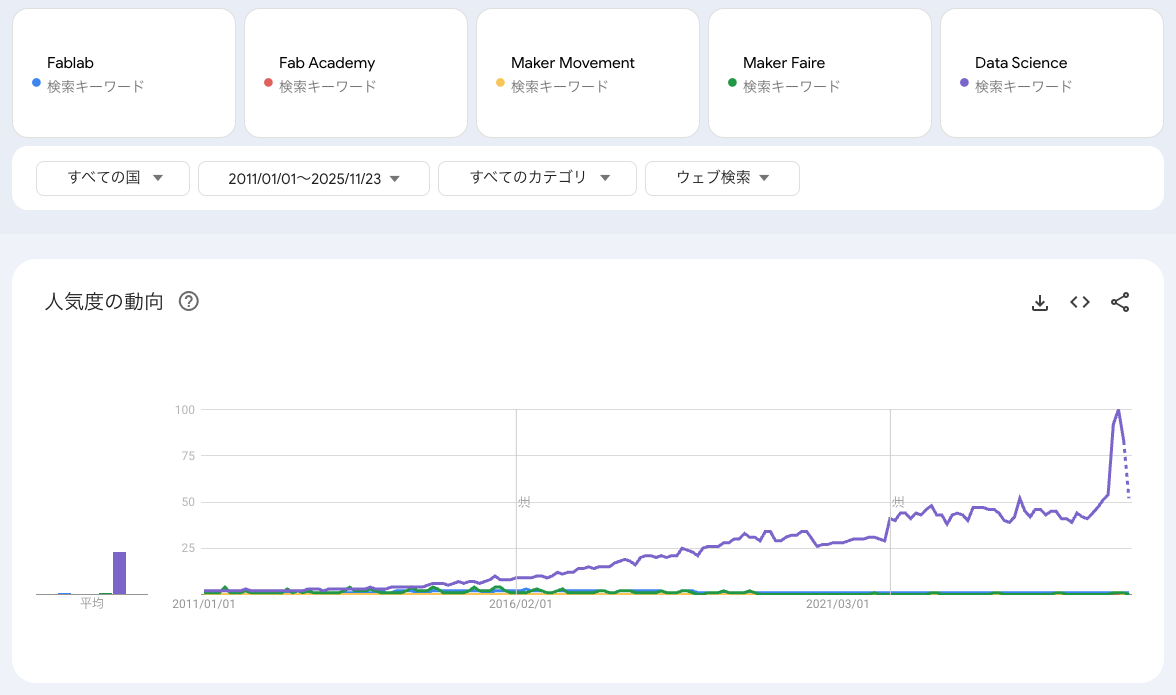
First, I checked the global trends for the period from 2011 to today, using the keywords “Fablab,” “Fab Academy,” “Maker Movement,” and “Maker Faire.” As shown below, the term Fablab peaked around 2016. Next, I added “Data Science” to the search keywords. The difference is quite clear, as shown below.
Please note that Google Trends does not show absolute search volumes. Instead, it provides relative values scaled from 0 to 100, based on the proportion of searches for a keyword within a selected time and region. see the doc.
Jupyter Notebook 
I had used Jupyter Notebook before, but this was my first time documenting in Markdown and working with Git. I’m writing down some notes on what I learned.
- To write in Markdown, select “Markdown” from the Cell Type menu in the top toolbar.
- Use the ▶️ Run button to execute a single cell, and ▶️▶️ Run All to execute all cells in the notebook.
- Use the icons on the right side of each cell to duplicate, move, add, or delete the cell.
- To run terminal commands, add an exclamation mark (!) at the beginning.
- When the output is long, right-click on the left side of the output cell and select “Enable Scrolling” to make it scrollable.
- When you open a JSON file in Jupyter Notebook, it is displayed in a rich format. If you want to view it in plain text, right-click the file on the left panel and select “Open With → Editor”
- When running Python code, if the output is slow, check the circle indicator in the top-right corner. A white circle means the kernel is idle, and black circle means it is busy. If it looks like the cell is frozen, I usually close the notebook and reopen it.