Class 1 - Cryptography
Assignment Create a public/private key pair.
Create Public / Private Key
I will try to create 2 keys, one on Windows and one on Ubuntu VM.
using PuTTYgen on Windows
PuTTYgen is a GUI key generator, I have used it many times before to generate keys, but never bothered with options the gui shows.
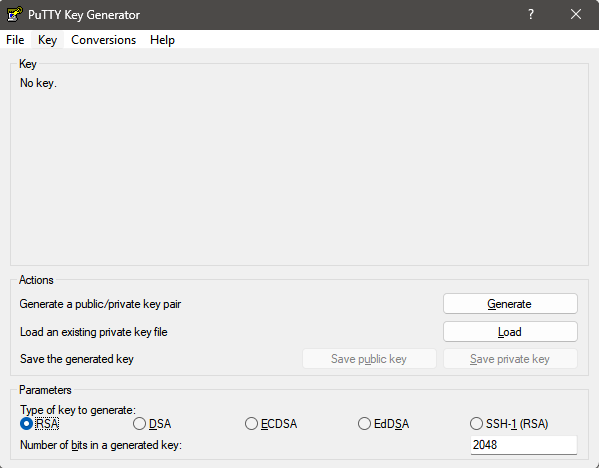 Interestingly, when you click generate, seemingly ntohing happens, unless you mvoe your mouse cursor in the app, this is a way to generate randomness for the key.
The 4+1 main options for key type and size are:
Interestingly, when you click generate, seemingly ntohing happens, unless you mvoe your mouse cursor in the app, this is a way to generate randomness for the key.
The 4+1 main options for key type and size are:
- An RSA key for use with the SSH-2 protocol.
- A DSA key for use with the SSH-2 protocol.
- An ECDSA (elliptic curve DSA) key for use with the SSH-2 protocol.
- An EdDSA key (Edwards-curve DSA, another elliptic curve algorithm) for use with the SSH-2 protocol.
- SSH-1 RSA - an older method, now considered insecure
[8.2.2: PuTTY User Manual]
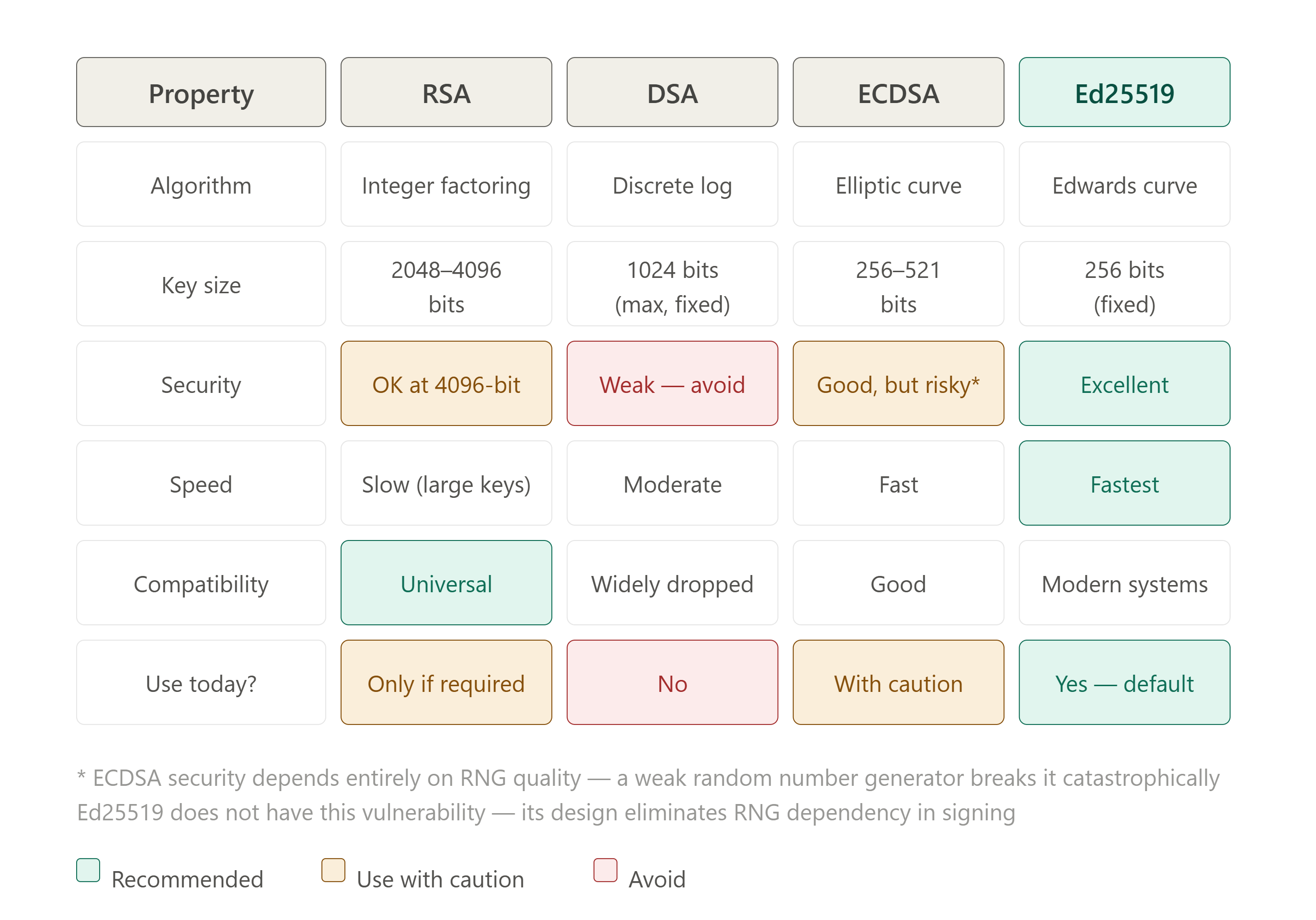
RSA and DSA keys should be 2048bits or longer, whereas the ECDSA and EdDSA can have smaller keys, but provide similar strength/security.
AI Overview
asked Sonet 4.6 (medium), whats the comparison between these
Key on Windows via PuTTYgen
Seems like we are gonna go with EdDSA, Ed25519 (255 bits) as default
---- BEGIN SSH2 PUBLIC KEY ----
AAAAC3NzaC1lZDI1NTE5AAAAIFELndWIqbBk64IJDGenuiQdBvt0130LVhNiKZFj
FkeT
---- END SSH2 PUBLIC KEY ----
Generating a Key on Linux / Ubuntu
Generating key on ubuntu is trivial, using the command ssh-keygen just running the command ssh-keygen selects the decent default, same as what we picked in Windows. **Note: ** on ubuntu, mention the file name with path and the .ssh is a special hidden folder for keys, if you just type a key name, it saves to pwd (present working directory)
ubuntu@ff-cs-zaid-pirwani:~$ ssh-keygen
Generating public/private ed25519 key pair.
Enter file in which to save the key (/home/ubuntu/.ssh/id_ed25519): /home/ubuntu/.ssh/ff_zp_ubuntu
Enter passphrase (empty for no passphrase):
Enter same passphrase again:
Your identification has been saved in /home/ubuntu/.ssh/ff_zp_ubuntu
Your public key has been saved in /home/ubuntu/.ssh/ff_zp_ubuntu.pub
The key fingerprint is:
SHA256:KBY3j+X8Q3+H5yLifr7fbai/7uHWxL1mP1BIe47r+vY ubuntu@ff-cs-zaid-pirwani
The key's randomart image is:
+--[ED25519 256]--+
|                 |
|             .   |
|    . o .   . o  |
|     o O     o o |
|    o o S .   =..|
|   . .   o . o o+|
|          o . *++|
|          ..o=+@+|
|         oo=O%@EB|
+----[SHA256]-----+
Fingerprint and random art are 2 interesting things we usually gloss over - these are basically identifiers of the key itself
Key on Ubuntu via ssh-keygen
ssh-ed25519 AAAAC3NzaC1lZDI1NTE5AAAAIIuH5L7fUh0MxMVTHg3nL5BIQOefjL85r/jHyZXnkVZm ubuntu@ff-cs-zaid-pirwani
We will be using these keys for various tasks - public keys are okay to be PUBLIC.
not sharing private keys here
Homework Questions
Public Key Cryptography Both public and private key are basically long strings of text which are generated as a pair using and have a mathematical connection between them. This mathematical connection is one way, you can generate public key from private key, but not the other way round (unless someone has almost infinite compute and time).
What is the public key?
Public key is something we can put online, share with anyone, it allows them to encrypt data which can only be decrypted by us (the private key holder). Similarly, the private key holder can sign a document and anyone else having the public key can check the authenticity of the document.
What is the private key?
Private Key is the secret part, not to be shared with anyone and allows for decryption of messages encrypted with the public key and for signing documents / confirming identity.
What can this key pair be used for?
The key pairs can be used to encrypt/decrypt files sent over Internet, even shared publicly without any issue, sign document, email, git commit - the signature can be verified with the public key - which must be published somewhere.
Why must the private key be protected?
If Private key is mistakenly leaked, shared or somehow known to others, it is no longer useful, as anyone else can now decrypt the messages encrypted by the related public key or sign documents using your private key and there would be no way to find out the authenticity of the document.