Project Title: Analysis and Hardening of a Home Wi-Fi Network
1. Introduction
My project focuses on analyzing the security of my home Wi-Fi network. Since many devices such as laptops, phones, and smart TVs rely on Wi-Fi, a weak wireless network can allow attackers to access my personal information or disrupt internet services. The aim of this project is to identify weaknesses and recommend improvements to make the network more secure.
2. Description of my wifi-router
 A typical, secure home Wi-Fi setup utilizing Tashi Cell services includes a wireless router and several connected devices.
• Router Brand & Model: Huawei 4G CPE (often provided by Tashi Cell)
• Internet Service Provider (ISP): Tashi Cell (utilizing their Fixed Wireless Access or Fiber Internet Leased Line plans).
• Wi-Fi Security Type: WPA2/WPA3 Mixed Mode to ensure maximum protection while remaining compatible with older hardware.
• Number of Connected Devices: 8 to 12 devices simultaneously online.
• Device Types: Smartphones, smart TVs, laptops, a tablet, and a smart home assistant
A typical, secure home Wi-Fi setup utilizing Tashi Cell services includes a wireless router and several connected devices.
• Router Brand & Model: Huawei 4G CPE (often provided by Tashi Cell)
• Internet Service Provider (ISP): Tashi Cell (utilizing their Fixed Wireless Access or Fiber Internet Leased Line plans).
• Wi-Fi Security Type: WPA2/WPA3 Mixed Mode to ensure maximum protection while remaining compatible with older hardware.
• Number of Connected Devices: 8 to 12 devices simultaneously online.
• Device Types: Smartphones, smart TVs, laptops, a tablet, and a smart home assistant
3. Possible Vulnerabilities:
• Weak or predictable Wi-Fi passwords • Default administrator credentials • Outdated router firmware • WPS enabled • Too many unknown devices connected • Weak firewall settings • Lack of regular firmware updates
4. Security Assessment
Security check Result WPA3 enabled - yes Strong Wi-Fi password - yes Default password changed - yes WPS disabled - No Firmware update - yes Guest network enabled - No
5. Some of the risk factors associated with each options:
i. Risk if WPA3 is NOT enabled
- Weaker encryption WPA2 is still secure but older than WPA3.
- Password guessing attacks WPA3 provides stronger protection against offline password attacks.
- Less protection on public Wi-Fi WPA3 improves encryption for wireless communication.
ii. Risk of a weak password and default password
- Easy to guess Attackers can guess simple passwords.
- Brute-force attacks Weak passwords can be cracked more quickly.
- Unauthorized access Attackers may connect to your Wi-Fi without permission.
- Easy takeover Default credentials are widely known.
- Settings can be changed Attackers with access to your network could change DNS or Wi-Fi settings.
- Malware installation A compromised router can redirect users to malicious websites.
iii. Risk if WPS is enabled
 -PIN vulnerabilities Older WPS PIN implementations have known weaknesses.
- Easier unauthorized access Attackers may exploit WPS instead of trying to crack the Wi-Fi password.
-PIN vulnerabilities Older WPS PIN implementations have known weaknesses.
- Easier unauthorized access Attackers may exploit WPS instead of trying to crack the Wi-Fi password.
iv. Risk if a guest network is not available
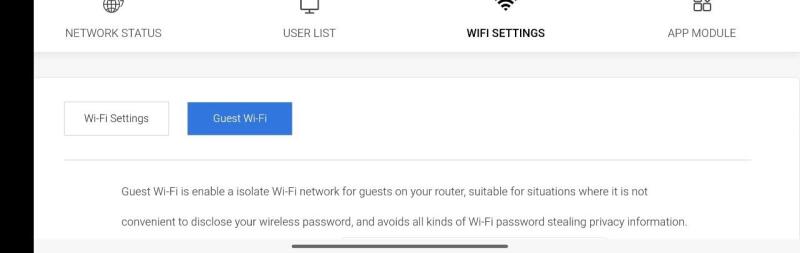 - Visitors share your main network Guests can access the same network as your personal devices.
- Increased exposure A compromised guest device could increase risk to your other devices if there is no isolation.
- Less control You cannot easily separate guest traffic from trusted devices.
- Visitors share your main network Guests can access the same network as your personal devices.
- Increased exposure A compromised guest device could increase risk to your other devices if there is no isolation.
- Less control You cannot easily separate guest traffic from trusted devices.
v. Risk if firmware is outdated
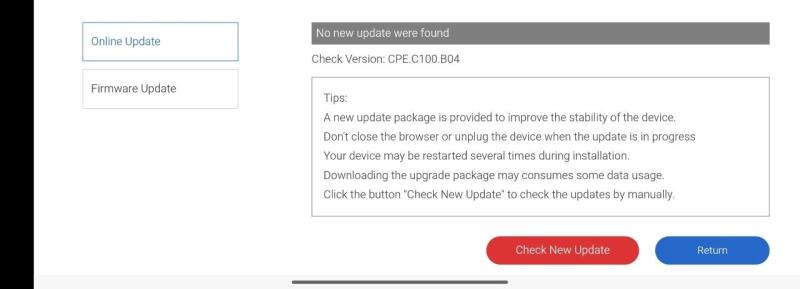 - Security vulnerabilities Known flaws may remain unpatched.
- Remote attacks Some vulnerabilities can allow attackers to compromise the router.
- Reduced stability Older firmware may have bugs or performance issues.
- Security vulnerabilities Known flaws may remain unpatched.
- Remote attacks Some vulnerabilities can allow attackers to compromise the router.
- Reduced stability Older firmware may have bugs or performance issues.
6. Hardening Recommendations
i. Using MAC filter
MAC filtering (Media Access Control filtering) is a security feature in a wireless router that controls which devices are allowed to connect to the Wi-Fi network based on their MAC address.
Every device that connects to Wi-Fi (laptop, phone, tablet, printer, smart TV) has a MAC address.
When MAC filtering is enabled, the router checks the MAC address of every device requesting access. If the address is on the allowed list, the router permits the connection. If it is not on the list, the router blocks the device.
Router decides access
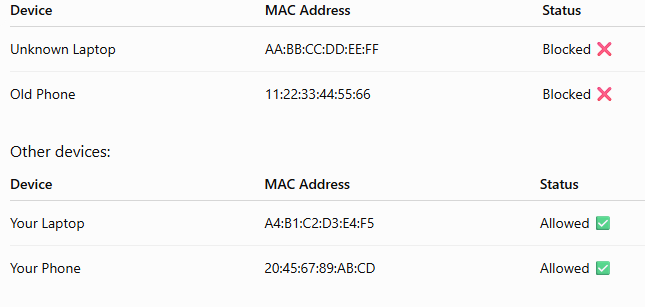
If the MAC address exists in the allowed list: Device → Router Allowed ✅ Connection accepted
If the MAC address is not listed: Unknown Device → Router Blocked ❌ Connection denied
It also Prevents Unauthorized Devices from Connecting. MAC filtering adds an additional access control layer.
Without MAC filtering: Attacker knows Wi-Fi password ↓ Connects to network ↓ Accesses internet
With MAC filtering: Attacker knows Wi-Fi password ↓ Attempts connection ↓ Router checks MAC address ↓ MAC not approved ↓ Access denied
ii. Create a Guest Network
Visitors should not access your personal devices which can leads to praying into personal datas and information.
Conclusion
This project helped me understand that securing a home Wi-Fi network requires more than just setting a strong password. Through the analysis of my Huawei 4G CPE router, I identified possible vulnerabilities such as enabled WPS, lack of guest network separation, and the risks associated with unauthorized device access.
By applying security hardening measures such as enabling WPA3/WPA2 encryption, maintaining strong passwords, updating firmware, using MAC filtering, and creating a guest network, the security of my wireless network can be improved significantly. These measures reduce the chances of unauthorized access, protect personal information, and improve the overall reliability of my network.
I also learned that cybersecurity is a continuous process rather than a one-time activity. Regular monitoring of connected devices, updating security settings, and staying aware of new threats are essential to maintaining cyber resilience. A secure Wi-Fi network requires a combination of technical controls and responsible user behavior to protect against evolving cyber threats.