Create the Host Secret Flag & Set Up a Shell, Activate the Jail!, and exit the jail
Create the Host Secret Flag The host is your normal Ubuntu system (outside the jail) and to see file create by te host
echo "HOST_SECRET_FLAG{chroot_escape_test}" > ~/host_secret.txt
cat ~/host_secret.txt
A chroot jail changes the apparent root directory of a process. The shell running inside the jail can only access files contained inside the jail directory tree. The host secret file remains outside this environment, therefore the jailed shell cannot access it. After exiting the jail, the original host environment and secret file become accessible again.
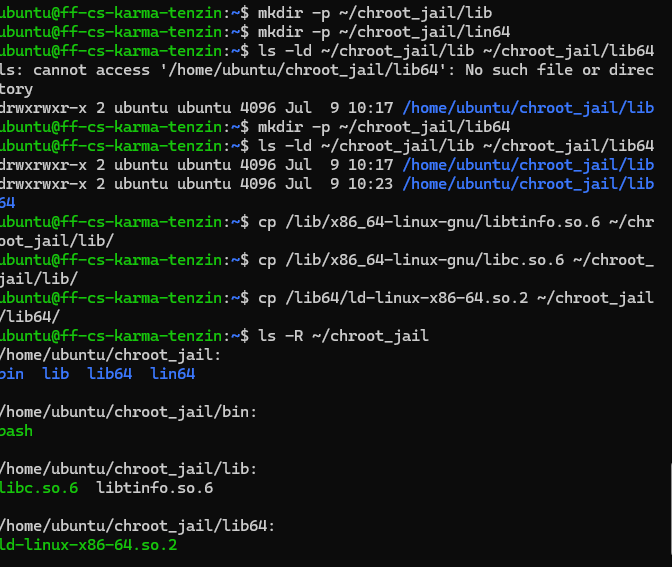
Created the libraries and copied
mkdir -p ~/chroot_jail/lib
mkdir -p ~/chroot_jail/lib64
cp /lib/x86_64-linux-gnu/libtinfo.so.6 ~/chroot_jail/lib/
cp /lib/x86_64-linux-gnu/libc.so.6 ~/chroot_jail/lib/
cp /lib64/ld-linux-x86-64.so.2 ~/chroot_jail/lib64/
Verify the code and then created the jail.
sudo chroot ~/chroot_jail /bin/bash
 To exit from the jail, we only need to command the exit.

Chroot Jail Containment Explanation
- When you ran cd ../../.. inside the jail and checked your location, why couldn’t you exit? How does the kernel manipulate path resolution for a chroot-ed process?
Inside the chroot jail, the directory traversal did not allow the process to move outside the jail. The reason is that chroot changes the root directory (/) seen by the process.

What happens if you try to run commands like nano, python3, or grep inside your jail? Explain why they fail, even if they are installed on your host OS.
commands like nano, python 3 are unavailable because /usr/bin/python3 does not exist from the jail’s point of view.
bash: nano: command not found
To make these commands work, their executable files and all required shared libraries must be manually copied into the jail.
Deep-Dive Discussion — The Privilege Escape Paradox
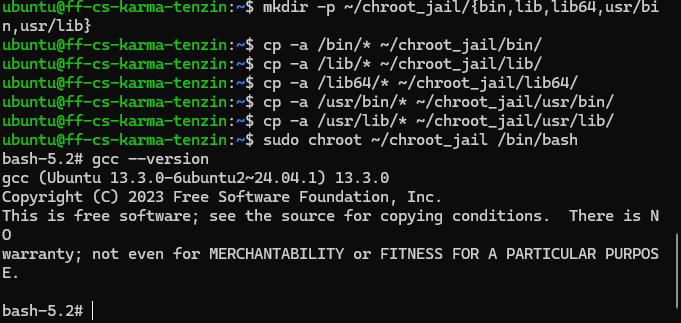
Fixing the limitations: Adding tools to the jail
A minimal chroot only contains the files you manually copied (for example, bash, libc, and the dynamic loader). Therefore, commands like: gcc, python3, grep, nano can make us view more.
Privilege Escape Paradox: How can the user access the host secret?
A chroot jail only restricts filesystem paths. It does not create a complete virtual machine. The important weakness is: -A privileged user (especially root) inside a chroot is still privileged on the host kernel. -The kernel is shared between the host and the jail.
A common way to escape a chroot is by using a process that has access to the host filesystem, such as: privileged mounts exposed devices unsafe configuration root permissions
For example, if a user inside the jail has root privileges and the ability to mount filesystems, they may mount the real host filesystem somewhere inside the jail and access files outside the chroot boundary. The reason this works is that chroot changes the process’s root directory but does not virtualize the kernel or hardware resources.
mount /dev/sda1 /mnt
Inside the jail, if the user has sufficient privileges or similar privileged operations could expose the host filesystem. After the host filesystem is mounted inside the jail, files outside the jail (including the secret flag) become visible.