Session 3 Software/memory security
## Setup
### QEMU
Protostar is said to introduce the following topics in a friendly way:
Network programming
Byte order
Handling sockets
Stack overflows
Format strings
Heap overflows
Lets hope this is no deceptive advertising.
Going to Protostar page it says that Protostar is deprecated. Lets continue anyway.
I loaded on exploit.education/downloads/ page the file exploit-exercices-protostar.iso. The credentials are either user/user or root/root.
During the QEMU launch some failure are reported.
I log as user.
I need to go to /opt/protostar/bin directory cd doesn’t seems to work :/
Lets go back to QEMU, a generic and open source machine emulator and virtualizer. Also a type-2 hypervisor.
What hardware is Protostar star supposed to be? Lets go back to the command line, also called invocation
qemu-system-x86_64 -boot d -cdrom ~/Downloads/exploit-exercises-protostar-2.iso -m 512
RAM memory → 512 GB -boot d → boots the first virtual CD drive
Thanks to this blog I could find some valide command
ip addr
 ````
 and I connect via ssh to eth0 inet adress
ssh user@…
```
I get in but got a warning about the authentification.
Are we automatically at the Stack0?
ls doesn’t return anything?
man gets
Opens Linux manual of the command gets. It has a Bugs section. Sadly I don’t know how to exit the manual. Esc, Ctr+C, Ctrl+D doesn’t work. The right command is q.
Lets try to the command recommanded by the blog author. I can’t manage to type brackets () or |, the mapping of the keyword seems faulty. Seems like some keys are restricted to release QEMU grab (Ctrl +Alt + G) making Alt impossible to use. Here is another testimony and analysis of the problem. https://wiki.archlinux.org/title/QEMU/Troubleshooting
SSH tunneling could be another solution.
To better understand the default addresses I found this visual.
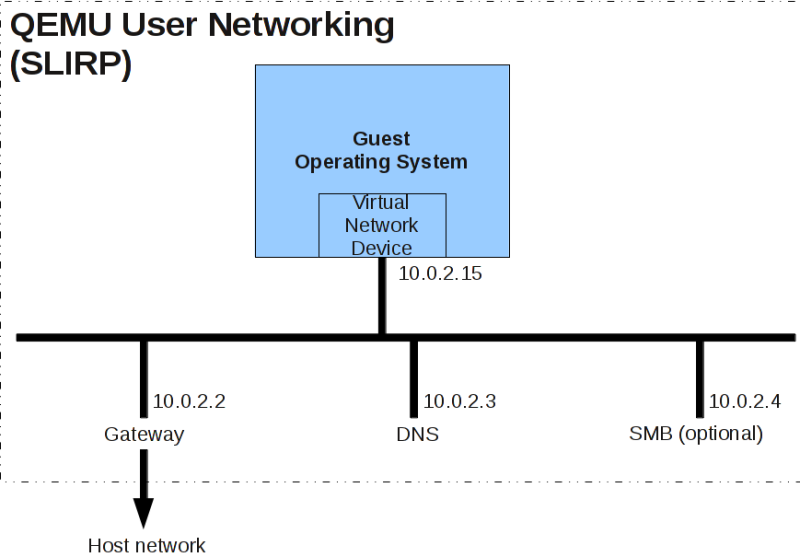
QEMU local
After the help session my keyboard seemed to be responsible of 80% of my issues (thanks AZERTY). But I have no QWERTY one :(
Pointing to my local ssh port was recommended so I followed Þórarinn documentation.
I launched QEMU locally with the line
qemu-system-i386 -boot d -cdrom exploit-exercises-protostar-2.iso -m 512 -nic user,hostfwd=tcp::2222-:22
The following line returned an error.
ssh -p 2222 -oHostKeyAlgorithms=+ssh-rsa -oPubkeyAcceptedAlgorithms=+ssh-rsa user@localhost
So I tried a simplification
ssh user@localhost
And it worked. Apparently bash also works as we are looking for a shell.
Indeed it does and it is very convenient.
The following commands work in bash: -ls -cd - password - mkdir - rm - cp - chat - echo - grep
Stack0
The command to launch an exercice is
```./stackX
I was then able to use the command map and python.
I thought the source code could be visualized in QEMU but this isn't the case.
include 
include 
include 
int main(int argc, char **argv) { volatile int modified; char buffer[64];
modified = 0; gets(buffer);
if(modified != 0) { printf(“you have changed the ‘modified’ variable\n”); } else { printf(“Try again?\n”); } }
The buffer supposed to be 64 bits.
Size is not checked by gets as underlined in the manual in the Bugs section.
The stack is: buffer on top of modified.
If the buffer is overflowed the variable modified is changed.
So if the buffer is 65.

How to assign a 65 bits value to buffer?
Simply by tipping 65 characters

[This](https://www.youtube.com/playlist?list=PLqyUgadpThTIPVHopgi1c870aDKbvE2j1) Youtube channel can be used for help.

### Stack1
include 
include 
include 
include 
int main(int argc, char **argv) { volatile int modified; char buffer[64];
if(argc == 1) { errx(1, “please specify an argument\n”); }
modified = 0; strcpy(buffer, argv[1]);
if(modified == 0x61626364) { printf(“you have correctly got the variable to the right value\n”); } else { printf(“Try again, you got 0x%08x\n”, modified); } }
The source code is similar to Stack0 but this time a specific value needs to be assigned to modified.

Lets learn what **little endian** is.

"Stores the least significant byte (the "little end") first. This means that the first byte (at the lowest memory address) is the smallest, which makes the most sense to people who read right to left."

As for [ascii](https://www.man7.org/linux/man-pages/man7/ascii.7.html), it reminds us that hexadecimal are 2 characters long and prefixed with 0x.

The
```./stack1
returns please specify an argument.
If I type Ax64 times then 64636261 it returns you got 0x32363336
I made several tries but at the end I got a segmentation fault.
“\x64\x63\x62\x61” is the equivalent of 0x61626364 on little endian machines.
Big endian to little endian converters exist.
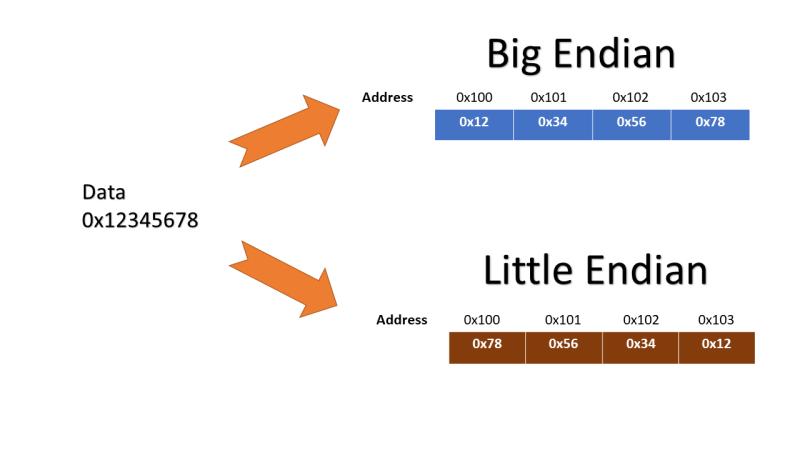 How to append it to the 64 character string?
I used a converter from hex to ASCII 61626364 > abcd So I type Ax64 times then dcba and it worked!
Stack 3
```#include
include 
include 
include 
void win() { printf(“code flow successfully changed\n”); }
int main(int argc, char *argv) { volatile int (fp)(); char buffer[64];
fp = 0;
gets(buffer);
if(fp) { printf(“calling function pointer, jumping to 0x%08x\n”, fp); fp(); } } ```
Canary concept
Biblio
A nice summary on memory overflow
What I learned
- To visualize memory in stacks.
Week feedbacks
The 3 exercices seem to exploit the gets() vulnerability, which is known. An exercice on Rust would have been nice.
The types of memory could have been better explored. RAM, stack, head dynamic allocatio, pointer. It is correlated to the type of langage used and orchestrated by the OS. A nice page on how RUST handles memory.