Class 2 – Port Scan & Firewall
Objective
To identify open ports on a system and block unnecessary or potentially vulnerable services using firewall rules.
Step 1: Port Scanning Using Nmap
I used Nmap to scan my system and identify currently open ports. The scan produced the following results:
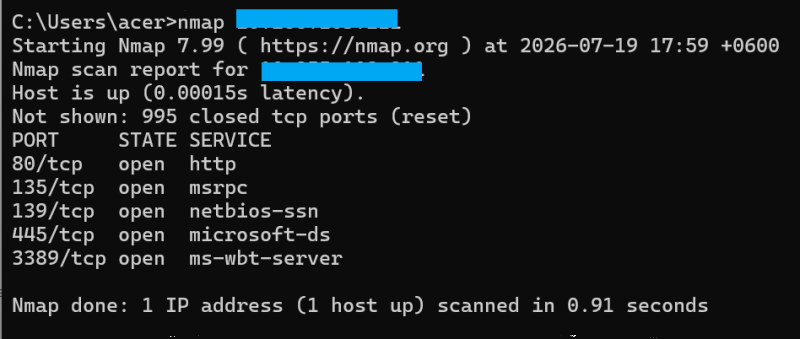
The scan revealed that several services were accessible on my system.
Step 2: Identifying a Risky Port
After analyzing the open ports, I focused on Port 445 (Microsoft-DS/SMB).
Port 445 is used by the Server Message Block (SMB) protocol for file and printer sharing. However, it has historically been targeted by major malware outbreaks, including WannaCry ransomware, which exploited vulnerabilities in SMB services to spread across networks.
To reduce the attack surface, I decided to block incoming traffic on port 445.
Step 3: Creating a Firewall Rule
I created a Windows Firewall rule to block incoming TCP connections on port 445 using:
netsh advfirewall firewall add rule name="Block SMB Port 445" dir=in action=block protocol=TCP localport=445

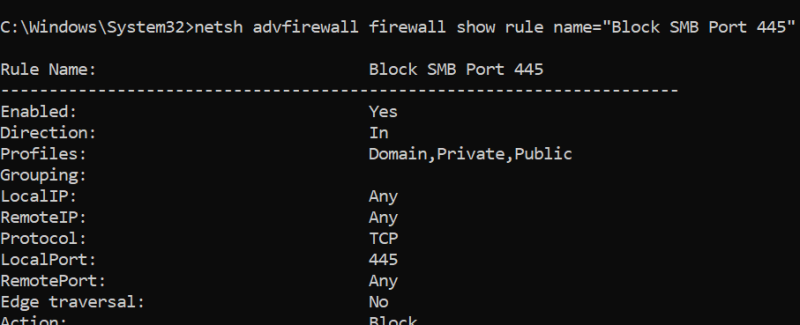
The rule was then verified using:
netsh advfirewall firewall show rule name="Block SMB Port 445"
The output confirmed that the firewall rule was successfully created.
Step 4: Verification and Observation
After applying the firewall rule, I performed another Nmap scan to check whether the port was blocked.
Observation
Although the firewall rule was successfully created and verified, a local Nmap scan still showed Port 445 as open.
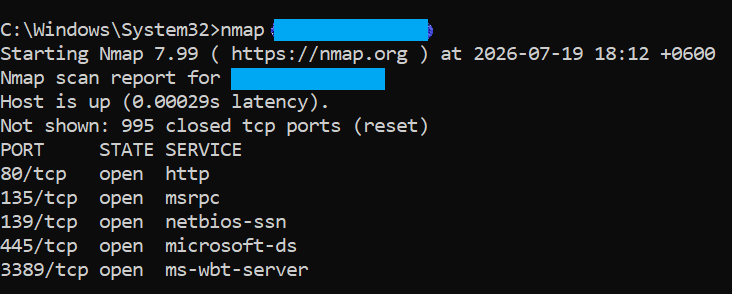
This occurred because scanning the same machine from itself can produce misleading results. Local scans may not accurately represent how the system appears to external attackers because the traffic does not always pass through the same network filtering path.
To accurately measure external exposure, a scan should be performed from:
- Another computer on the same network
- A separate virtual machine (VM)
- An external testing system
Key Learning
Through this exercise, I learned the difference between local security testing and real network exposure assessment.
- A local scan shows how services appear from within the same machine.
- A remote scan provides a more realistic view of what an attacker on the network can access.
Blocking unnecessary ports helps reduce the attack surface and improves overall system security.