Class 5 – OS and Application Security
Practical Exercise: chroot Demo Lab
Objective
The objective of this lab was to understand how Linux chroot works and explore its limitations as a security mechanism.
A chroot environment was created to isolate a process from the host filesystem. The experiment demonstrated both filesystem restriction and why chroot alone is not a complete security sandbox.
Part 1: Creating the chroot Jail
Creating a Secret File
A secret file was created on the host system:
sudo sh -c 'echo "FLAG{CHROOT_IS_NOT_A_SECURE_SANDBOX_1206}" > /host_secret.txt'
The file was verified:
cat /host_secret.txt
Output:
FLAG{CHROOT_IS_NOT_A_SECURE_SANDBOX_1206}
Creating the chroot Environment
A jail directory was created:
mkdir -p ~/chroot_jail/bin
BusyBox was copied into the jail:
cp /usr/bin/busybox ~/chroot_jail/bin/sh
The chroot environment was started:
sudo chroot ~/chroot_jail /bin/sh
The prompt changed to:
/ #
This confirmed that the shell was running inside the chroot environment.
Testing the Isolation
Checking the Root Directory
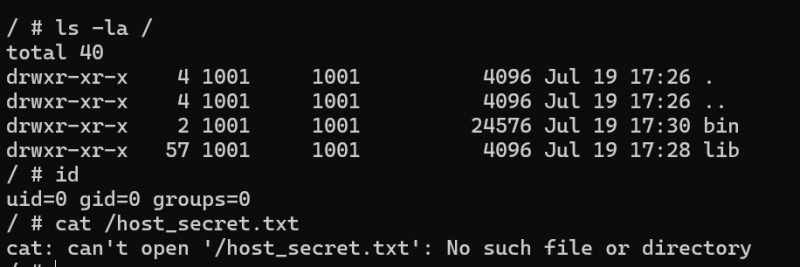
Inside the jail, the root directory was checked:
ls -la /
Only files and directories available inside the jail were visible.
Screenshot 1: Root directory inside chroot
Testing Directory Traversal
The following command was tested:
cd ../../..
pwd
Output:
/
Even after moving to parent directories, the process remained inside the chroot environment.
This happens because chroot changes the root directory reference used by the Linux kernel.
Accessing Host Files
The host secret file was accessed from inside the jail:
cat /host_secret.txt
Output:
cat: can't open '/host_secret.txt': No such file or directory
Screenshot 2: Host file blocked inside chroot
This confirmed that the chroot environment successfully hid files outside the jail.
Part 2: Adding More Tools
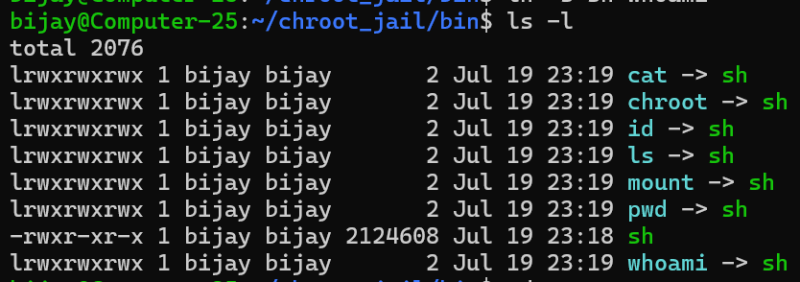
Additional binaries and libraries were copied into the jail:
sudo cp -r /bin/* ~/chroot_jail/bin/

sudo cp -r /lib/* ~/chroot_jail/lib/
Adding more tools made the environment more usable, but it did not improve security because chroot still depends on the same kernel and user privileges.
Part 3: Demonstrating chroot Escape
Checking User Privileges
Inside the chroot environment:
id
Output:
uid=0 gid=0 groups=0
This showed that the process was running as the root user.
Screenshot 3: Root privilege inside chroot

Mounting the Host Filesystem
A directory was created inside the jail:
sudo mkdir ~/chroot_jail/host
The host filesystem was mounted:
sudo mount --bind / ~/chroot_jail/host
The chroot environment was started again:
sudo chroot ~/chroot_jail /bin/sh
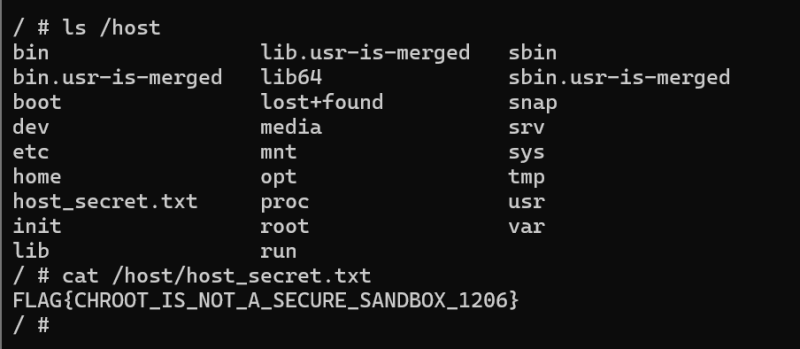
The host filesystem became accessible:
ls /host
Output:
bin
etc
home
usr
var
host_secret.txt
Screenshot 4: Accessing host filesystem from chroot
The secret file was accessed:
cat /host/host_secret.txt
Output:
FLAG{CHROOT_IS_NOT_A_SECURE_SANDBOX_1206}
Screenshot 5: Reading host secret after escape
Discussion Questions
1. Why couldn’t cd ../../.. escape the jail?
chroot changes the root directory for a process.
After applying chroot, / points to the jail directory instead of the real system root. Therefore, moving to parent directories cannot go outside the assigned root.
2. Why do commands like nano, python3, or grep fail inside the jail?
Programs from the host system are not automatically available inside the chroot environment.
To run a program inside the jail, it requires:
- The executable file
- Required libraries
- Configuration files
If these files are missing, the program cannot execute.
3. Why is chroot not a secure sandbox?
chroot provides only filesystem isolation.
It does not restrict:
- Root privileges
- Kernel access
- Processes
- Hardware resources
In this experiment, the root user inside the chroot was able to mount the host filesystem and access files outside the jail.
Modern container technologies such as Docker provide stronger isolation using:
- Namespaces
- Control groups (cgroups)
- Capability restrictions
Learning Outcome
This experiment demonstrated that:
chrootcan hide the host filesystem from a process.- Directory traversal cannot escape the chroot environment.
- Root privileges remain powerful inside the jail.
- A privileged user can bypass chroot restrictions.
Therefore, chroot is useful for basic filesystem isolation but should not be considered a complete security sandbox.