Cryptography
What is the public key?
The public key is a key that can be shared with anyone. It is used to encrypt data or verify a digital signature.*
What is the private key?
The private key is a secret key that must be kept safe. It is used to decrypt encrypted data or create a digital signature.*
What can this key pair be used for?
A public/private key pair can be used to: • Encrypt and decrypt messages. • Send information securely over the internet. • Create and verify digital signatures. • Protect online communication and data. ***
Why must the private key be protected?
The private key must be protected because: • It gives access to encrypted information. • If someone steals it, they can read private messages or pretend to be the owner. • Keeping it secret helps keep data secure and protects your identity.*
Creating Private and public key
PuTTY and PuTTYgen were used to create a secure public and private key pair for SSH authentication. First, PuTTYgen was opened to generate the keys, and a key passphrase was assigned to provide extra protection for the private key. After the key pair was created, the private key was saved in the .ppk format, which is used by PuTTY for secure logins, while the public key was saved in the .pub format. The public key can be copied to a server, and the private key remains securely stored on the user’s computer. When using PuTTY to connect to the server, the .ppk private key is selected for authentication, allowing secure remote access without entering a password each time.
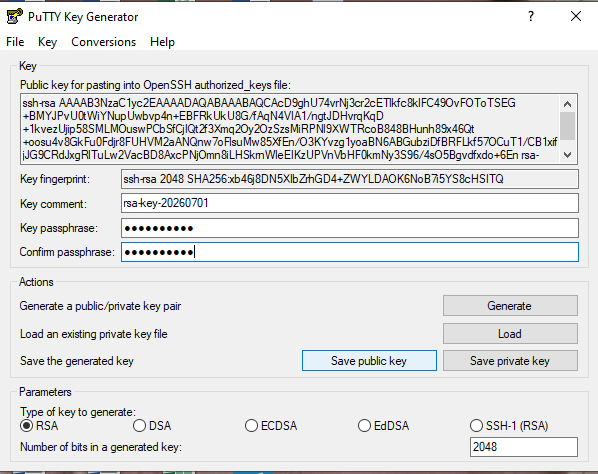
Steps to Create an SSH Key Pair
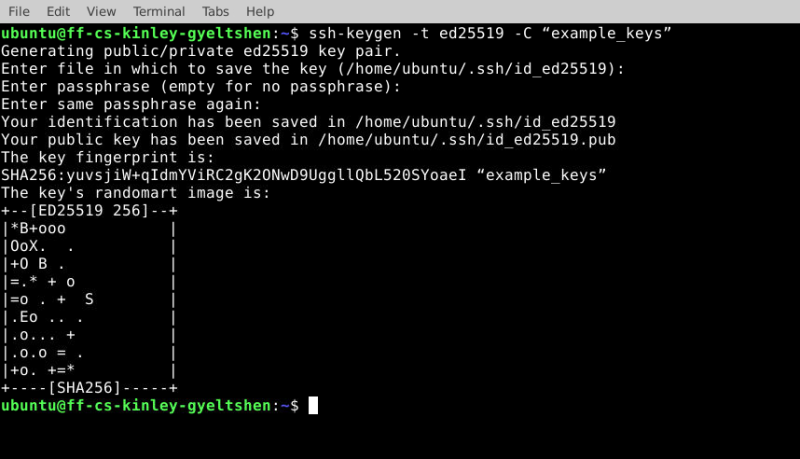
- Open the Terminal.
- Run the following command:
- ssh-keygen -t ed25519 -C “example_keys”
- Replace your_email@example.com with your own email address.

- Press Enter to save the key in the default location.
- Enter a passphrase (optional but recommended), or press Enter to skip it.
- Your SSH public key and private key will be created successfully.
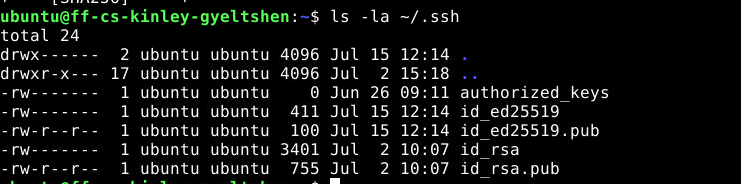
- To verify that your SSH keys were created successfully, open the Terminal and run the following command:
- In order to View the public key
