Analysis and Hardening of Vulnerabilities in my Personal Computer (Windows 11)
USB Malware Scanner: A Defensive System for Detecting Malware on USB Flash Drives
Project Objective
Develop a system that automatically scans USB flash drives when they are connected to my computer, detects suspicious or malicious files, and alerts the user before any files are opened or executed.
****USB flash drives are widely used to transfer files between computers. However, they can also spread: 1. Viruses 2. Worms 3. Trojan horses 4. Ransomware 5. Malicious scripts
Vulnerability Analysis
1. Automatic USB Access
Vulnerability: Computers often allow users to access USB contents immediately after the device is connected.
Risk: Users may accidentally open infected files.
2. Hidden Malicious Files
Vulnerability: Malware may hide files or use misleading names and icons. Risk: Users mistake malware for legitimate documents.
3. Executable Files
Vulnerability: USB drives may contain executable files such as: .exe, .bat, .cmd, .vbs, .ps1
Risk: Running these files can infect the computer.
4. Macro-Enabled Documents
Vulnerability: Documents with embedded macros (for example, some Office files) may contain malicious code. Risk: Enabling macros can execute unwanted actions.
Develop a USB Malware Scanner using cmd from the window.
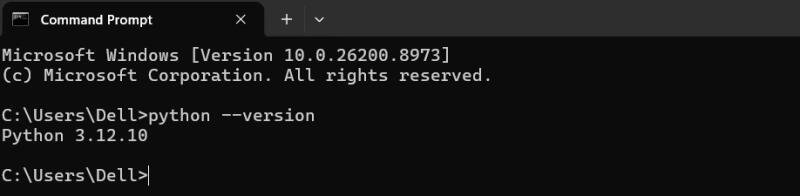
I installed Python in my window
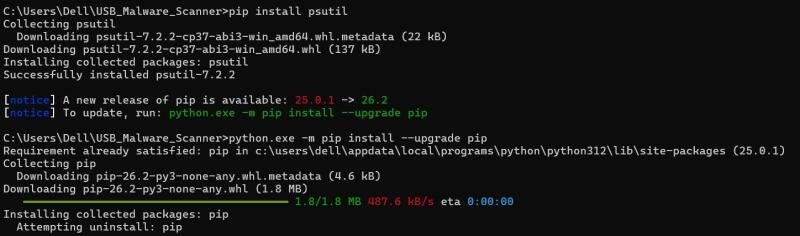
pip (package installer) pip install psutil
Create my project folder
mkdir USB_Malware_Scanner
cd USB_Malware_Scanner
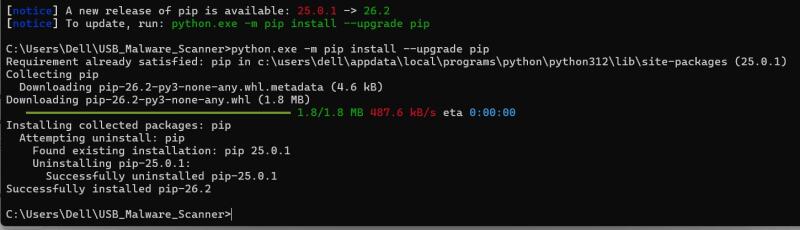
Install libraries
pip install psutil
pip install pywin32

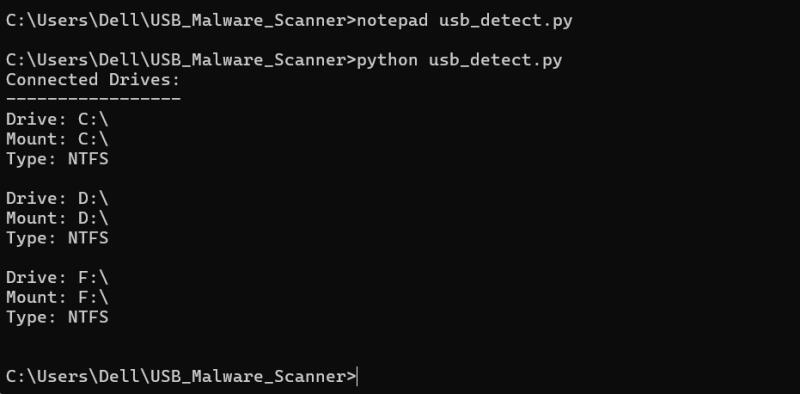
Create my first USB detector
notepad usb_detect.py
import psutil

print("Connected Drives:")
print("-----------------")

for drive in psutil.disk_partitions():
    print("Drive:", drive.device)
    print("Mount:", drive.mountpoint)
    print("Type:", drive.fstype)
    print()
import psutil


def find_usb():

    drives = []

    for partition in psutil.disk_partitions():

        if "removable" in partition.opts.lower():

            drives.append(partition.device)

    return drives


if __name__ == "__main__":

    usb = find_usb()

    if usb:
        print("USB detected:")
        for drive in usb:
            print(drive)

    else:
        print("No USB found")
Then run python usb_detect.py
Create scanner.py
notepad scanner.py
import os
from datetime import datetime

suspicious_extensions = [
    ".exe",
    ".bat",
    ".cmd",
    ".vbs",
    ".ps1"
]

print("USB Malware Scanner")
print("------------------")

usb_path = input("Enter USB drive path (example E:\\): ")

if not os.path.exists(usb_path):
    print("USB drive not found")
    exit()

print("\nScanning:", usb_path)

found = []

for root, folders, files in os.walk(usb_path):
    for file in files:
        file_path = os.path.join(root, file)

        # Check suspicious extensions
        if file.lower().endswith(tuple(suspicious_extensions)):
            found.append(file_path)

        # Check autorun file
        if file.lower() == "autorun.inf":
            found.append(file_path)


print("\nScan Completed")

report = "USB Malware Scan Report\n"
report += str(datetime.now()) + "\n\n"

if found:
    report += "Suspicious files found:\n"
    for item in found:
        report += item + "\n"

    print("\nWARNING! Suspicious files detected:")
    for item in found:
        print(item)

else:
    report += "No suspicious files found\n"
    print("No suspicious files found")


with open("scan_report.txt", "w") as f:
    f.write(report)

print("\nReport saved as scan_report.txt")
Run the scanner
python scanner.py
Then ask Enter USB drive path:
Example: E:\ , F:\ or D:\
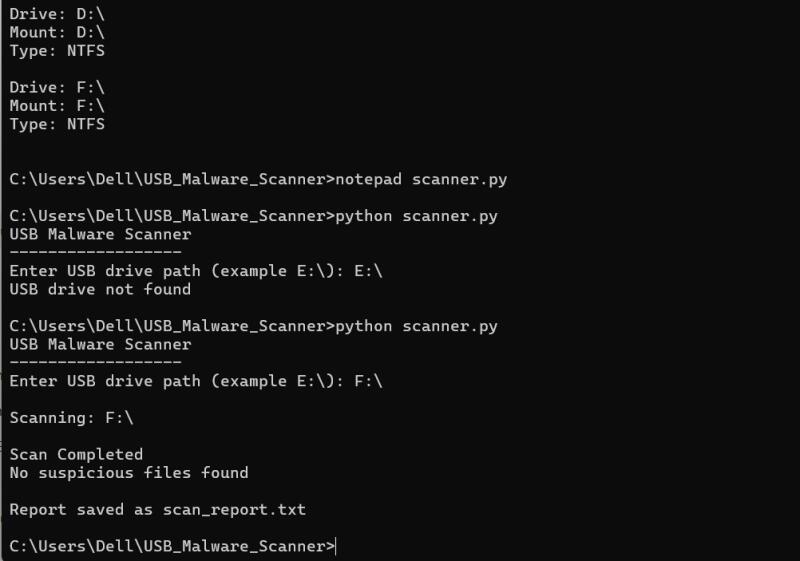
Check report
Inside your project folder:
USB_Malware_Scanner
│
├── scanner.py
└── scan_report.txt
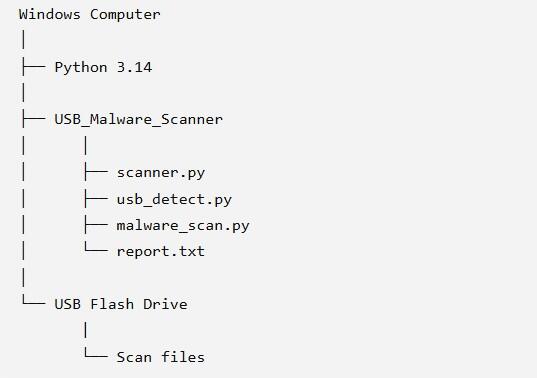
Suspicious files detected by my USB Malware Scanner
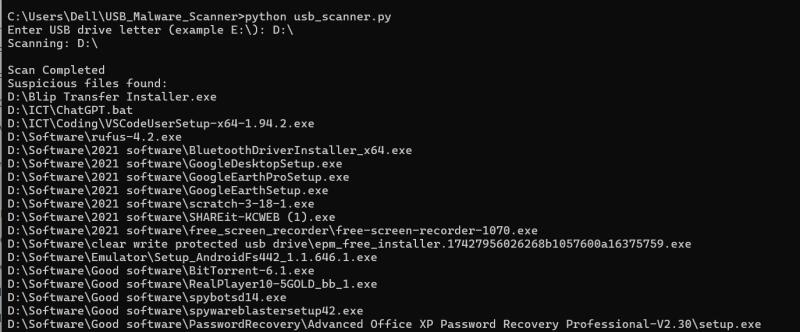
Upgrading of my USB Malware scanner with python usb_detector_gui.py
I installed extra python library (Package) pip install customtkinter
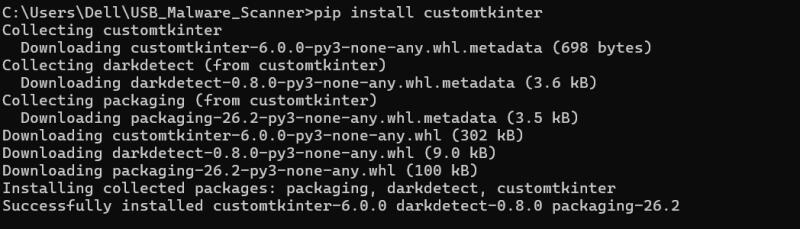
Use code in Notepad
import os
import time
import psutil
import threading
import customtkinter as ctk
from tkinter import messagebox

ctk.set_appearance_mode("dark")
ctk.set_default_color_theme("blue")

suspicious_files = ['autorun.inf', '.vbs', '.exe','.bat','cmd','scr']
connected_drives = set()
LOG_FILE = "usb_log.txt"

class USBMonitorApp(ctk.CTk):
    def __init__(self):
        super().__init__()

        self.title("USB Malware Detector")
        self.geometry("800x500")

        self.title_label = ctk.CTkLabel(self, text="USB Malware Detector", font=ctk.CTkFont(size=20, weight="bold"))
        self.title_label.pack(pady=15)

        self.status_label = ctk.CTkLabel(self, text="Status: Monitoring USB ports...", font=ctk.CTkFont(size=14))
        self.status_label.pack()

        self.log_textbox = ctk.CTkTextbox(self, width=750, height=300, font=("Courier", 12))
        self.log_textbox.pack(pady=15)
        self.log_textbox.configure(state="disabled")

        self.log_button = ctk.CTkButton(self, text="Open Log File", command=self.open_log)
        self.log_button.pack(pady=10)

        self.start_monitoring()

    def open_log(self):
        os.system(f'notepad {LOG_FILE}')

    def log(self, message):
        timestamp = time.strftime("[%Y-%m-%d %H:%M:%S] ")
        full_message = timestamp + message + "\n"

        with open(LOG_FILE, "a", encoding="utf-8") as f:
            f.write(full_message)

        self.log_textbox.configure(state="normal")
        self.log_textbox.insert("end", full_message)
        self.log_textbox.see("end")
        self.log_textbox.configure(state="disabled")

    def scan_usb(self, drive_path):
        self.log(f"Scanning USB: {drive_path}")
        threats_found = False
        for root, dirs, files in os.walk(drive_path):
            for file in files:
                file_path = os.path.join(root, file)
                lower_file = file.lower()
                if any(susp in lower_file for susp in suspicious_files):
                    self.log(f"Suspicious file found: {file_path}")
                    threats_found = True

        # Show warning once if any threat is found
        if threats_found:
            messagebox.showwarning(
                "Warning",
                "Suspicious files were found on this USB drive.\n\nPlease remove it immediately.\nThank you!"
            )

        if not threats_found:
            self.log("No suspicious files found.")
        self.log("-" * 60)

    def monitor_usb(self):
        global connected_drives
        while True:
            try:
                current_drives = set()
                partitions = psutil.disk_partitions()
                for p in partitions:
                    if 'removable' in p.opts or 'cdrom' in p.opts:
                        current_drives.add(p.device)

                new_drives = current_drives - connected_drives
                for drive in new_drives:
                    self.log(f"USB Detected: {drive}")
                    self.scan_usb(drive)

                connected_drives = current_drives
                time.sleep(5)
            except Exception as e:
                self.log(f"Error: {e}")

    def start_monitoring(self):
        t = threading.Thread(target=self.monitor_usb, daemon=True)
        t.start()


if __name__ == "__main__":
    app = USBMonitorApp()
    app.mainloop()
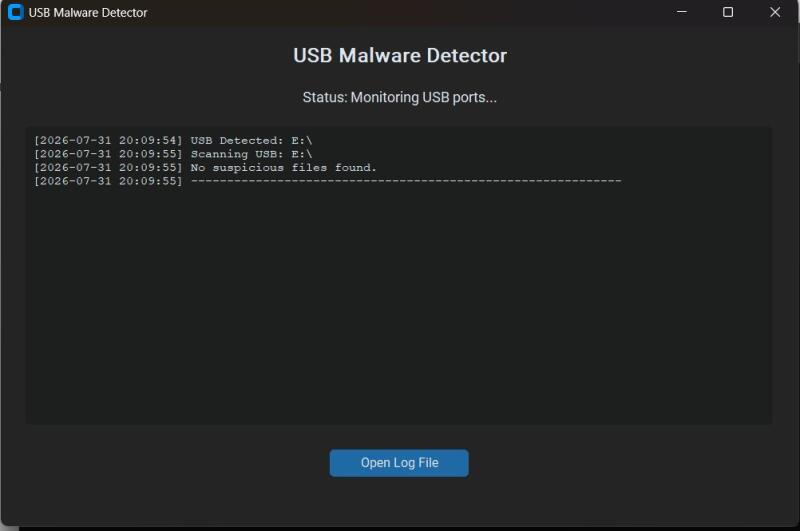
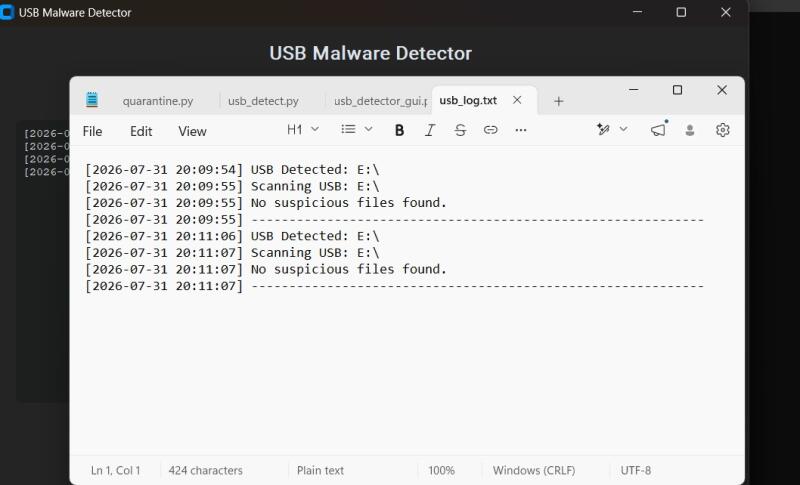
In CMD i run python usb_detector_gui.py in USB malware scanner.
USB Malware Detector.
Further Enhancement with USB defender Scanner
I used following code for Enhancment
"""
USB Defender Scanner
=====================
Watches for removable (USB) drives being connected on Windows and automatically
triggers a Windows Defender scan on them using the built-in command-line tool
MpCmdRun.exe. This avoids reinventing malware detection — Defender's engine and
signature database do the real work; this script just automates pointing it at
USB drives the moment they appear.

Requirements:
    Windows 10/11 with Windows Defender enabled
    pip install pywin32

Usage:
    python usb_defender_scanner.py            # continuous monitoring (scans new USBs as they're plugged in)
    python usb_defender_scanner.py --once      # scan all currently connected USB drives once, then exit
    python usb_defender_scanner.py --quick     # use QuickScan instead of FullScan for the USB (faster, less thorough)

Run from an elevated (Administrator) command prompt for best results —
Defender's command-line scanner behaves more reliably with admin rights.
"""

import argparse
import ctypes
import datetime
import os
import subprocess
import sys
import time

try:
    import win32file
except ImportError:
    print("This script requires pywin32. Install it with:\n    pip install pywin32")
    sys.exit(1)

DRIVE_REMOVABLE = 2  # win32file.DRIVE_REMOVABLE

# Common install locations for Windows Defender's command-line scanner
DEFENDER_PATHS = [
    r"C:\Program Files\Windows Defender\MpCmdRun.exe",
    r"C:\ProgramData\Microsoft\Windows Defender\Platform",  # versioned subfolders live here
]

LOG_FILE = os.path.join(os.path.dirname(os.path.abspath(__file__)), "usb_scan_log.txt")


def log(message):
    timestamp = datetime.datetime.now().strftime("%Y-%m-%d %H:%M:%S")
    line = f"[{timestamp}] {message}"
    print(line)
    with open(LOG_FILE, "a", encoding="utf-8") as f:
        f.write(line + "\n")


def find_defender_exe():
    """Locate MpCmdRun.exe, checking the fixed path first, then versioned Platform folders."""
    fixed_path = DEFENDER_PATHS[0]
    if os.path.isfile(fixed_path):
        return fixed_path

    platform_root = DEFENDER_PATHS[1]
    if os.path.isdir(platform_root):
        # Versioned folders look like "4.18.24090.11" - pick the newest one
        versions = sorted(os.listdir(platform_root), reverse=True)
        for version in versions:
            candidate = os.path.join(platform_root, version, "MpCmdRun.exe")
            if os.path.isfile(candidate):
                return candidate

    return None


def is_admin():
    try:
        return ctypes.windll.shell32.IsUserAnAdmin()
    except Exception:
        return False


def get_removable_drives():
    """Return a list of drive letters (e.g. ['E:\\\\']) currently attached as removable media."""
    drives = []
    bitmask = win32file.GetLogicalDrives()
    for letter_index in range(26):
        if bitmask & (1 << letter_index):
            drive = f"{chr(65 + letter_index)}:\\"
            try:
                if win32file.GetDriveType(drive) == DRIVE_REMOVABLE:
                    drives.append(drive)
            except Exception:
                continue
    return drives


def scan_drive(defender_exe, drive_path, quick=False):
    scan_type = "3"  # 3 = custom scan of a specific file/folder path
    log(f"Starting {'quick' if quick else 'full'} Defender scan on {drive_path} ...")

    cmd = [defender_exe, "-Scan", "-ScanType", scan_type, "-File", drive_path]
    if quick:
        cmd += ["-DisableRemediation"]  # report-only pass, faster, doesn't auto-remove found items

    try:
        result = subprocess.run(
            cmd,
            capture_output=True,
            text=True,
            timeout=1800,  # 30 minute safety timeout for large drives
        )
    except subprocess.TimeoutExpired:
        log(f"Scan of {drive_path} timed out after 30 minutes.")
        return

    output = (result.stdout or "").strip()
    error_output = (result.stderr or "").strip()

    if result.returncode == 0:
        log(f"Scan complete for {drive_path}: no threats found.")
    else:
        log(f"Scan finished for {drive_path} with return code {result.returncode} "
            f"(non-zero can indicate threats found or scan issues).")

    if output:
        log(f"Defender output for {drive_path}:\n{output}")
    if error_output:
        log(f"Defender stderr for {drive_path}:\n{error_output}")


def run_once(defender_exe, quick):
    drives = get_removable_drives()
    if not drives:
        log("No removable (USB) drives currently connected.")
        return
    for drive in drives:
        scan_drive(defender_exe, drive, quick=quick)


def monitor(defender_exe, quick, poll_seconds=3):
    log("Monitoring for USB drives. Press Ctrl+C to stop.")
    known_drives = set(get_removable_drives())
    log(f"Currently connected removable drives: {sorted(known_drives) or 'none'}")

    try:
        while True:
            time.sleep(poll_seconds)
            current_drives = set(get_removable_drives())

            new_drives = current_drives - known_drives
            removed_drives = known_drives - current_drives

            for drive in new_drives:
                log(f"New USB drive detected: {drive}")
                scan_drive(defender_exe, drive, quick=quick)

            for drive in removed_drives:
                log(f"USB drive removed: {drive}")

            known_drives = current_drives

    except KeyboardInterrupt:
        log("Stopped monitoring.")


def main():
    parser = argparse.ArgumentParser(description="Scan USB drives automatically using Windows Defender.")
    parser.add_argument("--once", action="store_true", help="Scan currently connected USB drives once, then exit.")
    parser.add_argument("--quick", action="store_true", help="Use a faster, report-only scan instead of a full scan.")
    parser.add_argument("--poll", type=int, default=3, help="Seconds between checks for new drives (default: 3).")
    args = parser.parse_args()

    if os.name != "nt":
        print("This script only works on Windows, since it relies on Windows Defender's MpCmdRun.exe.")
        sys.exit(1)

    if not is_admin():
        log("Warning: not running as Administrator. Some scans may be limited. "
            "Consider re-running this script from an elevated command prompt.")

    defender_exe = find_defender_exe()
    if not defender_exe:
        log("Could not find MpCmdRun.exe. Make sure Windows Defender is installed and enabled, "
            "or check that real-time protection hasn't been replaced by a third-party antivirus.")
        sys.exit(1)

    log(f"Using Defender scanner at: {defender_exe}")

    if args.once:
        run_once(defender_exe, args.quick)
    else:
        monitor(defender_exe, args.quick, poll_seconds=args.poll)


if __name__ == "__main__":
    main()
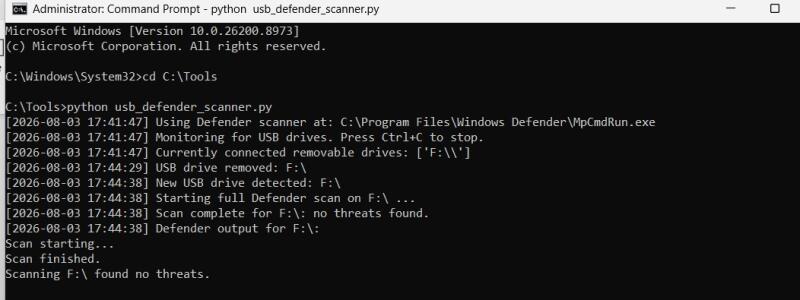
I have created a folder (cd C:\Tools)
Then run to scan the drive using python usb_defender_scanner.py --once
To leave it running and auto-scan any USB you plug in from now on:
python usb_defender_scanner.py
For a faster, lighter scan (good for demos, since full scans can take a while on large drives):
python usb_defender_scanner.py --once --quick
USB drives remain one of the most common malware infection vectors because they bypass network-based defenses entirely — a device physically connects and can execute autorun scripts or hide payloads before any firewall or network monitor ever sees it. Historic attacks like Stuxnet spread specifically through infected USB media, proving that air-gapped or offline systems aren’t immune. A dedicated USB malware scanner closes this gap by inspecting removable media automatically at the point of connection, rather than relying on users to remember to scan manually. This is especially critical in environments like schools, offices, and industrial control systems, where USB drives are frequently shared between untrusted devices and sensitive machines.
Vulnerability Analysis of My Computer Window 11.
Vulnerability Identification. (Tools used)
1. Windows Security (Microsoft Defender)
Which checks antivirus status, firewall, device security, and account protection.
2. Window update
Verifies if the system is fully patched

3. Device Manager
Identifies outdated or problematic device drivers

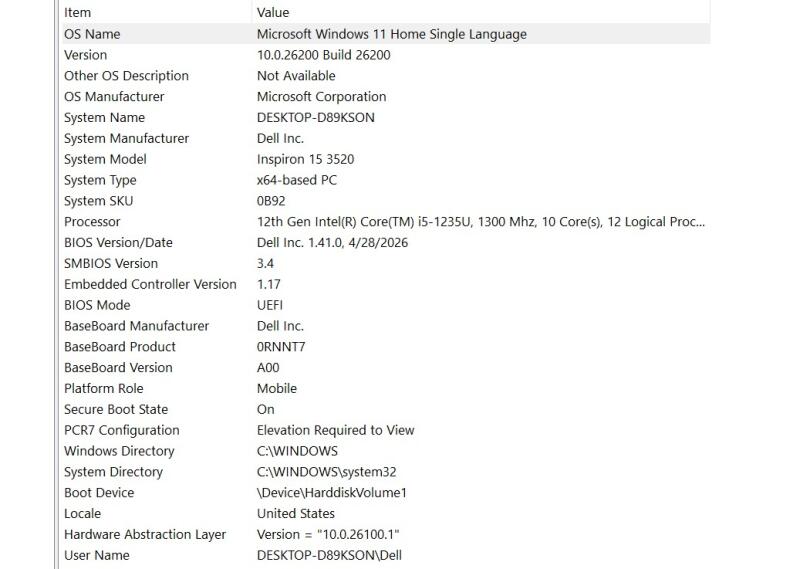
4. System Information (msinfo32)
Displays hardware, BIOS, OS version, and security settings.
1. Press Win + R to open the Run dialog.
2. Type msinfo32 and press Enter.
3. The System Information window opens.
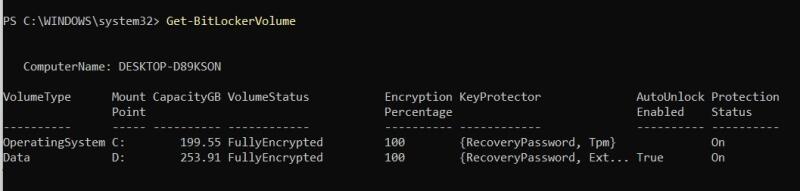
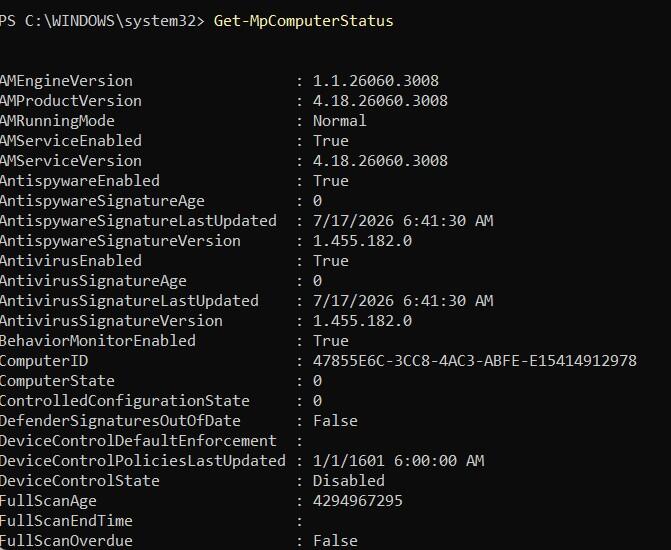
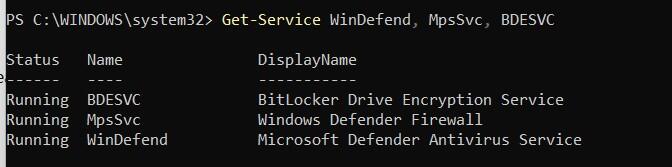
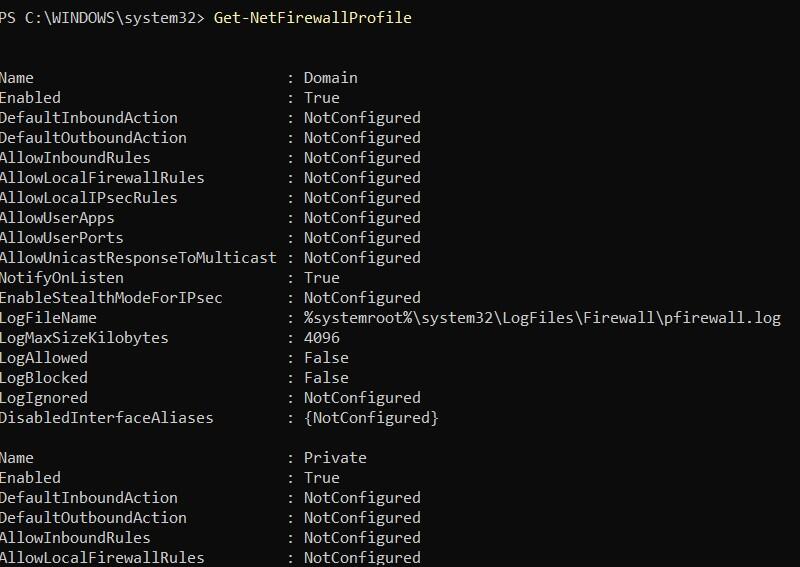
5. Powershell
Retrieves detailed security information (Commands to check antivirus, firewall, and BitLocker status)
BitLocker
Computer status
Window Defender
Net Firewall
6. Nessus Essentials
Professional vulnerability scanner (free for personal use) ( Detected vulnerabilities, severity levels, and recommendations)
7. Nmap
Scans open ports and running services
8. OpenVAS (Greenbone)
Open-source vulnerability scanner
9. Wireshark
Captures and analyzes network traffic
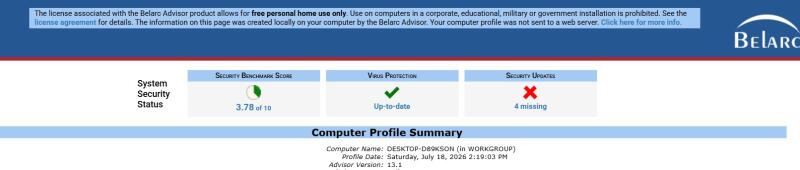
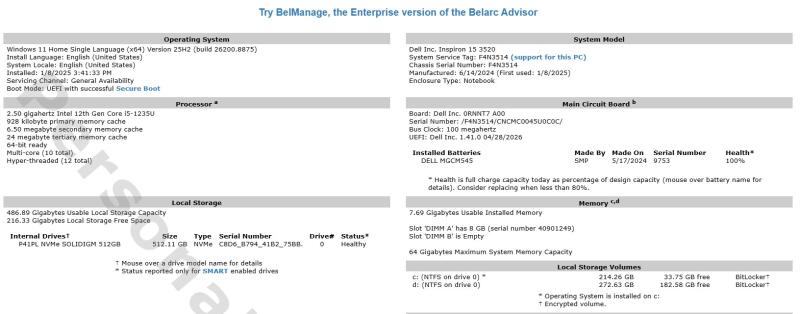
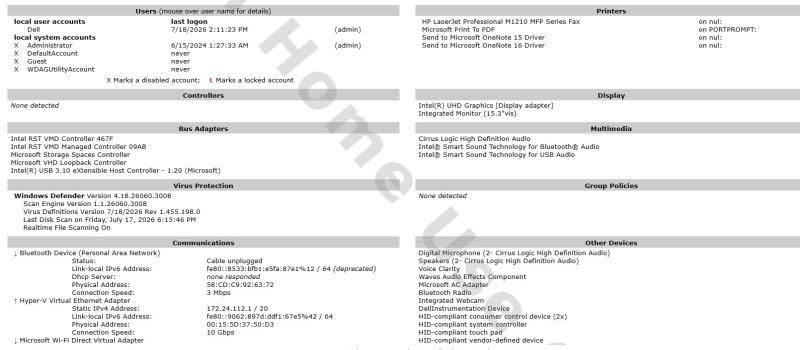
10. Belarc Advisor
Generates a report of installed software, hardware, and missing updates
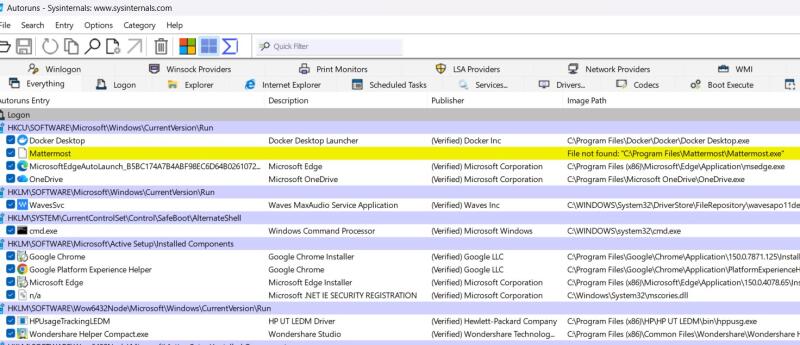
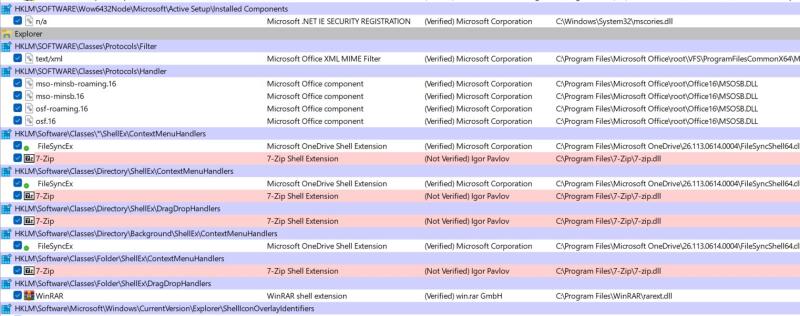
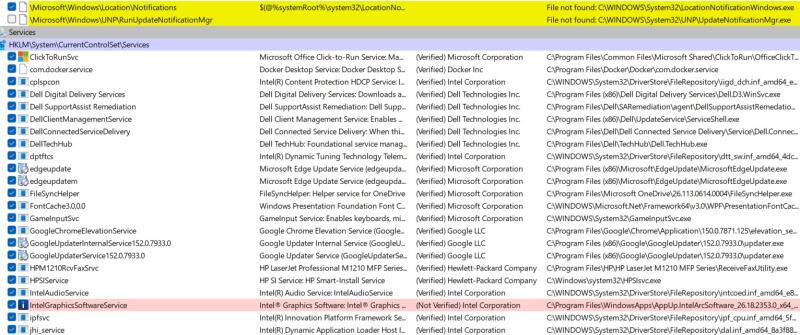
11. Autoruns (Sysinternals)
Lists programs that start automatically with Windows
Vulnerability: Insufficient Security Protection and Poor System Hardening
Risk:
A Windows 11 computer with weak security controls, such as weak passwords, outdated software, malware exposure, unsafe network connections, lack of backup protection, and phishing Attacks is vulnerable to cyberattacks. These weaknesses can allow attackers to gain unauthorized access, exploit system flaws, steal sensitive information, or disrupt normal operations.
Possible Attacks:
Brute force and dictionary attacks to compromise weak passwords Exploitation of outdated software vulnerabilities Malware infections through malicious downloads, applications, or email attachments Phishing attacks to steal login credentials and personal information Man-in-the-middle attacks through insecure Wi-Fi networks Ransomware attacks causing data encryption and loss
Impact:
Unauthorized access to user accounts and systems Theft of personal, financial, or confidential data Malware infection and system compromise Identity theft and financial losses Data leakage and privacy violations Permanent data loss due to ransomware or hardware failure Reduced system availability and productivity disruption
Security Hardening Measures
Strong Authentication
- Use passwords with at least 12 characters.
- Enable Multi-Factor Authentication (MFA).
- Avoid password reuse.
- Use a password manager.
Software Updates
- Enable automatic Windows updates.
- Keep browsers and applications updated.
- Remove unsupported software.
Antivirus Protection
- Enable Microsoft Defender.
- Perform weekly full system scans.
- Enable real-time protection.
Firewall
- Enable Windows Defender Firewall.
- Block unnecessary incoming connections.
- Monitor suspicious traffic.
Secure Internet Usage
- Avoid downloading software from unknown websites.
- Verify website HTTPS certificates.
- Avoid clicking suspicious links.
Wi-Fi Security
- Use WPA3 encryption if supported.
- Change the default router password.
- Disable WPS.
- Use a VPN when on public Wi-Fi.
Data Backup
Follow the 3-2-1 Backup Rule:
- Three copies of data
- Two different storage media
- One off-site or cloud backup
Conclusion
The Windows 11 personal computer is vulnerable to threats such as weak passwords, malware, phishing, outdated software, insecure networks, and data loss. Implementing security hardening measures—including strong authentication, timely software updates, antivirus protection, firewalls, secure Wi-Fi practices, regular backups, and user awareness—significantly reduces the risk of successful cyberattacks. Maintaining cybersecurity is an ongoing process that requires continuous monitoring, updates, and responsible user behavior.