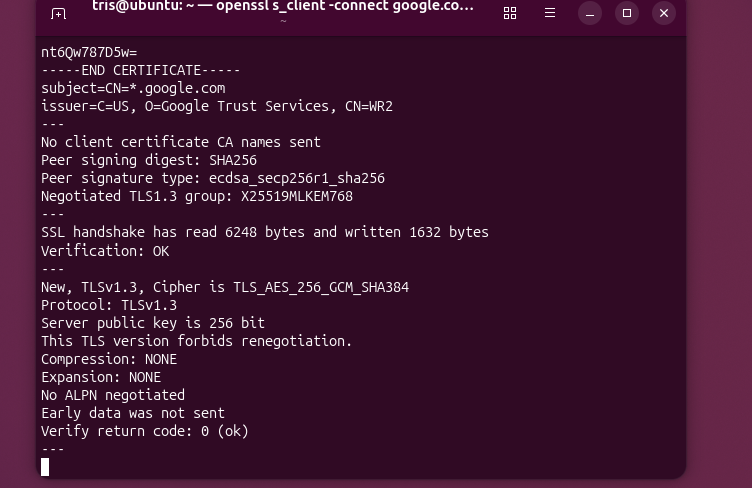
🔐 SSH Key Authentication
What is SSH?
- SSH (Secure Shell) is a protocol for secure remote login and communication.
- It allows encrypted connections between a client (your PC) and a server.
How SSH Key Authentication Works
- A cryptographic key pair is created: one public, one private.
- The public key is stored on the server.
- The private key stays securely on the user’s PC.
- When you attempt to log in:
- The server sends a challenge (test).
- Only the private key can correctly answer it.
- If the answer matches, access is granted — without needing a password.
What is Stored on the Server?
- The public key of the user.
What Stays on Your PC?
- The private key, which must be kept secret.
Why Doesn’t the Server Need Your Private Key?
- You generate a key pair: one public, one private.
- The public key goes on the server.
- The private key stays on your PC.
- The server sends a challenge that only your private key can solve.
- This proves your identity without exposing the private key.
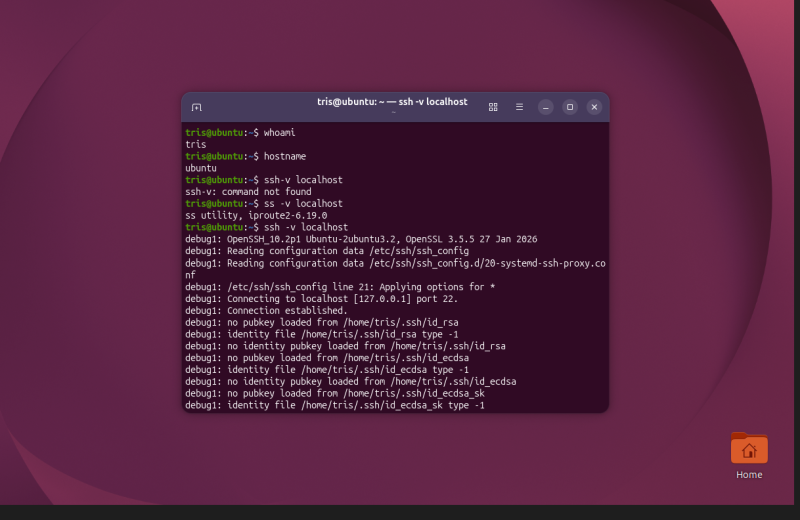
🔑 Public and Private Keys Explained
Public Key
- A cryptographic key that is openly shared.
- Used for encryption (locking data) or signature verification (checking authenticity).
- Enables secure communication because others can use it to encrypt data that only your private key can unlock.
Private Key
- A master key to your digital identity and assets.
- Must be kept secret and stored securely.
- Used to decrypt data encrypted with your public key or to create digital signatures proving ownership/identity.
Key Pair Usage
- Public and private keys work together as a pair.
- They allow secure communication without needing passwords.
- The private key stays on your device, while the public key can be shared widely.
- Together, they enable:
- Secure data transfer
- Authentication
- Digital signatures
Why Protect the Private Key
- Grants control over all your digital assets and encrypted data.
- If compromised, attackers can:
- Access funds (e.g., cryptocurrency wallets).
- Steal sensitive information.
- Impersonate your digital identity.
- Protecting it is critical to maintaining security and trust.
🔐 File Encryption and Decryption with GPG
Step 1: Create a File
```bash echo “secret message” > secret.txt
**Step 2: Encrypt the File
gpg -c secret.txt
Step 3: Decrypt the File
gpg -d secret.txt.gpg Enter the password.
You will see the original message:
“secret message”
🔎 Key Details
Did you use symmetric or public-key encryption?
→ Symmetric encryption.
Where did the key come from?
→ Derived from the password you entered.
Who can decrypt the file?
→ Anyone who knows the correct password.
What happens if the key or password is lost?
→ The file cannot be decrypted; the data is permanently lost.
💾 Disk, USB Stick, Directory, or Filesystem Encryption What is Encrypted? All data stored on the disk, USB stick, directory, or filesystem.
When is Data Decrypted? When the correct password or encryption key is provided and the storage is unlocked.
What Does This Protect Against? Unauthorized access if the device is lost, stolen, or accessed without permission.
What Does It Not Protect Against? Malware or keyloggers.
Someone accessing the data while the device is already unlocked.
Code
This Markdown version is ready to paste into notes or documentation.
Would you like me to also add a visual diagram (ASCII-style or image)
📝 Hashing Example
Create a file, compute its hash, change the file, and compute the hash again
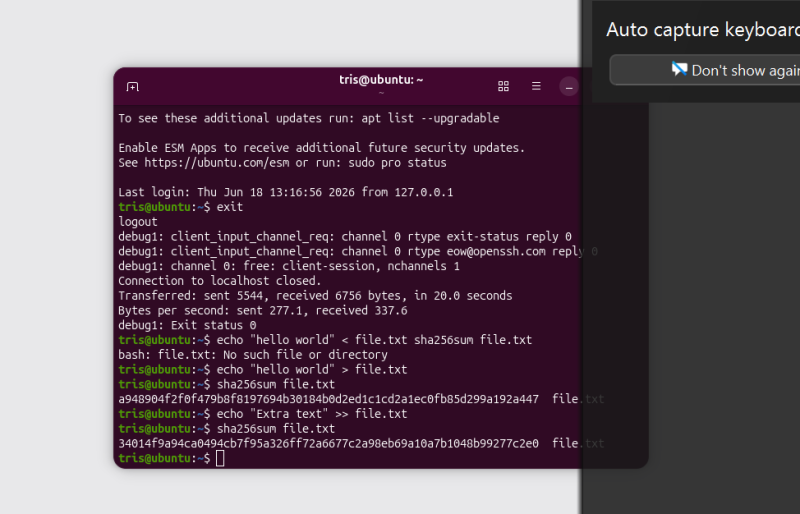
🔑 Understanding Hashes
What Changed?
- The hash value changed completely after the file was modified.
- Even a small change in the file produces a very different hash.
Why Are Hashes Useful?
- Hashes are useful for verifying data integrity.
- They allow you to quickly check whether a file has been changed, corrupted, or tampered with.
Why Doesn’t a Hash Prove Who Created the File?
- A hash only represents the contents of a file.
- Anyone can create a file with the same contents and generate the same hash.
- Therefore, it does not identify the creator.
How Can Hashes Detect Tampering?
- Compare the current hash of a file with the original hash.
- If the hashes are different, the file has been modified or tampered with.
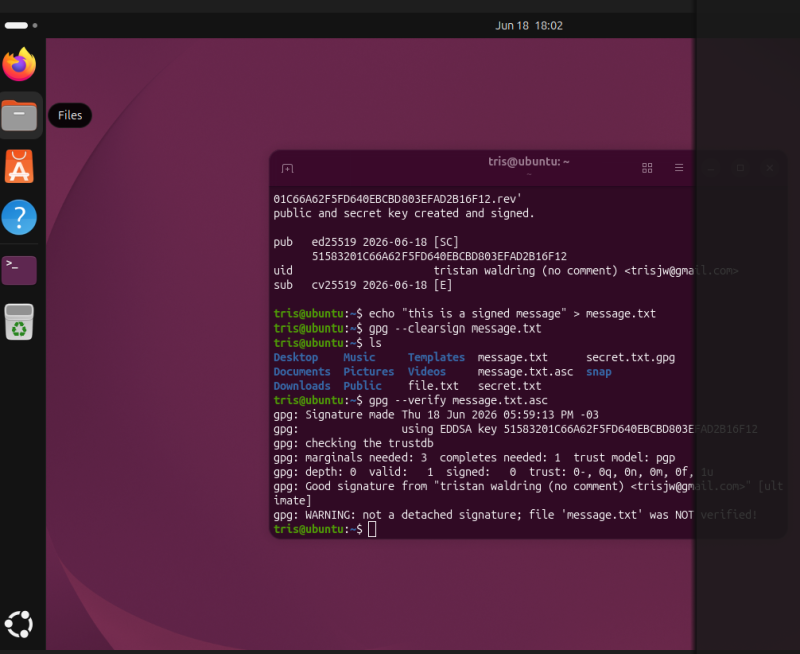
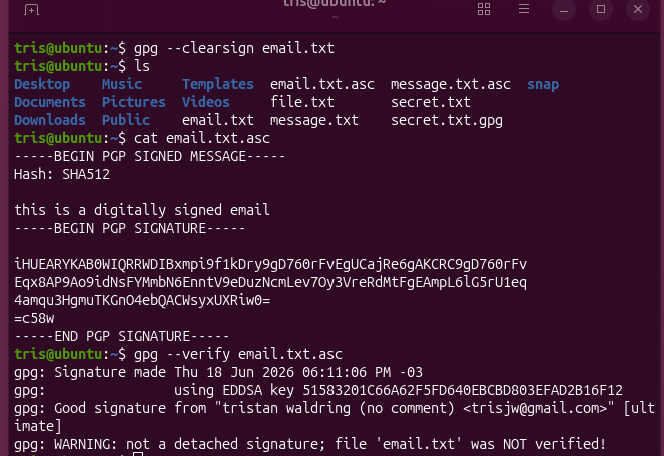
Sign a file or message and verify the signature.
✍️ Digital Signatures
What Does the Signature Prove?
- A digital signature proves that the message or file was signed by the owner of the private key.
- It also proves that the contents have not been changed since it was signed.
What Does It Not Prove?
- A digital signature does not prove that the contents are true or trustworthy.
- It does not prove the real-world identity of the signer unless the public key is linked to a verified identity.
Why Is the Message Usually Hashed Before Signing?
- Hashing is faster and more efficient than signing the entire message.
- The signature is created from the hash, which still protects the integrity of the message.
What Happens If the Signed File Is Changed?
- If the signed file is modified, the hash will change.
- The signature verification will fail, indicating that the file has been altered after it was signed.
🔐 Certificates and Hybrid Encryption
Why Does the Server Send a Certificate Instead of Just a Public Key?
- A certificate contains the server’s public key and identity information.
- It is signed by a trusted Certificate Authority (CA), allowing clients to verify that the public key belongs to the legitimate server.
What Role Does the Certificate Authority Play?
- The CA verifies the identity of the server and issues a signed certificate.
- It acts as a trusted third party that helps establish trust between the client and the server.
What Attack Does This Help Prevent?
- Certificates help prevent Man-in-the-Middle (MITM) attacks.
- They allow clients to verify that they are communicating with the legitimate server and not an attacker.
How to Encrypt a Long Message Using a Public Key?
- A long message is usually encrypted with a randomly generated symmetric key.
- The symmetric key is then encrypted with the recipient’s public key.
- The recipient decrypts the symmetric key with their private key and uses it to decrypt the message.
Why Not Encrypt the Whole Message Directly with the Public Key?
- Public key encryption is computationally expensive and slower than symmetric encryption.
- For large messages, it is more efficient to use a symmetric key to encrypt the data.
What Is a Symmetric Key?
- A symmetric key is a single secret key used for both encryption and decryption of data.
How Is the Symmetric Key Protected?
- The symmetric key is encrypted using the recipient’s public key.
- Only the recipient can decrypt it using their private key.
Why Is This Called Hybrid Encryption?
- It combines symmetric encryption (for the message) and asymmetric encryption (for protecting the symmetric key).
- This approach balances efficiency with strong security.