Class 1 - Cryptography
Assignments
 Create a public/private key pair
Install an SSH public key on a server and use it to log in
 Encrypt and decrypt a file
Encrypt a disk, USB stick, directory, or filesystem
Create a file, compute its hash, change the file, and compute the hash again
Sign a file or message and verify the signature
Send a digitally signed email
Install a certificate on a web server, or inspect the certificate of an HTTPS website
Show or describe how to encrypt a long message for someone using their public key
Research how RSA creates its private key
Suppose Alice uses (e, p) as a public key, where p is prime
Research why faster factoring would break RSA
Research why the industry is moving away from RSA and other older public-key systems
File encryption
Encryption is the process of transforming a readable file into an unreadable data string using a key. Decryption reverses this process, converting the encrypted data back to its original, readable form. The main goal of encryption is to protect sensitive information from unauthorized access.
There are two main types of encryption: symmetric encryption uses a single password (or key) for both encryption and decryption. This means the same key must be shared and kept secure; and asymmetric encryption uses a pair of keys: a public key and a private key. One key is used to encrypt the data, and the other is used to decrypt it, adding an extra layer of security.
In practice, a symmetric key is typically a password chosen by the user, while an asymmetric key pair can be generated using tools such as ssh-keygen.
An important consideration is that if the password or key pair is lost, the data is effectively unrecoverable. Unlike typical systems, there is no “reset password” option in encryption, which makes key management critical.
Encrypt and brute-force test
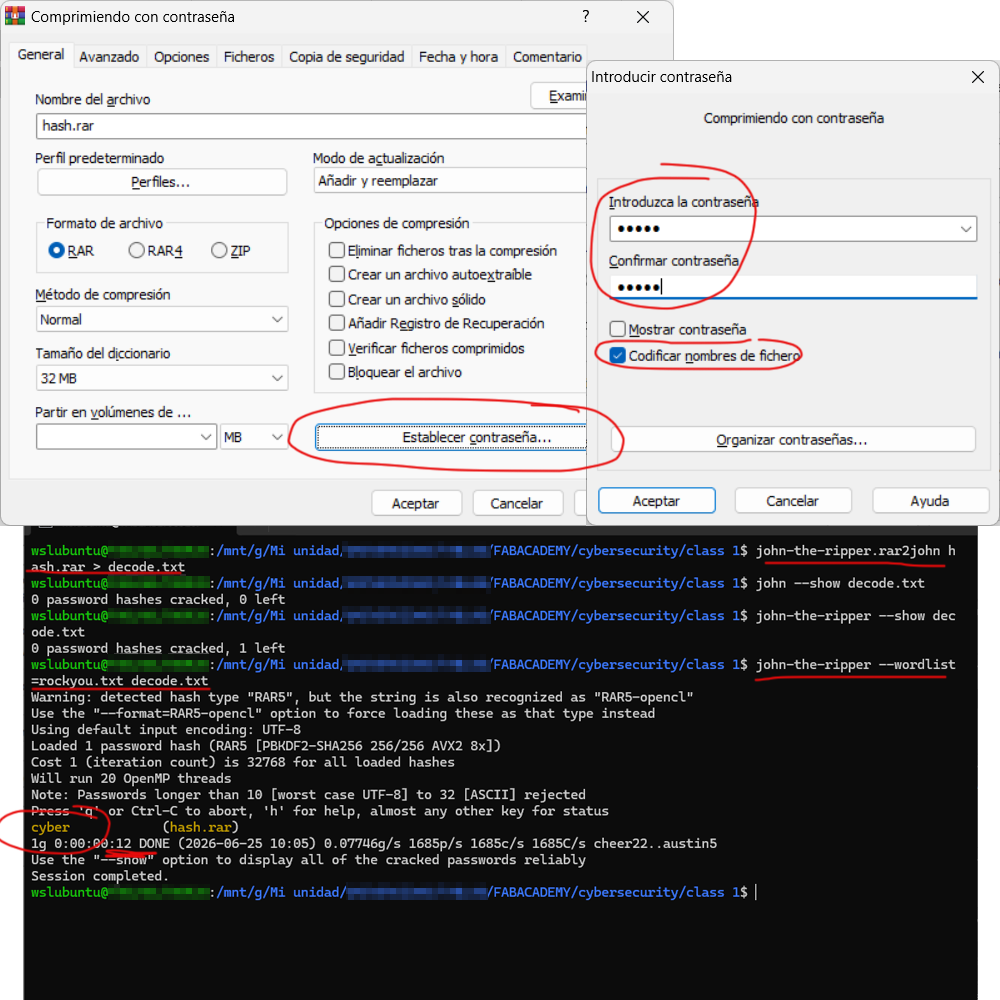
Windows does not natively support password-protecting ZIP files, so I used WinRAR to create a compressed archive and set a password. This is an example of symmetric encryption, where a user-defined password is used to protect the content.
To evaluate the strenght of this protection, I attempted a brute-force attack. Using the John the Ripper tool, I first extracted the hash of the archive password with the following command john-the-ripper.rar2john hash.rar > decode.txt. Then, I ran a comparation john-the-ripper --wordlist=rockyou.txt decode.txt between this hash and a password dictionary. The password was successfully recovered in approximately 12 seconds.
This exercise demonstrate that while encryption and hashing are powerfull tools, weak or predictable passwords can significantly reduce their effectiveness.
Disk encryption
When a disk is encrypted, all data stored on it is protected at a low level. From the outside, the system only seesrandom-loking data rahter than readable files. Decryption happens automatically in memory once the correct password or key is provided. This means that data remains encrypted on the disk, while it is temporarily decrypted in RAM during use.
Disk encryption provides strong protection against scenarios such as psyhical theft, unauthorized offilne access, data recovery attempts or list devices. However, it does not protect against threats during active sessions.
To explore this in practice, I worked with the open-source disk encryption software VeraCrypt. I created an encrypted file container that acts as a virtual disk using the following steps:
Create Volume -> Create an encrypted file container -> Standard VeraCrypt volume -> Select/Create file -> Choose encryption options -> Define volume size -> Set password -> Format volume -> Volume successfully created!
To use this encrypted container, it must be mounted as a virtual drive and unlocked with the correct password.
An interesting observation is that the container produces a different hash each time it is mounted, even if the stored content has not changed. This highlights the role of randomness and internal encryption mechanisms in protecting the data.
Understanding Hashes
Every digital file has its own hash, but it doesn’t exist in a visible way until you compute it. A simple analogy is weight: an object always has a weight, but you need to measure it to know the value. Hashes work in a similar way - they exist implicitly, but must be calculated.
Hash functions are designed with the avalanche effect, meaning that even the smallest change in the input produces a completely different output. This makes them very sensitive to modifications.
There are several types of hash algorithms, such as MD5 and SHA-256, each with different levels of security and use cases.
Hashes are useful because they are practically unique, fast to compute and one-way functions (you cannot reconstruct the original file from its hash).
It’s important to note that hashes depend only on the content of a file, not on its author or ownership. They carry no identity information.
One common application is detecting tampering: by comparing the hash of a file with its official hash, you can verify its integrity. If both hashes match, the file is considered original and unchanged.
Computing a hash
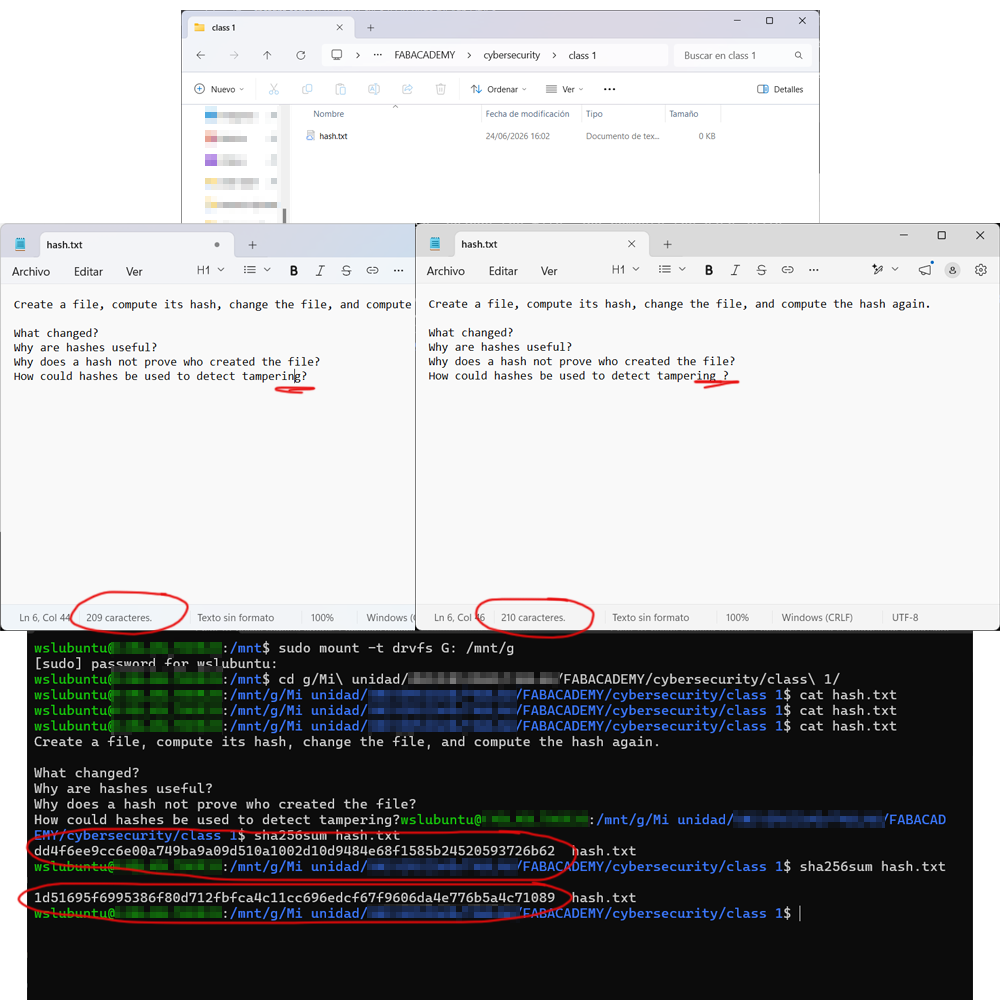
I have created a simple text file containing the questions related to hashes. I am working on my main operating system, using Windows Subsystem for Linux (WSL).
Since my files are stored in Google Drive, first I needed to mount the drive within WSL using the following command sudo mount -t drvfs G: /mnt/g. After navigating to the directory containing my newly created file, I ran the command sha256sum hash.txt. This computed the original hash of the file.
To test the sensitivity of the hash function, I made a minimal change to the file (adding just one character) and I computed the hash again. As expected, this resulted in a completely different hash value and confirming that the file had been modified.