Session 1: Introduction & Cryptography
Cryptography: defined as the art and science of securing information by converting readable text into unreadable code; the three main types of cryptography consist of symmetric-key (secret-key), asymmetric-key (public-key), and hash functions. Cryptography is used primarily for encryption, integrity protection, and authentication.
Assignment(s)
Create a public/private key pair.
- What is the public key?
- What is the private key?
- What can this key pair be used for?
- Why must the private key be protected?
Install an SSH public key on a server and use it to log in.
- How does SSH key authentication work?
- What is stored on the server?
- What stays on your own computer?
- Why does the server not need your private key?
Encrypt and decrypt a file.
- Did you use symmetric or public-key encryption?
- Where did the key come from?
- Who can decrypt the file?
- What happens if the key or password is lost?
Create a file, compute its hash, change the file, and compute the hash again.
- What changed?
- Why are hashes useful?
- Why does a hash not prove who created the file?
- How could hashes be used to detect tampering?
Install a certificate on a web server, or inspect the certificate of an HTTPS website.
- Why does the server send a certificate instead of just a public key?
- What role does the Certificate Authority play?
- What attack does this help prevent?
Setting up This Documentation Site
Accessing my Repository
-
I opened up the welcome email containing my log-in information (my email and a unique password)
-
I went to https://gitlab.fabcloud.org/ and clicked “Sign in with FabLabs”
-
I input my log-in information, accessing my repository
You can find my repo here.
-
I then cloned my repository locally in Visual Studio Code via
git clone https://gitlab.fabcloud.org/academany/futures/units/cybersecurity/2026/labs/charlotte/students/angelina-yang.gitto create a remote location for editing my documentation files. Alternatively, you can use the fabcloud editor software. -
To view the documentation site locally, I ran
mkdocs serve
Accessing Virtual Server
After opening the learning environment manager, I followed the VPN Access instructions, which included installing the Wireguard app and downloading the VPN configuration file (.conf) (provided through the environment). Upon opening Wireguard, I clicked Import Tunnel(s) From File and inserted the config file, before clicking activate. I then installed Ubuntu 26.04.
Ubuntu is a popular, user-friendly Linux operating system.
In terminal, I ran
with my ip address to remotely connect to the ubuntu server. When prompted, I copied and pasted the provided password.Creating a Public/Private Key Pair
Public and private keys are a pair of mathematically linked cryptographic keys used in asymmetric encryption. A public key is openly shared to encrypt data or verify signatures; a private key is kept strictly secret and unique, and is used by a decryptor to decrypt data or create digital signatures (i.e., one can use a private key to “sign” a document to verify that it hasn’t been tampered with).
To create a public/private key pair, I typed the command in the macbook terminal command line interface
To view my public keys, I entered
to which the terminal displayed the two keys I just created:

To view these keys individually, I ran cat ~/.ssh/id_ed25519_session1_assignment and cat ~/.ssh/id_ed25519_session1_assignment.pub respectively.
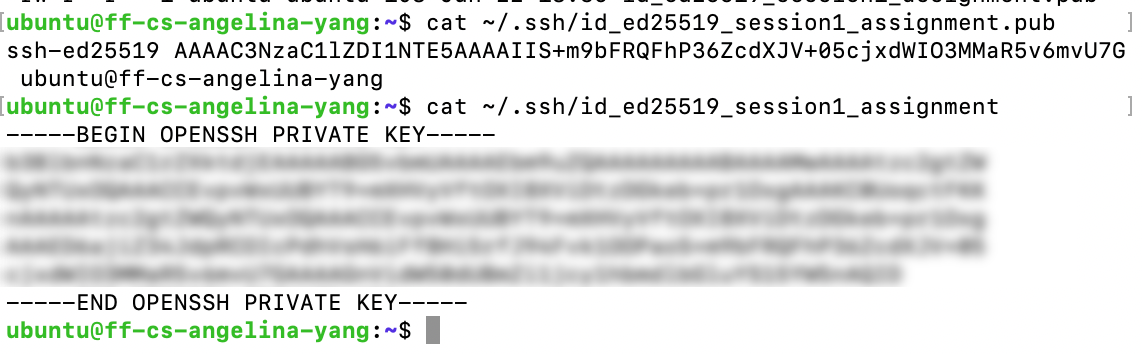
Note that the private key is blocked out. While the public key is openly accessible, the private key must be protected because it is the acts as a sole digital signature, unique to a user. Compromising a private key is synonymous with leaking your confidential information–and can result in scenarios like impersonation.
After searching it up, I learned that ed25519 is a highly secure and efficient digital signature algorithm (EdDSA) built on elliptic curve cryptography, consisting of 32 bytes or 256 bits. I recall that other types of algorithms, including RSA and diffie-hellman, were discussed during the lecture. ദ്ദി( ˙ᗜ˙ )
Additionally, I learned that the private key appears significantly longer than the public key for the sake of computational efficiency. Both the public and private key are 32 bytes in length, but the private key actually appends the public key, reducing the need for a system to re-derive the public key.
What can this key pair be used for? The use cases range anywhere from encrypting a simple message to sending a confidential e-mail to securing web traffic (think transport layer security, TLS) or accessing repositories on development platforms like Github!
Installing SSH Public Key on Server
First, in my macbook terminal CLI, I ran ssh-keygen -t ed25519 -f ~/.ssh/public_key_authentication to generate a new key pair saved locally. Had I used the key pair from the first assignment, both the public and private key would be trapped in the server and cannot be used for authentication (had to learn this the hard way). To install the SSH public key on server (i.e., using a public key as authentication rather than a traditional password), I typed the following in my command line interface, using the provided password:
This is the notification that popped up in response:

I confirmed that the public key was actually saved by running
in a separate terminal tab already connected to the server. Now, to test whether the public key authentication worked, I needed to disable password authentication (default). To do that, I ran
and found the line containing PasswordAuthentication. I deleted the hash symbol and changed “yes” to “no.” I again pressed ctrl + O, followed by enter and ctrl + X to save the edits and exit the editing environment.

However, when I opened a new terminal and attempted to enter the server, I was still getting a prompt for a password. Odd. (,,•᷄ࡇ•᷅ ,,)?
After a quick google search, I learned that there could be an override within the cloud-init configuration file still authorizing the password, so I ran
and it returned
thus my suspicions were confirmed. I ran
and changed “yes” to “no”, before saving and exiting one last time. Now we should be good! I read online that it is good practice to run a test config command first, so I did that:
Then, to apply any and all configuration updates made to the /etc/ssh/sshd_config file, I ran
Before testing out whether the public key authentication worked, I first need to make sure that my macbook recognizes that this key belongs to the server in question. In my original mac terminal, I opened the config environment by running
and added the server specifications in the following format: I again usedctrl + O, enter, and ctrl + X to save the changes made to the config file. Now I can connect to the server without my password with the same command as before
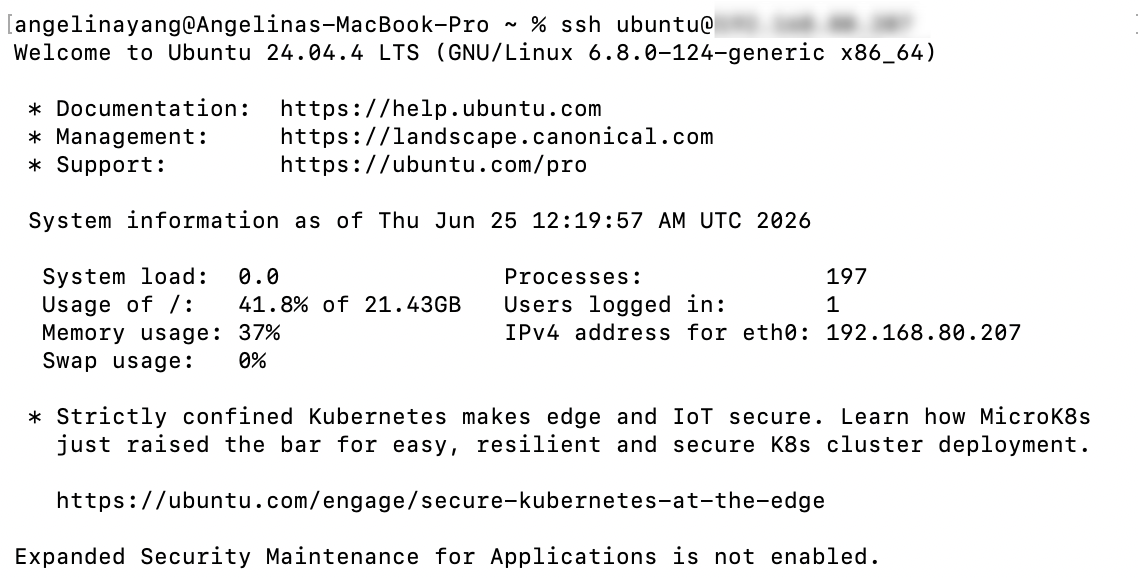
Alternatively, if the config file isn’t modified to include the specific server details, you can force your way into the server by addressing the specific private key, and it should yield the same results:
When I attempt to connect to the server, the server responds with a challenge, a random string of data sent by the server to the client. The client must use their hidden private key to digitally sign this challenge and send it back as a response, verifying their identity. This is a prime example of challenge-response authentication.
What is stored on the server? A copy of the public key is stored on the server and is openly accessible to all. The server verifies the user’s identity through the challenge.
What stays on your own computer? The private key linked to the server’s public key is stored on my own computer and should not be shared publicly with others.
Why does the server not need your private key? The server does not need my private key because public key authentication relies on asymmetric cryptography; only through the server’s challenge–crafted with its public key and answered with the user’s private key–can a client verify their identity, all while never explicitly revealing their actual private key to the server.
Encrypting/Decrypting a File
I’ve never properly encrypted anything before, so I turned to some online forums for assistance. Conveniently, I found this forum thread, which suggested using GNU Privacy Guard or GPG, which is an open-source command-line software that is dedicated to securely encrypting data and establishing digital signatures. It can use both asymmetric cryptography (i.e., using a key pair, a public key to encrypt and a private key to decrypt), as well as symmetric encryption (i.e., using a standard password).
In the server, I first created a “secret text” test file:
containing a simple message:
I made two “secret” files total–secretfile.txt for symmetric encryption and secretfile2.txt for asymmetric encryption.
Symmetric Encryption
For symmetric encruption, GPG will store the keys locally in the user’s computer, and the private key is protected with a custom password. To encrypt it using symmetric encryption, I ran
However, I kept getting this timeout error.. ( •̀ - •́ )

After some troubleshooting, I learned that I can force command line password entry by using a ‘loopback mode’:
I simply modified this config file by adding which apparently forces the terminal-based interface for password entry. After saving the file, I reloaded (i.e. flush cache + force-reset with the new changes) the agent:When I ran gpg -c secretfile.txt again, the correct pop-up appeared! With the new passphrase established, a new file secretfile.txt.gpg is created. I then deleted the original secretfile.txt for verification purposes through
To decrypt the file (and create a designated file for the decrypted message), I ran
which asked for the passphrase again before returning

which is a command dedicated to creating a new location for the decrypted message.
AES256.CFB specifies the mathematical method and/or algorithm the GPG used to scramble the file. The “256” refers to the number of bits in the new encryption, and “CFB” abbreviates cipher feedback mode, which turns the AES into a “stream cipher.” In other words, the plain text is broken up into different segments, and the encryption is obtained by encrypting with the block cipher the last piece of ciphertext produced so far. This guarantees that even files with repeating passwords or phrases can be randomized in the newly encrypted files. Pretty cool!
By using cat decryptedfile.txt and cat secretfile.txt.gpg, you can visually confirm the encryption has taken place:

Asymmetric Encryption
To begin with asymmetric encryption, I generated a new key pair with GPG through this command:
Note that using pinentry-mode loopback will bypass GPG’s natural issues with opening a graphical window in this scenarioImmediately, the terminal displayed different key options.
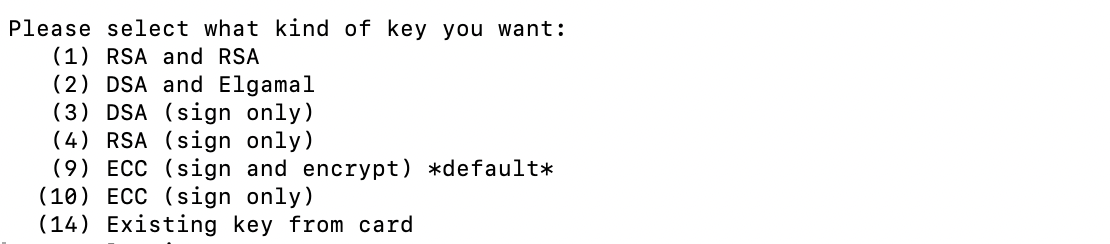
To break down some of these options, I read this article about RSA, DSA and ECC, as well as this article, which described how the Elgamal algorithm worked. From my understanding (and a bit of help from Claude), all of these public key algorithms have to do with modular arithmetic. RSA (Rivest–Shamir–Adleman) is built on the difficulty of factoring, while DSA (Digital Signature Algorithm) and ElGamal relies on the discrete logarithm, albeit for slightly different applications. Finally, ECC (Elliptical Curve Cryptography) manipulates the privaate key by multiplying it with a generator or starting point on a curve. To follow my extended exploration of RSA algorithms, click here.
For the purpose of this exercise, I selected the most standard option: (1) RSA and RSA. Immediately after, the terminal asks about the key length, specifying that RSA keys may be between 1024 and 4096 bits long. Additionally, it allows the user to input a potential key expiration date before requesting their personal information (i.e., name, email address) to build a user ID. I chose a 4096-bit long RSA key and set the expiration to never (0). An interesting message popped up once I responded to all of the prompts and typed in my passphrase:

I remember Mrs. Perlman mentioning something about entropy during the lecture, but I was still a bit confused as to what this meant in the context of specifically generating an RSA key. After reading up on entropy, I learned that linux replenishes the entropy pool, a measurement of the encryption’s randomness and unpredictability, by collecting a series of random events, such as network traffic and hardware interactions. I wonder why it only popped up now, even though all encryption relies on entropy–is entropy more significant or essential for certain forms of encryption? Food for thought.
Other messages were subsequently printed in the terminal–confirming the creation of a public/private key, a trust database (i.e., central file used to track how much you trust other people’s keys and identities), and a dedicated revocation (i.e., kill switch).
To export my public key, I ran
Here,--armorencodes the raw binary OpenPGP data into plain-text ASCII, making it safe to copy and paste. --export extracts the public key. The inclusion of the email address allows the system to match the specific key pair associated with that user ID. I used cat public.key to view the key and as expected, it was HUGE. ( •͈૦•͈ )
To encrypt, I ran
and the output was initially bit confusing..

..but a simple Google search cleared up my questions! checking the trustdb indicates that GPG is scanning its database to see how well a user knows and trusts the public keys stored on their computer. marginals and completes refers to a degree of trust–to validate identity, GPG needs the key to be digitally signed by either 1 person the user trusts completely, or 3 people the user trusts marginally…a very intriguing mechanism. The jumble of characters at the end refer to levels of “assigned trust,” and because I haven’t assigned trust levels to anyone else’s keys yet, most of the values read 0. Only 1u stands out, as it symbolizes “ultimate” trust and represents my own private key.
To decrypt, I ran a command with a format similar to encryption, outputting my decrypted message in a new file:
which, as expected, asked for the passphrase before returning
Similar to symmetric encryption, the RSA4096 concatenates RSA, the encryption algorithm, and the 4096-bit length.
Last but not least, using cat decryptedfile2.txt and cat secretfile2.txt.gpg, here is the side-by-side comparison of the encrypted and decrypted files:
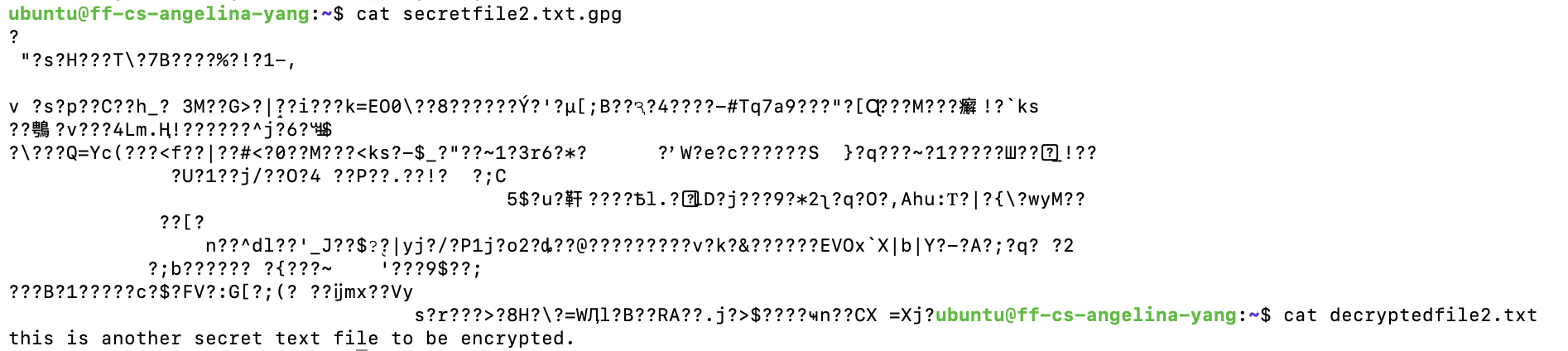
Did you use symmetric or public-key encryption? I used both symmetric and public-key encryption with GPG.
Where did the key come from? With symmetric encryption, the key originates from the user’s passphrase–GPG derives the encryption key from the input and uses it to lock the file. With public-key encryption, the private key is generated directly from the computer.
Who can decrypt the file? With symmetric encryption, anyone who has access to the passphrase can decrypt the file. With public-key encryption, only someone with the matching private key and access to the private-key-protecting passphrase can decrypt the file.
What happens if the key or password is lost? If the key or password is lost, then decrypting an encrypted file becomes significantly more difficult. If a key or password is compromised, a user can use a revocation to invalidate their digital asset before an attacker strikes.
Create a File, Compute its Hash, Change the File, and Compute the Hash Again
To begin, I created a new file
I then used the SHA-256 (Secure Hash Algorithm) to transform the plain text into a digital footprint of a fixed length, which in this case is 256 bits long.
Here was the result, a long string of random characters:
I subsequently modified the message and ran the same hash algorithm again. Here’s what I got:

A completely different hash!
What changed? The entire value of the hash changed–no part of the new hash resembles the original file’s hash.
Why are hashes useful? Hashes are useful because they can act like a unique digital fingerprint. In application, they secure against data theft, and as we’ve seen, are highly sensitive to even the smallest changes in the input data.
Why does a hash not prove who created the file? Anyone can hash the file, and thus hashing can only prove data integrity–not authorship. There lacks a private key or some other form of unique identification.
How could hashes be used to detect tampering? As mentioned previously, even small tweaks in the file produce significant changes in the resulatant hash.
Install a Certificate on a Web Server, or Inspect the Certificate of an HTTPS Website
Installing a Certificate on a Web Server via Certbot (Set-up)
Note that this documentation merely features the set-up for intalling a certificate on a web server through a third-party certificate authority–because I do not own a domain, I cannot actually generate a publicly trusted SSL certificate.
After doing some quick research, it seems that the easiest way to install a free, trusted public certificate on Ubuntu is through Certbot, which is a free, open-source software tool that automatically enables HTTPS on websites by fetching and installing SSL/TLS certificates from Let’s Encrypt. Good news is, it automatically configures popular/commonly used web servers, such as Nginx and Apache, to use the certificates in practice.
Digital Certificate: electronic credential used to prove the identity of a device, server, or user on a network. It acts like an electronic passport, using cryptography and a Public Key Infrastructure, a type of cybersecurity framework. In other words, it ensures that only authenticated users can connect to the network.
Certificate Authority: A trusted third party (in this case, Certbot) that issues, signs, and manages digital certificates.
In this case, installing a certificate for a server enables secure, encrypted communication and verifies your website’s identity to potential visitors. It proves to web browsers that the server you are connecting to actually owns the domain in question–this is particularly crucial in countering impersonators. To learn more about the epic TLS handshake that goes down when a user connects to a network, read my documentation on internet security.
To begin, I installed Certbot on my ubuntu server by running
I used the dedicated certbot command to acquire and install the certificate:
At this point, the terminal will prompt the user with a myriad of questions–asking for an e-mail for urgent renewal / security notices and the domain name(s) they would like on their certiicate. And you should be all set!