Session 2: Internet Security
TCP/IP: Transmission Control Protocol/Internet Protocol, or shortened to TCP/IP, is the standard communication protocol that enables devices to exchange data across the Internet and private networks. TCP allows for reliable data delivery. It breaks messages into small pieces called packets, sends them, and verifies that they all arrive correctly without errors. IP handles the addressing and routing by ensuring that each packet gets labeled with the correct destination address.
Assignment(s)
For each of the following systems, research and document 3 parts what threat does it address? what’s the trust model? what’s the residual risk?
- PGP (end to end email security)
- SSH (secure remote access)
- VPN / IPsec (network-layer tunneling)
- MACsec (link-layer encryption)
- DNS Security (DNSSEC & DNS spoofing)
- IDS / IPS (detection vs. prevention)
Complete these exercises:
TLS Handshake Trace
- Trace a real TLS handshake and an encrypted data segment. Identify how the session is established — cipher suite, certificate, key exchange — and confirm what an observer can and cannot see.
Port Scan & Firewall
- Your VM will be subjected to a port scan. Determine what it reveals about your exposed services, then configure the firewall to reduce what’s reachable from outside.
The Network Stack
Prior to this session, my knowledge of the internet / internet security was wildly abstracted – so naturally, I began this assignment by carefully reviewing the new terminology from the lecture.
From my understanding, sending data over the internet operates on a top-down stack: data is generated by the Application, split up and regulated (i.e., broken down data into segments) by Transport, routed globally to heterogeneous networks via Network, and transmitted locally at the Link layer. Each layer has its own security measures and essentially “trusts the layer below” to reliably handle delivery. Here is a chart detailing each layer’s job, example protocols, and security tools:
| Layer | Job | Example protocols | Security tool |
|---|---|---|---|
| Application | The content or message itself | HTTP, DNS, email (SMTP) | PGP, DNSSEC |
| Transport (L4) | Oragnizes data into segments and dictates how it gets to a certain location | TCP, UDP (addresses by port number) | TLS/SSL |
| Network (L3) | Manages global addressing and routing, determining a reliable and efficient path for the data packets to travel | IP | IPsec, VPNs, firewalls |
| Link | Delivers data between two directly-connected devices (e.g., your laptop and your WiFi router) | Ethernet, WiFi, MAC addresses | MACsec, VLANs |
During the lecture, we learned about two ingenious elements of this network stack design:
-
Substitution: A user can swap out one layer’s protocol without changing/affecting any other layer. Some examples of substitution in use include the transition from IPv4 to IPv6, HTTP to HTTPS, Ethernet to WiFi, etc.
-
Encapsulation: Each layer wraps the layer above in a header + payload. If a user encrypts something at one layer, the payload is hidden, but the outer layer (e.g., IP address) is still visible to anyone watching the wire. It’s kind of like a set of russian dolls! (˵ •̀ ᴗ - ˵ ) ✧
Working With Tools for Network Analysis
TCPDump
NMap
In my virtual machine, I installed NMap:
Defining Systems
The core toolkit, introduced by Mr. Droms, includes the following: 1) What threat does it address? (eavesdropping, tampering, impersonation, denial of service), 2) What’s the trust model? (What is the system assuming about the attacker, and who/what are you trusting for this to actually work?), and 3) What’s the residual risk? (Even if it works perfectly, what’s still exposed? What does it not fix?)
PGP (end to end email security)
Short for Pretty Good Privacy, PGP is a widely used encryption program that provides cryptographic privacy and data authentication. It guarantees the integrity, confidentiality, and authenticity of e-mails sent from user to user using asymmetric cryptography. The sender’s private key is used to ‘sign’ the e-mail, confirming that it hasn’t been tampered with.
What threat does it address? PGP addresses primary digital threats, such as eavesdropping, impersonation, repudiation and tampering by encrypting the e-mail and only allowing the intended recipient to read it.
What’s the trust model? Unconventionally, PGP uses a decentralized security framework to establish identity verification. Through a Web of Trust, PGP bypasses centralized Certificate Authorities–instead allowing individual users digitally sign each other’s public keys to vouch for their authenticity. In terms of how much a user actually “trusts” another user to accurately verify other people, PGP uses the following tiers to assess trust level: unknown, none (untrusted), marginal (partial), and full.
What’s the residual risk? An attacker can see exposed metadata, in the form of an unencrypted e-mail header for instance. Additionally, a compromised endpoint (i.e., a device is infected with malware) and poor key management and result in loss of data or the decryption of historical messages.
SSH (secure remote access)
Secure Shell, or SSH for short, is a cryptographic network protocol that enables a user to securely connect to and manage a remote computer or server over an unsecured network like the internet. Often described as an encrypted tunnel, converting any command-line data, passwords, or files passing through it into unreadable text to prevent interception by third parties. In session 1, I generated an SSH key and used public key authentication with the key pair to connect to the ubuntu virtual machine.
What threat does it address? Through the aforementioned ‘encryption tunnel’ infrastructure, SSH addresses man-in-the-middle attacks (i.e., a type of cyberattack in which an attacker intercepts and manipulates communication between two parties), credential theft or impersonation, and eavesdropping.
What’s the trust model? SSH is built upon a hybrid system, consisting of asymmetric cryptography and Trust on First Use, a mechanism that establishes trust during the first server-user interaction by searching for an identifier (e.g., public key) locally. The server identifies the user through cryptographic key pairs–a private and public key.
What’s the residual risk? Compromised or mismanaged private keys (e.g., private keys encrypted with weak passphrases) allow attackers to access remote servers / virtual machines; furthermore, an attacker can intercept the very first connection attempt before the legitimate server fingerprint is saved–a phenomenon known as TOFU vulnerability; brute force attacks often occur on SSH port 22.
VPN / IPsec (network-layer tunneling)
IPsec, broken down into “Internet Protocol” and “secure,” is a group of protocols for securing communication between multiple devices by encrypting IP packets and authenticating the source of the packets. A Virtual Private Network creates an encrypted connection, a tunnel, between two or more computers and makes it reliable to securely access and exchange confidential data over shared network infrastructure. It is built upon an existing internet connection.
What threat does it address? network-layer tunneling through VPN / IPsec prevents eavesdropping, man-in-the-middle attacks, and identity spoofing (i.e., an attacker masquerades as a trusted person).
What’s the trust model? IPsec relies on trusted endpoints–the physical security of the VPN gateways / client devices–while assuming that all intermediate networks are hostile. This mutual authentication, or in other words, the verification of endpoint identity, is built through pre-shared keys (PSK) and certificates.
What’s the residual risk? Malware on a client device can tunnel directly into the trusted private network. Compromised certificates or stolen keys can allow attackers to create unauthorized tunnels that bypass security measures. Even with the encrypted payload via IPsec, attackers can still observe packet sizes, timing, and communication endpoints to infer data patterns.
MACsec (link-layer encryption)
Media Access Control Security (MACsec) provides point-to-point security on Ethernet links, authenticating and encrypting Ethernet frames between directly connected devices on the same network. MACsec can be enabled the following security modes: Static Connectivity Association Key (CAK) mode and Dynamic CAK mode. Static CAK mode means that the network admin manually configures the same “shared secret” for the devices at each end of the link. In Dynamic CAK mode, each device first authenticates using a protocol called 802.1X, which is often backed by a certificate, before they exchange the CAK / session keys.
What threat does it address? MACsec addresses passive wiretapping / sniffing (i.e., viewing and copying data traversing across a network cable without altering it), man-in-the-middle attacks, and replay attacks (i.e., the attacker, after intercepting a packet, implements a re-transmission of the copied data).
What’s the trust model? Trust is built upon hop-by-hop encryption and mutual authentication, in which both endpoints are authenticated through the 802.1X protocol. MACsec Key Agreement (MKA) is the protocol known for automating the distribution and management of security keys required for data transmission. With Dynamic CAK mode specifically, Ephemeral keys mean past sessions can’t be decrypted later–a case of forward secrecy.
What’s the residual risk? Cleartext metadata (e.g., source / destination MAC addresses) are exposed to attackers. Also, because MACsec only protects the transmission of data, or when data is “on the wire,” malware can leave endpoints vulnerable to cyberattacks.
DNS Security (DNSSEC & DNS spoofing)
Domain Name System (DNS) is the system / server that translates comprehensible domain names into machine-readable IP addresses, enabling computers to connect to one another. Domain Name System Security (DNSSEC) is a suite of security protocols that adds signatures to DNS records, or the set of instructions used to connect domain names with internet protocol (IP) addresses within DNS servers.
What threat does it address? DNSSEC addresses DNS spoofing, an cyberattack in which an attacker introduces a fake or malicious DNS record into a system’s cache; it thus redirects a user’s traffic to a fraudulent and dangerous website.
What’s the trust model? DNSSEC uses a hierarchial Chain of Trust, Trust Anchor, and public key infrastructure (PKI). The Trust Anchor refers to the cryptographic public keys for the DNS Root Zone, or the master directory for resolving web addresses. The Chain of Trust indicates that each level of the DNS hierarchy vouches for the layer below it.
What’s the residual risk? Although DNSSEC authenticates DNS records, it does not encrypt them. This means that anyone actively monitoring the network traffic can see which websites a specific user is trying to access. Moreover, authoritative servers become highly susceptible to DNS amplification and Distributed Denial of Service (DDoS) attacks.
IDS / IPS (detection vs. prevention)
The Intrusion Detection System (IDS) is a system dedicated to passively monitoring network traffic and reporting any and all suspicious behavior to administrators. On the other hand, Intrusion Detection System (IDS) sits directly in the traffic flow (inline), actively dropping malicious packets or blocking traffic in real time.
What threat does it address? IDS / IPS address, detect, and counter malware, port scanning, and unauthorized access–whether through reports or active blocking. These two systems focus on preventing attacks before they happen, distinguishing them from other security systems.
What’s the trust model? IDS works as an inspect and trust until verified model, meaning that the network remains open to traffic, and IT trusts human analysts to engage in intervention against these anomalies when necessaary. Meanwhile, IPS works by an inspect and deny by rule model, meaning that IT must trust the IPS algorithm to accurately distinguish between malicious zero-day traffic and legitimate business activity, reducing inaccuracy.
What’s the residual risk? IDS / IPS residual risks boil down to the risk of false positives or false negatives due to its largely AI-driven algorithm and rule-based systems. They may fail to catch more advanced modes of encryption or fail to distinguish between malicious traffic and genuine activity, for instance.
TLS Handshake Trace
As mentioned earlier, TLS or Transport Layer Security is the protocol that establishes an encrypted link between a web browser and an internet server. Thus the TLS Handshake is the introductory and implicit mechanism that takes place before any data is transmitted, in which the browser and the server agree on how to communicte securely; it verifies the server’s identity, agrees on encryption rules, and generates temporary keys for the session. Here is the broad pipeline for a TLS handshake, taken from the lecture notes:
- Client & server agree on a cipher suite
- Server presents its certificate (identity + public key)
- Both sides derive a shared session key via Diffie-Hellman
- All further traffic is encrypted and authenticated
This was a pretty confusing process for me as I’ve never worked with an application like this, so I’d like to thank Yosuke Tsuchiya for his helpful documentation, which helped me get started.
To begin, I downloaded Wireshark, the recommended tool for network analysis and debugging, to my macbook.
To allow Wireshark to decrypt the connection, I configured my system to log temporary session keys before I begin browsing. I ran this in my terminal:
In Wireshark, I went to Preferences > Protocols > TLS and imported the sslkeylog.log file I had just created into the (Pre)-master-Secret log filename. I then closed Chrome entirely–closing the windows SND application–to allow the browser to recognize the SSLKEYLOGFILE environment variable I set for Wireshark.
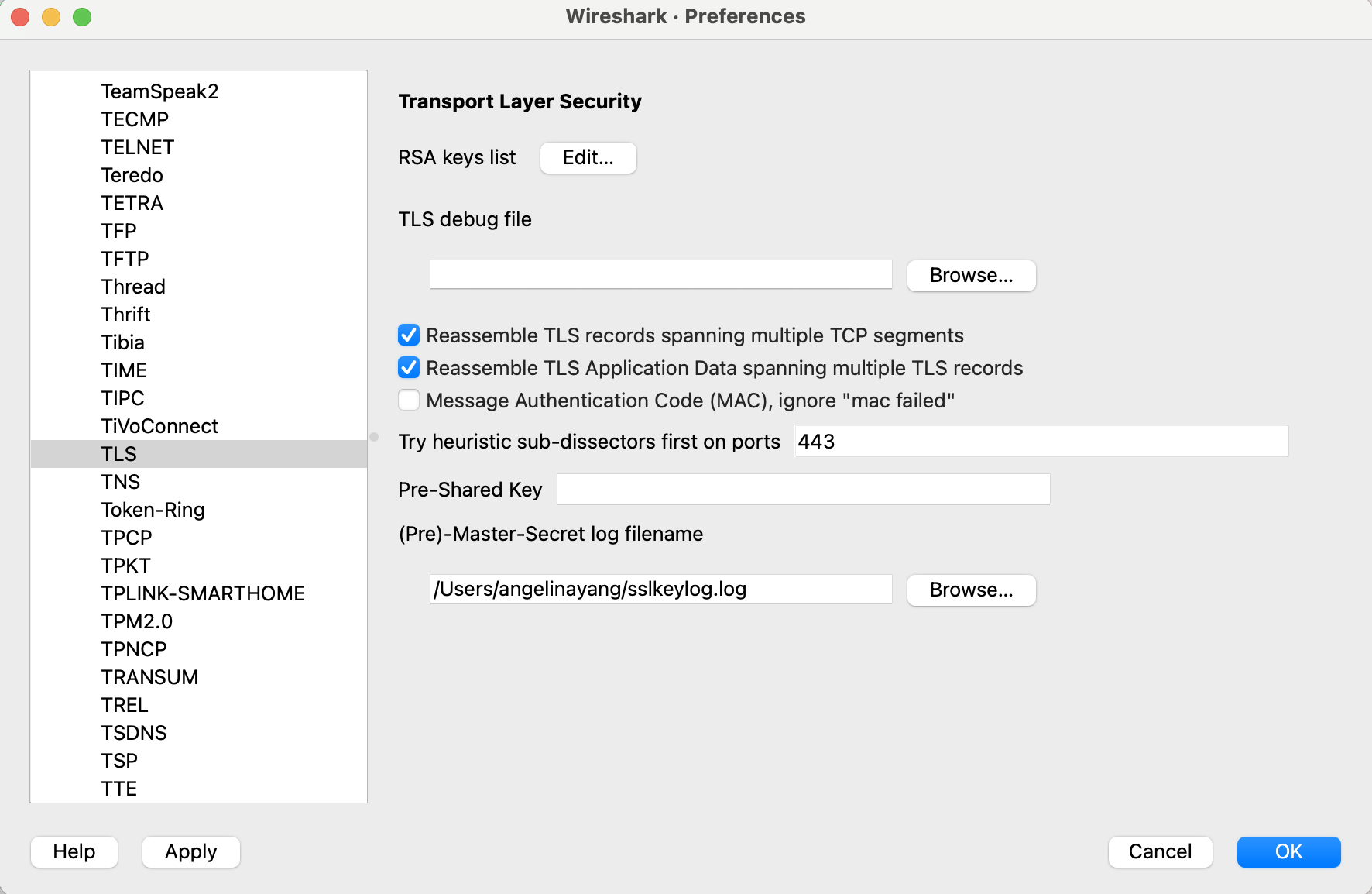
I started Google Chrome by inputting the following in the same terminal window:
In Wireshark, I selected WiFi: en0 as my active network interface and input port 443 into the capture filter because port 443 is the standard global port for secure web traffic. After starting the capture (blue fin), Wireshark used its built-in HTTP and TLS dissectors to pick-up on the traffic between my client (Chrome) and the server. To begin observing the TLS handshake, I opened my fab futures documentation site on the new Chrome window:
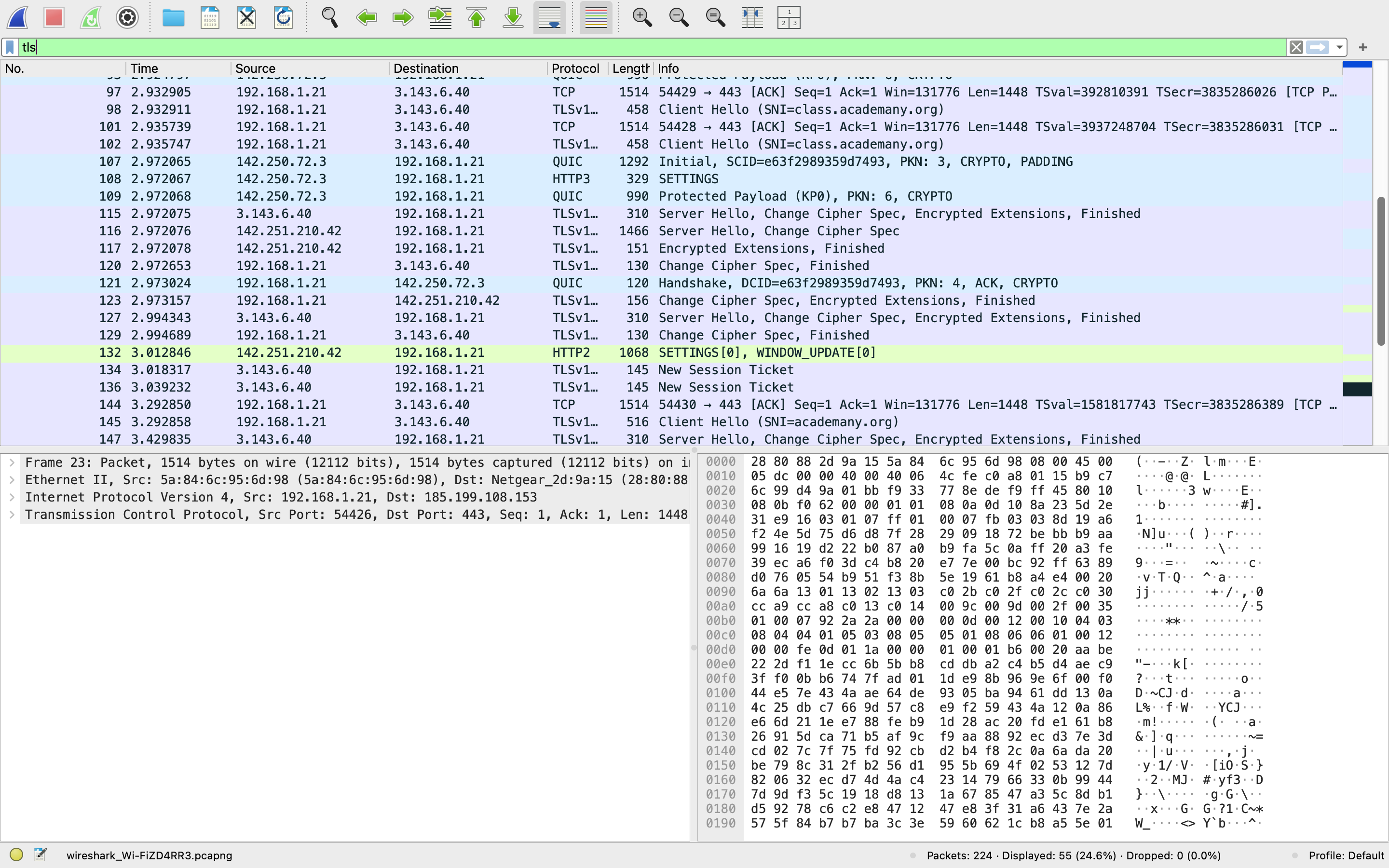
TLS Handshake Pipeline Explained
I understand what the different types of messages displayed meant, I read this article, this explanation, and this guide on TLS 1.2 / TLS 1.3. Here’s what I’ve gathered:
Client Hello: A handshake initiation from the client to the server; the client will commuhnicate which TLS version it supports, the cipher suites supported (i.e., informing the server about which cryptographic options it can handle), and a string of random bytes known as the “client random,” which ensures connection uniqueness.
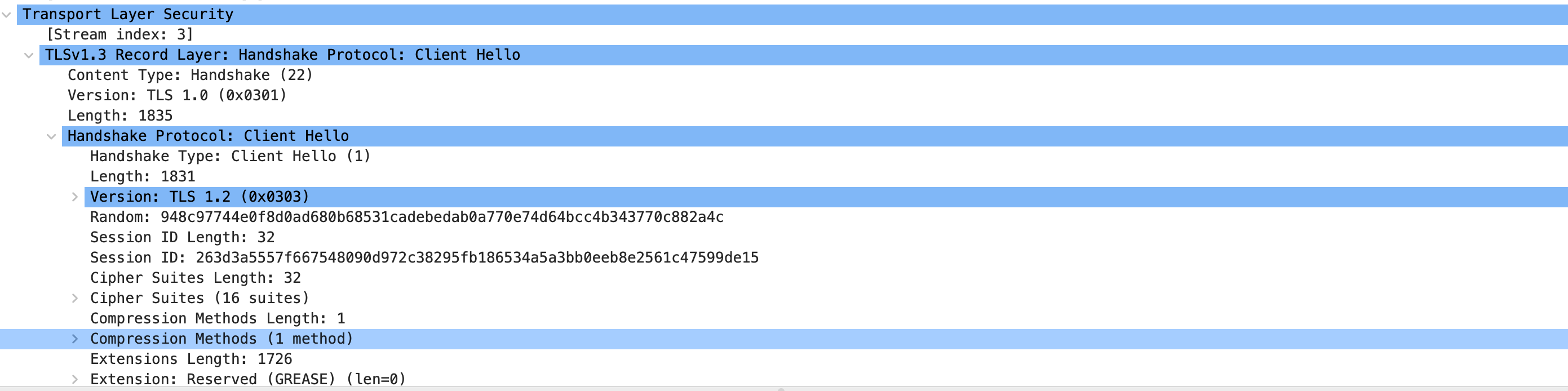
Analyzing the client hello packet, I noticed that my client advertised 16 total cipher suites
Server Hello: The first response from the server; the server sends a message containing the server’s SSL certificate–authenticating the websites identity and encrypting data transferred between a client and the server–the server’s chosen cipher suite, and the “server random.”
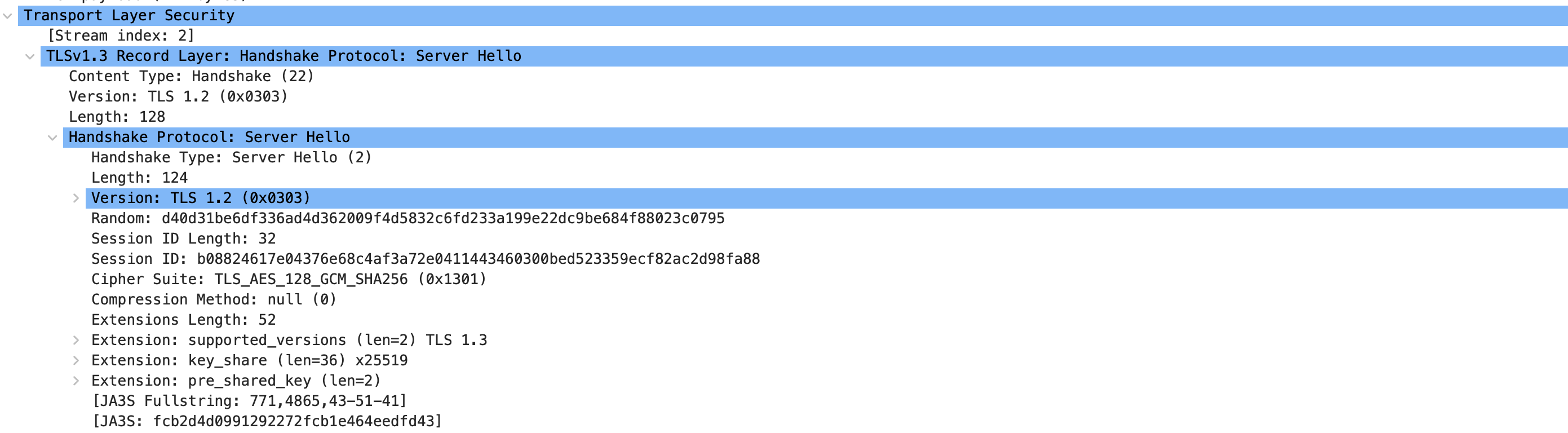
Upon further inspection, I observed how the server selected the cipher suite TLS_AES_128_GCM_SHA256 (0x1301)
Authentication: The client verifies the server’s SSL certificate with the certificate authority that issued it.
The Premaster Secret: The client sends one more random string of bytes, the “premaster secret.” The premaster secret is encrypted with the public key and can only be decrypted with the private key by the server. Both the client and the server independently feed the Pre-Master Secret, along with random values–Client Random and Server Random–exchanged earlier, into a Pseudorandom Function (PRF). This produces the master secret, which is then used to generate the actual encryption and session authentication keys. Note that the ssl key, used to unlock the premaster secret, was created locally earlier with the export SSLKEYLOGFILE=/Users/$USER/sslkeylog.log command
Change Cipher Spec: Once the master secret is ready, both the client and server send a change cipher spec message to each other, notifying that all future messages will be encrypted.
Finished: Confirms the handshake succeeded.
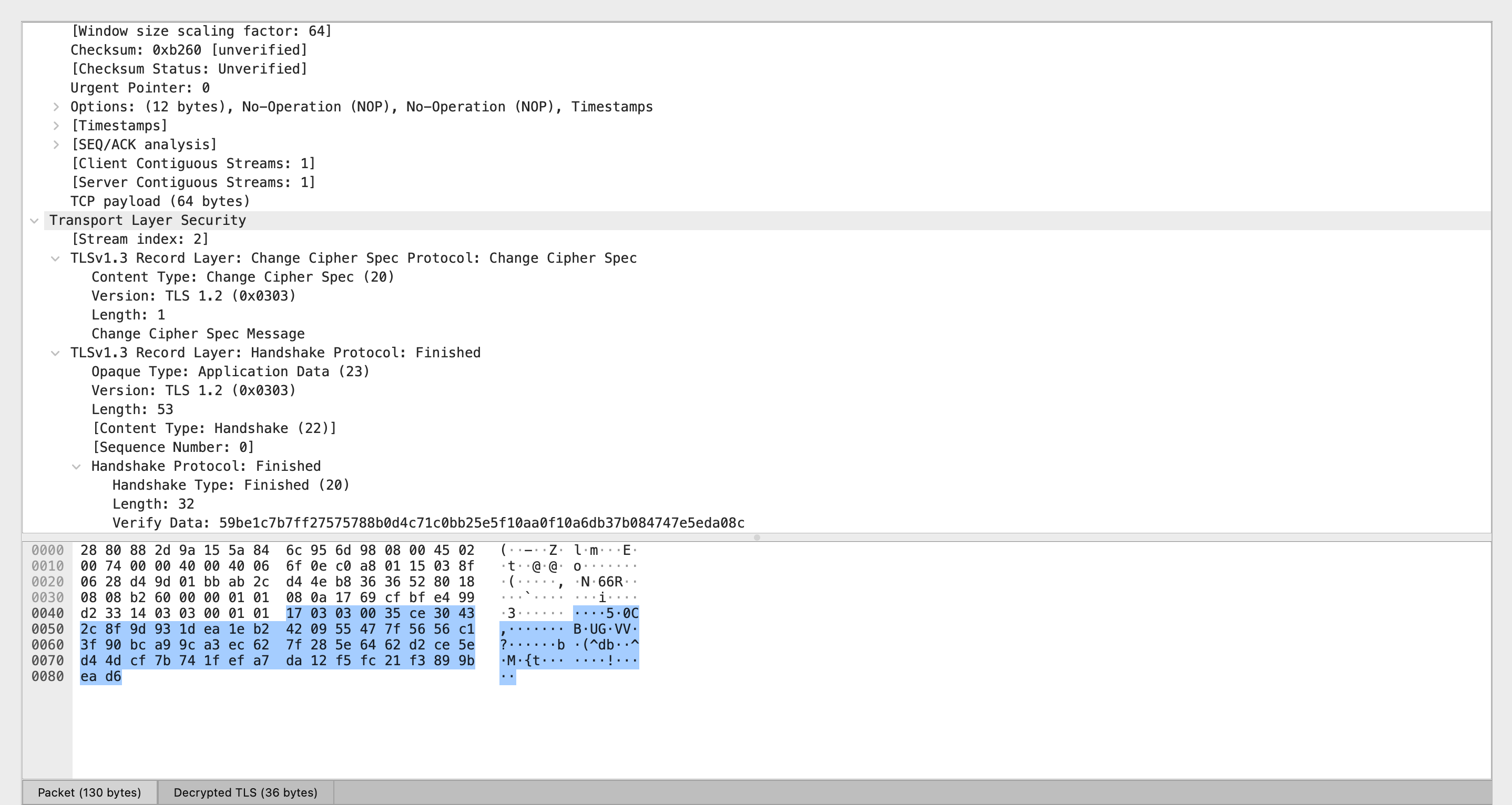
At this point, the browser and the server are pretty much set to begin communicating.
Port Scan & Firewall
Port Scan
After connecting to my virtual machine through SSH, I ran a quick port scan:
Note thatsudo nmap -sV <ip-address> also works, but it will only display 1,000 of the most common ports and leave out hidden internal services.
I got this as the output:
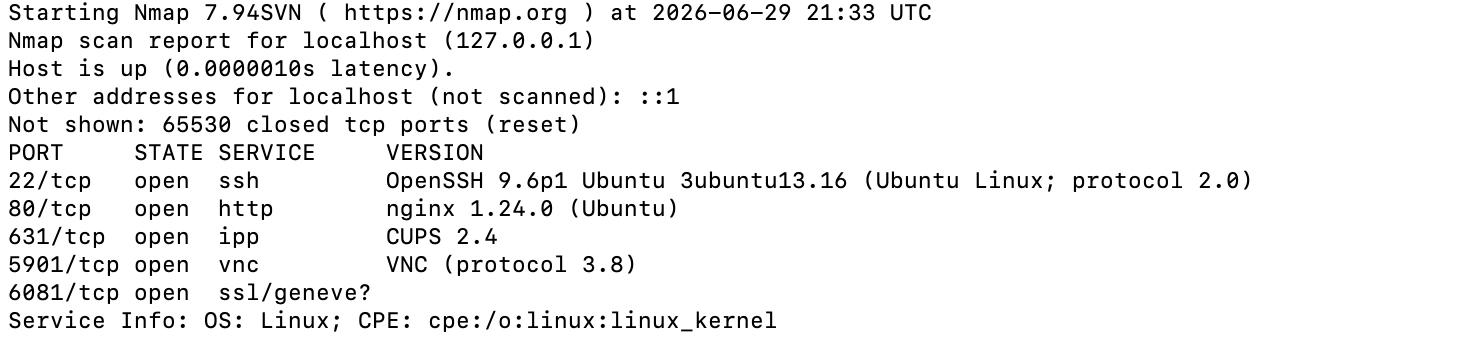
22/tcp – ssh: This is the secure shell protocol, which I use for communicating on the CLI with my server.
80/tcp – http: This is the NGINX Web Server from session 1.
631/tcp – ipp: This is primarily used for the CUPS (Common UNIX Printing System) daemon; while on a public IP, leaving IPP unguarded can result in unauthorized access and print-job manipulation.
5901/tcp – vnc: This is the Virtual Networking Computing service, which allows me to remotely control the GUI of my VM. Port 5900 is the default port used for VNC for remote desktop connections.
6081/tcp – ssl/geneve?: This indicates that NMap detected a service using an SSL/TLS handshake on a TCP port.
Firewall
Firewall: a firewall is a security device that acts as a digital barrier separating a private internal network and untrusted external networks; it serves as a filter that only authorizes certain traffic to enter. One can set up “rules” or boundaries for traffic, such as ‘allow/deny’.
How do we decide what needs a firewall and what doesn’t? In order to decide what needs a firewall and what doesn’t, I evaluated each port’s network exposure (i.e., whether it is accessible to the public, and therefore vulnerable to malicious activity?), whether it relies on remote access, and the data sensitivity. SSH, SSL, and HTTP do not inherently need firewalls because they already have built-in security measures (e.g., cryptographic keys) that protect them from malicious behavior. If you access port 5900 for VNC, however, a firewall is recommended–standard VNC traffic can transmit keystrokes and screen data without encryption, leaving the session vulnerable for hijacking. Similarly, IPP, when left unfiltered, can pose a huge security risk.
Thankfully, ubuntu and linux have a built-in program ufw that manages firewalls and allows users to configure these ports to only listen to localhost and/or reject external traffic entirely. For this part of the exercise, I referenced this firewall tutorial.
In my CLI, I blocked both port 5901 and port 631, which stops all outside traffic from reaching the VNC and IPP.
Alternatively, you can use reject if you would like the firewall to actively send back an error.
To activate the firewall, I ran
I verified the status of the updated firewall settings:
Here’s what came out:
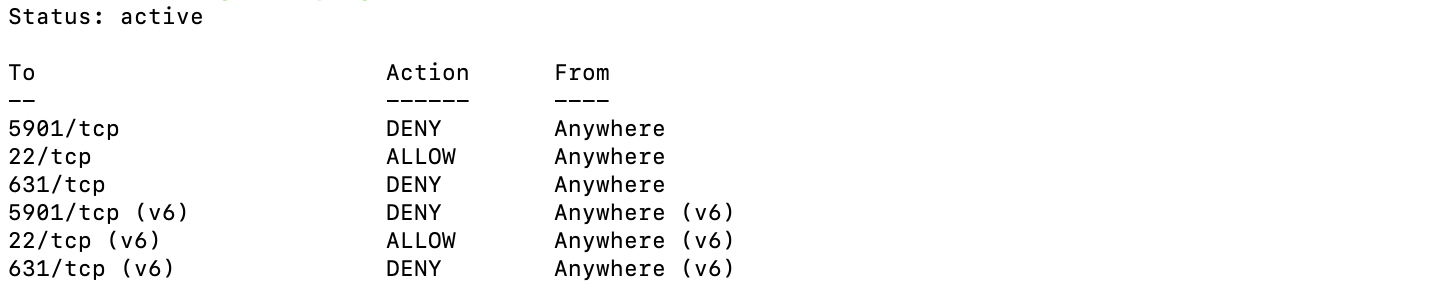
With these changes, the firewall will silently drop any packets that attempt to enter from an unauthorized source.