Session 2: Internet Security
The important thing of this week is to examine threads, trust model and residual risk of existing protocol, method base on the Internet such as SSL/TLS, SSH, PGP, DNS,,,,.
Here is the toolkit that showed in the class: Three Question for Any Security Mechanism.
- What threads does it address?
- Which adversary goal - eavesdropping, tampering, imprersonation – is this mechanism designed to step?
- What’s the trust model?
- What does the mechanism assume about the attacker, and who/what are we trusting to make it work?
- What’s the residual risk?
- Even when it works as intended, what’s left exposed? What doesn’t this solve?
In the class, TLS is examined with toolkit:
- Thread addressed
- Evasdropping, tampering, and impesonation on the path between clinet and server.
- Trust model
- You trust certificate authorities to correctly verify identity before issuing certificates.
- Residual Risk
- Endopint compromise, traffic metadata (who’s talking to whom), and CA trust failures remain.
Homework 1.
For each of the following systems, research and document 3 parts what threat does it address? what’s the trust model? what’s the residual risk?
PGP (end to end email security)
- Thread addressed
In the earlier stage of the Internet, e-mail is basic communication method, but early stage e-mail protocol (POP/SMTP) directly send a message without any encryption/decryption. E-mail has always the following vulnability as message interception, message tampering and sender spoofing.
PGP(Pretty Good Privacy) is a security program that use for encrypt and decrypt e-mail and authentication of e-mail message with digital signature and file encryption. PGP address the threads for interception, tampering and spoofing by encrypting the data and privatizing of communication method.
- Trust Model
PGP works by combining of three technology as encryption, data compression and hash. Those are similar with general encryption methods such as Kerberos authentication, SSL(Secure Socket Layer) and SFTP(Secure File Transfer Protocol).
PGP also use public key authentication. All users have public and private key. When a sender send a message with encrypting by public key, a receiver decrypt the message with his private key.
Web of Trust is a trust mode of PGP, that users who trust one another sign each other’s public keys to establish a relationship of trust. That supports the principle that “a public key trusted by a trusted party is trustworthy”. It makes possible to trust parties with whom one has no direct trust relationship through third parties.
- Residual Risk
PGP regards the following risk
- The risk in user operation and management
- it has a risk user lost or leak a private key. If the private key is lost, no message could decrypt. if the private key is leaked, it has a critical incident (the message would decrypt, tampering by the third party.)
- Vulnability of Client Environment
- PGP algorithm is itself robust, it could not protect the vulnability of e-mail client software, endpoint invasion or malware.
SSH (secure remote access)
- Thread Addressed
In the early stage of the Internet, when connecting to remote computer (server), Telnet (teletype network) is mainly used. But, Telnet is also send/receive the message, user information (account), auth info (password) without any encryption/decryption and no secure authentication. That has always the following vulnability as theft of account info by unauthorized access and Brute-Force Attack, Privileged Account Compromise, Man-in-the-Middle Attack, Server Misuse as a Relay like DDos Attack.
SSH (Secure SHell) address those threads by providing public key authentication, rejecting remote access by privilege accout (root account), encryption of the data transmission, IP access control.
- Trust Model
SSH relies on a hybrid of trust models. Traditional SSH uses a Trust On First Use (TOFU) model for server verification and decentralized keys for user access. Modern Enterprise setups often replace this with a Centralized Certificate Authority (CA) model.
- Residual Risk
The following is regards as residual risk:
- Unused old key: if retiree’s key or past used key are still remained in the server, it could be target for attack. It is better to set the expired date for keys and centralized management.
- SSH use port 22, and it is well known fact, so port scanning and attacking are still remaining. It is recommended to change the SSH port from 22 to other high port.
- Abuse of Port forwarding: If SSH port forwarding (tunneling) is enable, malicious third party would use it for avoiding the security boundary (firewall, VPN and so on).
VPN / IPsec (network-layer tunneling)
- Thread Addressed
IPSec is a protocol for secure data transmission on the Internet. IPSec works on the network layer of Internet architecture that encrypt a packet. IPSec has two operating mode, one is transport mode to encrypt the payload of data (not encrypt the IP header), another is tunnel mode that encrypt whole the packet (IP header also encrypt and add new IP header). Generally, IPSec tunnel mode is used in VPN: Virtual Private Network.
Since IPsec encrypts the data (packets) flowing over the Internet itself, it can address threads such as eavesdropping, data tampering, and impersonation along the Internet route.
- Trust Model
Trust model of IPSec-VPN is based on the Mutual Authentication and Perimeter-Based Trust. This is a mechanism in which devices that have established a relationship of trust in advance communicate with one another, and once a connection is authorized, all internal network communications are trusted.
Mutual Authentication is verified using a pre-shaed Key (PSK) or digital certificate. Endpoints transmitting the data such as Routers or firewalls perfome and verify strict mutual authentications before establishing a connection. Once after each endpoints established trast conneciton via mutual authenticaiton, the tunnel network such as VPN regards as a trusted (internal) network.
- Residual Risk
IPSec-VPN is also have some residual risk. One is the leaking of authentication information and unauthorized access. Eventhough the security of VPN devices are robust, if user’s ID/Password or private key is leaked, it leads impersonation-based intrusion.
If the old protocol “IKEv1” or weak encryption or weak auth algorithm is used, it would become the kist that an attacker could decrypt or hijack the communciation.
The most important risk is that VPN-IPsec protect the packet transmission in the network layer, and that does not protect the endpoint itself. That means, if the client PC infects a malware, VPN connected network also has a risk that the malware infection are spreading.
This is also the limitation of “Perimeter-Based Trust”. That’s because, resently, “Zero-Trust model” are suggested. The Zero Trust model operates on the principle of ‘never trust, always verify’ — every device and user must be authenticated regardless of whether they are inside or outside the network perimeter.
MACsec (link-layer encryption)
- Thread Addressed
MACSec is a encryption protocol that works on the layer 2 (linke-layer), defined in IEEE802.1AE.It encrypts data transmitted between directly connected nodes in a communications network (such as between end devices and switches, or between switches). It also performs encryption and authentication not only on IP packets but also on control frames such as ARP and DHCP.
MACSec address the threads for eavesdropping, data tampering and impersonation in the direct transmission between the communication devices. By combining with the IPSec, it could build multi-layer defence network.
- Trust model
The trust model of MACSec is “strict mutual authentication” and hop-by-hop encryption”.
In MACSec, directly connected devices verify that their connection is legitimate with those ways:
- Static CAK mode: Administrator manually set a common key (CAK: Connectivity Association Key). Only CAC and identifier (CKN) are match allowed to communicate.
- Dynamic CAK: Dynamically generating the security key with using IEE 802.1X Auth framework.
In hop-by-hop encryption, the data are encrypt/decrypt when reaching each devices. In each devices, the data is decrypted and verify the authentication, then if passed the authentication, the data encrypt again and send to the next device.
In that sense, the trust mdoe of MACSec is similar spirit to “Zero Trust model (never trust, always verify)”.
- Residual Risk
There are a couple of residual risk in MACSec. MACSec only protect the link of directly connected network devices (protect the data transmission between host and switch, switch and switch or switch and router). That mean, it does not protect endpoint itself, and the same risk with IPSec are still remaining. If the endpoint device infect malware, the network have a risk to be infect it.
Usually, MACSec and IPSec are combined and it makes robust security network,,, but if the devices through which data passes have a risk of data leaking via log or memory (because in MACSec the data is decrypted temporary for verification…).
Also, MACSec increase the packet size by it overhead for encryption, and it may cause data delay due to the limitation of the architecture of layer 2 network.
DNS Security (DNSSEC & DNS spoofing)
- Thread Addressed
DNS: domain name system translate domain names into IP addresses, it’s widely well used for accessing website, using for e-mail address.... But, it does not include build-in security, and it makes a frequent target for attacks such as DNS cache poisoning (DNS Spoofing) — an attacker injects forged DNS records into a caching resolver’s cache, causing all users of that resolver to be redirected to malicious IPs.
DNSSec (DNS Security Extension) use encrypted signature and public key for response of DNS, something like similar image with giving signature to the message with public/private key that I examined in Session 01 (sigining to git commit).
it enables to protect DNS spoofing by data integrity (ensuring that the response data originates from the legitimate server and has not been tampered with during transmission), sender authentication (verifying that the server that sent the response is the legitimate administrator), and proof of existence (enabling secure verification of non-existence even when the relevant domain or record does not exist).
- Trust Model
In DNSSEC, the “authoritative server” that manages the domain sends a response containing both a digital signature generated with a private key and the corresponding public key. The “caching DNS server” that receives the query verifies the signature using the received public key; if the key and signature match, it processes the response as valid, and if the verification fails, it blocks the communication.
DNSSec is based one two trust model, one is “Trust Anchor” and another is “Chain of Trust”. Trust Anchor is a starting point of trust, that is root zone. Usually, chache DNS server have public key of the root zone. DNSSec is relied on this trust anchor being accurate and not tampered. “Chain of Trust” is a mechanism that prove the legitemacy of each authoritative servers from its starting point (root zone) with following the Hierarchical Structure of DNS (Tree Structure).
- Residual Risk
DNSSec have a couple of residual risks. One is a risk of leaking and analyzing of encrypt key. If the key that is used for DNSSec signature (ZSK/KSK) would not be updated long time, it lead to the risk that are leaked and analyzed by malcious third party. Also, because DNSSec does not encrypt the trasmission between the endpoit device and DNS server, it would become the risk to sniffering of the data on the Internet Routes. Also, DNSSec could verify the response of authoritative server, but it could not protect redirecting users to fake authorirative DNS servers.
Moreover, DNSSec has a risk of “zone walking”, by exploiting the response to a query for a nonexistent domain (NSEC domain), it is possible to enumerate all records within the domain (including subdomains).
IDS / IPS (detection vs. prevention)
- Thread Addressed
Both IDS (Intrusion Detection System) and IPS (Intrusion Prevention System) are the security system that monitoring network and servers to detect/prevent unauthorized access, cyber attacks. IDS send alerts to the administrators if it detects signs of unauthorized access or attackes. IPS blocks that unauthorized access and attacks.
Unlike other security systems (such as firewalls and the systems mentioned above), IDS/IPS focuses primarily on preventing attacks and unauthorized communications “before they occur”.
- Trust Model
IDS/IPS is based on the “Zero Trust Model” (never trust, always verify). The Traditional Perimeter Defence model, “Internal Network is secure”, is crumbling, and this is evident from recent ransomeware thrats, among other things. IDS/IPS monitors all networks in organizations, not only DMZ and cloud networks but also internal networks for detecting any small unauthorized access or attacks. Recently, by using AI/machine learning models of transmission logs, the automation and qualify improvement of detection/preventions are proposed.
- Residual Risk
IDS/IPS have the following residual risks. Many IPS/IDS detects the attckes that have been already known in the world. Therefore, IPS/IDS have a risk to delay or be unable to response to unknown threads (zero-day attacks). Also, IPS/IDS cannot detect/prevent the attacks that occurs on high layers of Internet architecture, such as typical website attacks (SQL injections and cross-site scripting(XSS)) on the application layer. Moreover, IPS/IDS cannot detect/prevent the data that are encrypted. In short, like other security system, IPS/IDS does not protect endpoint devices. If the endpoints are infected malwares, the comminication by malware also encrypted and cannot detected/prevented.
Lessons from homework 01.
- Security system is better to combine to use. Each security system works in different layers of Internet. For example, TLS/SSH works on high layers (layer 6 or layer 7), IPSec works on layer 3 (network layer, IP layer), MACSec works on layer 2 (link-layer), IDS/IPS works on over layer 3....
- Move from each trust model to “Zero-trust model”. Many protocols/systems relies on “Chain of Trust” that trust the devices/networks which have already trusted. But, recently security incident such as ransomware sometimes could not protect with those exisiting trust model. “Internal network is secure” does not trust anymore....
- Network security system cannot protect the endpoint devices. Unless we continue to implement endpoint security measures, we will not be able to prevent such tragedies.
Homework 02
TLS Handshake Trace
Trace a real TLS handshake and an encrypted data segment. Identify how the session is established — cipher suite, certificate, key exchange — and confirm what an observer can and cannot see.
I traced TLS ver1.3 handshake with using Wireshark. Here, I examined the access to the fabcloud server (gitlab.fabcloud.org).
Wireshark Setting
In order to pick up only related handshake and port 443 communicatio to the fab cloud server, I set the filter as following.
(tls.handshake || tcp.port == 443) && (ip.dst==13.59.248.79 || ip.src == 13.59.248.79)
Also, in this time, in order to see the encrypted packet, I installed browser’s ssl key as following steps.
(Note:Here is the macos procedure.)
- write the following variable into .zshrc file
export SSLKEYLOGFILE=/Users/$USER/pre-master-secret.log
-
Then close the Google Chrome (not only close the window but also finish the application itself).
-
Also close and restart the terminal to read .zshrc again.
-
Open the Google Chrome from the Terminal as following command
open -a "Google Chrome"
Then, the “pre-master-secret.log” file is generated into the home directory.
-
Open the “preference” of the Wireshark. Go to “Protocol”->”TLS” section.
-
brows “(pre)-Master-Secret log filename, then specify the generated file(pre-master-secret.log).
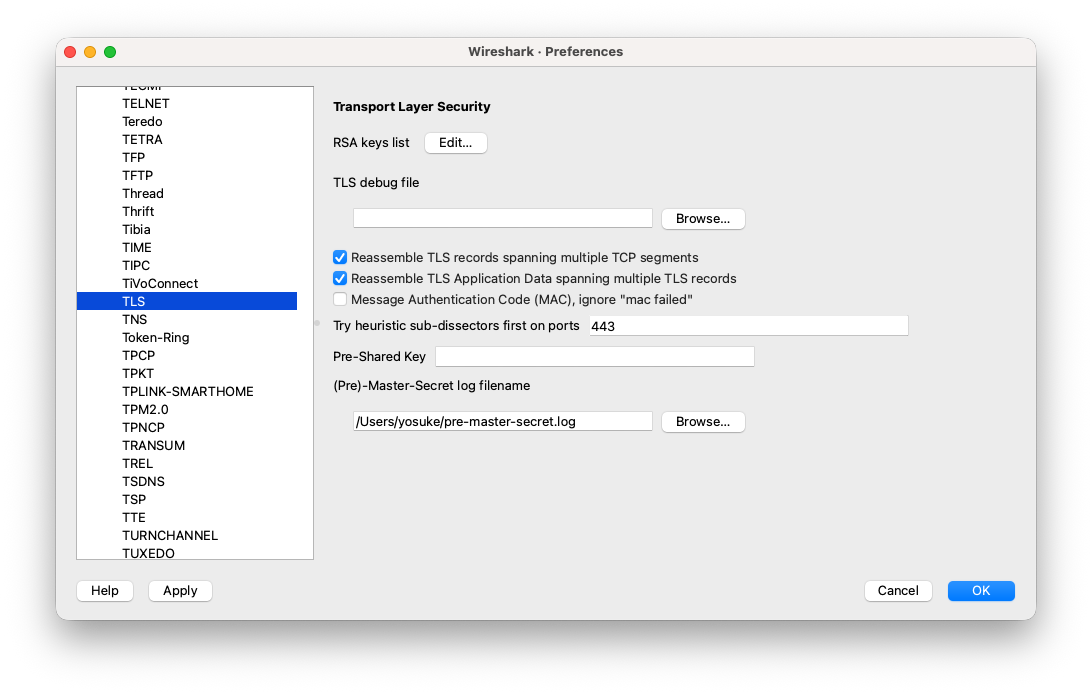
Then, start the wireshark capturing. And access to “https://gitlab.fabcloud.org” on the Google Chrome.
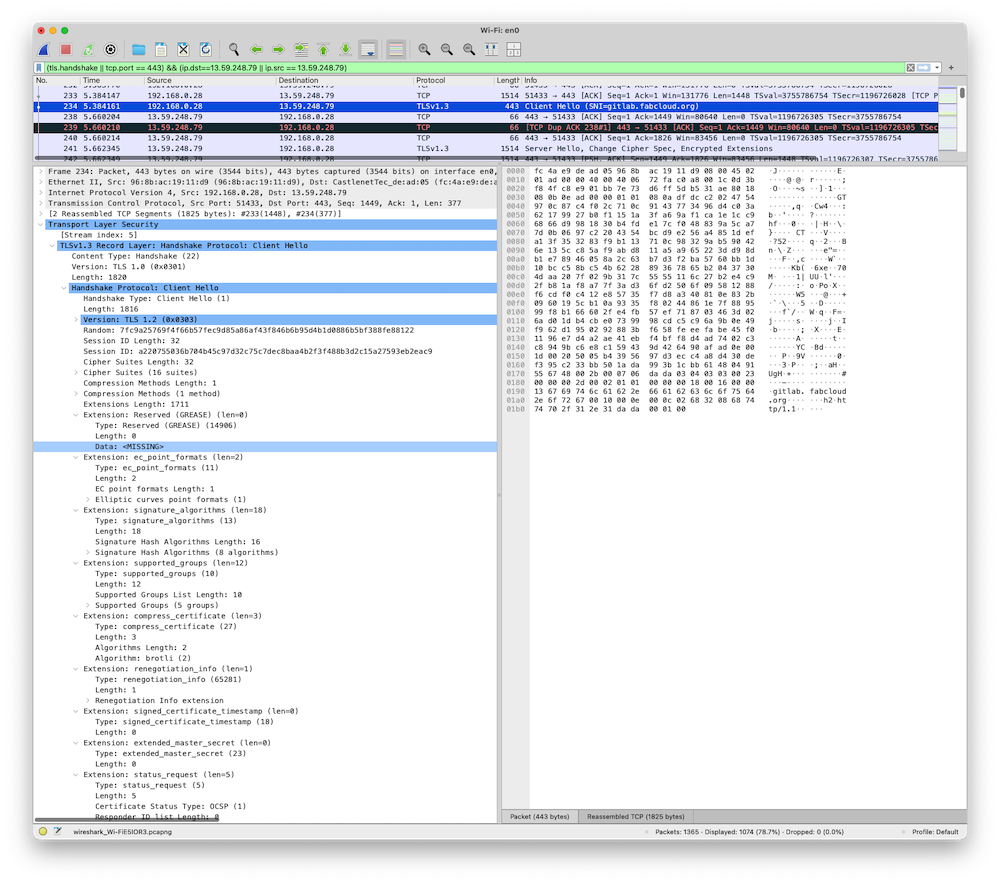
Client Hello
First, when the client browser access to the website, “client hello” is sent to the server. In this time, client send a “key_share”, the key for encryption and the key algorithm is “X25519MLKEM768”. X25519MLKEM768 is a hybrid key exchange combining X25519 (classical elliptic curve) and ML-KEM-768 (a post-quantum algorithm), designed to remain secure even against future quantum computers.
Client also send a couple of “Cipher Suites” to the server, which client is possible to use for encryption (such as TLS_AES_128_CGM_SHA256, TLS_ECDHE_ECDSA_WITH_AES_128_GCM_SHA256, and so on).
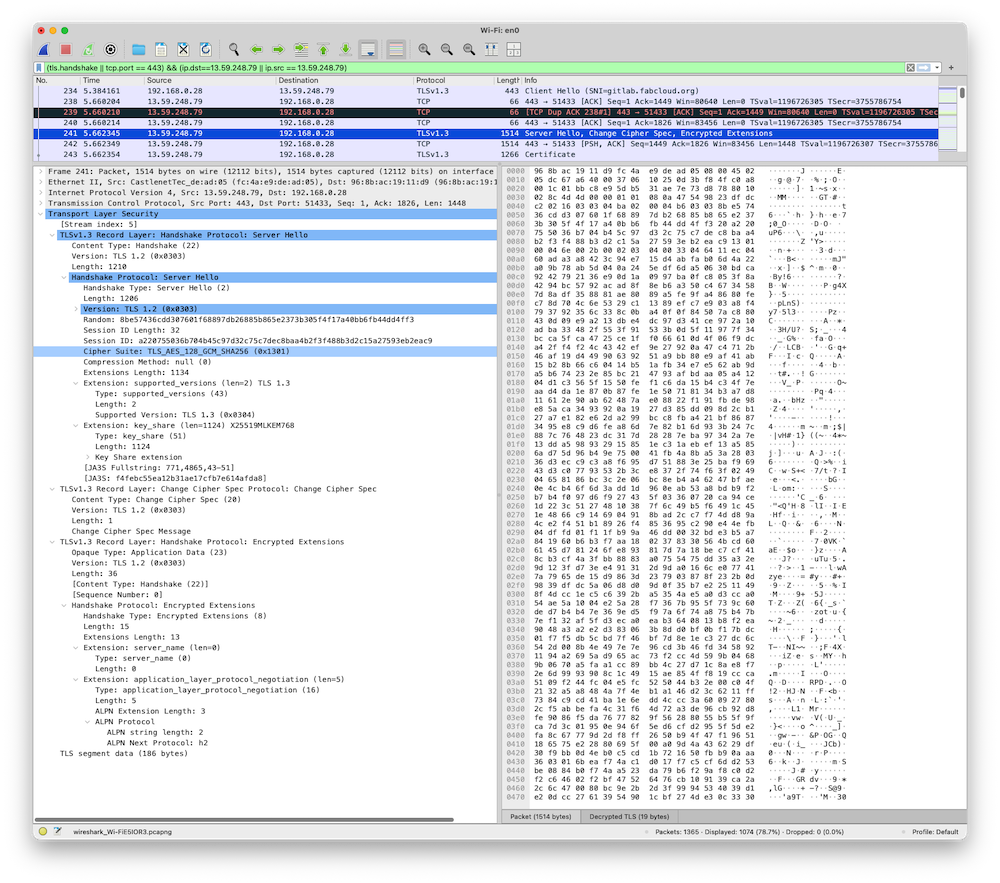
Server Hello, Change Ciper Spec, Encrypted Extensions
Next, Server send to client “Hello”, and send “key_share” to the client, the algorithm of the key is also “X25519MLKEM768”. Server also send “Chiper Suite” to the client. “Chiper Suite” is recorded the algorithm which is specifyed by the server for encryption (here, selected “TLS_AES_128_GCM_SHA256”).
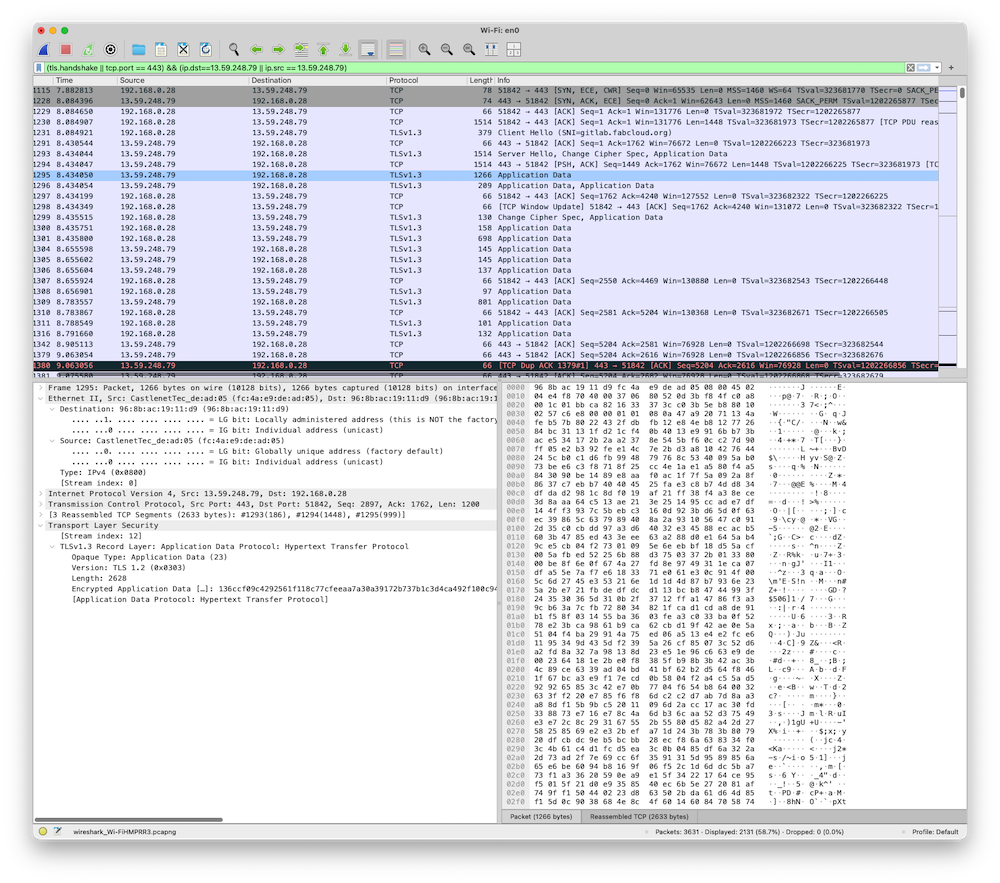
if not decrypted the packets
If we don’t set the browser’s SSLKEY in the Wireshark, encrypted packet could see as “Application Data” of TLSv1.3 protocol. As following, “Transport Layer Security” section just show the encrypted application data. We cannot see inside them.
After the “Server Hello, Ciper Spec”, segment, remained segments are encrypted and regards as “Application Data”. “Encrypted Extensions” also encrypted and regards as “Application Data”. The following description is the result of decryption of the packe data with SSLKEY.
Certificate
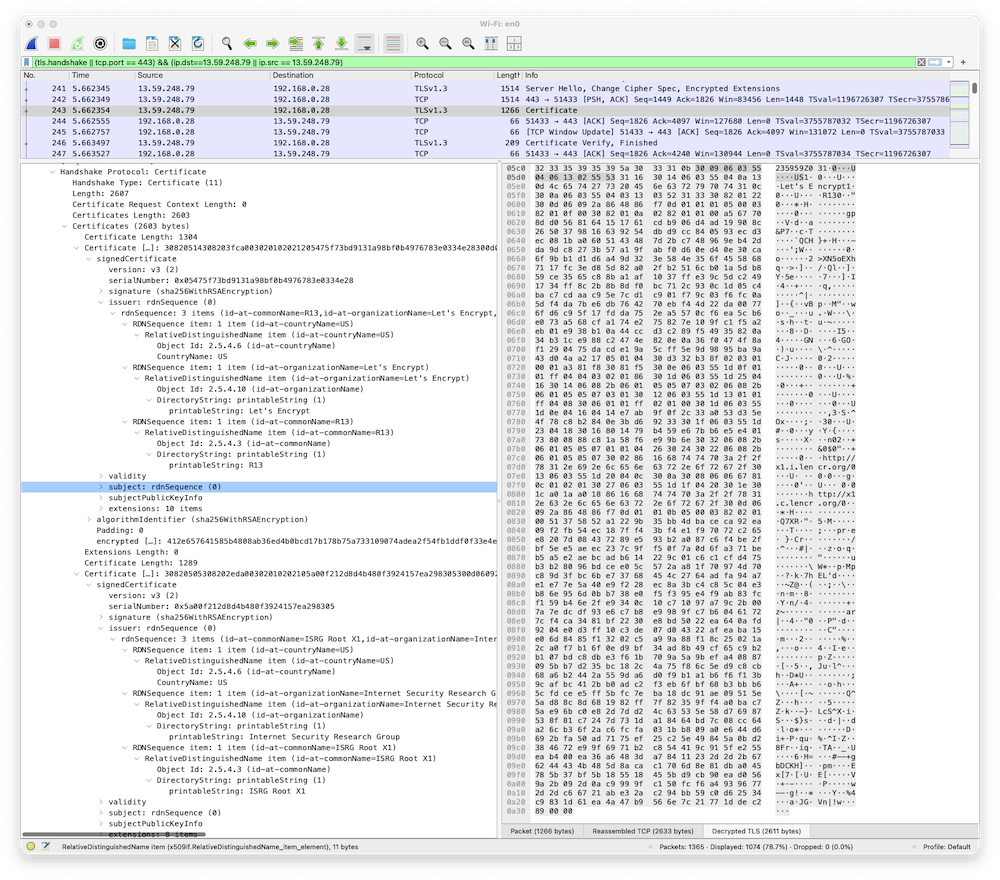
Third, server send a cerfificate to the client. This packet is usually encrypted, and could not see on the Wireshark unless the SSLKEYLOG of web browser is imported. Here, two certificates are embedded in the packet, one is a server certificate, another is CA Certificate.
I could see the certificate itself in the wireshark. For example, the issuer of server certificate is as following:
- countryName=US
- organizationName=Let’s Encrypt
- commonName=R13
Also, the issuer of CA certifiate is as following:
- countryName=US
- organizationname=Internet Security Research Group
- commonName=ISRG Root X1
I could see the certificate itself in the wireshark. For example, the issuer of server certificate is as following:
- countryName=US
- organizationName=Let’s Encrypt
- commonName=R13
Also, the issuer of CA certifiate is as following:
- countryName=US
- organizationname=Internet Security Research Group
- commonName=ISRG Root X1
Certificate Verify, Finish
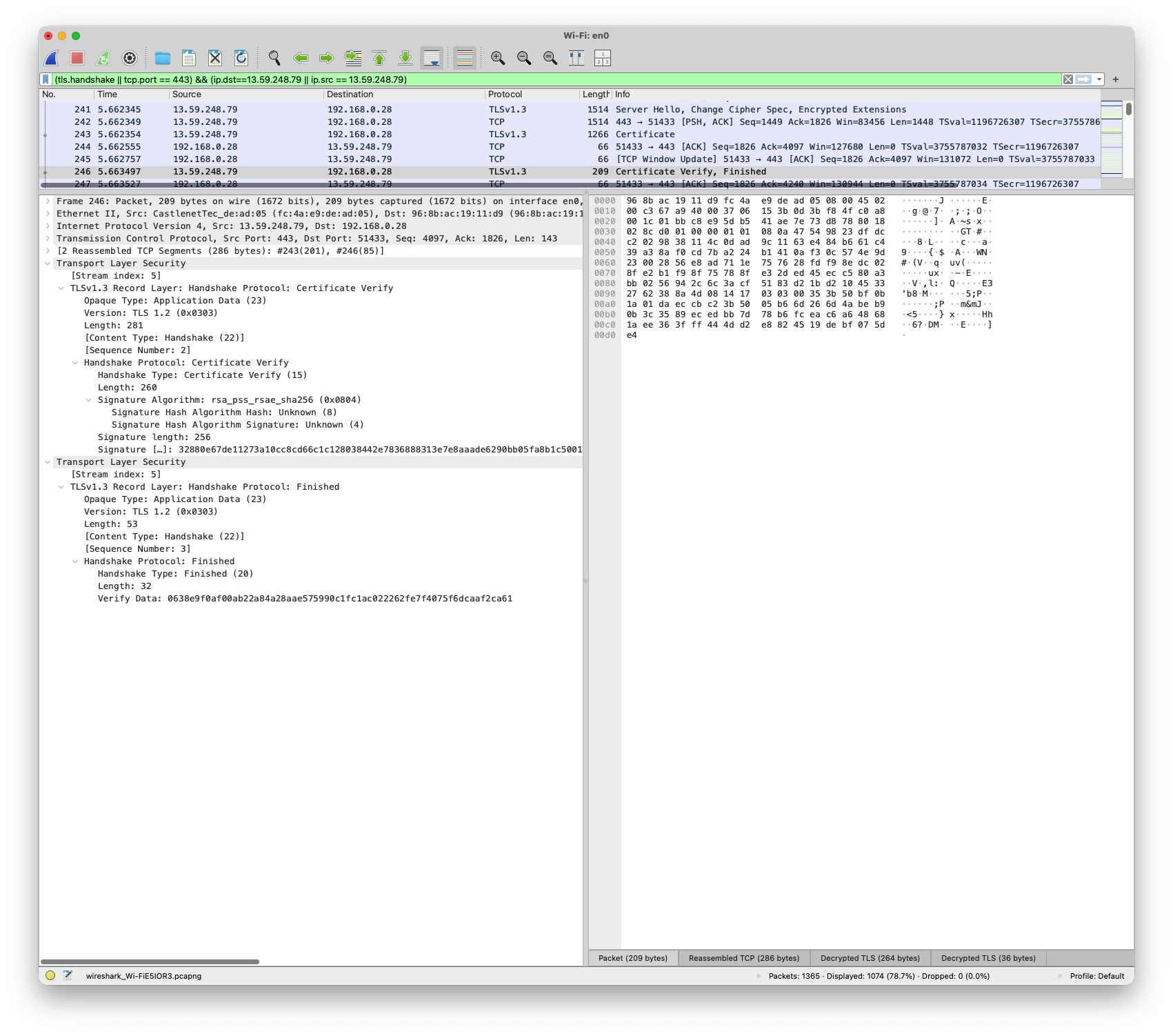
Lastly, server send a certificte verify to the client. At the sametime, server send “Finish” to the client for closing handshake.
HTTPS Data Transmission (302 Rediect)
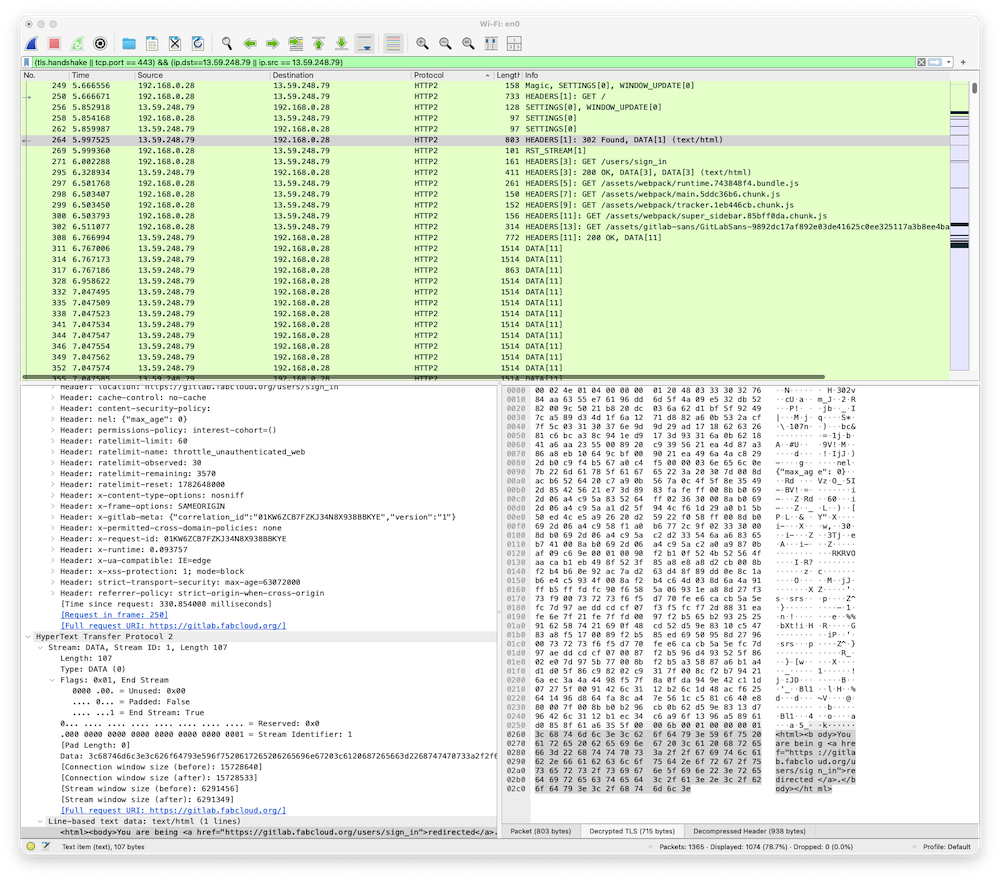
The contents of website is sent with encrypted. So, these data also could not see on the Wireshark unless the SSLKEYLOG of web browser is imported.
When we access to https://gitlab.fabcloud.org, the redirect 302 occurs. Wireshark capture the text/html before redirecting to /user/sign_in page as follow.
<html><body>You are being <a href="https://gitlab.fabcloud.org/users/sign_in">redirected</a>.</body></html>
HTTPS Data Transmission (gitlab login page)
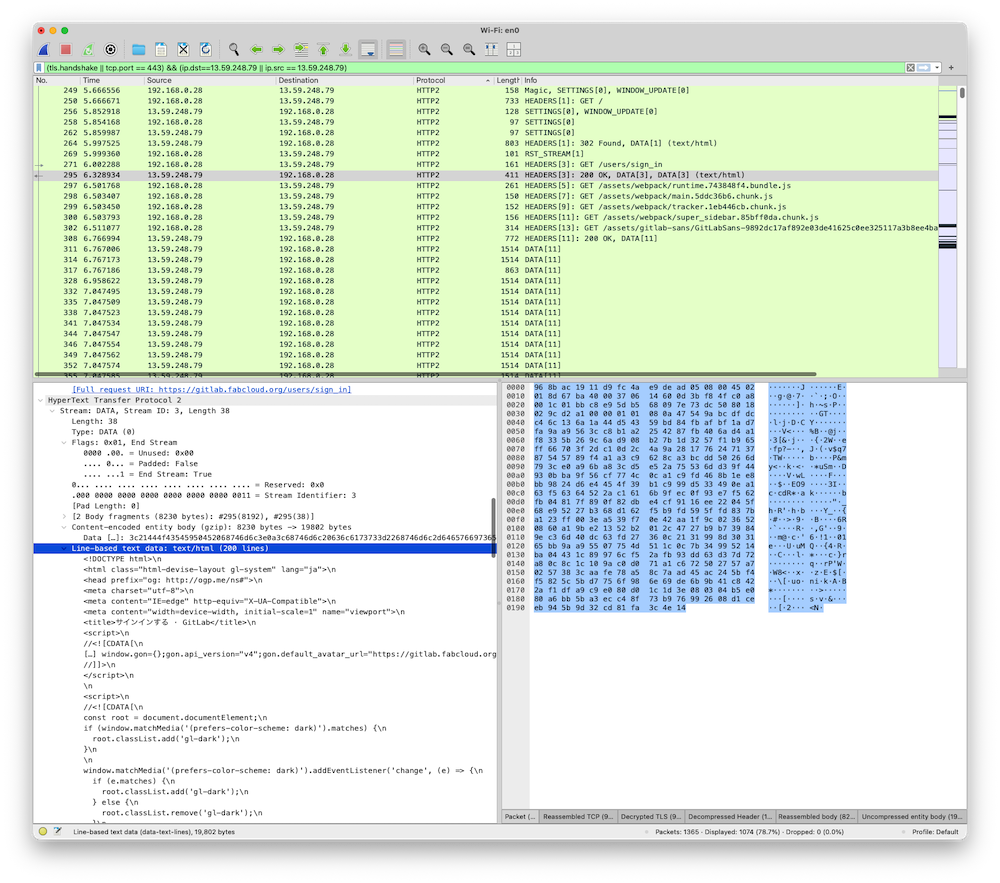
Then, redirected to “https://gitlab.fabcloud.org/users/sign_in”. Above handshake process are executed again, and sign_in page comes up. When we could decrypt the packet, we can see that the text/html is embedded into in the “line-based text data: text/html” in the packet.
Answer to the questions
-
Trace a real TLS handshake and an encrypted data segment.
- Client Hello, Server Hello, Change Cipher Spec could see without SSLKEYLOG, that means those segments are not encrypted.
- Certificate, Certificate Verify and Finish could not see without SSLKEYLOG, that means those segments are encrypted.
-
Identify how the session is established — cipher suite, certificate, key exchange
- Session is established when the key_share are exchaanged, and specify the algorithm of encryption.
-
confirm what an observer can and cannot see.
- Observer only could see negotiation process for establishing the encrypted TLS communication without SSLKEYLOG. When observer see the SSKLEYLOG, all encrypted packets could see.
Port Scan & Firewall
Your VM will be subjected to a port scan. Determine what it reveals about your exposed services, then configure the firewall to reduce what’s reachable from outside.
Port Scan by nmap… mysterious story
First, I installed nmap on the VM Server.
sudo apt install nmap
Port Scanning on my Virtual Machine.
ubuntu@ff-cs-yosuke-tsuchiya:~$ nmap -sT 192.168.80.129
Starting Nmap 7.94SVN ( https://nmap.org ) at 2026-06-28 13:54 UTC
Nmap scan report for ff-cs-yosuke-tsuchiya (192.168.80.129)
Host is up (0.000030s latency).
Not shown: 995 closed tcp ports (conn-refused)
PORT     STATE SERVICE
22/tcp   open  ssh
25/tcp   open  smtp
80/tcp   open  http
443/tcp  open  https
5901/tcp open  vnc-1

Nmap done: 1 IP address (1 host up) scanned in 0.02 seconds
I could understand why port 80 and 443 is opened… That’s because I setup nginx server with self-certificate https in the last assignments. However, I have not remember when I opened the port 25/tcp, smtp.
So, I checked who (what applications or services) are used port 25.
ubuntu@ff-cs-yosuke-tsuchiya:~$ sudo ss -tlnp
State                            Recv-Q                           Send-Q                                                      Local Address:Port                                                       Peer Address:Port                           Process
LISTEN                           0                                4096                                                           127.0.0.54:53                                                              0.0.0.0:*                               users:(("systemd-resolve",pid=633,fd=17))
LISTEN                           0                                4096                                                            127.0.0.1:631                                                             0.0.0.0:*                               users:(("cupsd",pid=5281,fd=7))
LISTEN                           0                                511                                                               0.0.0.0:443                                                             0.0.0.0:*                               users:(("nginx",pid=1065,fd=7),("nginx",pid=1064,fd=7),("nginx",pid=1061,fd=7))
LISTEN                           0                                100                                                               0.0.0.0:25                                                              0.0.0.0:*                               users:(("master",pid=1577,fd=13))
LISTEN                           0                                4096                                                              0.0.0.0:22                                                              0.0.0.0:*                               users:(("sshd",pid=3492,fd=3),("systemd",pid=1,fd=195))
LISTEN                           0                                511                                                               0.0.0.0:80                                                              0.0.0.0:*                               users:(("nginx",pid=1065,fd=5),("nginx",pid=1064,fd=5),("nginx",pid=1061,fd=5))
LISTEN                           0                                100                                                               0.0.0.0:6081                                                            0.0.0.0:*                               users:(("python3",pid=1045,fd=3))
LISTEN                           0                                5                                                                 0.0.0.0:5901                                                            0.0.0.0:*                               users:(("Xtigervnc",pid=1207,fd=9))
LISTEN                           0                                4096                                                        127.0.0.53%lo:53                                                              0.0.0.0:*                               users:(("systemd-resolve",pid=633,fd=15))
LISTEN                           0                                511                                                                  [::]:443                                                                [::]:*                               users:(("nginx",pid=1065,fd=8),("nginx",pid=1064,fd=8),("nginx",pid=1061,fd=8))
LISTEN                           0                                100                                                                  [::]:25                                                                 [::]:*                               users:(("master",pid=1577,fd=14))
LISTEN                           0                                4096                                                                 [::]:22                                                                 [::]:*                               users:(("sshd",pid=3492,fd=4),("systemd",pid=1,fd=196))
LISTEN                           0                                511                                                                  [::]:80                                                                 [::]:*                               users:(("nginx",pid=1065,fd=6),("nginx",pid=1064,fd=6),("nginx",pid=1061,fd=6))
LISTEN                           0                                4096                                                                [::1]:631                                                                [::]:*                               users:(("cupsd",pid=5281,fd=6))
LISTEN                           0                                5                                                                    [::]:5901                                                               [::]:*                               users:(("Xtigervnc",pid=1207,fd=10))
I could find “users:((“master”,pid=1577,fd=13))” is used port 25. So, I checked what the process ID 1577 is.
ubuntu@ff-cs-yosuke-tsuchiya:~$ ps aux | grep 1577
root        1577  0.0  0.2  42856  4892 ?        Ss   Jun27   0:00 /usr/lib/postfix/sbin/master -w
ubuntu      8947  0.0  0.1   7076  2164 pts/0    S+   14:02   0:00 grep --color=auto 1577
It is a postfix server used… It is interesting that I haven’t remember when I installed and started postfix.... Anyway, it could be a vulnability.... So, I tried to close this port by firewall.
Firewall (ufw)… closed mysterious thing…
Checking the status of firewall.
ubuntu@ff-cs-yosuke-tsuchiya:~$ sudo ufw status
Status: inactive
ubuntu@ff-cs-yosuke-tsuchiya:~$ sudo ufw status verbose
Status: inactive
ubuntu@ff-cs-yosuke-tsuchiya:~$ sudo iptables -L
Chain INPUT (policy ACCEPT)
target     prot opt source               destination

Chain FORWARD (policy ACCEPT)
target     prot opt source               destination

Chain OUTPUT (policy ACCEPT)
target     prot opt source               destination
Firewall is deactive. So, start ufw as following.
sudo systemctl start ufw
Then, checking the status again.
ubuntu@ff-cs-yosuke-tsuchiya:~$ sudo ufw status
Status: active

To                         Action      From
--                         ------      ----
5901/tcp                   ALLOW       Anywhere
22/tcp                     ALLOW       Anywhere
5901/tcp (v6)              ALLOW       Anywhere (v6)
22/tcp (v6)                ALLOW       Anywhere (v6)

ubuntu@ff-cs-yosuke-tsuchiya:~$
Firewall is active and already opened 22/tcp (SSH) and 5901 (VNC-1). So, it assumes port 80 and 443 is blocked by firewall....
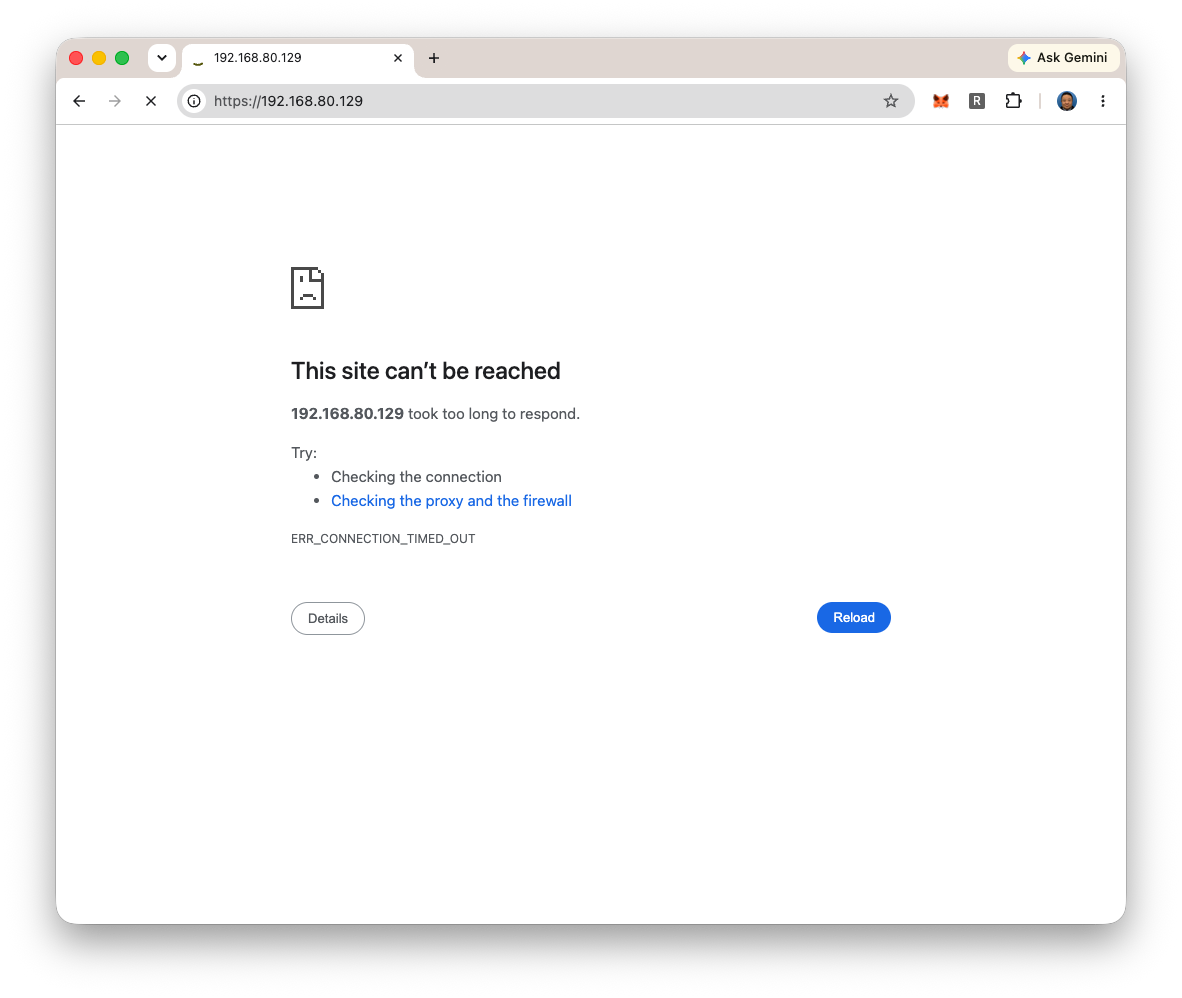
It looks port 443 is blocked. So, allow port 443 as following.
ubuntu@ff-cs-yosuke-tsuchiya:~$ sudo ufw allow 443/tcp
Rule added
Rule added (v6)
ubuntu@ff-cs-yosuke-tsuchiya:~$ sudo ufw status
Status: active

To                         Action      From
--                         ------      ----
5901/tcp                   ALLOW       Anywhere
22/tcp                     ALLOW       Anywhere
443/tcp                    ALLOW       Anywhere
5901/tcp (v6)              ALLOW       Anywhere (v6)
22/tcp (v6)                ALLOW       Anywhere (v6)
443/tcp (v6)               ALLOW       Anywhere (v6)

ubuntu@ff-cs-yosuke-tsuchiya:~$
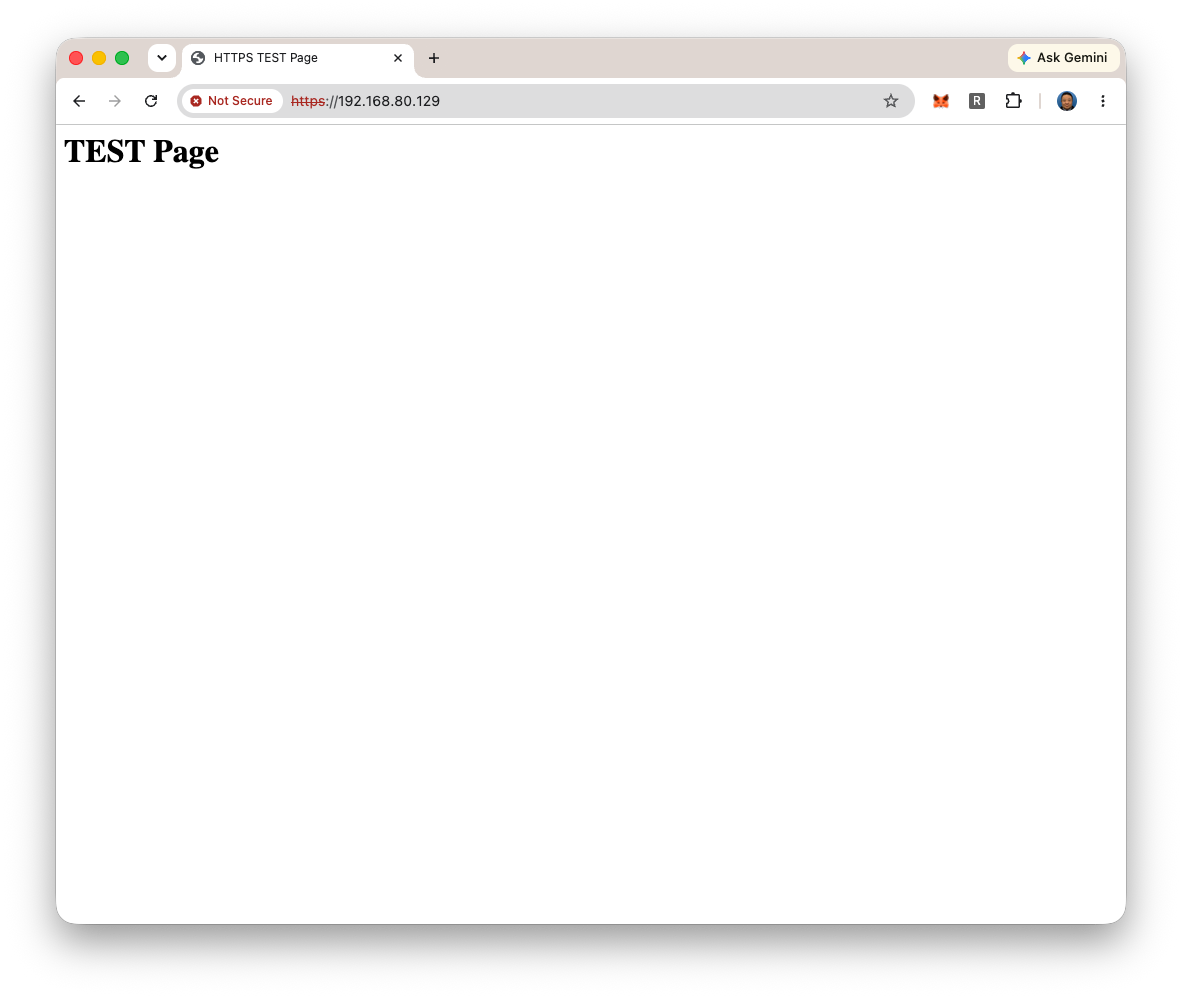
Then, post 443 test page could see. Port 80 (HTTP) is usually blocked because it transmits data without encryption, making it vulnerable to eavesdropping. If it is require to use (such as Domain Authentication for setting let’s encrypt), it would be unblocked temporarily.
So, checking whether port 25 is blocked or not.... with using telnet from my mac PC.
telnet 192.168.80.129 25
The connection is timeouted. So, I start for ufw logging.
sudo ufw logging on
Then, checked the ufw logs.
ubuntu@ff-cs-yosuke-tsuchiya:~$ sudo tail -f /var/log/ufw.log
2026-06-28T14:31:47.886935+00:00 ff-cs-yosuke-tsuchiya kernel: [UFW BLOCK] IN=eth0 OUT= MAC=bc:24:11:aa:90:4b:6c:63:f8:31:fa:61:08:00 SRC=192.168.81.35 DST=192.168.80.129 LEN=64 TOS=0x00 PREC=0x00 TTL=63 ID=0 DF PROTO=TCP SPT=52958 DPT=443 WINDOW=65535 RES=0x00 CWR ECE SYN URGP=0
2026-06-28T14:31:48.139010+00:00 ff-cs-yosuke-tsuchiya kernel: [UFW BLOCK] IN=eth0 OUT= MAC=bc:24:11:aa:90:4b:6c:63:f8:31:fa:61:08:00 SRC=192.168.81.35 DST=192.168.80.129 LEN=64 TOS=0x00 PREC=0x00 TTL=63 ID=0 DF PROTO=TCP SPT=52959 DPT=443 WINDOW=65535 RES=0x00 CWR ECE SYN URGP=0
2026-06-28T14:32:11.064852+00:00 ff-cs-yosuke-tsuchiya kernel: [UFW BLOCK] IN=eth0 OUT= MAC=bc:24:11:aa:90:4b:6c:63:f8:31:fa:61:08:00 SRC=192.168.81.35 DST=192.168.80.129 LEN=48 TOS=0x00 PREC=0x00 TTL=63 ID=0 DF PROTO=TCP SPT=52958 DPT=443 WINDOW=65535 RES=0x00 SYN URGP=0
2026-06-28T14:32:55.390053+00:00 ff-cs-yosuke-tsuchiya kernel: message repeated 2 times: [ [UFW BLOCK] IN=eth0 OUT= MAC=bc:24:11:aa:90:4b:6c:63:f8:31:fa:61:08:00 SRC=192.168.81.35 DST=192.168.80.129 LEN=48 TOS=0x00 PREC=0x00 TTL=63 ID=0 DF PROTO=TCP SPT=52958 DPT=443 WINDOW=65535 RES=0x00 SYN URGP=0 ]
2026-06-28T14:34:02.910257+00:00 ff-cs-yosuke-tsuchiya kernel: [UFW BLOCK] IN=eth0 OUT= MAC=bc:24:11:aa:90:4b:6c:63:f8:31:fa:61:08:00 SRC=192.168.81.35 DST=192.168.80.129 LEN=64 TOS=0x00 PREC=0x00 TTL=63 ID=0 DF PROTO=TCP SPT=52967 DPT=443 WINDOW=65535 RES=0x00 CWR ECE SYN URGP=0
2026-06-28T14:34:03.165748+00:00 ff-cs-yosuke-tsuchiya kernel: [UFW BLOCK] IN=eth0 OUT= MAC=bc:24:11:aa:90:4b:6c:63:f8:31:fa:61:08:00 SRC=192.168.81.35 DST=192.168.80.129 LEN=64 TOS=0x00 PREC=0x00 TTL=63 ID=0 DF PROTO=TCP SPT=52968 DPT=443 WINDOW=65535 RES=0x00 CWR ECE SYN URGP=0
2026-06-28T14:34:03.256755+00:00 ff-cs-yosuke-tsuchiya kernel: [UFW BLOCK] IN=eth0 OUT= MAC=bc:24:11:aa:90:4b:6c:63:f8:31:fa:61:08:00 SRC=192.168.81.35 DST=192.168.80.129 LEN=64 TOS=0x00 PREC=0x00 TTL=63 ID=0 DF PROTO=TCP SPT=52967 DPT=443 WINDOW=65535 RES=0x00 SYN URGP=0
2026-06-28T14:34:06.980736+00:00 ff-cs-yosuke-tsuchiya kernel: [UFW BLOCK] IN=eth0 OUT= MAC=bc:24:11:aa:90:4b:6c:63:f8:31:fa:61:08:00 SRC=192.168.81.35 DST=192.168.80.129 LEN=64 TOS=0x00 PREC=0x00 TTL=63 ID=0 DF PROTO=TCP SPT=52968 DPT=443 WINDOW=65535 RES=0x00 SYN URGP=0
2026-06-28T14:36:21.429687+00:00 ff-cs-yosuke-tsuchiya kernel: [UFW BLOCK] IN=eth0 OUT= MAC=bc:24:11:aa:90:4b:6c:63:f8:31:fa:61:08:00 SRC=192.168.81.35 DST=192.168.80.129 LEN=64 TOS=0x10 PREC=0x00 TTL=63 ID=0 DF PROTO=TCP SPT=52977 DPT=25 WINDOW=65535 RES=0x00 CWR ECE SYN URGP=0
2026-06-28T14:36:21.800221+00:00 ff-cs-yosuke-tsuchiya kernel: [UFW BLOCK] IN=eth0 OUT= MAC=bc:24:11:aa:90:4b:6c:63:f8:31:fa:61:08:00 SRC=192.168.81.35 DST=192.168.80.129 LEN=64 TOS=0x10 PREC=0x00 TTL=63 ID=0 DF PROTO=TCP SPT=52977 DPT=25 WINDOW=65535 RES=0x00 SYN URGP=0
2026-06-28T14:36:28.002392+00:00 ff-cs-yosuke-tsuchiya kernel: message repeated 5 times: [ [UFW BLOCK] IN=eth0 OUT= MAC=bc:24:11:aa:90:4b:6c:63:f8:31:fa:61:08:00 SRC=192.168.81.35 DST=192.168.80.129 LEN=64 TOS=0x10 PREC=0x00 TTL=63 ID=0 DF PROTO=TCP SPT=52977 DPT=25 WINDOW=65535 RES=0x00 SYN URGP=0 ]
2026-06-28T14:39:40.973720+00:00 ff-cs-yosuke-tsuchiya kernel: [UFW BLOCK] IN=eth0 OUT= MAC=bc:24:11:aa:90:4b:6c:63:f8:31:fa:61:08:00 SRC=192.168.81.35 DST=192.168.80.129 LEN=64 TOS=0x10 PREC=0x00 TTL=63 ID=0 DF PROTO=TCP SPT=52980 DPT=25 WINDOW=65535 RES=0x00 CWR ECE SYN URGP=0
2026-06-28T14:39:41.313082+00:00 ff-cs-yosuke-tsuchiya kernel: [UFW BLOCK] IN=eth0 OUT= MAC=bc:24:11:aa:90:4b:6c:63:f8:31:fa:61:08:00 SRC=192.168.81.35 DST=192.168.80.129 LEN=64 TOS=0x10 PREC=0x00 TTL=63 ID=0 DF PROTO=TCP SPT=52980 DPT=25 WINDOW=65535 RES=0x00 SYN URGP=0
2026-06-28T14:39:53.158221+00:00 ff-cs-yosuke-tsuchiya kernel: message repeated 8 times: [ [UFW BLOCK] IN=eth0 OUT= MAC=bc:24:11:aa:90:4b:6c:63:f8:31:fa:61:08:00 SRC=192.168.81.35 DST=192.168.80.129 LEN=64 TOS=0x10 PREC=0x00 TTL=63 ID=0 DF PROTO=TCP SPT=52980 DPT=25 WINDOW=65535 RES=0x00 SYN URGP=0 ]
2026-06-28T14:40:04.268407+00:00 ff-cs-yosuke-tsuchiya kernel: [UFW BLOCK] IN=eth0 OUT= MAC=bc:24:11:aa:90:4b:6c:63:f8:31:fa:61:08:00 SRC=192.168.81.35 DST=192.168.80.129 LEN=48 TOS=0x10 PREC=0x00 TTL=63 ID=0 DF PROTO=TCP SPT=52980 DPT=25 WINDOW=65535 RES=0x00 SYN URGP=0
^C
ubuntu@ff-cs-yosuke-tsuchiya:~$
It is recorded that the port 25 accesses are blocked several times from my mac PC’s IP address (192.168.81.35). So, I confirmed port 25 is blocekd.
2026-06-28T14:36:21.800221+00:00 ff-cs-yosuke-tsuchiya kernel: [UFW BLOCK] IN=eth0 OUT= MAC=bc:24:11:aa:90:4b:6c:63:f8:31:fa:61:08:00 SRC=192.168.81.35 DST=192.168.80.129 LEN=64 TOS=0x10 PREC=0x00 TTL=63 ID=0 DF PROTO=TCP SPT=52977 DPT=25 WINDOW=65535 RES=0x00 SYN URGP=0
81.35 DST=192.168.80.129 LEN=64 TOS=0x10 PREC=0x00 TTL=63 ID=0 DF PROTO=TCP SPT=52977 DPT=25 WINDOW=65535 RES=0x00 SYN URGP=0 ]
2026-06-28T14:39:40.973720+00:00 ff-cs-yosuke-tsuchiya kernel: [UFW BLOCK] IN=eth0 OUT= MAC=bc:24:11:aa:90:4b:6c:63:f8:31:fa:61:08:00 SRC=192.168.81.35 DST=192.168.80.129 LEN=64 TOS=0x10 PREC=0x00 TTL=63 ID=0 DF PROTO=TCP SPT=52980 DPT=25 WINDOW=65535 RES=0x00 CWR ECE SYN URGP=0
2026-06-28T14:39:41.313082+00:00 ff-cs-yosuke-tsuchiya kernel: [UFW BLOCK] IN=eth0 OUT= MAC=bc:24:11:aa:90:4b:6c:63:f8:31:fa:61:08:00 SRC=192.168.81.35 DST=192.168.80.129 LEN=64 TOS=0x10 PREC=0x00 TTL=63 ID=0 DF PROTO=TCP SPT=52980 DPT=25 WINDOW=65535 RES=0x00 SYN URGP=0
2026-06-28T14:39:53.158221+00:00 ff-cs-yosuke-tsuchiya kernel: message repeated 8 times: [ [UFW BLOCK] IN=eth0 OUT= MAC=bc:24:11:aa:90:4b:6c:63:f8:31:fa:61:08:00 SRC=192.168.81.35 DST=192.168.80.129 LEN=64 TOS=0x10 PREC=0x00 TTL=63 ID=0 DF PROTO=TCP SPT=52980 DPT=25 WINDOW=65535 RES=0x00 SYN URGP=0 ]
2026-06-28T14:40:04.268407+00:00 ff-cs-yosuke-tsuchiya kernel: [UFW BLOCK] IN=eth0 OUT= MAC=bc:24:11:aa:90:4b:6c:63:f8:31:fa:61:08:00 SRC=192.168.81.35 DST=192.168.80.129 LEN=48 TOS=0x10 PREC=0x00 TTL=63 ID=0 DF PROTO=TCP SPT=52980 DPT=25 WINDOW=65535 RES=0x00 SYN URGP=0
By the way, if port 25 allowed, the result of telnet would be as following (logged in with port 25 and could use postfix for sending e-mail).
yosuke@ysk-M1Pro ~ % telnet 192.168.80.129 25
Trying 192.168.80.129...
Connected to ff-cs-yosuke-tsuchiya.
Escape character is '^]'.
220 ff-cs-yosuke-tsuchiya ESMTP Postfix (Ubuntu)
Mysterious thing have already occured before....
I did this my assignment last night (midnight 23:30-24:00 on June 28 Sunday).... I go to sleep… and wake up and found out the message from Þórarinn.... he found my VM’s port 25 are opened and sent mail to me....
?????? I was surprised. And checked again my status of firewall.... yeah, I have surely blocked the port 25.....
Þórarinn said he sent a message two days ago and he asked me to check my mailbox…
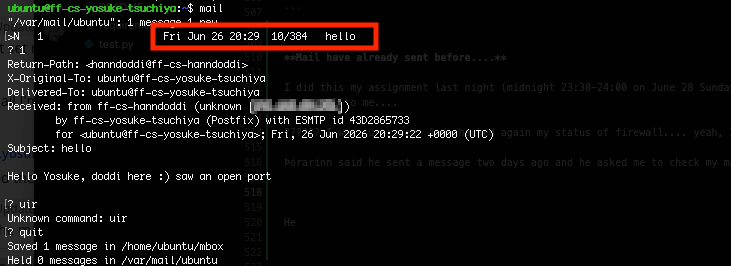
Yes, he sent me a message on June 26… If this had been a production server, we’d be in big trouble… Thanks Þórarinn to send me a message before I found it out.
I also checked the mail log (/var/log/mail.log), and found out no one except Þórarinn send a message via SMTP.
ubuntu@ff-cs-yosuke-tsuchiya:/var/log$ ls
README            auth.log               cups-browsed  faillog         lastlog     syslog.1
alternatives.log  auth.log.1             dist-upgrade  fontconfig.log  libvirt     syslog.2.gz
apport.log        auth.log.2.gz          dmesg         installer       lightdm     syslog.3.gz
apport.log.1      auth.log.3.gz          dmesg.0       journal         mail.log    sysstat
apport.log.2.gz   bootstrap.log          dmesg.1.gz    kern.log        mail.log.1  ubuntu-advantage-apt-hook.log
apport.log.3.gz   btmp                   dmesg.2.gz    kern.log.1      mail.log.2  ufw.log
apport.log.4.gz   cloud-init-output.log  dmesg.3.gz    kern.log.2.gz   nginx       unattended-upgrades
apport.log.5.gz   cloud-init.log         dmesg.4.gz    kern.log.3.gz   private     wtmp
apt               cups                   dpkg.log      landscape       syslog
ubuntu@ff-cs-yosuke-tsuchiya:/var/log$ sudo less mail.log | grep Subject
ubuntu@ff-cs-yosuke-tsuchiya:/var/log$ sudo less mail.log.1 | grep Subject
2026-06-26T20:29:22.282725+00:00 ff-cs-yosuke-tsuchiya postfix/smtpd[38277]: improper command pipelining after DATA from unknown[192.168.80.251]: Subject: hello\r\n\r\nHello Yosuke, doddi here :) saw an open port\r\n\r\n.\r\n
ubuntu@ff-cs-yosuke-tsuchiya:/var/log$ sudo less mail.log.2 | grep Subject
ubuntu@ff-cs-yosuke-tsuchiya:/var/log$ cat mail.log.2
2026-06-23T13:55:13.189094+00:00 ff-cs-yosuke-tsuchiya postfix/postfix-script[9958]: starting the Postfix mail system
2026-06-23T13:55:13.191062+00:00 ff-cs-yosuke-tsuchiya postfix/master[9960]: daemon started -- version 3.8.6, configuration /etc/postfix
ubuntu@ff-cs-yosuke-tsuchiya:/var/log$
Why mysterious thing is occured…?
I checked the apt log in /var/log/apt/history.log .... And found it.

I like to use emacs for editing on the remote terminal, so I installed it doing session 01 assignment. Postfix is installed AT THE SAME TIME as a dependend package…
I research it on the web, and found out this issue. This issue said:
This is due to a change in Ubuntu packaging for emacs-bin-common package (dependency of the emacs-nox package and in turn the emacs meta-package); specifically, the mailutils (meta-)package is now a recommended package rather than a suggested package on Ubuntu 24.04.
Also, as explained in this video, ubuntu automatically start in the background after installed it…
In short
- In Ubuntu 24.04, when installed emacs, mailutils (including Postfix) is also installed as recommended package.
- Also, due to Ubuntu’s specifications, postfix is automatically started in the background....
I have not good at for ubuntu recently because I am using RPM seriese servers such as Rocky Linux or Alma Linux in works.... So, this was good learning for me in this time....
End of the mysterious thing…
Finally, with confirming that there are no service processes that uses postfix. Also, I don’t use sending message via emacs. So, I stopped postfix....
systemctl stop postfix
The services was closed.