Session 1: Cryptography

ah,ah,ah......
He’s solving it in his head…
— summer wars (Japanese Movie, 2009)
Create a public/private key pair
On the virtual machine, use the command “ssh-keygen” to generate public/private key pair.
ssh-keygen -t rsa -b 4096
- -t option select an algorithm for crypt. RSA is default algorithm and one of the secure one.
- -b option set the length of the key. Default length is 2048bit.
Then, the public key is generated as follow.
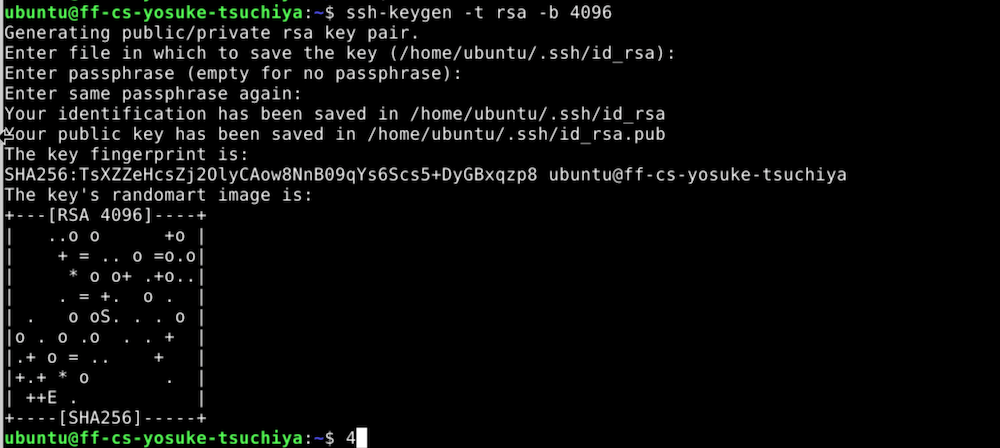
Public key is saved as “id_rsa.pub” and private key is saved as “id_rsa” in .ssh folder.

What is the public key ?
Public key is a key to crypt the data/communication, and that are opened, shared on the public.
What is the private key ?
Private key is a key to decrypt the data/communication that are crypted by public key. Private key is not shared, strictly protected.
What can this key pair be used for ?
Those public/private key pair is used to transmit the data with secure. For example, we use the public/private key to push/pull to the fabcloud gitlab server. Also, it is used to crypt/decrypt highly confidential files. When connecting to the remote server via SSH, it is recommended to use public/private key authentication (not password authentication).
Why must the private key be protected ?
Private key must be protected because it is only the key to decrypt the data which is crypted by public key. Private key leak is, generally, regards as serious incidents that leads the leak of secret data of organization, system hijack and tampering....
So, generally, public/private key are strictly protected by the system. For example, in case of recent Linux server, .ssh folder only works when the permission is set as 700 (only user could read/write/execute), and private key file only works when the permission is set as user only read/write (600).
Install an SSH public key on a server and use it to log in.
Here, we describe the installation procedure assuming we are logging into the Fab Future server from my Mac PC.
First, generate the public/private key pair on my mac as follow.
yosuke@ysk-M1Pro .ssh % ssh-keygen -t rsa -b 4096
Generating public/private rsa key pair.
Enter file in which to save the key (/Users/yosuke/.ssh/id_rsa): fabfuture_server
Enter passphrase for "fabfuture_server" (empty for no passphrase):
Enter same passphrase again:
Your identification has been saved in fabfuture_server
Your public key has been saved in fabfuture_server.pub
The key fingerprint is:
SHA256:O4kQZbawPY6qMcI2VVfbemEvtnkNCx6pyfTNx/qTq3o yosuke@ysk-M1Pro.local
The key's randomart image is:
+---[RSA 4096]----+
|    . +  .       |
|     B .. o      |
|    o.+. . +     |
|    .+..  o +    |
|   .o . So B o   |
|. .. . .ooB O =  |
|++.   . ++ = = +.|
|o+.      .  .Eoo |
|.          .ooooo|
+----[SHA256]-----+
“fabfuture_server” and “fabfuture_server.pub” key files are generated.
Since I use a separate key pair for each connection, I modified the “config” file so that those generated key is used for my Fab Future server. In detail, open “config” file in .ssh folder, then add the following description.
Host XXX.XXX.XXX.XXX
     User AAA
     identityFile ~/.ssh/fabfuture_server
Note:
- write IP address or FQDN in XXX.XXX.XXX.XXX
- write username on the system in AAA
Then, copy the public key on the clipboard as follow:
pbcopy < fabfuture_server.pub
Then, login to fabfuture server with password authentication, and pasete the public key in .ssh/authorized_keys. You can check the inside of authorized_keys with using cat command as follow.
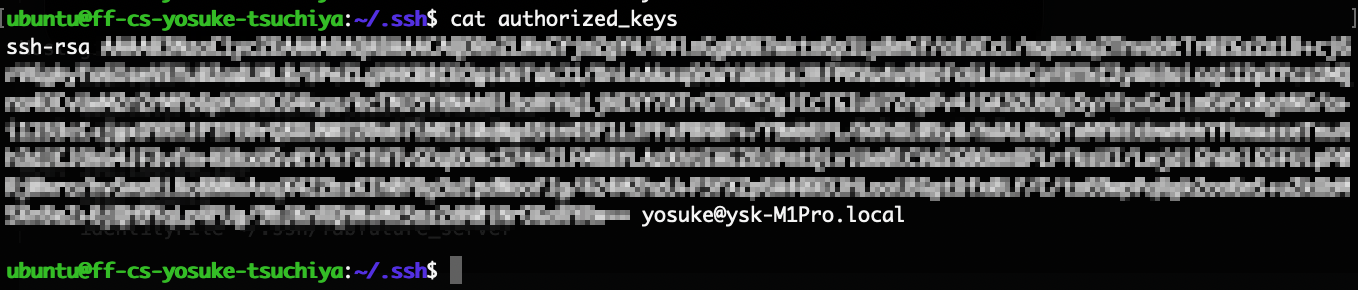
Finally, logout from the server, and try to login, again.
yosuke@ysk-M1Pro ~ % ssh ubuntu@192.168.80.129
Welcome to Ubuntu 24.04.4 LTS (GNU/Linux 6.8.0-124-generic x86_64)

 * Documentation:  https://help.ubuntu.com
 * Management:     https://landscape.canonical.com
 * Support:        https://ubuntu.com/pro

 System information as of Tue Jun 23 01:08:52 PM UTC 2026

  System load:           0.03
  Usage of /:            41.8% of 21.43GB
  Memory usage:          19%
  Swap usage:            0%
  Processes:             194
  Users logged in:       0
  IPv4 address for eth0: 192.168.80.129
  IPv6 address for eth0: 2607:7e80:d003:be08:be24:11ff:feaa:904b

 * Strictly confined Kubernetes makes edge and IoT secure. Learn how MicroK8s
   just raised the bar for easy, resilient and secure K8s cluster deployment.

   https://ubuntu.com/engage/secure-kubernetes-at-the-edge

Expanded Security Maintenance for Applications is not enabled.

0 updates can be applied immediately.

6 additional security updates can be applied with ESM Apps.
Learn more about enabling ESM Apps service at https://ubuntu.com/esm


Last login: Tue Jun 23 13:01:13 2026 from 192.168.81.35
ubuntu@ff-cs-yosuke-tsuchiya:~$
I could logged into the server without password authentications.
How does SSH key authentication work?
When access to the server from client PC, the server make a random data (called “challenge”) and send it to client PC. Then, the client PC generate the unique digital signiture with private key and send it back to the server. If the server could verify the signiture from the client PC with the stored public key, the server give the grant to login.
Reference: SSH Explained
What is stored on the server?
On the server, public key is stored in user’s .ssh folder.
What stays on your own computer?
On my own PC, both private/public key is stored in .ssh folder. Stored private key is used for authentication.
Why does the server not need your private key?
Because, in SSH key authentication, private key is used by the client to respond (with a signature) to a challenge from the server. In other words, this is to ensure that only the account owner on the server can gain access by using private key.
Encrypt and decrypt a file.
Here, I tried to file encryption/decription with using GnuPG.
Symmetric encryption
Symmetric encryption is a method to encryption/decription with common key.
First, make an simple text file as follow.
ubuntu@ff-cs-yosuke-tsuchiya:~$ echo "this is the secretfile." > secretfile.txt
ubuntu@ff-cs-yosuke-tsuchiya:~$ ls
Desktop  Documents  Downloads  Music  Pictures  Public  secretfile.txt  Templates  Videos
ubuntu@ff-cs-yosuke-tsuchiya:~$ cat secretfile.txt
this is the secretfile.
ubuntu@ff-cs-yosuke-tsuchiya:~$
Then, use gpg command to encrypt the secret.txt file as follow. The “-c” option means to use symmetric encryption.
gpg -c secretfile.txt
Then, set the passphrase for encryption/decription.
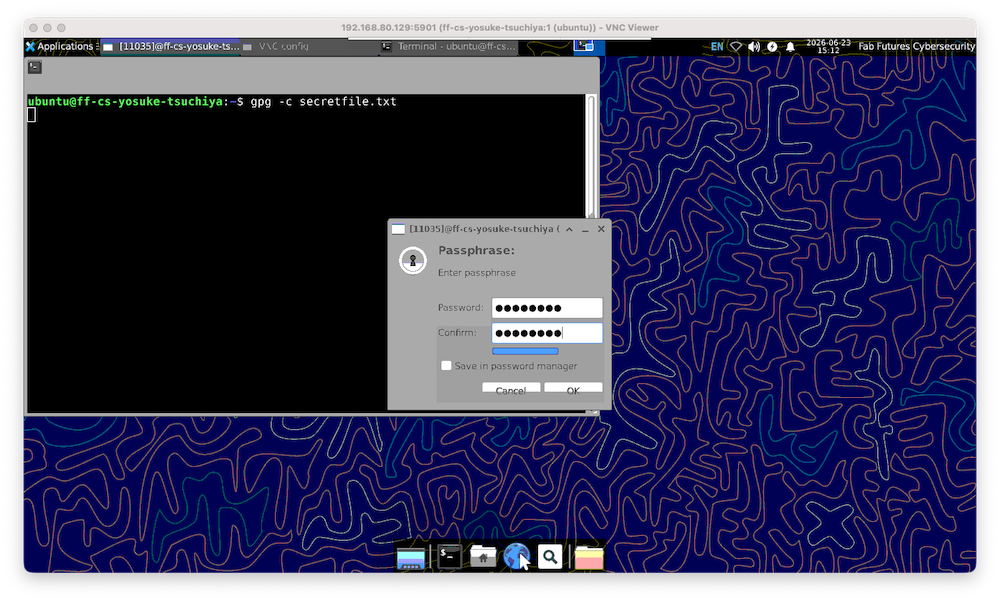
encrypted file “secretfile.txt.gpg” was generated.
ubuntu@ff-cs-yosuke-tsuchiya:~$ ls -l
total 40
drwxr-xr-x 2 ubuntu ubuntu 4096 Jun 11 13:38 Desktop
drwxr-xr-x 2 ubuntu ubuntu 4096 Jun 11 13:38 Documents
drwxr-xr-x 2 ubuntu ubuntu 4096 Jun 11 13:38 Downloads
drwxr-xr-x 2 ubuntu ubuntu 4096 Jun 11 13:38 Music
drwxr-xr-x 2 ubuntu ubuntu 4096 Jun 11 13:38 Pictures
drwxr-xr-x 2 ubuntu ubuntu 4096 Jun 11 13:38 Public
-rw-rw-r-- 1 ubuntu ubuntu   25 Jun 23 15:10 secretfile.txt
-rw-rw-r-- 1 ubuntu ubuntu  100 Jun 23 15:12 secretfile.txt.gpg
drwxr-xr-x 2 ubuntu ubuntu 4096 Jun 11 13:38 Templates
drwxr-xr-x 2 ubuntu ubuntu 4096 Jun 11 13:38 Videos
ubuntu@ff-cs-yosuke-tsuchiya:~$
Then, downlod this secretfile.txt.gpg into my Mac PC, and try to decrypt it.
For decryption, use gpg command with -d option.
gpg -d secretfile.txt.gpg > decriptionfile.txt
Then, enter the passphrase that are set when encrypting the file.
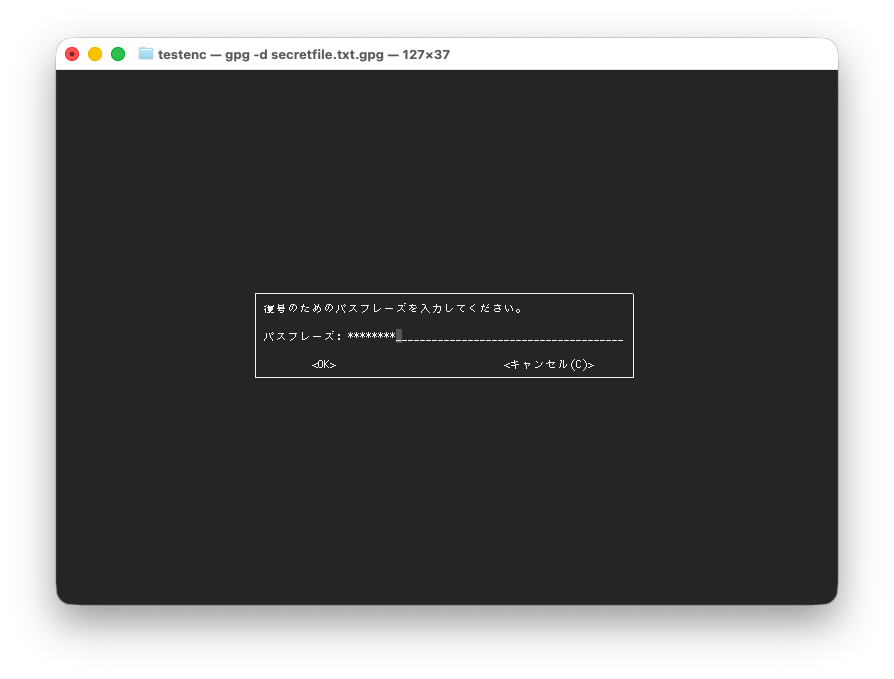
Finally, decripted file are saved as “decriptionfile.txt”.
yosuke@ysk-M1Pro testenc % cat decriptionfile.txt
This is the secret file.
yosuke@ysk-M1Pro testenc %
public key encryption
We can use public key encryption with gpg command. Here, I tried to encrypt file on the Vietual Machine, then try to decrypt it on my Mac.
First, generate public/private key on my Mac.
gpg --gen-key
Then, email address and name are registerd as follow.
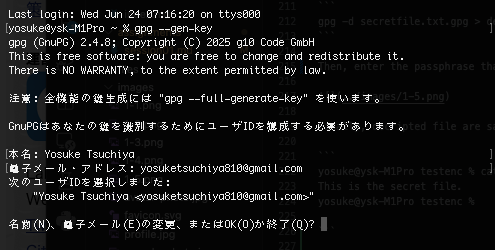
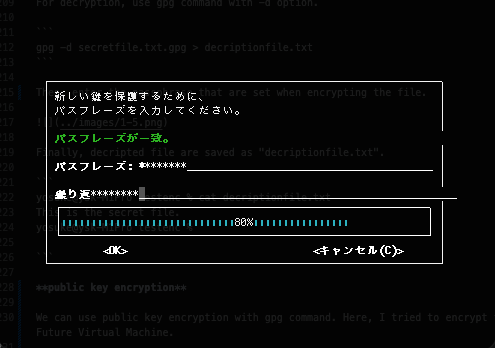
Next, generate the passphrase.
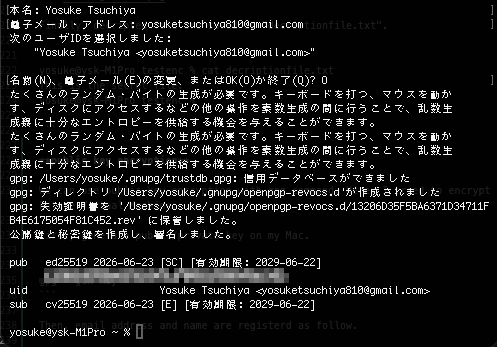
Then, public/private key are generated. The result also show where those are stored in my Mac PC.
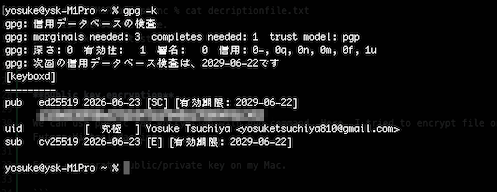
To check the public key that stored on my Mac PC, use -k option.
gpg -k
Then, the public key which is generated above are confirmed.
To check the private key that store on my Mac PC, use -K option (a big character K).
gpg -K
Then, the private key which is generated above are confirmed.
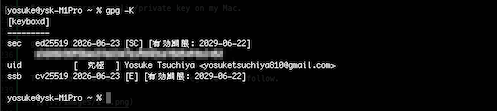
Now, we need to export public key to bring it to store on the Fab Future Virtual Machine as follow.
- -o option set the filepath to save the public key.
- -a option use ASCII for output the key
- lastly, specify the name to export the public key.
gpg -o publickey-yosuke -a --export "Yosuke Tsuchiya"
Then, “publickey-yosuke” file are generated. You can check the public key using cat or less command.
yosuke@ysk-M1Pro testenc % gpg -o publickey-yosuke -a --export "Yosuke Tsuchiya"
yosuke@ysk-M1Pro testenc % ls
aaa         decriptionfile.txt  publickey-yosuke    secretfile.txt.gpg
yosuke@ysk-M1Pro testenc % less publickey-yosuke
yosuke@ysk-M1Pro testenc % cat publickey-yosuke
-----BEGIN PGP PUBLIC KEY BLOCK-----


(here is the public key )


-----END PGP PUBLIC KEY BLOCK-----
yosuke@ysk-M1Pro testenc %
Then, upload the public key file to Virtual Machine. Usually, I am using FileZilla, but here, I show the simple SFTP command for upload. SFTP is file transfer protocol using SSH. Therefore, I could use public/private key for authentication.
yosuke@ysk-M1Pro testenc % sftp ubuntu@192.168.80.129
Connected to 192.168.80.129.
sftp> put publickey-yosuke
Uploading publickey-yosuke to /home/ubuntu/publickey-yosuke
publickey-yosuke                                                           100%  677     3.6KB/s   00:00
sftp> ls
Desktop              Documents            Downloads            Music                Pictures
Public               Templates            Videos               decrption.txt        publickey-yosuke
secretfile.txt       secretfile.txt.gpg
sftp> exit
yosuke@ysk-M1Pro testenc %
Then, login to the server and import the public key file as follow.
gpg --import publickey-yosuke
Then, public key are stored on the Virtual Machine.

Generate the file for encryption on the Virtual Machine.
ubuntu@ff-cs-yosuke-tsuchiya:~$ echo "This is the testfile for encryption/decription with gpg public/private key" > secretfile-pub-priv.txt
ubuntu@ff-cs-yosuke-tsuchiya:~$ ls
decrption.txt  Documents  Music     Public            secretfile-pub-priv.txt  secretfile.txt.gpg  Videos
Desktop        Downloads  Pictures  publickey-yosuke  secretfile.txt           Templates
ubuntu@ff-cs-yosuke-tsuchiya:~$ cat secretfile-pub-priv.txt
This is the testfile for encryption/decription with gpg public/private key
ubuntu@ff-cs-yosuke-tsuchiya:~$
Then, encrypt the file with using the public key stored (in case, using the public key for users to send.)
gpg -r "Yosuke Tsuchiya" -ea secretfile-pub-priv.txt
- -r option specify username (public key) to receive the file
- -e option use the public key for encryption
- -a option generate the ASCII file.
Then, the .enc file is generated.
ubuntu@ff-cs-yosuke-tsuchiya:~$ gpg -r "Yosuke Tsuchiya" -ea secretfile-pub-priv.txt
gpg: BFA80F003C32DE4D: There is no assurance this key belongs to the named user

sub  cv25519/BFA80F003C32DE4D 2026-06-23 Yosuke Tsuchiya <yosuketsuchiya810@gmail.com>
 Primary key fingerprint: 1320 6D35 F5BA 6371 D347  11FB 4E61 7505 4F81 C452
      Subkey fingerprint: A699 FFE1 9B5A 68BE 6079  ECB0 BFA8 0F00 3C32 DE4D

It is NOT certain that the key belongs to the person named
in the user ID.  If you *really* know what you are doing,
you may answer the next question with yes.

Use this key anyway? (y/N) y
ubuntu@ff-cs-yosuke-tsuchiya:~$ ls
decrption.txt  Documents  Music     Public            secretfile-pub-priv.txt      secretfile.txt      Templates
Desktop        Downloads  Pictures  publickey-yosuke  secretfile-pub-priv.txt.asc  secretfile.txt.gpg  Videos
ubuntu@ff-cs-yosuke-tsuchiya:~$
Afterthat, download “secretfile-pub-priv.txt.asc” into my mac PC with SFTP.
yosuke@ysk-M1Pro testenc % sftp ubuntu@192.168.80.129
Connected to 192.168.80.129.
sftp> ls
Desktop                        Documents                      Downloads                      Music
Pictures                       Public                         Templates                      Videos
decrption.txt                  publickey-yosuke               secretfile-pub-priv.txt        secretfile-pub-priv.txt.asc
secretfile.txt                 secretfile.txt.gpg
sftp> get secretfile-pub-priv.txt.asc
Fetching /home/ubuntu/secretfile-pub-priv.txt.asc to secretfile-pub-priv.txt.asc
secretfile-pub-priv.txt.asc                                                                  100%  407     1.1KB/s   00:00
sftp> exit
yosuke@ysk-M1Pro testenc %
Then, decrypt the file as follow.
gpg -o secretfile-pub-priv.txt -d secretfile-pub-priv.txt.asc
gpg try to decrypt with using private key, so we need to input the passphrase for it.
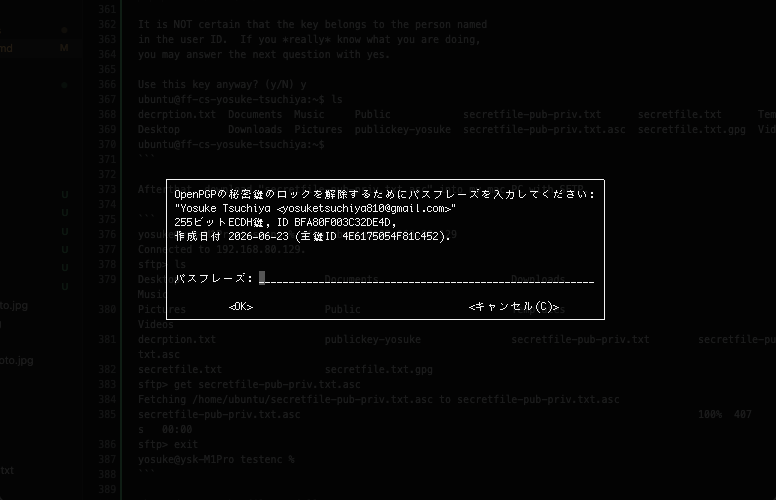
Finally, file is decrypted.
yosuke@ysk-M1Pro testenc % gpg -o secretfile-pub-priv.txt -d secretfile-pub-priv.txt.asc
gpg: cv25519鍵, ID BFA80F003C32DE4D, 日付2026-06-23に暗号化されました
      "Yosuke Tsuchiya <yosuketsuchiya810@gmail.com>"
yosuke@ysk-M1Pro testenc % ls
aaa             publickey-yosuke        secretfile-pub-priv.txt.asc
decriptionfile.txt      secretfile-pub-priv.txt     secretfile.txt.gpg
yosuke@ysk-M1Pro testenc % cat secretfile-pub-priv.txt
This is the testfile for encryption/decription with gpg public/private key
yosuke@ysk-M1Pro testenc %
Did you use symmetric or public-key encryption?
I tryid both symmetric and public-key encryption with GnuPG.
Where did the key come from?
In case of symmetric, the key (passphrase) come from the user who encrypted the file. On the other hand, in case of public-key encryption, the key (public key) come from the user who receive (decrypt) the file.
Who can decrypt the file?
Only the user who have the key could decrypt the file. In case of symmetric, anyone who know common key (passphrase) could decrypt. On the other hand, in case of public-key encryption, only user who have a private key could be decrypt the file.
What happens if the key or password is lost?
Generally, if the key or password is lost, no one could decrypt the file. In case of symmetric, if the passphrase is lost, the file could not be decrypted, but may decrypt when using something like password-crack. On the other hand, if the private key lost, the file could not be decrypted and generally it is impossible to analyze and decrypt without using private key.
If the users who want to exchange the files lost key or passphrase, it is simple. Encrypt/decrypt the file with different key or passphrase. But, if the private key is not lost but “leaks” to somewhere, that would be a critical incidents. At least, paired public key stored on all the systems must be deleted.
Encrypt a disk, USB stick, directory, or filesystem.
encrypt the USB disk on Mac PC
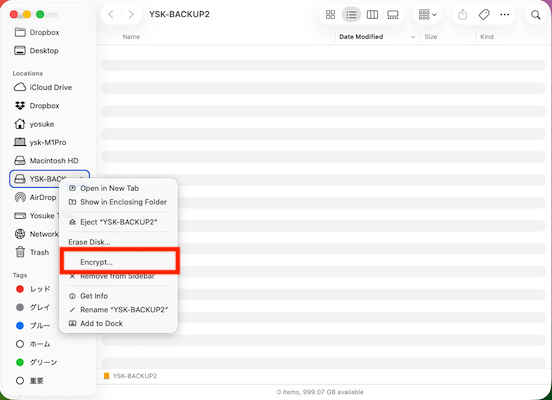
I can encrypt the USB stick or external drive connected by USB on my Mac PC as follow.
First, connect the drive via USB, right click the USB drive on Finder. Then, choose “encrypt…”.
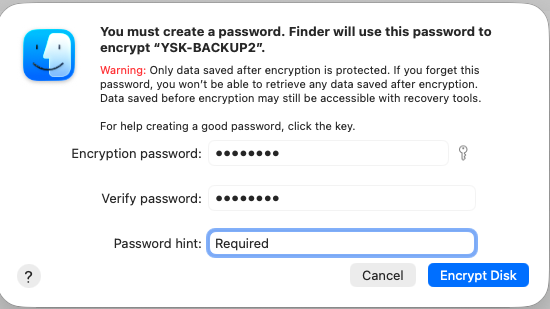
Then, put the passphrase for encryption.
We cand find out that the disk are encrypted on the Disk Utility App.
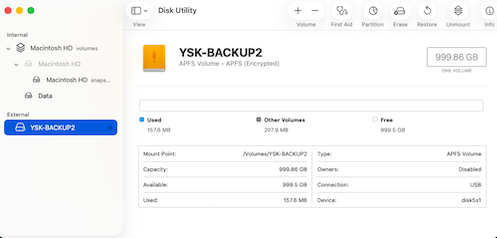
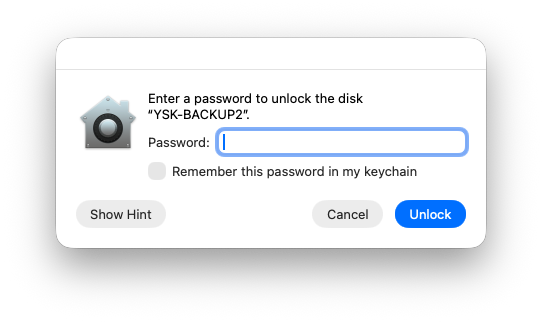
If the USB disk is connected to the PC, the passphrase shold be required for mounting.
encrypt specific folder on Virtual Machine
I tried to encrypt/decrypt folders on the Virtual Machine.
First, install fscrypt as follow.
sudo apt install fscrypt libpam-fscrypt
First, setup the fscrypt.
ubuntu@ff-cs-yosuke-tsuchiya:~$ sudo fscrypt setup
Defaulting to policy_version 2 because kernel supports it.
Customizing passphrase hashing difficulty for this system...
Created global config file at "/etc/fscrypt.conf".
Allow users other than root to create fscrypt metadata on the root filesystem?
(See https://github.com/google/fscrypt#setting-up-fscrypt-on-a-filesystem) [y/N] y
Metadata directories created at "/.fscrypt", writable by everyone.
ubuntu@ff-cs-yosuke-tsuchiya:~$
make a target folder to be encrypted, a text file is also generated in this folder.
ubuntu@ff-cs-yosuke-tsuchiya:~$ mkdir secret_folder
ubuntu@ff-cs-yosuke-tsuchiya:~$ ls
decrption.txt  Music             secretfile-pub-priv.txt      secret_folder
Desktop        Pictures          secretfile-pub-priv.txt.asc  Templates
Documents      Public            secretfile.txt               Videos
Downloads      publickey-yosuke  secretfile.txt.gpg
ubuntu@ff-cs-yosuke-tsuchiya:~$ cd secret_folder/
ubuntu@ff-cs-yosuke-tsuchiya:~/secret_folder$ ls
ubuntu@ff-cs-yosuke-tsuchiya:~/secret_folder$ echo "this is the secret folder" > secretfolder.txt
ubuntu@ff-cs-yosuke-tsuchiya:~/secret_folder$ ls
secretfolder.txt
ubuntu@ff-cs-yosuke-tsuchiya:~/secret_folder$
folder encryption would be execute as following command, but the error occur.
ubuntu@ff-cs-yosuke-tsuchiya:~$ fscrypt encrypt ~/secret_folder
[ERROR] fscrypt encrypt: encryption not enabled on filesystem / (/dev/dm-0).

To enable encryption support on this filesystem, run:

     sudo tune2fs -O encrypt "/dev/dm-0"

Also ensure that your kernel has CONFIG_FS_ENCRYPTION=y. See the documentation for more details.
ubuntu@ff-cs-yosuke-tsuchiya:~$
It require tune2fs, the tuning command of filesystem.
tune2fs -O encrypt "/dev/dm-0"
- -O option enable/disable feature of filesystem. Here, enable the feature of encryption
- “/dev/dm-0” means the target volume for applying the features.
When using the encryption/decryption of the folder, it required to add feature of encryption to the logical volume that the target belong to. With using df command and searching in the /dev/mapper, I could find the “/dev/dm-0” means system root folder of the virtual machine. So, executing the above command means to apply features of encryption to all the folders on the volumes (not meaning to encrypt, but means I can use encryption anywhere on the Virtual Machine).
ubuntu@ff-cs-yosuke-tsuchiya:~$ df /dev/dm-0
Filesystem                        1K-blocks    Used Available Use% Mounted on
/dev/mapper/ubuntu--vg-ubuntu--lv  22473872 9766660  11540264  46% /
ubuntu@ff-cs-yosuke-tsuchiya:~$  ls -l /dev/mapper/
total 0
crw------- 1 root root 10, 236 Jun 22 14:19 control
lrwxrwxrwx 1 root root       7 Jun 22 14:19 ubuntu--vg-ubuntu--lv -> ../dm-0
ubuntu@ff-cs-yosuke-tsuchiya:~$ df
Filesystem                        1K-blocks    Used Available Use% Mounted on
tmpfs                                341464    1456    340008   1% /run
efivarfs                                256     152       100  61% /sys/firmware/efi/efivars
/dev/mapper/ubuntu--vg-ubuntu--lv  22473872 9766660  11540264  46% /
tmpfs                                966952       0    966952   0% /dev/shm
tmpfs                                  5120       0      5120   0% /run/lock
tmpfs                                974120       0    974120   0% /run/qemu
/dev/sda2                           1992552  106804   1764508   6% /boot
/dev/sda1                           1098632    6288   1092344   1% /boot/efi
tmpfs                                194824     104    194720   1% /run/user/1000
ubuntu@ff-cs-yosuke-tsuchiya:~$
So, I confirmed that command could be executed.
ubuntu@ff-cs-yosuke-tsuchiya:~$ sudo tune2fs -O encrypt "/dev/dm-0"
tune2fs 1.47.0 (5-Feb-2023)
Then, execute fsencrypt again.
fscrypt encrypt ~/secret_folder
[ERROR] fscrypt encrypt: Directory "/home/ubuntu/secret_folder" cannot be encrypted because it is non-empty.

Files cannot be encrypted in-place. Instead, encrypt a new directory, copy the files into it, and securely delete the
original directory. For example:

     mkdir "/home/ubuntu/secret_folder.new"
     fscrypt encrypt "/home/ubuntu/secret_folder.new"
     cp -a -T "/home/ubuntu/secret_folder" "/home/ubuntu/secret_folder.new"
     find "/home/ubuntu/secret_folder" -type f -print0 | xargs -0 shred -n1 --remove=unlink
     rm -rf "/home/ubuntu/secret_folder"
     mv "/home/ubuntu/secret_folder.new" "/home/ubuntu/secret_folder"

Caution: due to the nature of modern storage devices and filesystems, the original data may still be recoverable from
disk. It's much better to encrypt your files from the start.
ubuntu@ff-cs-yosuke-tsuchiya:~$ cd
..... if some files have already stored in target foloder, the encryption does not works.... So, deleted the file, and try again.
ubuntu@ff-cs-yosuke-tsuchiya:~$ fscrypt encrypt ~/secret_folder
Should we create a new protector? [y/N] y
The following protector sources are available:
1 - Your login passphrase (pam_passphrase)
2 - A custom passphrase (custom_passphrase)
3 - A raw 256-bit key (raw_key)
Enter the source number for the new protector [2 - custom_passphrase]: 2
Enter a name for the new protector: secretfolder
Enter custom passphrase for protector "secretfolder":
Confirm passphrase:
"/home/ubuntu/secret_folder" is now encrypted, unlocked, and ready for use.
ubuntu@ff-cs-yosuke-tsuchiya:~$
So, the folder is encrypted. And then, generate the file again.
ubuntu@ff-cs-yosuke-tsuchiya:~$ cd secret_folder/
ubuntu@ff-cs-yosuke-tsuchiya:~/secret_folder$ ls
ubuntu@ff-cs-yosuke-tsuchiya:~/secret_folder$ echo "this is secret folder" > secretfile.txt
ubuntu@ff-cs-yosuke-tsuchiya:~/secret_folder$ ls
secretfile.txt
ubuntu@ff-cs-yosuke-tsuchiya:~/secret_folder$ cd ..
ubuntu@ff-cs-yosuke-tsuchiya:~$
Then, lock the folder as follow.
ubuntu@ff-cs-yosuke-tsuchiya:~$  fscrypt lock secret_folder/
"secret_folder/" is now locked.
The folder is locked, and move to the folder and see the file.
ubuntu@ff-cs-yosuke-tsuchiya:~$ cd secret_folder/
ubuntu@ff-cs-yosuke-tsuchiya:~/secret_folder$ ls
inqdIxceuqUy4v85W9LxZ0gRnms6pLpBSpky9Rg_7bi6xqB-Cd2yew
ubuntu@ff-cs-yosuke-tsuchiya:~/secret_folder$ ls -la
total 12
drwx------  2 ubuntu ubuntu 4096 Jun 24 04:58 .
drwxr-x--- 19 ubuntu ubuntu 4096 Jun 24 04:51 ..
-rw-rw-r--  1 ubuntu ubuntu   22 Jun 24 04:58 inqdIxceuqUy4v85W9LxZ0gRnms6pLpBSpky9Rg_7bi6xqB-Cd2yew
ubuntu@ff-cs-yosuke-tsuchiya:~/secret_folder$
the filename is encrypted.
ubuntu@ff-cs-yosuke-tsuchiya:~/secret_folder$ less inqdIxceuqUy4v85W9LxZ0gRnms6pLpBSpky9Rg_7bi6xqB-Cd2yew
inqdIxceuqUy4v85W9LxZ0gRnms6pLpBSpky9Rg_7bi6xqB-Cd2yew: Required key not available
ubuntu@ff-cs-yosuke-tsuchiya:~/secret_folder$
We cannot open the file.
To see inside the folder, the folder should be unlocked.
ubuntu@ff-cs-yosuke-tsuchiya:~$ fscrypt unlock secret_folder/
Enter custom passphrase for protector "secretfolder":
"secret_folder/" is now unlocked and ready for use.
ubuntu@ff-cs-yosuke-tsuchiya:~$
Then, we can see inside the folder, and could open the file.
ubuntu@ff-cs-yosuke-tsuchiya:~$ cd secret_folder/
ubuntu@ff-cs-yosuke-tsuchiya:~/secret_folder$ ls
secretfile.txt
ubuntu@ff-cs-yosuke-tsuchiya:~/secret_folder$ ls -la
total 12
drwx------  2 ubuntu ubuntu 4096 Jun 24 04:58 .
drwxr-x--- 19 ubuntu ubuntu 4096 Jun 24 04:51 ..
-rw-rw-r--  1 ubuntu ubuntu   22 Jun 24 04:58 secretfile.txt
ubuntu@ff-cs-yosuke-tsuchiya:~/secret_folder$ cat secretfile.txt
this is secret folder
ubuntu@ff-cs-yosuke-tsuchiya:~/secret_folder$
What exactly is encrypted?
It seems target folder or target disk are encrypted, but the specific sector/partition in target volume are encrypted. In case of Virtual Machine, that are the sector (regards as “secret_folder”) in /dev/dm-0 volume. In case of Mac PC, a USB drive may appear to be encrypted, but in reality, it is specific sector/partitions of the volume space on the USB drive mounted under /Volume/.
I could find out when trying the folder encryption on the Virtual Machine. (It required to change the feature of the filesystem in the target volume).
When is the data decrypted?
The data is decrypted when user could verify the correct key or passphrase for decryption. It is the same mechanism with the above symmetric authentication.
What does this protect against?
This method can prevent malicious third parties from accessing your confidential files if you lose your PC or USB flash drive. However, if you set a passphrase that is easy to guess, there is a risk that it could be easily cracked.
What does it not protect against?
While this method can prevent files from being viewed, it cannot prevent them from being deleted or overwritten. Even if a file is encrypted, it can still be deleted from outside the system. In fact, as shown below, it is possible to delete an encrypted file using the rm command.
ubuntu@ff-cs-yosuke-tsuchiya:~$ fscrypt lock secret_folder/
"secret_folder/" is now locked.
ubuntu@ff-cs-yosuke-tsuchiya:~$ cd secret_folder/
ubuntu@ff-cs-yosuke-tsuchiya:~/secret_folder$ ls
inqdIxceuqUy4v85W9LxZ0gRnms6pLpBSpky9Rg_7bi6xqB-Cd2yew
ubuntu@ff-cs-yosuke-tsuchiya:~/secret_folder$ ls -la
total 12
drwx------  2 ubuntu ubuntu 4096 Jun 24 04:58 .
drwxr-x--- 19 ubuntu ubuntu 4096 Jun 24 04:51 ..
-rw-rw-r--  1 ubuntu ubuntu   22 Jun 24 04:58 inqdIxceuqUy4v85W9LxZ0gRnms6pLpBSpky9Rg_7bi6xqB-Cd2yew
ubuntu@ff-cs-yosuke-tsuchiya:~/secret_folder$ rm inqdIxceuqUy4v85W9LxZ0gRnms6pLpBSpky9Rg_7bi6xqB-Cd2yew
ubuntu@ff-cs-yosuke-tsuchiya:~/secret_folder$ ls
ubuntu@ff-cs-yosuke-tsuchiya:~/secret_folder$ cd ..
ubuntu@ff-cs-yosuke-tsuchiya:~$ fscrypt unlock secret_folder/
Enter custom passphrase for protector "secretfolder":
"secret_folder/" is now unlocked and ready for use.
ubuntu@ff-cs-yosuke-tsuchiya:~$ cd secret_folder
ubuntu@ff-cs-yosuke-tsuchiya:~/secret_folder$ ls
ubuntu@ff-cs-yosuke-tsuchiya:~/secret_folder$ ls -la
total 8
drwx------  2 ubuntu ubuntu 4096 Jun 24 05:23 .
drwxr-x--- 19 ubuntu ubuntu 4096 Jun 24 04:51 ..
ubuntu@ff-cs-yosuke-tsuchiya:~/secret_folder$
This demonstrates that it cannot prevent overwriting, tampering, or destruction caused by ransomware, which has been a hot topic recently.
Create a file, compute its hash, change the file, and compute the hash again.
To compute the hash on Mac PC, we can use shasum command.
First, generate the sample file as follow.
yosuke@ysk-M1Pro testenc % echo "calculating the hash file" > hash.txt
yosuke@ysk-M1Pro testenc % ls
hash.txt
Next, use shasum command to check the hash as follow. We use sha256 algorithm for hash check.
yosuke@ysk-M1Pro testenc % shasum -a 256 hash.txt
bedc7d21b3b2e4221a08791aa7548279949c67acf4d8e0df24004afea90334bd  hash.txt
To compare the expected hash value and real hash value, use shasum –check as follow.
echo "bedc7d21b3b2e4221a08791aa7548279949c67acf4d8e0df24004afea90334bd  hash.txt" | sha256sum -c -
hash.txt: OK
Then, change the file as follow.
yosuke@ysk-M1Pro testenc % cat hash.txt
calculating the hash file
yosuke@ysk-M1Pro testenc % echo "calculating the hash files" > hash.txt
yosuke@ysk-M1Pro testenc % cat hash.txt
calculating the hash files
Then, check again the hash value.
yosuke@ysk-M1Pro testenc % shasum -a 256 hash.txt
78599cbe4669a23fb55f7f4a12b7591ab8bb3cb5c501126f5f7f6ceee0d02e25  hash.txt
Hash is changed. To check the hash before modified:
yosuke@ysk-M1Pro testenc % echo "bedc7d21b3b2e4221a08791aa7548279949c67acf4d8e0df24004afea90334bd  hash.txt" | sha256sum -c -
hash.txt: FAILED
sha256sum: WARNING: 1 computed checksum did NOT match
yosuke@ysk-M1Pro testenc %
What changed?
If the file content changed, hash also changed.
Why are hashes useful?
Because it could detect the file contents changed (updated, overwrited).
Why does a hash not prove who created the file?
Because hash is target the file contents, not the file property information. In fact, if the same file is generated with different users, hash is the same. I checked it on the Virtual machine, creating a different user “test” and make a same file “hash.txt” in ubuntu user and test user, then check the hash with sha256sum command.
ubuntu@ff-cs-yosuke-tsuchiya:/home$ sudo su test
test@ff-cs-yosuke-tsuchiya:/home$ cd
test@ff-cs-yosuke-tsuchiya:~$ ls
test@ff-cs-yosuke-tsuchiya:~$ echo "calculating the hash files" > hash.txt
test@ff-cs-yosuke-tsuchiya:~$ sha256sum hash.txt
78599cbe4669a23fb55f7f4a12b7591ab8bb3cb5c501126f5f7f6ceee0d02e25  hash.txt
test@ff-cs-yosuke-tsuchiya:~$ exit
exit
ubuntu@ff-cs-yosuke-tsuchiya:/home$ cd
ubuntu@ff-cs-yosuke-tsuchiya:~$ echo "calculating the hash files" > hash.txt
ubuntu@ff-cs-yosuke-tsuchiya:~$ sha256sum hash.txt
78599cbe4669a23fb55f7f4a12b7591ab8bb3cb5c501126f5f7f6ceee0d02e25  hash.txt
ubuntu@ff-cs-yosuke-tsuchiya:~$ sudo chmod 755 /home/test
ubuntu@ff-cs-yosuke-tsuchiya:~$ sha256sum /home/test/hash.txt
78599cbe4669a23fb55f7f4a12b7591ab8bb3cb5c501126f5f7f6ceee0d02e25  /home/test/hash.txt
ubuntu@ff-cs-yosuke-tsuchiya:~$ sha256sum /home/test/hash.txt | sha256sum -c
/home/test/hash.txt: OK
ubuntu@ff-cs-yosuke-tsuchiya:~$
Also, even though the file name is different, if the file contents is same, the hash would also be same as shown follow.
yosuke@ysk-M1Pro testenc % ls
hash.txt
yosuke@ysk-M1Pro testenc % cat hash.txt
calculating the hash files
yosuke@ysk-M1Pro testenc % echo "calculating the hash files" > hash2.txt
yosuke@ysk-M1Pro testenc % shasum -a 256 hash2.txt
78599cbe4669a23fb55f7f4a12b7591ab8bb3cb5c501126f5f7f6ceee0d02e25  hash2.txt
yosuke@ysk-M1Pro testenc % shasum -a 256 hash.txt
78599cbe4669a23fb55f7f4a12b7591ab8bb3cb5c501126f5f7f6ceee0d02e25  hash.txt
How could hashes be used to detect tampering?
Tampering could be detected by comparing the hash between target file and origin file.
Sign a file or message and verify the signature.
I tried to signing my git commit with GPG public key.
First, checking my public/private key again.
yosuke@ysk-M1Pro yosuke-tsuchiya % gpg -k
[keyboxd]
---------
pub   ed25519 2026-06-23 [SC] [expires: 2029-06-22]

uid           [ultimate] Yosuke Tsuchiya <yosuketsuchiya810@gmail.com>
sub   cv25519 2026-06-23 [E] [expires: 2029-06-22]

yosuke@ysk-M1Pro yosuke-tsuchiya % gpg -K
[keyboxd]
---------
sec   ed25519 2026-06-23 [SC] [expires: 2029-06-22]

uid           [ultimate] Yosuke Tsuchiya <yosuketsuchiya810@gmail.com>
ssb   cv25519 2026-06-23 [E] [expires: 2029-06-22]

yosuke@ysk-M1Pro yosuke-tsuchiya %
Then, check the signature ID (LONG format) as following command.
yosuke@ysk-M1Pro yosuke-tsuchiya % gpg --list-secret-keys --keyid-format LONG
[keyboxd]
---------
sec   ed25519/XXXXXXXXX 2026-06-23 [SC] [expires: 2029-06-22]

uid                 [ultimate] Yosuke Tsuchiya <yosuketsuchiya810@gmail.com>
ssb   cv25519/BFA80F003C32DE4D 2026-06-23 [E] [expires: 2029-06-22]

yosuke@ysk-M1Pro yosuke-tsuchiya %
Here, XXXXXXXX is a keyID.
Then, registert the keyID to the Git.
yosuke@ysk-M1Pro yosuke-tsuchiya % git config --global user.signingkey <keyID>
yosuke@ysk-M1Pro yosuke-tsuchiya % git config --global commit.gpgsign true
Export gpg key to text: XXXXXXX input your keyID.
gpg --armor --export XXXXXXXXXXXX > gpg-key.txt
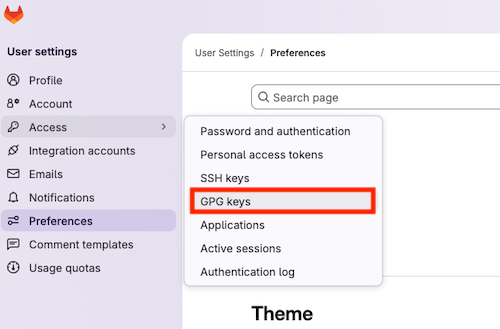
Login to Gitlab Fabcloud, and go to GPG key register form.
Then, register exported public key.
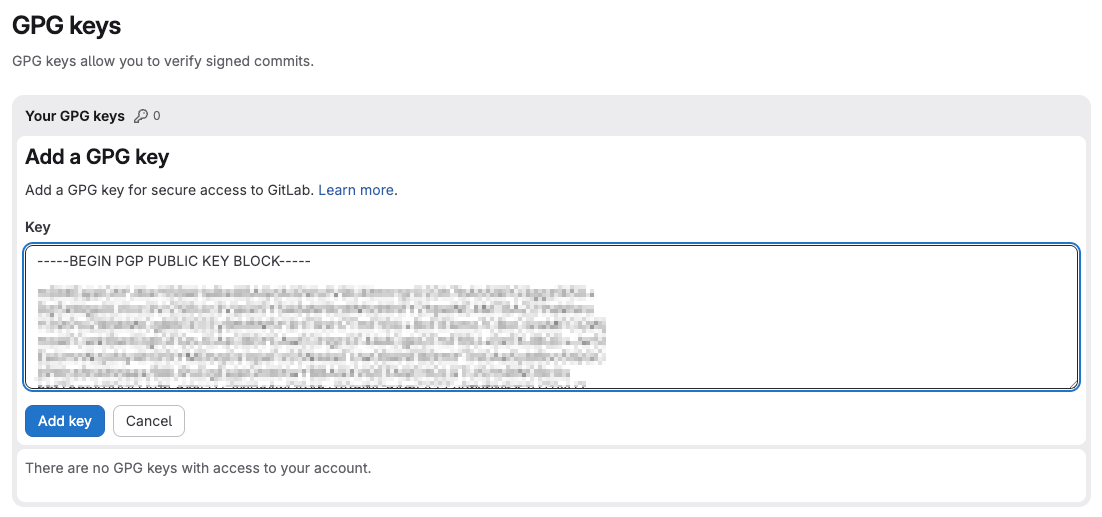
GPG key is registerd.
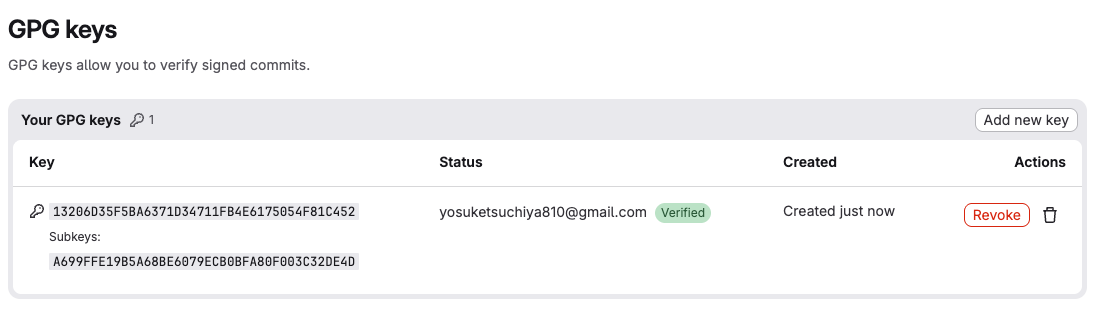
Then, try to commit.
yosuke@ysk-M1Pro yosuke-tsuchiya % git commit -m "wip with signature"
error: gpg failed to sign the data:
[GNUPG:] KEY_CONSIDERED 13206D35F5BA6371D34711FB4E6175054F81C452 2
[GNUPG:] BEGIN_SIGNING H10
[GNUPG:] PINENTRY_LAUNCHED 77627 curses 1.3.2 - xterm-256color /var/run/com.apple.launchd.mGPLWRlbTk/org.xquartz:0 - 501/20 0
gpg: signing failed: Inappropriate ioctl for device
[GNUPG:] FAILURE sign 83918950
gpg: signing failed: Inappropriate ioctl for device
commit is failed because GPG cannot detect the terminal (TTY) for enterning passphrase. So, temporarly, I added the following configuration for the terminal.
export GPG_TTY=$(tty)
Then, commit again
yosuke@ysk-M1Pro yosuke-tsuchiya % git commit -m "wip with signature"
[main 86f04a0] wip with signature
 4 files changed, 72 insertions(+)
 create mode 100644 docs/images/1-17.png
 create mode 100644 docs/images/1-18.png
 create mode 100644 docs/images/1-19.png
yosuke@ysk-M1Pro yosuke-tsuchiya % git push
Enumerating objects: 14, done.
Counting objects: 100% (14/14), done.
Delta compression using up to 10 threads
Compressing objects: 100% (8/8), done.
Writing objects: 100% (9/9), 201.45 KiB | 28.78 MiB/s, done.
Total 9 (delta 3), reused 0 (delta 0), pack-reused 0 (from 0)
To gitlab.fabcloud.org:academany/futures/units/cybersecurity/2026/labs/skylab/students/yosuke-tsuchiya.git
   31ce9fc..86f04a0  main -> main
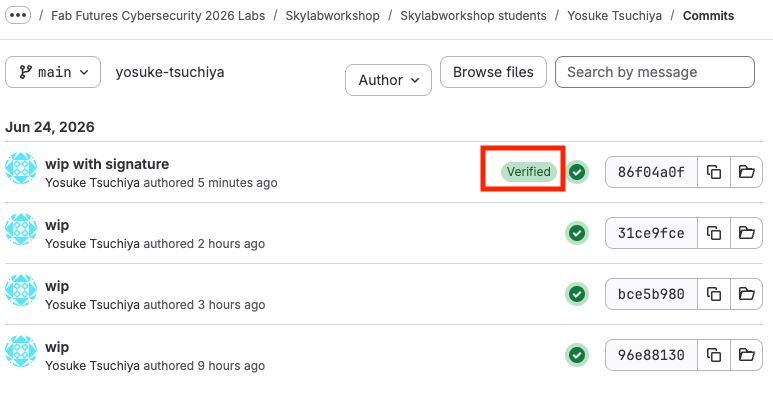
And, checked on the FabCloud, and my commit marked as “verified”.
What does the signature prove?
Signature prove both authentication and integrity. Authentication means that the message/files are definity generated the person itself. Integrity means that the message/files is not tampered.
What does it not prove?
Sigunature does not prove the signer identity. Ite means signature does not prove whether that person (signed name, email address) does really exists in the world.
Why is the message usually hashed before signing?
Because it ensure for security. For example, by leveraging the fact that even a single-byte change in the original data results in a completely different hash value, we can robustly prove that the data has not been tampered with.
What happens if the signed file is changed?
If the signed file is changed, the signature would become invalid and the document is flagged as tampered.
Send a digitally signed email.
To send a digitally signed email from my MacPC, I used Apple Mail with GPG Tools extensions.
First, download GPGTools and install it.
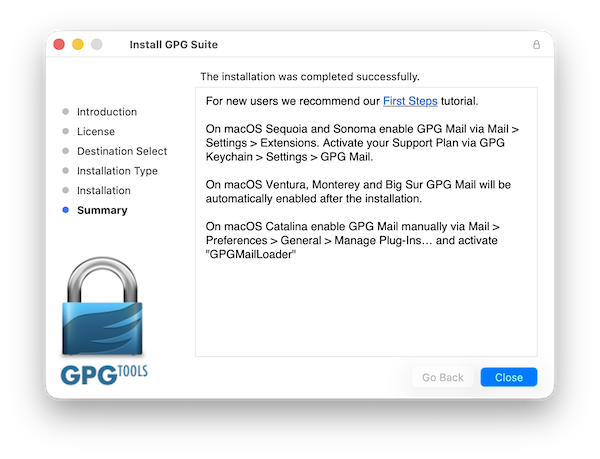
Then, open apple Mail and turn on GPG extensions.
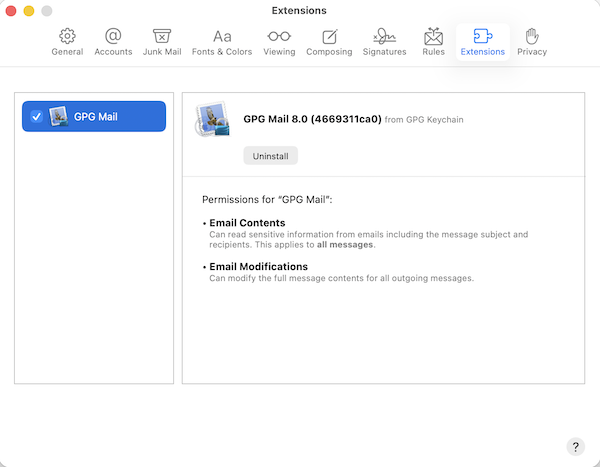
Open the GPG keychan.app, and send my public key to the server.
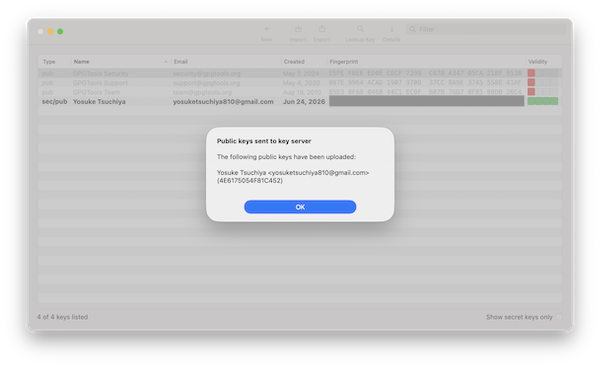
Then, try to send a sigature message.
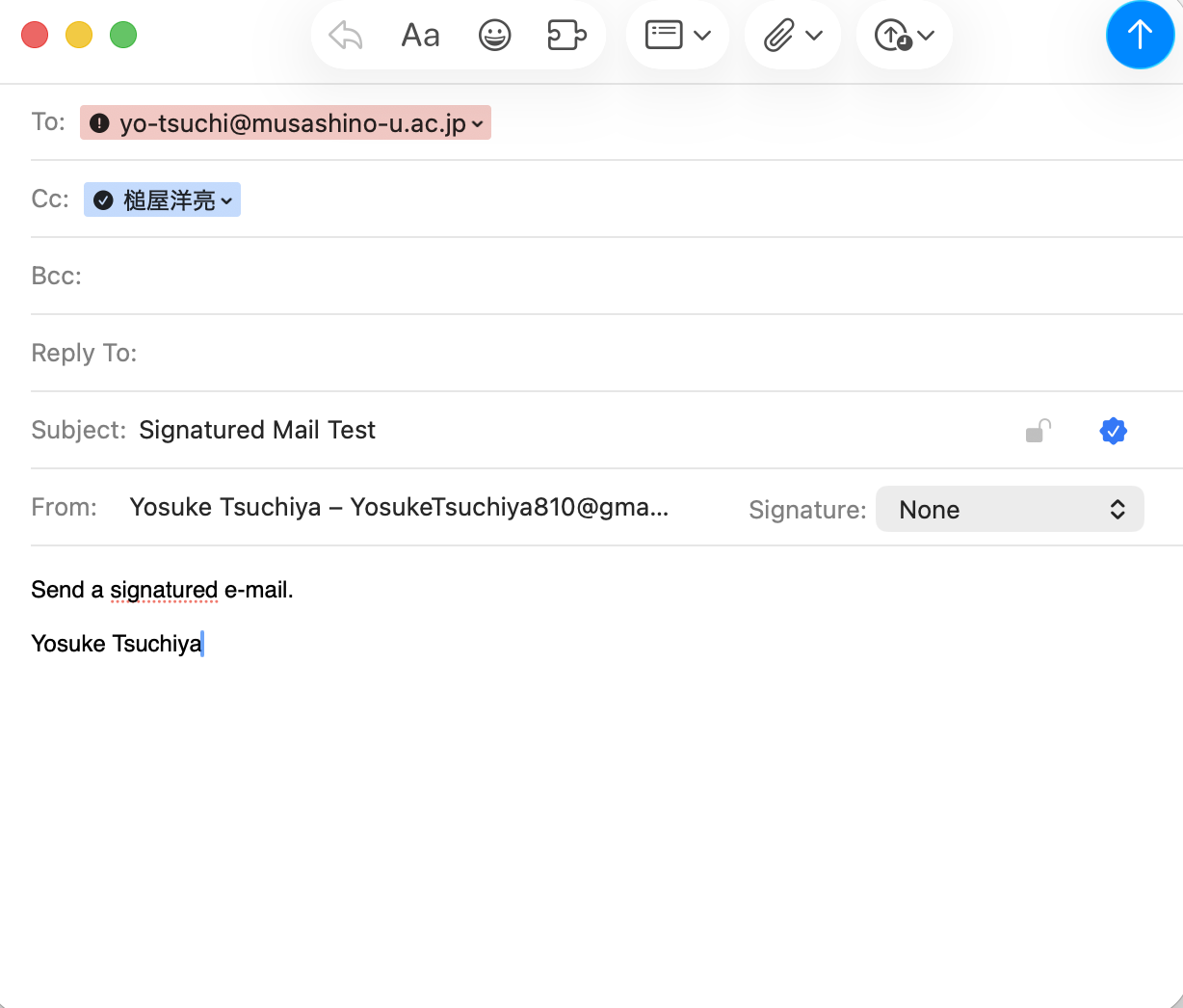
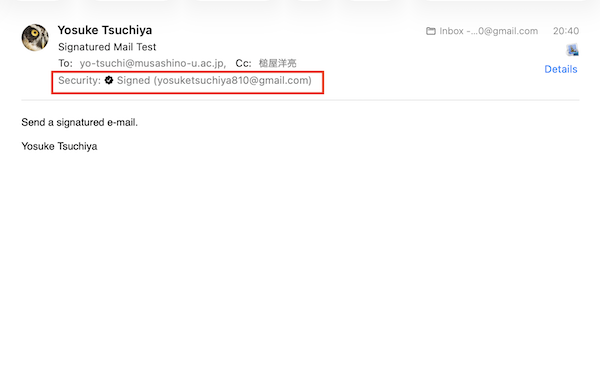
Received the message on Apple Mail, Security: Signed marked.
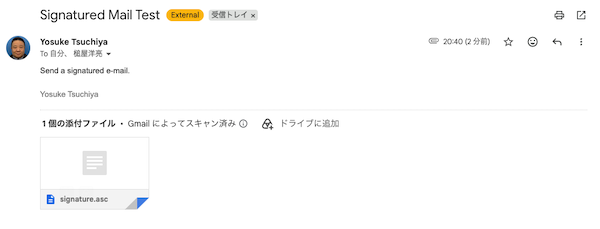
On the otherhand, when opening on the browser, signature does not find but the public key is attached to the e-mail itself.
How can the recipient verify the signature?
Recipent verify the signature with public key attached on the e-mail. In those case, it is require to something like a tool to verify attached public key on the mail client software (like a GPG Mail in Apple Mail Client). That’s because, web browsing mail could not verify their public key.
What key or certificate do they need?
public key attached by the sender (or those could be publically opend like a GPG server.)
Is the email encrypted, signed, or both?
The email is signed, but not encrypted.
What is the difference between signing and encrypting?
Siging is just prove authentication and integrity. Authentication means that the message/files are definity generated the person itself. Integrity means that the message/files is not tampered.
Encryption can prevent snake peak on email content while it is being sent or received.
Install a certificate on a web server, or inspect the certificate of an HTTPS website.
I setup the nginx web server with self-signed SSL certificate as follow.
First, install nginx on the server.
sudo apt install nginx
Then, start the nginx
sudo systemctl start nginx
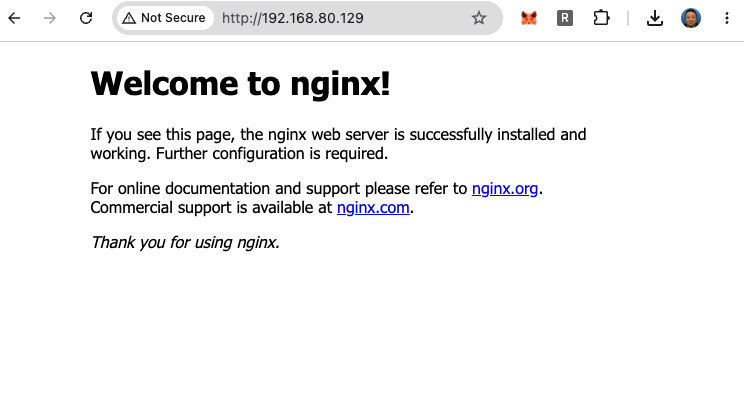
Open the browser and access to http://(Server IP Address), confirmed that http access works.
Next, go to /etc/nginx folder and make a “ssl” directory to store the ssl keychain files.
ubuntu@ff-cs-yosuke-tsuchiya:~$ cd /etc/nginx
ubuntu@ff-cs-yosuke-tsuchiya:/etc/nginx$ ls
conf.d        fastcgi_params  koi-win     modules-available  nginx.conf    scgi_params      sites-enabled  uwsgi_params
fastcgi.conf  koi-utf         mime.types  modules-enabled    proxy_params  sites-available  snippets       win-utf
ubuntu@ff-cs-yosuke-tsuchiya:/etc/nginx$ sudo mkdir ssl
ubuntu@ff-cs-yosuke-tsuchiya:/etc/nginx$ cd ssl
ubuntu@ff-cs-yosuke-tsuchiya:/etc/nginx/ssl$
Then, generate 2048 bit length rsa private key with openssl.
ubuntu@ff-cs-yosuke-tsuchiya:/etc/nginx/ssl$ sudo openssl genrsa -out server.key 2048
ubuntu@ff-cs-yosuke-tsuchiya:/etc/nginx/ssl$ ls
server.key
Next, generate CSR as follow.
ubuntu@ff-cs-yosuke-tsuchiya:/etc/nginx/ssl$ sudo openssl req -new -key server.key -out server.csr
You are about to be asked to enter information that will be incorporated
into your certificate request.
What you are about to enter is what is called a Distinguished Name or a DN.
There are quite a few fields but you can leave some blank
For some fields there will be a default value,
If you enter '.', the field will be left blank.
-----
Country Name (2 letter code) [AU]:
State or Province Name (full name) [Some-State]:
Locality Name (eg, city) []:
Organization Name (eg, company) [Internet Widgits Pty Ltd]:
Organizational Unit Name (eg, section) []:
Common Name (e.g. server FQDN or YOUR name) []:
Email Address []:

Please enter the following 'extra' attributes
to be sent with your certificate request
A challenge password []:
An optional company name []:
ubuntu@ff-cs-yosuke-tsuchiya:/etc/nginx/ssl$ ls
server.csr  server.key
ubuntu@ff-cs-yosuke-tsuchiya:/etc/nginx/ssl$
Then, generate the self-certificate as follow,
ubuntu@ff-cs-yosuke-tsuchiya:/etc/nginx/ssl$ sudo openssl x509 -req -days 30 -in server.csr -signkey server.key -out server.crt
Certificate request self-signature ok
subject=C = AU, ST = Some-State, O = Internet Widgits Pty Ltd
ubuntu@ff-cs-yosuke-tsuchiya:/etc/nginx/ssl$ ls
server.crt  server.csr  server.key
ubuntu@ff-cs-yosuke-tsuchiya:/etc/nginx/ssl$
now, three files (server.crt, server.csr, server.key ) is generated. Then, configure HTTPS on the nginx.
open the /etc/nginx/sites-available/default, then add the configuration for HTTPS.
vi /etc/nginx/sites-available/default
The following configuration is added in the end of default file.
server {
       listen 443 ssl default_server;
       listen [::]:443 ssl default_server;
       server_name localhost;

       ssl_certificate /etc/nginx/ssl/server.crt;
       ssl_certificate_key /etc/nginx/ssl/server.key;

       ssl_protocols TLSv1.2 TLSv1.3;
       ssl_ciphers HIGH:!aNULL:!MD5;

       location / {
        root /var/www/html;
        index index.html index.htm;
       }

}
Then, restart nginx.
sudo systemctl restart nginx
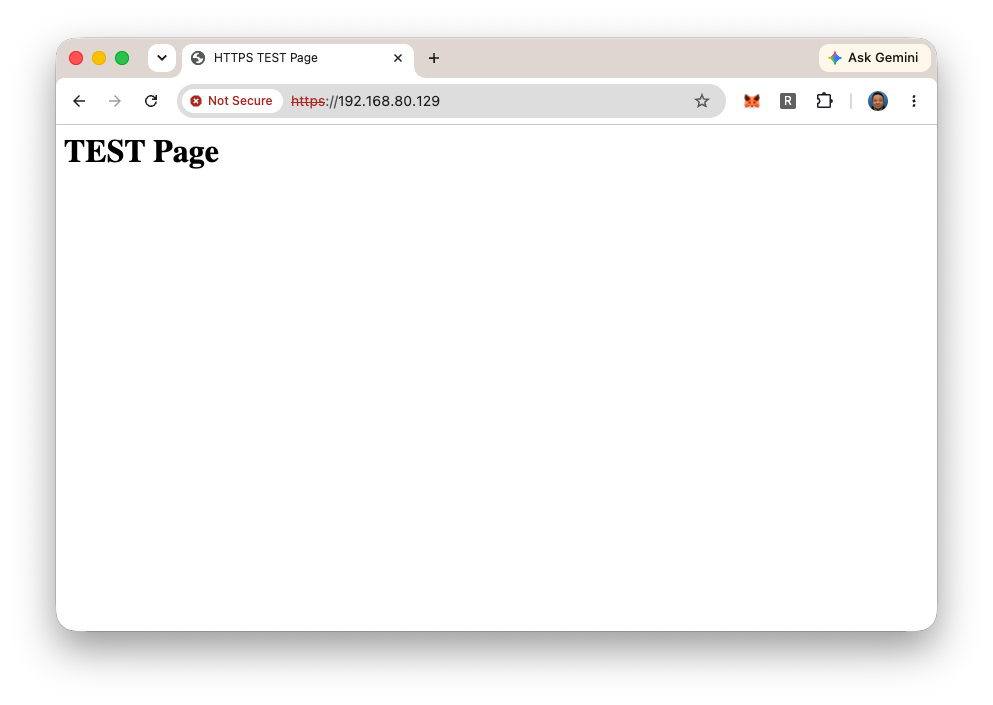
put the following index.html file in /var/www/html folder
<html>
  <head>
    <title>HTTPS TEST Page</title>
  </head>
  <body>
    <h1>TEST Page</h1>
  </body>
</html>
Then, access to https://)server IP address)
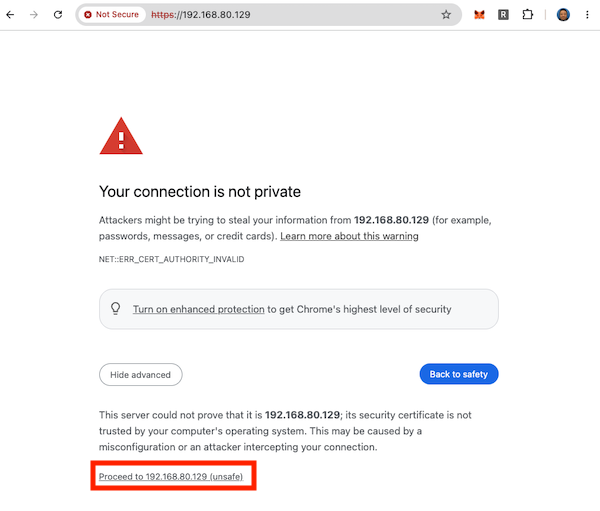
So, security warning is occured because self-certificate is used. Click “Proceed to XXXXX”.
Confirmed that the HTTPS works!
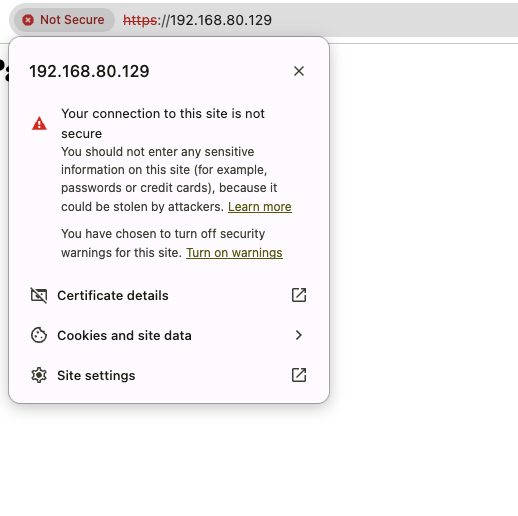
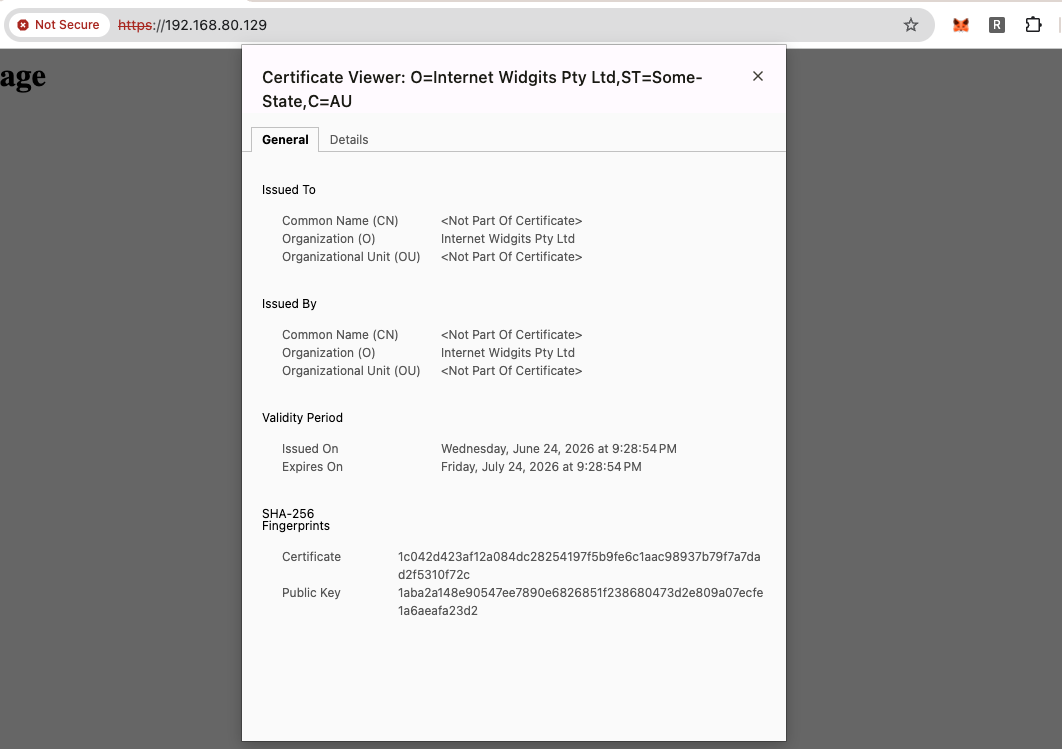
If we click the address bar on the browser, we can confirm the certification.
Click the “certificate details”, then we can see the details of certificate as follow:
Why does the server send a certificate instead of just a public key?
Because certificate include both signature and encryptions.
Note: Usually, csr file which is generated by openssl would be sent to the organization of Certificate Authority (CA) (such as global sign) to authorize the certificate identity and authority. The above procedure that I show is used self-certificate. That’s the reason why the browser raised the caution as “Your connection is not private”.
What role does the Certificate Authority play?
There are three reasons, to prevent the sneak peak and tampering, to prevent Phishing Sites, to build user trust.
What attack does this help prevent?
The SSL certificate prevent many attacks. For example, Man-In-The-Middle Attack, phishing, Unauthorized login to the web services,,, and so on.
Show or describe how to encrypt a long message for someone using their public key
First, I tried to encrypt/decrypt with gpg key which I generated in Question 3.
Make long message file with python.
python3 -c "print('This is a secret message.' * 1000)" > long_message.txt
Then, encrypt the long_message.txt with gpg public key
ubuntu@ff-cs-yosuke-tsuchiya:~/ssl$ gpg -r "Yosuke Tsuchiya" -ea long_message.txt
gpg: BFA80F003C32DE4D: There is no assurance this key belongs to the named user

sub  cv25519/BFA80F003C32DE4D 2026-06-23 Yosuke Tsuchiya <yosuketsuchiya810@gmail.com>
 Primary key fingerprint: 1320 6D35 F5BA 6371 D347  11FB 4E61 7505 4F81 C452
      Subkey fingerprint: A699 FFE1 9B5A 68BE 6079  ECB0 BFA8 0F00 3C32 DE4D

It is NOT certain that the key belongs to the person named
in the user ID.  If you *really* know what you are doing,
you may answer the next question with yes.

Use this key anyway? (y/N) y
ubuntu@ff-cs-yosuke-tsuchiya:~/ssl$ ls
long_message.txt  long_message.txt.asc  long_message.txt.enc
ubuntu@ff-cs-yosuke-tsuchiya:~/ssl$
Afterthat, download “long_message.txt.enc” into my mac PC via SFTP
yosuke@ysk-M1Pro testenc % sftp ubuntu@192.168.80.129
Connected to 192.168.80.129.
sftp> get long_message.txt.asc
Fetching /home/ubuntu/long_message.txt.asc to long_message.txt.asc
long_message.txt.asc                                                                                           100%  460     0.7KB/s   00:00
sftp>
sftp> exit
Finally, try to decrypt with my gpg private key.
yosuke@ysk-M1Pro testenc % gpg -o long_message.txt -d long_message.txt.asc
gpg: encrypted with cv25519 key, ID BFA80F003C32DE4D, created 2026-06-23
      "Yosuke Tsuchiya <yosuketsuchiya810@gmail.com>"
yosuke@ysk-M1Pro testenc %
Could decrypt and opened the long_message.txt.
Next, I tried the same thing with different encrypt/decrypt tool, openssl.
First, generate public/private key on my MacPC with openssl as follow.
yosuke@ysk-M1Pro testenc % openssl genrsa -out private.key 2048
yosuke@ysk-M1Pro testenc % ls
private.key
yosuke@ysk-M1Pro testenc % openssl rsa -in private.key -pubout -out public.key
writing RSA key
yosuke@ysk-M1Pro testenc % ls
private.key public.key
yosuke@ysk-M1Pro testenc %
Upload this public.key to the server,
then try to encrypt long_message.txt with this public.key
ubuntu@ff-cs-yosuke-tsuchiya:~/ssl$ openssl pkeyutl -encrypt -inkey public.key -pubin -in long_message.txt -out long_message.txt.enc
Public Key operation error
40974AAF2D7E0000:error:0200006E:rsa routines:ossl_rsa_padding_add_PKCS1_type_2_ex:data too large for key size:../crypto/rsa/rsa_pk1.c:133:
ubuntu@ff-cs-yosuke-tsuchiya:~/ssl$
Data too large error exists. Generally, RSA could not encrypt the messages which is larger than the key size. Usually, when we send a long message, we encrypt the message itself with symmetric method, and then, encrypt the passphrase for symmetric encryption with public key. This is called hybrid encryption.
So, first, encrypt long_message.txt with gpg symmetric as follow. We generate random 32 character passphrase with openssl, then, try to encrypt the long_message.txt with AES256 algorithm.
openssl rand -base64 32 >> pass.key
This makes random 32 byte characters and save it into “pass.key”. Then, encrypt with gpg as follow.
gpg --batch --cipher-algo AES256 --passphrase-fd 0 --symmetric long_message.txt < pass.key
- –batch option works gpg on the terminal to prevent to use the GUI when entering passphrase.
- –passphrase-fd 0 use general in/out for inputting the passphrase.
- –cipher-algo specify the algorithm for encryption, heare uses AES256
Now, “long_message.txt.gpg” are generated.
ubuntu@ff-cs-yosuke-tsuchiya:~/ssl$ ls -la
total 52
drwxrwxr-x  2 ubuntu ubuntu  4096 Jun 24 21:52 .
drwxr-x--- 20 ubuntu ubuntu  4096 Jun 24 21:17 ..
-rw-rw-r--  1 ubuntu ubuntu 25001 Jun 24 21:30 long_message.txt
-rw-rw-r--  1 ubuntu ubuntu   192 Jun 24 21:51 long_message.txt.gpg
-rw-rw-r--  1 ubuntu ubuntu    45 Jun 24 21:49 pass.key
-rw-------  1 ubuntu ubuntu  1704 Jun 24 21:29 private.key
-rw-rw-r--  1 ubuntu ubuntu   451 Jun 24 21:29 public.key
ubuntu@ff-cs-yosuke-tsuchiya:~/ssl$
Then, encrypt “pass.key” with using openssl public key.
openssl pkeyutl -encrypt -inkey public.key -pubin -in pass.key -out pass.key.enc
“pass.key.enc” are generated. Send both “long_message.txt.gpg” and “pass.key.enc” to the client.
ubuntu@ff-cs-yosuke-tsuchiya:~/ssl$ ls -la
total 52
drwxrwxr-x  2 ubuntu ubuntu  4096 Jun 24 22:06 .
drwxr-x--- 20 ubuntu ubuntu  4096 Jun 24 21:17 ..
-rw-rw-r--  1 ubuntu ubuntu 25001 Jun 24 21:30 long_message.txt
-rw-rw-r--  1 ubuntu ubuntu     0 Jun 24 22:06 long_message.txt.enc
-rw-rw-r--  1 ubuntu ubuntu   192 Jun 24 21:51 long_message.txt.gpg
-rw-rw-r--  1 ubuntu ubuntu    45 Jun 24 21:49 pass.key
-rw-rw-r--  1 ubuntu ubuntu   256 Jun 24 22:06 pass.key.enc
-rw-r--r--  1 ubuntu ubuntu   451 Jun 24 22:05 public.key
ubuntu@ff-cs-yosuke-tsuchiya:~/ssl$
Here, I download both file into my Mac PC.
sftp> get long_message.txt.gpg
Fetching /home/ubuntu/ssl/long_message.txt.gpg to long_message.txt.gpg
long_message.txt.gpg                                                                                           100%  192     0.5KB/s   00:00
sftp> get pass.key.enc
Fetching /home/ubuntu/ssl/pass.key.enc to pass.key.enc
pass.key.enc                                                                                                   100%  256     0.6KB/s   00:00
sftp> exit
yosuke@ysk-M1Pro testenc % ls
long_message.txt.gpg    pass.key.enc        private.key     public.key
yosuke@ysk-M1Pro testenc %
Then, try to decrypt. First, decrypt pass.key.enc with private.key which I generated with openssl.
yosuke@ysk-M1Pro testenc % ls -la
total 40
drwxr-xr-x    7 yosuke  staff   224 Jun 25 07:10 .
drwxr-x---+ 309 yosuke  staff  9888 Jun 25 07:04 ..
-rw-r--r--    1 yosuke  staff   192 Jun 25 07:09 long_message.txt.gpg
-rw-r--r--    1 yosuke  staff    45 Jun 25 07:10 pass.key
-rw-r--r--    1 yosuke  staff   256 Jun 25 07:09 pass.key.enc
-rw-------    1 yosuke  staff  1704 Jun 25 07:03 private.key
-rw-r--r--    1 yosuke  staff   451 Jun 25 07:03 public.key
yosuke@ysk-M1Pro testenc % cat pass.key
(passphrase for symmetric encryption are come out here.)
pass.key could successfully decrypted. Then, use this key to decrypt “long_message.txt.gpg” as follow.
gpg -d long_message.txt.gpg > long_message.txt
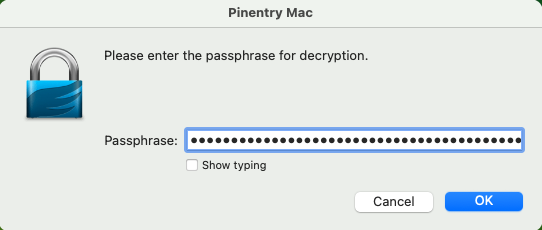
Then, asked the passphrase. Input the passphrase which is saveed into pass.key
yosuke@ysk-M1Pro testenc % ls -la
total 96
drwxr-xr-x    8 yosuke  staff    256 Jun 25 07:14 .
drwxr-x---+ 309 yosuke  staff   9888 Jun 25 07:14 ..
-rw-r--r--    1 yosuke  staff  25001 Jun 25 07:14 long_message.txt
-rw-r--r--    1 yosuke  staff    192 Jun 25 07:09 long_message.txt.gpg
-rw-r--r--    1 yosuke  staff     45 Jun 25 07:10 pass.key
-rw-r--r--    1 yosuke  staff    256 Jun 25 07:09 pass.key.enc
-rw-------    1 yosuke  staff   1704 Jun 25 07:03 private.key
-rw-r--r--    1 yosuke  staff    451 Jun 25 07:03 public.key
yosuke@ysk-M1Pro testenc %
Finally, long message are decrypted successfully.
Why is the whole message usually not encrypted directly with the public key?
Generally, public key encryption does not works for larger data than the key size. In case of RSA 2048 bit, it cannot encrypt the data over 2048 bit (256 byte). So, usually, “hybrid encryption” is used for encryption of long message. Hybrid encryption use multiple way for encryption, for example, encrypt long message itself with symmetric and symmetric key is encrypted with public key.
In above demonstration, gpg could directly encrypted long message (just did “gpg -c long_message.txt”). The reason is taht GPG automatially use hybrid encryption when it try to encrypt long message.
What is a symmetric key?
Symmetric key is a common key, demonstarted in Quetion 3, that is something like common passphrase which is shared with users.
How is the symmetric key protected?
Symmeteric key is protected by public key encryption.
Why is this called hybrid encryption?
Because, it uses multiple way for encyption. For example, message itself are encrypted as symmetric method, then passkey for symmetric method are encrypted with public key.
Research how RSA creates its private key.
(Sorry, this is my short understanding. maybe something description is misunderstanding…)
The mechanism for generating an RSA private key utilizes the mathematical property that “while it is easy to multiply two very large prime numbers, it is extremely difficult to determine the original prime numbers from their product (i.e., to factor the product).”
Suppose Alice chooses two primes p1, and p2, and her modulus is then n=p1*p2. She also chooses a public exponent e, so her public key is (e,n). How does she compute the private exponent d?
Generally, if the primes p1 and p2 are given in advanece, public key and private key would determine as follow:
- Calculate modulus n = p1 * p2.
- Calculate φ(n) = (p1 - 1) * (p2 - 1)
- determine public key e as meeting the following conditions:
- 1 < e < φ(n)
- e and φ(n) are relatively prime
- determine private key d as meeting the following conditions
- e * d ≡ 1 (mod φ(n))
For example, let’s calculate this using some simple prime numbers
p1 = 17 p2 = 19
n = p1 * p2 = 17 * 19 = 323
φ(n) = (p1 - 1) * (p2 - 1) = (17 - 1) * (19 - 1) = 16 * 18 = 288
Select a number e such that 1 < e < φ(n) and e is coprime (has no common divisors) with φ(n). Here 1 < e < 288 and e is relatively prime of 288.
Here, I asked Claude the following to generate Python code
“Please generate a program that finds candidates for the number e such that 1 < e < φ(n) and e is coprime (has no common divisors) with φ(n).”
The following program was generated
from math import gcd

def find_e_candidates(p1, p2):
    phi = (p1 - 1) * (p2 - 1)
    return [e for e in range(2, phi) if gcd(e, phi) == 1]

print(find_e_candidates(17, 19))
The candidates are:
5, 7, 11, 13, 17, 19, 23, 25, 29, 31, 35, 37, 41, 43, 47, 49, 53, 55, 59, 61, 65, 67, 71, 73, 77, 79, 83, 85, 89, 91, 95, 97, 101, 103, 107, 109, 113, 115, 119, 121, 125, 127, 131, 133, 137, 139, 143, 145, 149, 151, 155, 157, 161, 163, 167, 169, 173, 175, 179, 181, 185, 187, 191, 193, 197, 199, 203, 205, 209, 211, 215, 217, 221, 223, 227, 229, 233, 235, 239, 241, 245, 247, 251, 253, 257, 259, 263, 265, 269, 271, 275, 277, 281, 283, 287
Here, let’s assume e = 95.
Private key d e x d ≡ 1 (mod φ(n)) e = 95, φ(n) = 288 In other words, we seek a value of d such that (95*d) % 288 = 1. d = 191.
What is the role of (p1 - 1)(p2 - 1)?
φ(n) = (p1 - 1)(p2 - 1) regards as role to generate the private key (d). It is easy to calculate φ(n) when p1 and p2 are given, but if p1 and p2 does not know and only n are given, it is difficult to find p1 and p2 (so many calucation of Prime Factorization) from n.
φ(n) is also called, Euler’s Theorem: For a positive integer (n) and an integer (a) that is coprime to (n), the following congruence holds.
$$ a^{\phi(n)} \equiv 1 \pmod n $$
In practice, computing d requires solving e × d ≡ 1 (mod φ(n)). Even for small numbers (e.g. e=7, φ(n)=120, p1=11, p2=13), finding d=103 by trial and error was time-consuming. For 2048-bit RSA, this is only feasible if φ(n) is known.
Why is it hard for someone that sees the public key (e,n) to compute the private key (d,n)? Why can Alice do this?
Because, it require to calculate φ(n) for calculate private key d, that also required to find out p1 and p2 from n. It is difficult to find out p1 and p2 from n, especially the number of digit become quite large like RSA key (over 2048 bit, over 600 digits).
Alice chose p1 and p2 herself, so she never needed to factor n. She computes φ(n) directly and easy to find d.
Refeences (sorry, all in Japanese Text)