Homework 01
Introduction to Crytpography
- Public Key: An open cryptographic code that you can freely share with the world (like an open padlock). Anyone can use it to encrypt data for you or verify your digital signature.
- Private Key: A secret cryptographic code that stays strictly on your machine (like the physical key to the padlock). Only this key can decrypt data encrypted by its matching public key.
- What it’s used for: Secure server logins (SSH), encrypting secure emails (PGP), signing Git commits, and protecting cryptocurrency wallets.
- Why the private key must be protected: If someone steals your private key, they can bypass all security, decrypt your private files, and completely impersonate your digital identity.
Steps to create Keys:
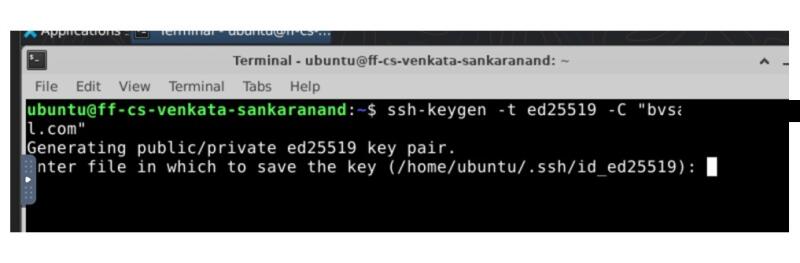
- Run the command in the terminal:
ssh-keygen -t ed25519 -C “your_email@example.com”
- Choose storage path:
Press Enter to accept the default hidden location
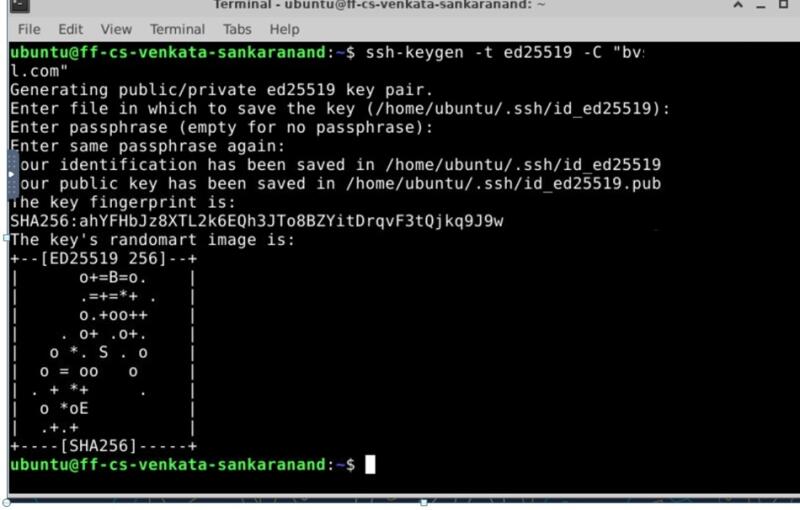
- Set a passphrase: I setup a passphrase by typing the same key twice in the terminal
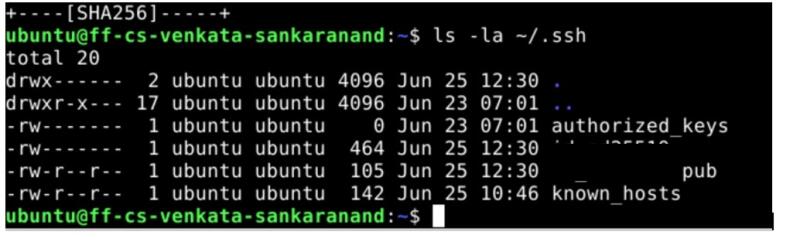
- Verify your created keys:
the command to view the created keys: * ls -la ~/.ssh*