Class 2 - Internet security
Homework
| System | What threat does it address? | What’s the trust model? | What’s the residual risk? |
|---|---|---|---|
| PGP (Pretty Good Privacy) (End-to-End Email Security) | Protects email confidentiality, integrity, and authenticity from eavesdropping, tampering, and impersonation. Encrypts email contents and digitally signs messages. | Users generate and manage their own public/private key pairs. Trust is established through a Web of Trust, where users verify and sign each other’s public keys rather than relying solely on a central authority. | Metadata (sender, recipient, subject, timestamps) remains visible. Private key theft, poor key management, user error, or compromised endpoints can still expose messages. Adoption and usability challenges can also weaken security. |
| SSH (Secure Shell) (Secure Remote Access) | Prevents credential theft, session hijacking, eavesdropping, and man-in-the-middle attacks during remote administration and file transfers. | Clients verify the server’s public key before establishing an encrypted session. Authentication occurs using passwords or, preferably, public/private key pairs. Trust depends on verifying the server’s identity the first time it is accessed (TOFU—Trust On First Use) or through trusted host keys. | A compromised endpoint, stolen credentials or private keys, weak passwords, or users accepting fake host keys can still lead to unauthorized access. Malware on either endpoint bypasses SSH protections. |
| VPN / IPsec (Network-Layer Tunneling) | Protects network traffic traveling over untrusted networks by preventing eavesdropping, packet tampering, and spoofing between connected sites or users. | Devices authenticate each other using pre-shared keys or digital certificates. IPsec establishes encrypted tunnels that trust authenticated endpoints to securely exchange traffic. | Once traffic exits the VPN tunnel, it may be unencrypted. Compromised endpoints, insider threats, poor VPN configuration, stolen credentials, or denial-of-service attacks remain possible. |
| MACsec (IEEE 802.1AE) (Link-Layer Encryption) | Protects Ethernet traffic on local network links from packet sniffing, tampering, replay attacks, and unauthorized devices connected to the physical network. | Neighboring network devices authenticate using MACsec Key Agreement (MKA) and establish encryption keys. Trust exists only between directly connected devices. | Protection is limited to individual Ethernet links. Traffic beyond the secured link is not protected unless additional security measures are used. Compromised switches or endpoints remain risks. |
| DNS Security (DNSSEC & DNS Spoofing Protection) | Protects against DNS cache poisoning, spoofed DNS responses, and unauthorized modification of DNS records. Ensures DNS data integrity and authenticity. | DNSSEC uses a hierarchical Public Key Infrastructure (PKI) rooted at the DNS root zone. Digital signatures allow resolvers to verify that DNS responses originate from authoritative servers and have not been modified. | DNSSEC does not encrypt DNS queries, so privacy is not provided. Distributed denial-of-service (DDoS) attacks, compromised authoritative servers, and incorrect DNSSEC configurations can still disrupt service. |
| IDS / IPS (Intrusion Detection & Prevention Systems) | Detects or blocks malicious network traffic, malware, exploits, unauthorized access attempts, and policy violations. IDS alerts administrators; IPS can automatically block attacks. | Trust is based on predefined signatures, behavioral analysis, anomaly detection, and security policies. Administrators trust the IDS/IPS to accurately identify malicious activity while minimizing false positives and negatives. | Unknown (zero-day) attacks, encrypted traffic, sophisticated evasion techniques, false positives, false negatives, and misconfigured rules can reduce effectiveness. An IDS only alerts—it does not stop attacks. An IPS may accidentally block legitimate traffic if improperly configured. |
exercises
TLS Handshake Trace
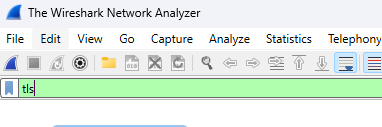
To complete this homework I downloaded wireshark portable and also installed npcap drivers to have access to my network devices. Once wireshark was running i added TLS to the filter so it will only show that data and not all network traffic.
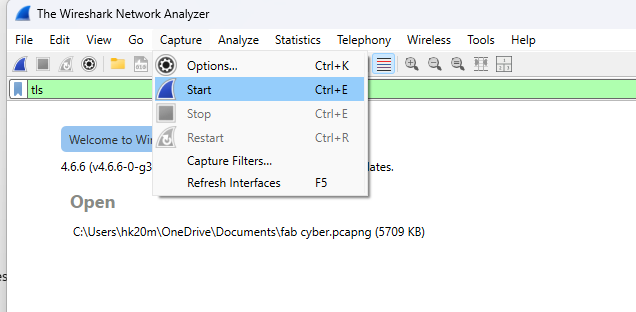
To start the capture make sure youn have the right network device picked and then start.
Once the caputre is started open a new private web browser and go to a site that uses https in this case i used class.academany.org . after the page loaded i stop the capture and started to analyze it.
The first step in the TLS handshake is the “ Client Hello” message. This message starts the process by saying hello and then transmitting important information like the cipher suites supported and other information.
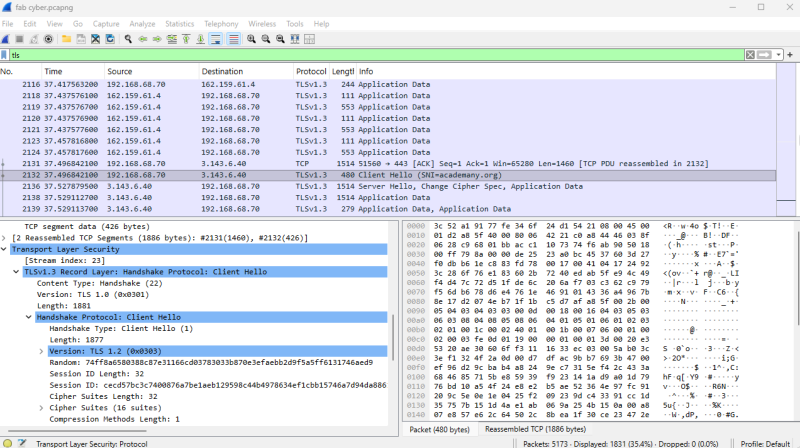
The next step is the “Server Hello” message. This is a response to the Client Hello and tells what cipher suite has been selected.
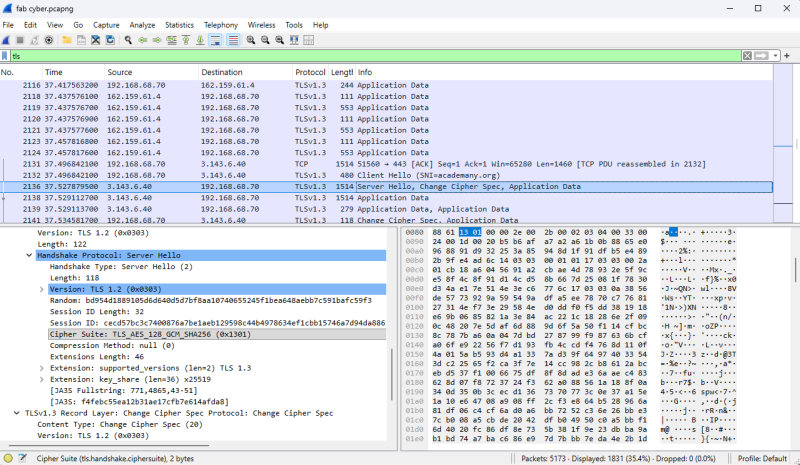
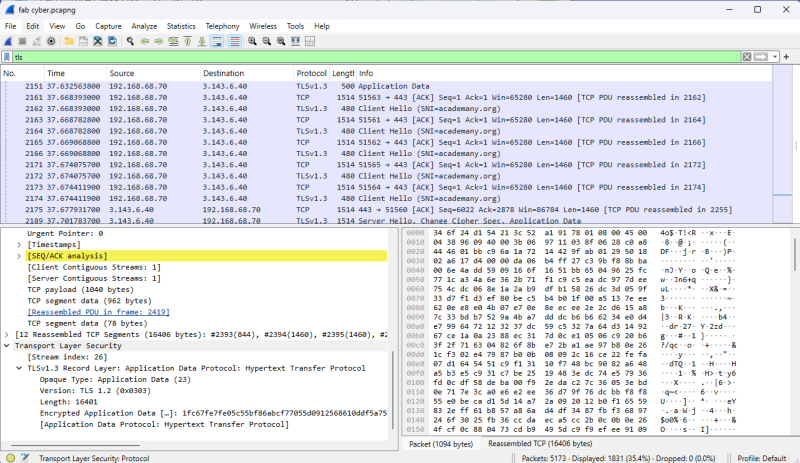
After these the client verifies the certificate from a trusted Certificate Authority (CA) in this case let’s encrypt. Data is then sent to establish keys and sessions for communication.
Port Scan & Firewall
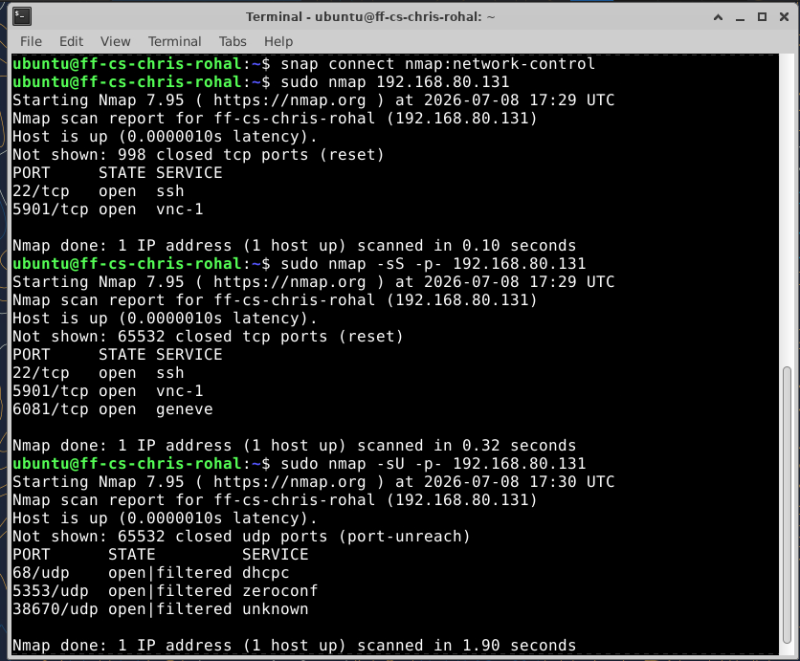
To use namp on the system to do a port scan I needed to install nmap first this is done by this command.
ubuntu@ff-cs-chris-rohal:~$ sudo snap install nmap
after install i tried to use namp and received this error
ubuntu@ff-cs-chris-rohal:~$ sudo nmap 192.168.80.xxx Starting Nmap 7.95 ( https://nmap.org ) at 2026-07-08 17:27 UTC Couldn’t open a raw socket. Error: Permission denied (13)
I found out that I needed to let nmap have network control so I had to use this command
ubuntu@ff-cs-chris-rohal:~$ snap connect nmap:network-control
After running that command it worked and I did 3 different scans. The first was a generic namp address this scans the 1000 most common ports. The next was sudo nmap -sS -p- address. This scanned all tcp ports and the last was sudo nmap -sU -p- address. This scanned all UDP ports.