Cryptography
Class 1 - Cryptography June 22, 2026
Speakers
Radia Perlman, Charlie Kaufman - Presentation
Choose one or more of the assignments below. For each one, do the practical work and write a short explanation of how it works. The advanced questions are optional deeper dives for those who want to.
✅ Create a public/private key pair
Questions
- What is the public key?
- What is the private key?
- What can this key pair be used for?
- Why must the private key be protected?
Answer
In Cryptography a public/private key pair can be used to encrypt/decrypt messages. These keys are basically just very large numbers where information can be encrypted with one number and decrypted with the other. The public key can be shared but the private key must be kept a secret. - Source
The public key can be shared with anyone, depending on the algorithm, public keys can encrypt messages or files that the corresponding private key can decrypt. - Source
The private key is the secret part of the asymmetric public/private key pair. The private key is typically used to digitally sign or decrypt data. - Source
The public/private key pair can be used for:
-
Encryption/Decryption
- Someone encrypts my data using my public key
- Only my private key can decrypt the data
-
Authentication
- I can prove that I know my private key.
- This helps others verify my identity
-
Integrity protection/Digital signatures
- I can sign a message using my private key.
- Others can verify my signature using the public key.
- This helps ensure the message has not been altered and confirms I signed it.
The private key must be protected because if an attacker gets my private key, they could be able to decrypt messages intended for me. They could also impersonate me during authentication and be able to created digital signatures that appears to come from me.
Create a public/private key pair
In terminal:
ssh-keygen -t ed25519 -C "andri@flr.is" -f ~/.ssh/id_ed25519_cybersecurity
This creates two files:
~/.ssh/id_ed25519_cybersecurity      private key
~/.ssh/id_ed25519_cybersecurity.pub  public key
I can view my public key with:
cat ~/.ssh/id_ed25519_cybersecurity.pub
✅ Install an SSH public key on a server and use it to log in
Questions
- How does SSH key authentication work?
- What is stored on the server?
- What stays on your own computer?
- Why does the server not need your private key?
Answer
SSH key authentication uses a public/private key pair. I put my public key on the server, while the private key remains on my computer. When I connect, the server verifies that I possess the right private key by sending a challenge that can only be correctly answered using my private key. Because the server can verify the response using my public key, I can authenticate myself without ever revealing my private key. Source
The server stores a copy of my public key. The public key is not secret and can be shared. The server uses it to verify that I have the matching private key. “Everyone knows Bob’s public key; only Bob knows his private key.” Source
The private key is stored on my computer and should never be shared with anyone. SSH uses the private key locally to prove ownership of the key pair. “Everyone knows Bob’s public key; only Bob knows his private key.” Source
The server does not need my private key because it only needs my public key to verify that I have the matching private key. When I connect, my computer uses the private key to answer the server’s challenge, and the server verifies the response using my public key. This allows me to prove my identity without ever sending my private key to the server. Source
Install an SSH public key on a server and use it to log in
In the previous assignment, Create a public/private key pair, I created a SSH public/private key pair in terminal:
ssh-keygen -t ed25519 -C "andri@flr.is" -f ~/.ssh/id_ed25519_cybersecurity
This created two files:
~/.ssh/id_ed25519_cybersecurity      private key
~/.ssh/id_ed25519_cybersecurity.pub  public key
Then to use this public/private key pair to authenticate myself on Gitlab, I sign into Gitlab using my fablabs.io credentials and go into Preferences - Access - SSH keys - hit the Add new key button, paste the full line from the cat command into the Key input field, change the Title and Expiration date(optional) and finally press the Add key button.
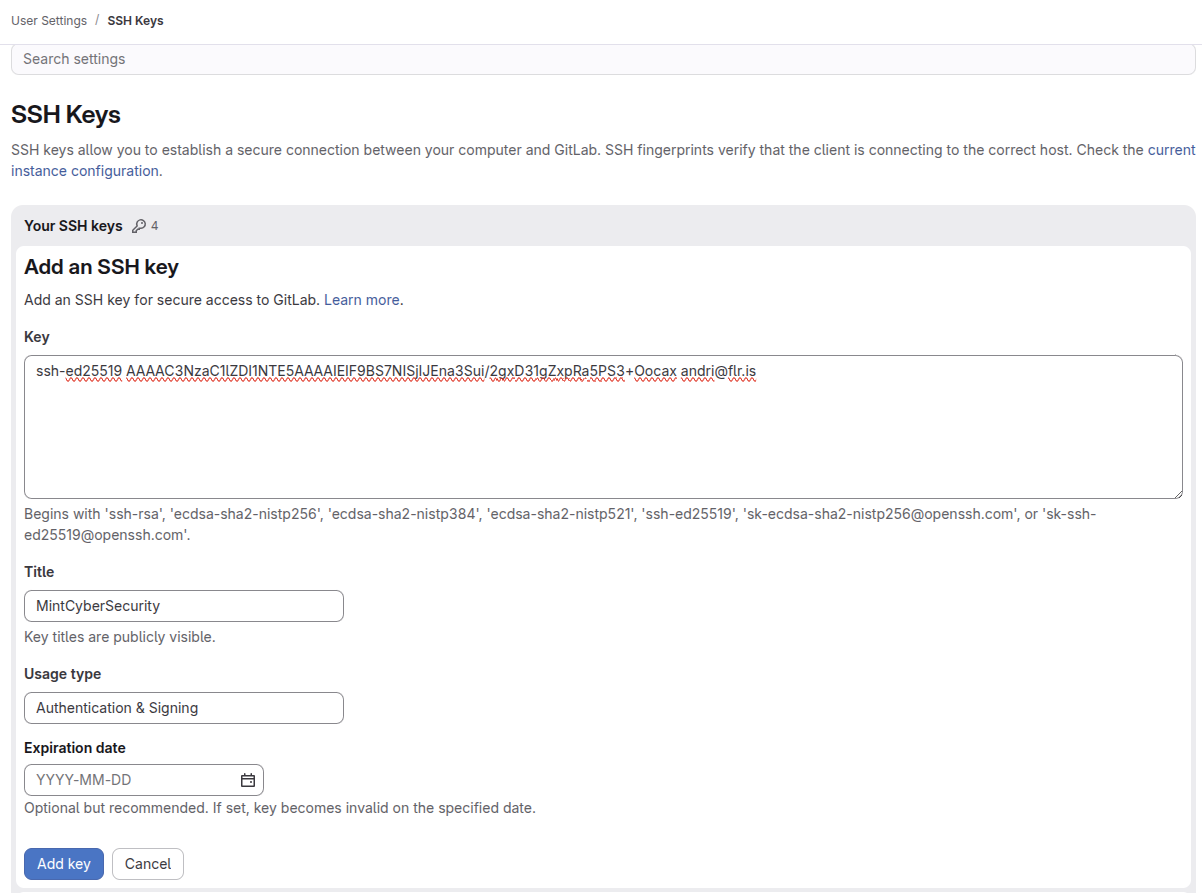
I can safely share my public key with the world because it is worthless to others without my private key.
Then I go back into my terminal and test it in my terminal:
ssh -T git@gitlab.fabcloud.org
The first connection also prompted me to verify the GitLab server’s host key. After accepting it, GitLab successfully authenticated me using my SSH key and displayed a welcome message.
The authenticity of host 'gitlab.fabcloud.org (13.59.248.79)' can't be established.
ED25519 key fingerprint is SHA256:JCWnquB9CdnH4ctlmBh6JGzw02iMui8j8KckmYNCq/M.
This key is not known by any other names.
Are you sure you want to continue connecting (yes/no/[fingerprint])? y
Please type 'yes', 'no' or the fingerprint: yes
Warning: Permanently added 'gitlab.fabcloud.org' (ED25519) to the list of known hosts.
Welcome to GitLab, @andrisaem!
Now I am able to connect to GitLab through SSH and clone my repo using:
git clone git@gitlab.fabcloud.org:academany/futures/units/cybersecurity/2026/labs/reykjavik/students/andrisaem.git
And to test i open a file and make a small edit.
nano index.md
Edit the file in nano by adding “Test”
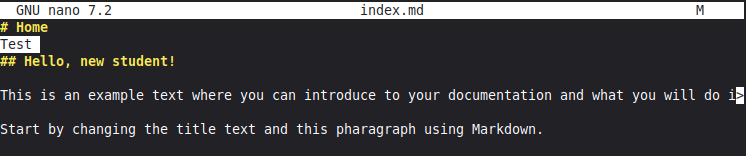
Commit the changes to my repo:
git status
git add index.md
git commit -m "test commit"
git push
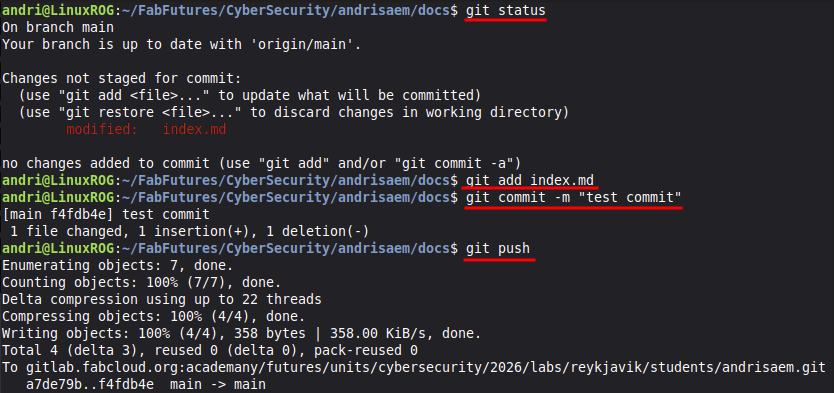
And check my site to see if everything works.
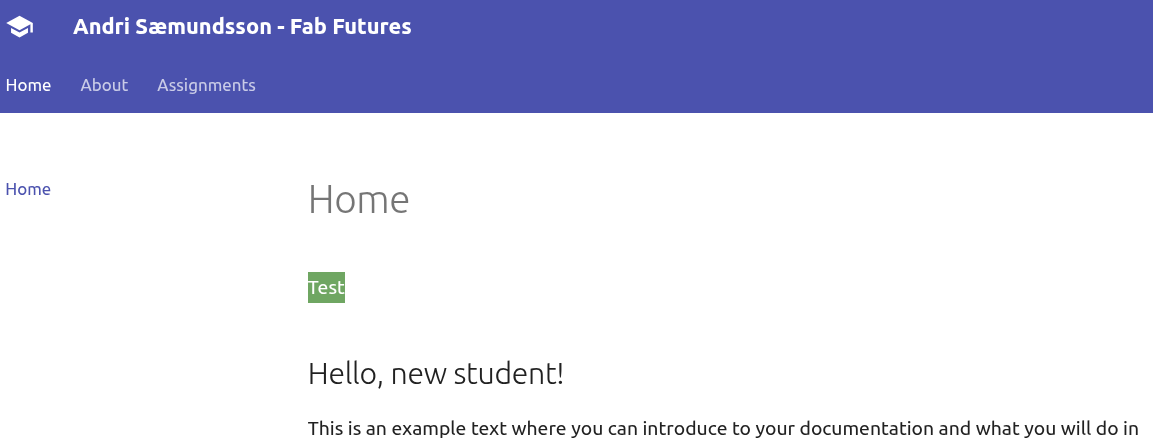
I have now successfully made changes to my repository using my public/private key pair for SSH authentication.
✅ Encrypt and decrypt a file
Questions
- Did you use symmetric or public-key encryption?
- Where did the key come from?
- Who can decrypt the file?
- What happens if the key or password is lost?
Answer
I have not encrypted or decrypted a lot of files so to start i just googled simple ways to encrypt / decrypt files in linux terminal, and found GnuPG. “GnuPG allows you to encrypt and sign your data and communications”. I looked for some examples online and found one tutorial on linuxbash.sh and another on meetcyber.net which was plenty to get me going.
To start with I wanted to try public-key encryption
I asked my friend Doddi / Þórarinn if he would like to join forces on this project, he would generate a public / private key pair and send me his public key, I would do the same and we would encrypt files for each other.
Only Doddi can decrypt the file I encrypted with his public key.
If the key or password is lost then the encrypted file stays encrypted and unrecoverable.
Encrypt and decrypt a file
To start this assignment I asked Doddi to generate a public / private key pair using gpg and send me his public key. I used his public key to encrypt an image that I then sent to him to decrypt.
I downloaded his public file doddi-public.asc and typed in terminal:
gpg --import doddi-public.asc
To check that it was successfully imported i typed:
gpg --list-keys
The output showed me the email Doddi used to create his public / private key pair, and I encrypted an image:
gpg --encrypt --recipient doddi@doddi.is image.png
This created a file
image.png.gpg
I sent Doddi the file through Discord chat, not worried about security because he would be the only one capable of decrypting the file using his private key. He would need to decrypt the file on his own by typing:
gpg -o decrypted-image.png --decrypt image.png.gpg
You will need to visit Doddis site to see what I sent him.
Encrypt and decrypt a file
Use GnuPG or gpg to create a public / private key in terminal by typing:
gpg --full-generate-key
I then followed the wizard to create the public / private key with the following entries. In the end I was asked to create a password, which was optional but encouraged.
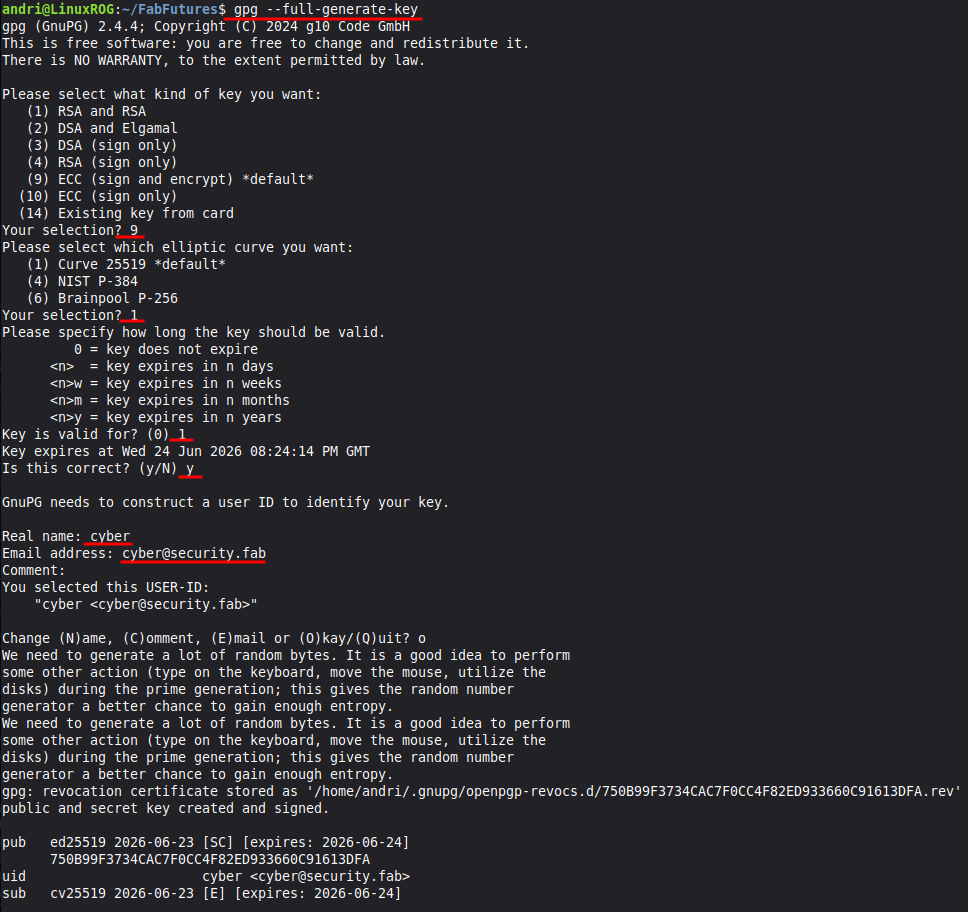
To get the public key into a file I typed:
gpg --armor --export cyber@security.fab > cyber-public.asc
Here is the public key I actually generated if you want to send me an encrypted message. andri-public.asc
I sent Doddi my .asc file through Discord chat, I was not worried about security here because this was a public key which is useless without my private key.
Doddi then went ahead and encrypted a file for me, I had no idea what I was about to receive.
I received this file secret-image.jpeg.gpg. You are welcome to try to decrypt the file if you want. :)
To decrypt the file I put the image in my FabFutures folder and typed this in my terminal:
gpg -o image-decrypted.jpg --decrypt secret-image.jpeg.gpg
And this is the image I received decrypted

Symmetric encryption
Since I already did public-key encryption I wanted to try symmetric encryption. Symmetric encryption does not rely on publy / private keys, only a password. So I found an image and performed symmetric encryption.
gpg -c neilG.png
Here is the file I encrypted neilG.png.gpg

If you want to see the image you can download the file and type this in terminal:
gpg -o decrypted_neilG.png --decrypt neilG.png.gpg
You will be asked for a password which is NeilYoung - Take a guess what the encrypted file is.
☐ Encrypt a disk, USB stick, directory, or filesystem
Questions
- What exactly is encrypted?
- When is the data decrypted?
- What does this protect against?
- What does it not protect against?
Answer
Write your answer here.
✅ Create a file, compute its hash, change the file, and compute the hash again
Create a file, compute its hash, change the file, and compute the hash again
I started by creating a .txt file with a simple message
echo "FabFutures - Cyber Security 2026" > hash_test.txt
I then use SHA256 to compute the hash of the file
sha256sum hash_test.txt
And i get a random hash string
c2f60f16e5fe416b9159e4e0cb292a29829473d3d9071d30ccf3a226286425ec hash_test.txt
If I make just a tiny change to the file the hash will change, lets change FabFutures to Fab Futures - just add a space in FabFutures.
nano hash_test.txt
Use nano to add the space in FabFutures - then to save and exit nano - CTRL+O - Enter - CTRL+X
Compute the hash of the file again.
sha256sum hash_test.txt
And I get a completely different hash, eventhough the change was minor.
254552040d38c02f35a04899c014618dbd6c00eeef044516488a09f56ad5931f hash_test.txt
Questions
- What changed?
- Why are hashes useful?
- Why does a hash not prove who created the file?
- How could hashes be used to detect tampering?
Answer
The computed hash was completely different eventhough the change was minor.
Hashes are useful because you can compare the hash of the file before and after a transfer or storage. You can see whether a file has been altered.
A hash only computes the contents of the file, you can rename the file but the hash will stay the same. You can make a copy of the file and the hash will remain the same. It does not prove who created the file only the contents.
If I know the hash of the original file then I can hash the file again and I can immediately see if the file has been corrupted or intentionally tampered with.
🟨 Sign a file or message and verify the signature
Challenge
Doddi / Þórarinn sent me a challenge. He sent me two files, /version_ldsflj/neo.txt and /version_fjkdfj/neo.txt with the signature for the file neo.txt.asc. My challenge was to figure out which neo.txt file had the good signature and which was bad.
To figure out the challenge I first did an excersize of my own where I signed a file with my own signature.
gpg --armor --detach-sign test.txt
To then test to see if the signature was good:
gpg --verify test.txt.asc test.txt
Which gave me:
gpg: Signature made Thu 25 Jun 2026 12:46:30 PM GMT
gpg:                using EDDSA key ED2F14F1FED237AA0F19CA81FAD4C804C17E2CD9
gpg: Good signature from "andri <andri@andri.is>" [ultimate]
I then made a small change to the test.txt file and ran the verification again:
gpg: Signature made Thu 25 Jun 2026 12:46:30 PM GMT
gpg:                using EDDSA key ED2F14F1FED237AA0F19CA81FAD4C804C17E2CD9
gpg: BAD signature from "andri <andri@andri.is>" [ultimate]
So now I am ready to solve Doddis challenge. I simply need to run the verification command on both files and see which gives me a Good signature using:
gpg --verify neo.txt.asc version_fjkdfj/neo.txt
and
gpg --verify neo.txt.asc version_ldsflj/neo.txt
Which tells me that the /version_fjkdfj/neo.txt had a Bad signature and the /version_ldsflj/neo.txt had the Good signature. Out of curiosity I cat-ed the neo.txt with the Good signature, and it reads:
I take the blue pill
Questions
- What does the signature prove?
- What does it not prove?
- Why is the message usually hashed before signing?
- What happens if the signed file is changed?
Answer
Write your answer here.
🟨 Send a digitally signed email
Send a digitally signed email
Questions
- How can the recipient verify the signature?
- What key or certificate do they need?
- Is the email encrypted, signed, or both?
- What is the difference between signing and encrypting?
Answer
Write your answer here.
☐ WIP Install a certificate on a web server, or inspect the certificate of an HTTPS website
Create a website and install an HTTPS certificate
I have owned the domain ormamolta.is for a while now but never got round to get it online. Ormamolta or vermicompost is a pet project of mine where I keep worms in boxes at home, feed them food scraps and produce vermicompost for soil enhancement. Since this assignment involved HTTPS certificates and web servers, I decided to use the opportunity to finally get the website online.
I created a simple placeholder website using GitHub Pages and connected it to my custom domain, ormamolta.is, which I had previously registered through ISNIC. To do this, I first verified ownership of the domain with GitHub. I then used the ISNIC control panel to configure the DNS records for the domain so that it pointed to GitHub Pages. Once GitHub could see the correct DNS records, it was able to verify the domain and GitHub automatically obtained and installed an HTTPS certificate from Let’s Encrypt.
Inspect the certificate
After the website was online, I inspected the certificate from the command line to verify that it had been issued correctly and to identify the Certificate Authority that signed it.
Using this command in terminal i can view the full certificate in detail:
openssl s_client -connect ormamolta.is:443 -servername ormamolta.is </dev/null 2>/dev/null | openssl x509 -text -noout
The certificate was issued by Let’s Encrypt and was valid for both ormamolta.is and www.ormamolta.is
Compare certificates on different networks
While inspecting the certificate for my website, I noticed that the results depended on which network I was connected to. When I used my phone’s hotspot, the certificate was issued by Let’s Encrypt and correctly identified ormamolta.is as the website owner. However, when I connected to the lab WiFi, the certificate appeared to be issued by Fortinet instead.
This was unexpected and led me to investigate further. I learned that the certificate presented to a user can sometimes depend on the network they are connected to. Since my website had only recently been published, it is possible that the lab network was treating the domain differently than other networks. Regardless of the cause, comparing the certificate information from both networks gave me practical experience inspecting certificates and understanding how HTTPS connections are established.
Phone wifi hotspot:
Issuer: C = US, O = Let's Encrypt, CN = YR1
Subject: CN = ormamolta.is
Fab Lab (School) wifi:
Issuer: C = US, ST = California, L = Sunnyvale, O = Fortinet,
CN = FG100FTK24028727
Subject: CN = ormamolta.is
Full certificate - Phone hotspot (Let’s Encrypt)
Certificate:
    Data:
        Version: 3 (0x2)
        Serial Number:
            05:47:44:0f:a8:e1:df:fc:c9:ce:af:cc:03:36:7d:3d:d3:a3
        Signature Algorithm: sha256WithRSAEncryption
        Issuer: C = US, O = Let's Encrypt, CN = YR1
        Validity
            Not Before: Jun 24 09:56:16 2026 GMT
            Not After : Sep 22 09:56:15 2026 GMT
        Subject: CN = ormamolta.is
        Subject Public Key Info:
            Public Key Algorithm: rsaEncryption
                Public-Key: (2048 bit)
                Modulus:
                    00:98:98:58:eb:ec:cb:b6:77:81:e8:70:0e:87:22:
                    31:ef:d2:63:63:67:01:9c:90:4e:10:16:94:9c:f5:
                    19:b6:05:30:56:b6:82:41:62:d4:31:0b:79:c0:d4:
                    e1:c1:36:13:1f:5c:70:16:21:d0:1c:53:13:8c:3c:
                    0c:8c:5d:15:47:f8:c7:94:29:41:8f:c2:e3:b2:29:
                    b6:1b:77:8d:a8:73:ea:d8:63:91:37:d2:26:50:61:
                    a1:04:bd:fa:76:22:06:a5:a0:3d:dc:07:4b:8f:b7:
                    06:24:b6:17:92:2e:c9:ae:dc:16:2c:2c:c3:6c:94:
                    23:2d:9f:9d:d4:40:da:98:26:3d:67:87:37:b6:4c:
                    a4:a3:ee:52:31:e3:87:2c:ed:38:ee:70:a5:b5:98:
                    7d:c3:87:96:fb:2e:45:6c:a2:6c:24:ff:63:42:b6:
                    e4:7c:d4:5f:6b:96:73:24:7a:0c:a5:89:68:86:f1:
                    71:03:79:53:0e:88:1c:6e:5a:a5:f0:80:0c:66:0d:
                    a4:a2:20:b5:b9:09:1c:00:35:8f:3c:89:a7:8a:8c:
                    4e:57:fd:1e:28:19:3a:63:d0:56:03:e9:f5:32:0d:
                    37:40:3f:9a:90:71:33:d7:d7:b4:7e:41:48:b4:05:
                    aa:8e:f7:65:36:87:87:66:ca:ff:6d:83:43:ef:48:
                    ac:8d
                Exponent: 65537 (0x10001)
        X509v3 extensions:
            X509v3 Key Usage: critical
                Digital Signature, Key Encipherment
            X509v3 Extended Key Usage:
                TLS Web Server Authentication
            X509v3 Basic Constraints: critical
                CA:FALSE
            X509v3 Subject Key Identifier:
                58:C9:B2:AA:68:E6:A5:48:CC:D8:2B:E8:42:B2:BF:7F:BE:45:66:68
            X509v3 Authority Key Identifier:
                1F:2F:35:BE:46:14:82:CD:40:B1:AE:79:2C:55:78:FA:F7:D4:68:FB
            Authority Information Access:
                CA Issuers - URI:http://yr1.i.lencr.org/
            X509v3 Subject Alternative Name:
                DNS:ormamolta.is, DNS:www.ormamolta.is
            X509v3 Certificate Policies:
                Policy: 2.23.140.1.2.1
            X509v3 CRL Distribution Points:
                Full Name:
                  URI:http://yr1.c.lencr.org/36.crl
            CT Precertificate SCTs:
                Signed Certificate Timestamp:
                    Version   : v1 (0x0)
                    Log ID    : D8:09:55:3B:94:4F:7A:FF:C8:16:19:6F:94:4F:85:AB:
                                B0:F8:FC:5E:87:55:26:0F:15:D1:2E:72:BB:45:4B:14
                    Timestamp : Jun 24 10:54:46.908 2026 GMT
                    Extensions: none
                    Signature : ecdsa-with-SHA256
                                30:44:02:20:02:DF:A5:2E:63:F2:65:3A:C7:28:86:4E:
                                37:C8:C4:BA:93:89:80:DB:F9:05:C3:C2:52:19:A4:98:
                                16:45:CB:C2:02:20:74:18:A0:5B:8D:B5:BD:7A:14:20:
                                6E:81:FD:7D:EB:D6:DB:69:AC:8D:90:FF:92:DB:23:EB:
                                76:E2:6C:B6:BF:6B
                Signed Certificate Timestamp:
                    Version   : v1 (0x0)
                    Log ID    : A8:26:CB:E3:0A:C6:35:12:46:53:3F:E0:65:F1:4F:19:
                                D9:6E:19:08:13:C4:1D:D9:6D:79:00:B3:12:3C:55:27
                    Timestamp : Jun 24 10:54:47.781 2026 GMT
                    Extensions: 00:00:05:00:10:DE:B5:18
                    Signature : ecdsa-with-SHA256
                                30:44:02:20:3C:19:79:A3:E3:68:40:49:4E:EC:98:6C:
                                78:97:9F:7C:07:C4:26:20:2E:79:79:2B:67:75:FB:26:
                                22:7A:D8:8D:02:20:50:1C:0F:0D:DF:3E:BD:48:65:25:
                                CE:9E:96:BA:60:D5:AB:53:F8:52:BC:6F:CA:37:FD:A6:
                                12:08:DB:11:3B:8C
    Signature Algorithm: sha256WithRSAEncryption
    Signature Value:
        4d:28:2c:22:14:d2:2f:07:3e:0a:09:44:13:dc:14:b1:d2:1c:
        d5:f4:2c:9d:fa:3c:c4:e8:17:55:93:22:45:d8:84:a3:39:56:
        55:6b:de:91:13:86:33:b8:fc:11:b5:a4:ae:ac:f6:e7:52:fa:
        20:58:23:50:c4:3c:31:a8:b1:81:a2:68:b8:dd:f5:e9:5b:92:
        4d:f6:0d:e4:de:8e:b5:77:18:ac:85:5a:c3:a7:3d:c8:ac:24:
        05:6d:3e:30:d0:ad:8c:b6:d4:43:d2:74:54:be:68:87:15:ce:
        09:1b:f0:10:c9:f0:93:9f:f4:a6:09:d1:1c:90:1d:e7:f3:61:
        c6:67:1a:3a:ca:c1:3a:21:a3:0e:5d:cc:3a:c4:91:8c:03:ee:
        d5:2b:8c:28:f1:86:a6:44:f5:9f:11:bf:7b:7d:04:0c:a9:8a:
        37:9a:18:68:b9:1e:af:49:4a:ad:df:df:3b:9a:45:e8:27:c2:
        86:e8:ce:fa:c8:10:94:7f:dc:7b:d5:29:e9:c3:7b:09:69:a3:
        3d:55:dc:2f:41:a7:98:0e:23:36:06:66:93:60:22:4f:87:fb:
        22:b8:80:5a:b3:d7:ec:98:81:4c:4d:9c:b2:20:1b:42:fa:2c:
        5a:28:1f:31:f6:c9:77:d2:ad:1c:3d:91:f6:08:11:02:15:3c:
        a9:51:df:ac
Full certificate - Fab Lab WiFi (Fortinet)
Certificate:
    Data:
        Version: 3 (0x2)
        Serial Number: 8859121351258116702 (0x7af1ebee6bd1925e)
        Signature Algorithm: sha256WithRSAEncryption
        Issuer: C = US, ST = California, L = Sunnyvale, O = Fortinet, OU = Certificate Authority, CN = FG100FTK24028727, emailAddress = support@fortinet.com
        Validity
            Not Before: Jun 24 09:56:16 2026 GMT
            Not After : Sep 22 09:56:15 2026 GMT
        Subject: CN = ormamolta.is
        Subject Public Key Info:
            Public Key Algorithm: rsaEncryption
                Public-Key: (2048 bit)
                Modulus:
                    00:a4:8c:f7:7e:a9:9d:3c:35:66:0f:f2:39:26:ac:
                    dc:dd:c9:8a:41:06:6a:28:0e:c3:4f:41:10:03:10:
                    d0:7c:6f:a2:0c:29:44:9e:11:c6:4c:f1:c2:36:f3:
                    b2:62:04:15:5e:84:dc:2c:23:d9:ae:28:79:92:0d:
                    cf:2f:55:c6:fa:98:ec:ef:97:f1:d7:5f:ac:f9:e5:
                    84:39:28:40:61:2f:77:c8:22:45:7a:be:4d:68:aa:
                    b8:20:4f:c0:e3:f4:52:32:e0:08:7c:5f:a6:e8:56:
                    61:b5:5c:d7:5f:65:2b:1b:ac:67:75:46:f0:8e:8d:
                    69:3a:67:a9:05:fd:84:5b:fd:12:2b:f9:c5:3c:30:
                    2f:18:6c:d3:da:7a:54:c4:43:a5:09:2f:1d:49:3a:
                    8d:8f:de:d5:4c:53:0b:e2:03:44:0a:10:72:ae:00:
                    85:d0:c2:83:d6:fc:f2:fc:70:c2:6a:f8:46:24:06:
                    ac:a1:2f:5c:b1:1e:5d:5a:fb:2c:35:44:c7:04:8d:
                    e3:6a:56:f7:e0:41:2b:44:b2:13:d3:80:8c:dc:f7:
                    97:df:0d:c4:e1:92:64:0d:e4:8e:c7:a2:6e:c6:48:
                    45:d4:6e:e1:14:43:bf:98:7b:ae:8e:e1:40:09:25:
                    a4:1e:31:3a:cc:38:d5:69:af:b9:d1:02:00:89:b4:
                    95:47
                Exponent: 65537 (0x10001)
        X509v3 extensions:
            X509v3 Key Usage: critical
                Digital Signature, Key Encipherment
            X509v3 Basic Constraints: critical
                CA:FALSE
            X509v3 Subject Alternative Name:
                DNS:ormamolta.is, DNS:www.ormamolta.is
            Netscape Comment:

MMMMMMMMMMMMMMMMMMMMMMMMMMMMMMMMMMMMMMMMMMMMMMMM
MMMMMMMMMMMMMMMMMMMMMWX00XWMMMMMMMMMMMMMMMMMMMMM
MMMMMMMMMMMMMMMMMWKko:.  .;okKWMMMMMMMMMMMMMMMMM
MMMMMMMMMMNkdolc;'...,looc,. .';clodkNMMMMMMMMMM
MMMMMMMMMMO. .,;:ldOXWMMMMWKkdl:,'. .OMMMMMMMMMM
MMMMMMMMMMO. lWMMMMMMMMMMMMMMMMMMWc .OMMMMMMMMMM
MMMMMMMMMMO. lMMMWNXNNXXXXNNXNWMMMl .OMMMMMMMMMM
MMMMMMMMMMO. lMMWOllkOolloOkloOWMMl .OMMMMMMMMMM
MMMMMMMMMMO. lMMNkooOXKKKKXOookNMMl .OMMMMMMMMMM
MMMMMMMMMMO. lMMXxllONWMMWNOllxXMMl .OMMMMMMMMMM
MMMMMMMMMMO. lMMWOooO0xddx0OooONMMl .OMMMMMMMMMM
MMMMMMMMMM0' cWMWXkx0KkxxkK0xkKWMWc '0MMMMMMMMMM
MMMMMMMMMMNl .xWMMMMMMMMMMMMMMMMWx. lNMMMMMMMMMM
MMMMMMMMMMMXc .lXMMMMMMMMMMMMMMXl. cXMMMMMMMMMMM
MMMMMMMMMMMMNx' .oKWMMMMMMMMWKd' 'xNMMMMMMMMMMMM
MMMMMMMMMMMMMMXd' .:xKWMMWKx:. 'dXMMMMMMMMMMMMMM
MMMMMMMMMMMMMMMMNkc. .,::,. .ckNMMMMMMMMMMMMMMMM
MMMMMMMMMMMMMMMMMMMXOo:;;:oOXMMMMMMMMMMMMMMMMMMM
MMMMMMMMMMMMMMMMMMMMMMMMMMMMMMMMMMMMMMMMMMMMMMMM
MMMMMMMMMMMMMMMMMMMMMMMMMMMMMMMMMMMMMMMMMMMMMMMM
MMMMMMMMMMMMMMMMMMMMMWX00XWMMMMMMMMMMMMMMMMMMMMM
MMMMMMMMMMMMMMMMMWKko:.  .;okKWMMMMMMMMMMMMMMMMM
MMMMMMMMMMNkdolc;'...,looc,. .';clodkNMMMMMMMMMM
MMMMMMMMMMO. .,;:ldOXWMMMMWKkdl:,'. .OMMMMMMMMMM
MMMMMMMMMMO. lWMMMMMMMMMMMMMMMMMMWc .OMMMMMMMMMM
MMMMMMMMMMO. lMMMWNXNNXXXXNNXNWMMMl .OMMMMMMMMMM
MMMMMMMMMMO. lMMWOllkOolloOkloOWMMl .OMMMMMMMMMM
MMMMMMMMMMO. lMMNkooOXKKKKXOookNMMl .OMMMMMMMMMM
MMMMMMMMMMO. lMMXxllONWMMWNOllxXMMl .OMMMMMMMMMM
MMMMMMMMMMO. lMMWOooO0xddx0OooONMMl .OMMMMMMMMMM
MMMMMMMMMM0' cWMWXkx0KkxxkK0xkKWMWc '0MMMMMMMMMM
MMMMMMMMMMNl .xWMMMMMMMMMMMMMMMMWx. lNMMMMMMMMMM
MMMMMMMMMMMXc .lXMMMMMMMMMMMMMMXl. cXMMMMMMMMMMM
MMMMMMMMMMMMNx' .oKWMMMMMMMMWKd' 'xNMMMMMMMMMMMM
MMMMMMMMMMMMMMXd' .:xKWMMWKx:. 'dXMMMMMMMMMMMMMM
MMMMMMMMMMMMMMMMNkc. .,::,. .ckNMMMMMMMMMMMMMMMM
MMMMMMMMMMMMMMMMMMMXOo:;;:oOXMMMMMMMMMMMMMMMMMMM
MMMMMMMMMMMMMMMMMMMMMMMMMMMMMMMMMMMMMMMMMMMMMMMM
MMMMMMMMMMMMMMMMMMMMMMMMMMMMMMMMMMMMMMMMMMMMMMMM
MMMMMMMMMMMMMMMMMMMMMWX00XWMMMMMMMMMMMMMMMMMMMMM
MMMMMMMMMMMMMMMMMWKko:.  .;okKWMMMMMMMMMMMMMMMMM
MMMMMMMMMMNkdolc;'...,looc,. .';clodkNMMMMMMMMMM
MMMMMMMMMMO. .,;:ldOXWMMMMWKkdl:,'. .OMMMMMMMMMM
MMMMMMMMMMO. lWMMMMMMMMMMMMMMMMMMWc .OMMMMMMMMMM
MMMMMMMMMMO. lMMMWNXNNXXXXNNXNWMMMl .OMMMMMMMMMM
MMMMMMMMMMO. lMMWOllkOolloOkloOWMMl .OMMMMMMMMMM
MMMMMMMMMMO. lMMNkooOXKKKKXOookNMMl .OMMMMMMMMMM
MMMMMMMMMMO. lMMXxllONWMMWNOllxXMMl .OMMMMMMMMMM
MMMMMMMMMMO. lMMWOooO0xddx0OooONMMl .OMMMMMMMMMM
MMMMMMMMMM0' cWMWXkx0KkxxkK0xkKWMWc '0MMMMMMMMMM
MMMMMMMMMMNl .xWMMMMMMMMMMMMMMMMWx. lNMMMMMMMMMM
MMMMMMMMMMMXc .lXMMMMMMMMMMMMMMXl. cXMMMMMMMMMMM
MMMMMMMMMMMMNx' .oKWMMMMMMMMWKd' 'xNMMMMMMMMMMMM
MMMMMMMMMMMMMMXd' .:xKWMMWKx:. 'dXMMMMMMMMMMMMMM
MMMMMMMMMMMMMMMMNkc. .,::,. .ckNMMMMMMMMMMMMMMMM
MMMMMMMMMMMMMMMMMMMXOo:;;:oOXMMMMMMMMMMMMMMMMMMM
MMMMMMMMMMMMMMMMMMMMMMMMMMMMMMMMMMMMMMMMMMMMMMMM
MMMMMMMMMMMMMMMMMMMMMMMMMMMMMMMMMMMMMMMMMMMMMMMM
MMMMMMMMMMMMMMMMMMMMMWX00XWMMMMMMMMMMMMMMMMMMMMM
MMMMMMMMMMMMMMMMMWKko:.  .;okKWMMMMMMMMMMMMMMMMM
MMMMMMMMMMNkdolc;'...,looc,. .';clodkNMMMMMMMMMM
MMMMMMMMMMO. .,;:ldOXWMMMMWKkdl:,'. .OMMMMMMMMMM
MMMMMMMMMMO. lWMMMMMMMMMMMMMMMMMMWc .OMMMMMMMMMM
MMMMMMMMMMO. lMMMWNXNNXXXXNNXNWMMMl .OMMMMMMMM
    Signature Algorithm: sha256WithRSAEncryption
    Signature Value:
        b9:fc:63:06:f7:39:00:29:41:3e:61:fb:3e:5b:80:71:db:cb:
        80:3e:91:30:db:d7:86:b3:95:79:d1:c7:ee:50:d1:dc:8e:1b:
        05:93:1c:23:39:2e:2d:c0:63:7b:9c:6e:ea:8d:9b:79:5a:99:
        9f:76:e4:a2:e4:40:4e:f0:f9:b9:87:a8:34:d0:52:87:6b:cc:
        f7:75:47:73:33:09:73:7e:71:d5:02:99:27:97:8a:f4:3e:67:
        9e:a2:da:91:04:bf:c8:0c:78:ef:68:b8:cd:76:42:3b:7b:bc:
        47:5e:9c:d6:6a:4f:ee:38:a3:a4:eb:a4:8c:a9:9e:86:9a:8c:
        fa:66:8c:37:cd:64:06:a7:f3:9a:4f:6e:6d:34:af:13:5e:7f:
        98:1c:42:26:aa:c6:c6:bd:5a:b2:1c:69:8a:ac:2a:b7:50:f0:
        27:03:d0:5b:59:d8:dc:48:ee:15:9c:85:08:60:fa:a6:a2:a5:
        27:32:ef:9b:2b:b2:5c:5a:3d:f4:0a:16:1b:20:f5:98:1c:c7:
        38:99:b4:c5:b7:c2:d4:c2:e3:22:c4:45:90:44:41:94:bb:3c:
        01:fc:c6:58:9f:85:e7:da:e5:3c:aa:1f:76:30:51:c5:2e:bd:
        37:6c:54:51:50:98:f7:13:eb:06:69:13:30:94:f0:4f:cc:54:
        fd:37:88:49
What I learned
I learned how to connect a domain name to a website, configure DNS records, and use HTTPS. I also learned how to inspect a certificate from the command line and verify who issued it. An unexpected lesson was discovering that different networks can present different certificates for the same website.
Questions
- Why does the server send a certificate instead of just a public key?
- What role does the Certificate Authority play?
- What attack does this help prevent?
Answer
Write your answer here.
⬜ Show or describe how to encrypt a long message for someone using their public key
Questions
- Why is the whole message usually not encrypted directly with the public key?
- What is a symmetric key?
- How is the symmetric key protected?
- Why is this called hybrid encryption?
Answer
Write your answer here.
Optional Advanced Questions
☐ Research how RSA creates its private key
Background
Suppose Alice chooses two primes p₁ and p₂, and her modulus is:
n = p₁ × p₂
She also chooses a public exponent e, so her public key is (e, n).
Questions
- How does she compute the private exponent
d? - What is the role of
(p₁ − 1)(p₂ − 1)? - Why is it hard for someone that sees the public key
(e, n)to compute the private key(d, n)? - Why can Alice do this?
Answer
Write your answer here.
☐ Suppose Alice uses (e, p) as a public key, where p is prime
Questions
- How would she compute the inverse exponent
d? - Why would Alice’s public key
(e, p)be insecure if her moduluspwere a prime?
Answer
Write your answer here.
☐ Research why faster factoring would break RSA
Questions
- What RSA publishes publicly.
- Why factoring
nreveals the private key. - Why a large quantum computer would be a problem for RSA.
- Why this does not break all cryptography in the same way.
Answer
Write your answer here.
☐ Research why the industry is moving away from RSA and other older public-key systems
Questions
- What problem RSA depends on being hard.
- Why quantum computers threaten RSA.
- What “post-quantum” or “quantum-safe” means.
- Name one post-quantum algorithm and what it is used for.
Answer
Write your answer here.