Harden
I have analized a clean installation of Linux Mint OS and discovered some vulnerabilities that can be hardened. During the analysis I created scripts that created reports and for the hardening process. I will also be creating scripts in this hardening phase that people can run on their own Linux Mint OS. So, the scripts created in this hardening phase will become a sort of hardening toolkit for Linux Mint OS.
I will follow the same structure as in the analysis and create scripts that address each vulnerability. I will also create a restore script in case people want to roll back the changes made by the vulnerability hardening script. I will then run the analysis scripts again to see before-and-after comparison results, create a validation report and if I have time I will make a full Bootable FabFutures CyberOS ISO from a hardened clean Linux Mint OS. I will start working in spirals, tackling one issue at a time, not neccesarily in order.
✅ Hardening plan + testing
Hardening Plan + testing
I will create one script per vulnerability. That script will enable/disable/harden the vulnerability but also create a restore point before making any changes in case things go wrong. The restore points will be protected using sha256sum checksums. All scripts will reuse the lib/hardening_common.sh script to avoid repeating code. The user will be asked to confirm all actions before the scripts actually run.
The workflow to create and run each script follows this structure:
-
Create the script
nano hardening/enable_automatic_security_updates.sh
-
Make the script executable
chmod +x hardening/enable_automatic_security_updates.sh
-
Run the script without creating a report
./run_remote_action.sh hardening/enable_automatic_security_updates.sh
-
Create a new analysis report
./run_remote.sh analysis/check_updates.sh \hardened/updates.txt
-
Then finally a new health report will be generated and compared to the baseline health report
./run_remote.sh analysis/check_health.sh \hardened/health.txt
Here are screenshots after running the first script enable_automatic_security_updates.sh
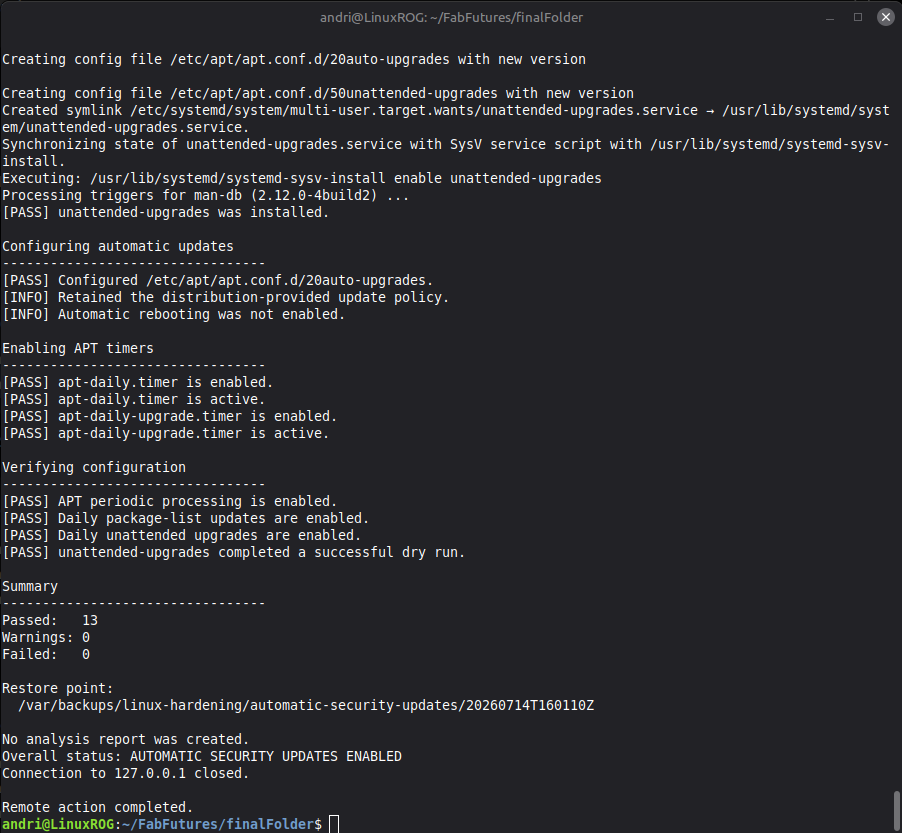
And here is the health report after running only the enable_automatic_security_updates.sh
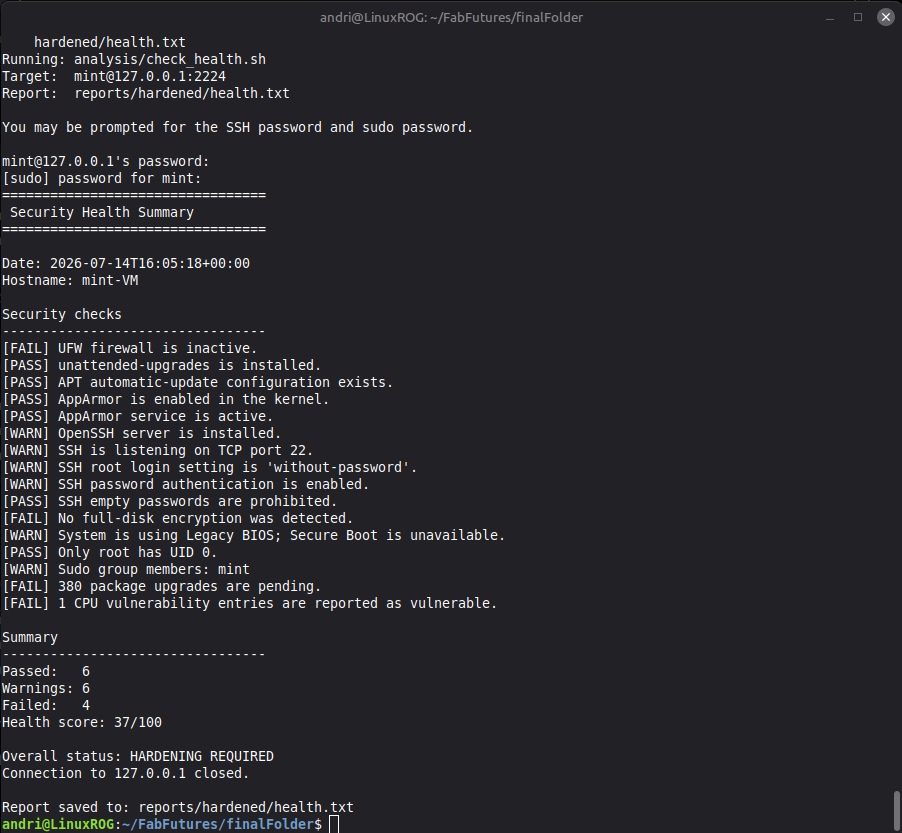
The health report shows the health score go from 25/100 in the baseline health check to 37/100
✅ Restore
Restore
All the hardening scripts save a restore point before being executed in case users want to roll back changes made by the hardening scripts, Now to check if the restore script works, this should restore the system to the way it was before the enable_automatic_security_updates.sh script was run. One thing it will not do is roll back any security updates that were installed but the configs and settings should go back to they way they were.
To run the restore script: ./run_remote_action.sh restore/restore.sh. This opens a window to select which restore point to restore.
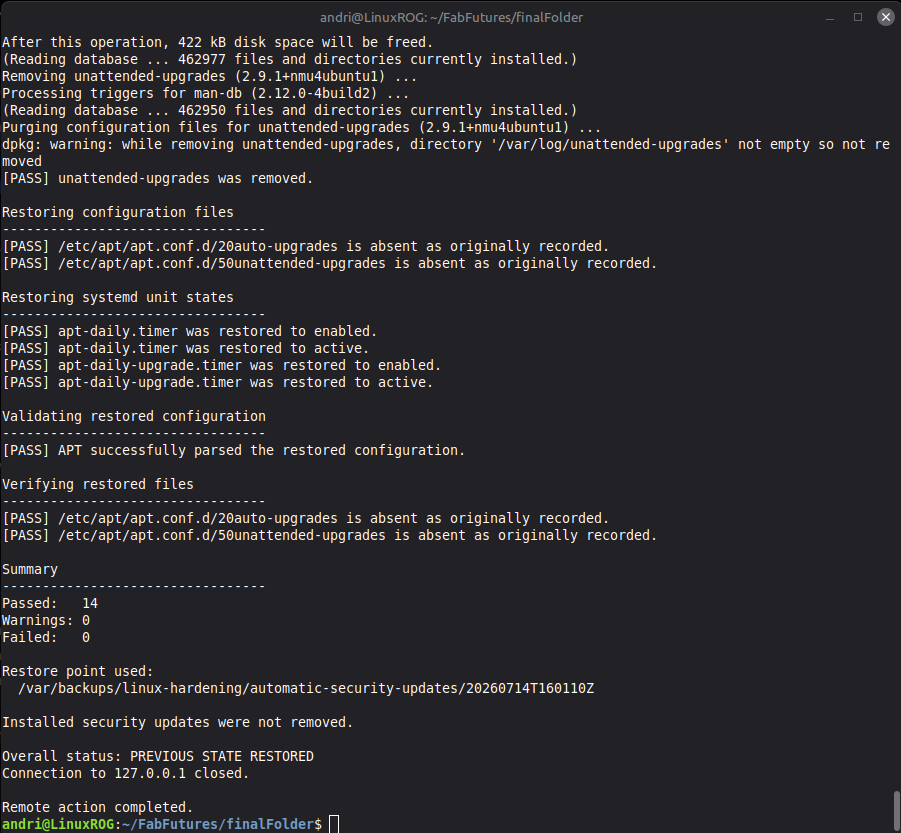
The summary clears with no errors.
Now to check the health report again.
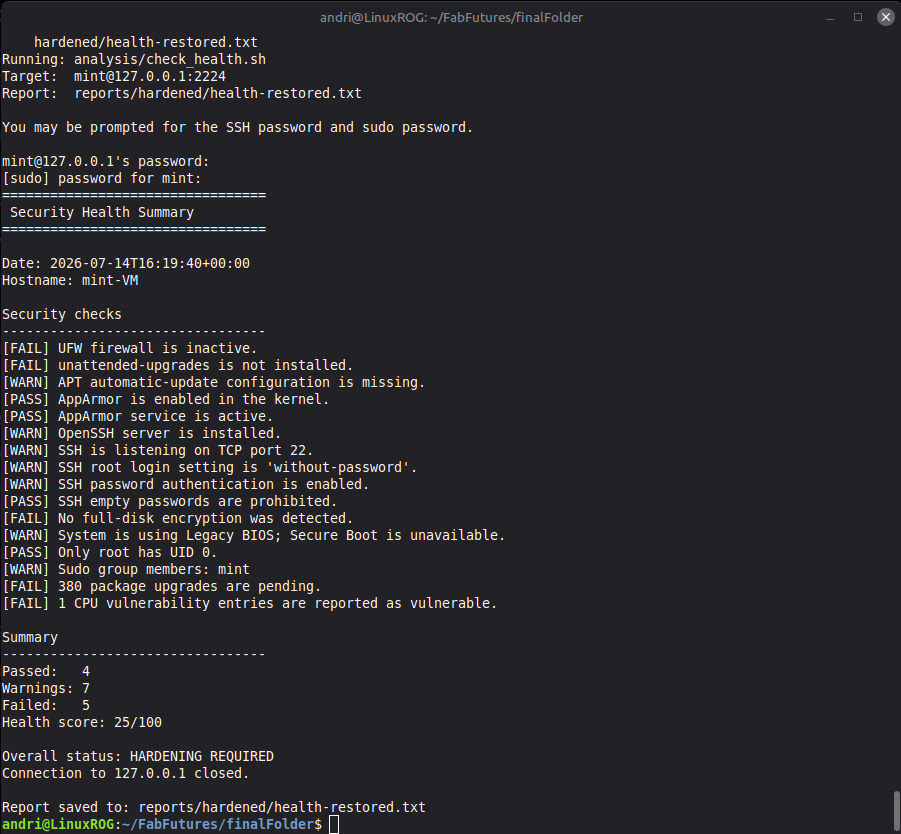
This shows the health score go back to 25/100 indicating that the restore was successful.
✅ Pre-installed Software
Pre-installed software
-
✅ Upgrade packages
-
Remove unnecessary packages.
-
Install security-related tools.
-
(Install FabFutures class recommended packages)
Before I start removing unnecessary packages I want to upgrade the pre-existing packages because some of these upgrades may be security upgrades. Durin analysis the updates.txt report showed me that the system hadthis many pendin upgrades:
Pending upgrades: 379
Estimated security upgrades: 256
After running my apply_package_upgrades.sh script the the updates.txt report prints this:
Pending upgrades: 0
Estimated security upgrades: 0
The script successfully upgraded 635 packages.
apply_package_upgrades.sh
apply_package_upgrades.sh
#!/usr/bin/env bash

set -Eeuo pipefail
umask 077

readonly ACTION_NAME="apply-package-upgrades"
readonly BACKUP_ROOT="/var/backups/linux-hardening/package-upgrades"
readonly SNAPSHOT_ID="$(date -u +%Y%m%dT%H%M%SZ)"
readonly SNAPSHOT_DIR="${BACKUP_ROOT}/${SNAPSHOT_ID}"
readonly CHECKSUM_FILE="${SNAPSHOT_DIR}/SHA256SUMS"
readonly LOCK_FILE="/run/lock/linux-hardening.lock"

PASS_COUNT=0
WARN_COUNT=0
FAIL_COUNT=0
SNAPSHOT_CREATED=0
CHANGES_STARTED=0
HEARTBEAT_PID=""

pass() {
    printf '[PASS] %s\n' "$1"
    PASS_COUNT=$((PASS_COUNT + 1))
}

warn() {
    printf '[WARN] %s\n' "$1"
    WARN_COUNT=$((WARN_COUNT + 1))
}

fail() {
    printf '[FAIL] %s\n' "$1"
    FAIL_COUNT=$((FAIL_COUNT + 1))
}

info() {
    printf '[INFO] %s\n' "$1"
}

fatal() {
    printf '[ERROR] %s\n' "$1" >&2
    exit 1
}

stop_heartbeat() {
    if [[ -n "$HEARTBEAT_PID" ]]; then
        kill "$HEARTBEAT_PID" >/dev/null 2>&1 || true
        wait "$HEARTBEAT_PID" 2>/dev/null || true
        HEARTBEAT_PID=""
    fi
}

start_heartbeat() {
    local message="$1"
    local interval="${2:-30}"

    stop_heartbeat

    (
        while true; do
            sleep "$interval"
            printf '[INFO] %s Still working at %s...\n' \
                "$message" \
                "$(date --iso-8601=seconds)"
        done
    ) &

    HEARTBEAT_PID=$!
}

run_with_heartbeat() {
    local description="$1"
    shift

    info "$description"
    start_heartbeat "$description"

    set +e
    "$@"
    local status=$?
    set -e

    stop_heartbeat
    return "$status"
}

cleanup() {
    stop_heartbeat
}

on_error() {
    local status=$?
    local line_number="${1:-unknown}"

    stop_heartbeat

    echo >&2
    printf '[ERROR] Package upgrade failed near line %s.\n' \
        "$line_number" >&2

    if (( SNAPSHOT_CREATED == 1 )); then
        echo "[INFO] Pre-upgrade audit snapshot:" >&2
        printf '       %s\n' "$SNAPSHOT_DIR" >&2
    fi

    if (( CHANGES_STARTED == 0 )); then
        echo "[INFO] No package upgrade had started." >&2
    fi

    exit "$status"
}

print_header() {
    echo "========================================="
    echo " Apply Package Upgrades"
    echo "========================================="
    echo
    echo "Date:        $(date --iso-8601=seconds)"
    echo "Hostname:    $(hostname)"
    echo "Snapshot ID: $SNAPSHOT_ID"
    echo
}

require_root() {
    if [[ "$EUID" -ne 0 ]]; then
        fatal "This script must be run as root."
    fi
}

require_commands() {
    local command_name

    for command_name in \
        apt-get \
        apt-mark \
        dpkg \
        dpkg-query \
        sha256sum \
        flock \
        install \
        find \
        sort \
        awk \
        grep \
        hostname \
        date
    do
        if ! command -v "$command_name" >/dev/null 2>&1; then
            fatal "Required command not found: $command_name"
        fi
    done
}

acquire_lock() {
    exec 9>"$LOCK_FILE"

    if ! flock -n 9; then
        fatal "Another hardening or restore operation is running."
    fi

    pass "Acquired the hardening operation lock."
}

confirm_action() {
    local answer=""

    echo "WARNING"
    echo "-----------------------------------------"
    echo "This action will upgrade installed packages on:"
    echo "  $(hostname)"
    echo
    echo "It will:"
    echo "  - Create a root-only pre-upgrade audit snapshot."
    echo "  - Refresh APT package indexes."
    echo "  - Upgrade installed packages."
    echo "  - Install new dependencies when required."
    echo "  - Refuse to remove installed packages."
    echo "  - Check whether a reboot is required."
    echo
    echo "It will not:"
    echo "  - Run apt autoremove."
    echo "  - Perform a release upgrade."
    echo "  - Automatically reboot the VM."
    echo "  - Create an analysis report."
    echo
    echo "Important:"
    echo "  Package upgrades cannot be reliably rolled back using"
    echo "  configuration-file backups. A VM snapshot is the safest"
    echo "  rollback mechanism."
    echo
    echo "Pre-upgrade audit data will be stored under:"
    echo "  $SNAPSHOT_DIR"
    echo

    if [[ ! -r /dev/tty || ! -w /dev/tty ]]; then
        fatal "No interactive terminal is available. No changes were made."
    fi

    printf '%s' \
        "Have you created a VM snapshot, and do you want to continue? [y/N]: " \
        >/dev/tty

    if ! IFS= read -r answer </dev/tty; then
        fatal "Could not read confirmation. No changes were made."
    fi

    case "${answer,,}" in
        y|yes)
            echo
            info "Confirmation accepted."
            ;;
        *)
            echo
            info "Confirmation declined. No changes were made."
            exit 0
            ;;
    esac
}

wait_for_apt_locks() {
    local attempt
    local lock_file
    local locked

    echo
    echo "Checking package-manager availability"
    echo "---------------------------------"

    if ! command -v fuser >/dev/null 2>&1; then
        warn "fuser is unavailable; APT will perform its own lock checks."
        return
    fi

    for ((attempt = 1; attempt <= 60; attempt++)); do
        locked=0

        for lock_file in \
            /var/lib/dpkg/lock-frontend \
            /var/lib/dpkg/lock \
            /var/lib/apt/lists/lock \
            /var/cache/apt/archives/lock
        do
            if [[ -e "$lock_file" ]] &&
               fuser "$lock_file" >/dev/null 2>&1; then
                locked=1
                break
            fi
        done

        if (( locked == 0 )); then
            pass "APT and dpkg locks are available."
            return
        fi

        if (( attempt == 1 )); then
            info "Another package-management process is running."
        fi

        if (( attempt % 15 == 0 )); then
            info "Still waiting for package-manager locks..."
        fi

        sleep 2
    done

    fatal "APT remained locked after approximately two minutes."
}

create_audit_snapshot() {
    echo
    echo "Creating pre-upgrade audit snapshot"
    echo "---------------------------------"

    install -d -o root -g root -m 0700 "$BACKUP_ROOT"

    if [[ -e "$SNAPSHOT_DIR" ]]; then
        fatal "Snapshot directory already exists: $SNAPSHOT_DIR"
    fi

    install -d -o root -g root -m 0700 "$SNAPSHOT_DIR"

    info "Recording installed package versions."
    dpkg-query \
        --show \
        --showformat='${binary:Package}\t${Version}\t${Architecture}\n' \
        2>/dev/null |
        sort >"${SNAPSHOT_DIR}/installed-packages.before.tsv"

    info "Recording manually installed packages."
    apt-mark showmanual |
        sort >"${SNAPSHOT_DIR}/manual-packages.before.txt"

    info "Recording held packages."
    apt-mark showhold |
        sort >"${SNAPSHOT_DIR}/held-packages.before.txt"

    run_with_heartbeat \
        "Simulating the package upgrade plan." \
        apt-get --simulate upgrade --with-new-pkgs \
        >"${SNAPSHOT_DIR}/upgrade-simulation.before.txt" 2>&1

    {
        echo "format_version=1"
        echo "action=$ACTION_NAME"
        echo "snapshot_id=$SNAPSHOT_ID"
        echo "created_utc=$(date -u --iso-8601=seconds)"
        echo "hostname=$(hostname)"
        echo "invoking_user=${SUDO_USER:-root}"
        echo "rollback_type=vm-snapshot-recommended"
        echo "automatic_package_downgrade_supported=no"
    } >"${SNAPSHOT_DIR}/metadata.txt"

    chown root:root "${SNAPSHOT_DIR}"/*
    chmod 0600 "${SNAPSHOT_DIR}"/*

    (
        cd "$SNAPSHOT_DIR"

        find . \
            -maxdepth 1 \
            -type f \
            ! -name SHA256SUMS \
            -print0 |
            sort -z |
            xargs -0 sha256sum >SHA256SUMS

        sha256sum --check --strict SHA256SUMS >/dev/null
    )

    chown root:root "$CHECKSUM_FILE"
    chmod 0600 "$CHECKSUM_FILE"

    SNAPSHOT_CREATED=1

    pass "Pre-upgrade audit snapshot was created and verified."
    echo "Snapshot:"
    echo "  $SNAPSHOT_DIR"
}

refresh_package_indexes() {
    echo
    echo "Refreshing package indexes"
    echo "---------------------------------"

    export DEBIAN_FRONTEND=noninteractive
    CHANGES_STARTED=1

    run_with_heartbeat \
        "Refreshing APT package indexes." \
        apt-get update

    pass "APT package indexes were refreshed."
}

show_upgrade_plan() {
    local upgrade_count
    local removal_count

    echo
    echo "Reviewing upgrade plan"
    echo "---------------------------------"

    run_with_heartbeat \
        "Rechecking the current upgrade plan." \
        apt-get --simulate upgrade --with-new-pkgs \
        >"${SNAPSHOT_DIR}/upgrade-simulation.current.txt" 2>&1

    chown root:root "${SNAPSHOT_DIR}/upgrade-simulation.current.txt"
    chmod 0600 "${SNAPSHOT_DIR}/upgrade-simulation.current.txt"

    upgrade_count="$(
        awk '
            /^Inst / {
                count++
            }

            END {
                print count + 0
            }
        ' "${SNAPSHOT_DIR}/upgrade-simulation.current.txt"
    )"

    removal_count="$(
        awk '
            /^Remv / {
                count++
            }

            END {
                print count + 0
            }
        ' "${SNAPSHOT_DIR}/upgrade-simulation.current.txt"
    )"

    info "Packages planned for upgrade or installation: $upgrade_count"
    info "Packages planned for removal: $removal_count"

    if (( removal_count > 0 )); then
        echo
        echo "Removal entries:"
        grep '^Remv ' \
            "${SNAPSHOT_DIR}/upgrade-simulation.current.txt" ||
            true

        fatal "The upgrade simulation includes package removals."
    fi

    if (( upgrade_count == 0 )); then
        pass "No package upgrades are currently required."
    else
        pass "The upgrade plan contains no package removals."
        info "The upgrade may take a while. A status message will appear every 30 seconds during quiet periods."
    fi
}

apply_upgrades() {
    echo
    echo "Applying package upgrades"
    echo "---------------------------------"

    export DEBIAN_FRONTEND=noninteractive
    CHANGES_STARTED=1

    # --with-new-pkgs allows required new dependencies.
    # apt-get upgrade does not remove installed packages.
    run_with_heartbeat \
        "Applying package upgrades." \
        apt-get upgrade \
            --yes \
            --with-new-pkgs \
            -o Dpkg::Options::="--force-confdef" \
            -o Dpkg::Options::="--force-confold"

    pass "The conservative package-upgrade command completed."
}

capture_after_state() {
    echo
    echo "Capturing post-upgrade state"
    echo "---------------------------------"

    info "Recording installed package versions after the upgrade."
    dpkg-query \
        --show \
        --showformat='${binary:Package}\t${Version}\t${Architecture}\n' \
        2>/dev/null |
        sort >"${SNAPSHOT_DIR}/installed-packages.after.tsv"

    info "Recording any remaining upgrades."
    apt list --upgradable 2>/dev/null \
        >"${SNAPSHOT_DIR}/remaining-upgrades.after.txt"

    chown root:root \
        "${SNAPSHOT_DIR}/installed-packages.after.tsv" \
        "${SNAPSHOT_DIR}/remaining-upgrades.after.txt"

    chmod 0600 \
        "${SNAPSHOT_DIR}/installed-packages.after.tsv" \
        "${SNAPSHOT_DIR}/remaining-upgrades.after.txt"

    (
        cd "$SNAPSHOT_DIR"

        find . \
            -maxdepth 1 \
            -type f \
            ! -name SHA256SUMS \
            -print0 |
            sort -z |
            xargs -0 sha256sum >SHA256SUMS

        sha256sum --check --strict SHA256SUMS >/dev/null
    )

    pass "Post-upgrade package state was recorded."
}

verify_package_state() {
    local remaining_count
    local audit_output

    echo
    echo "Verifying package state"
    echo "---------------------------------"

    remaining_count="$(
        apt list --upgradable 2>/dev/null |
            awk '
                NR > 1 && NF {
                    count++
                }

                END {
                    print count + 0
                }
            '
    )"

    if (( remaining_count == 0 )); then
        pass "No package upgrades remain pending."
    else
        warn "$remaining_count package upgrades remain pending."
        warn "These may require package removals, phased updates, or special handling."
    fi

    audit_output="$(dpkg --audit || true)"

    if [[ -n "$audit_output" ]]; then
        fail "dpkg reported packages requiring attention."
        printf '%s\n' "$audit_output"
    else
        pass "dpkg reports no incomplete package operations."
    fi

    if [[ -f /var/run/reboot-required ]]; then
        warn "A reboot is required to complete one or more upgrades."

        if [[ -f /var/run/reboot-required.pkgs ]]; then
            echo
            echo "Packages requesting a reboot:"
            echo "---------------------------------"
            cat /var/run/reboot-required.pkgs
        fi
    else
        pass "No reboot requirement is currently reported."
    fi
}

print_summary() {
    echo
    echo "Summary"
    echo "---------------------------------"
    printf 'Passed:   %d\n' "$PASS_COUNT"
    printf 'Warnings: %d\n' "$WARN_COUNT"
    printf 'Failed:   %d\n' "$FAIL_COUNT"
    echo
    echo "Audit snapshot:"
    echo "  $SNAPSHOT_DIR"
    echo
    echo "No analysis report was created."
    echo "Run check_updates.sh, check_packages.sh, and check_health.sh separately."
    echo

    if (( FAIL_COUNT > 0 )); then
        echo "Overall status: PACKAGE UPGRADE VERIFICATION FAILED"
        return 1
    fi

    if (( WARN_COUNT > 0 )); then
        echo "Overall status: PACKAGE UPGRADES APPLIED WITH WARNINGS"
        return 0
    fi

    echo "Overall status: PACKAGES SUCCESSFULLY UPGRADED"
}

main() {
    trap cleanup EXIT
    trap 'on_error "$LINENO"' ERR

    print_header
    require_root
    require_commands
    acquire_lock
    confirm_action
    wait_for_apt_locks
    create_audit_snapshot
    refresh_package_indexes
    show_upgrade_plan
    apply_upgrades
    capture_after_state
    verify_package_state
    print_summary
}

main "$@"
Automatically running services
Automatically running services
- Turn off all unnecessary services that start automatically.
- Not implemented yet.
✅ Open Ports
Open ports
- Close all ports that do not need to be open.
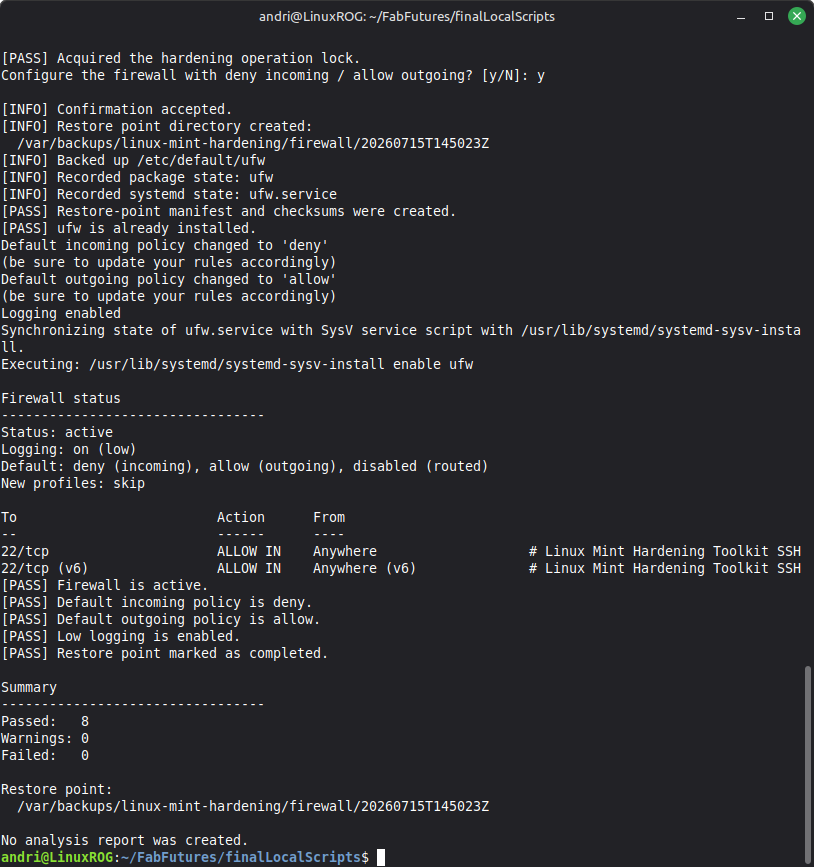
The configure_firewall does this, it denies incoming traffic, accepts outgoing traffic, but leaves port 22 open for SSH.
✅ Firewall
Firewall
- Enable ufw and create firewall rules.
If I run ./run_hardening.sh configure_firewall it starts a small wizard that walkd the user through what is happening. The user needs to input their password to continue.
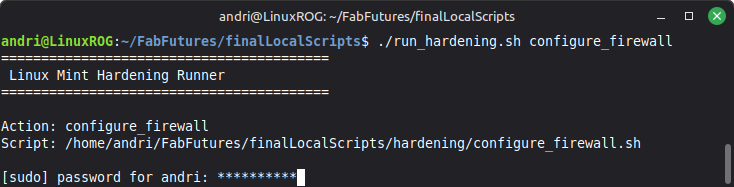
The user is then asked if they would like to deny incoming and allow outgoing traffic.
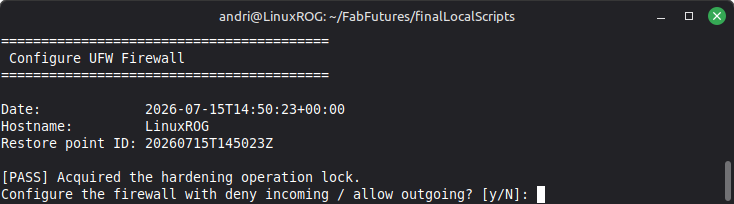
Before making any changes to the firewall configuration a restore point is created. ufw is installed if not already installed, then the firewall is activated and the user sees a summary.
✅ configure_firewall.sh
configure_firewall.sh
#!/usr/bin/env bash
# configure_firewall.sh
# Linux Mint Hardening Toolkit

set -Eeuo pipefail
umask 077

readonly SCRIPT_DIR="$(
    cd -- "$(dirname -- "${BASH_SOURCE[0]}")" &&
    pwd
)"
readonly PROJECT_ROOT="$(
    cd -- "$SCRIPT_DIR/.." &&
    pwd
)"
readonly HARDENING_LIB="${PROJECT_ROOT}/lib/hardening_common.sh"

if [[ ! -r "$HARDENING_LIB" ]]; then
    echo "[ERROR] Shared hardening library not found:"
    echo "        $HARDENING_LIB"
    exit 1
fi

# shellcheck disable=SC1090
source "$HARDENING_LIB"

readonly UFW_DEFAULT="/etc/default/ufw"

install_ufw() {
    if hardening_package_installed ufw; then
        hardening_pass "ufw is already installed."
        return
    fi

    export DEBIAN_FRONTEND=noninteractive
    hardening_wait_for_apt_locks
    hardening_mark_changes_started

    hardening_run_with_heartbeat \
        "Installing ufw." \
        apt-get install -y ufw

    hardening_package_installed ufw || hardening_fatal "Failed to install ufw."
}

configure_ufw() {
    hardening_mark_changes_started

    ufw --force default deny incoming
    ufw --force default allow outgoing
    ufw logging low

    systemctl enable ufw

    if ! ufw status | grep -q "^Status: active"; then
        ufw --force enable
    fi
}

verify_ufw() {
    local status
    status="$(ufw status verbose)"

    echo
    echo "Firewall status"
    echo "---------------------------------"
    printf '%s\n' "$status"

    grep -q "Status: active" <<<"$status" \
        && hardening_pass "Firewall is active." \
        || hardening_fail "Firewall is not active."

    grep -q "Default: deny (incoming)" <<<"$status" \
        && hardening_pass "Default incoming policy is deny." \
        || hardening_fail "Incoming policy is not deny."

    grep -q "allow (outgoing)" <<<"$status" \
        && hardening_pass "Default outgoing policy is allow." \
        || hardening_fail "Outgoing policy is not allow."

    grep -qi "Logging: on (low)" <<<"$status" \
        && hardening_pass "Low logging is enabled." \
        || hardening_warn "Logging is not set to low."
}

main() {
    trap hardening_cleanup EXIT
    trap 'hardening_handle_error "$?" "$LINENO"' ERR

    hardening_begin \
        "firewall" \
        "Configure UFW Firewall" \
        "configure"

    hardening_require_commands \
        apt-get grep systemctl ufw

    hardening_confirm \
        "Configure the firewall with deny incoming / allow outgoing?"

    hardening_create_restore_point
    hardening_backup_file "$UFW_DEFAULT"
    hardening_record_package "ufw"
    hardening_record_unit "ufw.service"
    hardening_finalize_restore_point

    install_ufw
    configure_ufw
    verify_ufw

    (( FAIL_COUNT == 0 )) && hardening_mark_completed

    hardening_print_summary

    (( FAIL_COUNT == 0 ))
}

main "$@"
✅ SSH
SSH
- Create a simple way for users to securely setup SSH.
To make a simple, easy way for non-tech savvy people to setup SSH on their Linux Mint I created a Secure SSH Wizard that runs on the terminal. To start the wizard simply type:
./run_hardening.sh setup_secure_ssh_server
The run_hardening.sh is a helper script that us used by all the hardening scripts. When you run the wizard it starts by explaining what the wizard will do.
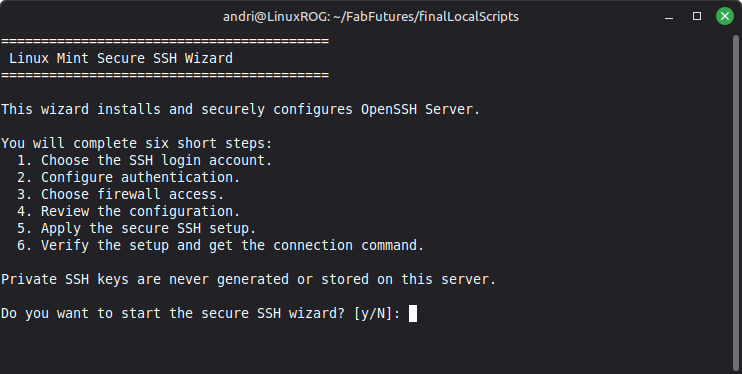
Press y to continue the wizard, n to exit.
The wizard then asks which Linux account will be allowed to login remotely using SSH, and shows the user what the default user is, the user types in the user name.
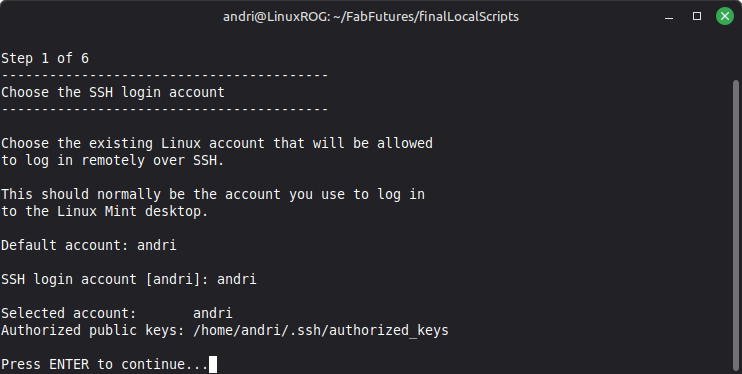
The user then can pick options 1-3, to use an existing public/private key pair, create a new public/private key or login with the user password.
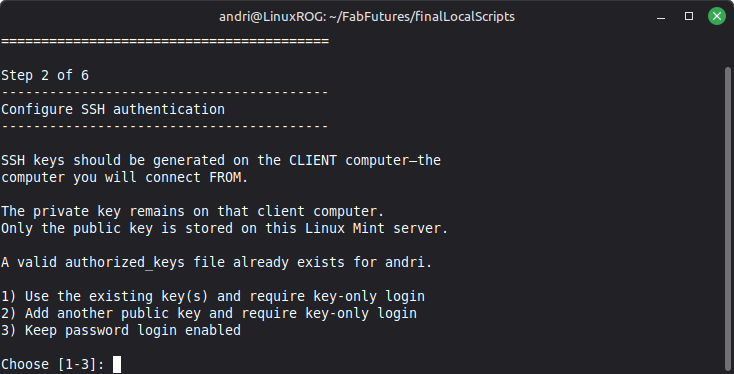
If the user chooses to create a new public/private key then the wizard will explain that the public/private key needs to be created on the client computer and then the user is prompted to paste the public key into the wizard.
The user is then prompted to choose the firewall acces, either make no changes to the ufw firewall, allow remote access or just on a local LAN.
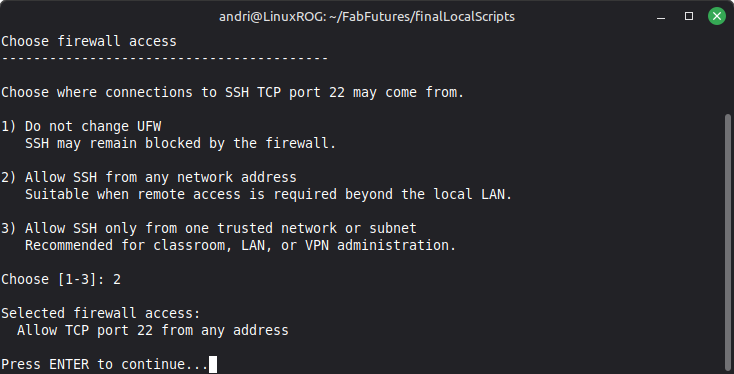
If the user chooses to allow remote access then the wizard will explain to the user that OpenSSH-server will be installed, if not already installed, explain that port 22 will be opened and a restore point will be created in case the user wants to revert the changes.
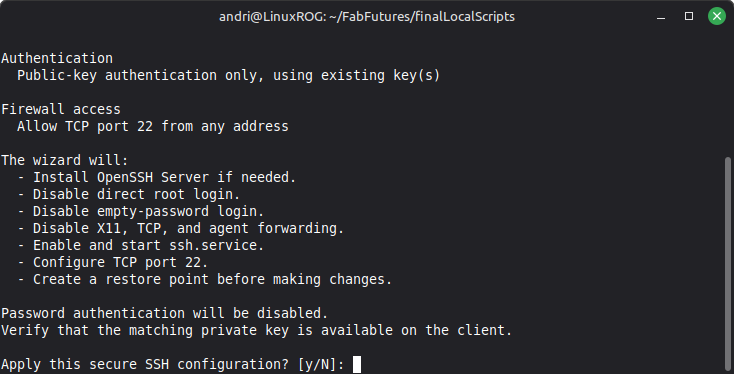
If the user chooses to continue then the SSH settings will be applied, but first a restore point is created, then the SSH firewall access is configured
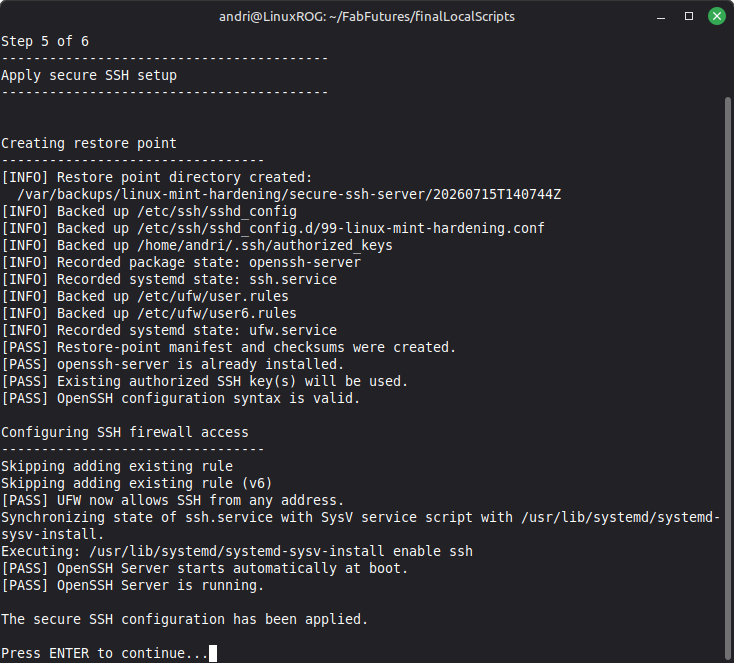
The final screen on the wizard just summarizes what the wizard has done.
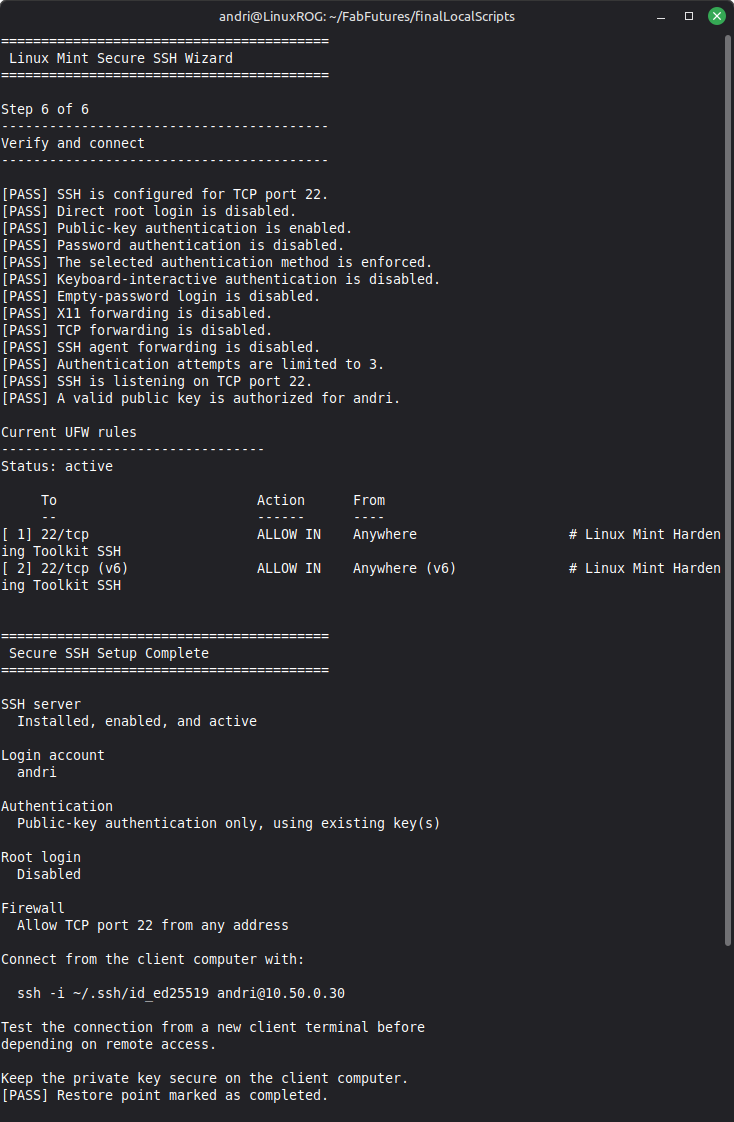
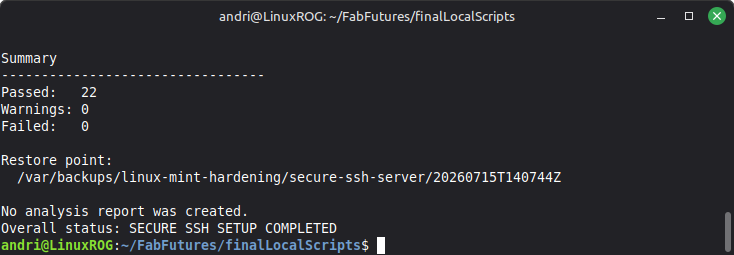
SSH has now been setup in an easy way. Users can now SSH into their machine using the login method they chose during the setup.
setup_secure_ssh_server.sh
setup_secure_ssh_server.sh
#!/usr/bin/env bash

set -Eeuo pipefail
umask 077

readonly SCRIPT_DIR="$(
    cd -- "$(dirname -- "${BASH_SOURCE[0]}")" &&
        pwd
)"

readonly PROJECT_ROOT="$(
    cd -- "$SCRIPT_DIR/.." &&
        pwd
)"

readonly HARDENING_LIB="${PROJECT_ROOT}/lib/hardening_common.sh"

if [[ ! -r "$HARDENING_LIB" ]]; then
    echo "[ERROR] Shared hardening library not found:" >&2
    echo "        $HARDENING_LIB" >&2
    exit 1
fi

# shellcheck disable=SC1090
source "$HARDENING_LIB"

readonly SSH_PACKAGE="openssh-server"
readonly SSH_SERVICE="ssh.service"
readonly SSHD_CONFIG="/etc/ssh/sshd_config"
readonly SSHD_DROPIN="/etc/ssh/sshd_config.d/99-linux-mint-hardening.conf"
readonly UFW_USER_RULES="/etc/ufw/user.rules"
readonly UFW_USER6_RULES="/etc/ufw/user6.rules"

TARGET_USER=""
TARGET_HOME=""
TARGET_GROUP=""
AUTHORIZED_KEYS=""

AUTH_MODE="password"
FIREWALL_MODE="none"
FIREWALL_SUBNET=""

read_tty_line() {
    local prompt="$1"
    local value=""

    if [[ ! -r /dev/tty || ! -w /dev/tty ]]; then
        hardening_fatal "An interactive terminal is required."
    fi

    printf '%s' "$prompt" >/dev/tty

    if ! IFS= read -r value </dev/tty; then
        hardening_fatal "Could not read input from the terminal."
    fi

    printf '%s\n' "$value"
}

pause_for_enter() {
    read_tty_line "Press ENTER to continue..." >/dev/null
}

print_step() {
    local number="$1"
    local title="$2"

    echo
    echo "========================================="
    echo " Step ${number} of 5: ${title}"
    echo "========================================="
    echo
}

select_target_user() {
    local default_user
    local requested_user
    local passwd_entry
    local target_uid
    local target_shell

    print_step "1" "Choose SSH Login Account"

    default_user="${SUDO_USER:-}"

    if [[ -z "$default_user" || "$default_user" == "root" ]]; then
        default_user="$(
            getent passwd |
                awk -F: '$3 >= 1000 && $3 != 65534 {print $1; exit}'
        )"
    fi

    if [[ -z "$default_user" ]]; then
        hardening_fatal "No regular local user account was found."
    fi

    echo "Choose the existing Linux account that will be allowed"
    echo "to log in remotely over SSH."
    echo
    echo "This should normally be the same account you use to log"
    echo "in to the Linux Mint desktop."
    echo
    echo "Default account: $default_user"
    echo

    requested_user="$(
        read_tty_line "SSH login account [${default_user}]: "
    )"

    TARGET_USER="${requested_user:-$default_user}"
    passwd_entry="$(getent passwd "$TARGET_USER" || true)"

    if [[ -z "$passwd_entry" ]]; then
        hardening_fatal \
            "The selected local account does not exist: $TARGET_USER"
    fi

    target_uid="$(awk -F: '{print $3}' <<<"$passwd_entry")"
    TARGET_HOME="$(awk -F: '{print $6}' <<<"$passwd_entry")"
    target_shell="$(awk -F: '{print $7}' <<<"$passwd_entry")"
    TARGET_GROUP="$(id -gn "$TARGET_USER")"

    if [[ "$target_uid" -eq 0 ]]; then
        hardening_fatal "Root cannot be selected for remote SSH login."
    fi

    if [[ "$target_shell" =~ (nologin|false)$ ]]; then
        hardening_fatal \
            "The selected account does not have a login-capable shell."
    fi

    if [[ ! -d "$TARGET_HOME" ]]; then
        hardening_fatal \
            "The selected account has no home directory: $TARGET_HOME"
    fi

    AUTHORIZED_KEYS="${TARGET_HOME}/.ssh/authorized_keys"

    echo
    echo "Selected SSH login account: $TARGET_USER"
    echo "Authorized public keys:     $AUTHORIZED_KEYS"
}

authorized_keys_contains_valid_key() {
    [[ -s "$AUTHORIZED_KEYS" ]] || return 1
    ssh-keygen -l -f "$AUTHORIZED_KEYS" >/dev/null 2>&1
}

select_authentication_mode() {
    local choice

    print_step "2" "Configure SSH Authentication"

    echo "SSH public/private key pairs should be generated on the"
    echo "client computer—the computer you will connect FROM."
    echo
    echo "The private key remains on that client computer."
    echo "Only the public key is stored on this Linux Mint server."
    echo

    if authorized_keys_contains_valid_key; then
        echo "A valid authorized_keys file already exists for $TARGET_USER."
        echo
        echo "1) Use the existing key(s) and require key-only login"
        echo "2) Add another public key and require key-only login"
        echo "3) Keep password login enabled"
        echo

        choice="$(read_tty_line "Choose [1-3]: ")"

        case "$choice" in
            1)
                AUTH_MODE="existing"
                ;;
            2)
                AUTH_MODE="import"
                ;;
            3)
                AUTH_MODE="password"
                ;;
            *)
                hardening_fatal "Invalid authentication choice: $choice"
                ;;
        esac
    else
        echo "No valid authorized SSH keys were found for $TARGET_USER."
        echo
        echo "1) I already have a public key and will paste it now"
        echo "2) Show me how to generate a key on the client, then paste it"
        echo "3) Keep password login enabled for now"
        echo

        choice="$(read_tty_line "Choose [1-3]: ")"

        case "$choice" in
            1)
                AUTH_MODE="import"
                ;;
            2)
                AUTH_MODE="guided-import"
                ;;
            3)
                AUTH_MODE="password"
                ;;
            *)
                hardening_fatal "Invalid authentication choice: $choice"
                ;;
        esac
    fi
}

select_firewall_mode() {
    local choice

    print_step "3" "Choose Firewall Access"

    echo "Choose where SSH connections to TCP port 22 may come from."
    echo
    echo "1) Do not change UFW"
    echo "2) Allow SSH from anywhere"
    echo "3) Allow SSH only from one network or subnet"
    echo

    choice="$(read_tty_line "Choose [1-3]: ")"

    case "$choice" in
        1)
            FIREWALL_MODE="none"
            ;;
        2)
            FIREWALL_MODE="anywhere"
            ;;
        3)
            FIREWALL_MODE="subnet"
            FIREWALL_SUBNET="$(
                read_tty_line \
                    "Allowed network (example 192.168.1.0/24): "
            )"

            if ! python3 - "$FIREWALL_SUBNET" <<'PY'
import ipaddress
import sys

try:
    ipaddress.ip_network(sys.argv[1], strict=False)
except ValueError:
    raise SystemExit(1)
PY
            then
                hardening_fatal \
                    "Invalid network or subnet: $FIREWALL_SUBNET"
            fi
            ;;
        *)
            hardening_fatal "Invalid firewall choice: $choice"
            ;;
    esac
}

create_restore_point() {
    echo
    echo "Creating restore point"
    echo "---------------------------------"

    hardening_create_restore_point

    hardening_backup_file "$SSHD_CONFIG"
    hardening_backup_file "$SSHD_DROPIN"
    hardening_backup_file "$AUTHORIZED_KEYS"

    hardening_record_package "$SSH_PACKAGE"
    hardening_record_unit "$SSH_SERVICE"

    if [[ "$FIREWALL_MODE" != "none" ]]; then
        hardening_backup_file "$UFW_USER_RULES"
        hardening_backup_file "$UFW_USER6_RULES"
        hardening_record_unit "ufw.service"
    fi

    hardening_finalize_restore_point
}

install_ssh_server() {
    print_step "4" "Install and Configure OpenSSH"

    if hardening_package_installed "$SSH_PACKAGE"; then
        hardening_pass "$SSH_PACKAGE is already installed."
    else
        export DEBIAN_FRONTEND=noninteractive

        hardening_wait_for_apt_locks
        hardening_mark_changes_started

        hardening_run_with_heartbeat \
            "Installing OpenSSH Server." \
            apt-get install \
                --yes \
                --no-install-recommends \
                "$SSH_PACKAGE"

        if hardening_package_installed "$SSH_PACKAGE"; then
            hardening_pass "$SSH_PACKAGE was installed."
        else
            hardening_fatal "$SSH_PACKAGE installation failed."
        fi
    fi

    if ! command -v sshd >/dev/null 2>&1; then
        hardening_fatal \
            "The sshd command is unavailable after installation."
    fi

    if [[ ! -f "$SSHD_CONFIG" ]]; then
        hardening_fatal \
            "The SSH server configuration file was not created."
    fi
}

validate_public_key() {
    local public_key="$1"
    local temporary_key

    temporary_key="$(mktemp)"
    printf '%s\n' "$public_key" >"$temporary_key"
    chmod 0600 "$temporary_key"

    if ! ssh-keygen -l -f "$temporary_key" >/dev/null 2>&1; then
        rm -f -- "$temporary_key"
        return 1
    fi

    rm -f -- "$temporary_key"
}

prompt_for_public_key() {
    local public_key
    local ssh_directory

    if [[ "$AUTH_MODE" == "guided-import" ]]; then
        echo
        echo "On the client computer that will connect to this server,"
        echo "generate an Ed25519 key pair with:"
        echo
        echo "  ssh-keygen -t ed25519 -a 100"
        echo
        echo "Accept the default location unless you need another path."
        echo "A passphrase is strongly recommended."
        echo
        echo "Then display the public key with:"
        echo
        echo "  cat ~/.ssh/id_ed25519.pub"
        echo
        echo "Copy the complete single line beginning with ssh-ed25519."
        echo
        pause_for_enter
    fi

    echo
    echo "Paste one complete SSH public key line."
    echo "The private key must not be pasted here."
    echo

    public_key="$(read_tty_line "Public key: ")"

    if [[ -z "$public_key" ]]; then
        hardening_fatal "No public key was provided."
    fi

    if ! validate_public_key "$public_key"; then
        hardening_fatal "The supplied SSH public key is invalid."
    fi

    ssh_directory="${TARGET_HOME}/.ssh"

    hardening_mark_changes_started

    install -d \
        -o "$TARGET_USER" \
        -g "$TARGET_GROUP" \
        -m 0700 \
        "$ssh_directory"

    touch "$AUTHORIZED_KEYS"
    chown "$TARGET_USER:$TARGET_GROUP" "$AUTHORIZED_KEYS"
    chmod 0600 "$AUTHORIZED_KEYS"

    if grep -Fxq -- "$public_key" "$AUTHORIZED_KEYS"; then
        hardening_pass "The supplied public key is already authorized."
    else
        printf '%s\n' "$public_key" >>"$AUTHORIZED_KEYS"
        hardening_pass "The supplied public key was authorized."
    fi

    if ! authorized_keys_contains_valid_key; then
        hardening_fatal \
            "The public key could not be verified after installation."
    fi
}

configure_authentication() {
    case "$AUTH_MODE" in
        import | guided-import)
            prompt_for_public_key
            ;;
        existing)
            if ! authorized_keys_contains_valid_key; then
                hardening_fatal \
                    "The existing authorized_keys file is not valid."
            fi

            hardening_pass \
                "Existing authorized SSH key(s) will be used."
            ;;
        password)
            hardening_warn \
                "Password authentication will remain enabled."
            ;;
    esac
}

write_ssh_configuration() {
    local password_authentication
    local authentication_methods

    if [[ -L "$SSHD_DROPIN" ]]; then
        hardening_fatal \
            "Refusing to replace symbolic link: $SSHD_DROPIN"
    fi

    if [[ "$AUTH_MODE" == "password" ]]; then
        password_authentication="yes"
        authentication_methods="any"
    else
        password_authentication="no"
        authentication_methods="publickey"
    fi

    hardening_mark_changes_started

    install -d \
        -o root \
        -g root \
        -m 0755 \
        "$(dirname "$SSHD_DROPIN")"

    cat >"$SSHD_DROPIN" <<EOF
# Managed by the Linux Mint Hardening Toolkit.

Port 22
PermitRootLogin no
PubkeyAuthentication yes
PasswordAuthentication ${password_authentication}
KbdInteractiveAuthentication no
AuthenticationMethods ${authentication_methods}
PermitEmptyPasswords no
X11Forwarding no
AllowTcpForwarding no
AllowAgentForwarding no
PermitTunnel no
GatewayPorts no
MaxAuthTries 3
LoginGraceTime 30
ClientAliveInterval 300
ClientAliveCountMax 2
MaxSessions 2
EOF

    chown root:root "$SSHD_DROPIN"
    chmod 0644 "$SSHD_DROPIN"

    if ! grep -Eq \
        '^[[:space:]]*Include[[:space:]]+/etc/ssh/sshd_config\.d/\*\.conf' \
        "$SSHD_CONFIG"; then
        hardening_fatal \
            "$SSHD_CONFIG does not include sshd_config.d/*.conf."
    fi

    sshd -t
    hardening_pass "OpenSSH configuration syntax is valid."
}

configure_firewall() {
    echo
    echo "Configuring SSH firewall access"
    echo "---------------------------------"

    if [[ "$FIREWALL_MODE" == "none" ]]; then
        hardening_warn \
            "UFW was not changed. SSH may remain blocked by the firewall."
        return
    fi

    if ! command -v ufw >/dev/null 2>&1; then
        hardening_fatal \
            "UFW is not installed. Run configure_firewall first."
    fi

    hardening_mark_changes_started

    case "$FIREWALL_MODE" in
        anywhere)
            ufw allow 22/tcp \
                comment "Linux Mint Hardening Toolkit SSH"

            hardening_pass \
                "UFW allows SSH on TCP port 22 from anywhere."
            ;;
        subnet)
            ufw allow \
                from "$FIREWALL_SUBNET" \
                to any \
                port 22 \
                proto tcp \
                comment "Linux Mint Hardening Toolkit SSH"

            hardening_pass \
                "UFW allows SSH from $FIREWALL_SUBNET."
            ;;
    esac
}

enable_and_restart_ssh() {
    hardening_mark_changes_started

    systemctl enable "$SSH_SERVICE"
    systemctl restart "$SSH_SERVICE"

    if systemctl is-enabled --quiet "$SSH_SERVICE"; then
        hardening_pass "$SSH_SERVICE is enabled."
    else
        hardening_fail "$SSH_SERVICE is not enabled."
    fi

    if systemctl is-active --quiet "$SSH_SERVICE"; then
        hardening_pass "$SSH_SERVICE is active."
    else
        hardening_fail "$SSH_SERVICE is not active."
    fi
}

verify_setting() {
    local effective_config="$1"
    local setting="$2"
    local expected="$3"

    if grep -Fqx "${setting} ${expected}" <<<"$effective_config"; then
        hardening_pass "${setting} is ${expected}."
    else
        hardening_fail "${setting} is not set to ${expected}."
    fi
}

verify_configuration() {
    local effective_config
    local expected_password_authentication
    local expected_authentication_methods

    print_step "5" "Verify Secure SSH Setup"

    effective_config="$(sshd -T)"

    if [[ "$AUTH_MODE" == "password" ]]; then
        expected_password_authentication="yes"
        expected_authentication_methods="any"
    else
        expected_password_authentication="no"
        expected_authentication_methods="publickey"
    fi

    verify_setting "$effective_config" "port" "22"
    verify_setting "$effective_config" "permitrootlogin" "no"
    verify_setting "$effective_config" "pubkeyauthentication" "yes"
    verify_setting \
        "$effective_config" \
        "passwordauthentication" \
        "$expected_password_authentication"
    verify_setting \
        "$effective_config" \
        "authenticationmethods" \
        "$expected_authentication_methods"
    verify_setting \
        "$effective_config" \
        "kbdinteractiveauthentication" \
        "no"
    verify_setting "$effective_config" "permitemptypasswords" "no"
    verify_setting "$effective_config" "x11forwarding" "no"
    verify_setting "$effective_config" "allowtcpforwarding" "no"
    verify_setting "$effective_config" "allowagentforwarding" "no"
    verify_setting "$effective_config" "maxauthtries" "3"

    if ss -tlnH |
        awk '$4 ~ /:22$/ || $4 ~ /\]:22$/ {found=1} END {exit !found}'; then
        hardening_pass "SSH is listening on TCP port 22."
    else
        hardening_fail "SSH is not listening on TCP port 22."
    fi

    if [[ "$AUTH_MODE" != "password" ]]; then
        if authorized_keys_contains_valid_key; then
            hardening_pass \
                "A valid public key is authorized for $TARGET_USER."
        else
            hardening_fail \
                "No valid public key is authorized for $TARGET_USER."
        fi
    fi

    if [[ "$FIREWALL_MODE" != "none" ]]; then
        echo
        echo "UFW status"
        echo "---------------------------------"
        ufw status numbered
    fi
}

print_connection_guidance() {
    local host_name
    local primary_address
    local connection_target

    host_name="$(hostname)"
    primary_address="$(
        hostname -I 2>/dev/null |
            awk '{print $1}'
    )"
    connection_target="${primary_address:-$host_name}"

    echo
    echo "Connection guidance"
    echo "---------------------------------"
    echo "SSH login account: $TARGET_USER"
    echo "SSH server:        $connection_target"
    echo "SSH port:          22"
    echo

    if [[ "$AUTH_MODE" == "password" ]]; then
        echo "Password login remains enabled."
        echo "Connect from another computer with:"
        echo
        echo "  ssh ${TARGET_USER}@${connection_target}"
    else
        echo "Key-only login is enabled."
        echo "Use the private key matching the installed public key:"
        echo
        echo "  ssh -i ~/.ssh/id_ed25519 ${TARGET_USER}@${connection_target}"
    fi
}

main() {
    trap hardening_cleanup EXIT
    trap 'hardening_handle_error "$?" "$LINENO"' ERR

    hardening_begin \
        "secure-ssh-server" \
        "Linux Mint Secure SSH Wizard" \
        "configure"

    hardening_require_commands \
        apt-get \
        awk \
        getent \
        grep \
        hostname \
        id \
        install \
        mktemp \
        python3 \
        ssh-keygen \
        ss \
        systemctl

    echo "This wizard installs and securely configures OpenSSH Server."
    echo
    echo "It will guide you through:"
    echo "  1. Choosing the existing Linux account used for SSH login."
    echo "  2. Configuring public-key or password authentication."
    echo "  3. Configuring optional UFW access to TCP port 22."
    echo "  4. Installing and hardening OpenSSH Server."
    echo "  5. Verifying the completed SSH configuration."
    echo
    echo "Private SSH keys are never generated or stored on this server."
    echo

    hardening_confirm "Do you want to start the secure SSH wizard?"

    select_target_user
    select_authentication_mode
    select_firewall_mode
    create_restore_point
    install_ssh_server
    configure_authentication
    write_ssh_configuration
    configure_firewall
    enable_and_restart_ssh
    verify_configuration
    print_connection_guidance

    if ((FAIL_COUNT == 0)); then
        hardening_mark_completed
    fi

    hardening_print_summary

    if ((FAIL_COUNT > 0)); then
        echo "Overall status: SECURE SSH SETUP FAILED VERIFICATION"
        exit 1
    fi

    if ((WARN_COUNT > 0)); then
        echo "Overall status: SECURE SSH SETUP COMPLETED WITH WARNINGS"
        exit 0
    fi

    echo "Overall status: SECURE SSH SETUP COMPLETED"
}

main "$@"
✅ Encryption
Encryption
- Add a helper script for encrypting files with GPG to make it easy for users to encrypt files.
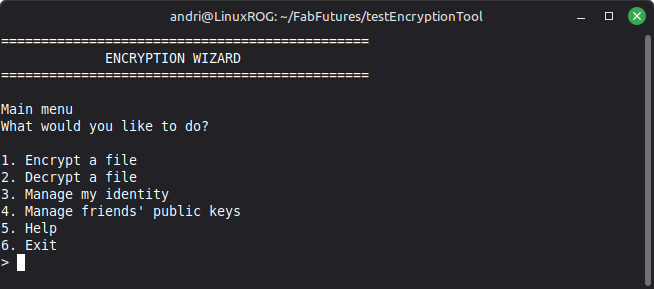
Instead of going for a full-disk encryption in this first spiral I thought it would be nice to make something for non-tech savvy people to encrypt and decrypt files using gpg, for people that don’t know what gpg is. Running ./install_encryptionwizard.sh will install the encryption wizard. The encryption wizard installs shell aliases that let users open the wizard and encrypt or decrypt files using simple commands such as encryptionwizard, encrypt, and decrypt, making it easier and more visual for people not used to gpg.
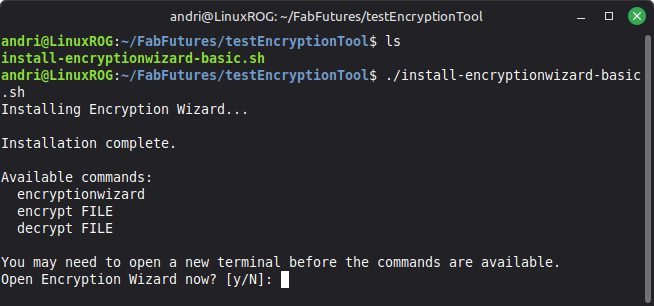
Users can open the wizard by typing encryptionwizard or simply encrypt <FILENAME> or decrypt <FILENAME> to open the wizard which leads you through the encryption/decryption process. Select 1. to encrypt a file.. and so on.
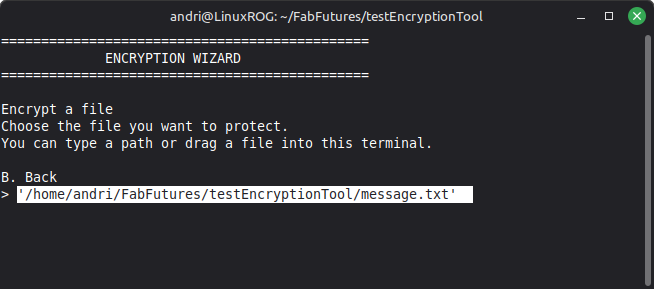
Encrypt a file
If you chose to encrypt a file then you can either hand-type the location of your file or drag and drop the file into the terminal which will auto-fill the location for you. Then hit Enter.
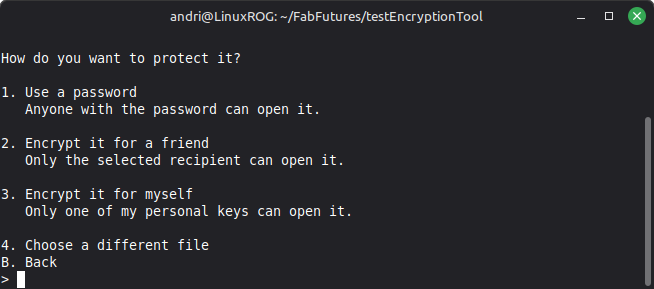
You then see a screen asking how to encrypt, with a simple password, encrypt for a friend using a public key from a friend, or use your own public key and encrypt for yourself.
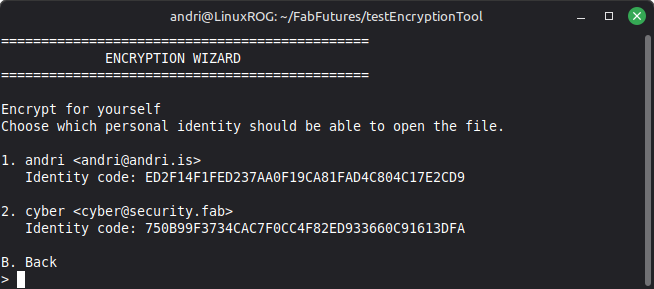
You then see the keys you have available in you gpg keychan, and you pick which identity should be able to decrypt the file.
Then you are asked what the output name of the encrypted file should be.
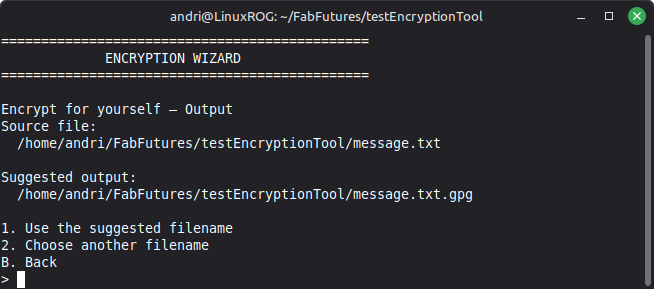
Then you get a final confirmation before encrypting, hit 1 to encrypt then the file gets encrypted and the wizard goes back to the main menu.
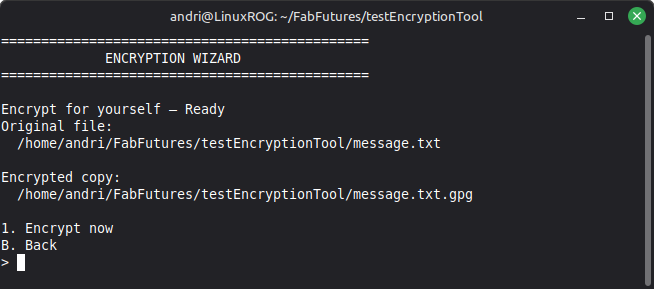
You have successfully created an encrypted file.
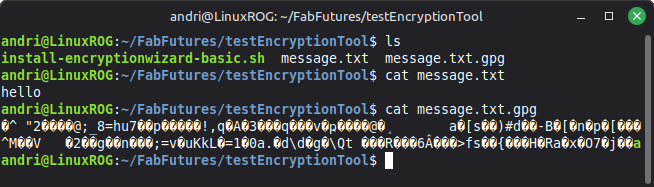
Decrypt a file
To decrypt a file you simply type decrypt <FILENAME> to open the encryption wizard, you get asked what the name of the decrypted file should be.
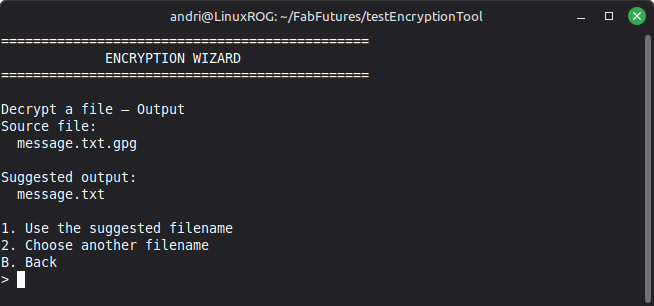
Accept the suggested name or enter a different filename.
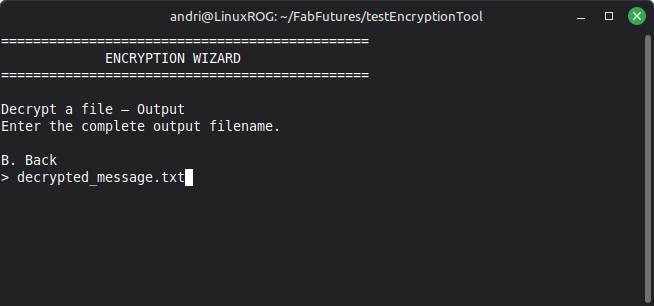
The wizard auto-detects if the encrypted file uses one of you keys or if it is simple password protected.
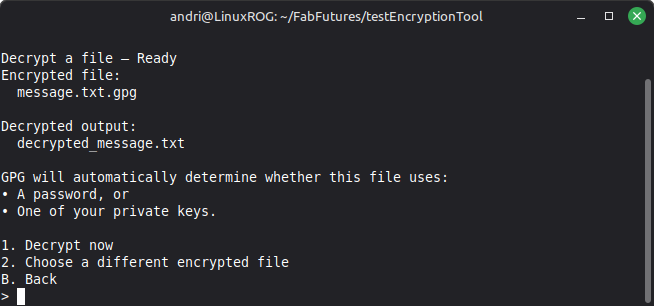
You then get a prompt to enter the password you used when you created your key, and then the file gets decrypted, you can then either decrypt another file or exit.
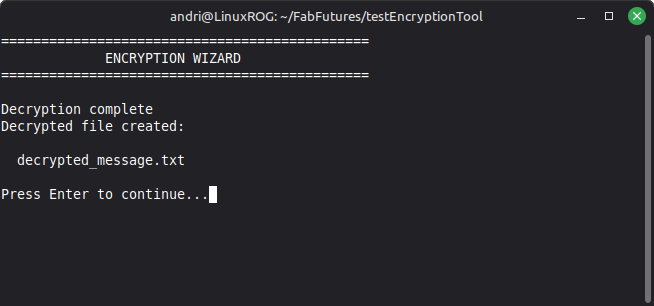
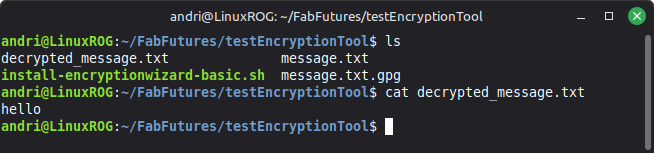
You have now successfully decrypted the file.
✅ ./install_encryptionwizard.sh
install_encryptionwizard.sh
#!/usr/bin/env bash
set -euo pipefail
INSTALL_DIR="${HOME}/.local/bin"
APP_PATH="${INSTALL_DIR}/encryptionwizard"
say() {
printf '%s\n' "$*"
}
die() {
printf 'Error: %s\n' "$*" >&2
exit 1
}
ask_yes_no() {
local prompt="$1"
local answer=""
read -r -p "${prompt} [y/N]: " answer
[[ "$answer" =~ ^([yY]|[yY][eE][sS])$ ]]
}
install_gpg_if_needed() {
if command -v gpg >/dev/null 2>&1; then
return 0
fi
say
say "GnuPG is not installed."
say "Encryption Wizard uses GnuPG to protect and open files."
say
ask_yes_no "Install GnuPG now?" ||
die "GnuPG is required. Install it and run this installer again."
if command -v apt-get >/dev/null 2>&1; then
sudo apt-get update
sudo apt-get install -y gnupg
elif command -v dnf >/dev/null 2>&1; then
sudo dnf install -y gnupg2
elif command -v yum >/dev/null 2>&1; then
sudo yum install -y gnupg2
elif command -v pacman >/dev/null 2>&1; then
sudo pacman -S --needed gnupg
elif command -v zypper >/dev/null 2>&1; then
sudo zypper --non-interactive install gpg2
elif command -v apk >/dev/null 2>&1; then
sudo apk add gnupg
else
die "No supported package manager was found. Install GnuPG manually."
fi
command -v gpg >/dev/null 2>&1 ||
die "GnuPG installation did not finish successfully."
}
ensure_path() {
local rc_file
case "${SHELL:-}" in
*/zsh)
rc_file="${HOME}/.zshrc"
;;
*/bash)
rc_file="${HOME}/.bashrc"
;;
*)
rc_file="${HOME}/.profile"
;;
esac
if [[ ":${PATH}:" != *":${INSTALL_DIR}:"* ]]; then
if ! grep -qsF 'export PATH="$HOME/.local/bin:$PATH"' "$rc_file" 2>/dev/null; then
{
printf '\n'
printf '%s\n' '# Encryption Wizard commands'
printf '%s\n' 'export PATH="$HOME/.local/bin:$PATH"'
} >> "$rc_file"
fi
export PATH="${INSTALL_DIR}:${PATH}"
say "Added ${INSTALL_DIR} to your command path in ${rc_file}."
fi
}
write_application() {
cat > "$APP_PATH" <<'APP_EOF'
#!/usr/bin/env bash
set -u
APP_VERSION="0.1.0"
BACK_CODE=20
die() {
printf 'Error: %s\n' "$*" >&2
exit 1
}
clear_screen() {
if command -v clear >/dev/null 2>&1 && [[ -t 1 ]]; then
clear
else
printf '\033[2J\033[H'
fi
}
header() {
clear_screen
printf '%s\n' "=============================================="
printf '%s\n' " ENCRYPTION WIZARD"
printf '%s\n' "=============================================="
if [[ -n "${1:-}" ]]; then
printf '\n%s\n' "$1"
fi
}
pause_screen() {
printf '\n'
read -r -p "Press Enter to continue..." _
}
ask_yes_no() {
local prompt="$1"
local answer=""
read -r -p "${prompt} [y/N]: " answer
[[ "$answer" =~ ^([yY]|[yY][eE][sS])$ ]]
}
strip_quotes() {
local value="$1"
value=${value#\"}
value=${value%\"}
value=${value#\'}
value=${value%\'}
printf '%s' "$value"
}
prompt_for_file() {
local title="$1"
local message="$2"
local value=""
while true; do
header "$title"
printf '%s\n' "$message"
printf '%s\n' "You can type a path or drag a file into this terminal."
printf '\n%s\n' "B. Back"
read -r -e -p "> " value
if [[ "$value" =~ ^[Bb]$ ]]; then
return "$BACK_CODE"
fi
value=$(strip_quotes "$value")
if [[ -f "$value" ]]; then
SELECTED_FILE="$value"
return 0
fi
printf '\nFile not found:\n %s\n' "$value"
pause_screen
done
}
prompt_for_output() {
local title="$1"
local source_file="$2"
local suggested_output="$3"
local choice=""
local output=""
while true; do
header "$title"
printf 'Source file:\n %s\n\n' "$source_file"
printf 'Suggested output:\n %s\n\n' "$suggested_output"
printf '%s\n' "1. Use the suggested filename"
printf '%s\n' "2. Choose another filename"
printf '%s\n' "B. Back"
read -r -p "> " choice
case "$choice" in
1)
output="$suggested_output"
;;
2)
header "$title"
printf '%s\n' "Enter the complete output filename."
printf '\n%s\n' "B. Back"
read -r -e -p "> " output
if [[ "$output" =~ ^[Bb]$ ]]; then
continue
fi
output=$(strip_quotes "$output")
if [[ -z "$output" ]]; then
continue
fi
;;
[Bb])
return "$BACK_CODE"
;;
*)
continue
;;
esac
if [[ -e "$output" ]]; then
header "$title"
printf 'This file already exists:\n %s\n\n' "$output"
if ! ask_yes_no "Replace it?"; then
continue
fi
fi
OUTPUT_FILE="$output"
return 0
done
}
list_keys() {
local key_type="$1"
if [[ "$key_type" == "secret" ]]; then
gpg --batch --with-colons --fingerprint --list-secret-keys 2>/dev/null
else
gpg --batch --with-colons --fingerprint --list-keys 2>/dev/null
fi |
awk -F: '
$1 == "sec" || $1 == "pub" {
waiting_for_fingerprint = 1
fingerprint = ""
uid = ""
}
waiting_for_fingerprint && $1 == "fpr" {
fingerprint = $10
waiting_for_fingerprint = 0
}
fingerprint != "" && uid == "" && $1 == "uid" {
uid = $10
gsub(/\\x3a/, ":", uid)
print fingerprint "\t" uid
fingerprint = ""
uid = ""
}
'
}
choose_key() {
local key_type="$1"
local title="$2"
local explanation="$3"
local key_data=""
local count=0
local selection=""
local selected_line=""
local number=1
while true; do
key_data=$(list_keys "$key_type")
header "$title"
printf '%s\n\n' "$explanation"
if [[ -z "$key_data" ]]; then
printf '%s\n' "No suitable keys were found."
printf '\n%s\n' "B. Back"
read -r -p "> " selection
return "$BACK_CODE"
fi
number=1
while IFS=$'\t' read -r fingerprint uid; do
printf '%d. %s\n' "$number" "$uid"
printf ' Identity code: %s\n\n' "$fingerprint"
((number++))
done <<< "$key_data"
printf '%s\n' "B. Back"
count=$(printf '%s\n' "$key_data" | wc -l)
read -r -p "> " selection
if [[ "$selection" =~ ^[Bb]$ ]]; then
return "$BACK_CODE"
fi
if [[ "$selection" =~ ^[0-9]+$ ]] &&
(( selection >= 1 && selection <= count )); then
selected_line=$(printf '%s\n' "$key_data" | sed -n "${selection}p")
SELECTED_FINGERPRINT=${selected_line%%$'\t'*}
SELECTED_UID=${selected_line#*$'\t'}
return 0
fi
done
}
create_identity() {
local name=""
local email=""
local user_id=""
local choice=""
while true; do
header "Create your personal identity — Step 1 of 3"
printf '%s\n' "Enter the name your friends will recognize."
printf '\n%s\n' "B. Back"
read -r -p "> " name
if [[ "$name" =~ ^[Bb]$ ]]; then
return "$BACK_CODE"
fi
if [[ -z "$name" ]]; then
continue
fi
while true; do
header "Create your personal identity — Step 2 of 3"
printf '%s\n' "Enter your email address."
printf '\n%s\n' "B. Back"
read -r -p "> " email
if [[ "$email" =~ ^[Bb]$ ]]; then
break
fi
if [[ "$email" != *"@"* ]]; then
printf '\nThat does not look like an email address.\n'
pause_screen
continue
fi
user_id="${name} <${email}>"
header "Create your personal identity — Step 3 of 3"
printf 'Your identity will be:\n\n %s\n\n' "$user_id"
cat <<'TEXT'
GPG will ask you to protect your private key with a password.
Your private key:
• Lets you open files sent specifically to you.
• Must never be shared.
• Cannot be recovered if both the key and its backup are lost.
1. Create my identity
B. Back
TEXT
read -r -p "> " choice
case "$choice" in
1)
if gpg --quick-generate-key "$user_id" default default 2y; then
header "Identity created"
printf 'Your personal identity is ready:\n\n %s\n\n' "$user_id"
printf '%s\n' "It is set to expire in two years."
pause_screen
return 0
fi
header "Identity creation failed"
printf '%s\n' "GPG could not create the identity."
pause_screen
return 1
;;
[Bb])
continue
;;
esac
done
done
}
ensure_personal_key() {
local choice=""
if [[ -n "$(list_keys secret)" ]]; then
return 0
fi
while true; do
header "Create your personal identity"
cat <<'TEXT'
You do not have a personal encryption identity yet.
You need one to:
• Receive files encrypted specifically for you.
• Encrypt files so only you can open them.
• Share a public key with friends.
1. Create my identity now
2. Explain this
B. Back
TEXT
read -r -p "> " choice
case "$choice" in
1)
create_identity
if [[ -n "$(list_keys secret)" ]]; then
return 0
fi
;;
2)
header "About personal encryption identities"
cat <<'TEXT'
GPG creates two connected keys.
PUBLIC KEY
You may share this with friends. They use it to encrypt files for you.
PRIVATE KEY
This stays on your computer. It opens files encrypted to your public key.
A private key is usually protected by a password. Never send your
private key or its password to anyone.
TEXT
pause_screen
;;
[Bb])
return "$BACK_CODE"
;;
esac
done
}
confirm_friend_key() {
local choice=""
while true; do
header "Confirm your friend's identity"
printf 'This key claims to belong to:\n\n %s\n\n' "$SELECTED_UID"
printf 'Identity code:\n %s\n\n' "$SELECTED_FINGERPRINT"
cat <<'TEXT'
For important files, compare this complete identity code with your
friend by phone, in person, or through another trusted method.
1. I checked the identity code
2. Use it without checking this time
B. Back
TEXT
read -r -p "> " choice
case "$choice" in
1)
FRIEND_KEY_VERIFIED="yes"
return 0
;;
2)
FRIEND_KEY_VERIFIED="no"
return 0
;;
[Bb])
return "$BACK_CODE"
;;
esac
done
}
import_key_from_file() {
local key_file=""
prompt_for_file \
"Add a friend's public key" \
"Choose the public-key file your friend sent you." ||
return "$?"
key_file="$SELECTED_FILE"
header "Review public key"
if ! gpg --show-keys --fingerprint -- "$key_file"; then
printf '\nThis file does not contain a readable public key.\n'
pause_screen
return 1
fi
printf '\n'
if ! ask_yes_no "Import this public key?"; then
return "$BACK_CODE"
fi
if ! gpg --import -- "$key_file"; then
header "Import failed"
printf '%s\n' "GPG could not import the public key."
pause_screen
return 1
fi
choose_key \
"public" \
"Choose the imported key" \
"Choose the public key you just imported." ||
return "$?"
confirm_friend_key
}
import_pasted_key() {
local temporary_file=""
temporary_file=$(mktemp) || return 1
trap 'rm -f "$temporary_file"' RETURN
header "Paste a friend's public key"
cat <<'TEXT'
Paste the complete public-key text, including:
-----BEGIN PGP PUBLIC KEY BLOCK-----
...
-----END PGP PUBLIC KEY BLOCK-----
After the END line:
1. Press Enter.
2. Press Ctrl-D.
TEXT
printf '\n'
cat > "$temporary_file"
header "Review public key"
if ! gpg --show-keys --fingerprint -- "$temporary_file"; then
printf '\nThe pasted text is not a readable public key.\n'
pause_screen
return 1
fi
printf '\n'
if ! ask_yes_no "Import this public key?"; then
return "$BACK_CODE"
fi
if ! gpg --import -- "$temporary_file"; then
header "Import failed"
printf '%s\n' "GPG could not import the public key."
pause_screen
return 1
fi
choose_key \
"public" \
"Choose the imported key" \
"Choose the public key you just imported." ||
return "$?"
confirm_friend_key
}
choose_friend() {
local choice=""
while true; do
header "Choose a friend"
cat <<'TEXT'
1. Choose a public key already saved
2. Import a public-key file
3. Paste a public key
B. Back
TEXT
read -r -p "> " choice
case "$choice" in
1)
if choose_key \
"public" \
"Choose a saved public key" \
"Choose the person who should be able to open the file."; then
confirm_friend_key && return 0
fi
;;
2)
import_key_from_file && return 0
;;
3)
import_pasted_key && return 0
;;
[Bb])
return "$BACK_CODE"
;;
esac
done
}
encrypt_with_password() {
local input_file="$1"
local choice=""
prompt_for_output \
"Password encryption — Output" \
"$input_file" \
"${input_file}.gpg" ||
return "$?"
header "Password encryption — Ready"
cat <<TEXT
Original file:
$input_file
Encrypted copy:
$OUTPUT_FILE
GPG will ask you to create and confirm a password.
Important:
• Anyone with the password can open the encrypted file.
• A forgotten password cannot be recovered.
• Send the password separately from the encrypted file.
• The original file will not be deleted.
1. Encrypt now
B. Back
TEXT
read -r -p "> " choice
if [[ "$choice" =~ ^[Bb]$ ]]; then
return "$BACK_CODE"
fi
if [[ "$choice" != "1" ]]; then
return 1
fi
if gpg --yes --output "$OUTPUT_FILE" --symmetric -- "$input_file"; then
header "Encryption complete"
printf 'Encrypted file created:\n\n %s\n\n' "$OUTPUT_FILE"
printf '%s\n' "Keep or send this encrypted file."
printf '%s\n' "Share its password separately."
else
header "Encryption failed"
printf '%s\n' "GPG could not encrypt the file."
fi
pause_screen
}
encrypt_for_friend() {
local input_file="$1"
local friend_fingerprint=""
local friend_name=""
local self_choice=""
local choice=""
local -a recipients=()
choose_friend || return "$?"
friend_fingerprint="$SELECTED_FINGERPRINT"
friend_name="$SELECTED_UID"
recipients=(--recipient "$friend_fingerprint")
while true; do
header "Keep your own readable copy?"
printf 'Recipient:\n %s\n\n' "$friend_name"
cat <<'TEXT'
Would you also like to encrypt the file to one of your own keys?
1. Yes — I want to be able to open my copy
2. No — only my friend should be able to open it
B. Back
TEXT
read -r -p "> " self_choice
case "$self_choice" in
1)
if ! ensure_personal_key; then
continue
fi
if ! choose_key \
"secret" \
"Choose your personal identity" \
"Choose the personal key that should also open this file."; then
continue
fi
recipients+=(--recipient "$SELECTED_FINGERPRINT")
break
;;
2)
break
;;
[Bb])
return "$BACK_CODE"
;;
esac
done
prompt_for_output \
"Encrypt for a friend — Output" \
"$input_file" \
"${input_file}.gpg" ||
return "$?"
header "Encrypt for a friend — Ready"
printf 'Original file:\n %s\n\n' "$input_file"
printf 'Recipient:\n %s\n\n' "$friend_name"
printf 'Encrypted copy:\n %s\n\n' "$OUTPUT_FILE"
if [[ "${FRIEND_KEY_VERIFIED:-no}" == "no" ]]; then
printf '%s\n\n' "WARNING: You did not verify your friend's identity code."
fi
printf '%s\n' "1. Encrypt now"
printf '%s\n' "B. Back"
read -r -p "> " choice
if [[ "$choice" =~ ^[Bb]$ ]]; then
return "$BACK_CODE"
fi
if [[ "$choice" != "1" ]]; then
return 1
fi
if gpg \
--yes \
--trust-model always \
--output "$OUTPUT_FILE" \
--encrypt \
"${recipients[@]}" \
-- "$input_file"; then
header "Encryption complete"
printf 'Encrypted file created:\n\n %s\n\n' "$OUTPUT_FILE"
printf 'Send this file to:\n %s\n' "$friend_name"
else
header "Encryption failed"
printf '%s\n' "GPG could not encrypt the file."
fi
pause_screen
}
encrypt_for_self() {
local input_file="$1"
local fingerprint=""
local choice=""
ensure_personal_key || return "$?"
choose_key \
"secret" \
"Encrypt for yourself" \
"Choose which personal identity should be able to open the file." ||
return "$?"
fingerprint="$SELECTED_FINGERPRINT"
prompt_for_output \
"Encrypt for yourself — Output" \
"$input_file" \
"${input_file}.gpg" ||
return "$?"
header "Encrypt for yourself — Ready"
printf 'Original file:\n %s\n\n' "$input_file"
printf 'Encrypted copy:\n %s\n\n' "$OUTPUT_FILE"
printf '%s\n' "1. Encrypt now"
printf '%s\n' "B. Back"
read -r -p "> " choice
if [[ "$choice" =~ ^[Bb]$ ]]; then
return "$BACK_CODE"
fi
if [[ "$choice" != "1" ]]; then
return 1
fi
if gpg \
--yes \
--output "$OUTPUT_FILE" \
--encrypt \
--recipient "$fingerprint" \
-- "$input_file"; then
header "Encryption complete"
printf 'Encrypted file created:\n\n %s\n' "$OUTPUT_FILE"
else
header "Encryption failed"
printf '%s\n' "GPG could not encrypt the file."
fi
pause_screen
}
encrypt_workflow() {
local input_file="${1:-}"
local choice=""
while true; do
if [[ -z "$input_file" ]]; then
if ! prompt_for_file \
"Encrypt a file" \
"Choose the file you want to protect."; then
return 0
fi
input_file="$SELECTED_FILE"
fi
header "Encrypt a file"
printf 'Selected file:\n %s\n\n' "$input_file"
cat <<'TEXT'
How do you want to protect it?
1. Use a password
Anyone with the password can open it.
2. Encrypt it for a friend
Only the selected recipient can open it.
3. Encrypt it for myself
Only one of my personal keys can open it.
4. Choose a different file
B. Back
TEXT
read -r -p "> " choice
case "$choice" in
1)
encrypt_with_password "$input_file"
;;
2)
encrypt_for_friend "$input_file"
;;
3)
encrypt_for_self "$input_file"
;;
4)
input_file=""
;;
[Bb])
return 0
;;
esac
done
}
decrypt_workflow() {
local input_file="${1:-}"
local suggested_output=""
local choice=""
while true; do
if [[ -z "$input_file" ]]; then
if ! prompt_for_file \
"Decrypt a file" \
"Choose the encrypted file you want to open."; then
return 0
fi
input_file="$SELECTED_FILE"
fi
case "$input_file" in
*.gpg)
suggested_output=${input_file%.gpg}
;;
*.pgp)
suggested_output=${input_file%.pgp}
;;
*.asc)
suggested_output=${input_file%.asc}
;;
*)
suggested_output="${input_file}.decrypted"
;;
esac
if ! prompt_for_output \
"Decrypt a file — Output" \
"$input_file" \
"$suggested_output"; then
return 0
fi
header "Decrypt a file — Ready"
printf 'Encrypted file:\n %s\n\n' "$input_file"
printf 'Decrypted output:\n %s\n\n' "$OUTPUT_FILE"
cat <<'TEXT'
GPG will automatically determine whether this file uses:
• A password, or
• One of your private keys.
1. Decrypt now
2. Choose a different encrypted file
B. Back
TEXT
read -r -p "> " choice
case "$choice" in
1)
if gpg --yes --output "$OUTPUT_FILE" --decrypt -- "$input_file"; then
header "Decryption complete"
printf 'Decrypted file created:\n\n %s\n' "$OUTPUT_FILE"
else
header "Decryption failed"
cat <<'TEXT'
The password may be wrong, the required private key may be missing,
or the encrypted file may be damaged.
TEXT
fi
pause_screen
;;
2)
input_file=""
;;
[Bb])
return 0
;;
esac
done
}
export_public_key() {
local fingerprint=""
local uid=""
local safe_name=""
local output_file=""
local choice=""
ensure_personal_key || return "$?"
choose_key \
"secret" \
"Export your public key" \
"Choose the identity whose public key you want to share." ||
return "$?"
fingerprint="$SELECTED_FINGERPRINT"
uid="$SELECTED_UID"
safe_name=$(printf '%s' "$uid" | tr ' /<>' '____' | tr -cd '[:alnum:]_.@-')
output_file="${HOME}/${safe_name}.public-key.asc"
header "Export your public key"
printf 'Identity:\n %s\n\n' "$uid"
printf 'Public-key file:\n %s\n\n' "$output_file"
printf '%s\n' "1. Export public key"
printf '%s\n' "B. Back"
read -r -p "> " choice
if [[ "$choice" != "1" ]]; then
return 0
fi
if gpg \
--yes \
--armor \
--output "$output_file" \
--export "$fingerprint"; then
header "Public key exported"
printf 'Share this file with friends:\n\n %s\n\n' "$output_file"
printf '%s\n' "This is your PUBLIC key and is safe to share."
printf '%s\n' "Never share your private key or its password."
else
header "Export failed"
printf '%s\n' "GPG could not export the public key."
fi
pause_screen
}
identity_menu() {
local choice=""
while true; do
header "My identity"
cat <<'TEXT'
1. Create a personal identity
2. View my personal identities
3. Export my public key for friends
B. Back
TEXT
read -r -p "> " choice
case "$choice" in
1)
create_identity
;;
2)
header "My personal identities"
gpg --list-secret-keys --fingerprint
pause_screen
;;
3)
export_public_key
;;
[Bb])
return 0
;;
esac
done
}
friends_menu() {
local choice=""
while true; do
header "Friends and public keys"
cat <<'TEXT'
1. Import a public-key file
2. Paste a public key
3. View saved public keys
B. Back
TEXT
read -r -p "> " choice
case "$choice" in
1)
import_key_from_file
;;
2)
import_pasted_key
;;
3)
header "Saved public keys"
gpg --list-keys --fingerprint
pause_screen
;;
[Bb])
return 0
;;
esac
done
}
help_screen() {
header "Help"
cat <<'TEXT'
QUICK COMMANDS
encrypt FILE
Protect a file with a password or public key.
decrypt FILE
Open a password-protected or public-key-encrypted file.
encryptionwizard
Open the complete menu.
IMPORTANT SAFETY NOTES
• Encryption does not delete the original file.
• Send passwords separately from encrypted files.
• Share public keys, never private keys.
• Compare a friend's complete identity code before trusting their key.
• Keep backups of important private keys in a secure location.
TEXT
pause_screen
}
main_menu() {
local choice=""
while true; do
header "Main menu"
cat <<'TEXT'
What would you like to do?
1. Encrypt a file
2. Decrypt a file
3. Manage my identity
4. Manage friends' public keys
5. Help
6. Exit
TEXT
read -r -p "> " choice
case "$choice" in
1)
encrypt_workflow
;;
2)
decrypt_workflow
;;
3)
identity_menu
;;
4)
friends_menu
;;
5)
help_screen
;;
6)
clear_screen
exit 0
;;
esac
done
}
main() {
local invoked_name=""
command -v gpg >/dev/null 2>&1 ||
die "GnuPG is not installed. Run the installer again."
invoked_name=$(basename "$0")
case "$invoked_name" in
encrypt)
if [[ $# -gt 1 ]]; then
die "Usage: encrypt [FILE]"
fi
if [[ $# -eq 1 && ! -f "$1" ]]; then
die "File not found: $1"
fi
encrypt_workflow "${1:-}"
;;
decrypt)
if [[ $# -gt 1 ]]; then
die "Usage: decrypt [FILE]"
fi
if [[ $# -eq 1 && ! -f "$1" ]]; then
die "File not found: $1"
fi
decrypt_workflow "${1:-}"
;;
*)
case "${1:-}" in
--version)
printf 'Encryption Wizard %s\n' "$APP_VERSION"
;;
--help)
help_screen
;;
*)
main_menu
;;
esac
;;
esac
}
main "$@"
APP_EOF
}
main() {
say "Installing Encryption Wizard..."
install_gpg_if_needed
mkdir -p "$INSTALL_DIR"
write_application
chmod +x "$APP_PATH"
ln -sf "encryptionwizard" "${INSTALL_DIR}/encrypt"
ln -sf "encryptionwizard" "${INSTALL_DIR}/decrypt"
ensure_path
say
say "Installation complete."
say
say "Available commands:"
say " encryptionwizard"
say " encrypt FILE"
say " decrypt FILE"
say
say "You may need to open a new terminal before the commands are available."
if [[ -t 0 ]] && ask_yes_no "Open Encryption Wizard now?"; then
exec "$APP_PATH"
fi
}
main "$@"
✅ CPU Velnerabilities
CPU Vulnerabilities
- Add a script that reports CPU vulnerabilities and mitigation status.
This was achieved in the analysis part with the check_cpu.sh script
✅ Automatic Updates
Automatic Updates
- Turn on automatic security updates.
In the Hardening plan + testing section I show how I ran the script and restored the changes to the way things were before running the hardening script.
enable_automatic_security_updates.sh
enable_automatic_security_updates.sh
#!/usr/bin/env bash

set -Eeuo pipefail

if [[ -z "${HARDENING_LIB:-}" || ! -r "$HARDENING_LIB" ]]; then
    echo "[ERROR] Shared hardening library is unavailable." >&2
    exit 1
fi

# shellcheck disable=SC1090
source "$HARDENING_LIB"

readonly AUTO_CONFIG="/etc/apt/apt.conf.d/20auto-upgrades"
readonly POLICY_CONFIG="/etc/apt/apt.conf.d/50unattended-upgrades"

readonly APT_DAILY_TIMER="apt-daily.timer"
readonly APT_UPGRADE_TIMER="apt-daily-upgrade.timer"

wait_for_apt_locks() {
    local attempt
    local lock_file
    local locked

    echo
    echo "Checking package-manager availability"
    echo "---------------------------------"

    if ! command -v fuser >/dev/null 2>&1; then
        hardening_warn \
            "fuser is unavailable; APT will perform its own lock checks."
        return
    fi

    for ((attempt = 1; attempt <= 60; attempt++)); do
        locked=0

        for lock_file in \
            /var/lib/dpkg/lock-frontend \
            /var/lib/dpkg/lock \
            /var/lib/apt/lists/lock \
            /var/cache/apt/archives/lock
        do
            if [[ -e "$lock_file" ]] &&
               fuser "$lock_file" >/dev/null 2>&1; then
                locked=1
                break
            fi
        done

        if (( locked == 0 )); then
            hardening_pass "APT and dpkg locks are available."
            return
        fi

        if (( attempt == 1 )); then
            hardening_info \
                "Another package-management process is running."
            hardening_info "Waiting for it to finish."
        fi

        sleep 2
    done

    hardening_fatal \
        "APT remained locked after approximately two minutes."
}

install_unattended_upgrades() {
    echo
    echo "Installing unattended-upgrades"
    echo "---------------------------------"

    export DEBIAN_FRONTEND=noninteractive
    hardening_mark_changes_started

    if hardening_package_installed "unattended-upgrades"; then
        hardening_pass "unattended-upgrades is already installed."
        return
    fi

    apt-get update

    apt-get install \
        --yes \
        --no-install-recommends \
        unattended-upgrades

    if hardening_package_installed "unattended-upgrades"; then
        hardening_pass "unattended-upgrades was installed."
    else
        hardening_fatal \
            "unattended-upgrades could not be installed."
    fi
}

configure_automatic_updates() {
    local temporary_file

    echo
    echo "Configuring automatic updates"
    echo "---------------------------------"

    hardening_mark_changes_started

    if [[ -L "$AUTO_CONFIG" ]]; then
        hardening_fatal \
            "Refusing to replace symbolic link: $AUTO_CONFIG"
    fi

    temporary_file="$(
        mktemp "/etc/apt/apt.conf.d/.20auto-upgrades.XXXXXX"
    )"

    cat >"$temporary_file" <<'EOF'
// Managed by enable_automatic_security_updates.sh.
//
// Numeric values are intervals in days.

APT::Periodic::Enable "1";
APT::Periodic::Update-Package-Lists "1";
APT::Periodic::Download-Upgradeable-Packages "1";
APT::Periodic::Unattended-Upgrade "1";
APT::Periodic::AutocleanInterval "7";
EOF

    chown root:root "$temporary_file"
    chmod 0644 "$temporary_file"

    mv -fT -- "$temporary_file" "$AUTO_CONFIG"

    hardening_pass "Configured $AUTO_CONFIG."

    if [[ ! -f "$POLICY_CONFIG" ]]; then
        hardening_fatal \
            "Missing unattended-upgrades policy: $POLICY_CONFIG"
    fi

    hardening_info \
        "Retained the distribution-provided update policy."
    hardening_info "Automatic rebooting was not enabled."
}

enable_apt_timers() {
    echo
    echo "Enabling APT timers"
    echo "---------------------------------"

    hardening_mark_changes_started

    systemctl daemon-reload
    systemctl enable --now "$APT_DAILY_TIMER"
    systemctl enable --now "$APT_UPGRADE_TIMER"

    if systemctl is-enabled --quiet "$APT_DAILY_TIMER"; then
        hardening_pass "$APT_DAILY_TIMER is enabled."
    else
        hardening_fail "$APT_DAILY_TIMER is not enabled."
    fi

    if systemctl is-active --quiet "$APT_DAILY_TIMER"; then
        hardening_pass "$APT_DAILY_TIMER is active."
    else
        hardening_fail "$APT_DAILY_TIMER is not active."
    fi

    if systemctl is-enabled --quiet "$APT_UPGRADE_TIMER"; then
        hardening_pass "$APT_UPGRADE_TIMER is enabled."
    else
        hardening_fail "$APT_UPGRADE_TIMER is not enabled."
    fi

    if systemctl is-active --quiet "$APT_UPGRADE_TIMER"; then
        hardening_pass "$APT_UPGRADE_TIMER is active."
    else
        hardening_fail "$APT_UPGRADE_TIMER is not active."
    fi
}

verify_configuration() {
    local apt_dump
    local dry_run_output
    local dry_run_status

    echo
    echo "Verifying configuration"
    echo "---------------------------------"

    apt_dump="$(apt-config dump)"

    if grep -Fq \
        'APT::Periodic::Enable "1";' \
        <<<"$apt_dump"; then
        hardening_pass "APT periodic processing is enabled."
    else
        hardening_fail "APT periodic processing is not enabled."
    fi

    if grep -Fq \
        'APT::Periodic::Update-Package-Lists "1";' \
        <<<"$apt_dump"; then
        hardening_pass "Daily package-list updates are enabled."
    else
        hardening_fail \
            "Daily package-list updates are not enabled."
    fi

    if grep -Fq \
        'APT::Periodic::Unattended-Upgrade "1";' \
        <<<"$apt_dump"; then
        hardening_pass "Daily unattended upgrades are enabled."
    else
        hardening_fail \
            "Daily unattended upgrades are not enabled."
    fi

    set +e
    dry_run_output="$(
        unattended-upgrade --dry-run --debug 2>&1
    )"
    dry_run_status=$?
    set -e

    if (( dry_run_status == 0 )); then
        hardening_pass \
            "unattended-upgrades completed a successful dry run."
    else
        hardening_fail \
            "unattended-upgrades dry run failed with status ${dry_run_status}."

        printf '%s\n' "$dry_run_output"
    fi
}

main() {
    trap \
        'hardening_handle_error "$?" "$LINENO"' \
        ERR

    hardening_begin \
        "automatic-security-updates" \
        "Enable Automatic Security Updates" \
        "enable"

    hardening_require_commands \
        apt-get apt-config dpkg-query systemctl mktemp

    echo "WARNING"
    echo "-----------------------------------------"
    echo "This action will:"
    echo "  - Create a root-only restore point."
    echo "  - Install unattended-upgrades if needed."
    echo "  - Enable automatic security updates."
    echo "  - Enable the APT update timers."
    echo
    echo "It will not:"
    echo "  - Create an analysis report."
    echo "  - Enable automatic rebooting."
    echo

    hardening_confirm \
        "Are you sure you want to enable automatic security updates?"

    echo
    echo "Creating restore point"
    echo "---------------------------------"

    hardening_create_restore_point
    hardening_backup_file "$AUTO_CONFIG"
    hardening_backup_file "$POLICY_CONFIG"
    hardening_record_package "unattended-upgrades"
    hardening_record_unit "$APT_DAILY_TIMER"
    hardening_record_unit "$APT_UPGRADE_TIMER"
    hardening_finalize_restore_point

    wait_for_apt_locks
    install_unattended_upgrades
    configure_automatic_updates
    enable_apt_timers
    verify_configuration

    hardening_print_summary

    if (( FAIL_COUNT > 0 )); then
        echo "Overall status: AUTOMATIC UPDATES NOT FULLY ENABLED"
        exit 1
    fi

    if (( WARN_COUNT > 0 )); then
        echo "Overall status: ENABLED WITH WARNINGS"
        exit 0
    fi

    echo "Overall status: AUTOMATIC SECURITY UPDATES ENABLED"
}

main "$@"
User Accounts
User Accounts
- Review user accounts and sudo privileges to ensure they follow the principle of least privilege.
- Not implemented yet.
✅ AppArmor
AppArmor
- Review the default AppArmor configuration and improve it where appropriate.
-
The
check_apparmor.shscript analysis report tells me thatAppArmoris installed, enabled and active. -
There are 109 enabled profiles.
So, no hardening was deemed necessary at this point.
✅ Boot Security
Boot Security
- Verify whether Secure Boot is enabled and document its status.
The check_boot.sh script from the analysis phase gives a summary of the boot status:
Summary
---------------------------------
Boot mode:              UEFI
EFI variables:          yes
Secure Boot available:  yes
Secure Boot state:      disabled
Kernel lockdown:        [none] integrity confidentiality
✅ Human Security
Human Security
-
Create a security health report.
-
Turn on automatic updates.
-
Activate the firewall.
-
Make encryption easy to use.
-
The
check_health.shmade in the analysis phase creates a very human understandable summary report to indicate the status of the system -
The
enable_automatic_security_updates.shturns on automatic updates. -
The
configure_firewall.shscript makes it easy to intall ufw if not already installed and activate it. -
The
install_encryptionwizard.shscript makes aliases that open an encryption wizard so users that dont know gpg can easily and visually encrypt and decrypt files.
The actions taken to increase human security have mostly been to make it easier for non-tech savvy people to learn about the cyber security health of the system and make it easier to configure the system to make it a bit more secure.