Analyze
My idea is to analyze a clean installation of the latest stable release of Linux Mint running with the default settings inside a virtual machine. No additional software or configuration changes will be made before the analysis. The project will follow a spiral development process.
✅ Downloading and setting up VM
Downloading and setting up VM
I started by downloading the latest stable release of Linux mint, and checking the hash to make sure the downloaded file was legit by running sha256sum linuxmint-22.3-cinnamon-64bit.iso which printed a081ab202cfda17f6924128dbd2de8b63518ac0531bcfe3f1a1b88097c459bd4 linuxmint-22.3-cinnamon-64bit.iso which was the same hash provided on the website. So, the first security check was successful. Next is getting the new Linux Mint installed as a virtual machine on VirtualBox.
I opened VirtualBox and started creating the VM.
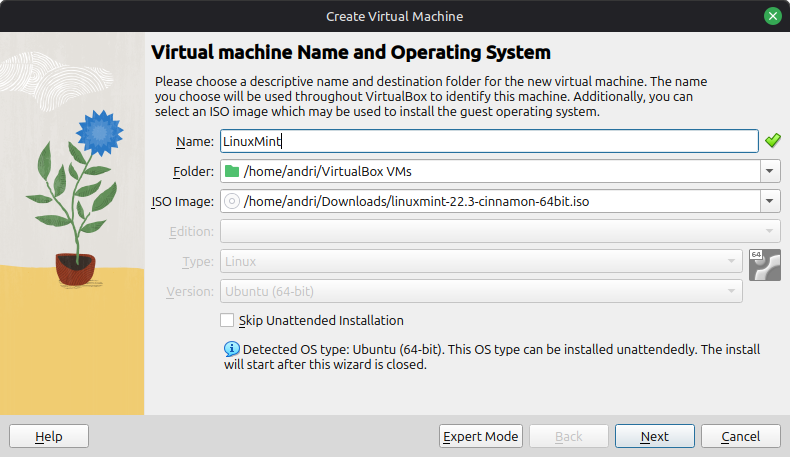
During the creation process I was asked to create a user and password and chose something basic and not secure.
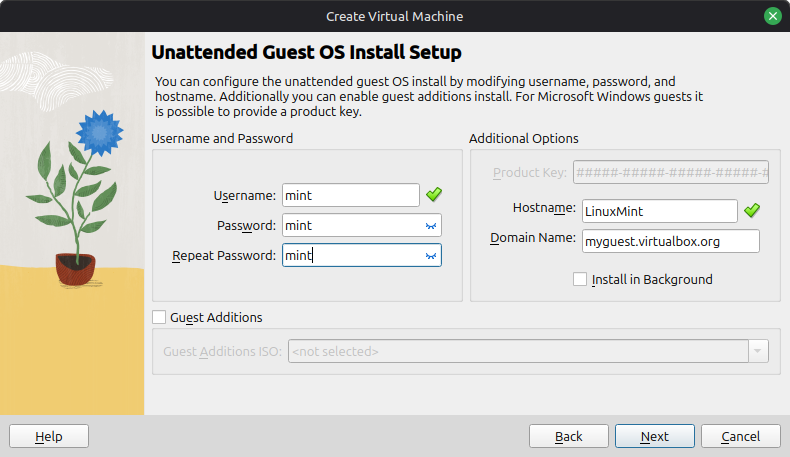
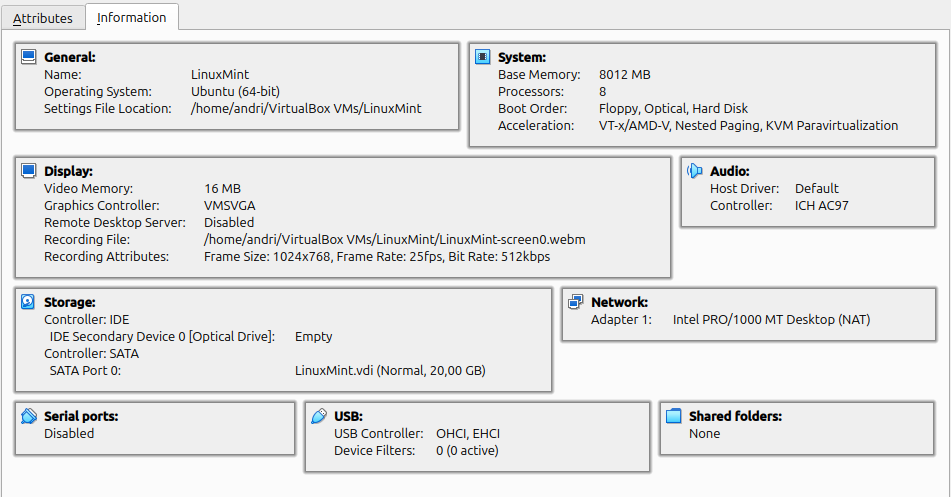
Here is the summary report from the VM creation.
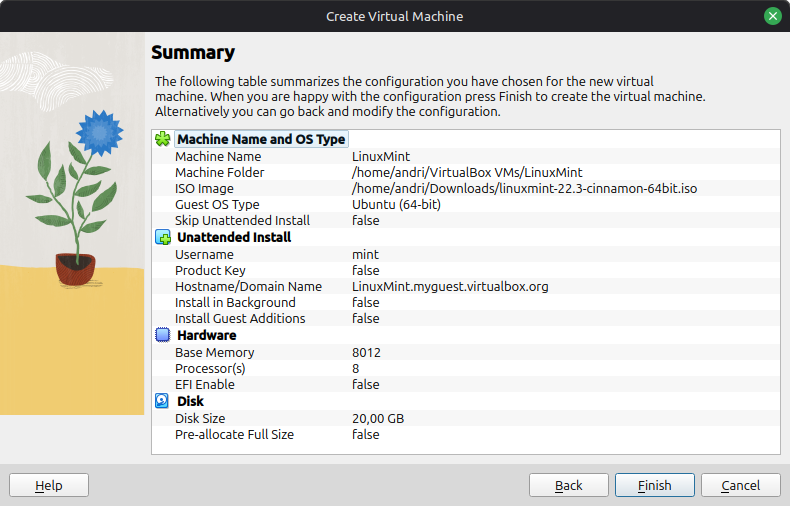
I then started the Mint virtual machine and went straight to the Desktop where I noticed the Intall Linux Mint icon. I double clicked the icon to start the installation process. During the installation I did not change any defaults, I just clicked next at each step. I was asked to create a user name and password, I tried to have the password field empty but that was not allowed.
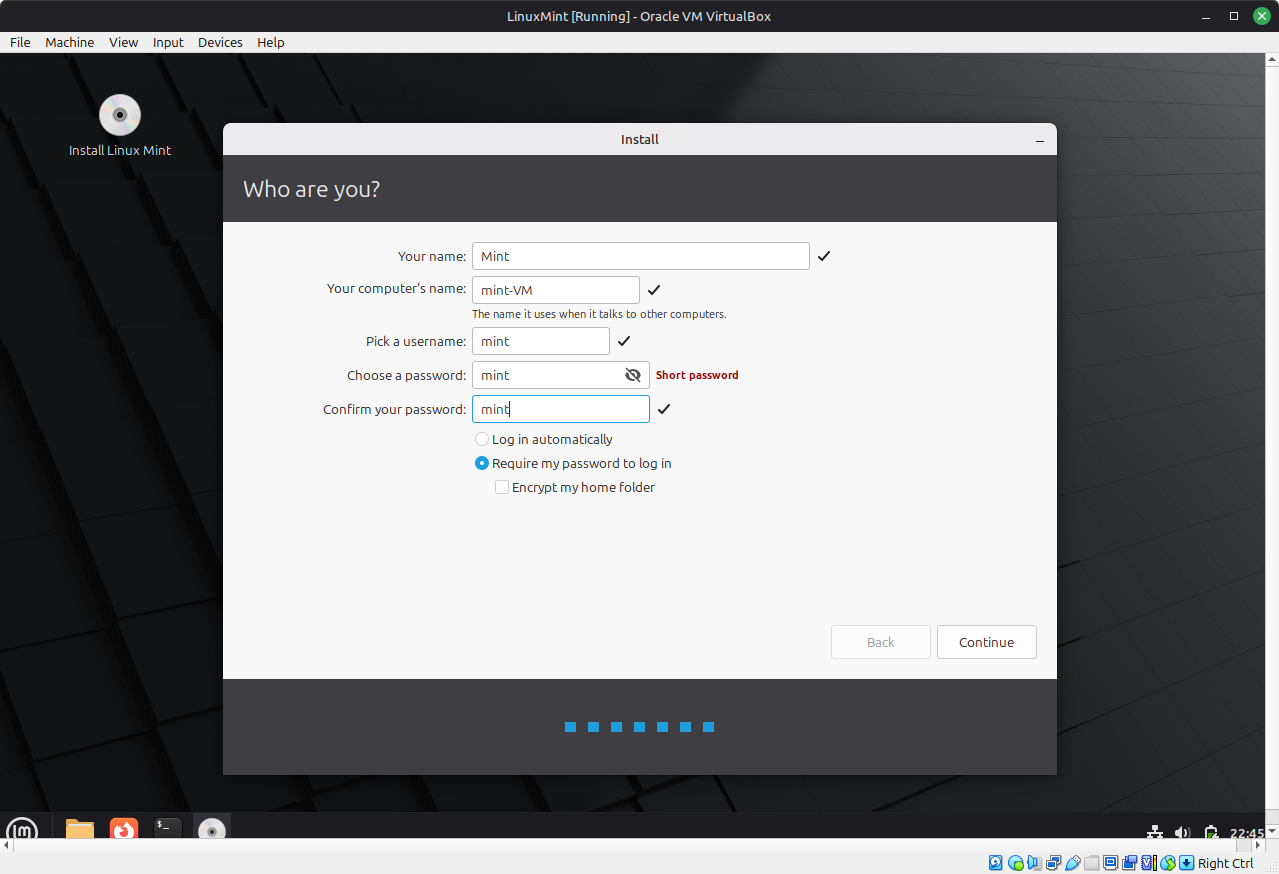
After the installation had finished I was prompted to restart the computer(VM) or nothing would be saved or preserved.
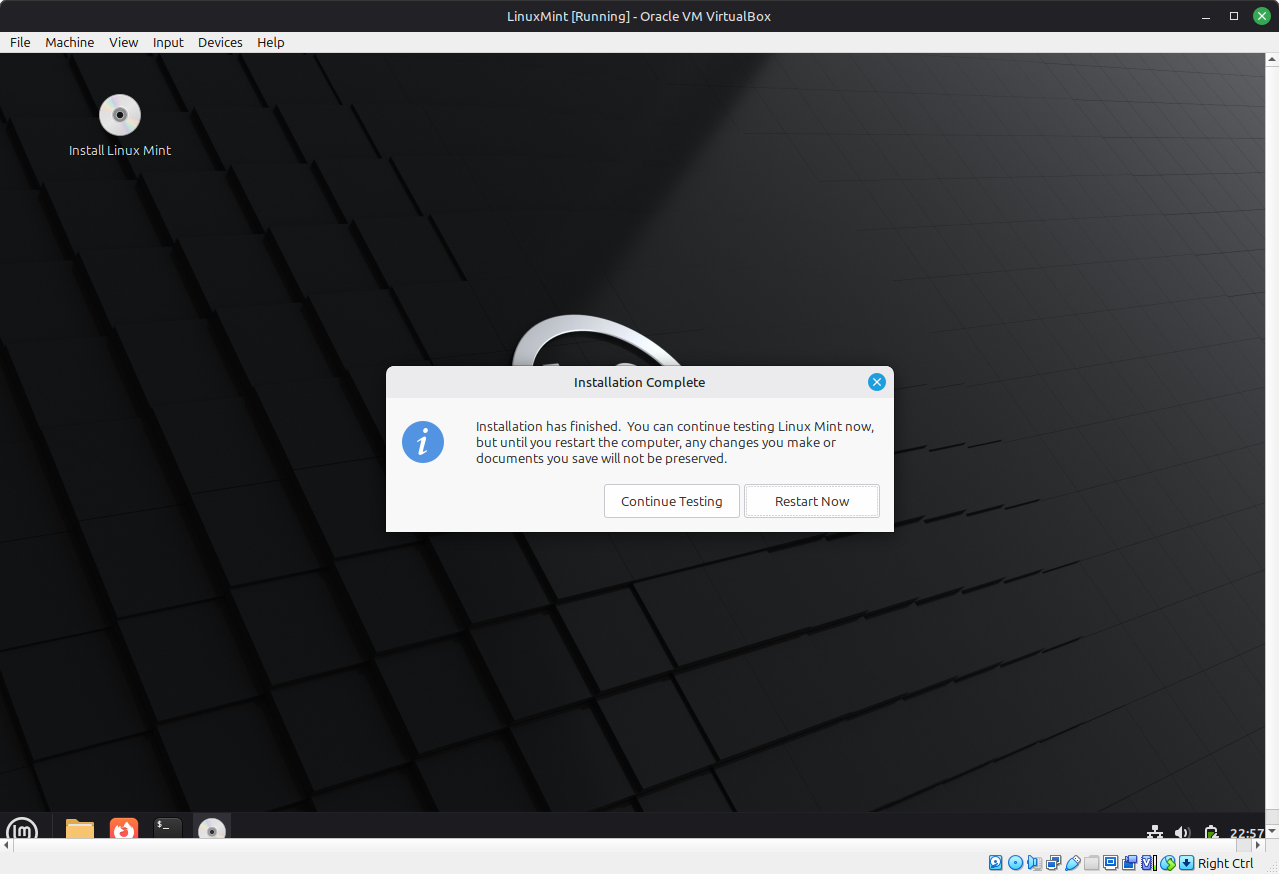
So, I clicked restart, and logged back in. Before seeing the desktop I was forced to input the password I created during the installation process. I was then greeted with the “Welcome to Linux Mint” window. I turned off the Mint VM and created a snapshot of the fully non-configured Mint VM. .re-started the new Mint VM from VirtualBox and I had a clean install to work with. Now I could start analyzing the clean system and have a baseline to get back to if I made some mistakes.
✅ Creating analysis scripts
Creating analysis scripts
I want to create scripts that automatically collect data into .txt files. I intend to create several scripts that can either be run individually or all at the same time. I started by trying to list all the packages. But then I ran into an issue with copy/paste, since I could not copy anything from my local machine and paste into the VM. I had to figure out a way to make things easier for me. See Sidenote
I used ChatGPT to help me generate the scripts I wanted. The process was the same for each script. I ran nano example.sh and pasted the script from the AI. Then I ran chmod +x example.sh and finally ran the script with ./example.sh. This is a simplified way of explaining how I ran the scripts because this is how they should be run if the scripts were on the actual machine being tested but since I was creating and running the scripts from my local machine and into the Mint VM I acually used commands such as ./run_remote.sh analysis/check_health.sh health.txt I used a helper script run_remote.sh which used ssh commands to make things easier, before I had the helper script I had to run ssh -tt -p 2224 mint@127.0.0.1 "printf '%s' '$SCRIPT_B64' | base64 -d | sudo bash" | tee reports/baseline/users.txt which needed to be simpler.
In the end I had created 12 analysis scripts and two helper scripts to produce 12 analysis reports.
.
├── analysis
│   ├── check_apparmor.sh
│   ├── check_boot.sh
│   ├── check_cpu.sh
│   ├── check_encryption.sh
│   ├── check_firewall.sh
│   ├── check_health.sh
│   ├── check_packages.sh
│   ├── check_ports.sh
│   ├── check_services.sh
│   ├── check_ssh.sh
│   ├── check_updates.sh
│   └── check_users.sh
├── reports
│   ├── baseline
│   │   ├── apparmor.txt
│   │   ├── boot.txt
│   │   ├── cpu.txt
│   │   ├── encryption.txt
│   │   ├── firewall.txt
│   │   ├── health.txt
│   │   ├── packages.txt
│   │   ├── ports.txt
│   │   ├── services.txt
│   │   ├── ssh.txt
│   │   ├── updates.txt
│   │   └── users.txt
│   └── hardened
├── run_all_analysis.sh
└── run_remote.sh
I will go over each script and note what I learned in the following dropdown windows.
✅ Pre-installed software
Pre-installed software
-
How many packages come pre-installed?
-
Which packages are unnecessary?
-
Are there packages that increase the attack surface?
-
Are packages installed for convenience rather than security?
-
To find how many packages come pre-installed by default I created the
check_packages.shscript. The main part of that script that counts the packages isdpkg-query -W -f='${binary:Package}\n' | wc -l. The`dpkg-querycommand lists all installed packages,wc -lcounts the number of lines giving the total number of packages. This analysis showed that a clean installation of Linux Mint 22.3 Cinnamon contains 1,893 installed packages.The 1,893 package count is the baseline for this project. The same script will be run again after the hardening phase and from that I will be able to determine if unnecessary packages have been removed and if additional security related packages have been installed.
-
The check_packages.sh script does not only count all the installed packages but also lists them. There are some services that may not be needed, such as CUPS, a printing service, Bluetooth support, Transmission, a BitTorrent client, LibreOffice and others that may not be required. These packages are candidates for removal but I need to verify that they will not break functionality of other stuff if removed. This will be evaluated further when I start the hardening process.
-
The analysis found packages such as CUPS (printing services), Avahi (network service discovery), and OpenSSH Server (installed for remote administration) as examples. These packages are not necessarily insecure but may become a target if misconfigured. These packages will be be evaluated further in the hardening process. The
check_services.shandcheck_ports.shalso showed which packages run services and could pose a risk but these scripts will be detailed later. -
Since Linux Mint is general purpose Desktop OS it has several packages specifically for convenience such as office and document applications, printing, multimedia, file sharing and transfer tools, graphical utilities and desktop accessories. This is to be expected since Linux Mint is aimed at a broad audience but these are not all required for a minimal hardened system.
check_packages.sh
check_packages.sh
#!/usr/bin/env bash

set -euo pipefail

readonly SCRIPT_DIR="$(
    cd -- "$(dirname -- "${BASH_SOURCE[0]}")" &&
        pwd
)"

readonly PROJECT_ROOT="$(
    cd -- "$SCRIPT_DIR/.." &&
        pwd
)"

readonly ANALYSIS_LIB="${PROJECT_ROOT}/lib/analysis_common.sh"

if [[ ! -r "$ANALYSIS_LIB" ]]; then
    echo "[ERROR] Shared analysis library not found:" >&2
    echo "        $ANALYSIS_LIB" >&2
    exit 1
fi

# shellcheck disable=SC1090
source "$ANALYSIS_LIB"

analysis_require_command dpkg-query
analysis_require_command sort
analysis_require_command wc

analysis_header "Installed Package Check"

package_count="$(
    dpkg-query \
        --show \
        --showformat='${binary:Package}\n' |
        wc -l
)"

analysis_section "Summary"
echo "Total installed packages: $package_count"
echo

analysis_section "Installed package list"

dpkg-query \
    --show \
    --showformat='${binary:Package}\t${Version}\n' |
    sort
See the full output from the check_packages.sh script here => packages.txt
✅ Automatically running services
Automatically running services
-
What services start automatically?
-
Are they all needed?
-
Are they listening on the network?
-
Do these services pose a risk?
-
To find what services start automatically I used the
check_services.shscript. It usessystemctl list-unit-files --state=enabledto list all packages that start automatically. The analysis revealed that there are 73 enabled unit files that start automatically on a fresh Linux Min system, with 30 running services, including services related to networking, printing, management and maintenance. -
These services will be reviewed during the hardening phase to determine whether they can be safely disabled.
-
I used the
check_ports.shscript which usesss -tulpnto see what enabled services were listening on the network. The analysis showed that very few services were listening for network connections. Some services were only listening locally, meaning they are not accessible from other machines on the network.check_ports.shwill be detailed later. -
Any running service could potentiall pose a risk, so having as few services automatically running as possible should in theory make the system harder to attack. The automatically running services will be reviewed further in the hardening process.
check_services.sh
check_services.sh
#!/usr/bin/env bash

set -euo pipefail

readonly SCRIPT_DIR="$(
    cd -- "$(dirname -- "${BASH_SOURCE[0]}")" &&
        pwd
)"

readonly PROJECT_ROOT="$(
    cd -- "$SCRIPT_DIR/.." &&
        pwd
)"

readonly ANALYSIS_LIB="${PROJECT_ROOT}/lib/analysis_common.sh"

if [[ ! -r "$ANALYSIS_LIB" ]]; then
    echo "[ERROR] Shared analysis library not found:" >&2
    echo "        $ANALYSIS_LIB" >&2
    exit 1
fi

# shellcheck disable=SC1090
source "$ANALYSIS_LIB"

analysis_require_command systemctl
analysis_require_command wc

analysis_header "Service and Startup Unit Check"

analysis_section "Enabled unit files"

systemctl list-unit-files \
    --state=enabled \
    --no-pager

echo

enabled_count="$(
    systemctl list-unit-files \
        --state=enabled \
        --no-legend \
        --no-pager |
        wc -l
)"

echo "Total enabled unit files: $enabled_count"
echo

analysis_section "Currently running services"

systemctl list-units \
    --type=service \
    --state=running \
    --no-pager

echo

running_count="$(
    systemctl list-units \
        --type=service \
        --state=running \
        --no-legend \
        --no-pager |
        wc -l
)"

echo "Total running services: $running_count"
echo

analysis_section "Failed services"

systemctl list-units \
    --type=service \
    --state=failed \
    --no-pager
See the full output from the check_services.sh script here => services.txt
✅ Open ports
Open ports
-
What ports are open?
-
Why are they open?
-
Should they be closed?
-
What is the risk of open ports?
- Open ports were checked using
check_ports.shscript which usesss -tulpnto find listening UDP and TCP port. The following is the table of listening ports generated by the script.
| Netid | Local Address:Port |
|---|---|
| udp | 127.0.0.54:53 |
| udp | 127.0.0.53%lo:53 |
| udp | 0.0.0.0:45936 |
| udp | 0.0.0.0:5353 |
| udp | [::]:45097 |
| udp | [::]:5353 |
| tcp | 127.0.0.53%lo:53 |
| tcp | 0.0.0.0:22 |
| tcp | 127.0.0.1:631 |
| tcp | 127.0.0.54:53 |
| tcp | [::1]:631 |
| tcp | [::]:22 |
-
Port 22 is open because I turned that on so I could SSH into the VM. Port 53 is for DNS services. Running
sudo ss -lunp | grep 45936tells me that port 45936 is being used byavahi-daemonwhich is network service discovery. Ports 631, 5353, 45097 are also being used byavahi-daemon. -
I will close port 22 before the end of this poroject. The rest of the ports being used by
avahi-daemonwill also be closed, andavahi-daemonmay also be removed entirely. -
An open port is not necessarily an issue, it depends on what is listening, who has access and whether the service is secure. A vulnerable or misconfigured service can pose a high risk if it is for example outdated software or has known exploits.
check_ports.sh
check_ports.sh
#!/usr/bin/env bash

set -euo pipefail

readonly SCRIPT_DIR="$(
    cd -- "$(dirname -- "${BASH_SOURCE[0]}")" &&
        pwd
)"

readonly PROJECT_ROOT="$(
    cd -- "$SCRIPT_DIR/.." &&
        pwd
)"

readonly ANALYSIS_LIB="${PROJECT_ROOT}/lib/analysis_common.sh"

if [[ ! -r "$ANALYSIS_LIB" ]]; then
    echo "[ERROR] Shared analysis library not found:" >&2
    echo "        $ANALYSIS_LIB" >&2
    exit 1
fi

# shellcheck disable=SC1090
source "$ANALYSIS_LIB"

analysis_require_command ss
analysis_require_command wc

analysis_header "Open Ports Check"

tcp_count="$(
    ss -tlpnH | wc -l
)"

udp_count="$(
    ss -ulpnH | wc -l
)"

analysis_section "Summary"

echo "Listening TCP sockets : $tcp_count"
echo "Listening UDP sockets : $udp_count"
echo "Total listening sockets: $((tcp_count + udp_count))"
echo

analysis_section "Listening TCP and UDP sockets"

ss -tulpn

echo

analysis_section "Listening TCP sockets"

ss -tlpn

echo

analysis_section "Listening UDP sockets"

ss -ulpn
See the full output from the check_ports.sh script here => ports.txt
✅ Firewall
Firewall
-
Is ufw enabled?
-
What firewall rules exist?
-
What risk exists if it remains disabled?
-
I checked the firewall status using the
check_firewall.shscript which usesufw status verboseto print if its active or not. It is not active by default. -
The script uses
ufw status numberedandnft list rulesetto list numbered rules and nftable rules which there are none. -
Having a disable firewall does not necessarily mean that the system is insecure. It depends on which services are listening. But simple ufw configuration can block unwanted incoming connections while still allowing normal outgoing traffic.
check_firewall.sh
check_firewall.sh
#!/usr/bin/env bash

set -euo pipefail

readonly SCRIPT_DIR="$(
    cd -- "$(dirname -- "${BASH_SOURCE[0]}")" &&
        pwd
)"

readonly PROJECT_ROOT="$(
    cd -- "$SCRIPT_DIR/.." &&
        pwd
)"

readonly ANALYSIS_LIB="${PROJECT_ROOT}/lib/analysis_common.sh"

if [[ ! -r "$ANALYSIS_LIB" ]]; then
    echo "[ERROR] Shared analysis library not found:" >&2
    echo "        $ANALYSIS_LIB" >&2
    exit 1
fi

# shellcheck disable=SC1090
source "$ANALYSIS_LIB"

analysis_require_command grep
analysis_require_command systemctl

ufw_installed="no"
ufw_status="unavailable"
ufw_service_enabled="unavailable"
ufw_service_active="unavailable"
ufw_rule_count="0"
firewall_risk="unknown"

if command -v ufw >/dev/null 2>&1; then
    ufw_installed="yes"

    ufw_status_output="$(ufw status verbose 2>&1 || true)"

    if grep -qi '^Status:[[:space:]]*active' <<<"$ufw_status_output"; then
        ufw_status="active"
    elif grep -qi '^Status:[[:space:]]*inactive' <<<"$ufw_status_output"; then
        ufw_status="inactive"
    else
        ufw_status="unknown"
    fi

    ufw_rule_count="$(
        ufw status numbered 2>/dev/null |
            grep -c '^\[[[:space:]]*[0-9]\+\]' ||
            true
    )"
fi

ufw_service_enabled="$(
    systemctl is-enabled ufw.service 2>/dev/null ||
        echo unavailable
)"

ufw_service_active="$(
    systemctl is-active ufw.service 2>/dev/null ||
        echo inactive
)"

case "$ufw_status" in
    active)
        firewall_risk="reduced; traffic is filtered according to the configured rules"
        ;;
    inactive)
        firewall_risk="increased; listening network services are not protected by UFW rules"
        ;;
    unavailable)
        firewall_risk="increased or unknown; UFW is not installed"
        ;;
    *)
        firewall_risk="unknown; the UFW state could not be determined"
        ;;
esac

analysis_header "Firewall Check"

analysis_section "UFW installation and service"

echo "UFW installed:        $ufw_installed"
echo "UFW service enabled:  $ufw_service_enabled"
echo "UFW service active:   $ufw_service_active"

echo

analysis_section "UFW status"

if [[ "$ufw_installed" == "yes" ]]; then
    printf '%s\n' "$ufw_status_output"
else
    echo "UFW is not installed."
fi

echo

analysis_section "UFW numbered rules"

if [[ "$ufw_installed" == "yes" ]]; then
    ufw status numbered 2>&1 || true
else
    echo "UFW rules are unavailable because UFW is not installed."
fi

echo

analysis_section "UFW default policies"

if [[ -r /etc/default/ufw ]]; then
    grep -E \
        '^[[:space:]]*DEFAULT_(INPUT|OUTPUT|FORWARD|APPLICATION)_POLICY=' \
        /etc/default/ufw ||
        echo "No default UFW policy settings were found."
else
    echo "/etc/default/ufw is unavailable."
fi

echo

analysis_section "IPv6 firewall configuration"

if [[ -r /etc/default/ufw ]]; then
    ipv6_setting="$(
        grep -E '^[[:space:]]*IPV6=' /etc/default/ufw |
            tail -n 1 ||
            true
    )"

    if [[ -n "$ipv6_setting" ]]; then
        echo "$ipv6_setting"
    else
        echo "The UFW IPv6 setting was not found."
    fi
else
    echo "The UFW IPv6 configuration is unavailable."
fi

echo

analysis_section "nftables ruleset"

if command -v nft >/dev/null 2>&1; then
    nft list ruleset 2>&1 || true
else
    echo "The nft command is not installed."
fi

echo

analysis_section "Summary"

echo "UFW installed:         $ufw_installed"
echo "UFW enabled at boot:   $ufw_service_enabled"
echo "UFW status:            $ufw_status"
echo "Configured UFW rules:  $ufw_rule_count"
echo "Risk assessment:       $firewall_risk"

case "$ufw_status" in
    active)
        echo
        echo "[OK] UFW is active."
        ;;
    inactive)
        echo
        echo "[WARN] UFW is installed but inactive."
        echo "[WARN] Any listening service may be reachable unless another firewall filters it."
        ;;
    unavailable)
        echo
        echo "[WARN] UFW is not installed."
        ;;
    *)
        echo
        echo "[WARN] The firewall state could not be confirmed."
        ;;
esac
See the full output from the check_firewall.sh script here => firewall.txt
✅ SSH
SSH
-
Is SSH pre-installed?
-
Is password authentication enabled?
-
How is root login?
-
Using the
check_ssh.shscript I can see that SSH is installed, However, with a fresh install of Linux Mint Remote SSH access is disabled by default because the OpenSSH server is not pre-installed. OpenSSH-client was however pre-installed. To be able to SSH into the Mint Vm I installed OpenSSH-Server and OpenSSH SFTP server. -
The analysis from the script tells me that: Password authentication is enabled, root password login is disabled, root SSH login is allowed and empty passwords are disabled
-
Root cannot sign in with a password, but may sign in using a valid SSH key.
This analysis my be skewed since openssh-server was installed by me so this may not reflect the actual values of a fresh Linux Mint.
check_ssh.sh
check_ssh.sh
#!/usr/bin/env bash

set -euo pipefail

readonly SCRIPT_DIR="$(
    cd -- "$(dirname -- "${BASH_SOURCE[0]}")" &&
        pwd
)"

readonly PROJECT_ROOT="$(
    cd -- "$SCRIPT_DIR/.." &&
        pwd
)"

readonly ANALYSIS_LIB="${PROJECT_ROOT}/lib/analysis_common.sh"

if [[ ! -r "$ANALYSIS_LIB" ]]; then
    echo "[ERROR] Shared analysis library not found:" >&2
    echo "        $ANALYSIS_LIB" >&2
    exit 1
fi

# shellcheck disable=SC1090
source "$ANALYSIS_LIB"

analysis_require_command awk
analysis_require_command dpkg-query
analysis_require_command find
analysis_require_command grep
analysis_require_command ss
analysis_require_command systemctl
analysis_require_command wc

openssh_server_installed="no"
ssh_service_enabled="unavailable"
ssh_service_active="unavailable"
ssh_socket_enabled="unavailable"
ssh_socket_active="unavailable"
ssh_listening="no"
listening_ports="none"

password_authentication="unknown"
public_key_authentication="unknown"
permit_root_login="unknown"
permit_empty_passwords="unknown"
max_auth_tries="unknown"
login_grace_time="unknown"
x11_forwarding="unknown"
allow_tcp_forwarding="unknown"
client_alive_interval="unknown"
client_alive_count_max="unknown"
banner="unknown"
allow_users="not configured"
deny_users="not configured"
allow_groups="not configured"
deny_groups="not configured"

if dpkg-query \
    --show \
    --showformat='${Status}\n' \
    openssh-server 2>/dev/null |
    grep -q '^install ok installed$'; then
    openssh_server_installed="yes"
fi

ssh_service_enabled="$(
    systemctl is-enabled ssh.service 2>/dev/null ||
        echo unavailable
)"

ssh_service_active="$(
    systemctl is-active ssh.service 2>/dev/null ||
        echo inactive
)"

ssh_socket_enabled="$(
    systemctl is-enabled ssh.socket 2>/dev/null ||
        echo unavailable
)"

ssh_socket_active="$(
    systemctl is-active ssh.socket 2>/dev/null ||
        echo inactive
)"

if command -v sshd >/dev/null 2>&1; then
    sshd_effective_config="$(sshd -T 2>&1 || true)"

    if [[ -n "$sshd_effective_config" ]] &&
        ! grep -qiE 'error|fatal|missing privilege separation directory' \
            <<<"$sshd_effective_config"; then

        password_authentication="$(
            awk '$1 == "passwordauthentication" {print $2; exit}' \
                <<<"$sshd_effective_config"
        )"

        public_key_authentication="$(
            awk '$1 == "pubkeyauthentication" {print $2; exit}' \
                <<<"$sshd_effective_config"
        )"

        permit_root_login="$(
            awk '$1 == "permitrootlogin" {print $2; exit}' \
                <<<"$sshd_effective_config"
        )"

        permit_empty_passwords="$(
            awk '$1 == "permitemptypasswords" {print $2; exit}' \
                <<<"$sshd_effective_config"
        )"

        max_auth_tries="$(
            awk '$1 == "maxauthtries" {print $2; exit}' \
                <<<"$sshd_effective_config"
        )"

        login_grace_time="$(
            awk '$1 == "logingracetime" {print $2; exit}' \
                <<<"$sshd_effective_config"
        )"

        x11_forwarding="$(
            awk '$1 == "x11forwarding" {print $2; exit}' \
                <<<"$sshd_effective_config"
        )"

        allow_tcp_forwarding="$(
            awk '$1 == "allowtcpforwarding" {print $2; exit}' \
                <<<"$sshd_effective_config"
        )"

        client_alive_interval="$(
            awk '$1 == "clientaliveinterval" {print $2; exit}' \
                <<<"$sshd_effective_config"
        )"

        client_alive_count_max="$(
            awk '$1 == "clientalivecountmax" {print $2; exit}' \
                <<<"$sshd_effective_config"
        )"

        banner="$(
            awk '$1 == "banner" {print $2; exit}' \
                <<<"$sshd_effective_config"
        )"

        allow_users="$(
            awk '
                $1 == "allowusers" {
                    $1 = ""
                    sub(/^[[:space:]]+/, "")
                    print
                    exit
                }
            ' <<<"$sshd_effective_config"
        )"

        deny_users="$(
            awk '
                $1 == "denyusers" {
                    $1 = ""
                    sub(/^[[:space:]]+/, "")
                    print
                    exit
                }
            ' <<<"$sshd_effective_config"
        )"

        allow_groups="$(
            awk '
                $1 == "allowgroups" {
                    $1 = ""
                    sub(/^[[:space:]]+/, "")
                    print
                    exit
                }
            ' <<<"$sshd_effective_config"
        )"

        deny_groups="$(
            awk '
                $1 == "denygroups" {
                    $1 = ""
                    sub(/^[[:space:]]+/, "")
                    print
                    exit
                }
            ' <<<"$sshd_effective_config"
        )"

        [[ -n "$allow_users" ]] || allow_users="not configured"
        [[ -n "$deny_users" ]] || deny_users="not configured"
        [[ -n "$allow_groups" ]] || allow_groups="not configured"
        [[ -n "$deny_groups" ]] || deny_groups="not configured"
    fi
else
    sshd_effective_config=""
fi

listening_ports="$(
    ss -tlnH 2>/dev/null |
        awk '
            {
                address = $4
                sub(/^.*:/, "", address)

                if (address ~ /^[0-9]+$/) {
                    ports[address] = 1
                }
            }
            END {
                separator = ""

                for (port in ports) {
                    printf "%s%s", separator, port
                    separator = ", "
                }

                if (separator == "") {
                    printf "none"
                }

                printf "\n"
            }
        '
)"

if command -v sshd >/dev/null 2>&1 &&
    [[ -n "$sshd_effective_config" ]]; then

    configured_ports="$(
        awk '
            $1 == "port" {
                ports[$2] = 1
            }
            END {
                for (port in ports) {
                    print port
                }
            }
        ' <<<"$sshd_effective_config"
    )"

    while IFS= read -r configured_port; do
        [[ -n "$configured_port" ]] || continue

        if ss -tlnH 2>/dev/null |
            awk -v port="$configured_port" '
                {
                    address = $4
                    sub(/^.*:/, "", address)

                    if (address == port) {
                        found = 1
                    }
                }
                END {
                    exit !found
                }
            '; then
            ssh_listening="yes"
            break
        fi
    done <<<"$configured_ports"
fi

analysis_header "SSH Configuration Check"

analysis_section "Installed OpenSSH packages"

dpkg-query \
    --show \
    --showformat='${binary:Package}\t${Version}\n' \
    'openssh-*' 2>/dev/null ||
    echo "No OpenSSH packages were found."

echo

analysis_section "SSH service status"

echo "ssh.service enabled: $ssh_service_enabled"
echo "ssh.service active:  $ssh_service_active"
echo "ssh.socket enabled:  $ssh_socket_enabled"
echo "ssh.socket active:   $ssh_socket_active"

echo

analysis_section "Listening TCP sockets"

ss -tlnp 2>/dev/null || true

echo

analysis_section "Effective SSH authentication settings"

if [[ "$openssh_server_installed" != "yes" ]]; then
    echo "OpenSSH server is not installed."
elif [[ -z "$sshd_effective_config" ]]; then
    echo "Effective SSH server configuration is unavailable."
else
    echo "PasswordAuthentication:  $password_authentication"
    echo "PubkeyAuthentication:    $public_key_authentication"
    echo "PermitRootLogin:          $permit_root_login"
    echo "PermitEmptyPasswords:     $permit_empty_passwords"
    echo "MaxAuthTries:             $max_auth_tries"
fi

echo

analysis_section "SSH access restrictions"

echo "AllowUsers:  $allow_users"
echo "DenyUsers:   $deny_users"
echo "AllowGroups: $allow_groups"
echo "DenyGroups:  $deny_groups"

echo

analysis_section "SSH session settings"

echo "LoginGraceTime:       $login_grace_time"
echo "X11Forwarding:        $x11_forwarding"
echo "AllowTcpForwarding:   $allow_tcp_forwarding"
echo "ClientAliveInterval:  $client_alive_interval"
echo "ClientAliveCountMax:  $client_alive_count_max"
echo "Banner:               $banner"

echo

analysis_section "SSH configuration files"

if [[ -r /etc/ssh/sshd_config ]]; then
    echo "/etc/ssh/sshd_config exists and is readable."
else
    echo "/etc/ssh/sshd_config is unavailable."
fi

if [[ -d /etc/ssh/sshd_config.d ]]; then
    config_count="$(
        find /etc/ssh/sshd_config.d \
            -maxdepth 1 \
            -type f \
            -name '*.conf' |
            wc -l
    )"

    echo "Drop-in configuration files: $config_count"

    find /etc/ssh/sshd_config.d \
        -maxdepth 1 \
        -type f \
        -name '*.conf' \
        -printf '  %f\n' |
        sort
else
    echo "/etc/ssh/sshd_config.d does not exist."
fi

echo

analysis_section "Summary"

echo "OpenSSH server installed:     $openssh_server_installed"
echo "SSH service enabled:          $ssh_service_enabled"
echo "SSH service active:           $ssh_service_active"
echo "SSH socket enabled:           $ssh_socket_enabled"
echo "SSH socket active:            $ssh_socket_active"
echo "SSH listener detected:        $ssh_listening"
echo "Listening TCP ports:          $listening_ports"
echo "Password authentication:      $password_authentication"
echo "Public-key authentication:    $public_key_authentication"
echo "Root login:                   $permit_root_login"
echo "Empty passwords:              $permit_empty_passwords"
echo "Maximum authentication tries: $max_auth_tries"

echo

if [[ "$openssh_server_installed" != "yes" ]]; then
    echo "[OK] OpenSSH server is not installed."
    echo "The system is not providing an SSH server."
elif [[ "$ssh_listening" != "yes" ]]; then
    echo "[OK] OpenSSH server is installed but no configured SSH listener was detected."
else
    echo "[INFO] The system is accepting SSH connections."

    if [[ "$password_authentication" == "yes" ]]; then
        echo "[WARN] SSH password authentication is enabled."
    else
        echo "[OK] SSH password authentication is not enabled."
    fi

    case "$permit_root_login" in
        no)
            echo "[OK] Direct SSH root login is disabled."
            ;;
        prohibit-password | without-password)
            echo "[INFO] Root login is restricted to non-password authentication."
            ;;
        forced-commands-only)
            echo "[INFO] Root login is restricted to forced commands."
            ;;
        yes)
            echo "[WARN] Direct SSH root login is permitted."
            ;;
        *)
            echo "[WARN] Root-login policy could not be determined."
            ;;
    esac

    if [[ "$permit_empty_passwords" == "yes" ]]; then
        echo "[WARN] SSH permits empty passwords."
    else
        echo "[OK] Empty SSH passwords are not permitted."
    fi
fi
See the full output from the check_ssh.sh script here => ssh.txt
✅ Encryption
Encryption
-
Is the disk encrypted?
-
Are home folders encrypted?
-
Can users easily encrypt files?
-
The
check_encryption.shscript analysis tells me that nothing on the disk on a fresh Linux Mint is encrypted. -
No
-
gpg(GnuPG) 2.4.4 comes pre-installed so if users know how to use GPG then it should be easy. But there is no “easy” way for users unfamiliar with GPG to encrypt files.
check_encryption.sh
check_encryption.sh
#!/usr/bin/env bash

set -euo pipefail

readonly SCRIPT_DIR="$(
    cd -- "$(dirname -- "${BASH_SOURCE[0]}")" &&
        pwd
)"

readonly PROJECT_ROOT="$(
    cd -- "$SCRIPT_DIR/.." &&
        pwd
)"

readonly ANALYSIS_LIB="${PROJECT_ROOT}/lib/analysis_common.sh"

if [[ ! -r "$ANALYSIS_LIB" ]]; then
    echo "[ERROR] Shared analysis library not found:" >&2
    echo "        $ANALYSIS_LIB" >&2
    exit 1
fi

# shellcheck disable=SC1090
source "$ANALYSIS_LIB"

analysis_require_command awk
analysis_require_command findmnt
analysis_require_command grep
analysis_require_command lsblk
analysis_require_command mount
analysis_require_command swapon

device_uses_encryption() {
    local source="$1"
    local device_name
    local device_type
    local filesystem_type
    local parent_name

    [[ "$source" == /dev/* ]] || return 1

    device_name="$(lsblk -no KNAME "$source" 2>/dev/null | head -n 1)"

    while [[ -n "$device_name" ]]; do
        device_type="$(lsblk -no TYPE "/dev/$device_name" 2>/dev/null | head -n 1)"
        filesystem_type="$(lsblk -no FSTYPE "/dev/$device_name" 2>/dev/null | head -n 1)"

        if [[ "$device_type" == "crypt" || "$filesystem_type" == "crypto_LUKS" ]]; then
            return 0
        fi

        parent_name="$(lsblk -no PKNAME "/dev/$device_name" 2>/dev/null | head -n 1)"

        if [[ -z "$parent_name" || "$parent_name" == "$device_name" ]]; then
            break
        fi

        device_name="$parent_name"
    done

    return 1
}

analysis_header "Disk and File Encryption Check"

analysis_section "Block devices and filesystems"

lsblk -o NAME,TYPE,SIZE,FSTYPE,FSVER,MOUNTPOINTS

echo

analysis_section "Encrypted block devices"

encrypted_count="$(
    lsblk -rno TYPE,FSTYPE |
        awk '
            $1 == "crypt" || $2 == "crypto_LUKS" {
                count++
            }
            END {
                print count + 0
            }
        '
)"

if ((encrypted_count > 0)); then
    lsblk -o NAME,TYPE,SIZE,FSTYPE,MOUNTPOINTS |
        awk 'NR == 1 || $2 == "crypt" || $4 == "crypto_LUKS"'
else
    echo "No LUKS or dm-crypt devices detected."
fi

echo

analysis_section "Root filesystem"

root_source="$(findmnt -n -o SOURCE / 2>/dev/null || true)"
root_fstype="$(findmnt -n -o FSTYPE / 2>/dev/null || true)"
root_encrypted="no"

echo "Root source: ${root_source:-unknown}"
echo "Root filesystem type: ${root_fstype:-unknown}"

if [[ -n "$root_source" ]] && device_uses_encryption "$root_source"; then
    root_encrypted="yes"
    echo "Root filesystem encryption: detected"
else
    echo "Root filesystem encryption: not detected"
fi

echo

analysis_section "Crypttab configuration"

if [[ -r /etc/crypttab ]]; then
    active_crypttab_entries="$(
        grep -Ev '^[[:space:]]*(#|$)' /etc/crypttab || true
    )"

    if [[ -n "$active_crypttab_entries" ]]; then
        printf '%s\n' "$active_crypttab_entries"
    else
        echo "/etc/crypttab exists but contains no active entries."
    fi
else
    echo "/etc/crypttab is unavailable."
fi

echo

analysis_section "Home directory storage"

home_source="$(findmnt -n -o SOURCE /home 2>/dev/null || true)"
home_fstype="$(findmnt -n -o FSTYPE /home 2>/dev/null || true)"
home_encrypted="unknown"
home_encryption_method="unknown"

if [[ -n "$home_source" ]]; then
    echo "/home source: $home_source"
    echo "/home filesystem type: ${home_fstype:-unknown}"

    if device_uses_encryption "$home_source"; then
        home_encrypted="yes"
        home_encryption_method="encrypted block device"
    else
        home_encrypted="no"
        home_encryption_method="no block-device encryption detected"
    fi
else
    echo "/home is not a separate mounted filesystem."
    echo "/home is stored on the root filesystem."

    home_encrypted="$root_encrypted"

    if [[ "$root_encrypted" == "yes" ]]; then
        home_encryption_method="inherits encrypted root filesystem"
    else
        home_encryption_method="inherits unencrypted root filesystem"
    fi
fi

echo

analysis_section "Per-user home encryption"

ecryptfs_active="no"

if command -v ecryptfs-stat >/dev/null 2>&1; then
    echo "eCryptfs tools installed: yes"
else
    echo "eCryptfs tools installed: no"
fi

if mount | grep -q 'type ecryptfs'; then
    ecryptfs_active="yes"
    home_encrypted="yes"
    home_encryption_method="active eCryptfs mount"
    echo "Active eCryptfs mount detected: yes"
else
    echo "Active eCryptfs mount detected: no"
fi

if mount | grep -q 'type fscrypt'; then
    echo "Active fscrypt mount detected: yes"
else
    echo "Active fscrypt mount detected: no"
fi

echo

analysis_section "File-encryption tools"

file_encryption_available="no"

for command_name in gpg age openssl zip; do
    if command -v "$command_name" >/dev/null 2>&1; then
        printf "%-10s installed: yes (%s)\n" \
            "$command_name" \
            "$(command -v "$command_name")"

        case "$command_name" in
            gpg | age)
                file_encryption_available="yes"
                ;;
        esac
    else
        printf "%-10s installed: no\n" "$command_name"
    fi
done

echo

analysis_section "GPG version"

if command -v gpg >/dev/null 2>&1; then
    gpg --version | head -n 3
else
    echo "GPG is not installed."
fi

echo

analysis_section "Swap encryption"

swap_encrypted="not applicable"

if swapon --show --noheadings 2>/dev/null | grep -q .; then
    swap_encrypted="yes"

    swapon --show

    while read -r swap_name _; do
        [[ -n "$swap_name" ]] || continue

        if device_uses_encryption "$swap_name"; then
            echo "$swap_name uses an encrypted device stack."
        else
            echo "$swap_name does not use a detected encrypted device stack."
            swap_encrypted="no"
        fi
    done < <(swapon --show --noheadings --raw)
else
    echo "No active swap detected."
fi

echo

analysis_section "Summary"

echo "Encrypted block devices:      $encrypted_count"
echo "Root filesystem encrypted:    $root_encrypted"
echo "Home folders encrypted:       $home_encrypted"
echo "Home encryption method:       $home_encryption_method"
echo "Active eCryptfs encryption:   $ecryptfs_active"
echo "Swap encrypted:               $swap_encrypted"
echo "Easy file-encryption tool:    $file_encryption_available"

if [[ "$root_encrypted" == "yes" ]]; then
    echo
    echo "[OK] Root filesystem encryption was detected."
else
    echo
    echo "[WARN] Root filesystem encryption was not detected."
fi

if [[ "$home_encrypted" == "yes" ]]; then
    echo "[OK] Home-folder data appears to be encrypted."
else
    echo "[WARN] Home-folder encryption was not detected."
fi

if [[ "$file_encryption_available" == "yes" ]]; then
    echo "[OK] GPG or age is available for user file encryption."
else
    echo "[WARN] Neither GPG nor age is available for straightforward file encryption."
fi
See the full output from the check_encryption.sh script here => encryption.txt
✅ CPU Vulnerabilities
CPU Vulnerabilities
-
What CPU vulnerabilities affect this system?
-
Which mitigations are enabled?
-
Are kernel mitigations active?
-
The
check_cpu.shscript analysis report tells me that Speculative Store Bypassspec_store_bypass.mmio_stale_datais unknown, not confirmed vulnerable. -
Mitigations are active for
Meltdown,Spectre v1,Spectre v2,L1TF,MDS,indirect target selection, and more. -
Kernel mitigations are active. The report shows 15 vulnerabilities mitigated or not affected, with one still vulnerable.
check_cpu.sh
check_cpu.sh
#!/usr/bin/env bash

set -euo pipefail

readonly SCRIPT_DIR="$(
    cd -- "$(dirname -- "${BASH_SOURCE[0]}")" &&
        pwd
)"

readonly PROJECT_ROOT="$(
    cd -- "$SCRIPT_DIR/.." &&
        pwd
)"

readonly ANALYSIS_LIB="${PROJECT_ROOT}/lib/analysis_common.sh"
readonly VULNERABILITY_DIR="/sys/devices/system/cpu/vulnerabilities"

if [[ ! -r "$ANALYSIS_LIB" ]]; then
    echo "[ERROR] Shared analysis library not found:" >&2
    echo "        $ANALYSIS_LIB" >&2
    exit 1
fi

# shellcheck disable=SC1090
source "$ANALYSIS_LIB"

analysis_require_command basename
analysis_require_command cat
analysis_require_command grep
analysis_require_command lscpu
analysis_require_command uname

mitigated_count=0
not_affected_count=0
vulnerable_count=0
unknown_count=0

kernel_cmdline="unavailable"
kernel_mitigations="unknown"

if [[ -r /proc/cmdline ]]; then
    kernel_cmdline="$(cat /proc/cmdline)"

    if grep -Eq '(^|[[:space:]])mitigations=off([[:space:]]|$)' <<<"$kernel_cmdline"; then
        kernel_mitigations="disabled"
    elif grep -Eq '(^|[[:space:]])mitigations=(auto|auto,nosmt)([[:space:]]|$)' \
        <<<"$kernel_cmdline"; then
        kernel_mitigations="enabled"
    else
        kernel_mitigations="enabled by kernel defaults"
    fi
fi

analysis_header "CPU Vulnerability Check"

analysis_section "CPU information"

lscpu

echo

analysis_section "Microcode"

if [[ -r /proc/cpuinfo ]]; then
    microcode_line="$(grep -m 1 '^microcode[[:space:]]*:' /proc/cpuinfo || true)"

    if [[ -n "$microcode_line" ]]; then
        echo "$microcode_line"
    else
        echo "Microcode information is unavailable."
    fi
else
    echo "/proc/cpuinfo is unavailable."
fi

echo

analysis_section "Kernel version"

uname -r

echo

analysis_section "CPU vulnerabilities"

if [[ -d "$VULNERABILITY_DIR" ]]; then
    vulnerability_files_found=0

    for vulnerability_file in "$VULNERABILITY_DIR"/*; do
        [[ -f "$vulnerability_file" ]] || continue

        vulnerability_files_found=1
        vulnerability_name="$(basename "$vulnerability_file")"
        vulnerability_status="$(cat "$vulnerability_file")"

        printf "%-30s : %s\n" "$vulnerability_name" "$vulnerability_status"

        case "$vulnerability_status" in
            "Not affected"*)
                not_affected_count=$((not_affected_count + 1))
                ;;
            "Mitigation:"*)
                mitigated_count=$((mitigated_count + 1))
                ;;
            "Vulnerable"*)
                vulnerable_count=$((vulnerable_count + 1))
                ;;
            *)
                unknown_count=$((unknown_count + 1))
                ;;
        esac
    done

    if [[ "$vulnerability_files_found" -eq 0 ]]; then
        echo "No vulnerability status files were found."
    fi
else
    echo "Kernel CPU vulnerability information is unavailable."
fi

echo

analysis_section "Kernel mitigation configuration"

echo "Kernel mitigation state: $kernel_mitigations"

if [[ "$kernel_mitigations" == "disabled" ]]; then
    echo "[WARN] The kernel command line contains mitigations=off."
elif grep -Eq '(^|[[:space:]])nospectre_v1([[:space:]]|$)' <<<"$kernel_cmdline"; then
    echo "[WARN] Spectre v1 mitigation appears to be disabled."
elif grep -Eq '(^|[[:space:]])nospectre_v2([[:space:]]|$)' <<<"$kernel_cmdline"; then
    echo "[WARN] Spectre v2 mitigation appears to be disabled."
elif grep -Eq '(^|[[:space:]])spec_store_bypass_disable=off([[:space:]]|$)' \
    <<<"$kernel_cmdline"; then
    echo "[WARN] Speculative Store Bypass mitigation appears to be disabled."
else
    echo "No common global mitigation-disabling options were detected."
fi

echo

analysis_section "Kernel command line"

echo "$kernel_cmdline"

echo

analysis_section "Summary"

echo "Mitigated vulnerabilities:     $mitigated_count"
echo "CPU not affected:              $not_affected_count"
echo "Reported vulnerable:           $vulnerable_count"
echo "Unknown or unclassified:       $unknown_count"
echo "Kernel mitigations:            $kernel_mitigations"

if [[ "$vulnerable_count" -gt 0 ]]; then
    echo
    echo "[WARN] One or more CPU vulnerabilities are reported as vulnerable."
elif [[ "$unknown_count" -gt 0 ]]; then
    echo
    echo "[WARN] Some vulnerability states could not be classified."
elif [[ ! -d "$VULNERABILITY_DIR" ]]; then
    echo
    echo "[WARN] CPU vulnerability status could not be determined."
else
    echo
    echo "[OK] No CPU vulnerabilities are currently reported as vulnerable."
fi
See the full output from the check_cpu.sh script here => cpu.txt
✅ Automatic Updates
Automatic Updates
- Are security updates installed automatically?
- To see if security updates are installed automatically I used the
check_updates.shscript which usesapt list --upgradableto see pending package upgrades. Automatic security updates are not enabled by default. There 379 total pending upgrades of which 256 are pending security upgrades.
check_updates.sh
check_updates.sh
#!/usr/bin/env bash

set -euo pipefail

readonly SCRIPT_DIR="$(
    cd -- "$(dirname -- "${BASH_SOURCE[0]}")" &&
        pwd
)"

readonly PROJECT_ROOT="$(
    cd -- "$SCRIPT_DIR/.." &&
        pwd
)"

readonly ANALYSIS_LIB="${PROJECT_ROOT}/lib/analysis_common.sh"

if [[ ! -r "$ANALYSIS_LIB" ]]; then
    echo "[ERROR] Shared analysis library not found:" >&2
    echo "        $ANALYSIS_LIB" >&2
    exit 1
fi

# shellcheck disable=SC1090
source "$ANALYSIS_LIB"

analysis_require_command apt
analysis_require_command apt-config
analysis_require_command dpkg-query
analysis_require_command find
analysis_require_command grep
analysis_require_command sed
analysis_require_command systemctl
analysis_require_command tail

unattended_installed="no"
package_list_updates="disabled"
unattended_upgrades="disabled"
security_origins_configured="no"
automatic_reboot="unknown"
apt_daily_timer="unavailable"
apt_upgrade_timer="unavailable"
last_upgrade_result="unknown"
package_lists_age="unknown"
automatic_security_updates="disabled"

if dpkg-query \
    --show \
    --showformat='${Status}\n' \
    unattended-upgrades 2>/dev/null |
    grep -q '^install ok installed$'; then
    unattended_installed="yes"
fi

effective_apt_config="$(apt-config dump 2>/dev/null || true)"

periodic_update_value="$(
    sed -n \
        's/^APT::Periodic::Update-Package-Lists[[:space:]]*"\([^"]*\)";/\1/p' \
        <<<"$effective_apt_config" |
        tail -n 1
)"

periodic_upgrade_value="$(
    sed -n \
        's/^APT::Periodic::Unattended-Upgrade[[:space:]]*"\([^"]*\)";/\1/p' \
        <<<"$effective_apt_config" |
        tail -n 1
)"

automatic_reboot_value="$(
    sed -n \
        's/^Unattended-Upgrade::Automatic-Reboot[[:space:]]*"\([^"]*\)";/\1/p' \
        <<<"$effective_apt_config" |
        tail -n 1
)"

if [[ -n "$periodic_update_value" && "$periodic_update_value" != "0" ]]; then
    package_list_updates="enabled"
fi

if [[ -n "$periodic_upgrade_value" && "$periodic_upgrade_value" != "0" ]]; then
    unattended_upgrades="enabled"
fi

if [[ -n "$automatic_reboot_value" ]]; then
    automatic_reboot="$automatic_reboot_value"
fi

if grep -Eqi \
    'security|UbuntuESMApps|UbuntuESM' \
    /etc/apt/apt.conf.d/50unattended-upgrades 2>/dev/null; then
    security_origins_configured="yes"
fi

apt_daily_timer="$(
    systemctl is-enabled apt-daily.timer 2>/dev/null ||
        echo unavailable
)"

apt_upgrade_timer="$(
    systemctl is-enabled apt-daily-upgrade.timer 2>/dev/null ||
        echo unavailable
)"

last_upgrade_result="$(
    systemctl show apt-daily-upgrade.service \
        --property=Result \
        --value 2>/dev/null ||
        true
)"

if [[ -z "$last_upgrade_result" ]]; then
    last_upgrade_result="unknown"
fi

if [[ -d /var/lib/apt/lists ]]; then
    newest_list_timestamp="$(
        find /var/lib/apt/lists \
            -maxdepth 1 \
            -type f \
            -printf '%T@\n' 2>/dev/null |
            sort -n |
            tail -n 1
    )"

    if [[ -n "$newest_list_timestamp" ]]; then
        newest_list_epoch="${newest_list_timestamp%%.*}"
        current_epoch="$(date +%s)"
        list_age_seconds=$((current_epoch - newest_list_epoch))
        list_age_days=$((list_age_seconds / 86400))
        package_lists_age="${list_age_days} day(s)"
    fi
fi

if [[ "$unattended_installed" == "yes" &&
    "$unattended_upgrades" == "enabled" &&
    "$security_origins_configured" == "yes" &&
    "$apt_upgrade_timer" == "enabled" ]]; then
    automatic_security_updates="enabled"
fi

analysis_header "Automatic Updates Check"

analysis_section "Unattended-upgrades package"

echo "Installed: $unattended_installed"

echo

analysis_section "Effective APT periodic configuration"

echo "Update package lists:    ${periodic_update_value:-not configured}"
echo "Unattended upgrades:     ${periodic_upgrade_value:-not configured}"
echo "Automatic reboot:        $automatic_reboot"

echo

analysis_section "APT periodic configuration files"

if [[ -r /etc/apt/apt.conf.d/20auto-upgrades ]]; then
    cat /etc/apt/apt.conf.d/20auto-upgrades
else
    echo "/etc/apt/apt.conf.d/20auto-upgrades not found."
fi

echo

analysis_section "Unattended-upgrades allowed origins"

if [[ -r /etc/apt/apt.conf.d/50unattended-upgrades ]]; then
    grep -Ev '^[[:space:]]*(//|$)' \
        /etc/apt/apt.conf.d/50unattended-upgrades ||
        true
else
    echo "/etc/apt/apt.conf.d/50unattended-upgrades not found."
fi

echo

analysis_section "APT update timers"

systemctl list-timers \
    --all \
    --no-pager \
    apt-daily.timer \
    apt-daily-upgrade.timer 2>/dev/null ||
    true

echo

echo "apt-daily.timer enabled:         $apt_daily_timer"
echo "apt-daily-upgrade.timer enabled: $apt_upgrade_timer"

echo

analysis_section "Automatic update service status"

for unit in \
    apt-daily.service \
    apt-daily-upgrade.service \
    unattended-upgrades.service; do

    unit_enabled="$(
        systemctl is-enabled "$unit" 2>/dev/null ||
            echo unavailable
    )"

    unit_active="$(
        systemctl is-active "$unit" 2>/dev/null ||
            echo inactive
    )"

    printf "%-32s enabled=%-12s active=%s\n" \
        "$unit" \
        "$unit_enabled" \
        "$unit_active"
done

echo

analysis_section "Last automatic upgrade result"

echo "apt-daily-upgrade.service result: $last_upgrade_result"

if [[ -r /var/log/unattended-upgrades/unattended-upgrades.log ]]; then
    echo
    echo "Recent unattended-upgrades log entries:"
    tail -n 20 /var/log/unattended-upgrades/unattended-upgrades.log
else
    echo "Unattended-upgrades log is unavailable."
fi

echo

analysis_section "APT package-list freshness"

echo "Newest package-list age: $package_lists_age"
echo "Pending-update results use the currently cached APT package lists."

echo

analysis_section "Pending package upgrades"

mapfile -t pending_upgrades < <(
    apt list --upgradable 2>/dev/null |
        tail -n +2 |
        sed '/^[[:space:]]*$/d'
)

upgrade_count="${#pending_upgrades[@]}"

echo "Total pending upgrades: $upgrade_count"

if ((upgrade_count > 0)); then
    echo
    echo "First 20 pending upgrades:"
    printf '%s\n' "${pending_upgrades[@]:0:20}"
else
    echo "No pending upgrades detected."
fi

echo

analysis_section "Estimated pending security upgrades"

mapfile -t security_upgrades < <(
    printf '%s\n' "${pending_upgrades[@]}" |
        grep -Ei \
            '(^|,)([^ ]*-)?security([, /]|$)|ubuntu.*-security|esm-apps|esm-infra' ||
        true
)

security_count="${#security_upgrades[@]}"

echo "Estimated pending security upgrades: $security_count"

if ((security_count > 0)); then
    echo
    echo "First 20 estimated security upgrades:"
    printf '%s\n' "${security_upgrades[@]:0:20}"
else
    echo "No security-labelled upgrades were detected."
fi

echo

analysis_section "Summary"

echo "Automatic security updates:        $automatic_security_updates"
echo "unattended-upgrades installed:     $unattended_installed"
echo "Automatic package-list refresh:    $package_list_updates"
echo "Automatic unattended upgrades:     $unattended_upgrades"
echo "Security origins configured:       $security_origins_configured"
echo "apt-daily timer enabled:           $apt_daily_timer"
echo "apt-daily-upgrade timer enabled:   $apt_upgrade_timer"
echo "Last automatic-upgrade result:     $last_upgrade_result"
echo "Automatic reboot configured:       $automatic_reboot"
echo "Pending upgrades:                  $upgrade_count"
echo "Estimated security upgrades:       $security_count"
echo "Cached package-list age:           $package_lists_age"

echo

if [[ "$automatic_security_updates" == "enabled" ]]; then
    echo "[OK] Security updates are configured for automatic installation."
else
    echo "[WARN] Automatic security updates are not fully configured."
fi

if ((security_count > 0)); then
    echo "[WARN] Security-labelled package upgrades appear to be pending."
fi

if [[ "$package_lists_age" != "unknown" && "$list_age_days" -gt 7 ]]; then
    echo "[WARN] Cached APT package lists are more than seven days old."
fi
See the full output from the check_updates.sh script here => updates.txt
✅ User Accounts
User Accounts
-
Who can log in?
-
Who has sudo priviledges?
-
The
check_users.shscript tells me thatmint, the user I created when I installed the OS, can log in. There are a bunch of systems with locked access such asroot L 2026-07-13 0 99999 7 -1,Lmeaning “Locked”.roothas a login shell but the account is locked. Other systems such asdaemonare also lockeddaemon L 2026-01-08 0 99999 7 -1 -
Only
mintuser has sudo priviledges.mint P 2026-07-13 0 99999 7 -1,Pmeaning “Password” can log in.
check_users.sh
check_users.sh
#!/usr/bin/env bash

set -euo pipefail

readonly SCRIPT_DIR="$(
    cd -- "$(dirname -- "${BASH_SOURCE[0]}")" &&
        pwd
)"

readonly PROJECT_ROOT="$(
    cd -- "$SCRIPT_DIR/.." &&
        pwd
)"

readonly ANALYSIS_LIB="${PROJECT_ROOT}/lib/analysis_common.sh"

if [[ ! -r "$ANALYSIS_LIB" ]]; then
    echo "[ERROR] Shared analysis library not found:" >&2
    echo "        $ANALYSIS_LIB" >&2
    exit 1
fi

# shellcheck disable=SC1090
source "$ANALYSIS_LIB"

analysis_require_command awk
analysis_require_command find
analysis_require_command getent
analysis_require_command grep
analysis_require_command id
analysis_require_command sort
analysis_require_command stat
analysis_require_command uniq
analysis_require_command who

uid_min="$(
    awk '
        /^[[:space:]]*UID_MIN[[:space:]]+/ {
            print $2
            exit
        }
    ' /etc/login.defs 2>/dev/null || true
)"

uid_min="${uid_min:-1000}"

regular_user_count=0
login_account_count=0
system_login_count=0
uid_zero_count=0
duplicate_uid_count=0
duplicate_gid_count=0
empty_password_count=0
unlocked_password_count=0
locked_password_count=0
expired_account_count=0
unsafe_home_count=0
unsafe_ssh_count=0
passwordless_sudo_count=0

mapfile -t regular_users < <(
    getent passwd |
        awk -F: -v uid_min="$uid_min" '
            $3 >= uid_min &&
            $3 != 65534 &&
            $7 !~ /(nologin|false)$/ {
                print $1
            }
        '
)

regular_user_count="${#regular_users[@]}"

analysis_header "User Account Check"

analysis_section "Regular user accounts"

if ((regular_user_count > 0)); then
    getent passwd |
        awk -F: -v uid_min="$uid_min" '
            $3 >= uid_min &&
            $3 != 65534 &&
            $7 !~ /(nologin|false)$/ {
                printf "%-20s UID=%-6s GID=%-6s Home=%-25s Shell=%s\n",
                    $1, $3, $4, $6, $7
            }
        '
else
    echo "No regular login-capable user accounts were found."
fi

echo

analysis_section "Accounts with login-capable shells"

while IFS=: read -r username _ uid _ _ home shell; do
    if [[ "$shell" =~ (nologin|false)$ ]]; then
        continue
    fi

    login_account_count=$((login_account_count + 1))

    printf "%-20s UID=%-6s Home=%-25s Shell=%s\n" \
        "$username" \
        "$uid" \
        "$home" \
        "$shell"
done < <(getent passwd)

echo

analysis_section "System accounts with login-capable shells"

system_accounts_found=0

while IFS=: read -r username _ uid _ _ home shell; do
    if [[ "$uid" -ge "$uid_min" || "$uid" -eq 0 ]]; then
        continue
    fi

    if [[ "$shell" =~ (nologin|false)$ ]]; then
        continue
    fi

    system_accounts_found=1
    system_login_count=$((system_login_count + 1))

    printf "[WARN] %-16s UID=%-6s Home=%-25s Shell=%s\n" \
        "$username" \
        "$uid" \
        "$home" \
        "$shell"
done < <(getent passwd)

if ((system_accounts_found == 0)); then
    echo "No unexpected system accounts with login-capable shells were found."
fi

echo

analysis_section "Administrative groups"

for group_name in sudo adm; do
    if group_entry="$(getent group "$group_name")"; then
        echo "$group_entry"
    else
        echo "$group_name group not found."
    fi
done

echo

analysis_section "Sudo configuration"

if [[ -r /etc/sudoers ]]; then
    echo "Active entries from /etc/sudoers:"

    grep -Ev \
        '^[[:space:]]*(#|$|Defaults)' \
        /etc/sudoers ||
        echo "No active user or group entries were found."
else
    echo "/etc/sudoers is unavailable."
fi

echo

if [[ -d /etc/sudoers.d ]]; then
    echo "Sudoers drop-in files:"

    find /etc/sudoers.d \
        -maxdepth 1 \
        -type f \
        ! -name 'README' \
        -printf '  %f\n' |
        sort

    echo
    echo "Active sudoers drop-in entries:"

    while IFS= read -r sudoers_file; do
        echo
        echo "[$sudoers_file]"

        grep -Ev \
            '^[[:space:]]*(#|$|Defaults)' \
            "$sudoers_file" ||
            echo "No active user or group entries."
    done < <(
        find /etc/sudoers.d \
            -maxdepth 1 \
            -type f \
            ! -name 'README' |
            sort
    )
else
    echo "/etc/sudoers.d does not exist."
fi

passwordless_sudo_count="$(
    {
        grep -Ehi \
            '^[[:space:]]*[^#].*NOPASSWD[[:space:]]*:' \
            /etc/sudoers 2>/dev/null || true

        grep -Erhi \
            '^[[:space:]]*[^#].*NOPASSWD[[:space:]]*:' \
            /etc/sudoers.d 2>/dev/null || true
    } |
        wc -l
)"

echo
echo "Passwordless sudo entries: $passwordless_sudo_count"

echo

analysis_section "UID 0 accounts"

while IFS=: read -r username _ uid _; do
    if [[ "$uid" -eq 0 ]]; then
        echo "$username"
        uid_zero_count=$((uid_zero_count + 1))
    fi
done < <(getent passwd)

echo

analysis_section "Duplicate user and group IDs"

duplicate_uids="$(
    getent passwd |
        awk -F: '{print $3}' |
        sort -n |
        uniq -d
)"

if [[ -n "$duplicate_uids" ]]; then
    echo "Duplicate UIDs detected:"

    while IFS= read -r duplicate_uid; do
        [[ -n "$duplicate_uid" ]] || continue

        duplicate_uid_count=$((duplicate_uid_count + 1))

        getent passwd |
            awk -F: -v uid="$duplicate_uid" '
                $3 == uid {
                    printf "  UID %-6s %s\n", $3, $1
                }
            '
    done <<<"$duplicate_uids"
else
    echo "Duplicate UIDs detected: none"
fi

echo

duplicate_gids="$(
    getent group |
        awk -F: '{print $3}' |
        sort -n |
        uniq -d
)"

if [[ -n "$duplicate_gids" ]]; then
    echo "Duplicate GIDs detected:"

    while IFS= read -r duplicate_gid; do
        [[ -n "$duplicate_gid" ]] || continue

        duplicate_gid_count=$((duplicate_gid_count + 1))

        getent group |
            awk -F: -v gid="$duplicate_gid" '
                $3 == gid {
                    printf "  GID %-6s %s\n", $3, $1
                }
            '
    done <<<"$duplicate_gids"
else
    echo "Duplicate GIDs detected: none"
fi

echo

analysis_section "Password and account status"

if [[ -r /etc/shadow ]]; then
    while IFS=: read -r username password_hash _ _ maximum_age _ _ expiration _; do
        account_state="unknown"
        account_expired="no"

        case "$password_hash" in
            "")
                account_state="empty password"
                empty_password_count=$((empty_password_count + 1))
                ;;
            '!'* | '*'*)
                account_state="locked"
                locked_password_count=$((locked_password_count + 1))
                ;;
            *)
                account_state="password set"
                unlocked_password_count=$((unlocked_password_count + 1))
                ;;
        esac

        if [[ -n "$expiration" && "$expiration" =~ ^[0-9]+$ ]]; then
            current_day=$(( $(date +%s) / 86400 ))

            if ((expiration <= current_day)); then
                account_expired="yes"
                expired_account_count=$((expired_account_count + 1))
            fi
        fi

        printf "%-20s State=%-16s MaxAge=%-8s Expired=%s\n" \
            "$username" \
            "$account_state" \
            "${maximum_age:-unset}" \
            "$account_expired"
    done < /etc/shadow
else
    echo "/etc/shadow is unavailable."
fi

echo

analysis_section "Regular-user password aging"

for username in "${regular_users[@]}"; do
    echo "[$username]"

    if command -v chage >/dev/null 2>&1; then
        chage -l "$username" 2>/dev/null ||
            echo "Password-aging information unavailable."
    else
        echo "The chage command is unavailable."
    fi

    echo
done

if ((regular_user_count == 0)); then
    echo "No regular users were available for password-aging checks."
fi

analysis_section "Home-directory security"

for username in "${regular_users[@]}"; do
    user_entry="$(getent passwd "$username")"
    user_uid="$(awk -F: '{print $3}' <<<"$user_entry")"
    user_gid="$(awk -F: '{print $4}' <<<"$user_entry")"
    home_directory="$(awk -F: '{print $6}' <<<"$user_entry")"
    expected_group="$(getent group "$user_gid" | awk -F: '{print $1}')"

    echo "[$username]"

    if [[ ! -d "$home_directory" ]]; then
        echo "[WARN] Home directory does not exist: $home_directory"
        unsafe_home_count=$((unsafe_home_count + 1))
        echo
        continue
    fi

    home_owner="$(stat -c '%U' "$home_directory")"
    home_group="$(stat -c '%G' "$home_directory")"
    home_mode="$(stat -c '%a' "$home_directory")"
    home_mode_numeric=$((8#$home_mode))

    echo "Path:        $home_directory"
    echo "Owner:       $home_owner"
    echo "Group:       $home_group"
    echo "Permissions: $home_mode"

    if [[ "$home_owner" != "$username" ]]; then
        echo "[WARN] Home directory is not owned by $username."
        unsafe_home_count=$((unsafe_home_count + 1))
    fi

    if [[ -n "$expected_group" && "$home_group" != "$expected_group" ]]; then
        echo "[INFO] Home-directory group differs from the user's primary group."
    fi

    if ((home_mode_numeric & 0002)); then
        echo "[WARN] Home directory is world-writable."
        unsafe_home_count=$((unsafe_home_count + 1))
    fi

    echo
done

if ((regular_user_count == 0)); then
    echo "No regular-user home directories were available to check."
    echo
fi

analysis_section "User SSH file permissions"

for username in "${regular_users[@]}"; do
    home_directory="$(
        getent passwd "$username" |
            awk -F: '{print $6}'
    )"

    ssh_directory="$home_directory/.ssh"
    authorized_keys="$ssh_directory/authorized_keys"

    [[ -e "$ssh_directory" || -e "$authorized_keys" ]] || continue

    echo "[$username]"

    if [[ -d "$ssh_directory" ]]; then
        ssh_owner="$(stat -c '%U' "$ssh_directory")"
        ssh_mode="$(stat -c '%a' "$ssh_directory")"
        ssh_mode_numeric=$((8#$ssh_mode))

        echo ".ssh owner:       $ssh_owner"
        echo ".ssh permissions: $ssh_mode"

        if [[ "$ssh_owner" != "$username" ]]; then
            echo "[WARN] .ssh is not owned by $username."
            unsafe_ssh_count=$((unsafe_ssh_count + 1))
        fi

        if ((ssh_mode_numeric & 0022)); then
            echo "[WARN] .ssh is writable by group or other users."
            unsafe_ssh_count=$((unsafe_ssh_count + 1))
        fi
    fi

    if [[ -f "$authorized_keys" ]]; then
        keys_owner="$(stat -c '%U' "$authorized_keys")"
        keys_mode="$(stat -c '%a' "$authorized_keys")"
        keys_mode_numeric=$((8#$keys_mode))

        echo "authorized_keys owner:       $keys_owner"
        echo "authorized_keys permissions: $keys_mode"

        if [[ "$keys_owner" != "$username" ]]; then
            echo "[WARN] authorized_keys is not owned by $username."
            unsafe_ssh_count=$((unsafe_ssh_count + 1))
        fi

        if ((keys_mode_numeric & 0022)); then
            echo "[WARN] authorized_keys is writable by group or other users."
            unsafe_ssh_count=$((unsafe_ssh_count + 1))
        fi
    fi

    echo
done

analysis_section "Currently logged-in users"

if who | grep -q .; then
    who
else
    echo "No interactive users are currently logged in."
fi

echo

analysis_section "Summary"

echo "Regular user accounts:               $regular_user_count"
echo "Login-capable accounts:              $login_account_count"
echo "System accounts with login shells:   $system_login_count"
echo "UID 0 accounts:                      $uid_zero_count"
echo "Duplicate UIDs:                      $duplicate_uid_count"
echo "Duplicate GIDs:                      $duplicate_gid_count"
echo "Unlocked password accounts:          $unlocked_password_count"
echo "Locked password accounts:            $locked_password_count"
echo "Empty-password accounts:             $empty_password_count"
echo "Expired accounts:                    $expired_account_count"
echo "Passwordless sudo entries:           $passwordless_sudo_count"
echo "Unsafe home-directory findings:      $unsafe_home_count"
echo "Unsafe SSH-permission findings:       $unsafe_ssh_count"

echo

if ((uid_zero_count == 1)); then
    echo "[OK] Only one UID 0 account was detected."
else
    echo "[WARN] More than one UID 0 account was detected."
fi

if ((empty_password_count == 0)); then
    echo "[OK] No empty-password accounts were detected."
else
    echo "[WARN] One or more accounts have empty passwords."
fi

if ((duplicate_uid_count == 0)); then
    echo "[OK] No duplicate UIDs were detected."
else
    echo "[WARN] Duplicate UIDs require review."
fi

if ((passwordless_sudo_count > 0)); then
    echo "[WARN] Passwordless sudo configuration was detected."
fi

if ((unsafe_home_count > 0)); then
    echo "[WARN] One or more home-directory security issues were detected."
fi

if ((unsafe_ssh_count > 0)); then
    echo "[WARN] One or more user SSH permission issues were detected."
fi
See the full output from the check_users.sh script here => users.txt
✅ AppArmor
AppArmor
-
Is AppArmor enabled?
-
Which profiles are enabled?
-
The
check_apparmor.shscript analysis report tells me thatAppArmoris installed, enabled and active. -
There are 109 enabled profiles.
check_apparmor.sh
check_apparmor.sh
#!/usr/bin/env bash

set -euo pipefail

readonly SCRIPT_DIR="$(
    cd -- "$(dirname -- "${BASH_SOURCE[0]}")" &&
        pwd
)"

readonly PROJECT_ROOT="$(
    cd -- "$SCRIPT_DIR/.." &&
        pwd
)"

readonly ANALYSIS_LIB="${PROJECT_ROOT}/lib/analysis_common.sh"

if [[ ! -r "$ANALYSIS_LIB" ]]; then
    echo "[ERROR] Shared analysis library not found:" >&2
    echo "        $ANALYSIS_LIB" >&2
    exit 1
fi

# shellcheck disable=SC1090
source "$ANALYSIS_LIB"

analysis_require_command dpkg-query
analysis_require_command systemctl
analysis_require_command find
analysis_require_command wc

analysis_header "AppArmor Check"

analysis_section "AppArmor package status"

if dpkg-query -W -f='${Status}\n' apparmor 2>/dev/null |
    grep -q '^install ok installed$'; then
    echo "AppArmor package installed: yes"
else
    echo "AppArmor package installed: no"
fi

echo

analysis_section "AppArmor service status"

service_enabled="$(systemctl is-enabled apparmor.service 2>/dev/null || echo unavailable)"
service_active="$(systemctl is-active apparmor.service 2>/dev/null || echo inactive)"

echo "Enabled: $service_enabled"
echo "Active:  $service_active"

echo

analysis_section "Kernel AppArmor status"

if [[ -r /sys/module/apparmor/parameters/enabled ]]; then
    printf "Kernel AppArmor enabled: "
    cat /sys/module/apparmor/parameters/enabled
else
    echo "Kernel AppArmor status unavailable."
fi

echo

analysis_section "AppArmor profile summary"

if command -v aa-status >/dev/null 2>&1; then
    aa-status || true
elif command -v apparmor_status >/dev/null 2>&1; then
    apparmor_status || true
else
    echo "Neither aa-status nor apparmor_status is available."
fi

echo

analysis_section "Loaded profiles"

if [[ -r /sys/kernel/security/apparmor/profiles ]]; then
    cat /sys/kernel/security/apparmor/profiles
else
    echo "AppArmor profile list is unavailable."
fi

echo

analysis_section "AppArmor configuration files"

if [[ -d /etc/apparmor.d ]]; then
    profile_file_count="$(
        find /etc/apparmor.d \
            -maxdepth 1 \
            -type f \
            ! -name '*.dpkg-*' |
            wc -l
    )"

    echo "Profile files in /etc/apparmor.d: $profile_file_count"
else
    echo "/etc/apparmor.d does not exist."
fi

echo

analysis_section "Summary"

if [[ -r /sys/module/apparmor/parameters/enabled ]]; then
    kernel_enabled="$(cat /sys/module/apparmor/parameters/enabled)"
else
    kernel_enabled="unknown"
fi

echo "Service enabled: $service_enabled"
echo "Service active:  $service_active"
echo "Kernel enabled:  $kernel_enabled"
See the full output from the check_apparmor.sh script here => apparmor.txt
✅ Boot Security
Boot Security
- Does the OS have secure boot?
- The script
check_boot.shdoes not give me a difinitive answer: “Secure Boot enabled: unknown” The script may need revising.
check_boot.sh
check_boot.sh
#!/usr/bin/env bash

set -euo pipefail

readonly SCRIPT_DIR="$(
    cd -- "$(dirname -- "${BASH_SOURCE[0]}")" &&
        pwd
)"

readonly PROJECT_ROOT="$(
    cd -- "$SCRIPT_DIR/.." &&
        pwd
)"

readonly ANALYSIS_LIB="${PROJECT_ROOT}/lib/analysis_common.sh"

if [[ ! -r "$ANALYSIS_LIB" ]]; then
    echo "[ERROR] Shared analysis library not found:" >&2
    echo "        $ANALYSIS_LIB" >&2
    exit 1
fi

# shellcheck disable=SC1090
source "$ANALYSIS_LIB"

analysis_require_command cat
analysis_require_command dpkg-query
analysis_require_command findmnt
analysis_require_command grep
analysis_require_command sort
analysis_require_command stat

boot_mode="Legacy BIOS"
efi_variables="no"
secure_boot_state="unavailable"
secure_boot_available="no"
recommendation="Migrate the installation to UEFI boot mode before Secure Boot can be used."

if [[ -d /sys/firmware/efi ]]; then
    boot_mode="UEFI"
    secure_boot_available="unknown"
    recommendation="Verify Secure Boot support and configuration in the system firmware."
fi

if [[ -d /sys/firmware/efi/efivars ]]; then
    efi_variables="yes"
fi

if command -v mokutil >/dev/null 2>&1; then
    secure_boot_output="$(mokutil --sb-state 2>&1 || true)"

    if grep -qi 'SecureBoot enabled' <<<"$secure_boot_output"; then
        secure_boot_state="enabled"
        secure_boot_available="yes"
        recommendation="Secure Boot is enabled. No firmware change is currently required."
    elif grep -qi 'SecureBoot disabled' <<<"$secure_boot_output"; then
        secure_boot_state="disabled"
        secure_boot_available="yes"
        recommendation="Verify the signed boot chain, then enable Secure Boot in the UEFI firmware."
    elif [[ "$boot_mode" == "UEFI" ]]; then
        secure_boot_state="unknown"
    fi
fi

analysis_header "Boot Security Check"

analysis_section "Firmware boot mode"

echo "Boot mode: $boot_mode"
echo "EFI variables available: $efi_variables"

echo

analysis_section "Secure Boot status"

if command -v mokutil >/dev/null 2>&1; then
    printf '%s\n' "$secure_boot_output"
else
    echo "mokutil is not installed."
    echo "Secure Boot state cannot be confirmed with mokutil."
fi

echo

analysis_section "Bootloader packages"

dpkg-query \
    --show \
    --showformat='${binary:Package}\t${Version}\n' \
    'grub*' \
    'shim*' \
    2>/dev/null |
    sort -u ||
    echo "No installed GRUB or shim packages were found."

echo

analysis_section "GRUB configuration"

if [[ -r /etc/default/grub ]]; then
    grep -E \
        '^[[:space:]]*GRUB_(TIMEOUT|TIMEOUT_STYLE|CMDLINE_LINUX|CMDLINE_LINUX_DEFAULT|DISABLE_RECOVERY|DISABLE_OS_PROBER)=' \
        /etc/default/grub ||
        echo "No selected GRUB settings were found."
else
    echo "/etc/default/grub is unavailable."
fi

echo

analysis_section "Kernel command line"

if [[ -r /proc/cmdline ]]; then
    cat /proc/cmdline
else
    echo "Kernel command line is unavailable."
fi

echo

analysis_section "Mounted boot partitions"

findmnt /boot 2>/dev/null ||
    echo "/boot is not separately mounted."

echo

findmnt /boot/efi 2>/dev/null ||
    echo "/boot/efi is not separately mounted."

echo

analysis_section "Boot path permissions"

for path in /boot /boot/efi; do
    if [[ -e "$path" ]]; then
        stat -c '%A %U:%G %n' "$path"
    else
        echo "$path does not exist."
    fi
done

echo

analysis_section "EFI boot entries"

if [[ "$boot_mode" != "UEFI" ]]; then
    echo "EFI boot entries are unavailable in Legacy BIOS mode."
elif command -v efibootmgr >/dev/null 2>&1; then
    efibootmgr -v 2>&1 || true
else
    echo "efibootmgr is not installed."
fi

echo

analysis_section "Kernel lockdown mode"

if [[ -r /sys/kernel/security/lockdown ]]; then
    lockdown_state="$(cat /sys/kernel/security/lockdown)"
    echo "$lockdown_state"
else
    lockdown_state="unavailable"
    echo "Kernel lockdown status is unavailable."
fi

echo

analysis_section "Summary"

echo "Boot mode:              $boot_mode"
echo "EFI variables:          $efi_variables"
echo "Secure Boot available:  $secure_boot_available"
echo "Secure Boot state:      $secure_boot_state"
echo "Kernel lockdown:        $lockdown_state"
echo
echo "Recommendation: $recommendation"
See the full output from the check_boot.sh script here => boot.txt
✅ Human Security
Human Security
-
Can you make a weak password?
-
Can I accidentally disable the firewall?
-
Can I store passwords in /Documents?
-
How can I know if my system is secure?
-
When I installed the Linux Mint OS, I created the user
mintwith the passwordmint. The system gave a small notification that the password was weak but nothing else. -
Maybe not accidentally, but someone with
sudopriviledges can disable the firewall withsudo ufw disablewithout an extra “Are you sure?” warning. -
Users can store passwords in plain text files in /Documents.
-
There is not one sure way to know if the system is secure but the
check_health.shscript does a summary check of all the previous scripts and can give the user an idea. Here is an output from the script:
=================================
 Security Health Summary
=================================

Date: 2026-07-15T21:55:32+00:00
Hostname: mint-VM
Operating system: Linux Mint 22.3
Kernel: 6.14.0-37-generic

Security checks
---------------------------------
[FAIL] UFW firewall is installed but inactive.
[FAIL] Automatic security-update support is not installed.
[PASS] AppArmor is enabled in the kernel.
[PASS] AppArmor service is active.
[PASS] OpenSSH server is not installed.
[FAIL] Root filesystem encryption was not detected.
[WARN] System is using Legacy BIOS; Secure Boot is unavailable.
[PASS] Only root has UID 0.
[PASS] No empty-password accounts were detected.
[FAIL] 385 package upgrades are pending.
[FAIL] 1 CPU vulnerability entries are reported as vulnerable.

Summary
---------------------------------
Passed:   5
Warnings: 1
Failed:   5
Health score: 45/100

Overall status: HARDENING REQUIRED

See the individual analysis reports for detailed evidence.
check_health.sh
check_health.sh
#!/usr/bin/env bash

set -euo pipefail

readonly SCRIPT_DIR="$(
    cd -- "$(dirname -- "${BASH_SOURCE[0]}")" &&
        pwd
)"

readonly PROJECT_ROOT="$(
    cd -- "$SCRIPT_DIR/.." &&
        pwd
)"

readonly ANALYSIS_LIB="${PROJECT_ROOT}/lib/analysis_common.sh"
readonly CPU_VULNERABILITY_DIR="/sys/devices/system/cpu/vulnerabilities"

if [[ ! -r "$ANALYSIS_LIB" ]]; then
    echo "[ERROR] Shared analysis library not found:" >&2
    echo "        $ANALYSIS_LIB" >&2
    exit 1
fi

# shellcheck disable=SC1090
source "$ANALYSIS_LIB"

analysis_require_command apt
analysis_require_command apt-config
analysis_require_command awk
analysis_require_command cat
analysis_require_command dpkg-query
analysis_require_command findmnt
analysis_require_command getent
analysis_require_command grep
analysis_require_command lsblk
analysis_require_command ss
analysis_require_command systemctl

pass_count=0
warn_count=0
fail_count=0

pass() {
    printf "[PASS] %s\n" "$1"
    pass_count=$((pass_count + 1))
}

warn() {
    printf "[WARN] %s\n" "$1"
    warn_count=$((warn_count + 1))
}

fail() {
    printf "[FAIL] %s\n" "$1"
    fail_count=$((fail_count + 1))
}

device_uses_encryption() {
    local source="$1"
    local device_name
    local device_type
    local filesystem_type
    local parent_name

    [[ "$source" == /dev/* ]] || return 1

    device_name="$(
        lsblk -no KNAME "$source" 2>/dev/null |
            head -n 1
    )"

    while [[ -n "$device_name" ]]; do
        device_type="$(
            lsblk -no TYPE "/dev/$device_name" 2>/dev/null |
                head -n 1
        )"

        filesystem_type="$(
            lsblk -no FSTYPE "/dev/$device_name" 2>/dev/null |
                head -n 1
        )"

        if [[ "$device_type" == "crypt" ||
            "$filesystem_type" == "crypto_LUKS" ]]; then
            return 0
        fi

        parent_name="$(
            lsblk -no PKNAME "/dev/$device_name" 2>/dev/null |
                head -n 1
        )"

        if [[ -z "$parent_name" || "$parent_name" == "$device_name" ]]; then
            break
        fi

        device_name="$parent_name"
    done

    return 1
}

analysis_header "Security Health Summary"

analysis_section "Security checks"

# Firewall
if command -v ufw >/dev/null 2>&1; then
    ufw_output="$(ufw status 2>/dev/null || true)"

    if grep -qi '^Status:[[:space:]]*active' <<<"$ufw_output"; then
        pass "UFW firewall is active."
    else
        fail "UFW firewall is installed but inactive."
    fi
else
    fail "UFW firewall is not installed."
fi

# Automatic security updates
unattended_installed="no"

if dpkg-query \
    --show \
    --showformat='${Status}\n' \
    unattended-upgrades 2>/dev/null |
    grep -q '^install ok installed$'; then
    unattended_installed="yes"
fi

apt_config="$(apt-config dump 2>/dev/null || true)"

unattended_value="$(
    awk '
        $1 == "APT::Periodic::Unattended-Upgrade" {
            gsub(/[";]/, "", $2)
            value = $2
        }
        END {
            print value
        }
    ' <<<"$apt_config"
)"

apt_upgrade_timer="$(
    systemctl is-enabled apt-daily-upgrade.timer 2>/dev/null ||
        true
)"

if [[ "$unattended_installed" == "yes" &&
    -n "$unattended_value" &&
    "$unattended_value" != "0" &&
    "$apt_upgrade_timer" == "enabled" ]]; then
    pass "Automatic unattended upgrades are enabled."
elif [[ "$unattended_installed" == "yes" ]]; then
    warn "unattended-upgrades is installed but not fully enabled."
else
    fail "Automatic security-update support is not installed."
fi

# AppArmor
if [[ -r /sys/module/apparmor/parameters/enabled ]] &&
    grep -q '^Y' /sys/module/apparmor/parameters/enabled; then
    pass "AppArmor is enabled in the kernel."
else
    fail "AppArmor is not enabled in the kernel."
fi

if systemctl is-active --quiet apparmor.service 2>/dev/null; then
    pass "AppArmor service is active."
else
    warn "AppArmor service is not active."
fi

# SSH
if dpkg-query \
    --show \
    --showformat='${Status}\n' \
    openssh-server 2>/dev/null |
    grep -q '^install ok installed$'; then

    if command -v sshd >/dev/null 2>&1; then
        ssh_config="$(sshd -T 2>/dev/null || true)"

        password_auth="$(
            awk '
                $1 == "passwordauthentication" {
                    print $2
                    exit
                }
            ' <<<"$ssh_config"
        )"

        root_login="$(
            awk '
                $1 == "permitrootlogin" {
                    print $2
                    exit
                }
            ' <<<"$ssh_config"
        )"

        empty_passwords="$(
            awk '
                $1 == "permitemptypasswords" {
                    print $2
                    exit
                }
            ' <<<"$ssh_config"
        )"
    else
        password_auth="unknown"
        root_login="unknown"
        empty_passwords="unknown"
    fi

    if ss -tlnH 2>/dev/null |
        grep -qE '(:|\])22[[:space:]]'; then
        warn "SSH is listening on TCP port 22."
    else
        pass "OpenSSH server is installed but port 22 is not listening."
    fi

    if [[ "$password_auth" == "no" ]]; then
        pass "SSH password authentication is disabled."
    elif [[ "$password_auth" == "yes" ]]; then
        warn "SSH password authentication is enabled."
    else
        warn "SSH password-authentication state is unknown."
    fi

    case "$root_login" in
        no)
            pass "Direct SSH root login is disabled."
            ;;
        prohibit-password | without-password | forced-commands-only)
            warn "SSH root login is restricted but not completely disabled."
            ;;
        yes)
            fail "Direct SSH root login is permitted."
            ;;
        *)
            warn "SSH root-login policy is unknown."
            ;;
    esac

    if [[ "$empty_passwords" == "no" ]]; then
        pass "SSH empty passwords are prohibited."
    elif [[ "$empty_passwords" == "yes" ]]; then
        fail "SSH permits empty passwords."
    else
        warn "SSH empty-password policy is unknown."
    fi
else
    pass "OpenSSH server is not installed."
fi

# Root filesystem encryption
root_source="$(
    findmnt -n -o SOURCE / 2>/dev/null ||
        true
)"

if [[ -n "$root_source" ]] &&
    device_uses_encryption "$root_source"; then
    pass "Root filesystem encryption was detected."
else
    fail "Root filesystem encryption was not detected."
fi

# Secure Boot
if [[ -d /sys/firmware/efi ]]; then
    if command -v mokutil >/dev/null 2>&1; then
        secure_boot_output="$(mokutil --sb-state 2>&1 || true)"

        if grep -qi 'SecureBoot enabled' <<<"$secure_boot_output"; then
            pass "Secure Boot is enabled."
        elif grep -qi 'SecureBoot disabled' <<<"$secure_boot_output"; then
            warn "Secure Boot is supported but disabled."
        else
            warn "Secure Boot state could not be determined."
        fi
    else
        warn "System uses UEFI, but mokutil is unavailable."
    fi
else
    warn "System is using Legacy BIOS; Secure Boot is unavailable."
fi

# UID 0 accounts
mapfile -t uid_zero_accounts < <(
    getent passwd |
        awk -F: '$3 == 0 {print $1}'
)

if (( ${#uid_zero_accounts[@]} == 1 )) &&
    [[ "${uid_zero_accounts[0]}" == "root" ]]; then
    pass "Only root has UID 0."
else
    fail "Unexpected UID 0 accounts were detected: ${uid_zero_accounts[*]}"
fi

# Empty-password accounts
empty_password_accounts=0

if [[ -r /etc/shadow ]]; then
    while IFS=: read -r _ password_hash _; do
        if [[ -z "$password_hash" ]]; then
            empty_password_accounts=$((empty_password_accounts + 1))
        fi
    done < /etc/shadow

    if ((empty_password_accounts == 0)); then
        pass "No empty-password accounts were detected."
    else
        fail "$empty_password_accounts account(s) have empty passwords."
    fi
else
    warn "Password status could not be checked."
fi

# Pending upgrades
pending_updates="$(
    apt list --upgradable 2>/dev/null |
        tail -n +2 |
        awk 'NF {count++} END {print count + 0}'
)"

if ((pending_updates == 0)); then
    pass "No package upgrades are currently listed as pending."
elif ((pending_updates < 20)); then
    warn "$pending_updates package upgrades are pending."
else
    fail "$pending_updates package upgrades are pending."
fi

# CPU vulnerabilities
cpu_vulnerable=0
cpu_unknown=0

if [[ -d "$CPU_VULNERABILITY_DIR" ]]; then
    for vulnerability_file in "$CPU_VULNERABILITY_DIR"/*; do
        [[ -f "$vulnerability_file" ]] || continue

        vulnerability_status="$(cat "$vulnerability_file")"

        case "$vulnerability_status" in
            Vulnerable*)
                cpu_vulnerable=$((cpu_vulnerable + 1))
                ;;
            "Mitigation:"* | "Not affected"*)
                ;;
            *)
                cpu_unknown=$((cpu_unknown + 1))
                ;;
        esac
    done

    if ((cpu_vulnerable > 0)); then
        fail "$cpu_vulnerable CPU vulnerability entries are reported as vulnerable."
    elif ((cpu_unknown > 0)); then
        warn "Some CPU vulnerability states could not be classified."
    else
        pass "No CPU vulnerabilities are reported as unmitigated."
    fi
else
    warn "CPU vulnerability status is unavailable."
fi

echo
analysis_section "Summary"

echo "Passed:   $pass_count"
echo "Warnings: $warn_count"
echo "Failed:   $fail_count"

total_count=$((pass_count + warn_count + fail_count))

if ((total_count > 0)); then
    health_score=$((pass_count * 100 / total_count))
else
    health_score=0
fi

echo "Health score: $health_score/100"
echo

if ((fail_count == 0 && warn_count == 0)); then
    echo "Overall status: HEALTHY"
elif ((fail_count == 0)); then
    echo "Overall status: NEEDS REVIEW"
else
    echo "Overall status: HARDENING REQUIRED"
fi

echo
echo "See the individual analysis reports for detailed evidence."
You can already see the full output above but here is a link to the full output from the check_health.sh script => health.txt
Sidenote
Sidenote
I realized when I started making scripts to check the number of packages that I could not copy/paste from my local machine into the VM. I was using ChatGPT to help me generate scripts but I could not copy/past. So, I checked to see if I could SSH into the MintVM and use my local terminal.
I ran the following commands to record the baseline before messing with the SSH on the Mint VM.
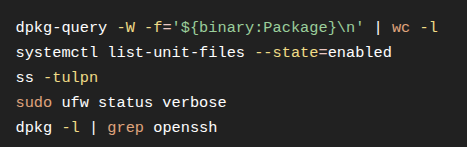
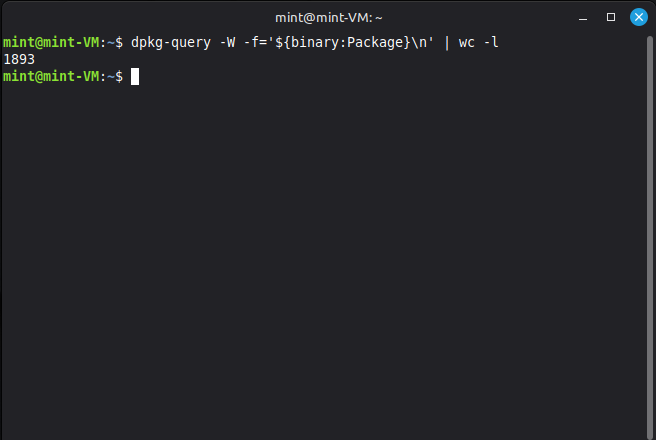
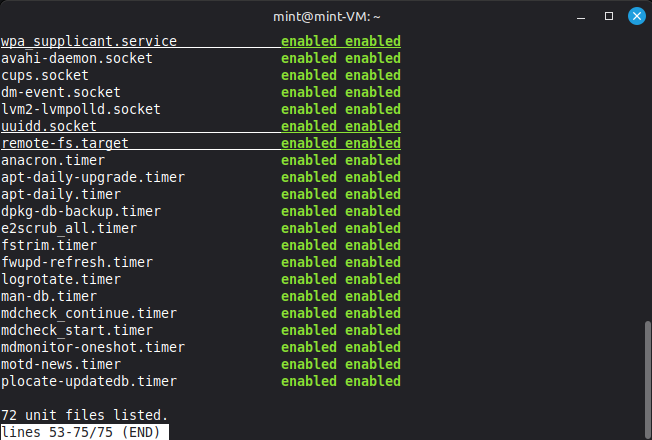
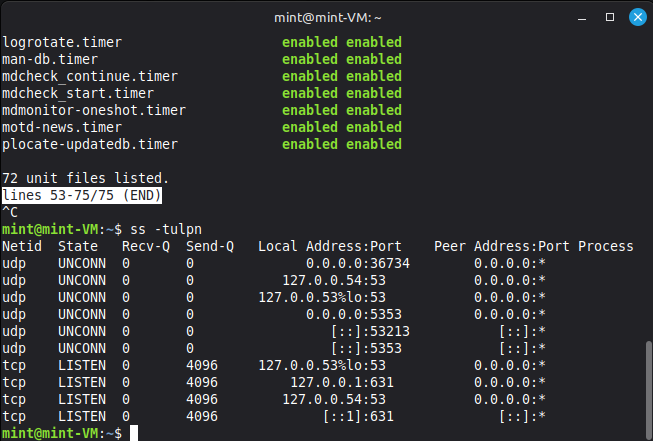


Initial Baseline Summary
The following baseline was collected immediately after a fresh installation of Linux Mint 22.3 Cinnamon in a VirtualBox virtual machine. No additional software had been installed and no configuration changes had been made before the analysis.
| Category | Result |
|---|---|
| Installed packages | 1,893 |
| Enabled systemd unit files | 72 |
| Firewall | UFW installed but inactive |
| SSH | OpenSSH client installed, OpenSSH server not installed |
| Listening ports | Local DNS resolver (127.0.0.53:53) and CUPS (127.0.0.1:631); no externally accessible TCP services detected |
Observations
- Linux Mint ships with 1,893 installed packages by default.
- The UFW firewall is installed but disabled after a fresh installation.
- Remote SSH access is disabled by default because the OpenSSH server is not installed.
- No network services were found listening on external interfaces, resulting in a relatively small default network attack surface.
- Several maintenance and update-related systemd services are enabled by default, along with services such as CUPS and Avahi that may not be required on every system.
This baseline will serve as the reference point for validating the effectiveness of the hardening process. The same analysis will be repeated after hardening to measure changes in the system’s attack surface.
I preceeded to install openssh-server since I already had a snapshot of the clean VM.
Changes After Installing OpenSSH Server
The OpenSSH server was installed to enable remote administration of the virtual machine over SSH. This introduced the following changes to the system:
| Category | Before | After |
|---|---|---|
| Installed packages | 1,893 | 1,897 (+4 packages) |
| OpenSSH client | Installed | Installed |
| OpenSSH server | Not installed | Installed |
| OpenSSH SFTP server | Not installed | Installed |
| SSH listening port | Not present | TCP port 22 listening on all interfaces (0.0.0.0:22 and [::]:22) |
| Enabled systemd unit files | 72 | 73 (ssh.socket added) |
| Firewall | UFW inactive | No change (still inactive) |
Observations
- Installing
openssh-serveradded four packages, including the SSH server and SFTP server. - The system now listens for incoming SSH connections on TCP port 22, increasing the network attack surface.
- A new systemd unit (
ssh.socket) was enabled to support SSH. - The firewall configuration remained unchanged and is still disabled.
- These changes were made solely to allow remote administration of the VM during development and do not represent the default Linux Mint installation.