OS and Application Security
Class 5 - OS and Application Security July 6, 2026
Speaker
Homework assignments
Homework assignments
Class 5 - OS and Application security
chroot Demo
Objective
Let’s say that you’re going to hand a terminal shell to a friend. They need root privileges to run their program, but you still don’t trust them to not go snooping around, and want to make sure that they can only get access to a very limited part of the OS.
What would you do?
In this lab, you will explore the historical foundation of modern containerization (like Docker) by manually building a minimalist file system sandbox using the Linux chroot (change root) utility.
You will observe how the operating system forces a process to accept a subfolder as its entire universe, and learn why this historic containment mechanism fails to meet certain security goals.
Step 1: Create the Host Secret Flag & Set Up a Shell
To simulate confidential data (e.g., password databases, environmental variables) that an attacker wants to steal, we’re going to create a “sensitive” file on your actual host operating system!
Open your terminal and run:
sudo echo "FLAG{CHROOT_IS_NOT_A_SECURE_SANDBOX_1206}" > /host_secret.txt
Modern programs rely on dozens of shared libraries (.so files). If you attempt to isolate a standard utility like Bash inside an empty directory, it will crash immediately due to missing dependencies.
To avoid “dependency hell” and keep the focus on security concepts, you will sandbox BusyBox Static. BusyBox combines tiny versions of many common UNIX utilities into a single, statically compiled binary that does not require external library paths.
Install BusyBox and set up your sandbox environment:
# Update repositories and install the static version of BusyBox
sudo apt update && sudo apt install -y busybox-static

# Create a clean directory structure for your jail
mkdir -p ~/chroot_jail/bin

# Copy the shell we're going to run into our "jail"
cp /bin/busybox-static ~/chroot_jail/bin/sh
Step 2: Activate the Jail!
Use the chroot command to execute your new shell. This command instructs the Linux kernel: “Launch /bin/sh, but trick it into thinking ~/chroot_jail is the absolute root (/) of the entire machine.”
sudo chroot ~/chroot_jail /bin/sh
Note: Your command prompt will change significantly (often down to a simple # or empty prompt). You are now inside the jail.
Step 3: Test the Containment
Now execute the following commands inside your jailed environment to test if you can break past the sandbox walls and find the host file created in Step 1.
- List the Root Directory:
bash
    ls -la /
Observation: You should only see the bin directory. To this shell, the parent directories do not exist.
- Attempt Directory Traversal:
    cd ../../..
    ls -la
Observation: No matter how many times you step “up” via .., you remain locked inside your bin folder tree. The kernel rewrites any traversal requests beyond the designated root back to the jail’s root.
- Can you grab the file?:
cat /host_secret.txt
Observation: The system outputs cat: can't open '/host_secret.txt': No such file or directory. The host file is safe from discovery.
- Exit the Jail: When finished exploring, close the sandbox session to return safely to your host terminal:
exit
Part 2: Deliverables & Submission Requirements
Submit a brief lab report with answers to the following questions:
-
When you ran
cd ../../..inside the jail and checked your location, why couldn’t you exit? How does the kernel manipulate path resolution for achroot-ed process? -
What happens if you try to run commands like
nano,python3, orgrepinside your jail? Explain why they fail, even if they are installed on your host OS.
Part 3: Deep-Dive Discussion — The Privilege Escape Paradox
New questions! 1. The user I mentioned isn’t happy with the limitations discussed in Part 2 above. Fix them! Add all of /bin and /lib, your user should be able to access a compiler and other tooling.
- Now various other commands are available to your sandboxed user, consider the below issue. You find out that your user was able to gain access to your secret file! How? Demonstrate at least one method of escaping the sandbox on your student VM, and demonstrate in your writeup that this works.
Hint: consider
mount.
While chroot effectively shifts the file path layout for standard operations, it was never designed to be a true security sandbox.
chroot modifies path resolution but does not isolate processes, namespaces, or administrative permissions.
Why would this be a problem?
The Double-Chroot Escape Vulnerability
If an untrusted process inside a chroot sandbox manages to maintain or upgrade its privileges to root (UID 0), it can easily bypass the filesystem barrier using a well-known exploit technique colloquially called a Double-Chroot Escape.
How the Escape Works
-
The attacker s running inside the jail, but retains full system admin capability (
root). -
The attacker calls
open(".", ...)to grab a direct hardware handle (file descriptor) pointing to the jail’s current root directory. -
The attacker creates a temporary subfolder inside the jail (e.g.,
/breakout) and issues a newchrootcommand targeting that deeper folder. -
The kernel updates the process’s internal root pointer to point to
/breakout. Crucially, the old root folder handle from step 2 is now technically outside the process’s new active root boundary. -
Because the attacker has a raw file descriptor to a directory outside its current root, they can call
fchdir()onto that handle, and executecd ..repeatedly. The kernel can no longer stop the traversal because the boundary calculation breaks down when navigating upwards from an external file handle. -
The attacker arrives at the true host root, issues one final
chroot("."), and breaks completely into the host filesystem with full administrative permissions intact.
✅ Step 1: Create the Host Secret Flag & Set Up a Shell
Step 1: Create the Host Secret Flag & Set Up a Shell
I logged into my VM and started following the instructions from the homework assignment.
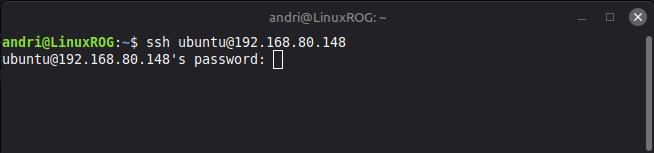
Logging into my VM through ssh, I need to enter my password to get in.
ssh ubuntu@192.168.80.148
First, I created a “sensitive” file to simulate confidential data that an attacker might want to steal:
sudo echo "FLAG{CHROOT_IS_NOT_A_SECURE_SANDBOX_1206}" > /host_secret.txt
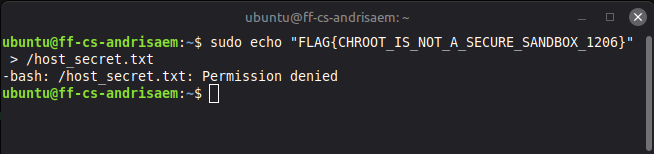
I was unable to create the host_secret.txt file, I got Permission denied. I thought that was weird since I used sudo, but after light googling I opened up a root shell and tried sudo -i
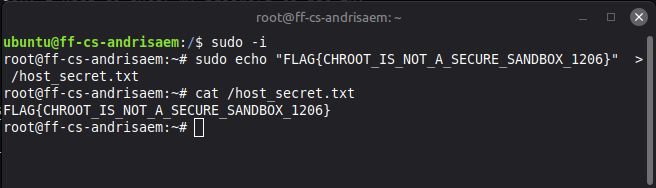
This gave me root access, now I was able to create the “sensitive” file with no problems.
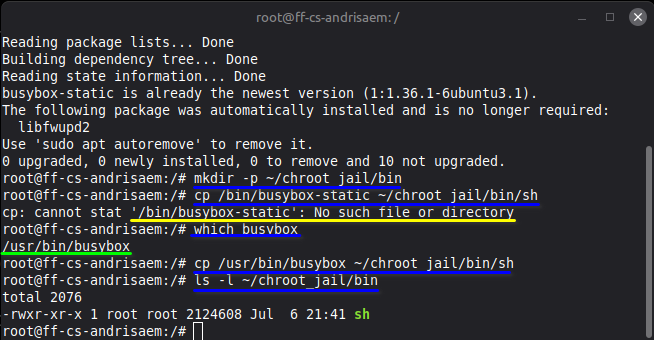
So, I continued following the assignment, next was installing BusyBox and setting up my virtual environment:
# Update repositories and install the static version of BusyBox
sudo apt update && sudo apt install -y busybox-static

# Create a clean directory structure for your jail
mkdir -p ~/chroot_jail/bin

# Copy the shell we're going to run into our "jail"
cp /bin/busybox-static ~/chroot_jail/bin/sh
I was able to install BusyBox and create a clean directory structure for my jail but copying the shell did not work since BusyBox was installed in a different location, but using which busybox revealed the location so I could do cp /usr/bin/busybox ~/chroot_jail/bin/sh to copy the shell into the “jail”.
✅ Step 2: Activate the Jail!
Step 2: Activate the Jail!
Now it was time to activate the jail. Following the instructions I ran sudo chroot ~/chroot_jail /bin/sh
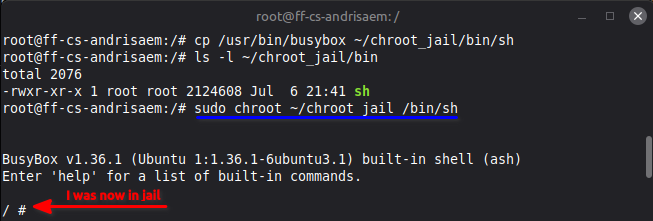
I was now in jail
✅ Step 3: Test the Containment
Step 3: Test the Containment
I tried the commands given in the homework description, and I was stuck:
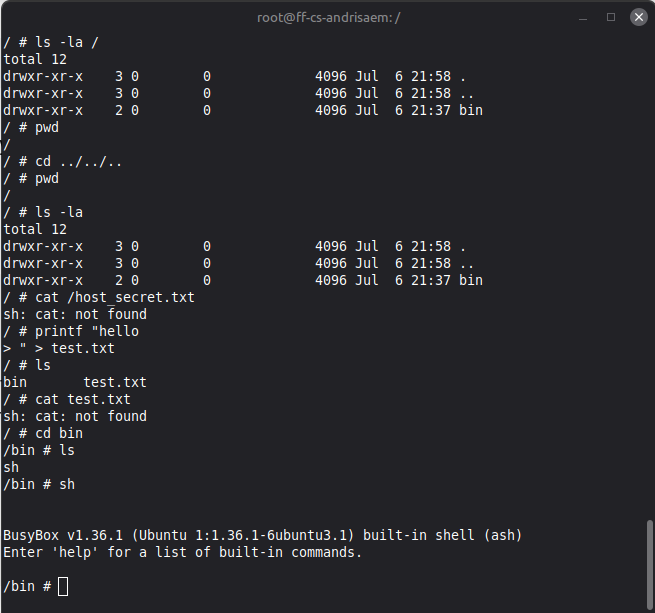
I continued browsing the jail, typed in help which gave me a list of commands, I tried a few, some worked some did not.
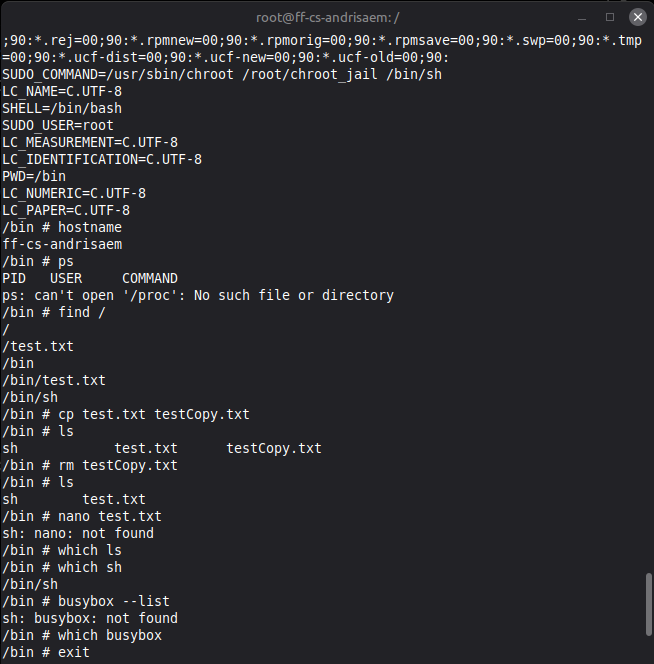
So, I exited out of the jail and continued the assignment.
✅ Part 2: Deliverables & Submission Requirements
Part 2: Deliverables & Submission Requirements
1. When you ran cd ../../.. inside the jail and checked your location, why couldn’t you exit? How does the kernel manipulate path resolution for a chroot-ed process?
When I am not in the jail my folder structure looks something like this:
/
├── bin
├── boot
├── home
├── root/
│   └── chroot_jail/
│       └── bin/
│           └── sh
├── lib
├── .
├── .
└── .
But when I’m in the jail I can only see:
/
└── bin/
    └── sh
So, when im in the jail at / I am unable to traverse backwards using cd .. because the kernel changes how absolute and relative paths are resolved for the chroot-ed process, making /root/chroot_jail appear to be the root directory / for the process inside the jail. So, cd .. from / leaves the process at / because the kernel treats that directory as the highest point for the jailed process, so there is no parent directory above it to go to.
2. What happens if you try to run commands like nano, python3, or grep inside your jail? Explain why they fail, even if they are installed on your host OS.
When Im in the jail I am unable to run commands like nano, python3, and other basic commands even though they are available on my host OS because, from the perspective of the jailed process, those programs and libraries are not available. The prisoner only sees:
/
└── bin/
│    └── sh
The actual commands live elsewhere on the host OS, so there is no python3 executable inside the jail /bin. When I type python3, the shell searches the directories in its PATH (such as /bin and /usr/bin) for an executable named python3. Since the jail only contains /bin/sh, it cannot find a python3 executable and tells me that the command is not found.
The actual location of python3 is:
/
├── bin
├── boot
├── home
├── root/
│   └── chroot_jail/  <--- The jailed process considers this its root and can't see anything above
│       └── bin/
│           └── sh
├── lib
├── usr
│   └── bin/
│       └── python3  <--- python 3 lives here
├── .
└── .
✅ Part 3: Deep-Dive Discussion — The Privilege Escape Paradox (Failed attempt)
Part 3: Deep-Dive Discussion — The Privilege Escape Paradox (Failed attemp)
Now it is time for a jail break. The prisoner is not happy, he is basically living in an empty room with no door, toilet, lights or anything. I should make the jail more humane. :) “Add all of /bin and /lib, your user should be able to access a compiler and other tooling.”
Adding all of /bin and /lib to the jail.
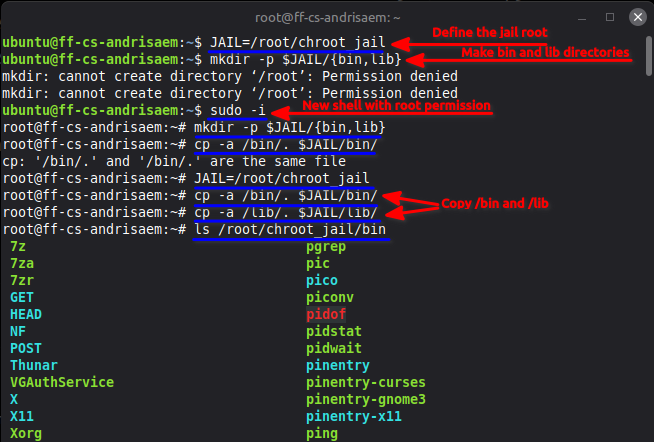
I start by adding the directories into the jail then copy /bin and /lib to jail, I had to have root permission to do this.
I went back to jail to see if I had any extra amenities such as python3, nano and cat. I was unable to walk straight to jail since the copy of /bin may have overwritten something so I had to copy the BusyBox shell back into the jail.
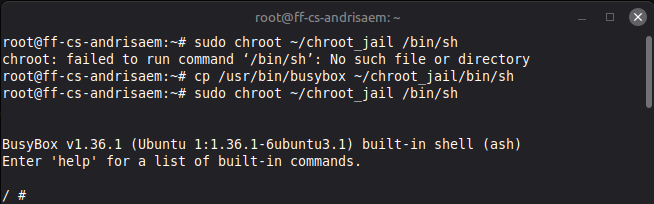
So, now I could see if my new extra amenities worked.
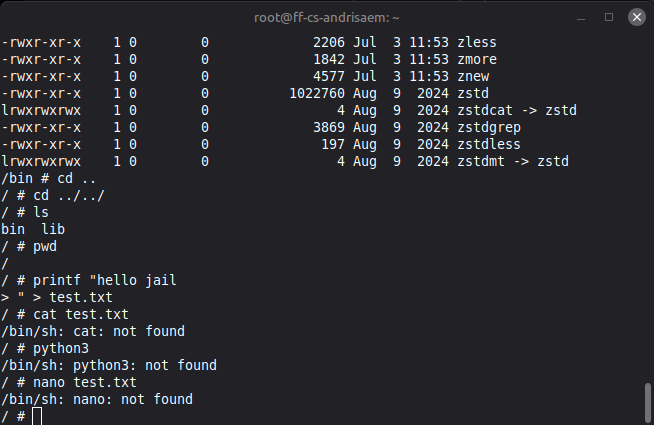
None of the commands I thought would be transferred to jail worked. I thought this was weird so, did some investigation. I went out of the jail and checked which cat

This showed that on the OS cat lives at /usr/bin/cat, I had seen from earlier that there is also where python3 lives. So, I decided to copy /usr/bin and /usr/lib to the jail.
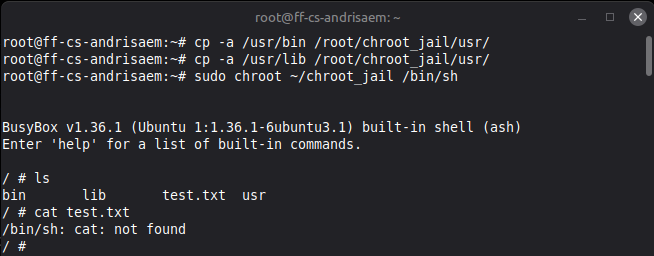
cat still did not work, so I did some googling and found these three sites talking about choroot and copying /bin and /lib into jail. How to Use chroot Jails to Restrict User Access on Ubuntu, chroot command in Linux with examples, Linux Virtualization - Chroot Jail
I followed the example from these sites and copied their advice. First I wanted to see if cat had any dependencies using ldd or List Dynamic Dependencies.
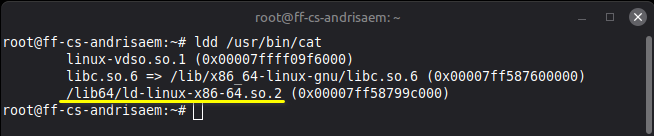
I could see that cat needs /lib64. The examples on the sites I mentioned also showed copying of /lib64 so that’s what I tried next, that did not work so I also copied the /lib64/ld-linux-x86-64.so.2 as was shown in the ldd command:
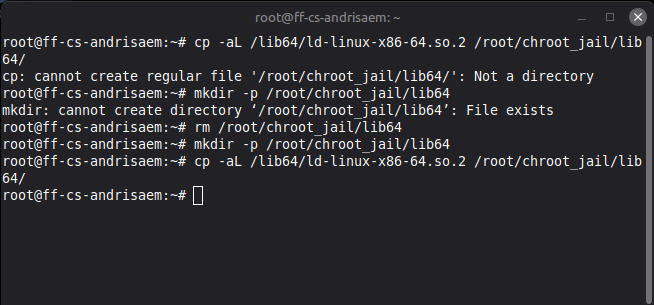
Then I went back in jail to test things out again:
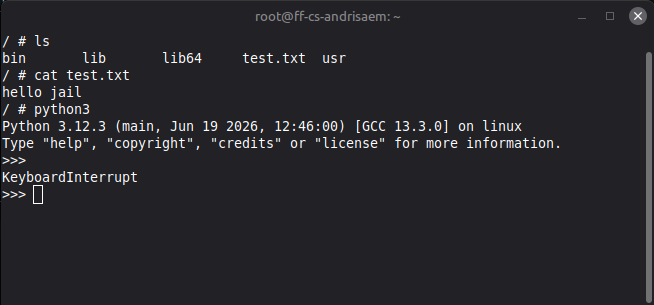
Finaly cat and python3 work in jail. Now I can continue with the assignment.
Hint: consider
mount.
I started by checking if I had mount available.
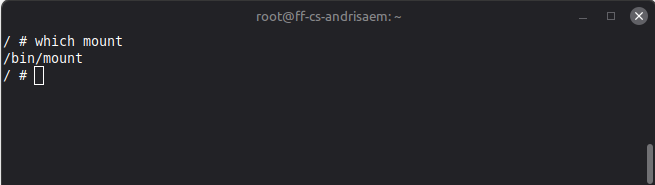
Running which mount tells me I do indeed have mount available.
I do some googling and find Linux Bind Mount: A Comprehensive Guide which talks about using mount --bind <source> <destination>, so I give that a shot:
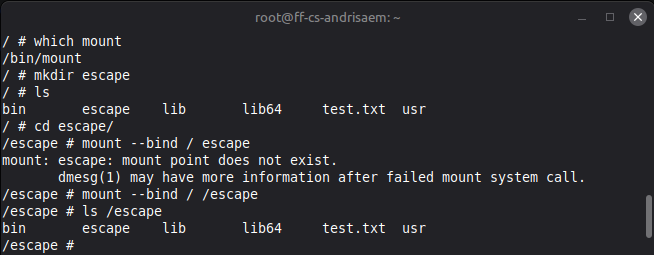
I tried mounting the OS / root to my new folder /escape but ls /escape showed me that I just bound the root of the jail to the /escape folder. So, I’m not sure how I can use mount to escape the jail or read the secret file.
The Double-chroot Escape Vulnerability
I dove right into the double-chroot escape vulnerability hint given.
- The attacker s running inside the jail, but retains full system admin capability (
root).
To check who I am I run whoami and id

According to Redhat.com uid=0 gid=0 means I have root priviledges inside the jail.
- The attacker calls
open(".", ...)to grab a direct hardware handle (file descriptor) pointing to the jail’s current root directory.
I googled and tried a few things and it seems like I need to make a c script, and the assignment says “your user should be able to access a compiler and other tooling.” But, running which gcc returns nothing, so I am exiting the the jail to see which gcc outside the jail and import at least the gcc into the jail. That’s all I can think of right now.
Running which gcc outside the jail revealed that gcc was not even available on the actual OS but the assignment said the user should be able to access a compiler, so my guess is the assignment was made under the assumption that at least gcc was available on the OS and would get copied to the jail. So, lets install gcc on the OS and copy /bin again to the jail.?
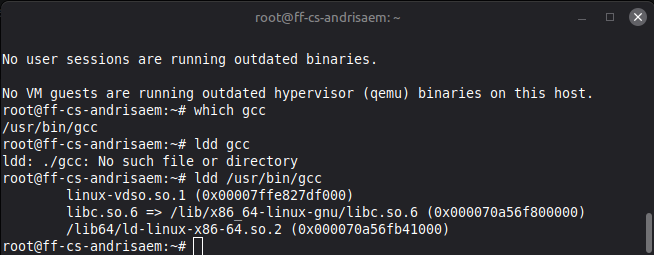
I got gcc on the actual OS and ran ldd to find dependencies that it needs before copying into the jail.
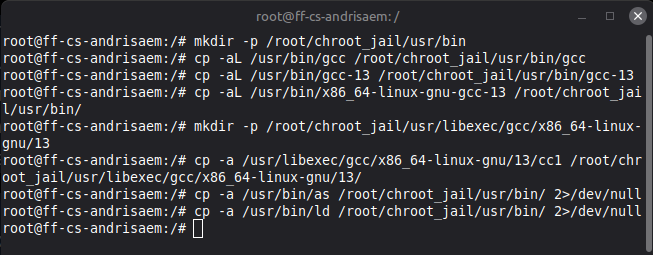
Since the assignment mentions that the user should have access to a compiler, I decided to install gcc on the host OS. I quickly discovered that copying gcc was not as straightforward as copying a single executable. Running ls -l /usr/bin/gcc showed that gcc is actually a symbolic link pointing to gcc-13, which in turn points to x86_64-linux-gnu-gcc-13. Simply copying the gcc link into the jail would leave me with a broken link because the files it points to would not exist inside the jail.
To fix this, I first created a usr/bin directory inside the jail since it did not already exist. I then copied the real gcc executable into the same location in the jail while following the symbolic links using the -L option. After that I copied the cc1 compiler backend into its expected location under usr/libexec, as well as the assembler (as) and linker (ld). These are all tools that gcc relies on internally when compiling a C program, so copying only the gcc executable would not have been enough to create a functional compiler inside the jail.
Next, I went back to jail to see if I had a functioning gcc compiler:
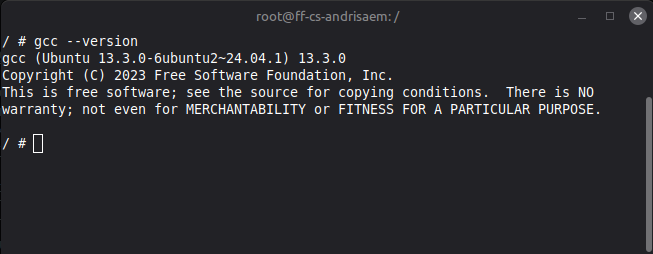
Now I at leas have a compiler so I can attempt to write some code, compile it and learn more. So I did some googling and found Understanding and Mastering Linux File Handles. I also got an AI response from firefox giving me this example code:
cat << EOF > my_program.c
#include <stdio.h>
int main() {
    printf("Hello, World!\\n");
    return 0;
}
EOF
So, I hand-typed a version of this code and tried to compile it:
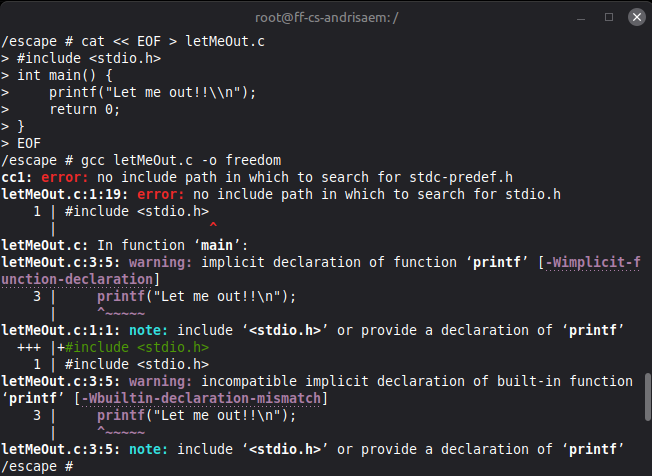
That did not work but the error tells me there is something wrong with <stdio.h> and printf. I don’t think I should go back out of jail and smuggle more packages or stuff back into jail. So, I thought I should try something different and do some more research.
I tried a few things but got no where. At this time Doddi had escaped the jail and gave me a hint, that if gcc did not I could still write code that wouldn’t need to be compiled if I just wrote it in assembly. I could write c code and use godbolt to compile/translate it into assemble.
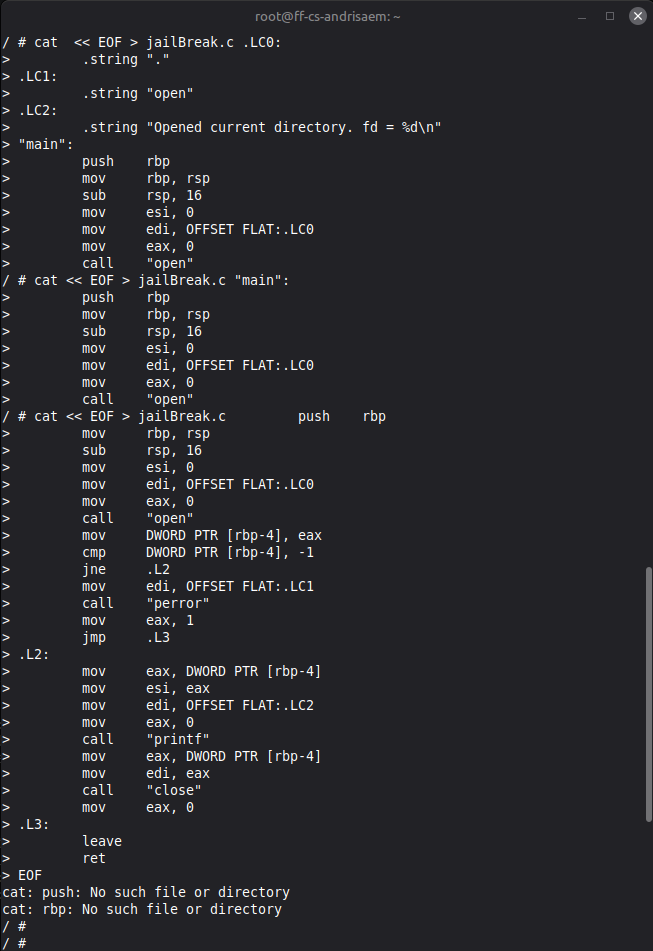
✅ Part 3: Deep-Dive Discussion — The Privilege Escape Paradox (Success)
Part 3: Deep-Dive Discussion — The Privilege Escape Paradox (Success!!!)
I had a suspicion that whatever I was doing was not right, everything I read online told me that this should not be this hard. So, I started from scratch creating a new jail; jail2 and started the assignment from scratch.
I started by creating a new jail called jail2. My goal was to build a minimal chroot environment from scratch and gradually add the tools I needed, rather than simply copying the entire root filesystem. I wanted the finished environment to support normal shell commands as well as C programming, assembly programming, GCC, Python 3, Nano, and other useful Linux utilities. I also wanted to understand exactly which files and directories were required for these programs to work inside a chroot.
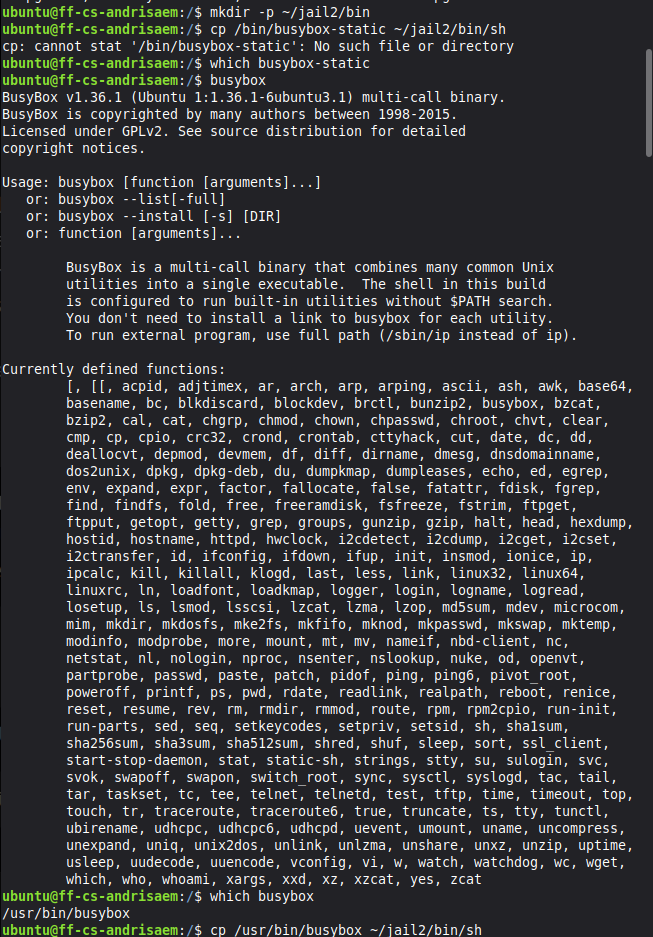
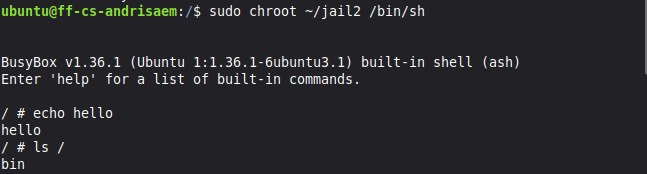
Ok, so now I’m in jail2, but at this point the jail is extremely minimal. When I run ls, the only thing I can see is the /bin directory, which contains the BusyBox executable and a symbolic link called sh that points to it. BusyBox gives me a working shell and provides some built-in Linux utilities, but I quickly discover that not every command is directly available. For example, when I try to create and read a text file using cat, the shell responds with /bin/sh: cat: not found. This shows that although the cat exists inside the jail, I have not created a separate command or symbolic link that allows the shell to find and execute it simply by typing cat.
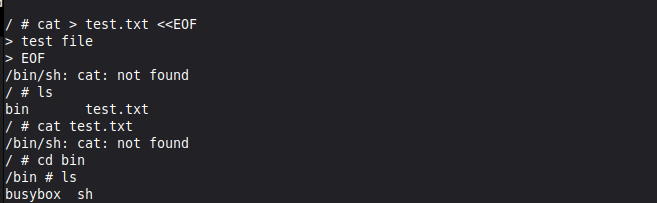
At this point, I knew that this minimal jail was not enough for what I wanted to do. I want to write and compile C and assembly programs, use GCC, maybe run python3, edit files with nano, and have access to other useful Linux tools. Instead of copying the entire root filesystem, I wanted to copy only the parts that were necessary. I left the jail and returned to the host system, where I began preparing jail2 to become a more humane environment.
I decided to start with a clean jail2 directory and build the environment in a more structured way. After creating the new jail, I first created the basic directories that would be needed inside it: usr, dev, proc, sys, tmp, root, and home. I also changed the permissions of the tmp directory to 1777, giving all users permission to create temporary files while ensuring that users can only delete their own files. At this stage, the jail contained only the empty directory structure, ready for the programs, libraries, header files, and configuration files that I would copy into it next.

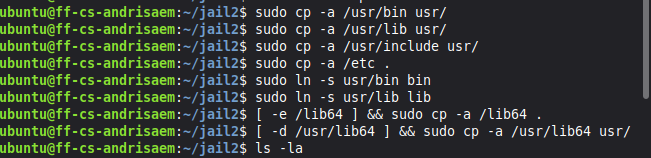
With the basic directory structure in place, I started copying the parts of the host system that I needed inside jail2. I copied /usr/bin, which contains many executable programs and command-line tools; /usr/lib, which contains shared libraries and other program support files; /usr/include, which contains the header files required for compiling C programs; and /etc, which contains important system configuration files. I used cp -a so that file permissions, symbolic links, timestamps, and other attributes would be preserved during the copy. Since Ubuntu uses a merged /usr filesystem layout, I then created symbolic links so that /bin pointed to /usr/bin and /lib pointed to /usr/lib. I also copied the lib64 components when they were present on the host system.
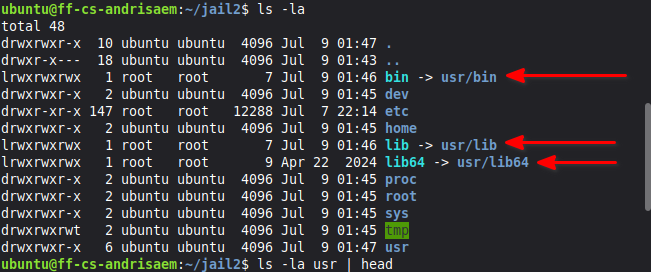
After copying the necessary programs, libraries, header files, and configuration files, I needed to make several virtual filesystems available inside jail2. I bind-mounted /dev so that the jail could access device files, mounted the proc filesystem to provide information about running processes and the kernel, and bind-mounted /sys to expose system and hardware information. Once these were mounted, I entered the new environment using sudo chroot ~/jail2 /bin/bash. The command worked successfully, and my shell prompt changed to root@ff-cs-andrisaem:/#. Running pwd returned /, confirming that the root directory visible to the process had changed to the root of jail2, while ls showed the new filesystem structure containing bin, dev, etc, home, lib, lib64, proc, root, sys, tmp, and usr.


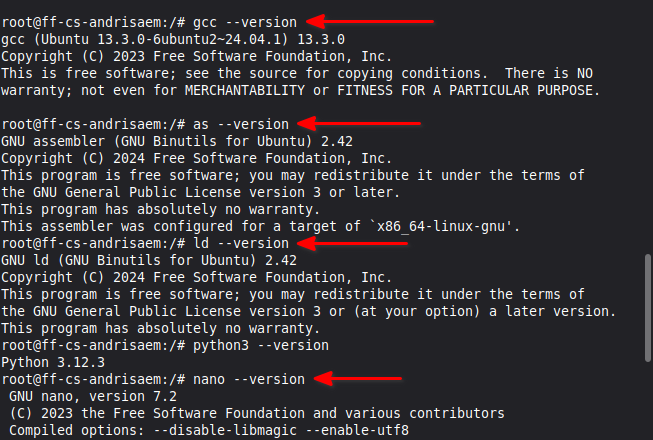
OK, now Im back inside jail2, I checked whether the development tools I needed were available. I ran gcc --version and confirmed that GCC 13.3.0 was installed. I then checked the GNU assembler with as --version and the GNU linker with ld --version, both of which were available and configured for the x86_64-linux-gnu architecture. I also verified that Python 3.12.3, Nano 7.2, and the mount utility were working. At this point, everything appeared to be ready, the jail had a shell, compiler, assembler, text editor, and other basic Linux commands. However, simply being able to run gcc --version did not necessarily mean that GCC had all of the internal components required to actually compile a C program.
Now that all the tools seemed to be working, it was time to actually test GCC by writing and compiling a simple C program. I created a file called hello.c directly from the terminal and wrote a small program that would print hello from jail2. This was just to see if I could compile and run a program.
This is the program I wrote using cat to write to a file hello.c:
root@ff-cs-andrisaem:/# cat > hello.c <<'EOF'
> #include <stdio.h>
>
> int main() {
> printf("hello from jail2\n");
> return 0;
> }
> EOF
I then tried to compile the program with gcc hello.c -o hello, but this time I got an error: gcc: fatal error: cannot execute 'cc1': execvp: No such file or directory. This was weird to me because gcc --version had worked perfectly before. I had the GCC command itself, but I was still missing a depedency that GCC uses during compilation. The missing program was called cc1, which is the actual C compiler used by GCC to process C source code.

So, GCC was there but something was still missing.
To investigate the problem, I asked GCC where it expected to find cc1 by running gcc -print-prog-name=cc1. The output was simply cc1, without a full path. I also searched the GCC directories inside the jail, but no cc1 executable could be found. This confirmed that the GCC installation inside jail2 was incomplete and that I needed to find the missing compiler component on the host system.

This did not give me much so I went out of jail to see what was going on.
I exited the prison and returned to the host system so I could search for the missing cc1 file. I used the find command to search through /usr for any file called cc1 located somewhere in a GCC-related path. This time I found exactly what I was looking for: cc1 was located at /usr/libexec/gcc/x86_64-linux-gnu/13/cc1. This explains why GCC could not compile my hello program inside the jail. I had copied /usr/bin and /usr/lib, but I had not copied /usr/libexec, which contained an important part of GCC.

There it was. The missing cc1 file was in /usr/libexec, a directory I had not copied into the jail.
Now that I knew where the missing file was, I copied /usr/libexec from the host system into the /usr directory of jail2. I also copied the contents of /usr/lib/gcc again to make sure the GCC support files were complete. After that, I entered the jail again and ran gcc -print-prog-name=cc1. This time, instead of just returning cc1, GCC returned the full path /usr/libexec/gcc/x86_64-linux-gnu/13/cc1. I also used find to confirm that the file really existed inside the jail.

This was looking much better. GCC could now find cc1 which was needed to compile c code.

With cc1 finally available, I tried compiling hello.c again using gcc hello.c -o hello. This time there was no error at all. I then ran the compiled program with ./hello, and it printed hello from jail2. This confirmed that I now had a working C development environment inside my prison. GCC could compile codeand run an executable inside jail2.

Now that I had a working c compiler inside jail2, I could move on to the setting up my jail escape. The purpose of building this development environment was not only to compile a simple Hello World program, but also to explore an important limitation of chroot: it changes the root directory that a process can see, but it is not designed to be a complete security boundary. To test this, I wrote another C program called jailBreak.c. This program used Linux system calls directly through inline assembly instead of relying on the standard C library.

The program first creates a directory called d and used chroot to make that directory the new root. It then changed the current working directory by repeatedly moving up with ../../../../../../../. Finally, it called chroot again on the current directory and started a new shell using the execve call. The idea was to test whether a privileged process inside the chroot could regain access to the host filesystem by exploiting the Double-chroot vulnerability.
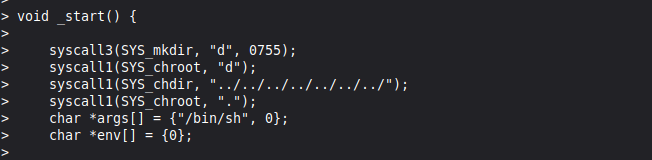
After writing the program, I compiled it with gcc -nostdlib jailBreak.c -o jailBreak. I compiled it with the -nostdlib option, meaning the program did not use the normal C standard library or standard startup code. The compilation completed without any errors, which was another confirmation that the GCC environment I had built inside jail2 was working properly. I then executed the new program using ./jailBreak.
I used a shell here-document (heredoc) with cat to create the c file directly from the terminal. See my full cat jailBreak code here This created jailbreak.c.
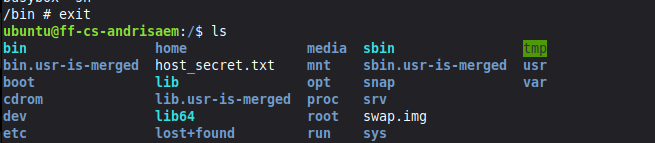
After running the program, I used ls and immediatly saw files and directories that had not been visible inside jail2, including boot, media, snap, swap.img, and most importantly host_secret.txt. I then used cat host_secret.txt and successfully read the secret stored on the host filesystem. This demonstrated the main security lesson of the experiment: chroot can change the apparent root directory of a process, but by itself it should not be treated as a secure sandbox for privileged processes. In this experiment, the process was running with sufficient privileges to call chroot again, allowing the program to escape the restricted filesystem view and access the host filesystem.
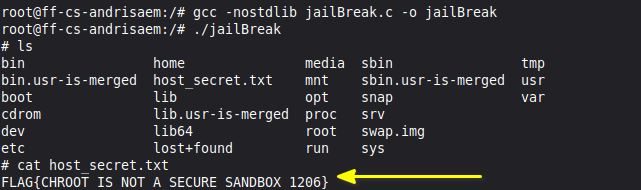
The host filesystem was visible again, and I could read host_secret.txt.
After successfully accessing the host filesystem and reading host_secret.txt, I exited the escaped shell and returned to the original shell inside jail2. I then exited the chroot completely and returned to my normal user account on the host system. From there, I listed the contents of ~/jail2 and could see everything I had created during my stint in jail, including hello.c, the compiled hello program, jailBreak.c, and the compiled jailBreak executable. Running whoami confirmed that I was back on the host system as the normal ubuntu user.
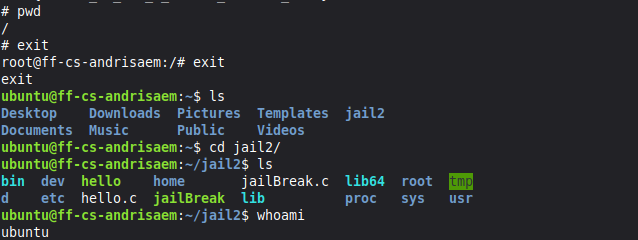
This experiment gave me a much better understanding of how a chroot environment actually works. I started with an extremely minimal jail containing only BusyBox and gradually built jail2 into a working development environment by copying the necessary programs, libraries, C header files, configuration files, and GCC components. Along the way, I learned that having the gcc command available does not necessarily mean that the full compiler toolchain is complete, as shown by the missing cc1 error. After finding and copying the missing GCC components, I was able to compile and run C programs successfully inside the jail. Finally, I demonstrated that chroot by itself is not a secure sandbox when a process inside it has enough privileges to call chroot again. Overall, the experiment showed me both how Linux programs depend on many different parts of the filesystem and why filesystem isolation alone is not enough to provide strong security.

links I used
First, I would like to thank Doddi for helping me escape the jail, I would probably still be rotting away without his help.
Here are some links I found during my escape attempts:
- Dashboard - Fab Futures Tools
- Students 2026 - Fab Futures Cyber Security
- Homework - Fab Futures Cybersecurity 2026 Curriculum
- How to run Terminal as root? - Ask Ubuntu
- how can I find where busybox is installed linux at DuckDuckGo
- BusyBox
- expain chroot jail linux at DuckDuckGo
- How to Use chroot Jails to Restrict User Access on Ubuntu
- chroot command in Linux with examples - GeeksforGeeks
- Linux Virtualization - Chroot Jail - GeeksforGeeks
- The Double-chroot Escape Vulnerability explained at DuckDuckGo
- Escaping the jail. If you’ve ever heard of chroot, you’ve… | by David Eduardo Karpinski | Medium
- Escaping Linux CHROOT Jail | Cybrary
- linux - chroot fails - cannot run command `/bin/bash’: No such file or directory - Server Fault
- Linux sysadmin basics: User account management with UIDs and GIDs
- fp = open() chroot escape double chroot at DuckDuckGo
- HackTheBox: Scanned - Detailed Walkthrough
- mount(8) - Linux manual page
- Escaping from Jails - HackTricks
- Linux Bind Mount: A Comprehensive Guide — linuxvox.com
- Here is all you need to know about File Descriptors in linux | by Ishan Dhar | Medium
- Understanding and Mastering Linux File Handles — linuxvox.com
- here-document write c code in terminal without an editor at DuckDuckGo
- How to use heredoc as a text editor | Opensource.com
- How to Write to a File From the Shell | Linode Docs
- liblto_plugin.so not found at DuckDuckGo
- gcc 10.3.1.1.fc32 build failing with “gcc: fatal error: ‘-fuse-linker-plugin’, but liblto_plugin.so not found” - Stack Overflow
- gcc fatal error: ‘-fuse-linker-plugin’, but liblto_plug - Page 1
- c - warning: incompatible implicit declaration of built-in function ‘printf’ [enabled by default] - Stack Overflow
- printf in C - GeeksforGeeks
- Session 5: OS and Application security - Philippe Libioulle - Fab Futures
- Escaping from Jails - HackTricks
- Compiler Explorer
- Escaping a chroot Jail — LazyHackers — LazyHackers
- chroot escape tutorial at DuckDuckGo
Fun reads
Fun reads
Mike suggested some fun reads:
Intro to security
-
Original Paper Intro:
-
Memory Corruption History:
OS Primitives for Security
-
System Decomp.:
-
Android:
-
Capabilities: