Virtual Session 12: what are the options to store keys and passwords ?
What is a secret ?
It’s something you say only to a very limited number of persons, usualy one at a time and only if they ask (Quoted from a 9 years old kid)
Seriously, it’a all about what purpose it has and who you have to share it with…
Personal use (passwords for accounts, etc.)
Password managers
Examples: Bitwarden, 1Password, KeePassXC, Proton Pass.
Encrypted vault, one master password, autofill, cross-device sync.
But…
- Everything sits behind one master password. If that’s weak, reused, or phished, an attacker potentially gets every credential you own at once — instead of compromising accounts one at a time
- No recovery if you forget it, unless you’ve set up recovery keys/emergency access in advance.
- Malicious sites or malware can sometimes scrape clipboard contents after a copy-paste
- I know it’s bad but I’m sometimes reading loudly the text I have to type (when I’m alone and when copy-paste is not possible !). With so many intelligent devices around, could it be risky…?
Mitigations
- Use a strong, unique master password (a long passphrase) and never reuse it anywhere else.
- Keep a printed copy of recovery keys, in a safe, offsite.
- Turn on 2FA for the password manager account itself, ideally with a hardware key.
- Prefer open-source, audited managers if you want to reduce “trust the vendor’s code” risk.
- Keep offline/local backups (e.g., KeePassXC’s local-only model) if you’re worried about cloud breaches specifically.
This is the standard recommendation for most people.
OS-level keychains
Examples: macOS Keychain, Windows Credential Manager, GNOME Keyring/libsecret on Linux.
Good for system/app credentials, less convenient as a general-purpose vault.
Keychains are solid for system and app-level credentials (Wi-Fi passwords, certificates, app tokens) where deep OS integration matters more than portability
But…
- Locked to one OS/device. If you use multiple platforms, you either duplicate secrets manually or fall back to something else, which undercuts the “one place for everything” benefit.
- Weaker UX for actual password management
- Limited support for storing structured extras
- Sharing credentials with others (family, team) is clunky or unsupported
- On many setups, once you’re logged into your user account, apps can request access to keychain items (sometimes with a prompt, sometimes not, depending on configuration).
So.. unless you live within a single ecosystem and you don’t share … do not go that way, unless for system and app-level credentials.
Hardware security keys
YubiKey etc., often used alongside a password manager for 2FA rather than storing the secrets themselves. Could be the “Something you have” in the https://csrc.nist.gov/glossary/term/multi_factor_authentication multi-factor definition
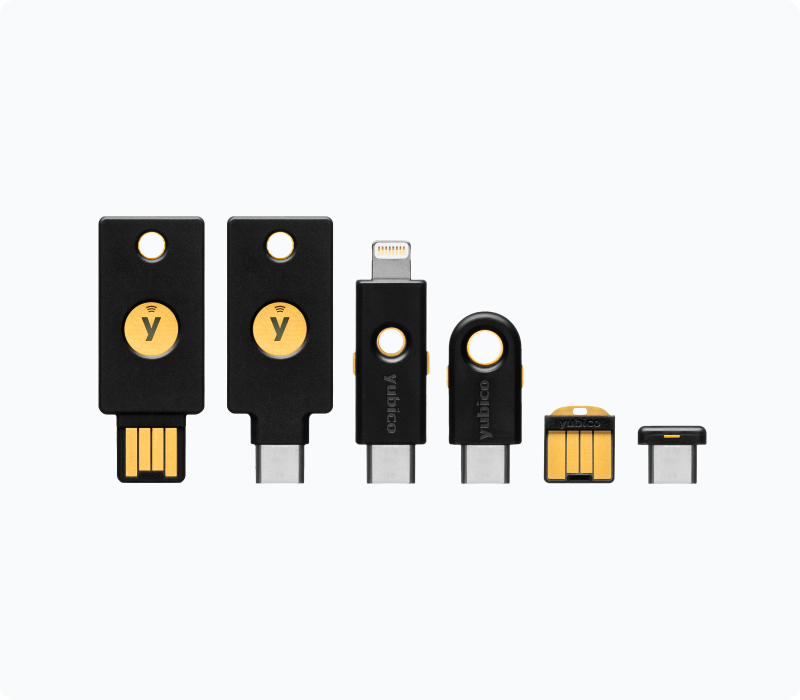
Nice… but it can be lost or stolen.
Want to build your own in the FabLab ? See https://www.picokeys.com/
Application/developer secrets (API keys, DB passwords, etc.)
Environment variables
Simple, common for local dev, but easy to leak (logs, crash dumps, ps output). Fine for low-sensitivity local work, not great alone for production.
Mitigation:
- add fences at the CI/CD level. Infisical has a nice secret scanning tool
- be carefull with AI copy-paste
.env files + .gitignore
Same caveat; never commit them, and rotate any key that accidentally lands in git history.
Secret managers:
A secret manager acts like a digital safe for your code. It stops you from hardcoding passwords in your scripts.
HashiCorp Vault
Self-hosted or cloud, dynamic secrets, fine-grained access policies. Could be hard to setup
AWS Secrets Manager / SSM Parameter Store, Azure Key Vault, Google Secret Manager
Cloud-native, integrate well with their respective platforms, support automatic rotation.
Infisical
Newer, more dev-friendly SaaS options with good CLI/CI integration.
Infisical provides a flexible platform for managing secrets such as API keys, database credentials, and application configuration across every stage of the development lifecycle — from local development to production. It enables teams to eliminate hardcoded secrets, enforce fine-grained access controls, deliver secrets across their infrastructure, and adopt secure workflows like secret rotation and dynamic secrets. Nice case studies here: https://infisical.com/customers
CI/CD secret stores — GitHub Actions secrets, GitLab CI/CD variables, etc. — for pipeline credentials, encrypted at rest and injected at build time.
KMS/HSM — AWS KMS, Google Cloud KMS, or a hardware security module, when you need to encrypt secrets with keys that never leave a hardened boundary (common for signing keys, encryption master keys).
Team/shared secrets
Shared vaults in a password manager (Bitwarden/1Password have team/org tiers) or a secret manager with role-based access control (RBAC), so you get audit logs and can revoke access per person instead of everyone knowing the raw value.
Wait, they said RBAC ? Time to write more details on that. Here it is
Role-based access control (RBAC) is a security method that restricts system access to authorized users based on their job function. Instead of assigning > permissions to individuals, administrators group privileges into “roles”. Users are assigned roles, automatically granting them the permissions needed to do their work.
What to avoid
-
Plaintext files, spreadsheets, Slack/email messages, or hardcoding secrets directly in source code — all common ways secrets end up leaked or committed to public repos.
-
Storing secrets unencrypted in a database column, if it can be avoided — encrypt at rest, and separate the encryption key from the data.
-
Your favorite pet’s name everywhere