Session 1: Introduction & Cryptography
“AI (Claude) has been used to provide answers to simple questions like “What is .., what does.. what are the risks..”. All demos are my own”
Part 1 - public/private key pair.
Demo - key generation
See step 2 in part 2 demo
What is the public key?
A public key is one half of a key pair used in asymmetric cryptography. It is shared openly with anyone.
What is the private key?
A private key is the other half of a key pair used in asymmetric cryptography. It is kep secret by the owner.
What can this key pair be used for?
- Encryption: anyone can use your public key to encrypt a message. Only your private key can decrypt it. This lets people send you secret messages without ever needing a shared secret upfront. The message content is not readable in clear text until it is decrypted.
- Signature: when you sign something with your private key, anyone with your public key can verify the signature came from you — proving authenticity and integrity. The message is un clear text but any change to the content will make the signature verification fail.
Why must the private key be protected?
Because anyone who could access it could: * Decrypt messages sent to you (encrypted using the public side of that key) * Alter a message signed by you and sign it again without your consent * Send encrypted message that looks like you have encrypted them
Part 2 - SSH key authentication
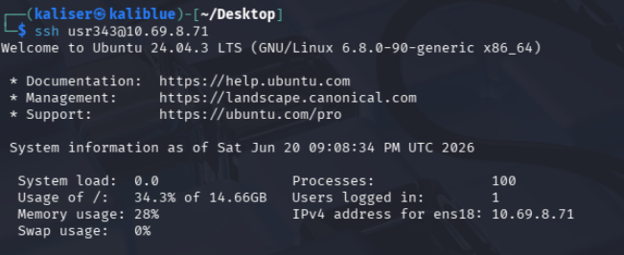
Demo - use a key to authenticate while connecting using SSH
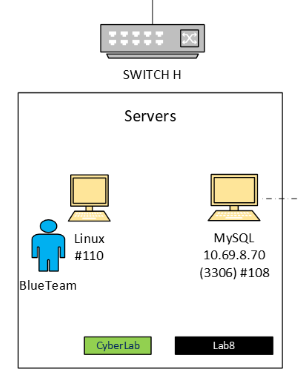
We want to connect using SSH from the Blue Teams computer to the MySQL server (Note: there is a typo in the picture, it should be 71 instead of 70)
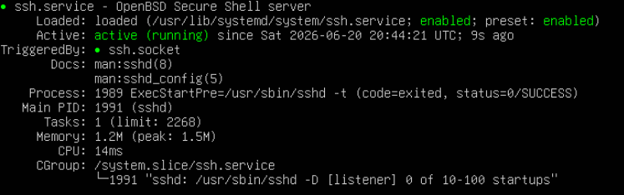
Step 1 — Install OpenSSH on the target machine: VM 108 (Linux – MySQL)
sudo apt update
sudo apt install openssh-server -y

# Start and enable SSH service
sudo systemctl enable ssh
sudo systemctl start ssh
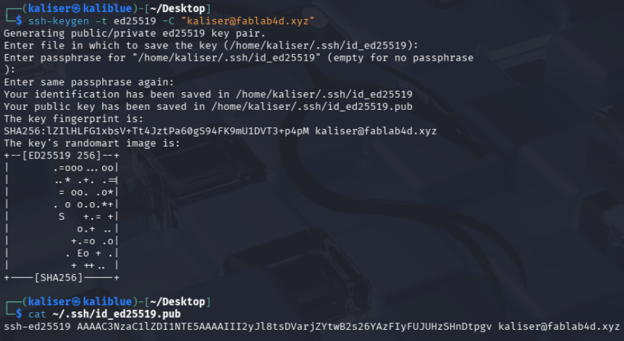
Step 2 — Generate Key Pair on Kali (client) VM 110 (Kali Blue Team)
On the Kali machine:
ssh-keygen -t ed25519 -C kaliser@fablab4d.xyz
You’ll be prompted: Enter file in which to save the key (/root/.ssh/id_ed25519): ← press Enter Enter passphrase (empty for no passphrase): ← recommended to set one Enter same passphrase again: This creates two files: ~/.ssh/id_ed25519 ← private key (never share this) ~/.ssh/id_ed25519.pub ← public key (this goes to Ubuntu) View your public key:
cat ~/.ssh/id_ed25519.pub
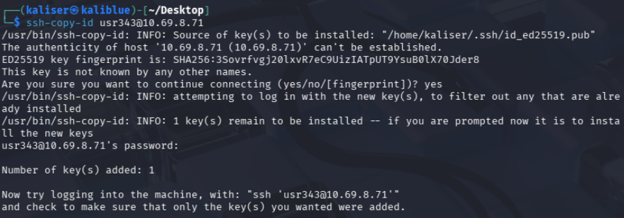
Step 3 — Copy Public Key to Ubuntu
Step 4 - Connect without entering a password
How does SSH key authentication work?
-
Setup: you generate a key pair on your machine, store the private key (that never leaves your machine, unless you store it in a secure vault somewhere) and copy your public key to the server.
-
Usage (as explained by Radia during the course)
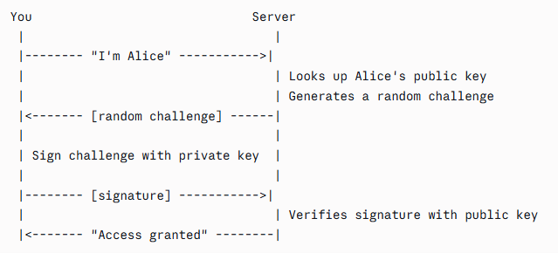
What is stored on the server?
The public key
What stays on your own computer?
The private key never leaves your machine, unless you store it in a secure vault somewhere.
Why does the server not need your private key?
Because the server only needs to verify the signed challenge. Notre: even if someone intercepts the connection, they can’t replay the challenge (it’s unique each time)
Part 3 – file encryption
Demo - Encrypt/decrypt a file.
Prepare a file (secret.txt) with a confidential information

Step 1 - Generate a random one-time use AES key
openssl rand -base64 32 > aes_key.bin
Step 2 - Encrypt the file with AES
openssl enc -aes-256-cbc -in secret.txt -out secret.enc -pass file:aes_key.bin
Step 3 - Get the recipient public key (public_key.pem).
Here is how the public key has been generated on his side
openssl genrsa -out private_key.pem 2048
openssl rsa -in private_key.pem -pubout -out public_key.pem
Step 4 - Encrypt the AES key with the recipient’s RSA public key
openssl pkeyutl -encrypt -inkey public_key.pem -pubin -in aes_key.bin -out aes_key.enc
Step 5 - Send both: secret.enc + aes_key.enc


Both files can travel over an insecure channel safely: secret.enc is useless without the AES key aes_key.enc is useless without the RSA private key
Step 6- Decrypt the file
Decrypt the AES key with recipient’s private key
openssl pkeyutl -decrypt -inkey private_key.pem -in aes_key.enc -out aes_key.bin
Step 7 - Decrypt the file with the recovered AES key
openssl enc -d -aes-256-cbc -in secret.enc -out clearText.txt -pass file:aes_key.bin

Did you use symmetric or public-key encryption?
Both (but it was not needed since the payload is small) . RSA can only encrypt data smaller than its key size. OpenSSL uses the hybrid approach : * RSA (asymmetric, public key) encrypts a small AES key * AES (symmetric) encrypts the actual file
Where did the key come from?
The keys are generated. AES key is generated on the sender side and RSA key is generated on the receiver side.
Who can decrypt the file?
You always encrypt to someone’s public key. Only their private key can decrypt it.
What happens if the key or password is lost?
Nothing if the original file still exists. Otherwise, the data is unrecoverable.
Part 4 - Encrypt a disk, USB stick, directory, or filesystem.
Demo - I choose to encrypt a directory, using GPG tool.
Step 1 - create a archive file
GPG cannot encrypt a directory directly — only files. That’s why we need the archive.
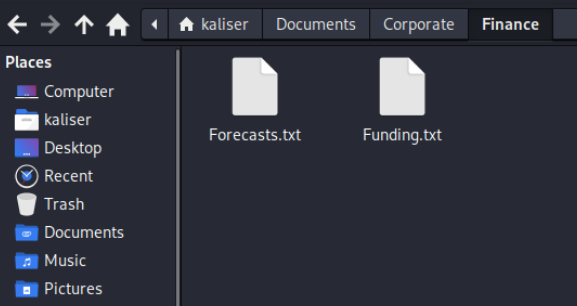
tar czf secret_project.tar.gz Corporate/
Step 2 - Generate a GPG key pair
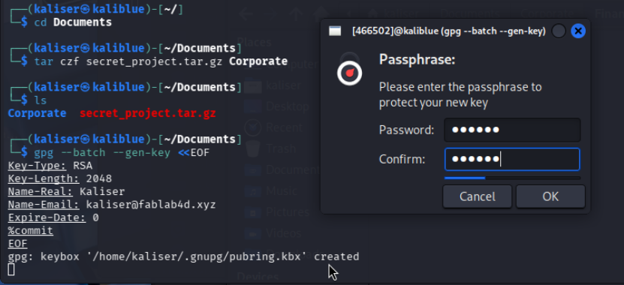

Step 3 - Encrypt with GPG
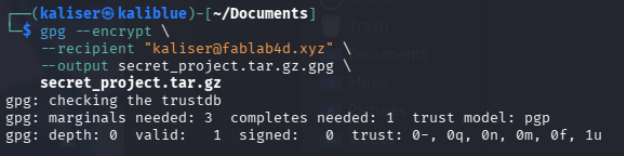
Step 4 - Get rid of the originals
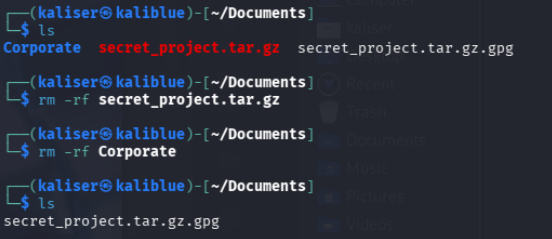
From now, we have only the encrypted archive left
Step 5 - Decrypt
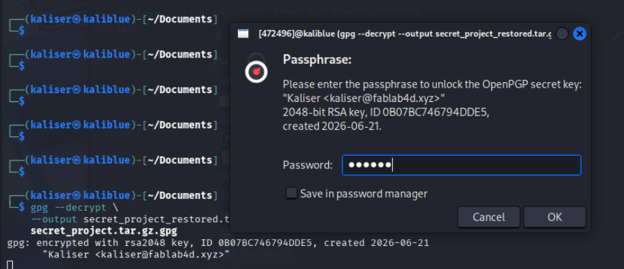
Step 6 - Get the data back, in directories
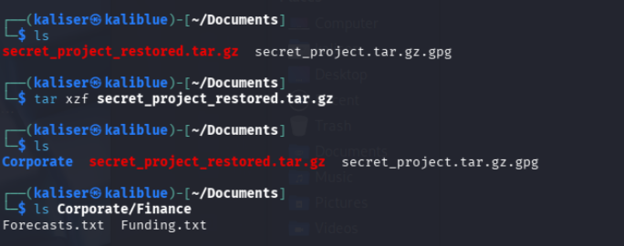
What exactly is encrypted?
It depends on the tool you used. In Linux, when you encrypt a directory, the file contents are always encrypted. But depending on the tool used, metadata may or may not be.
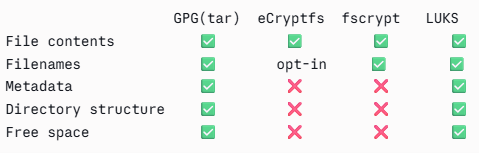
For maximum privacy, LUKS full-disk or volume encryption is the only option that hides everything — including the fact that specific files even exist.
When is the data decrypted?
What does this protect against?
- Physical theft: If someone steals your laptop, hard drive, or USB stick, they cannot read the data without the key — even by mounting the drive on another machine.
- Unauthorized physical accesss: an attacker with brief physical access to your machine (while it’s off) cannot extract your files.
- Discarded or resold hardware: data on a sold or thrown-away drive is unreadable without the key, protecting against data recovery attacks.
- Cloud/backup provider snooping: if you back up encrypted volumes, the provider sees only ciphertext — they cannot read your files.
What does it not protect against?
Encryption protects data at rest on a powered-off or locked device. The moment the volume is mounted and in use, you are relying on your OS, network security, and physical security — not encryption — to protect your data.
Part 5 – hash
Demo - Create a file, compute its hash, change the file, and compute the hash again.
For this demonstration, I’m using a Python script:
import hashlib
FILENAME = "demo.txt"
def compute_hash(filepath):
    sha256 = hashlib.sha256()
    with open(filepath, "rb") as f:
        for chunk in iter(lambda: f.read(4096), b""):
            sha256.update(chunk)
    return sha256.hexdigest()

# Step 1: Create the file
original_content = "This is the original content of the file.\nHashing is cool!"
with open(FILENAME, "w") as f:
    f.write(original_content)
print(f"File created: {FILENAME}")
print(f"Content:\n  {repr(original_content)}\n")

# Step 2: Compute original hash
hash1 = compute_hash(FILENAME)
print(f"SHA-256 (original): {hash1}\n")

# Step 3: Modify the file (change just one character)
modified_content = "This is the original content of the file.\nHashing is kool!"  # 'cool' -> 'kool'
with open(FILENAME, "w") as f:
    f.write(modified_content)
print(f"File modified — changed 'cool' to 'kool'")
print(f"Content:\n  {repr(modified_content)}\n")

# Step 4: Compute new hash
hash2 = compute_hash(FILENAME)
print(f"SHA-256 (modified): {hash2}\n")

# Step 5: Compare
print("=" * 60)
print(f"Hashes match: {hash1 == hash2}")
print(f"\nOriginal : {hash1}")
print(f"Modified : {hash2}")

# Highlight difference
diff_positions = [i for i, (a, b) in enumerate(zip(hash1, hash2)) if a != b]
print(f"\nDifferent at {len(diff_positions)} character positions: {diff_positions[:10]}{'...' if len(diff_positions) > 10 else ''}")
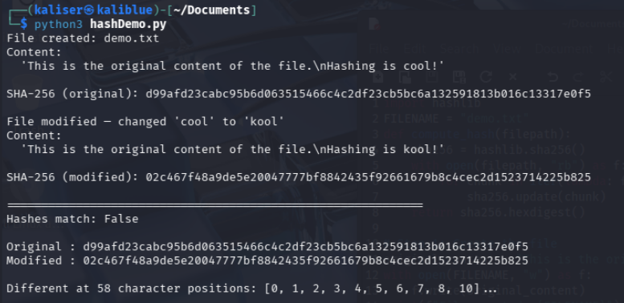
What changed?
Just one letter (cool became kool) in the content but the impact is clearly visible, the new hash is almost completely different.
Why are hashes useful?
If someone tampers with even a single byte of a file, the hash will be completely different, and the tampering is immediately detected.
Why does a hash not prove who created the file?
Because there is no key involved, anybody could run the same code on the same content and get the same hash result.
How could hashes be used to detect tampering?
If someone tampers with even a single byte of a file, the hash will be completely different and the tampering is immediately detected.
Part 6 – signature
Demo - Sign a message and verify the signature.
from cryptography.hazmat.primitives.asymmetric import rsa, padding
from cryptography.hazmat.primitives import hashes, serialization
from cryptography.exceptions import InvalidSignature

MESSAGE = (
    b"Cryptography without system integrity is like investing in an armored car "
    b"to carry money between a customer living in a cardboard box and a person "
    b"doing business on a park bench. \xe2\x80\x94 Gene Spafford"
)

# ── Step 1: Generate RSA key pair ─────────────────────────────────────────────
print("=" * 65)
print("STEP 1 — Generate RSA key pair")
print("=" * 65)

private_key = rsa.generate_private_key(
    public_exponent=65537,
    key_size=2048,
)
public_key = private_key.public_key()

pub_pem = public_key.public_bytes(
    encoding=serialization.Encoding.PEM,
    format=serialization.PublicFormat.SubjectPublicKeyInfo
).decode()

print(pub_pem)

# ── Step 2: Sign the message ──────────────────────────────────────────────────
print("=" * 65)
print("STEP 2 — Sign the message")
print("=" * 65)

print(f"\nMessage:\n  {MESSAGE.decode()}\n")

signature = private_key.sign(
    MESSAGE,
    padding.PSS(
        mgf=padding.MGF1(hashes.SHA256()),
        salt_length=padding.PSS.MAX_LENGTH
    ),
    hashes.SHA256()
)

print(f"Signature (hex):\n  {signature.hex()}\n")
print(f"Signature length: {len(signature)} bytes\n")

# ── Step 3: Verify the signature (valid case) ─────────────────────────────────
print("=" * 65)
print("STEP 3 — Verify signature (original message)")
print("=" * 65)

try:
    public_key.verify(
        signature,
        MESSAGE,
        padding.PSS(
            mgf=padding.MGF1(hashes.SHA256()),
            salt_length=padding.PSS.MAX_LENGTH
        ),
        hashes.SHA256()
    )
    print("\n  ✅ Signature is VALID — message is authentic and untampered.\n")
except InvalidSignature:
    print("\n  ❌ Signature is INVALID.\n")

# ── Step 4: Verify the signature (tampered message) ───────────────────────────
print("=" * 65)
print("STEP 4 — Verify signature (tampered message)")
print("=" * 65)

TAMPERED_MESSAGE = MESSAGE.replace(b"armored car", b"armored cat")
print(f"\n  Changed 'armored car' → 'armored cat'\n")

try:
    public_key.verify(
        signature,
        TAMPERED_MESSAGE,
        padding.PSS(
            mgf=padding.MGF1(hashes.SHA256()),
            salt_length=padding.PSS.MAX_LENGTH
        ),
        hashes.SHA256()
    )
    print("  ✅ Signature is VALID.")
except InvalidSignature:
    print("  ❌ Signature is INVALID — tampering detected!\n")

# ── Step 5: Verify with wrong key ─────────────────────────────────────────────
print("=" * 65)
print("STEP 5 — Verify with a different (wrong) public key")
print("=" * 65)

wrong_private_key = rsa.generate_private_key(public_exponent=65537, key_size=2048)
wrong_public_key = wrong_private_key.public_key()

try:
    wrong_public_key.verify(
        signature,
        MESSAGE,
        padding.PSS(
            mgf=padding.MGF1(hashes.SHA256()),
            salt_length=padding.PSS.MAX_LENGTH
        ),
        hashes.SHA256()
    )
    print("\n  ✅ Signature is VALID.")
except InvalidSignature:
    print("\n  ❌ Signature is INVALID — wrong key detected!\n")

print("=" * 65)
print("SUMMARY")
print("=" * 65)
print("  Original message  + correct key  → ✅ VALID")
print("  Tampered message  + correct key  → ❌ INVALID")
print("  Original message  + wrong key    → ❌ INVALID")
print("=" * 65)
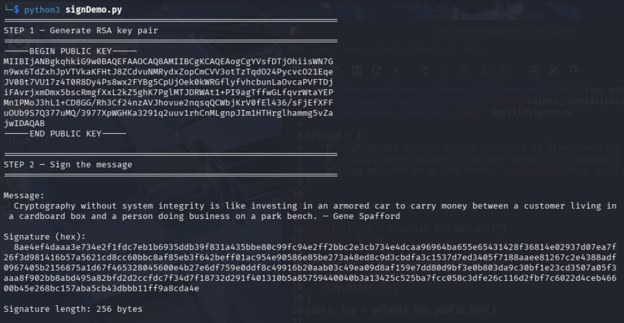
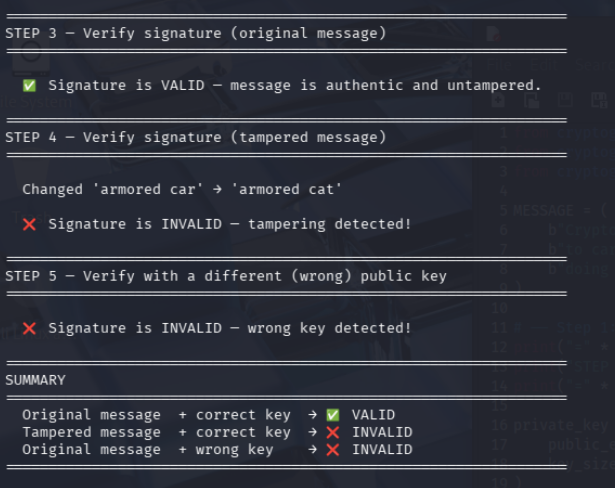
What does the signature prove?
- Authenticity The message was signed by whoever holds the private key. If you trust that Alice owns that key, you know Alice signed it.2.
- Integrity The message has not been altered since it was signed. Even a one-character change (like car → cat) produces a completely different hash, making the signature invalid — as we just saw.3.
- Non-repudiation The signer cannot later deny having signed it. Only the holder of the private key could have produced that signature, so they can’t credibly claim they didn’t sign it.
What does it not prove?
- Identity of the person: It proves ownership of a key, not who that person actually is in real life. If Alice’s private key was stolen, the attacker can sign as Alice and the signature will verify perfectly.
- That the public key belongs to who you think: If you receive a public key claiming to be Alice’s, you have no cryptographic proof it actually is — unless a trusted third party (like a Certificate Authority) has vouched for it. This is the entire purpose of PKI (Public Key Infrastructure) and SSL certificates.
- The truth of the content: A signature proves the message is intact and came from the key owner. It says nothing about whether the content is true, accurate, or trustworthy.
- That the private key wasn’t compromised: If the private key was stolen before signing, the signature is “valid” but fraudulent. A signature is only as trustworthy as the security of the private key.
- When it was signed: Unless a trusted timestamp authority is involved, there’s no reliable proof of when the signature was created.
Why is the message usually hashed before signing?
- Size RSA operates on fixed-size blocks of data — a 2048-bit key can only directly sign 256 bytes at most. A hash is always a fixed small size (32 bytes for SHA-256) regardless of whether the input is a tweet or a 10GB file. RSA can sign that directly.
- Speed Asymmetric encryption (RSA) is orders of magnitude slower than hashing. Signing 1GB directly with RSA would be impractically slow. Hashing is extremely fast.
What happens if the signed file is changed?
Even a single bit changed anywhere in the file — whether accidental corruption or deliberate tampering — is detected immediately.
Part 7 - Send a digitally signed email.
Demo - send an unencrypted but signed email
Step 1 - Setup a basic email server
I already have a server running MySQL database. I will add a mail server there. This is not on the DMZ, there is no need. It will be accessible by internal users only, on a Windows 11 workstation for example. Let’s start by the email server setup (on 10.69.8.71, there is a typo on the picture). Just a local setup, no access between the mail server and the Internet. And then setup a Thunderbird client on the Kali workstation And now, please Alice, meet Bob!
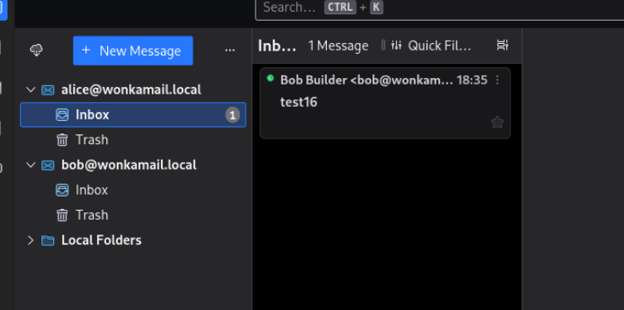
This setup is definitely not secure and rely on password in clear text… but we have a starting point
Step 2 - configure the email client to use the certificate
In Thunderbird, you can sign emails using either a simple text signature or a cryptographic digital signature (S/MIME or OpenPGP).
Let’s try OpenPGP (RFC 9580). The story behind OpenPGP is fascinating. More to read on OpenPGP.org
Step 3 - generate an OpenPGPkey
- Go to Settings → click Alice account → End-To-End Encryption
- Under the OpenPGP section, click Add Key
- Create a new OpenPGP key — fill in expiry preference and click Generate Key
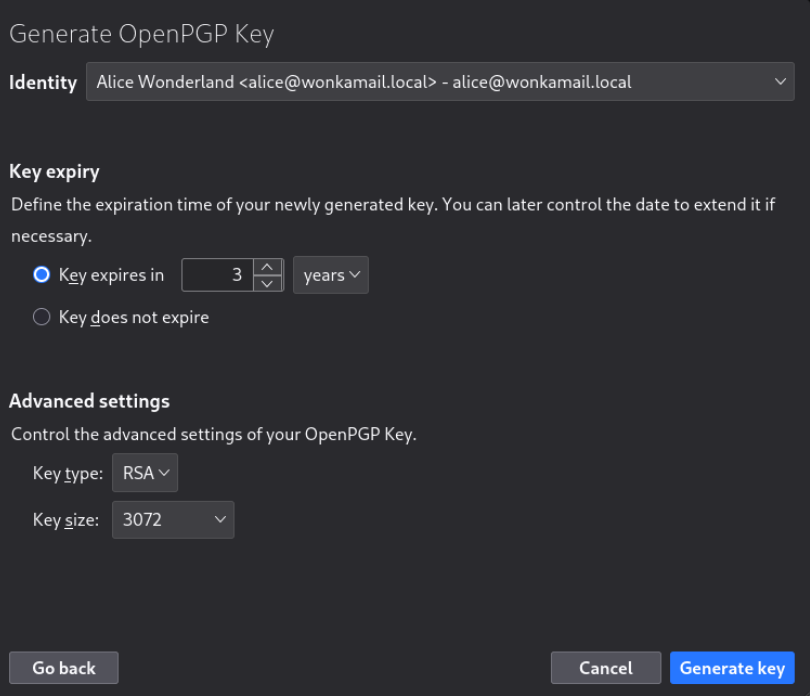
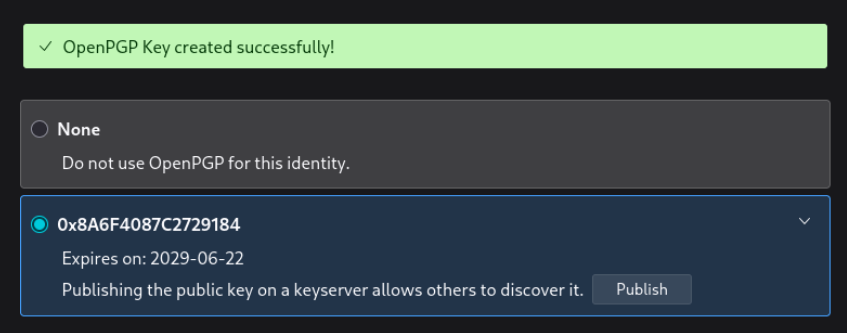
Step 4 - share Alice public key
Options are: * Attach the public key to the message when composing * Upload it to a keyserver. For more on this, just google “OpenPGP HTTP Keyserver Protocol”
Step 4 - send a signed message
When composing a message:
- Click the Security button in the compose toolbar (lock icon)
- Enable Digitally Sign This Message
- Send as usual — recipients with your public key can verify the signature
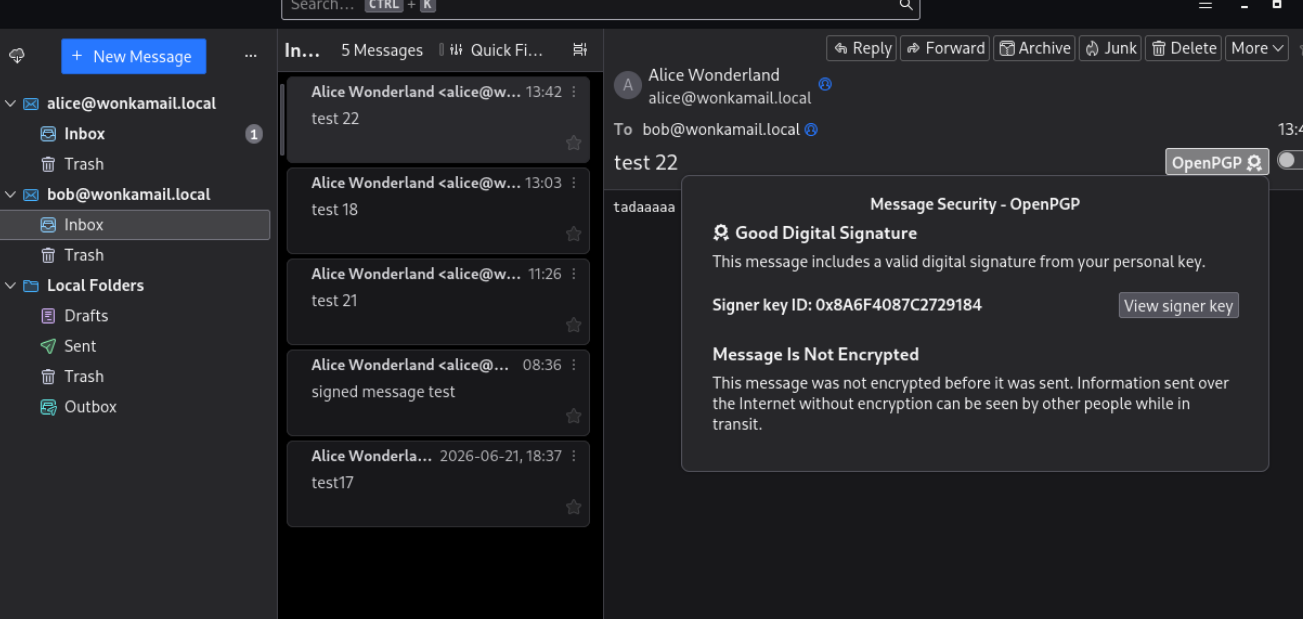
Step 5 - inspect signature
Signing only proves the email came from Alice — it doesn’t encrypt the content. To encrypt, you also need Bob’s public key.
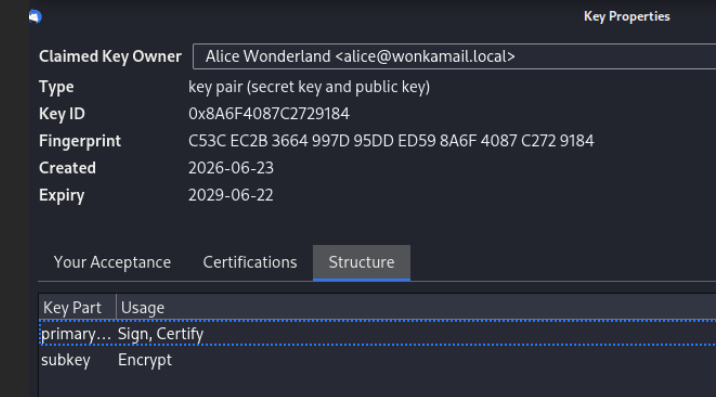
How can the recipient verify the signature?
A certificate from a trusted Certificate Authority (CA) is required. When you request a certificate, you get two parts: a private key kept securely on your device, and a public key shared with people who receive your signed emails.
- Email arrives with Alice’s certificate attached
- Your email client reads the certificate
- Checks the CA’s signature on it → valid?
- Checks the CA is in your trusted root store → trusted?
- Checks the certificate hasn’t expired
- Checks the certificate hasn’t been revoked (via CRL or OCSP) ✅ All good → shows “Verified sender” badge
If a private key is compromised, the CA can revoke the certificate before it expires — essentially publishing a “do not trust this anymore” notice. Two mechanisms: * CRL (Certificate Revocation List) — a periodically published blacklist of revoked certificates. * OCSP (Online Certificate Status Protocol) — a real-time check: “is this certificate still valid right now?” Without revocation, a stolen private key would remain trusted until the certificate’s natural expiry.
What key or certificate do they need?
The public key and the CA certificate. The receiver will use the public key to verify the signature. But before that, he has to verify that the certificate is still valid. It could be expired or not trusted any more. Is the email encrypted, signed, or both? If you need both privacy and proof of identity, you can use encryption and a digital signature together
What is the difference between signing and encrypting?
A signed message does not imply that the content is encrypted. It could be in clear text or encrypted. Those are two different steps. Email encryption hides the content of the message so only the recipient can read it. A digital signature doesn’t hide anything — it proves who (= the person using the private key, it still does not confirm it is a legitimate owner, it could have been stolen) sent the message and protects it from being altered. If you need both privacy and proof of identity, you can use encryption and a digital signature together
Part 8 - Install a certificate on a web server
This is our setup
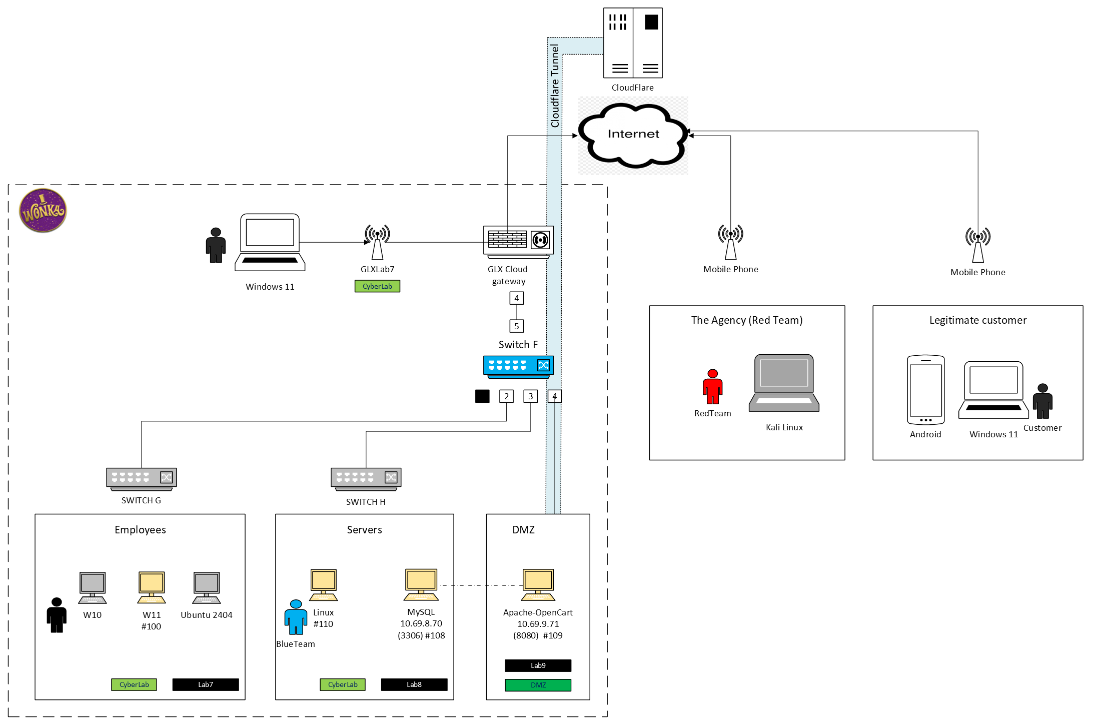
For a detailed explanation, see my final project. Let’s focus on improving OpenCart server security. The server runs Ubuntu 24.04. The web engine is Apache.
Demo - Deploy a certificate on a web server
Here is our starting point: an OpenCart based web site without any security.
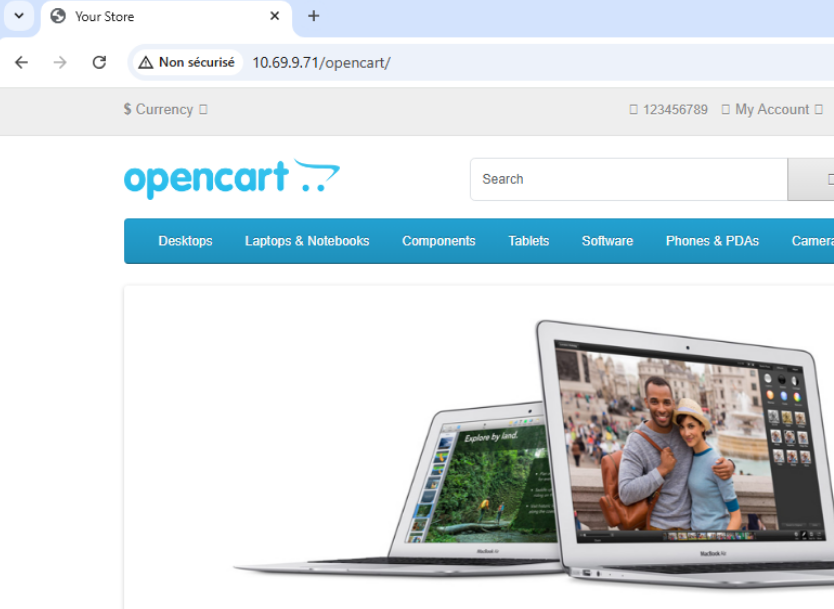
Step 0 - setup a key to help to connect without password to the OpenCart server
- Install OpenSSH on the target machine: VM 109 (Linux – OpenCart)
sudo apt update
sudo apt install openssh-server -y

# Start and enable SSH service
sudo systemctl enable ssh
sudo systemctl start ssh
We already have two files from a previous step: ~/.ssh/id_ed25519 ← private key (never share this) ~/.ssh/id_ed25519.pub ← public key (this goes to Ubuntu)
- Copy Public Key to the server
ssh-copy-id usr342@10.69.9.71
- Connect without entering a password
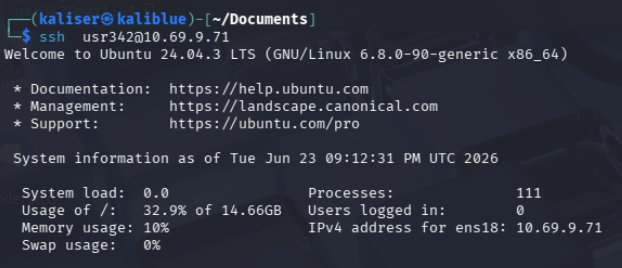
Step 1 - get a certificate
Generate a private key and CSR (self-signed)
sudo openssl req -x509 -nodes -days 365 -newkey rsa:2048 \
  -keyout /etc/ssl/private/opencart.key \
  -out /etc/ssl/certs/opencart.crt
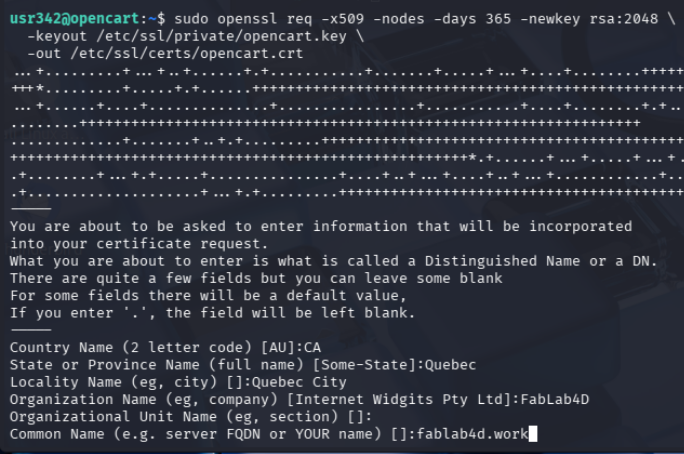
Step 2 - deploy it on the web server
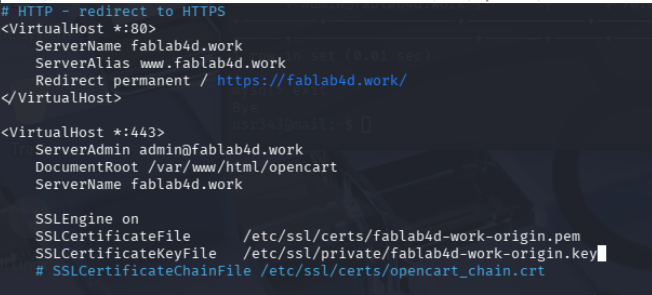
Update OpenCart configuration
sudo nano /etc/apache2/sites-available/opencart.conf
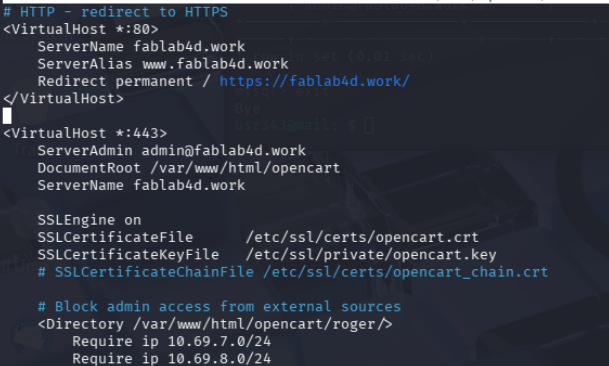
Enable SSL module and restart Apache2
sudo a2enmod ssl
sudo a2ensite yourdomain.conf
sudo systemctl restart apache2
Update config.php files /var/www/html/opencart/config.php (storefront)

Update /var/www/opencart/SECRET/config.php (admin panel), same logic
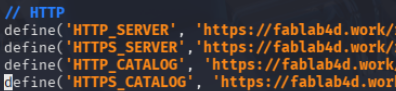
Step 3 - connect using HTTPS from a browser
It works locally, on 127.0.0.1 but not from another computer (in the same subnet). There are two issues:
- Name resolution (i.e mapping fablab4d.work to an IP adress)
- Self-signed certificate authenticity. Anybody can create one with my domain name in it.
So I need a DNS. In my Lab, I’m not confortable in exposing a web server to the Internet directly, by “punching a hole”, i.e exposing 80 and 443 router ports.
The solution I found was to use CloudFlare services.
fablab4d.work is now handled by CloudFlare DNS but CloudFlare does not accept my self-signed certificates. That’s the whole point of “Being a Certificate Authority” question hereafter..
What we need is a tunnel between our web server and Cloudflare, so we could benefit from the name resolution AND avoid the “self-signed certificate” annoying message.
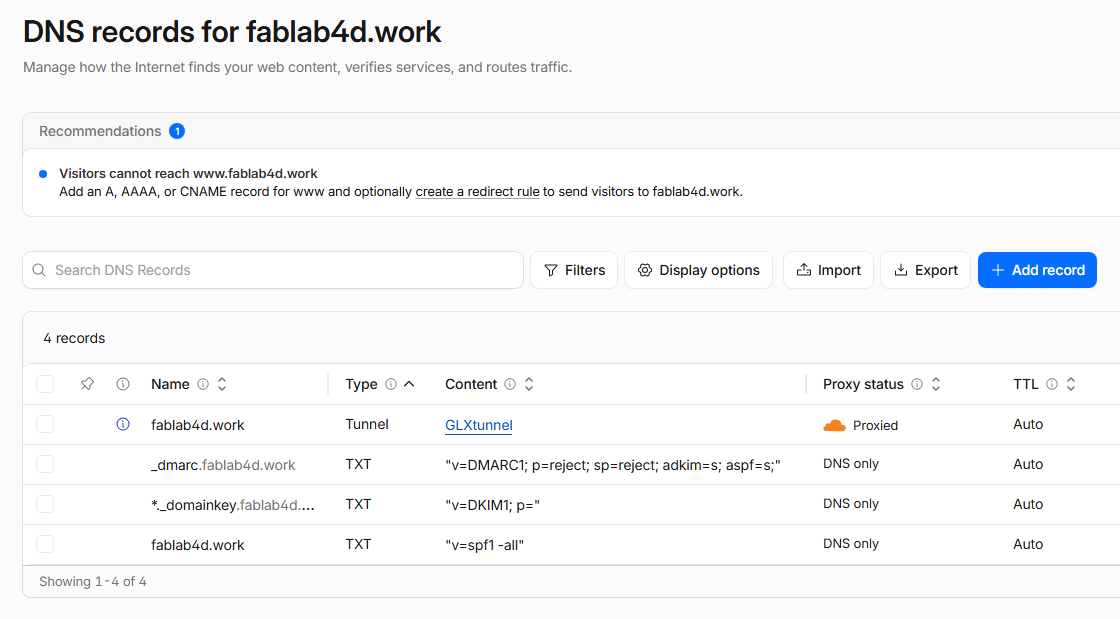
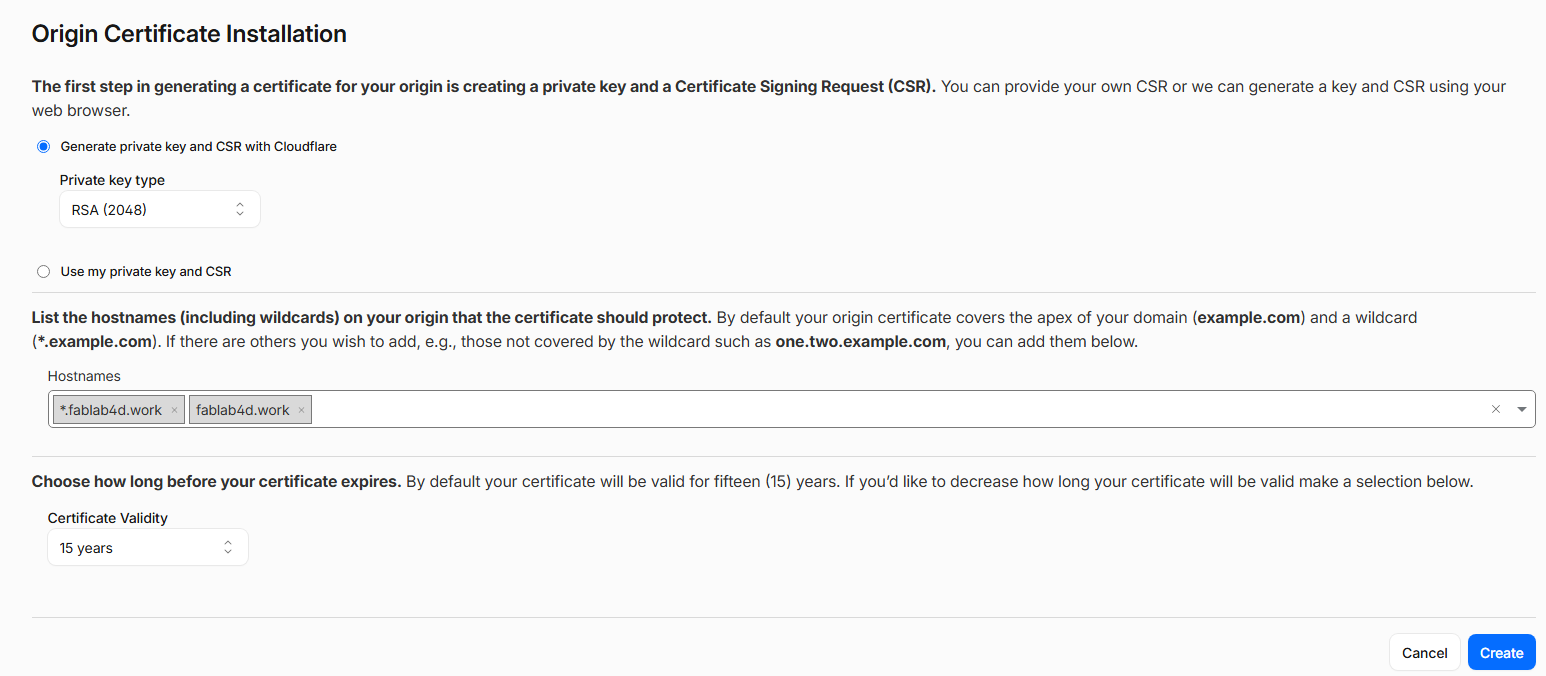
Update opencart config
Step 4 - wrapping up and testing
This screenshot is taken from a Windows worstation, on another vlan
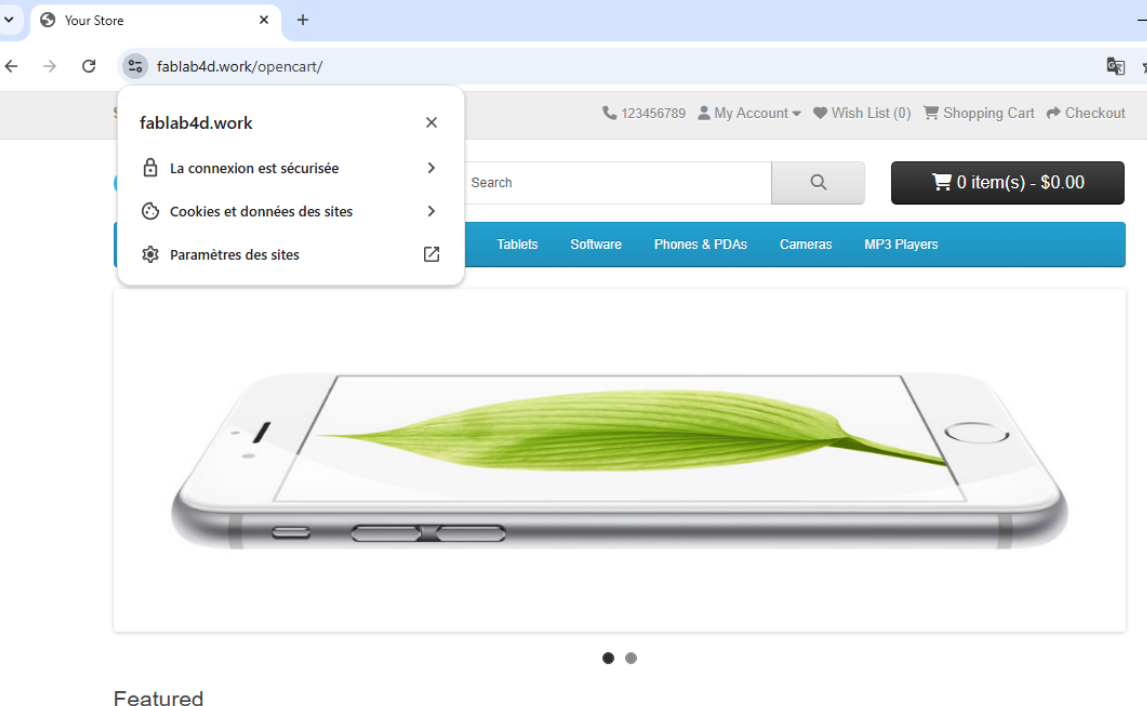
CloudFlare acts as a DNS HTTP calls are redirected to HTTPS
Why does the server send a certificate instead of just a public key?
A certificate is essentially a signed statement from the CA
{
  Subject:    alice@acme.com
  Public Key: [Alice's public key]
  Issuer:     DigiCert Inc.
  Valid from: 2025-01-01
  Valid to:   2026-01-01
  Signed by:  [DigiCert's signature]
}
Without CAs, digital signatures would only be meaningful between people who had already exchanged keys in person.
What role does the Certificate Authority play?
The CA is the notary of the internet — it doesn’t encrypt anything itself, but it provides the trusted third-party stamp that lets strangers verify each other’s identities without ever having met. Without CAs, digital signatures would only be meaningful between people who had already exchanged keys in person. A CA is a trusted third party that: * Verifies your identity — confirms you really are who you claim to be * Issues a certificate — digitally signs your public key with the CA’s own private key * Vouches for the binding — declares “this public key belongs to this person/organization”
What attack does this help prevent?
Without a trusted third party, an attacker could:
- Intercept your connection request
- Present their own fake public key as if it belonged to the legitimate server
- Decrypt, read, or modify all your traffic — while forwarding it to the real server so you notice nothing
A CA is a trusted third party that digitally signs a server’s certificate, binding a public key to a verified identity (e.g., bank.com). Your browser ships with a list of trusted root CAs and will:
- Verify the certificate’s signature is from a trusted CA
- Confirm the domain name matches
- Check the certificate hasn’t expired or been revoked
As an example, here is how FabLab4D certificate looks like
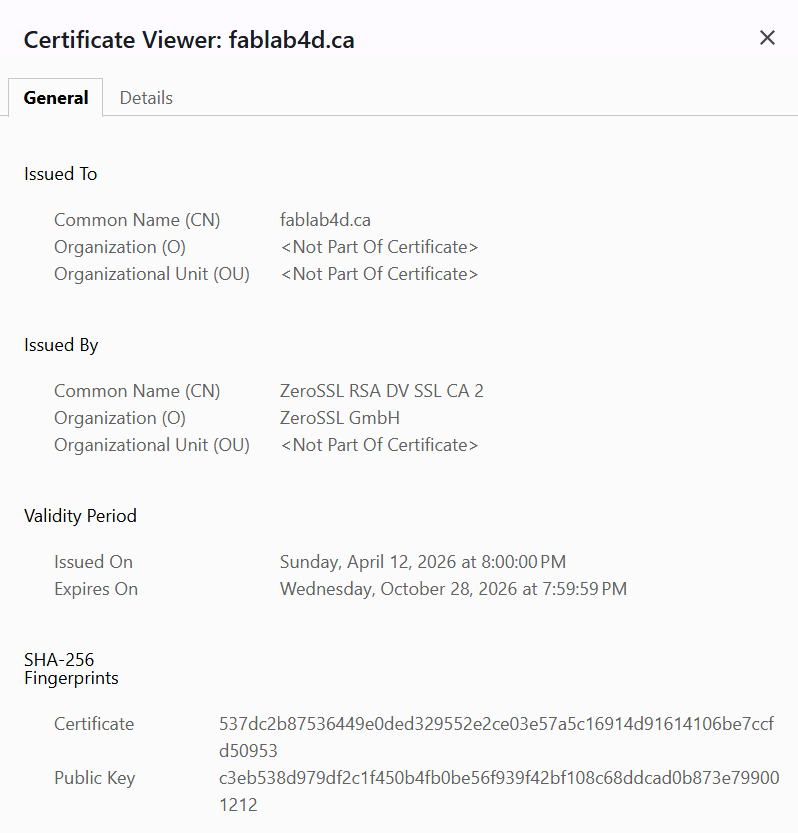
Part 9 - Show or describe how to encrypt a long message for someone using their public key.
Demo
See demo in Part 3 demo
Why is the whole message usually not encrypted directly with the public key?
Already answered in Part 3
What is a symmetric key?
A symmetric key is a single secret key used for both encryption and decryption. The same key that locks the data is the key that unlocks it. AES (Advanced Encryption Standard) — the current gold standard, used everywhere (HTTPS, file encryption, Wi-Fi, disk encryption). Comes in 128, 192, or 256-bit key sizes.
How is the symmetric key protected?
Both the sender and receiver must have the exact same key — and keep it secret (in a vault)
Why is this called hybrid encryption?
The fundamental challenge with symmetric encryption is key distribution — how do you securely share the secret key with the other person in the first place? This is exactly why asymmetric cryptography exists — to solve this bootstrapping problem. In practice, the two are almost always combined: Asymmetric crypto (RSA/ECC) → securely exchanges a symmetric key Symmetric crypto (AES) → encrypts the actual data. AES is orders of magnitude faster than asymmetric encryption. AES can encrypt gigabytes per second on modern hardware. RSA cannot This is the hybrid approach and it’s how HTTPS, TLS, SSH, and virtually every secure protocol works.
Part 10 - Research how RSA creates its private key.
If Alice knows two primes p1 and p2, and n = p1 × p2, how does she compute the private exponent d?
Step 1 — Compute Euler’s Totient φ(n)
φ(n) = (p1 - 1) × (p2 - 1) This counts how many integers from 1 to n are coprime with n. This value is kept secret — it’s only computable if you know p1 and p2 separately. Knowing just n (without the factors) makes it computationally infeasible.
Step 2 — Choose the Public Exponent e
Alice picks e such that: 1 < e < φ(n) gcd(e, φ(n)) = 1 — meaning e and φ(n) share no common factors In practice e is almost always 65537 (a prime, fast to compute with, widely standardized).
Step 3 — Compute d via the Modular Inverse
d is defined as the modular inverse of e modulo φ(n): d × e ≡ 1 (mod φ(n)) In plain English: d is the number such that d × e divided by φ(n) leaves remainder 1.
What is the role of (p1 - 1)(p2 - 1)?
This counts the Euler’s Totient , i.e. how many integers from 1 to n are coprime with n
What is a modular inverse?
The modular inverse of a modulo n is the number x such that: a × x ≡ 1 (mod n)
Why is this hard for someone who only knows n?
If you only know n, you need to find p1 and p2 such that p1 × p2 = n. This is called the integer factorization problem — and it is computationally asymmetric: EASY: p1 × p2 → n (milliseconds) HARD: n → p1 × p2 (potentially longer than the age of the universe) Suppose Alice uses (e, p) as a public key, where p is prime. • How would she compute the inverse exponent d? • Why is p - 1 important? • What does Fermat’s little theorem have to do with this? • Why would this not be secure if p is public?
Part 11 - Research why faster factoring would break RSA.
What RSA publishes publicly ?
RSA publishes exactly two numbers: * Public Key = (e, n), with ** n — the modulus n = p1 × p2A large number, typically 2048 or 4096 bits long. It’s the product of the two secret primes. Everyone can see it — but factoring it back into p1 and p2 is computationally infeasible. ** e — the public exponent, e = 65537 (almost universally)
Why factoring n reveals the private key.
Think of RSA as a vault with a combination lock where: * n = the vault door (visible to everyone) * e = the slot where you deposit money (public, usable by anyone) * p1, p2 = the two halves of the secret combination * φ(n) = the full combination (derivable only from both halves) * d = the handle that opens the vault (usable only with the combination)
Factoring n is like finding both halves of the combination. The moment you have them, opening the vault is trivial — and you can retrieve everything that was ever deposited.
Why a large quantum computer would be a problem for RSA.
Peter Shor showed in 1994 that a sufficiently powerful quantum computer could factor n in polynomial time, completely breaking RSA.
Why this does not break all cryptography in the same way.
Shor’s Algorithm works by finding the period of a function using quantum superposition. This works against: * Integer factorization (RSA) * Discrete logarithm (Diffie-Hellman) * Elliptic curve discrete logarithm (ECC) All three share a common trait — they involve cyclic mathematical groups with hidden periodic structure that a quantum computer can detect efficiently. Symmetric encryption like AES is just a complex substitution and permutation network — there is no periodic algebraic structure for Shor to exploit.
Part 12 - Research why the industry is moving away from RSA and other older public-key systems.
later…